
I’ll never forget the moment a small nonprofit reached out to me, frustrated after losing 40% of potential donors to a clunky third-party donation system.
Their donors had to leave the website, create accounts on external platforms, and navigate confusing checkout processes. Most simply gave up.
That’s when I discovered the real power of WordPress donation plugins. Instead of sending supporters away, these tools keep everything on your site.
In the end, donors can give in seconds, you avoid hefty platform fees, and you maintain complete control over your fundraising.
The best part? You don’t need any coding skills or technical expertise to set them up.
In this guide, I’ll share the best WordPress donation plugins I’ve personally tested, along with the essential tools every nonprofit needs to run a successful fundraising website.
Key Takeaways
Here’s what you’ll discover in this guide:
- Top donation plugins tested on real nonprofit sites
- Best plugins to accept donations without transaction fees
- Recurring donation plugins for sustainable monthly giving
- Essential nonprofit tools beyond just accepting donations
- Choosing the right plugin for your budget
If you would like to skip directly to a particular fundraising tool, use the table of contents below. Just click on any link to move to that section of the article.
- Best WordPress Donation & Fundraising Plugins
- How to Choose the Right Donation Plugin for Your Nonprofit
- Final Verdict: Best WordPress Donation Plugin for Your Nonprofit
- Bonus: Essential WordPress Tools Every Nonprofit Needs
- FAQs: Best WordPress Donation Plugins for Nonprofits
- Resource Hub: WordPress Donation & Fundraising
How I Test Donation Plugins for WordPress
When I test donation plugins, I focus on six key areas that matter most to nonprofits.
- Set up ease comes first. Can you create your first donation form in under 15 minutes? I time myself installing each plugin from scratch on a fresh WordPress site.
- Payment options determine your reach. I check which gateways work (PayPal, Stripe, etc.), whether they support recurring donations, and what transaction fees apply.
- Donor management shows how well you can track supporters. Can you export donor lists? Send thank you emails? Generate tax receipts?
- Mobile responsiveness is critical since over half of donors give from their phones. I test every form on actual mobile devices.
- Email integrations help you nurture relationships. I verify connections with Mailchimp, Constant Contact, and other services.
- Real-world performance matters most. I run these plugins on actual nonprofit sites to see how they handle traffic spikes during fundraising campaigns.
All the donation plugins I list below pass through this vigorous test and the high bar I set before inclusion in this list.
Why Trust IsItWP?
At IsItWP, my team and I have been the WordPress community’s go-to resource since 2009, helping over 2 million users choose better plugins for their websites.
Unlike review sites that never actually use the products, we maintain active nonprofit sites, test donation plugins with real campaigns, and track actual conversion rates.
Our team has helped dozens of nonprofits set up their fundraising systems. We’ve processed real donations, dealt with payment gateway issues, and optimized forms for better results.
We stay current with plugin updates and new features as they roll out.
Best WordPress Donation & Fundraising Plugins
Now, before we get started with my list of the best donation plugins, I have created a quick comparison table. You can use it to visually compare the different fundraising plugins before you make your decision.
I detail the rating, what the plugin is best for, if it has a free version, pricing, and key features.
| Plugin | Rating | Free Version | Best For | Key Features | Starting Price |
|---|---|---|---|---|---|
🥇 Charitable | ✅ | Peer-to-peer fundraising | Zero fees, crowdfunding, unlimited campaigns | $69/year | |
🥈 WPForms | ✅ | Beginner-friendly forms | Drag-and-drop builder, 2000+ templates, conversational forms | $49.50/year | |
🥉 WP Simple Pay | ✅ | Recurring donations | Stripe-focused, Apple Pay, Google Pay, ACH payments | $49.50/year | |
4. GiveWP | ✅ | Large nonprofits | Multi-campaign support, donor dashboard, advanced reporting | $149/year | |
5. Formidable Forms | ✅ | Complex workflows | Conditional logic, multi-step forms, calculations | $39.50/year | |
6. MemberPress | ❌ | Membership programs | Tiered memberships, content restriction, recurring payments | $199.50/year | |
7. Ninja Forms | ✅ | Custom forms | Flexible design, conditional logic, modular add-ons | $59.40/year | |
8. PayPal Donations | ✅ | Quick setup | Instant setup, simple buttons, multi-currency | $49.95/year | |
| 9. Donorbox | ✅ | Multi-channel fundraising | Hosted platform, text-to-give, QR codes | Free with a 1.5% fee above $1k/mo | |
| 10. Gravity Forms | ❌ | Professional nonprofits | Advanced conditional logic, file uploads, premium support | $59/year | |
| 11. Contact Form 7 | Free | Budget-conscious | Highly flexible, extensions available, lightweight | Free | |
OptinMonster (BONUS) | ❌ | Lead generation | Exit-intent popups, visitor targeting, email list growth | $7/month |
With that out of the way, let us begin!
1. Charitable ⭐⭐⭐⭐⭐
10,000+ nonprofits use this plugin | Best for: Complete fundraising campaigns
Why Is Charitable One of the Best WordPress Donation Plugins?
Charitable is hands down the best WordPress donation plugin because it helps you build trust and credibility with donors.
You can create your own donation campaigns or allow users to create crowdsourced fundraisers.
The donation plugin doesn’t charge any transaction fees. So, you never have to worry about hidden charges eating into your donations.
My Experience
I set up Charitable for a local cancer research center last year. Within minutes, I had three different campaigns running.
A regular donation campaign, a time-sensitive campaign for emergency treatment, and a goal-based fundraiser for their new facility.
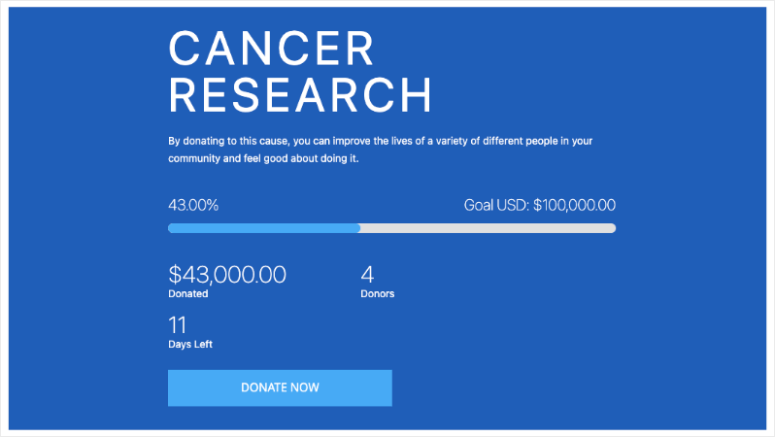
First off, the zero transaction fee model made a huge difference.
While other platforms were taking 5-8% cuts, this cancer research center kept every dollar donors gave, minus standard payment processor fees, of course.
I love how the donor management dashboard gives you a central place to track everything. You can see who donated, when, and to which campaigns.
Apart from that, building a donor campaign form is incredibly simple. Just choose a template, then drag and drop the different elements in place, and you’re all set!
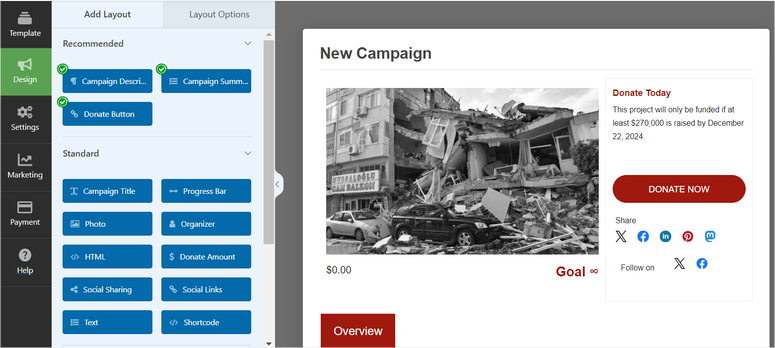
What really impressed me was the peer-to-peer fundraising feature. Volunteers could create their own fundraising pages, and all donations flowed back to the main organization.
Charitable supports anonymous donations for donors who prefer privacy. Combining these features helps turn supporters into active fundraisers.
Charitable integrates smoothly with popular email services like Mailchimp and Constant Contact.
With this in place, you can automatically add users to your mailing list and send thank-you emails without lifting a finger.
🟢► Pros
- Zero transaction fees from the plugin itself
- Unlimited campaigns with no restrictions
- Peer-to-peer and crowdfunding capabilities built in
- Recurring donation support for monthly giving
🔴► Cons
- Free version lacks some advanced features
My Verdict: Charitable delivers everything a nonprofit needs without nickel-and-diming you on fees. The peer-to-peer fundraising alone makes it worth considering.
Check out my Charitable review.
Pricing: Free plugin available. Pro starts at $69/year
Get Started with Charitable Today
2. WPForms ⭐⭐⭐⭐⭐
6+ million active installations | Best for: Beginner-friendly donation forms
Why Is WPForms One of the Best WordPress Donation Plugins?
WPForms is the best multifunctional form builder. This makes it the most beginner-friendly donation plugin. You can build professional forms in under 5 minutes without touching a single line of code.
The drag-and-drop form builder makes creating donation forms ridiculously easy. You simply pick a template, customize the fields, and drop it anywhere on your site.
My Experience
I recommended WPForms to a church that needed to collect donations for three different programs.
The secretary had zero tech experience but was able to create different donation forms using WPForms donation templates in one afternoon.
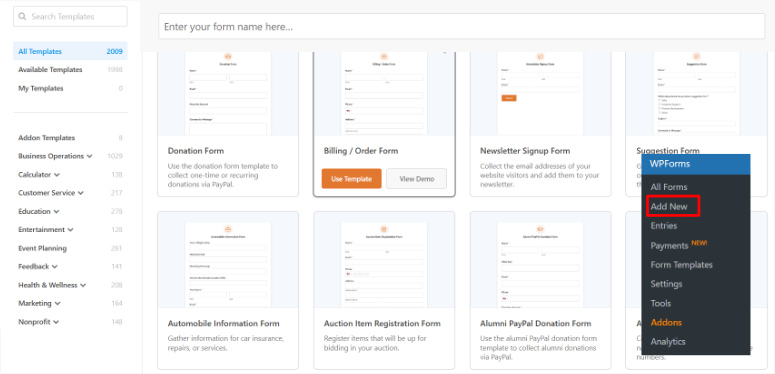
In fact, she even created a form using the AI builder by just explaining what she needed.
She also built a conversational form, which ended up being the highest converter. Instead of overwhelming donors with a long form, it presents one question at a time.
This simple change boosted their completion rate by 23%.
If you do not like the donation-specific templates, WPForms offers over 2000 templates you can also choose from.
Plus, you can use the drag and drop builder to add donation-specific fields like custom amount fields, suggested donation levels, and even cover payment processing fees if you want.
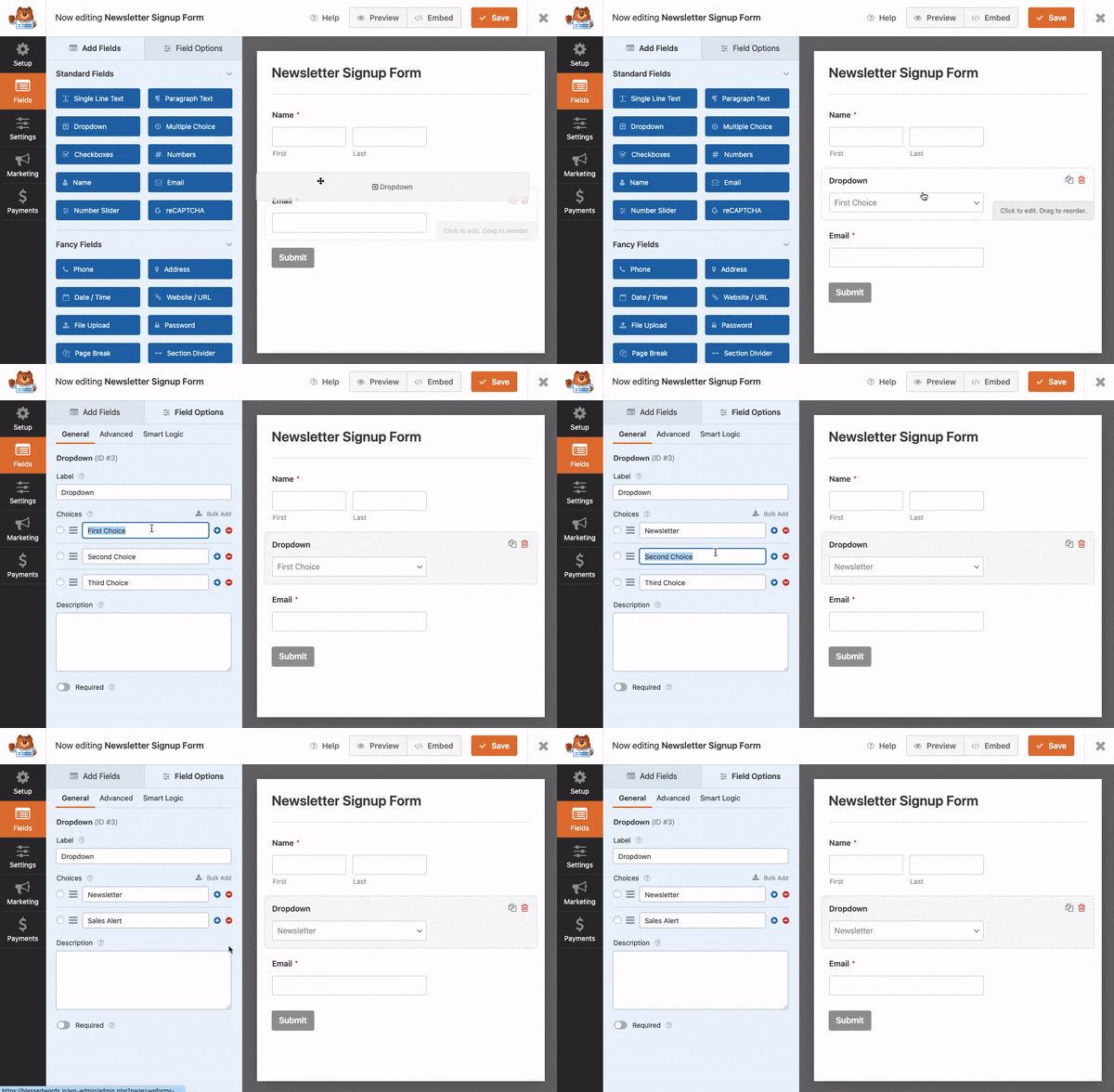
The payment integrations work flawlessly.
I’ve connected it with PayPal, Stripe, and Square without any issues. Plus, it syncs directly with email marketing services like Mailchimp and Constant Contact.
One feature that saved countless headaches was form abandonment recovery. When someone starts filling out a donation form but doesn’t finish, WPForms captures their info so you can follow up.
The mobile optimization is perfect. I tested every form on my phone, and they looked just as good as on desktop.
🟢► Pros
- Drag-and-drop builder requires zero coding skills
- 2,000+ templates including donation-specific designs
- Conversational forms increase completion rates
- Form abandonment recovery captures incomplete donations
🔴► Cons
- Some features require paid version
- WordPress-only; can’t use on other platforms
My Verdict: WPForms makes donation forms so simple that anyone on your team can create and manage them. Perfect for nonprofits without dedicated tech staff.
Check out my WPForms review. Here are also the best WPForms Pro alternatives, if you are looking for more options.
Pricing: Free plugin available. Pro starts at $49.50/year
Get Started with WPForms Today
3. WP Simple Pay ⭐⭐⭐⭐
Stripe-focused payment plugin | Best for: Recurring donations
Why Is WP Simple Pay One of the Best WordPress Donation Plugins?
WP Simple Pay is the best choice when you want to accept Stripe payments without building a full online store.
The plugin specializes in making one-time and recurring donations incredibly simple. You don’t need shopping carts, product pages, or complicated checkout flows.
My Experience
I helped a youth mentoring program set up monthly recurring donations using WP Simple Pay. They wanted donors to commit to ongoing support rather than one-time gifts.
The setup took about 10 minutes. I connected their Stripe account, created a donation form with suggested amounts like $5, $10, $15, and so on. Plus, we added a custom amount field for flexibility.
The recurring donation feature worked flawlessly. Donors simply checked a box to make their gift monthly, and Stripe handled everything automatically.
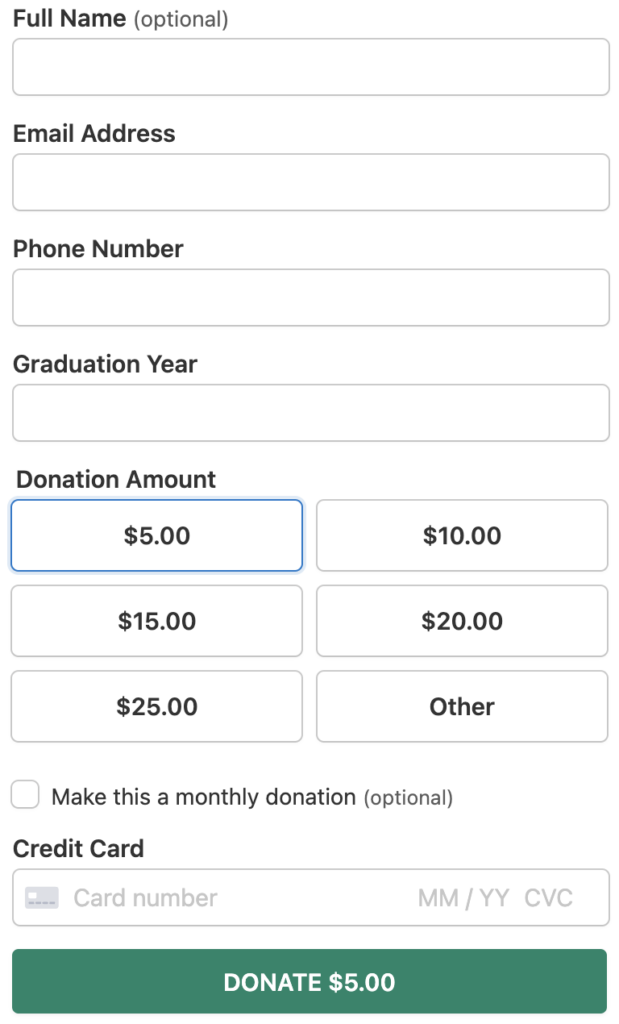
What really impressed donors was the payment variety. Beyond credit cards, they could use Apple Pay, Google Pay, or even pay directly from their bank account with ACH debit payments.
WP Simple Pay supports multiple currencies, which helped when they expanded their donor base internationally.
A supporter in the UK can donate in pounds, while someone in Canada can give in Canadian dollars.
All this is possible through the drag-and-drop form builder. It lets you add custom fields to collect donor information without coding.
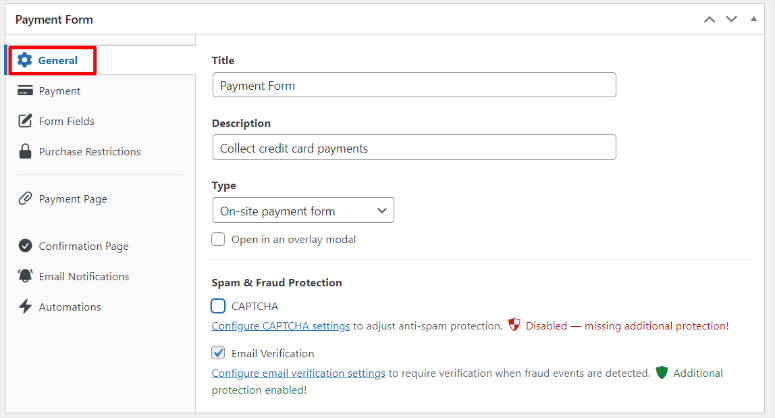
The mobile experience deserves special mention. Every payment form looked perfect on phones, and Apple Pay made mobile donations with a single tap.
🟢► Pros
- Stripe integration is solid and powerful
- Apple Pay, Google Pay, and ACH payments included
- Recurring donations set up in minutes
- Multi-currency support for international donors
🔴► Cons
- Stripe-only; no PayPal or other gateways
- Requires Stripe account to use
My Verdict: WP Simple Pay is perfect for nonprofits serious about building monthly recurring revenue. The Stripe focus is a strength, not a limitation.
Check out my WP Simple Pay review.
Pricing: Free plugin available. Pro starts at $49.50/year
Get Started with WP Simple Pay Today
4. GiveWP ⭐⭐⭐⭐⭐
Professional fundraising platform | Best for: Large nonprofits
Why Is GiveWP One of the Best WordPress Donation Plugins?
GiveWP is built specifically for serious nonprofit fundraising. It’s more than a donation plugin; it’s a complete donor management system.
The fundraising plugin powers over 100,000 nonprofits worldwide, handling everything from simple one-time gifts to complex multi-campaign fundraising.
My Experience
I worked with an environmental nonprofit running three campaigns at the same time. Ocean cleanup, forest preservation, and wildlife protection.
They needed donors to choose which cause to support instead of forcing them to support one or all three.
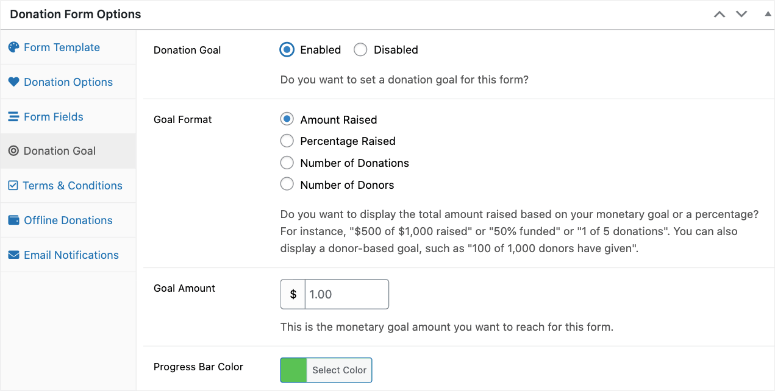
GiveWP’s multi-form donation system made this easy. Each campaign got its own customized form with unique goal meters, featured images, and impact statements.
The donor dashboard became their favorite feature. Supporters could log in, view donation history, download tax receipts, and update payment methods without contacting the organization.
One powerful moment happened during their year-end campaign. GiveWP’s goal tracking showed real-time progress on their homepage.
When they hit 87% of their target, donations suddenly accelerated. This is because seeing the goal meter so close to completion offered social proof and motivated fence-sitters to give.
Since you get 18+ payment options, including Stripe, PayPal, and even offline donations, donors could support using their favorite payment options.
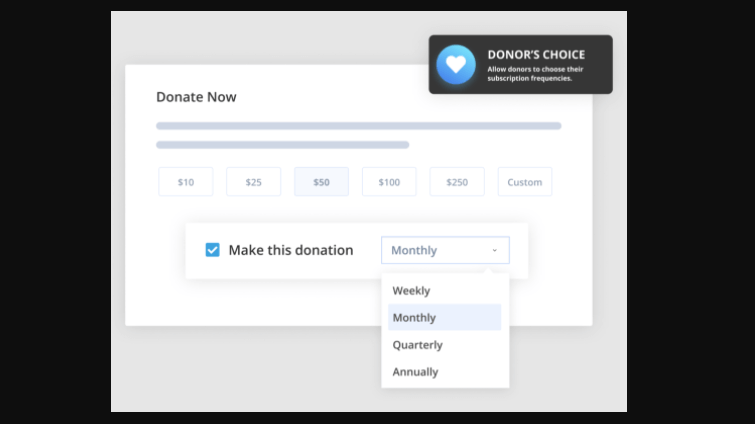
What’s more, the recurring donation options let supporters choose weekly, monthly, quarterly, or annual gifts. So these users could commit to supporting the cause long term.
The best part is the reporting tools. They saved their finance team hours every month. Instead of manually compiling donor data, they exported everything to CSV files for their accountant with one click.
GiveWP integrates with major email marketing platforms. This allows new donors to automatically join their newsletter, eliminating manual data entry.
🟢► Pros
- Complete donor management dashboard
- Multi-campaign support with individual goal tracking
- Powerful reporting and export tools
- Integrates with major email platforms
🔴► Cons
- Higher price point than competitors
- More features mean a steeper learning curve
My Verdict: GiveWP is worth the investment for established nonprofits managing multiple campaigns. The donor dashboard and reporting alone justify the cost.
Pricing: Free plugin available. Pro starts at $149/year
5. Formidable Forms ⭐⭐⭐⭐⭐
Advanced form builder with payment processing | Best for: Complex donation workflows
Why Is Formidable Forms One of the Best WordPress Donation Plugins?
Formidable Forms is a powerful and smart form builder for nonprofits that need more than specialized donation forms.
This fundraising plugin handles complex donation scenarios like sponsorship programs, event registrations with payments, and multi-step application forms.
My Experience
A scholarship foundation came to me needing a complicated system. Students had to apply, submit essays, provide references, and their sponsors needed to donate at the same time.
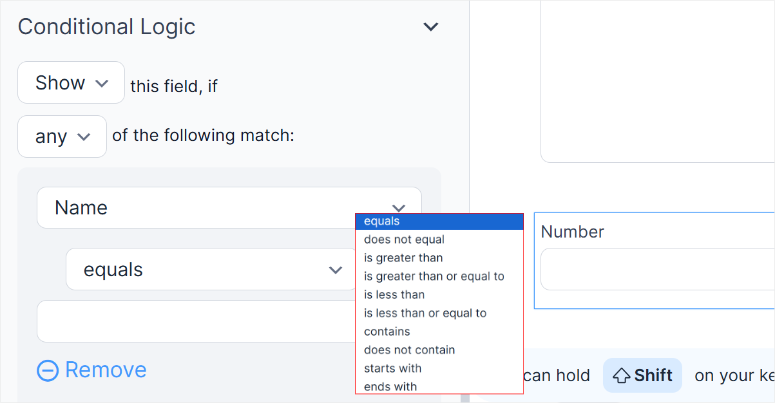
Formidable Forms made this possible with conditional logic. If someone selected “I want to sponsor a student,” the form showed payment fields.
If they chose “I’m applying for a scholarship,” it displayed essay upload fields instead.
On top of that, the multi-step forms kept applicants from getting overwhelmed.
Instead of one long intimidating page, we broke it into five manageable steps: personal info, academic history, essay submission, references, and final review.
What amazed the foundation was the automatic calculation feature.
Sponsors could choose to fund a full scholarship ($5,000), half scholarship ($2,500), or partial support (custom amount). The form calculated totals instantly.
The front-end form editing lets students save progress and return later.
As you can imagine, many scholarship applicants are busy, so being able to work on applications across multiple sessions increased completion rates by 43%.
Formidable Forms creates a donor database automatically. Every submission becomes a searchable entry with all donor information, payment history, and custom fields organized beautifully.
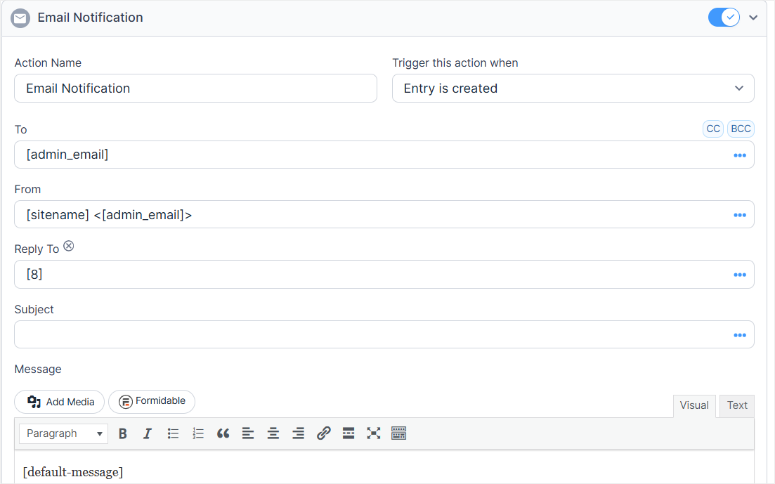
The Stripe and PayPal integrations work perfectly. As a result, payments process securely, and donors receive instant confirmation emails with tax receipt information.
🟢► Pros
- Conditional logic for complex donation scenarios
- Multi-step forms reduce completion anxiety
- Front-end editing lets donors save progress
- Automatic calculations for tiered giving
🔴► Cons
- Requires time to learn advanced features
- Basic version lacks payment processing
My Verdict: Formidable Forms shines when your nonprofit needs more than simple donation buttons. The conditional logic and multi-step capabilities are unmatched.
Check out my Formidable Forms review. You can also compare WPForms and Formidable Forms to see which of these two donation form builders is right for you.
Pricing: Free plugin available. Pro starts at $39.50/year
Get Started with Formidable Forms Today
6. MemberPress ⭐⭐⭐⭐
Membership plugin with recurring payments | Best for: Membership-based nonprofits
Why Is MemberPress One of the Best WordPress Donation Plugins?
MemberPress turns your nonprofit website into a membership platform with recurring donations built in.
This plugin is on this list because it can help you create donation tiers. This can help make your donors feel important and encourage them to give more consistently.
My Experience with MemberPress
That is why I used MemberPress to help a conservation group create three membership tiers: Basic Supporter ($10/month), Active Member ($25/month), and Champion ($100/month).
Each level unlocked different content like exclusive updates, virtual events, and member forums.
Plus, the automatic renewal feature kept monthly donations flowing without asking members to re-commit.
To make donations as smooth as possible, MemberPress integrates with major payment gateways and protects premium content from non-members automatically.
🟢► Pros
- Creates tiered membership levels easily
- Automatic recurring payments
- Content restriction features
- Detailed member management
🔴► Cons
- Higher price point
- More complex than simple donation plugins
My Verdict: Perfect for nonprofits building community through membership programs rather than one-time donations.
Check out my MemberPress review. You can also compare MemberPress and LearnDash, two of the top membership plugins, to see which is right for you.
Pricing: Starts at $199.50/year
Get Started with MemberPress Today
7. Ninja Forms ⭐⭐⭐⭐
Flexible form builder with payment add-ons | Best for: Custom donation forms

Why Is Ninja Forms One of the Best WordPress Donation Plugins?
Ninja Forms gives you complete control over donation form design without touching code.
My Experience with Ninja Forms
I helped a community theater use Ninja Forms to create season ticket packages with optional add-on donations.
Ninja Forms allowed patrons to buy tickets and donate to specific programs like youth education or set design in one transaction.
This came down to the drag-and-drop interface, which made customizing forms quick. I added custom fields for seat preferences, program dedications, and anonymous giving options.
Plus, the conditional logic showed relevant fields based on donor choices, and users could make payments through Stripe and PayPal smoothly.
🟢► Pros
- Highly customizable form layouts
- Conditional logic for smart forms
- Add-ons for specific features
- Clean, modern interface
🔴► Cons
- Payment processing requires paid add-ons
- Some features need multiple purchases
My Verdict: Great for nonprofits wanting design flexibility and custom donation experiences beyond standard templates.
Check out my Ninja Forms review. Then compare WPForms vs Ninja Forms to see which is right for you.
Pricing: Free plugin available. Pro starts at $59.40/year
Get Started with Ninja Forms Today
8. PayPal Donations ⭐⭐⭐⭐
Simple PayPal donation buttons | Best for: Quick setup
Why Is PayPal Donations One of the Best WordPress Donation Plugins?
PayPal Donations is one of the fastest ways to add donation buttons to your WordPress site.
My Experience with PayPal Donations
I was able to set up donations for a small animal rescue within an hour. All I did was install the plugin, connect their PayPal account, and place donation buttons on three pages in 20 minutes.
The simplicity is its strength. No complex forms or settings, just straightforward donation buttons that work immediately.
Donors can give via credit card or PayPal without leaving your site. On top of that, the plugin supports multiple currencies for international supporters.
🟢► Pros
- Incredibly easy setup
- Works immediately after installation
- Free forever
- Multiple currency support
🔴► Cons
- Limited customization options
- PayPal only
- No donor management features
My Verdict: Perfect for small nonprofits needing donations live today without technical complexity.
Pricing: Free plugin available. Pro starts at $49.95/year
Get Started with PayPal Donations Today
9. Donorbox ⭐⭐⭐⭐
Hosted donation platform with WordPress embedding | Best for: Multi-channel fundraising
Why Is Donorbox One of the Best WordPress Donation Plugins?
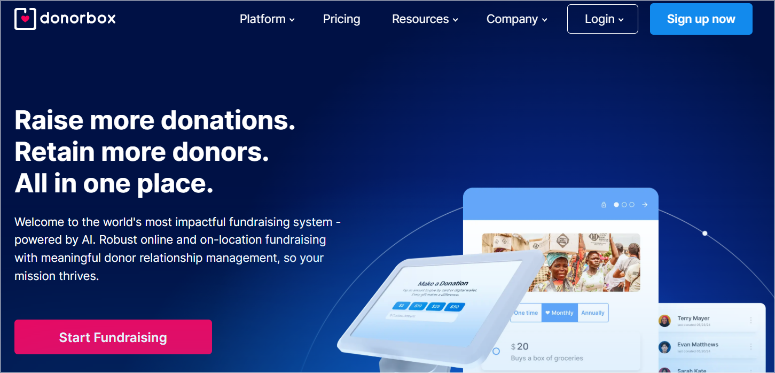
Donorbox is a hosted donation platform that embeds beautifully into WordPress sites.
My Experience with Donorbox
A homeless outreach program I work with used Donorbox across their website, email campaigns, and social media.
Their interconnection was so good that the same donation form worked everywhere, keeping branding consistent.
The recurring donation prompts increased monthly giving significantly. When someone donated once, Donorbox suggested converting to monthly support with one click.
My favorite features are the text-to-give and QR code payments that let them collect donations at events without laptops. Donors simply scan codes with their phones to make their donation.
🟢► Pros
- Works across multiple platforms
- Strong recurring donation features
- Text-to-give and QR codes
- Professional donor management
🔴► Cons
- Platform fee on free plan
- Hosted solution (not fully self-contained)
My Verdict: Excellent for nonprofits running campaigns across websites, emails, and events with unified donation tracking.
Pricing: Free with a 1.5% fee above $1k/month
Get Started with Donorbox Today
10. Gravity Forms ⭐⭐⭐⭐
Premium form builder with payment add-ons | Best for: Professional nonprofits
Why Is Gravity Forms One of the Best WordPress Donation Plugins?
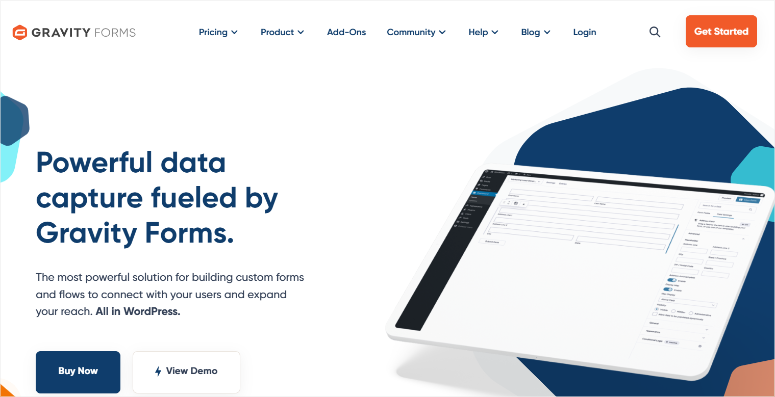
Gravity Forms is the premium standard for WordPress forms with powerful donation capabilities.
My Experience with Gravity Forms
I helped a medical research foundation use Gravity Forms to create memorial donation pages.
With this in place, families could dedicate gifts in honor of loved ones, and the form automatically sent acknowledgement letters to designated recipients.
Corporate donors saw employer matching fields, while individual donors saw tribute options. This came down to the conditional logic feature which made it easy to create personalized experiences.
What’s more, grant applicants submit supporting documents alongside donation commitments using the form file upload feature. This helped merge several processes together, making it smooth.
🟢► Pros
- Extremely powerful conditional logic
- Professional form styling
- File upload capabilities
- Excellent documentation and support
🔴► Cons
- Higher price point
- Payment processing requires add-ons
My Verdict: Worth the investment for established nonprofits needing sophisticated forms beyond basic donation collection.
Check out my Gravity Forms review. You can also compare WPForms with Gravity forms to see which meets your needs.
Pricing: Starts at $59/year
Get Started with Gravity Forms Today
11. Contact Form 7 ⭐⭐⭐
Popular contact form with donation extensions | Best for: Budget-conscious organizations

Why Is Contact Form 7 One of the Best WordPress Donation Plugins?
Contact Form 7 is WordPress’s most popular form plugin with over 5 million installations.
My Experience with Contact Form 7
A grassroots advocacy group looking for a cheap and reliable way to fundraise asked me to set up Contact Form 7 with free Stripe extensions. This allowed them to accept donations without monthly fees.
Even though it is a cheap and reliable way to collect donations, Contact Form 7 has a steeper learning curve than drag-and-drop form builders.
You’ll need basic HTML knowledge to customize forms effectively. You will also need to understand shortcodes to place them correctly in widget-ready areas.
On top of that, payment integration requires installing separate extensions. This makes setup take longer than all-in-one solutions. But the zero cost makes it worthwhile.
🟢► Pros
- Completely free
- Highly flexible with extensions
- Massive community support
- Lightweight and fast
🔴► Cons
- Requires technical knowledge
- No visual form builder
- Manual payment gateway setup
My Verdict: Best for tech-savvy nonprofits with tight budgets willing to invest time for zero ongoing costs.
Check out my Contact Form 7 review. Follow that by comparing WPForms with Contact Form 7 to see which one works for you.
Pricing: Free plugin. Payment extensions available
Get Started with Contact Form 7 Today
Bonus: OptinMonster ⭐⭐⭐⭐⭐
Lead generation tool for growing donor lists | Best for: Building email subscribers
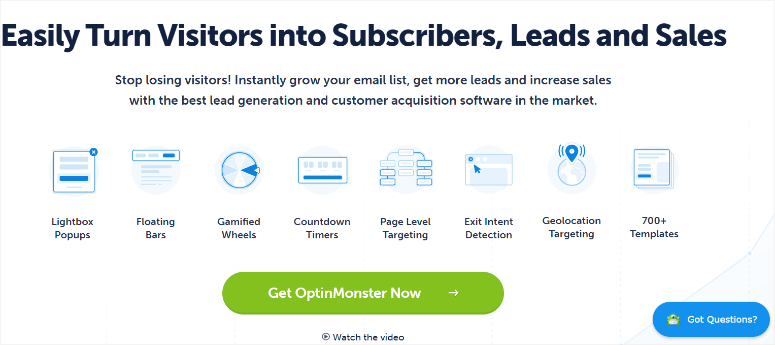
OptinMonster isn’t technically a donation plugin, but it’s essential for nonprofits serious about growing their donor base.
A wildlife conservation nonprofit struggled to get website visitors to join their mailing list. They had great content, but no way to capture interested supporters before they left.
OptinMonster changed everything. I set up exit-intent popups that appeared when visitors were about to leave. The popup offered a free wildlife guide in exchange for email addresses.
It was super simple to create this popup using the drag-and-drop builder and conditional logic. In the end, the campaign was highly targeted, ready to drive quality donors to subscribe.
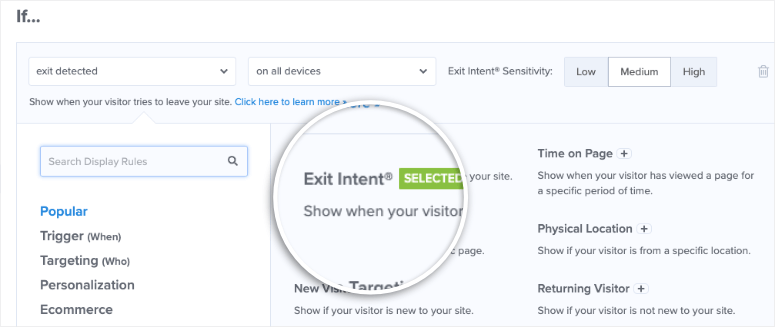
Within 60 days, their email list grew from 800 subscribers to 3,200. More importantly, 18% of new subscribers became donors within three months.
The targeting rules let them show different messages to different visitors.
First-time visitors saw the guide offer. Then, returning visitors saw donation appeals. Finally, people on donation pages saw urgency messages during year-end campaigns.
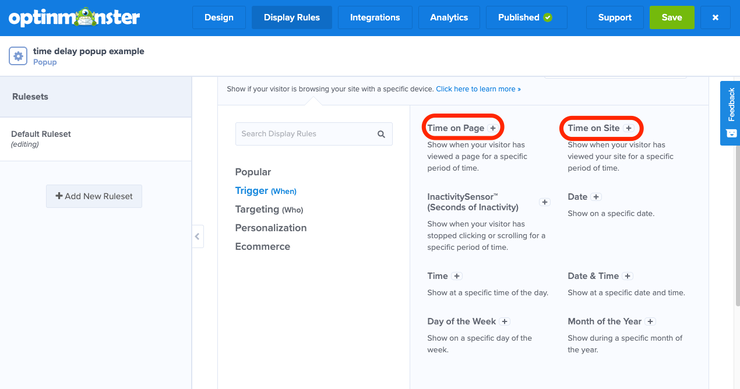
Campaign triggers like delayed popups worked beautifully. When someone spent over 2 minutes reading impact stories, a floating bar appeared asking them to support the cause.
🟢► Pros
- Powerful exit-intent technology
- Advanced visitor targeting
- Beautiful pre-made templates
- Integrates with all major email services
🔴► Cons
- Not a direct donation tool
- Requires email marketing strategy
My Verdict: Every nonprofit should use OptinMonster to convert website visitors into email subscribers, then nurture those subscribers into donors. This not only grows your email list but also gets you quality donors.
Check out my OptinMonster review. Compare Bloom and OptinMonster to see which lead generation tool suits your needs.
Pricing: Starts at $7/month (billed annually)
Get Started with OptinMonster Today
How to Choose the Right Donation Plugin for Your Nonprofit
The best donation plugin depends on your nonprofit’s current setup and future goals. Let me help you find your perfect match.
Need an all-in-one solution?
- Choose Charitable. It handles donation forms, payment processing, peer-to-peer fundraising, and donor management in one plugin. The free version works great for small nonprofits just starting out.
Already using WooCommerce?
Go with WP Simple Pay. It connects directly with Stripe for one-time and recurring donations without building a full store. Perfect if you’re selling merchandise and accepting donations together.
Running multiple campaigns simultaneously?
- GiveWP offers the most comprehensive features, including multi-form support, goal tracking, donor dashboards, and detailed reporting. It’s worth the investment if fundraising is central to your mission.
Need complex donation workflows?
- Use Formidable Forms to create applications with conditional logic, calculations, and multi-step processes. It’s ideal for scholarship programs, sponsorships, or tiered giving with custom rules.
Want maximum simplicity?
- PayPal Donations gets you live in 20 minutes. Zero configuration complexity, just straightforward donation buttons. Perfect for volunteer-run organizations without technical staff.
Building a membership community?
- MemberPress turns recurring donations into membership tiers with exclusive content access. Great for organizations offering value to supporters beyond thank-you emails.
On an extremely tight budget?
- Contact Form 7 comes with free payment extensions that cost nothing. Though it requires technical knowledge, but eliminates ongoing subscription fees completely.
Need donations across multiple channels?
- Donorbox works on websites, emails, social media, and text-to-give. It brings unified tracking even when donors give through different platforms.
Want to visualize your fundraising goals and boost donor motivation?
Pair any plugin on this list with a donation thermometer plugin. These visual progress bars showing how close you are to hitting your goal create urgency and push fence-sitters to donate. We tested the top options in our dedicated roundup.
I always recommend testing free versions first before committing to paid plans. Most premium plugins offer 14-30 day money-back guarantees, so you can try risk-free.
Final Verdict: Best WordPress Donation Plugin for Your Nonprofit
I hope this guide helped you find the perfect donation plugin for your nonprofit’s needs.
You now know the top-rated fundraiser plugins, what makes each one unique, and how to match features to your organization’s goals.
More importantly, you understand that accepting donations online isn’t complicated or expensive anymore.
The right plugin transforms your website from a static information page into an active fundraising tool.
Plus, donors can give instantly when they feel inspired by your mission, rather than waiting to mail checks or call during business hours.
Start with a free version to test the donor experience yourself. Click through the entire donation process on both desktop and mobile. If something feels clunky to you, it’ll frustrate your supporters too.
As your nonprofit grows, you can always upgrade to premium features like recurring donations, donor dashboards, and advanced reporting.
Your mission matters. The right donation plugin helps you spend less time on administrative tasks and more energy creating real impact in your community.
Ready to make giving easier for your supporters? Pick your plugin, install it today, and watch your fundraising transform.
Bonus: Essential WordPress Tools Every Nonprofit Needs
Beyond donation plugins, your nonprofit website needs supporting tools to run smoothly and engage supporters effectively.
Here are the must-have WordPress plugins I recommend to every organization I work with.
Capture Donor Leads: Constant Contact
Constant Contact keeps donors engaged between fundraising campaigns through automated email sequences.
You can send impact updates, volunteer opportunities, and donation reminders directly to supporters’ inboxes.
Plus, the platform integrates easily with donation plugins to automatically add new donors to specific email lists.
With built-in donation buttons, you can accept contributions directly from newsletters. To improve efficiency, track open rates and click-through rates to see which messages motivate giving.
Check out my Constant Contact review.
Get started with Constant Contact here.
Lead Magnet Creation: Beacon.by
Beacon.by helps you build lead magnets so that you can convert website visitors while building authority.
You can create professional eBooks, checklists, and resource guides without design experience. The best part is you can repurpose your content into lead magnets with a click of a button.
For fundraisers, Becon.by helps you offer a “Donor Impact Report” or “Volunteer Handbook” in exchange for email addresses.
With the resource library feature, you can gate valuable content, requiring sign-up to access multiple resources.
Plus, the lead capture forms embed anywhere on your site with exit-intent popups that appear when visitors are about to leave.
Check out my Beacon.by review.
Get started with Beacon.by here.
Event Management: Sugar Calendar
Sugar Calendar is the best event calendar plugin. This means it is great at managing fundraising events, volunteer schedules, and community programs from one dashboard.
It can help you accept event registrations and ticket payments through Stripe integration.
If you hold the same event several times throughout the year, the recurring event features eliminate repetitive data entry for weekly volunteer shifts or monthly donor meetups.
On top of that, RSVP management tracks attendance numbers automatically. With this, the automated email reminders reduce no-shows for scheduled appointments or events.
The booking system works perfectly for nonprofits offering services like counseling sessions, food bank appointments, or workshop registrations.
Check out my Sugar Calendar review.
Get started with Sugar Calendar here.
SEO Optimization: All in One SEO (AIOSEO)
AIOSEO is the best SEO plugin for WordPress. It can help potential donors discover your nonprofit through Google searches.
You can optimize donation pages to rank for keywords like “donate to [cause] near me” or “support [issue] charity.”
This SEO plugin generates schema markup that displays star ratings and donation information in search results.
Local SEO features boost visibility for community-based organizations in map searches. While XML sitemaps ensure Google indexes all your fundraising campaigns and impact stories.
Get started with All in One SEO here.
Social Proof: TrustPulse
TrustPulse displays real-time donation notifications that encourage others to give through social proof.
For example, you can show messages like “John from Seattle just donated $25” to create urgency during campaigns.
Campaign-specific notifications highlight matching gift deadlines or fundraising goal progress. The FOMO effect motivates fence-sitters to contribute when they see others taking action.
The best part is that the display rules let you show notifications only on donation pages or during specific timeframes.
Check out my TrustPulse review.
Get started with TrustPulse here.
Analytics: MonsterInsights
MonsterInsights reveals which content drives donations and where supporters come from.
As a result, you can track donation form conversions, see which blog posts generate the most donor interest, email campaign effectiveness, and page engagement without touching code.
For added analytics, this statistics plugin can monitor traffic sources to understand whether social media, email, or search brings in more contributions.
Check out my MonsterInsights review.
Get started with MonsterInsights here.
Coming Soon Pages: SeedProd
SeedProd is the best landing page builder. It can help you create anticipation for upcoming campaigns while collecting interested supporters.
Most importantly, you can build coming soon pages for new fundraising initiatives or website launches. But SeedProd also offers other amazing features you can use for your fundraisers.
For example, email opt-in forms capture early supporters before your campaign goes live. Countdown timers create urgency around launch dates.
Maintenance mode pages keep donors informed during site updates without showing broken pages. Plus, built-in templates include designs specifically for nonprofits and fundraising campaigns.
Get started with SeedProd here.
Speed Optimization: WP Rocket
WP Rocket prevents donors from abandoning slow-loading donation pages. With page caching, you can deliver content instantly to returning visitors.
You can easily set up image optimization to reduce file sizes without quality loss. Pair this with lazy loading to delay image loading until visitors scroll, speeding initial page loads.
This cache plugin also offers database cleanup to remove unnecessary data, slowing your site.
Check out my WP Rocket review.
Get started with WP Rocket here.
Security: Sucuri
Sucuri protects sensitive donor data from breaches and cyberattacks. The web application firewall blocks malicious traffic before it reaches your site.
As a result, DDoS protection keeps your donation pages online during high-traffic campaigns.
While malware scanning detects infections early before they compromise payment information. Security monitoring alerts you to suspicious login attempts or file changes.
As if that’s not enough, compliance features help meet data protection requirements for handling donor information.
That’s it! Now that you have the best fundraising WordPress tools at your fingertips, let me help you narrow them down according to your needs.
FAQs: Best WordPress Donation Plugins for Nonprofits
What is the best free WordPress donation plugin?
Charitable and PayPal Donations are the top free options. Charitable offers more features like donor management and campaign tracking, while PayPal Donations provides the fastest setup. Both handle secure payments without monthly fees. For basic needs, PayPal Donations works immediately. For growth potential, start with Charitable’s free version and upgrade later when needed.
Do donation plugins charge transaction fees?
Most WordPress plugins don’t charge fees. You only pay payment processor rates, which are typically 2.9% + $0.30 per transaction for Stripe/PayPal. But, hosted platforms like Donorbox add platform fees (1.5% on free plans). On the other hand, self-hosted plugins like Charitable, GiveWP, and WPForms have zero platform fees, making them more cost-effective for high-volume fundraising.
Can I accept recurring monthly donations?
Yes, most modern donation plugins support recurring donations. WP Simple Pay, GiveWP, and MemberPress excel at monthly giving. Donors simply check a box to make donations recurring. The payment gateway handles automatic charges monthly, and donors receive confirmation emails. Recurring donations are important. Nonprofits with monthly giving programs see higher lifetime donor value.
Which payment gateways do donation plugins support?
Most plugins support Stripe and PayPal, the two most popular gateways. WP Simple Pay focuses exclusively on Stripe but includes Apple Pay and Google Pay. GiveWP and Charitable support multiple gateways, including Authorize.net and offline donations.
Do I need coding skills to set up donation forms?
No coding required for modern donation plugins. WPForms, Charitable, and GiveWP offer drag-and-drop builders with visual editors. Contact Form 7 requires basic HTML knowledge but remains manageable for beginners. Most fundraising plugins include setup wizards that guide you through connecting payment accounts, designing forms, and adding donation buttons to pages within 15-30 minutes.
Can donors get automatic tax receipts?
Yes, most premium donation plugins send automatic tax receipts via email after donations are complete. GiveWP, Charitable, and Formidable Forms include customizable receipt templates with your nonprofit’s tax ID. Donors receive PDFs immediately, satisfying IRS requirements. This feature alone saves hours of manual receipt generation and improves donor satisfaction significantly.
How do I migrate from one donation plugin to another?
Most premium plugins offer migration tools or services. GiveWP provides free migration from other donation plugins. Export your donor data as CSV files, then import them into your new plugin. Payment gateway connections transfer easily. Just reconnect your Stripe or PayPal account. Remember to test thoroughly before switching.
Are donation plugins GDPR compliant?
Reputable donation plugins comply with GDPR requirements. They include consent checkboxes, data deletion tools, and privacy policy integrations. WPForms, GiveWP, and Charitable specifically have GDPR compliance as one of their features. Always enable SSL certificates, use secure payment gateways, and add privacy policies explaining how you handle donor data. Compliance protects both your organization and your supporters.
Resource Hub: WordPress Donation & Fundraising
- How to Build Donor Trust with Charitable in Your Nonprofit Campaigns ( My 9 Strategies)
- 6 Trust Badge Plugins I Use to Improve Conversions
- 10+ Tips and Tools to Improve E-E-A-T for SEO in WordPress
- Nonprofit & Charity WordPress Themes I Trust
These articles will not only help you learn more about improving your donation campaigns, but they will also help you improve trust and credibility.
Thanks for reading! We’d love to hear your thoughts, so please feel free to leave a comment with any questions and feedback.

Comments Leave a Reply