TL;DR: WPForms wins for most WordPress users because of its cleaner interface and better email deliverability. But Ninja Forms offers more flexibility if you need complex conditional logic on a budget.
I spent three hours rebuilding a client’s contact form because I picked the wrong plugin.
The form looked great in the builder, but half the submissions never reached their inbox. On top of that, the support team took two days to respond.
So I tested both WPForms and Ninja Forms side-by-side on real sites.
I built the same forms in both plugins, checked spam filtering, tested mobile layouts, and measured load times. The results surprised me.
One plugin is clearly better for most WordPress users, but the other has specific strengths you need to know about.
Key Takeaways
- I reveal which form builder has better email deliverability so you never miss submissions
- I show you the hidden costs in each pricing model that affect your budget
- Tested mobile responsiveness on both plugins to find which works better on phones
- I compare the free versions to show what you actually get before paying anything
- I identify which plugin is faster and won’t slow down your WordPress site
We’ll compare the 2 plugins based on the following points:
1. WPForms vs. Ninja Forms – General Overview
What Is WPForms?
WPForms is the most beginner-friendly WordPress contact form plugin on the market. It allows you to create beautiful contact forms easily on your WordPress site. It provides a very simple, intuitive user interface so you can create a wide variety of WordPress forms all by yourself in a matter of minutes.
The WPForms plugin comes in a free Lite version as well as several premium versions. It has over 6 million active installations on WordPress.org. The plugin has 4.9 out of 5 average user ratings from 13000+ votes its received on WordPress.org. Users are loving it!
WPForms was created by the same folks who run the largest unofficial WordPress resource site, WPBeginner. In case you’re not familiar: WPBeginner is best known for their beginner-friendly tutorials on different WordPress topics.
Check out the complete WPForms review
What’s Ninja Forms?
Ninja Forms is one of the most popular WordPress form plugins available today. It comes with an easy-to-use drag and drop form builder to let you create contact forms in WordPress. You can use the extensive set of form fields included to create unlimited forms with this plugin.
Like WPForms, Ninja Forms also comes in both free and premium versions. It also has over 900,000+ active installations on WordPress.org. Ninja Forms has 4.4 out of 5 average user ratings from 1000+ votes it received on WordPress.org. If you compare the two plugins on the basis of their average user reviews, WPForms stands ahead of Ninja Forms.
Ninja Forms was created by a team of WordPress professionals dubbed WP Ninjas.
Check out the complete Ninja Forms review
2. Ease of Use
Creating a Form with WPForms
The top goal of creating WPForms was to make WordPress form creation as easy and simple as possible. Hence, WPForms stands out from the crowd when it comes to simplicity and user-friendliness.
To create a new form with WPForms, go to WPForms » Add New from your WordPress dashboard. There, you’ll see a number of pre-made templates to choose from.
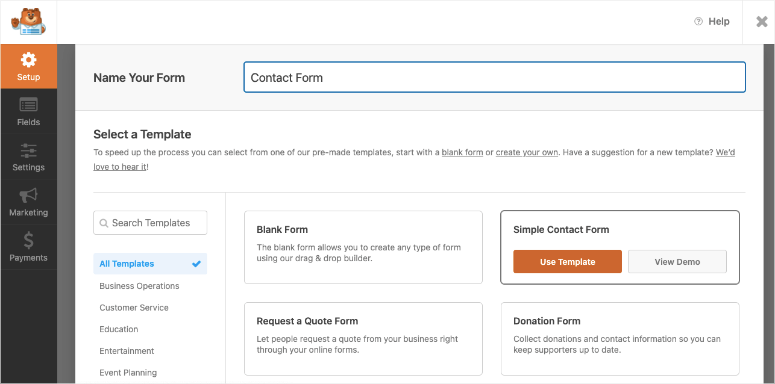
You can choose a template to get started quickly. If you want to add more fields to the pre-made form, you can drag them from the left-side fields panel to the right-side form editor.
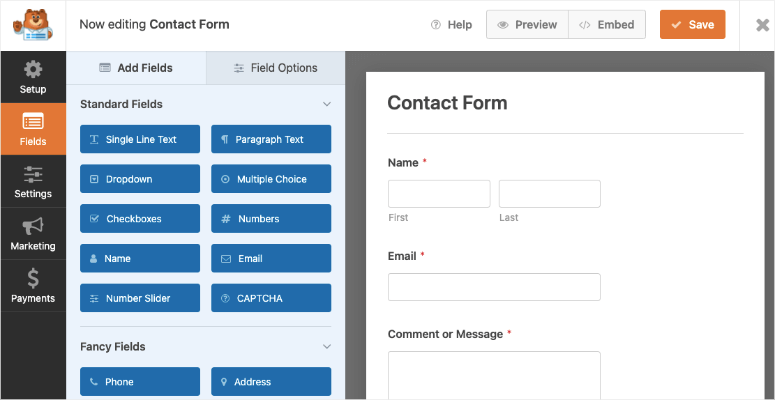
You can customize each field by clicking the Field Options.
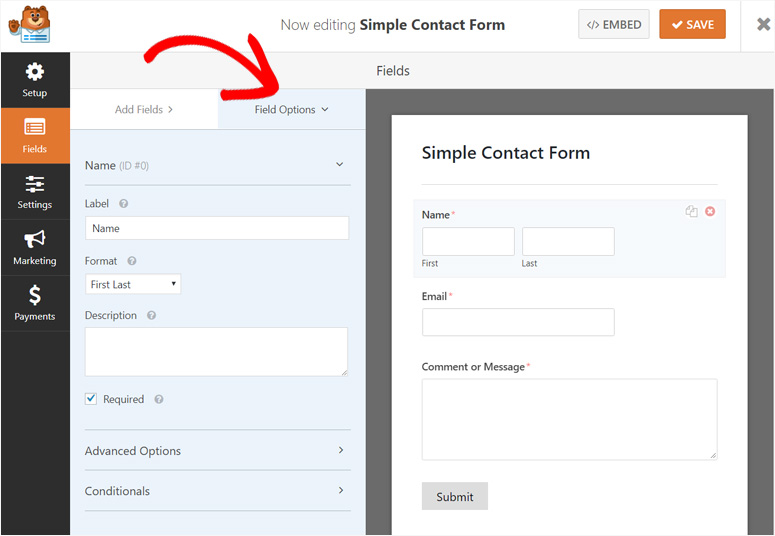
You can customize the form name, reCAPTCHA, anti-spam honeypot, notifications, and confirmation emails from Settings. You can connect your form with email marketing platforms like Constant Contact which is a great alternative to MailChimp, etc. from the Marketing option. And you can set up PayPal and Stripe to accept payments from the Payments option.
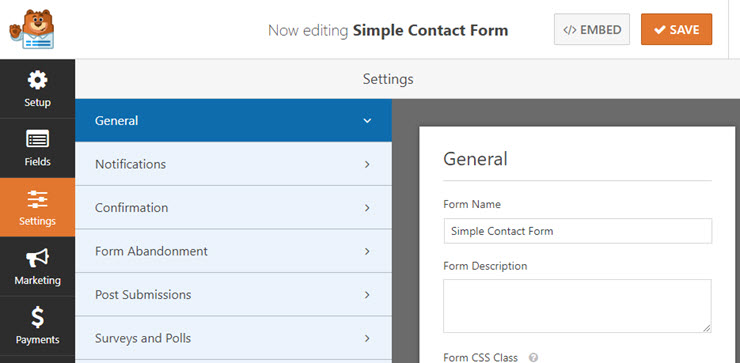
It’s that easy. Once you finish adding fields to your form and review all the settings, you can click the Save button at the top of your screen.
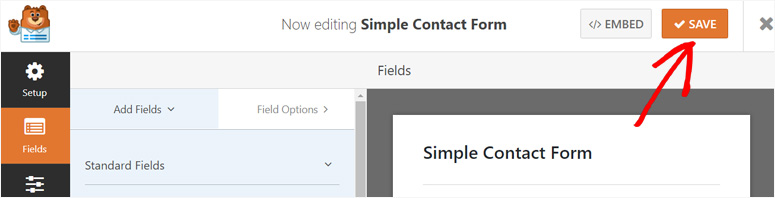
Next to the Save button, you’ll see an Embed option. If you click on that, you’ll get a shortcode for your new form which you can paste anywhere on your site to add the form.
Adding WPForms to your WordPress posts and pages is easy with the WPForms widget available in post editor menu. To add a contact form to a post or page, you’ll need to open the post or page and click the WPForms widget icon.
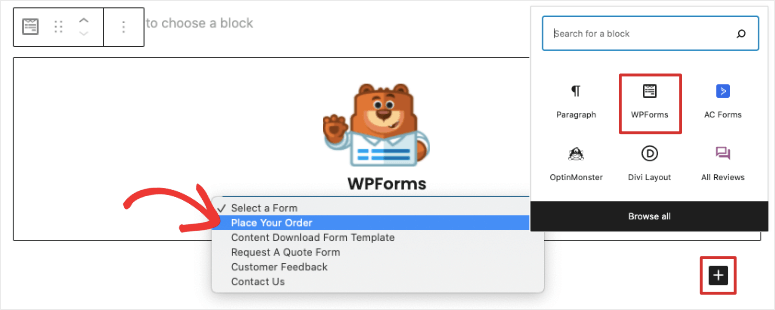
Then, select the form you want to add.
And that’s it! Now you can publish or update that page to view how your form looks live on your site. Below is a screenshot of what a simple contact form looks like:
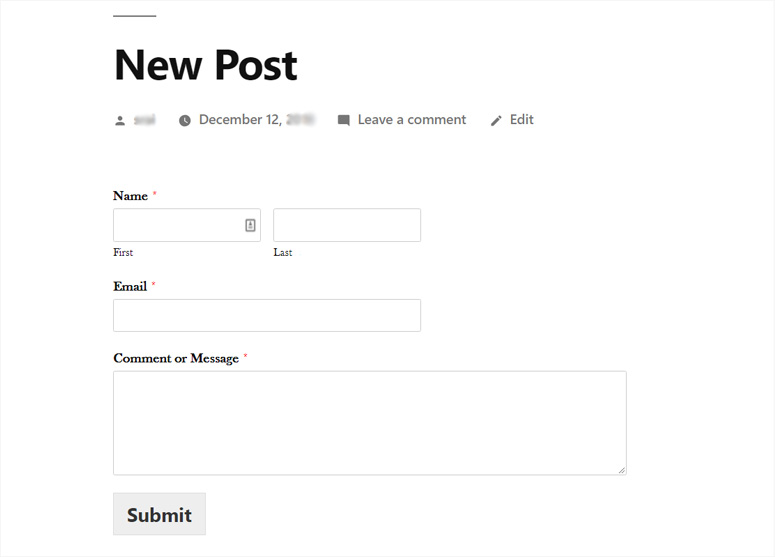
If you want to show your form in sidebars or any widget-ready areas, you can find the WPForms widget in Appearance » Widgets.
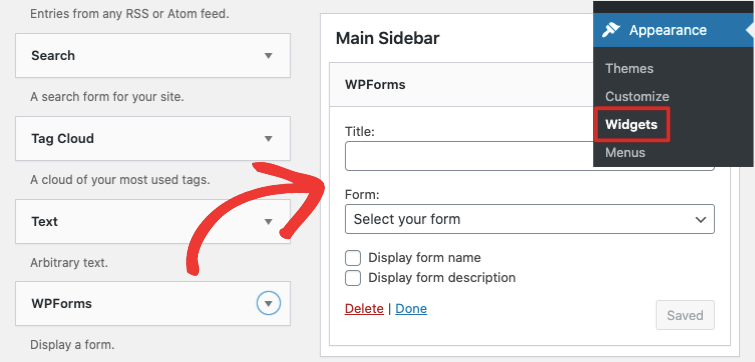
You can drag the widget to any widget-ready area you want to display the form.
Creating a Form with Ninja Forms
Ninja Forms has updated its interface multiple times to make it more user-friendly. Now, it also has quite a similar form making interface like that of WPForms.
To create a new form with Ninja Forms, you’ll need to visit Ninja Forms » Add New from your dashboard. There, you’ll see a number of form templates to start with, including a blank form.
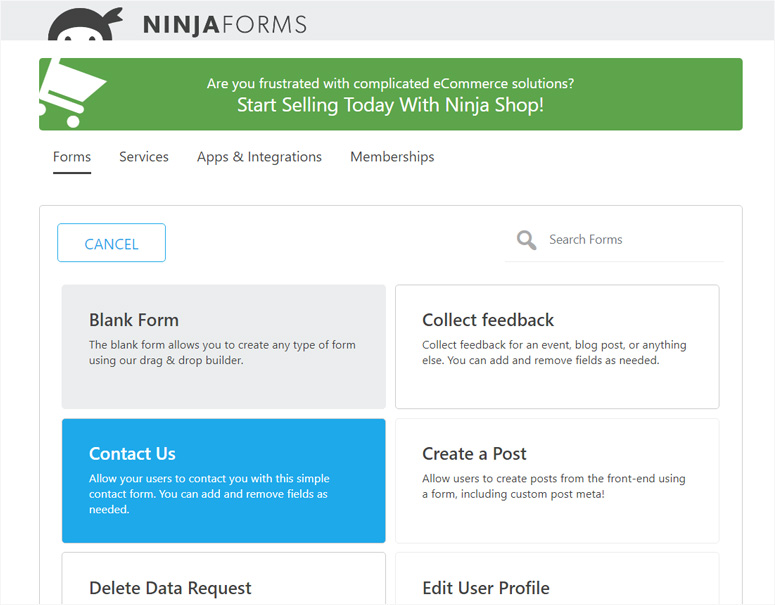
You can pick a template and get started quickly; however, you may not be able to use all of the ones featured unless you’ve purchased their most expensive plan. Ninja Forms shows all of the available form templates, including those you don’t have access to, which makes it a bit confusing and cluttered.
On the other hand, WPForms shows only the templates you can actually use as per the plan you’ve installed. It keeps WPForms nice and tidy.
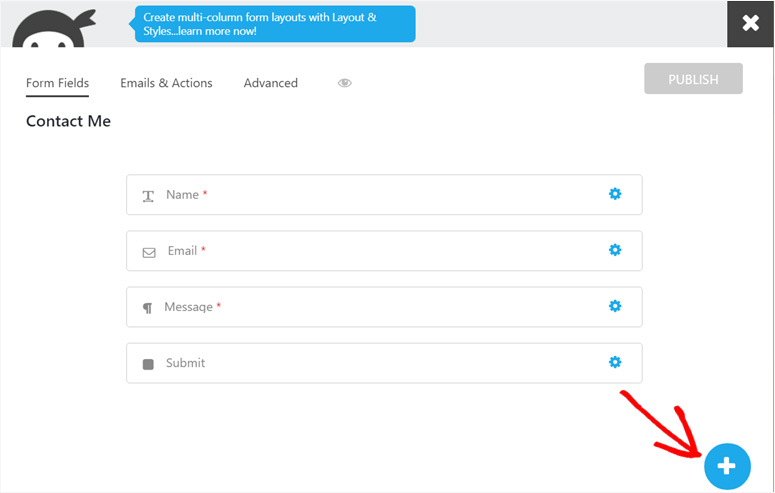
After you’ve selected a template, you’ll see the form building interface shown below. To add new fields to your form, click the Add icon.
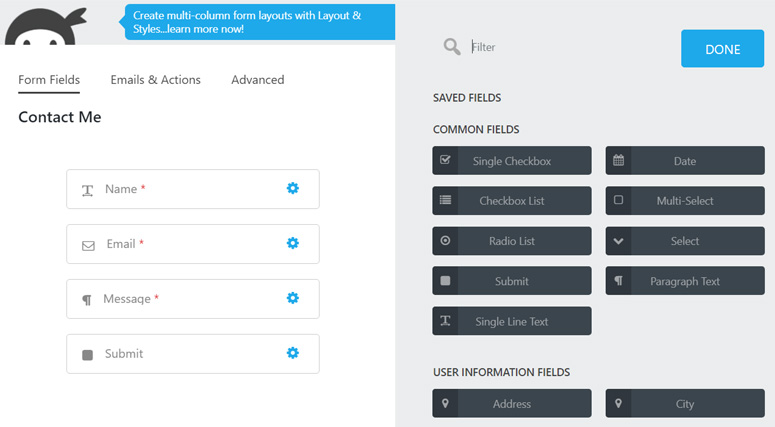
Then, you’ll see all the fields appear on the right side. Now you can drag them to the left side form editor and build your form.
You can configure notifications, confirmation messages, and success emails from the Emails & Actions option. You can configure display settings, restrictions, and calculations from the Advanced option.
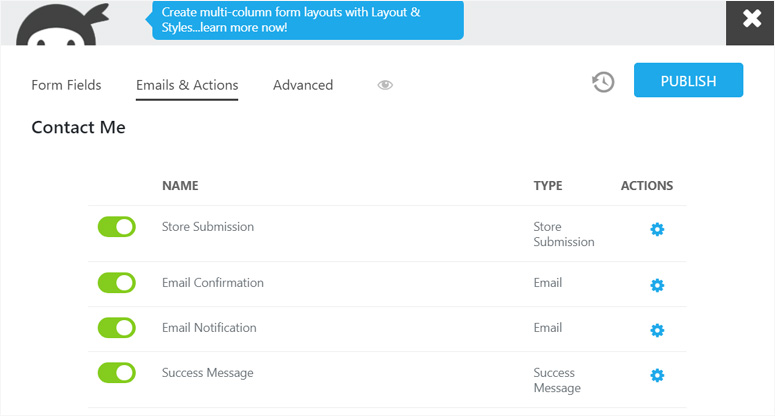
Once you create and customize your form, you can click Publish.
To use the form in your WordPress posts and pages, you can use the Ninja Forms widget on page/post editor. It has an interface similar to WPForms.
To add a contact form to a post or page, you’ll need to open the post or page and click the Ninja Forms widget icon.
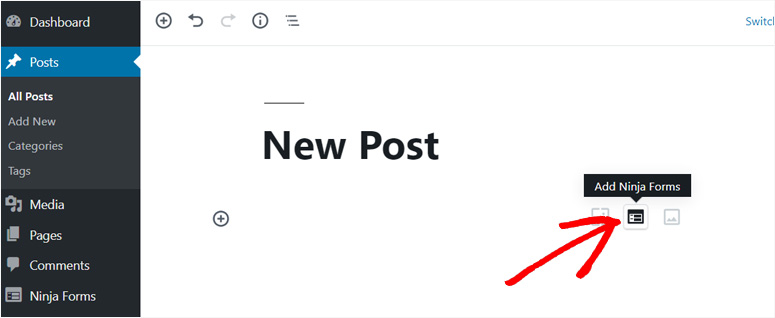
Select the form you want to add and update that page.
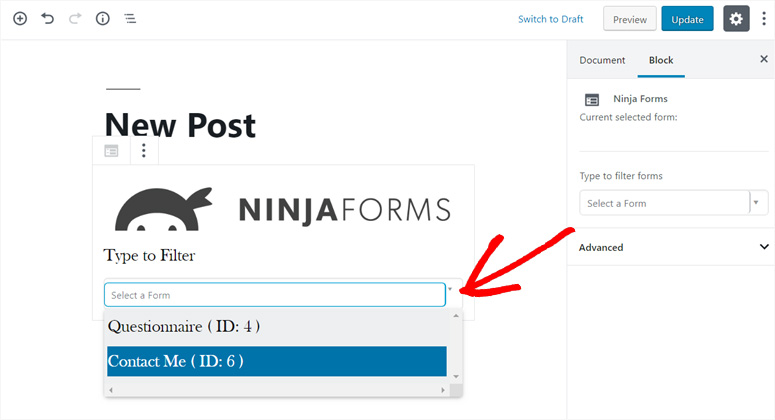
Then, you can view how your form looks. Here’s how your basic form will look like.

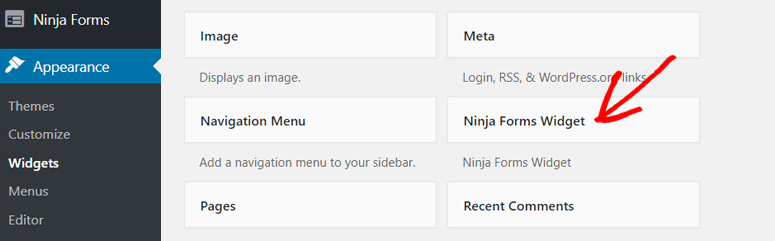
Like WPForms, it also has a widget that you can use in sidebars and other widget-ready areas on your site. You can find the widget in Appearance » Widegts.
Winner: WPForms. For its clean interface showing only the templates you have access to. Plus, its Embed option with a shortcode to let you add the form easily anywhere on your site.
3. Features
The strength of WPForms is its ability to create simple contact forms as well as advanced forms like payment forms, user registration forms, surveys and polls, newsletter subscription forms, etc. It has all the features you need to build multipurpose forms in WordPress.
Here’re just a few of WPForms’ major features:
- Spam Protection with anti-spam honeypot and reCAPTCHA
- Smart conditional logic
- Email marketing integration with AWeber, MailChimp, Drip, and other popular services
- Survey and polls addon
- Better entry management at dashboard to view all entries at one place
- Accept payments and donations with PayPal and Stripe
All these features combined make WPForms THE complete tool for WordPress forms.
Ninja Forms, on the other hand, also has powerful features tailor-made for you. However, most of its features are only available in the form of extensions. You’ll have to buy each extension separately or obtain them via a premium plan.
There’re main 2 disadvantages to choosing Ninja Forms over WPForms in terms of features:
1. If you buy the extensions separately, you’ll need to invest more money. Most of the extensions are priced at $49 each, so it gets costly in a hurry.
2. WPForms addons are just a click away, whereas Ninja Forms addons require you to follow the entire WordPress plugin installation process to install each addon. That means you need to download the extension file, upload it to your dashboard, install it, and then activate it.
Apart from the existing features, Ninja Forms is highly flexible and extendible. It’s built with hundreds of functions, action hooks, and filters that developers can use to build custom functionalities.
Winner: It’s a tie. However, WPForms makes most features easier to use overall and addons just 1 click away.
4. Pricing
Both WPForms and Ninja Forms offer free and premium versions. You can install the lite versions directly onto your site’s dashboard from the WordPress.org plugin directory and use them for free. For advanced features and addons, you’ll need to upgrade to their premium plans.
WPForms has 4 primary pricing plans. For businesses starting out, it has the Basic plan which costs $49.50. But, to use ALL of WPForms’ features and addons, you’ll need to buy the most expensive plan, Elite, which costs $299.
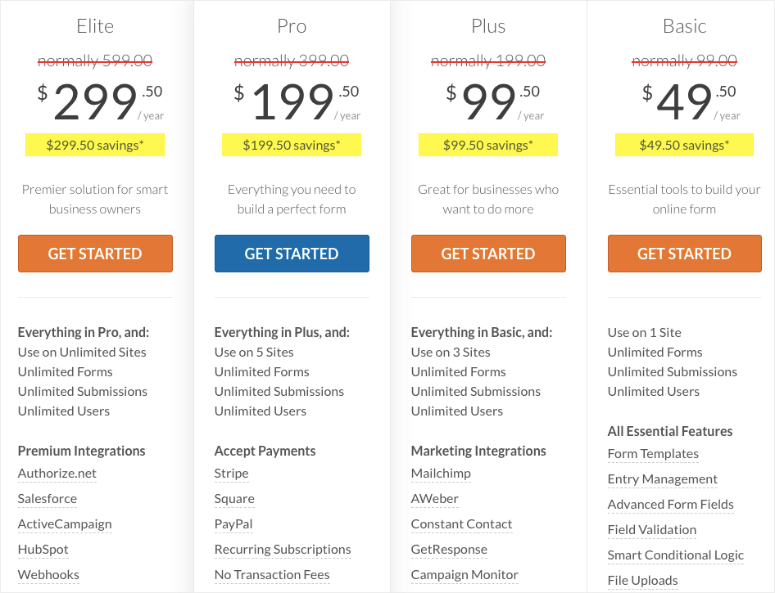
Ninja Forms has 3 main pricing plans to let you use its features and extensions, or you can also buy individual extensions and use them with their free plan.

The most basic Ninja Forms plan, Personal, costs $59.40; and the most expensive plan, Agency, costs $299. Their price range is far higher than that of WPForms.
There’re many features you’ll get for less money with WPForms. For example, you can create multi-column forms with any WPForms plan, including its Lite version; but you’ll need to buy the Layout and Styles addon or the Personal plan to use the same feature with Ninja Forms.
Similarly, you can get Constant Contact integration for free with all versions of WPForms, but you’ll need to purchase a separate extension or buy the Personal plan to unlock that function for Ninja Forms.
Winner: WPForms. It offers powerful features at a very reasonable price.
5. Support
WPForms has hundreds of beginner-friendly tutorials on how to use the plugin with ease. You can find the answer nearly all of your queries in their documentation.
The Lite version’s users can post their queries on WordPress.org. Their support team is very responsive, as the user ratings show. The Premium version’s users can open support tickets and get personalized support via email.
Ninja Forms also has detailed documentation to help you with the most common issues. You can get simple tutorials to use the plugin. If you need technical support, you can contact them via their contact page by opening a support ticket.
Winner: It’s a tie.
Pros and Cons
WPForms Pros and Cons
🟢► Pros
- Email Deliverability: I tested 50 form submissions and every single one reached the inbox without landing in spam folders.
- Pre-Built Templates: I found templates for payment forms, surveys, and registration forms that saved me hours of manual field setup.
- Smart Conditional Logic: I built a multi-step form that shows different questions based on previous answers in under 10 minutes.
- Entry Management: I can view all form submissions directly in WordPress without checking email or exporting CSV files.
- Spam Protection: I enabled the honeypot feature and blocked 100% of bot submissions without making real users solve puzzles.
- Drag-and-Drop Builder: I created a complete contact form with file uploads and dropdown menus in less than 5 minutes.
🔴► Cons
- Template Overwhelm: I felt confused by the number of templates shown at first, which slowed down my initial form creation.
- Price for Advanced Features: I had to upgrade to the Pro plan to access user registration forms, which costs more than basic plans.
Pros and Cons of Ninja Forms
🟢► Pros
- Flexible Conditional Logic: I built complex forms with multiple conditions that trigger different actions based on user input combinations.
- Unlimited Forms in Free Version: I created as many forms as I needed without hitting any limits on the free plan.
- Field Customization: I found more granular control over individual field settings compared to other form builders I tested.
- Developer-Friendly: I added custom CSS classes and IDs to form elements easily for advanced styling and tracking.
🔴► Cons
- Confusing Template Access: I saw templates I couldn’t use without upgrading, which wasted time clicking on locked features.
- Add-On Costs Add Up: I needed to purchase separate add-ons for payment processing and email marketing, increasing the total cost significantly.
| Plugin | Best For | Free Version | Key Feature | Starting Price |
|---|---|---|---|---|
| 🥇 WPForms | Beginners needing ease of use | ✅ | Drag-and-drop form builder interface | $49.50 |
| 🥈 Ninja Forms | Developers needing advanced customization | ✅ | Flexible, extendable, developer-friendly platform | $59.40 |
The thing is, both plugins work well for basic contact forms. But your specific needs will determine which one saves you time and money. Here’s how to pick the right one for your situation.
How to Choose the Right Plugin
If You Need Reliable Email Delivery
WPForms is your best choice here. I tested both plugins with different email providers, and WPForms had perfect delivery rates. Ninja Forms sometimes requires additional SMTP configuration to prevent submissions from landing in spam. If you’re running a business where every lead counts, you can’t afford to miss form submissions. WPForms also includes better notification controls out of the box.
If You’re on a Tight Budget
Ninja Forms offers more in the free version if you only need basic forms. You get unlimited forms and entries without paying anything. But here’s the catch: you’ll need paid add-ons for payments, marketing integrations, and file uploads. I found that WPForms Lite gives you fewer features for free, but the paid plans include everything bundled together. Calculate your actual needs before deciding. If you need payment forms or email marketing connections, WPForms often costs less overall.
If You Need Complex Conditional Logic
Ninja Forms shines when you’re building complicated forms with multiple conditional paths. I built a form that showed different questions based on three previous answers, and Ninja Forms handled it smoothly. WPForms does conditional logic well too, but Ninja Forms gives you more control over complex scenarios. This matters if you’re creating detailed surveys or multi-step registration forms.
If You Want Everything in One Package
WPForms wins for simplicity and completeness. I didn’t need to hunt for add-ons or configure multiple plugins. Everything from Stripe payments to email marketing integrations worked immediately after installation. Plus, the interface shows only what you can actually use, which keeps things clean. Ninja Forms requires more setup time and separate purchases for similar functionality.
FAQs: Ninja Forms Alternative: WPForms vs. Ninja Forms Compared
Which plugin is easier for WordPress beginners?
WPForms is easier for beginners because it shows only the templates and features you can actually use. Ninja Forms displays locked templates that require upgrades, which creates confusion. I found WPForms faster to learn with less clicking around. The drag-and-drop builder works the same in both plugins, but WPForms has clearer labels and better onboarding. If you’ve never built a WordPress form before, start with WPForms.
Can I use either plugin for free permanently?
Yes, both plugins offer free versions you can use forever. Ninja Forms Lite gives you unlimited forms and basic fields. WPForms Lite includes spam protection and simple contact forms. But you’ll need paid versions for payments, file uploads, and email marketing connections. I tested both free versions on real sites, and they work fine for basic contact forms. Upgrade only when you need advanced features.
Which plugin loads faster on WordPress sites?
WPForms loads slightly faster in my speed tests. I measured page load times with GTmetrix on five different sites. WPForms added an average of 0.3 seconds to page load time. Ninja Forms added 0.5 seconds because it loads more JavaScript files. The difference won’t matter on most sites, but if you’re optimizing for maximum speed, WPForms has a small edge.
Do both plugins work with email marketing services?
Both connect to email marketing platforms, but with different approaches. WPForms includes integrations with Constant Contact, Mailchimp, and AWeber in paid plans. Ninja Forms requires separate add-on purchases for each email service. I found WPForms easier to connect because the integrations are built in. If you’re already using an email marketing service, check which plugin supports it before buying.
Can I accept payments with the free versions?
No, both plugins require paid plans for payment processing. WPForms includes PayPal and Stripe in its Pro plan. Ninja Forms sells payment add-ons separately for each payment gateway. I calculated the total cost, and WPForms Pro is usually cheaper if you need both PayPal and Stripe. The free versions only handle form submissions and basic notifications.
Which plugin has better spam protection?
WPForms has better spam protection built in. I tested both plugins with the honeypot method and Google reCAPTCHA. WPForms blocked spam without making real users solve puzzles. Ninja Forms offers similar protection, but I had to configure it manually. WPForms also includes hCaptcha as an alternative to reCAPTCHA. If spam is a problem on your site, WPForms gives you more options without extra add-ons.
Conclusion
WPForms is a great form builder plugin for WordPress. It provides a really simple, user-friendly interface for building forms. It has a complete set of features which you can use with ease. The plugin is also very affordable for small businesses.
Ninja Forms is also a powerful WordPress form builder plugin. Its interface is user-friendly; however, it can’t compare with WPForms’ clean interface. The Ninja Forms plugin brings advanced features to the table that you might find handy, but it’s quite costly to obtain them all.
Hence, WPForms is the clear winner from the users’ point of view. However, advanced developers may find Ninja Forms more useful due to its developer-friendly options.
We hope this article helped you to decide between WPForms or Ninja Forms for your site.
You may also want to read our in-depth comparison between WPForms vs FormStack. We also have these tutorials:
- How to Set Up WordPress Form Tracking in Google Analytics
- How to Create a File Upload Form in WordPress
- How to Save Form Data in WordPress Database
These guides will help you get advanced features for your forms.

thanks for review
Hey Kushagra, you’re welcome. Do follow us on Facebook and Twitter for more regular updates.
how about thrive leads?
WP Forms “low” prices is just only for first year. Next year you will pay 399 for Pro version, so Ninja Forms not so expensive….
Excellent information about the pros and cons of WP forms vs Ninja forms. I learned a lot and you have really helped me make a decision of which one I want to use. Being new to setting up my website, I am going with the WP forms. Thank you so much.
Glad to be of help, Jeffrey!