
One of the most common questions I get from small business owners is how to build a professional form without hiring a developer.
They want something that looks polished, works on their site, and feels like theirs, not a copy-paste template that looks the same as everyone else’s.
My answer is always the same: use a drag and drop form builder.
You see, drag and drop WordPress form builders are built for exactly this situation. If you can click a mouse and move things around a screen, you can build a form.
You don’t need to understand code or have a developer on speed dial. This means you don’t need to wait a week for someone else to do it.
I’ve tested over a dozen of them. Below is my list of nine best drag and drop form builders for WordPress that I actually recommend to people.
Key Takeaways
- I’ll show you a form builder with 2,100+ ready-made templates, so you never have to start from a blank form again
- I mention a builder where every paid plan includes all features with no forced upgrades to access the tools you actually need
- Reveal which plugin builds forms natively inside the WordPress editor, meaning nothing new to learn if you already use blocks
- I tested 10+ options to find what genuinely works for non-technical WordPress site owners
- I include a pick for conversational forms. The style that guides users one question at a time and boosts completion rates
How I Test Drag and Drop Form Builders
🔍 Click to see my testing methodology
Here’s exactly how I evaluate drag and drop form builders:
- Builder speed – How fast can I get a working form live? I time myself from plugin install to first published form. Anything over 10 minutes needs to earn its place.
- Template quality – Do the templates cover real small business needs? Order forms, booking forms, and quote requests. I check relevance, not just raw numbers.
- Drag and drop experience – Does the builder feel smooth? Does the preview update as I add fields? Can I rearrange things without fighting the interface?
- Conditional logic – Can I show or hide fields based on what someone selects? This is standard in every builder worth recommending.
- Payment and integration options – Can I collect payments or connect to email marketing without buying the most expensive plan?
- Spam protection – Does it block bots without frustrating real visitors?
- Page speed impact – I run before/after speed tests using a guide on how to boost WordPress performance on a clean WordPress install to check for noticeable slowdowns.
Tools I use:
- GTmetrix: page load speed before and after
- Free IsItWP Performance tool: Compare with GTmetrix to have a clearer picture
- A fresh WordPress staging site: each plugin tested from scratch
Why Trust IsItWP?
At IsItWP, we’ve been the WordPress community’s go-to resource since 2009, helping over 2 million users choose better plugins and tools.
Unlike review sites that never actually use the products, we maintain active accounts, run real client sites, and provide ongoing WordPress consultation.
Best Drag and Drop Form Builders Compared
The table below covers the top 7 builders from my testing. The table shows you the WordPress.org rating so you quickly know what others think about the drag and drop builder. Plus, you can see the pricing, what each is best for, if it has a free version, and form builder type.
| Plugin | Best For | Free Version | Builder Type | WP.org Rating | Starting Price |
|---|---|---|---|---|---|
| 🥇 WPForms | Beginners who want powerful, easy drag and drop | ✅ (generous) | Visual drag & drop | 4.8/5 (14,277 reviews) | $49.50/yr |
| 🥈 Formidable Forms | Advanced users who need data-driven forms & apps | ✅ (solid core) | Visual drag & drop | 4.8/5 (1,354 reviews) | $39.50/yr |
| 🥉 Fluent Forms | Budget users who want all features on every plan | ✅ (generous) | Visual drag & drop | 4.8/5 (741 reviews) | $63/yr |
| 4. Gravity Forms | Developers who need maximum add-on flexibility | ❌ | Visual drag & drop | N/A (premium only) | $59/yr |
| 5. Ninja Forms | Beginners who want a free drag-and-drop to start with | ✅ (solid core) | Visual drag & drop | 4.4/5 (1,383 reviews) | $59.40/yr |
| 6. SureForms | Gutenberg users who want AI-powered form creation | ✅ (full) | Block editor (Gutenberg) | 4.9/5 (74 reviews) | $59/yr |
| 7. Sigma Forms | Marketers who want AI generation + built-in analytics | ❌ | AI-powered builder | N/A (premium only) | $20/yr |
If you want to dig deeper into growing your list alongside your forms, I’ve also put together a guide on the best lead capture tools for WordPress.
This way, you see which lead capture tools pair well with what you’ll find here.
On top of that, use the table of contents below to see my ranking at a glance. You can also click on any link to skip to that section of the article.
- 1. WPForms ⭐⭐⭐⭐⭐
- 2. Formidable Forms ⭐⭐⭐⭐⭐
- 3. Fluent Forms ⭐⭐⭐⭐⭐
- 4. Gravity Forms ⭐⭐⭐⭐
- 5. Ninja Forms ⭐⭐⭐⭐
- 6. SureForms ⭐⭐⭐⭐
- 7. Sigma Forms ⭐⭐⭐⭐
- Bonus: Best Drag and Drop Form Builders
- How to Choose a Drag and Drop Form Builder
- FAQs: Best Drag and Drop Form Builders
- Final Verdict: Should I Use a Drag and Drop Form Builder on My WordPress Site?
- Resource Hub: WordPress Forms & Lead Capture
With that out of the way, let’s dive in.
1. WPForms ⭐⭐⭐⭐⭐
Best for: Beginners who want a powerful drag-and-drop builder without the complexity
The first thing that sets WPForms apart isn’t the drag and drop builder itself; it’s what’s waiting for you before you ever drag a single field.
There are over 2,100 ready-made templates, including order forms, quote request forms, event registration forms, job applications, donation forms, and more.
Whatever a small business owner needs, there’s almost certainly a template for it. And that matters more than people realise.
Why Is WPForms One of the Best Drag and Drop Form Builders?
Here’s why: starting from a blank form is intimidating if you’ve never built one before.
Starting from a template means you’re editing something that already works. You’re swapping out placeholder text, not figuring out which fields even belong in a form.

On top of that, the drag and drop builder itself is genuinely fast.
For my site, I pulled in a contact form template and added a “preferred contact method” as a radio button.
Then, I set up conditional logic for the payment field number only when someone selects “credit card,” and had the whole thing live in under eight minutes.
This way, I do not scare users with a payment option immediately when they land on the form.

That’s the kind of experience that makes you want to build another one.
Apart from the visual form builder, you can also use AI to create a form using plain English. It will insert all the fields you want. Plus, you can then use the drag and drop builder to customize your AI form further.

Now, there’s a real friction point I should flag. If you want to connect WPForms to other tools, this drag and drop builder has 400+ integrations.
This includes payment options like Stripe and PayPal. Email marketing services like Constant Contact, MailChimp, and Bravo.
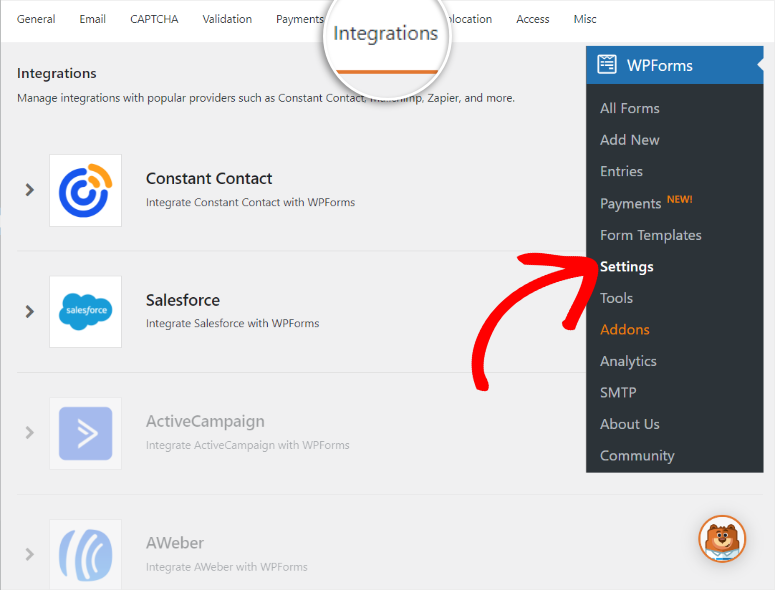
But if you want to connect with Zapier, which opens up connections to 10,000+ other apps, you need the Pro plan.
That’s a jump from the Basic plan at $49.50. For small businesses that just need a contact form or order form, the Basic plan is perfectly fine. But if automation is part of your plan, budget for Pro.
The good news is that the native integrations cater to most needs of small businesses, so you do not need to connect WPForms to Zapier.
WPForms is the builder I recommend most often because it strikes the right balance. It’s simple enough that a first-timer can publish their first form in an afternoon.
And it’s powerful enough that the same site owner can add payment processing, multi-page forms, and email list signups when they’re ready.
My Experience with WPForms
For this article to show how easy it is to use, I installed WPForms Lite on a fresh WordPress install and opened the builder.
I selected the “Contact Form” template. Then, swapped the product dropdown for a checkbox list of menu items.
Added a “special instructions” text area, and enabled conditional logic to hide a delivery address field until someone picked “delivery” over “pickup.”

The whole thing took just over six minutes. The form worked on the first submission test. The email notification arrived within seconds.
🟢► Pros
- Fast setup: I had a working order form live in under 8 minutes using a template with no blank-page panic
- 2,100+ templates: The largest library in this category. It covers almost every small business form type without starting from scratch
- Smart conditional logic: Show or hide fields based on what someone selects. This makes forms feel personalized without technical skills
- Payment processing: Accept PayPal, Stripe, Square, or Authorize.net payments directly through your form
- Entry management dashboard: Every submission lands in a clean WordPress dashboard view with no digging through email inboxes
- AI form builder: Describe what you need in plain text, and WPForms generates the form. Useful when you’re not sure where to start
🔴► Cons
- Zapier requires Pro: Connecting WPForms to Zapier, an external automation tool, you need the Pro plan
My Verdict: WPForms is the closest thing to a guaranteed win for WordPress beginners. The template library alone makes it worth trying. Start with Lite to get a feel for the builder, then upgrade when you need conditional logic or payments.
Check out my WPForms review for a deeper look at every plan.
Pricing: Free form builder available (WPForms Lite) | Premium starts at $49.50/year
👉 Get started with WPForms here
2. Formidable Forms ⭐⭐⭐⭐⭐
Best for: Advanced users and developers who need data-driven forms and front-end apps
Most form builders collect data and stop there. Formidable Forms collects data and then does something with it.
Once someone submits a form, you can transform those entries into front-end content.
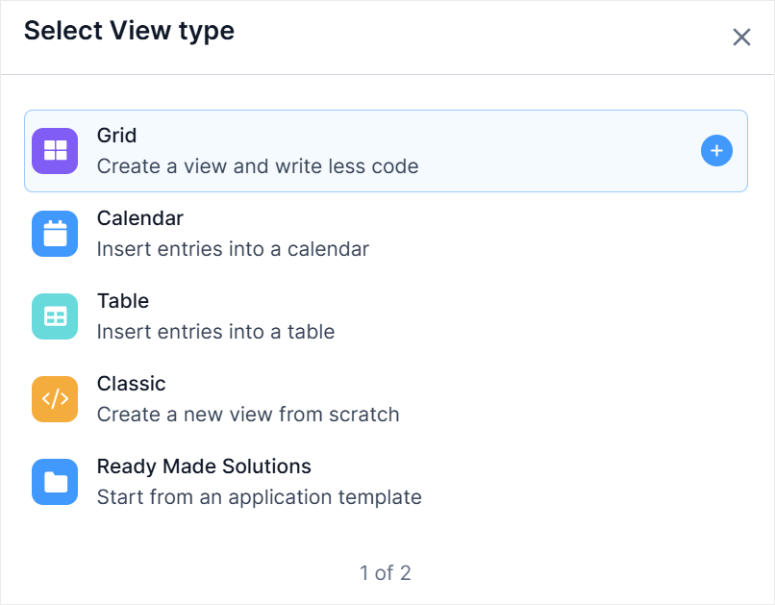
On top of that, you can use this feature to create a searchable directory, a filterable listing page, a calendar of events, and a portfolio grid without shortcodes or custom theme files.
Why Is Formidable Forms One of the Best Drag and Drop Form Builders?
The feature is called Formidable Views. I’ve used Views and a Formidable form to build staff directories, local business listings, and property search pages.
But the reason Formidable Forms is so high up in my list is because of its drag and drop builder. The Repeater fields let you collect multiple sets of data in a single form.
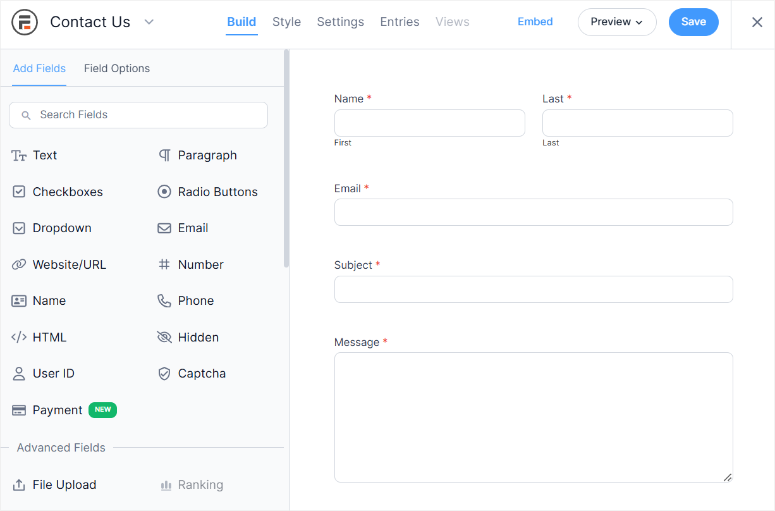
Think about booking a table for a party where you need each guest’s dietary requirements, or a job application form where someone lists multiple past employers.
Other builders either can’t do this or make it painful. Formidable Forms makes it feel straightforward.
The advanced calculation builder is the other standout. You can build quote calculators, cost estimators, and scoring forms where the total updates as users fill out fields.
I used this to build a BMI calculator with height, weight, and results, and the live result updated on-screen as the user made selections.
That said, the learning curve here is real.
Formidable works differently from WPForms. There are more settings, more terminology, and more places to look. Beginners who just need a simple drag and drop form will feel overwhelmed.
My Experience with Formidable Forms
As mentioned, I built a BMI quote calculator using Formidable’s calculation fields.
Set up a form with dropdowns for height, weight, and results. Added a calculation field that multiplied the unit price by quantity and applied a finish surcharge.
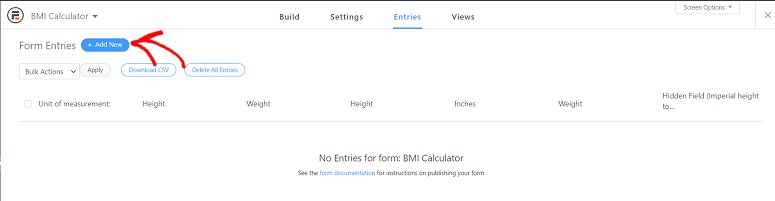
The live preview updated as I filled it out.
Setting up the calculation logic took 25 minutes, longer than a standard form. But the result was something I couldn’t have built with WPForms Basic or Ninja Forms.
That’s the trade-off: more power, more time investment upfront.
One thing that tripped me up early: spam submissions. Formidable doesn’t enable honeypot protection by default.
I got 14 spam submissions in two hours before I went back and turned it on. Always enable spam protection before you publish any form.
🟢► Pros
- Formidable Views: Transform form entries into front-end directories, listings, and calendars without another form plugin. This is done as well out of the box
- Calculator forms: Build real-time quote calculators and cost estimators without writing a single line of JavaScript
- Repeater fields: Collect multiple sets of structured data in one form. Great for booking, registration, and application forms
- 300,000+ sites: Strong track record in production environments, not just small blogs
- Affordable entry point: One of the lowest starting prices of any paid builder on this list
- Support quality: Consistently praised in reviews for responding fast and solving problems in the same thread
🔴► Cons
- Steep learning curve: Formidable works differently from most form builders. Beginners will need documentation more often and more patience upfront
- Elementor integration issues: Forms inside Elementor popups and widgets can behave unexpectedly. Test this early if Elementor is part of your workflow
My Verdict: Formidable Forms is what you graduate to when basic drag and drop form builders stop meeting your needs. The Views feature and calculation builder are genuinely unique. Just expect to invest more time learning it than you would with WPForms.
Check out my Formidable Forms review for a full breakdown. Or see how it stacks up in WPForms vs Formidable Forms if you’re deciding between the two.
Pricing: Free version available | Pro starts at $39.50/year
👉 Get started with Formidable Forms here
3. Fluent Forms ⭐⭐⭐⭐⭐
Best for: Budget-conscious users who want all features included without plan upgrades
Fluent Forms does something the other builders on this list don’t.
Every paid plan includes every feature. The only difference between plans is how many sites you can use the plugin on.
That means form conditional logic, payment forms, conversational forms, and 60+ integrations are all available on the cheapest plan.
Why Is Fluent Forms One of the Best Drag and Drop Form Builders?
With other drag and drop form builders on this list, when you need advanced features, you will need a separate paid add-on. With Fluent Forms, what you see in the features list is what you get from day one.
The drag and drop builder is clean and fast. Form fields snap into position.
The preview updates in real-time, and the template library, while smaller than WPForms’ 2,100+, covers the most common use cases for small businesses.
There’s also an AI form builder if you want to skip manual field setup entirely.
Most plugins use addons to keep the plugin size small. So you only add an addon when you require a feature. So, I wanted to see if Fluent Forms’ approach of everything included would actually affect performance.
The lightweight performance advantage is real. I ran GTmetrix tests before and after installing Fluent Forms and saw no meaningful page speed difference on a standard WooCommerce site.
The one friction point I hit was notification routing.
Setting up conditional email notifications, which allows you to send to team A if someone picks “service request,” or send to team B if they pick “complaint,” was less intuitive than I expected.
The settings are there, but you’ll need to read the docs to get them right the first time.
My Experience with Fluent Forms
I built a multi-step lead capture form for a service business.
Step one: get contact information, step two service selection, step three: preferred appointment time. I then connected it to Mailchimp and set up a conditional redirect based on the service selected.
The form was live in about 12 minutes. The conditional redirect worked correctly on the first test. The Mailchimp sync pushed entries immediately.
The notification routing took an extra 20 minutes of documentation reading. Once I understood how the notification conditions worked, it was fine, but it wasn’t as obvious as WPForms’ interface makes it.
🟢► Pros
- All features on every plan: No paywall for conditional logic, payments, or integrations. You pay for the number of sites, not for features
- Lightweight: No measurable page speed impact on standard WordPress installs. This keeps your site fast
- Lifetime deal: One-time payment option available
- 60+ native integrations: Mailchimp, Slack, Google Sheets, HubSpot, and Zapier are all included on paid plans
🔴► Cons
- Notification routing is tricky: Setting up conditional email routing requires documentation. This is less intuitive than WPForms or Gravity Forms
- Smaller template library: 75 templates vs. WPForms’ 2,100+. Less variety for niche or industry-specific form types
My Verdict: Fluent Forms is the right call if you’re frustrated by paywalled features or subscription fatigue. The lifetime deal alone makes it worth serious consideration. Just budget extra time for email notification setup.
Pricing: Free plugin available | Pro plan starts at $63/year
👉 Get started with Fluent Forms here
4. Gravity Forms ⭐⭐⭐⭐
Best for: Developers and agencies who need maximum customization and add-on flexibility

Gravity Forms has been around for close to a decade. That longevity shows. The plugin has one of the largest certified developer ecosystems of any WordPress form builder.
It has over 100 official, certified, and community add-ons that extend what the builder can do.
Why Is Gravity Forms One of the Best Drag and Drop Form Builders?
The drag and drop builder itself gives you something most competitors don’t: column control within the builder. You can drag fields side by side and set column widths as you go.

For complex forms like insurance applications, detailed service quotes, and multi-section surveys, this visual precision makes a real difference.
The design grid overlay shows you how fields align before you publish.
The add-on that keeps developers loyal is GravityView.
It works similarly to Formidable Views. It transforms form entries into front-end displays. Meaning you can create searchable directories, member portfolios, and event listings.
The difference is GravityView is a third-party certified add-on with its own dedicated development team. The depth and maturity of it reflects that.
Here’s the honest downside: Gravity Forms has no free version. Otherwise, I would have placed it higher on my list. For a small business owner comparing options, that’s an immediate barrier.
Especially if you consider WPForms, Formidable Forms, Fluent Forms, and Ninja Forms all have generous free tiers.
The UI also shows its age. Functionally, it’s fine, and everything works, but the builder interface looks dated compared to WPForms or SureForms.

All the same, it doesn’t affect performance, but it does affect first impressions. Developers who care about what’s under the hood won’t notice.
Beginners who judge by how things look might reach for something else.
My Experience with Gravity Forms
I built a multi-column job application form with personal info on the left and employment history on the right using one of the templates.

The column drag-and-drop worked exactly as advertised. I added a file upload for CVs, conditional logic to reveal a “work visa required?” question based on nationality.
Finally, I connected it to Slack for team notifications.
The setup took longer than WPForms for the same complexity level. Not because the builder is hard to use, but because some features, like conversational Forms, Survey add-on, require the Elite plan.
If you need those, plan for that upfront. I also noticed the PayPal Checkout integration required extra troubleshooting on a shared hosting environment.
🟢► Pros
- Column drag-and-drop: Arrange fields in side-by-side columns with a visual grid control. The most precise layout tool of any builder here
- 100+ certified add-ons: The largest add-on ecosystem in this space, with vetted third-party developers building deep integrations
- GravityView: Display form entries as searchable directories, member pages, or listing sites. A mature, well-supported companion add-on
- Fixed pricing: No surprise renewal jumps. The price you see is the price you pay at renewal
- Cloudflare Turnstile: CAPTCHA-free spam protection that doesn’t frustrate real users. A strong modern alternative to reCAPTCHA
- Developer community: Nearly a decade of community tutorials, custom code snippets, and support threads. Rarely hit a problem that someone hasn’t already solved
🔴► Cons
- No free version: Every tier requires payment, which is a real barrier if you just want to test the builder before committing
- Advanced features need Elite: Conversational forms, surveys, quizzes, and user registration are locked to the Elite plan
My Verdict: Gravity Forms earns its place for developers and agencies who need a battle-tested plugin with serious add-on depth. For small business owners who just need a few forms, the lack of a free tier and the aging interface make other options on this list a better starting point.
Check out my Gravity Forms review. You can also have a look at my WPForms vs Gravity Forms comparison if you’re deciding between the two.
Pricing: Starts at $59/year
👉 Get started with Gravity Forms here
5. Ninja Forms ⭐⭐⭐⭐
Best for: Beginners who want a free drag-and-drop form builder to start with

Ninja Forms gives you a fully functional drag and drop builder at zero cost. Plus, you get unlimited forms, unlimited submissions, and solid core functionality.
For someone who just wants to try drag-and-drop form building before spending money, Ninja Forms is a sensible first stop.
Why Is Ninja Forms One of the Best Drag and Drop Form Builders?
The core drag and drop experience is clean. Fields snap into position, the builder is fast, and the form preview is accurate.
Basic form types like contact forms, feedback forms, and simple registration forms work well out of the box. There’s also no cap on how many forms you build or how many submissions you collect.
That’s genuinely generous for a free plugin.
The challenge comes when you need features beyond the basics.
For example, conditional logic, Payment processing (Stripe, PayPal), and Email marketing integrations (Mailchimp, ActiveCampaign) are paid add-ons.
Each one is purchased separately or bundled into the Elite plan.
Here’s the thing: once you start buying the add-ons you actually need, the cost often exceeds what other drag and drop builders on this list charge for an all-inclusive plan.
This model works if you genuinely need only one or two specific features. If you need conditional logic, payments, and an email integration, you’re likely better off with a bundled plan elsewhere.
My Experience with Ninja Forms
I built a basic contact form using the free plugin. The drag-and-drop builder was smooth. Fields went where I dropped them, the preview matched the live form, and the submission email arrived as expected.
Where I hit the wall: I wanted to add conditional logic to hide a “company name” field for individual inquiries. That’s a paid add-on.
🟢► Pros
Free drag-and-drop: A real, functional D&D builder at no cost. The best free starting point on this list
Unlimited forms in free: No restriction on how many forms you build or how many submissions you collect
40+ official add-ons: Highly modular. Buy only the specific features you need rather than a full plan
Clean builder UX: The core drag-and-drop experience is smooth and accurate. Fields go where you drop them
🔴► Cons
Conditional logic is paid: A basic feature in every other builder here costs extra in Ninja Forms. This catches users off guard
Add-on costs add up quickly: Buying conditional logic + payments + one email integration often costs more than an all-inclusive plan elsewhere
My Verdict: Ninja Forms is the right free starting point if you’re not sure whether you need a paid form builder at all. Test it, build a form or two, and see what features you actually need. If you need conditional logic, payments, or integrations from day one, go straight to WPForms or Fluent Forms instead.
Check out my Ninja Forms review for more details. See how it compares head-to-head in WPForms vs Ninja Forms.
Pricing: Free core plugin | Pro starts at $59.40/year
👉 Get started with Ninja Forms here
6. SureForms ⭐⭐⭐⭐
Best for: Gutenberg users who want AI-powered form creation without a separate builder interface
SureForms does something genuinely different: it doesn’t add a new editor. It builds forms inside the WordPress block editor you already use.
Drag and drop in SureForms means dragging Gutenberg blocks. If you already know how to build pages with the block editor, you already know how to build forms with SureForms.
Why Is SureForms One of the Best Drag and Drop Form Builders?
That matters more than it sounds. One of the biggest friction points with form plugins is learning a completely new interface. SureForms removes that friction.
The form blocks behave exactly like any other WordPress block. You drag them in from the block inserter, configure them in the sidebar, and preview them in the editor.
No separate builder tab to open, no learning curve to climb.
The AI form builder takes this further. Type “create a service enquiry form with name, email, phone, service type dropdown, and preferred date” and SureForms generates the entire form instantly.
For someone setting up five forms across a new site, this is a significant time saver.
The free version also includes Stripe payment processing. That’s unusual. Most builders lock payment collection behind paid plans.
For a small business owner who needs to collect payments through a booking or online order form, SureForms offers more at no cost than most of its competitors.
Where SureForms is still catching up: the template library is smaller than WPForms or Formidable Forms. And because it’s a newer plugin, the third-party tutorial ecosystem is thinner.
If you hit an unusual configuration problem, you may not find a community forum post that already covers it.
My Experience with SureForms
I tested SureForms on a site already using the Astra theme and the WordPress block editor for pages.
The experience was remarkably smooth. Building the form felt exactly like building a block-based page section.
I added fields by searching the block inserter, configured them in the right-hand sidebar, and published the form as a page.
I used the AI generator to build a job enquiry form from a single sentence prompt. The result was accurate and usable in under 30 seconds. I adjusted two fields, and it was ready to test.
The one limitation I hit: some of the more advanced integrations (beyond Stripe) require the Business plan. The free version is genuinely capable, but as your needs grow, you’ll likely need to upgrade.
🟢► Pros
Gutenberg-native builder: Forms are built using WordPress blocks. No new interface to learn if you already use the block editor
AI form generation: Describe your form in a sentence and get a complete, configured form in under a minute
Free Stripe payments: Collect payments through your form without a paid plan
Rapid development: Regular updates and an active development team. Features are being added frequently in response to user feedback
🔴► Cons
Smaller template library: Fewer ready-made templates than WPForms or Formidable Forms. So, more manual setup is required for niche form types
Newer plugin: Less battle-tested than WPForms or Gravity Forms. Smaller community and fewer third-party tutorials when you hit edge cases
My Verdict: SureForms is the best option if you’re already building in Gutenberg and want forms that feel native to that experience. The AI generator and free Stripe payments give it a strong edge for smaller sites. Just go in knowing the template library is still growing.
Pricing: Free plugin available | Pro plan starts at $59/year
👉 Get started with SureForms here
7. Sigma Forms ⭐⭐⭐⭐
Best for: Marketers who want AI-generated forms with built-in conversion analytics
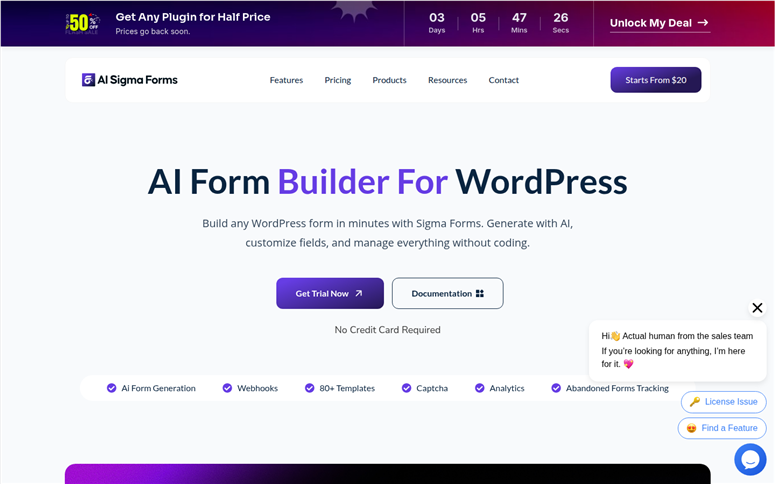
Sigma Forms is the newest plugin on this list, and it approaches form building from a different angle than the others.
Most builders focus on the building experience. Sigma Forms focuses on what happens after someone starts filling out your form and doesn’t finish.
Why Is Sigma Forms One of the Best Drag and Drop Form Builders?
The abandoned form recovery feature tracks when users drop off mid-form, logs what they’d already entered, and lets you follow up.
The built-in analytics dashboard shows submission rates, drop-off points, and form completion rates.
For a marketer running lead generation forms, this kind of visibility is normally something you’d need a separate analytics tool to get.
The AI form builder works from natural language prompts. Type what you need, and Sigma assembles the fields and structure.
The 80+ templates cover common business form types, and the 50+ integrations handle most standard email and CRM connections.
But the downside is Sigma Forms is still building credibility. It’s new, and there are not enough users or reviews to place it higher on this list.
Early feedback from users is positive, but “early feedback” is different from “proven at scale.” If you’re risk-averse about your site’s critical forms, WPForms or Formidable Forms have a longer track record.
That said, the 60-day money-back guarantee is the most generous on this list. This is more than enough time to test it across a real campaign.
You can also set up WordPress form tracking in Google Analytics alongside it for a complete picture of form performance.
My Experience with Sigma Forms
I set up a lead capture form for a fictional service business, enabled the analytics dashboard, and ran 30 test submissions with half of them incomplete.
The drop-off tracking correctly identified the field where most “visitors” abandoned the form. That’s genuinely useful data for optimisation.
The AI generator was fast. I described a multi-step survey form in one sentence and got a usable result in about 20 seconds.
The builder interface is clean, though it has fewer power-user options than Formidable Forms or Gravity Forms.
🟢► Pros
Abandoned form tracking: Identifies where users drop off mid-form. Conversion data that most builders don’t offer built-in
AI form generation: Full form creation from a text prompt. Fast for setting up multiple forms quickly
60-day money-back guarantee: The most generous refund window on this list. Enough time to run a real test campaign
Analytics dashboard: Submission rates, completion rates, and drop-off points are visible without needing a third-party analytics plugin
🔴► Cons
New product: Limited review volume compared to established builders. Less certainty about long-term reliability and support responsiveness
No free version: You need to pay to start, unlike many options on this list which all have usable free tiers
My Verdict: Sigma Forms is worth watching if you’re building lead generation forms and want conversion tracking built in. The abandoned form recovery alone sets it apart from everything else here. Just go in knowing you’re an early adopter.
Pricing: Starts at $20/year
👉 Get started with Sigma Forms here
That’s my list of the best drag and drop form builders for WordPress. But I have listed a few bonus options below for tools that just missed the list.
Bonus: Best Drag and Drop Form Builders
Everest Forms
Everest Forms earns its place as a bonus pick for one reason: the free version is surprisingly complete. File uploads, image uploads, admin approval workflows, and 40+ form fields are all available without paying.
The drag-and-drop grid layout also lets you arrange fields in columns visually, which is more than most free contact form plugins offer.
If your budget is zero and you need a real drag-and-drop experience, Everest Forms is where I’d send you first. That said, the premium ecosystem and tutorial resources are thinner than WPForms or Fluent Forms.
Happyforms
Happyforms is the lightest form plugin on this list and intentionally so. Everything is built in. No add-ons, no extensions, no separately installed modules.
Conditional logic, multi-page forms, file uploads, payment collection, and digital signatures are all included in the base plugin.
The standout feature is the live preview inside the WordPress Customizer. You see exactly how your form looks on your actual site while you build it.
For users who care about minimal page weight and prefer simplicity over power, Happyforms is a strong alternative to the bigger players.
Quill Forms
Quill Forms builds Typeform-style conversational forms. That is, one question at a time on full-screen with smooth transitions.
The drag-and-drop builder handles 20+ question types, including quiz scoring, jump logic, and conditional branching.
Research consistently shows that this one-at-a-time format improves form completion rates. Especially for longer forms, where a wall of fields would cause people to bounce.
If you’re running surveys, quizzes, or multi-step lead capture forms and want to maximize completions, Quill Forms is the pick.
How to Choose a Drag and Drop Form Builder
Every WordPress drag and drop form builder on this list does the fundamentals well. Where they differ is in what happens after you get the basics working.
Here’s how I’d think through the choice based on your actual situation.
If you’re a complete beginner and just need your first form live today:
- Go with WPForms. The template library means you’re never starting from zero, the builder is the fastest to learn, and the free Lite version gives you a real taste before spending anything.
If you’re building something beyond a simple contact form:
- Go with Formidable Forms to create forms with calculator features, directory listings, or data you want to display back to users. The Views feature and calculation builder are genuinely unique.
If you’re a developer or agency building client sites:
- Gravity Forms’ add-on ecosystem and developer community are hard to beat. The fixed renewal pricing also makes budgeting predictable.
If subscription costs frustrate you:
- Fluent Forms’ lifetime deal changes the economics entirely. Pay once, use forever, get every feature on every plan. For small business owners who’ve watched annual SaaS subscriptions pile up, this is a meaningful alternative.
If you already live in the WordPress block editor:
- SureForms removes the context-switching friction that every other builder adds. Forms live inside the same editor you use for everything else. The AI generator accelerates setup significantly.
If you’re not sure whether you even need a paid builder:
- Start with Ninja Forms’ free core. Build a form, see what features you actually reach for, and upgrade only when the free version stops being enough.
Remember, you can also A/B split test your WordPress forms to see which version converts better. One thing that cuts across all of these: check what plan includes the features you need before you buy.
Conditional logic, payments, and third-party integrations are the three features most commonly locked behind higher tiers. Know which tier you actually need, not just the entry price.
That’s it from me. If anything is unclear, check out the commonly asked questions below for clarification.
FAQs: Best Drag and Drop Form Builders
What is the best free drag and drop form builder for WordPress?
WPForms Lite is the best free option for most users. It has a real drag-and-drop builder and enough functionality to build basic contact forms. Ninja Forms and SureForms also have strong free versions. If you need free file uploads and grid layout, Everest Forms is worth trying. For a broader comparison, my best WordPress contact form plugins guide covers all the free options side by side.
Does WordPress have a built-in form builder?
No, WordPress doesn’t include a native form builder. You need a plugin. SureForms comes the closest to feeling built-in since it uses the WordPress block editor, but it’s still a separate plugin you install. Most WordPress themes come with a basic contact form shortcode, but no real builder.
What’s the difference between a contact form plugin and a form builder?
A contact form plugin creates one specific type of form. A form builder lets you create any type of form, like order forms, registration forms, surveys, payment forms, and booking forms, with a visual drag-and-drop interface. Every plugin on this list is a form builder, not just a contact form plugin.
Which WordPress form builder is best for payment forms?
WPForms supports Square, Stripe, PayPal, and Authorize.net on the Pro plan. Formidable Forms also handles payments well. SureForms is the only builder here that includes free Stripe payments on its free plan. Gravity Forms requires the Pro plan for Stripe.
Can I build a calculator form in WordPress without code?
Yes. Formidable Forms has the best native calculation builder. You can create real-time pricing calculators, quote estimators, and scoring forms using its calculation field. Gravity Forms also supports calculations via add-ons. WPForms has a Calculations add-on on the Pro plan.
Which drag and drop form builder works best with Elementor?
WPForms has the smoothest Elementor integration. There’s a native WPForms widget in Elementor’s widget panel. Gravity Forms also integrates cleanly. Formidable Forms has documented issues with Elementor popups and dynamic content areas. SureForms is Gutenberg-native and not designed with Elementor in mind. You can also tackle contact form spam with dedicated plugins regardless of which builder you use.
Final Verdict: Should I Use a Drag and Drop Form Builder on My WordPress Site?
Yes, without question.
The question I get from small business owners isn’t really “should I use a form builder?” It’s “Do I need to hire someone to do this for me?” The answer is no. That’s the whole point of drag-and-drop tools.
The builders on this list were made specifically for people who want to add a contact form to their WordPress site but don’t have the technical background to build it from scratch.
The free options are genuinely usable. The paid plans start at reasonable annual costs. And the time you save.
Compared to manually enquiring about custom development, waiting for quotes, and reviewing revisions, it is real and immediate.
Pick one, get a form live this week, and adjust from there.
Resource Hub: WordPress Forms & Lead Capture
Find what you need to get more from your WordPress forms.
- 8 Best WordPress Lead Capture Tools to Double Your List – Go beyond forms with the full range of lead capture tools for WordPress
- How to Create a Typeform Style Form in WordPress – Step-by-step tutorial for building conversational forms that increase completions
- How to Create a Multi-Page Form in WordPress – Break long forms into steps to reduce abandonment
- How to Create a Job Application Form in WordPress – Build a complete hiring form that collects what you actually need
- How to Create a File Upload Form in WordPress – Accept document and image uploads through your WordPress forms
- 11+ Powerful WordPress Lead Generation Plugins Compared – Expand your lead capture strategy beyond the contact form

Comments Leave a Reply