I learned something brutal about eCommerce plugins the hard way.
A client hired me to build their online store. I picked an eCommerce plugin with stunning templates and drag-and-drop product pages. The demo looked gorgeous.
Two months after launch, they called frustrated. Sales were happening, but they had no idea who was buying, why customers abandoned carts, or which products drove the most revenue.
The plugin made their store look like a million bucks. But it functioned like a beautiful office with no phone lines, no filing system, and no way to track visitors.
Here’s what I discovered: the best eCommerce plugins track customer behavior, optimize for SEO, enable upsells, and show you exactly how to grow.
In this article, I break down the best eCommerce plugins that I have tested and use for maximum conversions.
Key Takeaways
- I’ll show you plugins that track sales AND customer behavior (not just pretty storefronts)
- I mention a solution built specifically for digital products that saves hours of manual delivery
- I’ll show you the difference between plugins that make sites look good vs. plugins that make money
- I reveal which platforms handle SEO, analytics, and upsells automatically
- I tested these with real stores – not just demos – to find what actually grows revenue
Plus, you can use this table of contents to see all the eCommerce WordPress tools at a glance. Click on any link to skip to that section of the article.
With that out of the way, let’s dive in.
How I Test eCommerce Plugins
🔍 Click to see my testing methodology.
Here’s exactly how I evaluate each platform:
- Scalability: Performance with 100+ products and 1,000+ monthly orders
- Setup Speed: How long it takes to go from installation to accepting your first real payment
- Sales Tracking: Does it show who bought what, when they bought it, and why they chose your product
- SEO Capabilities: Built-in optimization for product pages so customers can actually find your store
- Analytics Integration: Seamless connection to Google Analytics, Facebook Pixel, and conversion tracking
- Upsell Features: Cross-sells, one-click upsells, and abandoned cart recovery that actually increase revenue
- Payment Flexibility: Number of payment gateways supported without expensive add-ons
- Customer Experience: Cart flow, checkout process, and mobile optimization that don’t lose sales
Tools I Use for Testing:
I run every plugin through GTmetrix and our very own free IsItWP speed tester for performance testing.
I connect Google Analytics 4 for conversion tracking and build actual test stores with real products, not empty demos. Plus, I test checkout flows on mobile devices because that’s where most sales happen now.
Why Trust IsItWP?
At IsItWP, we’ve been the WordPress community’s go-to resource since 2009, helping over 2 million users choose better eCommerce solutions.
Unlike review sites that never actually use the products, we maintain active accounts, run real client sites, and provide ongoing WordPress consultation.
Our team has built hundreds of online stores across every industry imaginable, from digital downloads to physical products to subscription services.
Best eCommerce Plugins Compared
I tested nine different eCommerce solutions for WordPress to find which ones actually grow revenue, not just display products. Here’s how they stack up.
| Plugin | Best For | Free Version | Analytics | Rating | Starting Price |
|---|---|---|---|---|---|
🥇 WooCommerce | Complete flexibility | ✅ | Built-in | ⭐⭐⭐⭐⭐ | Free |
🥈 Easy Digital Downloads | Digital products | ✅ | Advanced | ⭐⭐⭐⭐⭐ | $99.50/year |
🥉 BigCommerce | High-volume sales | ❌ | Powerful | ⭐⭐⭐⭐⭐ | $29/month |
4. Shopify | Easiest setup | ❌ | Excellent | ⭐⭐⭐⭐ | $19/month |
5. MemberPress | Subscriptions | ❌ | Good | ⭐⭐⭐⭐ | $199.50/year |
6. WP Simple Pay | Simple payments | ✅ | Basic | ⭐⭐⭐⭐ | $49.50/year |
7. WPForms | Single products | ✅ | Basic | ⭐⭐⭐⭐ | $49.50/year |
8. Ecwid | Multi-platform | ✅ | Good | ⭐⭐⭐⭐ | $5/month |
Now, let us look at each tool in detail.
1. WooCommerce ⭐⭐⭐⭐⭐
5 Million+ Active Installs | Best for: Complete eCommerce Flexibility
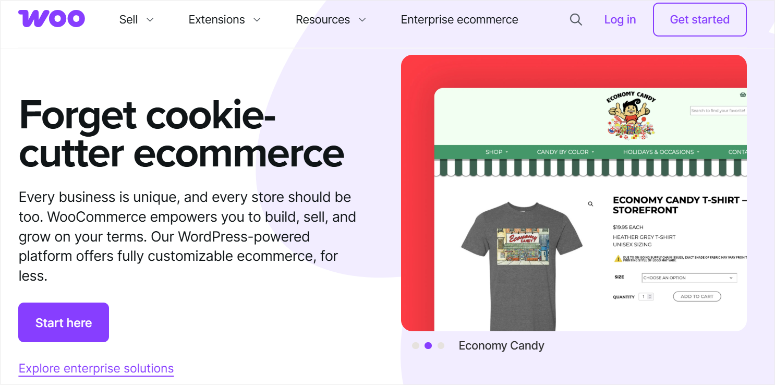
WooCommerce is my top eCommerce plugin recommendation because it powers everything from digital download stores to 10,000-product physical goods shops.
The secret lies in its flexibility. You get complete control over every aspect of your store without touching a single line of code.
Want to sell physical products? Done. Digital downloads? Easy. Subscriptions? Add an extension.
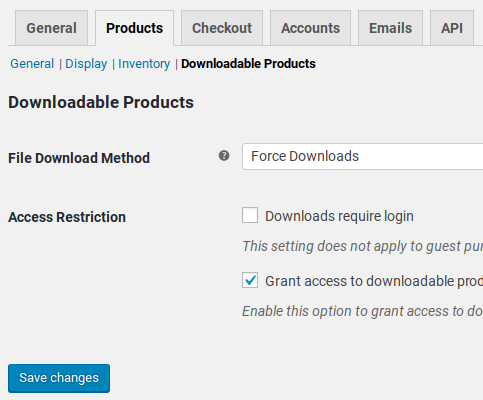
Why is WooCommerce One of the Best eCommerce Plugins?
The plugin integrates with every major payment gateway. I’ve connected it to Stripe, PayPal, Square, and even cryptocurrency processors. Your customers can pay however they want.
The extension ecosystem solved problems I didn’t know existed.
For example, you can get extensions for advanced product filtering, optimize your WooCommerce SEO, and manage product attributes at scale.
In fact, I list 30+ WooCommerce plugins you can use to extend your store’s capabilities so you can see exactly what I am talking about.
My Experience with WooCommerce
I set up WooCommerce for a handmade jewelry business that needed specific features. The owner wanted customers to customize necklace lengths, choose metal types, and add gift wrapping.
Using WooCommerce’s product variations and add-ons, I built exactly what she needed. There was no learning curve because the interface looks just like the WordPress editor.
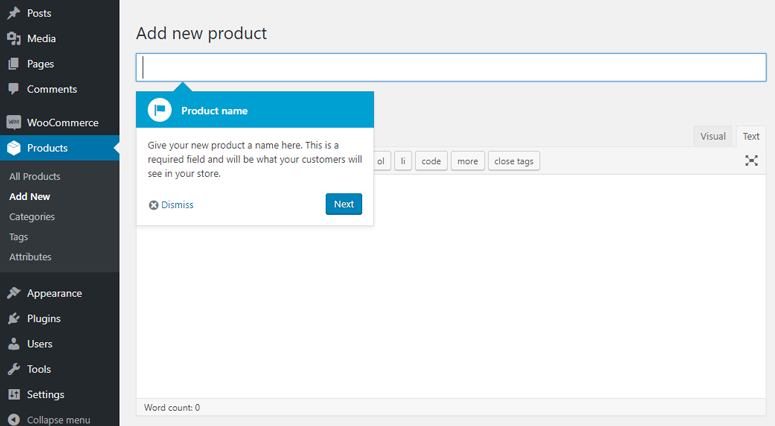
The whole setup took about 4 hours, including payment gateway testing.
Three months later, she was processing more orders with zero payment issues. The built-in analytics showed which product variations sold best, so she stocked inventory more smartly.
The analytics dashboard became her favorite feature. She could see which marketing campaigns drove sales, which products customers abandoned in carts, and which days generated the most revenue.
► Pros
- Free core plugin with no monthly fees or transaction charges
- Works with any WordPress theme and thousands of extensions
- Complete ownership of your store data and customer information
- Handles unlimited products without performance hits if hosted properly
- Built-in analytics show exactly who bought what and when
► Cons
- Requires good WordPress hosting to handle traffic spikes during sales
- Extension costs add up if you need advanced features
- More complex setup compared to hosted solutions like Shopify
- You’re responsible for security updates and PCI compliance
My Verdict: WooCommerce gives you total control over your online store without monthly platform fees. If you want flexibility and don’t mind managing your own hosting, this is the plugin to use.
Check out my WooCommerce review for more details. still browsing? Check out the best WooCommerce alternatives.
Pricing: Free (extensions and hosting cost extra)
Get started with WooCommerce here
2. Easy Digital Downloads ⭐⭐⭐⭐⭐
50,000+ Merchants | Best for: Selling Digital Products Exclusively
Easy Digital Downloads saved me hours of frustration when I realized WooCommerce was overkill for digital products.
Here’s the thing: WooCommerce comes with shipping calculators, inventory tracking, and physical product features you’ll never use for digital goods.
Easy Digital Downloads strips away everything you don’t need and focuses on what actually matters.
Why Is Easy Digital Downloads One of the Best eCommerce Plugins?
Easy Digital Downloads focuses more on selling digital products. For starters, the automatic file delivery system works perfectly.
Customers pay, they get instant download links, and you never touch a thing. This means no manual email sending or file management headaches.
Plus, the digital products selling plugin handles licensing for software and digital products. I use it to sell WordPress plugins, and customers get automatic license key generation and validation.
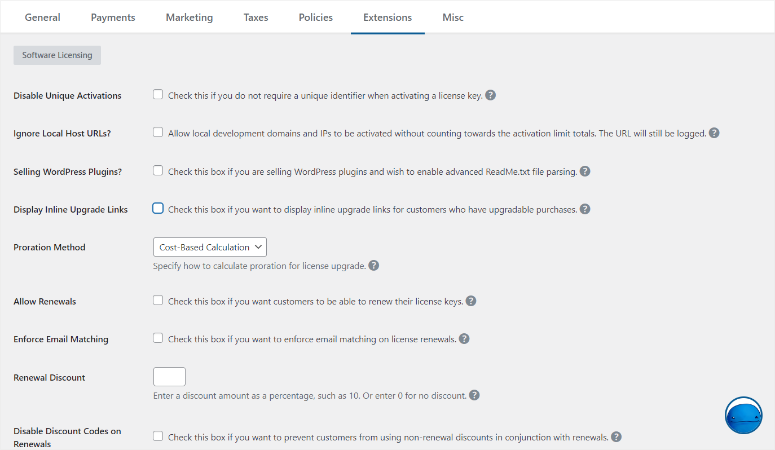
But you would also be surprised to learn that Easy Digital Downloads can also sell physical products. It comes with features to manage physical product inventory, shipping, and custom checkout fields
In the end, the analytics dashboard shows which products sell best, where customers drop off during checkout, and which discount codes drive the most sales. You get the insights you need to grow revenue.
My Experience with Easy Digital Downloads
I switched a client from manually emailing PDF courses to Easy Digital Downloads. The client was spending 2-3 hours per week sending download links and tracking who paid for what.
After setting up Easy Digital Downloads, I created the product pages using a simple builder.
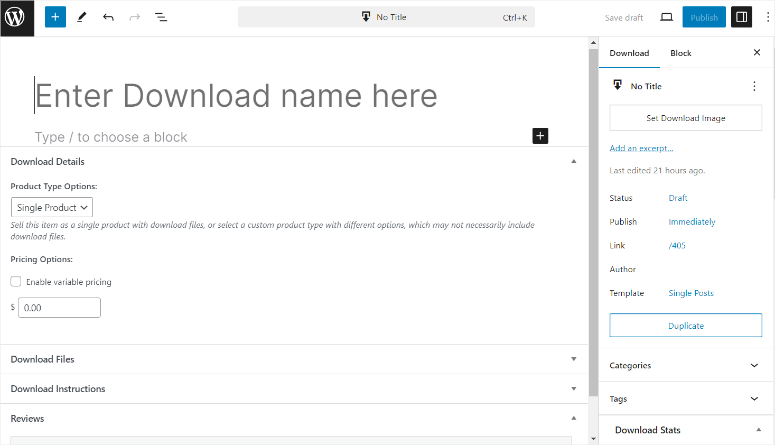
After this, I connected EDD to Stripe and just like that, everything was automated.
Customers purchased, received instant download links, and got added to her email list automatically. Her manual work dropped to zero.
The best part showed up in her sales data. The built-in reports revealed that one course generated 60% of her revenue. She created two more courses in that same topic and grew her income in four months.
We also enabled download limits so customers couldn’t share files endlessly. This was a game-changer and led to more revenue.
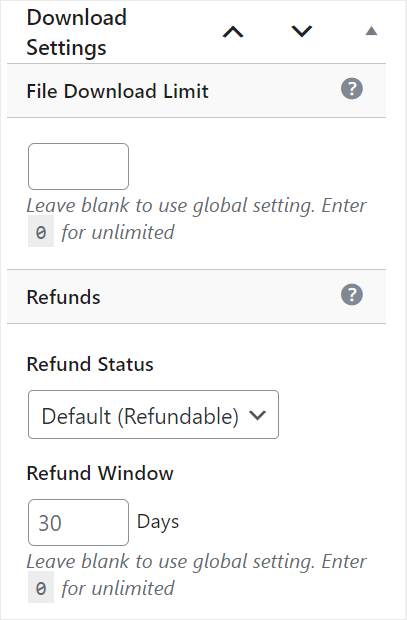
Plus, the plugin tracks every download attempt, so she knew if someone was abusing the system.
► Pros
- Built specifically for digital products without physical goods clutter
- Can also handle selling physical products
- Automatic file delivery saves hours of manual work every week
- Powerful analytics show which products make money and which flop
- Software licensing built in for selling plugins and digital tools
- Integrates seamlessly with email marketing to build your list while selling
► Cons
- Not ideal if you sell both physical and digital products together
- Advanced features require premium add-ons and extensions
- Smaller extension library compared to WooCommerce’s massive ecosystem
My Verdict: Easy Digital Downloads eliminates the complexity of selling digital products. If you’re selling ebooks, courses, software, or any downloadable content, this plugin handles everything automatically.
Check out my Easy Digital Downloads review for more details. If you are still browsing, here are the best Easy Digital Downloads alternatives.
Learn how to sell digital products with WordPress in my step-by-step guide.
Pricing: Starts at $99.50/year
Get started with Easy Digital Downloads here
3. BigCommerce ⭐⭐⭐⭐⭐
60,000+ Online Stores | Best for: High-Volume Sales Without Server Worries
BigCommerce helps companies build ecosystems so that they can scale without overspending. For example, it can handle traffic spikes during holidays, sales events, and when you are running campaigns.
Here’s what happens with regular cheap hosting. You run a Black Friday sale, traffic jumps 10x, and your server buckles. Customers see error pages instead of your products, leading to thousands in revenue losses.
BigCommerce stops this by handling all the hosting infrastructure for you. Their servers auto-scale during traffic spikes, so your store stays online when it matters most.
Why Is BigCommerce One of the Best eCommerce Platforms?
Even if they handle the hosting for you, BigCommerce doesn’t charge transaction fees. Most hosted platforms take 1-3% of every sale on top of payment processor fees.
BigCommerce only charges a monthly plan, so you keep more profit.
The built-in SEO features impressed me. Product pages get automatically optimized URLs, meta descriptions, and schema markup.
I didn’t need to install on-page SEO plugins or configure anything manually.
My Experience with BigCommerce
I migrated a sporting goods store from WooCommerce to BigCommerce after their site crashed during a holiday sale. They’d lost revenue because their hosting couldn’t handle the traffic.
Setting up BigCommerce took about 6 hours. I used their WordPress plugin to embed the store on their existing WordPress site.
As a result, the content stayed in WordPress, but the product catalog and checkout lived on BigCommerce’s servers.
During their next holiday sale, traffic increased 800% compared to normal days. The store didn’t slow down once. This allowed them to process more orders in less time without a single technical issue.
The analytics dashboard showed me exactly where customers came from, which products they viewed, and why they abandoned carts.
I used that data to optimize their product pages and increase conversions.
► Pros
- Handles unlimited traffic without site crashes or slowdowns
- Zero transaction fees means you keep more profit per sale
- Built-in SEO optimization eliminates need for extra plugins
- Automatic backups and security updates handled by BigCommerce
- Scales from startup to enterprise without platform migration
► Cons
- Monthly fees regardless of sales volume
- Less control over checkout page customization than self-hosted solutions
- Moving to another platform later requires complete data migration
- Annual sales limits on lower-tier plans may force upgrades
My Verdict: BigCommerce removes hosting headaches while providing enterprise-level features. If you expect high traffic or need guaranteed uptime during sales events, this platform delivers.
Compare BigCommerce vs WooCommerce if deciding between hosted and self-hosted.
Pricing: Starts at $29/month
Get started with BigCommerce here
4. Shopify ⭐⭐⭐⭐
Millions of Merchants | Best for: Easiest All-in-One Solution

Shopify is one of the best eCommerce plugins because it wins the simplicity contest. I’ve set up stores in under an hour with zero technical knowledge required.
The eCommerce platform handles everything automatically. Payment processing, security certificates, hosting, backups, and software updates all work without you touching anything.
Why Is Shopify One of the Best eCommerce Platforms?
As mentioned, Shopify keeps things simple. But they go a step further, offering 24/7 support that actually helps.
I’ve called them at midnight with urgent checkout issues and gotten real solutions, not scripted responses.
Apart from that, the multi-channel selling feature impressed me most. You can sell on your Instagram, Facebook, Amazon, your website, and in-person with their POS system. All managed from one dashboard.
My Experience with Shopify
I recommended Shopify to a friend launching a clothing brand. He had great designs but zero tech skills and needed to start selling immediately.
He built his entire store in one weekend using Shopify’s templates. No developers, no hosting setup, no payment gateway configuration. Just pick a theme, add products, and go live.
Within two weeks, he’d made his first sales. The abandoned cart recovery feature automatically emailed customers who left items in their carts.
With this, he recovered abandoned sales without any extra work.
The analytics showed which Instagram posts drove the most traffic and which products had the highest conversion rates. He used that data to focus his marketing budget.
► Pros
- Easiest platform to launch with zero technical knowledge needed
- 24/7 phone and chat support solves problems fast
- Automatic updates and security without WordPress maintenance
- Sell everywhere: website, social media, marketplaces, and physical stores
► Cons
- Monthly fees plus transaction fees can add up quickly
- Limited WordPress integration compared to WooCommerce or BigCommerce
- Moving from Shopify to WooCommerce or another platform requires complete store rebuild
- Theme customization options more restricted than self-hosted solutions
My Verdict: Shopify removes every technical barrier to selling online. If you want the fastest path from idea to revenue and don’t mind monthly fees, this platform delivers.
Check out my Shopify review for more details. Compare Shopify vs WooCommerce if choosing between hosted and self-hosted. Plus, here are some great Shopify alternatives if you are still browsing.
Pricing: Starts at $19/month
5. MemberPress ⭐⭐⭐⭐
Best for: Subscription-Based Products & Memberships
MemberPress is the perfect eCommerce plugin if you want to set up recurring revenue. Instead of chasing one-time sales, you build predictable monthly income.
The plugin controls exactly what content members can access based on their subscription level. You can create free tiers, paid memberships, and premium levels without complicated user role management.
Why Is MemberPress One of the Best eCommerce Plugins?
MemberPress integrates seamlessly with WooCommerce. You can sell both subscriptions and physical products from the same WordPress site.
The built-in course creator impressed me. You don’t need a separate LMS plugin to sell online courses. Everything lives inside MemberPress.
My Experience with MemberPress
I helped a fitness coach transition from selling one-time courses to a fully functioning membership site. She was skeptical about recurring revenue at first because she thought it would scare off her clients.
But this perspective quickly changed after she grew her active members. She now generates a more predictable monthly income, helping her plan better.
That’s more stable than hoping for course sales every month.
The automated email notifications kept members engaged. New content alerts, renewal reminders, and access expiration warnings all happened automatically.
► Pros
- Recurring revenue creates predictable monthly income streams
- Controls content access by membership level without complicated setup
- Built-in course creator eliminates need for separate LMS plugins
- Integrates with WooCommerce for combined subscription and product sales
► Cons
- Pricing can be steep for beginners
- Requires active content creation to keep members subscribed
- Not ideal if you only want to sell one-time purchases
- Learning curve steeper than simple payment plugins
My Verdict: MemberPress excels at building subscription businesses. If you want recurring revenue from memberships or online courses, this plugin handles everything.
Check out my MemberPress review for more details. Compare LearnDash vs MemberPress to see which fits your needs.
Pricing: Starts at $199.50/year
Get started with MemberPress here
6. WP Simple Pay ⭐⭐⭐⭐
Best for: Simple One-Time and Recurring Payments
WP Simple Pay solved a problem I kept seeing: people who wanted to accept payments without building entire online stores.
The plugin connects directly to Stripe and lets you create payment forms in minutes. No product catalogs, no shopping carts, no complicated checkout processes. Just a form that collects money.
Why Is WP Simple Pay One of the Best Payment Plugins?
WP Simple Pay handles both one-time and recurring payments. You can sell services, accept donations, or set up subscriptions without the complexity of full eCommerce platforms.
The form builder includes Apple Pay and Google Pay options automatically. Most customers prefer these quick checkout methods over typing credit card details.
My Experience with WP Simple Pay
I used WP Simple Pay for a consultant who charged per strategy session. He didn’t need a full store, just a way to accept payment when clients booked.
I created a payment form in about 15 minutes. After this, clients clicked a button, entered their details, and paid instantly. The money hit her Stripe account within seconds.
After six months, he was processing all payments through that single form, keeping everything centralized.
Couple this with the built-in WP Simple Pay analytics, and he now has better records and serves clients better
► Pros
- Creates payment forms in minutes without store complexity
- Stripe integration handles credit cards, Apple Pay, and Google Pay
- Supports both one-time payments and recurring subscriptions
- No monthly fees or transaction charges beyond Stripe’s standard rates
► Cons
- Limited to Stripe payment gateway only
- Not suitable if you need product catalogs or inventory management
- Can’t handle complex discount codes or coupon systems
- No built-in abandoned cart recovery features
My Verdict: WP Simple Pay excels at simple payment collection. If you sell services, accept donations, or need basic subscription forms, this plugin eliminates unnecessary complexity.
Check out my WP Simple Pay review for more details.
Pricing: Starts at $49.50/year
Get started with WP Simple Pay here
7. WPForms ⭐⭐⭐⭐
5 Million+ Active Installs | Best for: Selling Without Full Store Setup
WPForms isn’t technically an eCommerce plugin, but it handles simple sales with forms better than building an entire store.
The plugin creates order forms that accept payments directly through PayPal, Stripe, or Authorize.net. Customers select products, add quantities, and pay, all through one form.
Why Is WPForms Good for Simple Product Sales?
Selling through forms works perfectly when you sell one or two products. Why set up WooCommerce with shopping carts and product catalogs when you just need a simple order form?
Plus, WPForms includes conditional logic. You can show different product options based on customer selections, creating dynamic order forms without code.
My Experience with WPForms
I used WPForms for a photographer selling three print packages. He didn’t need a full store, just a way for clients to choose sizes and pay.
I built an order form in 20 minutes. In fact, I used the AI form builder to make this process even easier.
This allowed clients to select print sizes, enter quantities, and pay with Stripe. The whole process happened on one page.
Plus, WPForms sent a confirmation email to the client and him. Each order email included customer details and their selections, making fulfillment simple.
On the other end, the client quickly knew that the order was processed, giving them peace of mind.
The form analytics showed which package sold the most and at what times clients typically ordered. This helped him adjust his pricing based on that data.
► Pros
- Creates payment forms without complex store setup
- Perfect for selling single products or simple services
- Conditional logic shows relevant options based on selections
- Integrates with popular email marketing services automatically
- Build a form with AI
► Cons
- Not designed for product catalogs or inventory management
- Limited compared to dedicated eCommerce platforms
- No shopping cart functionality for multiple item purchases
- Basic analytics compared to full eCommerce solutions
My Verdict: WPForms eliminates store complexity when you sell simple products or services. If you need order forms more than product catalogs, this plugin delivers fast.
Check out my WPForms review for more details.
You can also compare WPForms and Formidable Forms, two of the best form builders with conditional logic.
Pricing: Starts at $49.50/year
8. Ecwid ⭐⭐⭐⭐
Best for: Selling Across Multiple Platforms
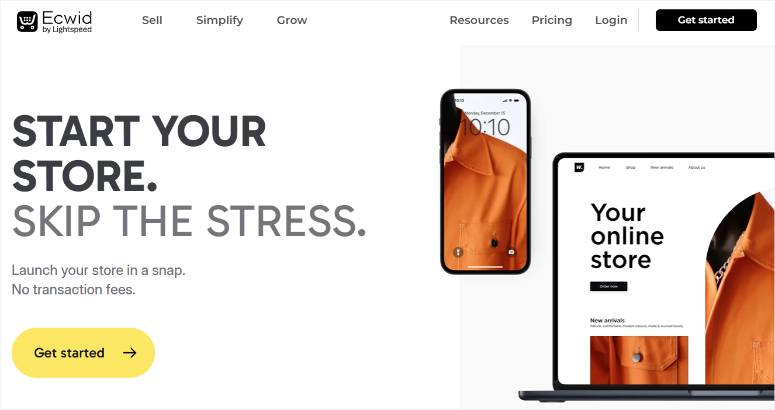
Ecwid takes a different approach than other plugins on this list. You manage one product catalog that sells everywhere simultaneously.
The platform lets you embed your store on WordPress, Facebook, Instagram, and even other website builders. Update a product once, and it changes across all platforms instantly.
Why Is Ecwid Worth Considering?
Ecwid’s forever-free plan lets you list up to 10 products with zero monthly fees or transaction charges. This makes testing eCommerce easy for absolute beginners.
Apart from that, the mobile app impressed me. You can manage inventory, process orders, and track sales from your phone while away from your computer.
My Experience with Ecwid
I recommended Ecwid to a jewelry maker selling on multiple platforms. She had Instagram followers, a WordPress blog, and a Facebook page, all driving potential sales.
Managing separate inventories across platforms was driving her crazy. She’d sell a necklace on Instagram, then forget to remove it from WordPress, creating overselling problems.
Ecwid solved this instantly. One inventory synced across all three platforms. When something sold anywhere, it disappears everywhere automatically.
► Pros
- Free plan includes 10 products without monthly fees
- Sells simultaneously across websites, social media, and marketplaces
- Automatic inventory sync prevents overselling across platforms
- Mobile app manages store from anywhere
► Cons
- Free plan limits features and product count significantly
- Less flexible than WooCommerce for WordPress customization
- Moving to another platform requires complete catalog rebuild
- Analytics less detailed than dedicated eCommerce solutions
My Verdict: Ecwid excels at multi-platform selling with synchronized inventory. If you sell across social media and multiple websites, this plugin simplifies management significantly.
Pricing: Free for 10 products, paid plans start at $5/month
There you have it! My list of the best eCommerce plugins I have tested, reviewed, and compared. But we are not yet done.
Let us look at some bonus WordPress tools that are not exactly eCommerce plugins but can help you improve conversions.
Bonus: Other eCommerce Tools Worth Knowing About
SearchWP
SearchWP transforms your default WordPress search into a powerful product finder. The plugin makes WooCommerce product attributes, custom fields, and categories searchable.
Customers find products faster, which means more sales. I’ve seen stores increase conversions just by improving search relevance.
Plus, it integrates with Easy Digital Downloads and WooCommerce seamlessly, indexing everything customers might search for.
Check out my SearchWP review.
Get started with SearchWP here.
SeedProd
SeedProd creates custom product landing pages without touching code. The drag-and-drop builder works perfectly with WooCommerce to design sales pages that actually convert.
Apart from that, you can use it to create coming soon pages before product launches and build custom checkout pages.
The 350+ templates include proven conversion elements like countdown timers, testimonials, and call-to-action buttons that drive sales.
Check out my SeedProd review.
Get started with SeedProd here.
WC Vendors
WC Vendors transforms your WooCommerce store into a multi-vendor marketplace like Etsy or Amazon.
Here you can set up multiple sellers to list products for which you earn commissions, and the plugin handles everything automatically.
Vendors get their own dashboards to manage inventory, while you control approval workflows and commission rates. Perfect for building marketplace businesses without custom development.
Get started with WC Vendors here.
MonsterInsights
MonsterInsights connects Google Analytics to your eCommerce store and shows which products make money.
This statistics plugin tracks cart abandonment, conversion rates, and customer behavior automatically. Plus, it is super easy to set up and use.
All you have to do is follow the setup wizard, and after that, you can view all your site data in your WordPress dashboard.
Check out my MonsterInsights review.
Get started with MonsterInsights here.
FunnelKit
FunnelKit adds one-click upsells and order bumps to WooCommerce checkout pages.
Customers see relevant product suggestions during checkout and add them with a single click. I’ve seen average order values increase with strategic upsells.
The plugin also includes abandoned cart recovery that automatically emails customers who leave without purchasing.
Get started with FunnelKit here.
Great. Now you have a list of the best eCommerce plugins and bonus tools to help you convert better. Let me help you narrow down the best options according to your needs.
How to Choose the Right eCommerce Plugin for Your Needs
Choosing the wrong eCommerce plugin wastes weeks of setup time and potentially thousands in lost sales. Here’s how to pick the right one.
If you’re selling physical products and want complete control:
- Start with WooCommerce.
- You own all your data, customize everything, and pay no monthly platform fees.
- Just make sure you have reliable WordPress hosting that can handle traffic spikes during sales events.
If you sell exclusively digital products:
- Easy Digital Downloads beats every other option.
- The plugin automates file delivery, handles software licensing, and eliminates the shipping settings clutter you’ll never use.
- I’ve never seen a digital product seller regret choosing EDD over WooCommerce.
If you expect high traffic or need guaranteed uptime:
- Pick BigCommerce or Shopify.
- Their hosted infrastructure auto-scales during traffic spikes, so your store stays online when customers actually want to buy.
- You’ll pay monthly fees, but you’ll never lose sales to server crashes.
If you want the absolute easiest setup:
- Shopify wins hands down.
- Non-technical users build complete stores in hours, not days.
- The 24/7 support helps when you’re stuck, and automatic updates mean zero maintenance headaches.
If you’re building subscription or membership sites:
- MemberPress handles recurring payments, content access control, and member management in one plugin.
- It integrates with WooCommerce if you need to sell both subscriptions and one-time products.
If you only need simple payment forms:
- WP Simple Pay or WPForms eliminates store complexity entirely.
- Perfect for consultants, service providers, or anyone selling a few products without needing full catalogs.
If you sell across multiple platforms:
- Ecwid synchronizes inventory across WordPress, social media, and marketplaces automatically.
- Update products once, sell everywhere.
Budget considerations matter too.
- WooCommerce is free but requires hosting costs.
- Shopify and BigCommerce charge monthly fees but include hosting.
- Easy Digital Downloads and MemberPress need annual licenses but offer more features than free alternatives.
Most importantly, don’t forget to consider growth potential. Starting with a limited plugin and migrating later wastes time. Pick something that scales with your business, even if you’re starting small.
That’s it from me. If anything is unclear, check out the commonly asked questions below.
FAQs: Best WordPress eCommerce Plugins
What is the best eCommerce plugin for beginners?
Shopify wins for absolute beginners who want the easiest setup. You can launch a store in hours with zero technical knowledge. For WordPress users willing to learn, WooCommerce offers more flexibility and no monthly platform fees. If you’re selling digital products only, Easy Digital Downloads provides the simplest path with automatic file delivery.
Can I sell both physical and digital products on WordPress?
Yes, WooCommerce and Easy Digital Downloads handle both physical and digital products seamlessly in one store. You can sell ebooks alongside t-shirts without any issues. Even though Easy Digital Downloads focuses more on digital goods, it offers extensions to help you sell physical products. MemberPress also handles digital content and subscriptions, but doesn’t support physical inventory management.
Do I need special hosting for eCommerce?
Yes, eCommerce sites need reliable WooCommerce hosting that handles traffic spikes during sales events. Shared hosting often crashes when you run promotions. I also recommend managed WordPress hosting for WooCommerce stores. Alternatively, Shopify and BigCommerce include hosting in their monthly fees, so server performance isn’t your problem.
Which eCommerce plugin has the best analytics?
BigCommerce provides the most comprehensive built-in analytics without additional plugins. WooCommerce requires MonsterInsights to track conversions properly. Easy Digital Downloads includes detailed sales reports and customer behavior tracking. Shopify’s analytics work well, but lack the depth of Google Analytics integration that MonsterInsights provides for WordPress.
Can I migrate from one eCommerce plugin to another?
Yes, you can migrate from one eCommerce platform to another. But migrations range from simple to complex, depending on platforms. Moving from BigCommerce to WooCommerce takes about a day with available migration tools. Switching from WooCommerce to Shopify requires rebuilding your entire store from scratch. Easy Digital Downloads to WooCommerce migrations work smoothly for digital products. Remember to always back up everything before migrating.
Final Verdict: Should I Use WordPress eCommerce Plugins?
Yes, if you want control over your store and customer data. The plugins I’ve covered solve the “beautiful storefront without functionality” problem completely.
WordPress eCommerce isn’t the easiest path. Shopify launches faster with less technical knowledge required. But you’ll pay monthly fees forever and own nothing if you leave their platform.
WooCommerce gives you flexibility. Easy Digital Downloads automates digital sales. BigCommerce handles traffic without server worries. Each solves specific problems.
Here’s my honest recommendation: if you’re selling physical products and want total control, start with WooCommerce. If you’re selling digital products exclusively, choose Easy Digital Downloads. If technical setup scares you, pay for Shopify’s simplicity.
Don’t overthink it. Pick the plugin that matches your product type and skill level, then start selling. You’ll learn more from running a real store for one month than researching options for six months.
Related Resources
Your eCommerce plugin handles transactions, but growing a successful online store requires additional tools and strategies.
These resources cover the essential elements that turn visitors into customers and one-time buyers into repeat purchasers.
- What are the best trust badge plugins for eCommerce? Trust badges reduce cart abandonment by showing security certifications and payment guarantees at checkout.
- How do I use lead generation plugins to capture emails? Building an email list lets you recover abandoned carts and announce new products to interested customers.
- Which email marketing services work best for online stores? Email automation increases customer lifetime value by nurturing relationships beyond the first purchase.
- Can I automate repetitive store tasks with WordPress? Automation plugins handle order confirmations, inventory updates, and customer notifications without manual work.
- How do I build a sales funnel that converts visitors? Strategic funnels guide customers from discovery to purchase through optimized landing pages and upsells.
- What are the best popup plugins for growing my email list? Smart popups capture emails without annoying visitors, building your subscriber base while maintaining user experience.
These tools complement your eCommerce platform by addressing the marketing, automation, and trust elements that drive consistent sales growth. Implement them strategically as your store scales.

Comments Leave a Reply