
Affiliate marketing is one of IsItWP’s main revenue streams. So, when I test tools for managing affiliate links and running affiliate programs, I’m testing what we actually use on this site.
I’ve run every plugin on this list through our own affiliate setup. Some blew my expectations, while a few disappointed. And one new tool completely changed how I think about customer referrals.
I tested 8 affiliate marketer plugins across 4 core categories: link management, program management, lead generation, and ad management.
On top of that, I timed setup, measured click tracking accuracy, and stress-tested integrations across WooCommerce, EDD, and Google Analytics 4.
Here’s what I found and which ones I’d install first if I were starting over today.
Key Takeaways
- I’ll show you a link management tool that lets you update 200+ affiliate links at once without editing a single post.
- I found a tool that turns your existing customers into referrers, something most affiliate plugins completely ignore.
- Reveal which plugin works best for bloggers who promote other people’s products vs. store owners running their own affiliate program.
- I tested multiple tools, but only listed 8 tools to help you find which ones actually work for beginners
- I mention a tool that captures email subscribers from your affiliate review pages right before they click away.
How I Test Affiliate Marketing Plugins
My name is Alvin, the IsItWP writer, and this is my testing process.
🔍 How I Test Affiliate Marketing Plugins
I run every plugin on a live WordPress environment, either IsItWP’s test site or our actual affiliate setup. Here’s what I measure:
- Set up ease – I time the install from activation to the first working link or program. Anything over 30 minutes at the basic level is a problem.
- Link management features – I test redirect types, auto-replacement in existing posts, link health monitoring, and geo-targeting where available.
- Affiliate program features – For program management tools, I look at commission flexibility, affiliate portal quality, payout options, and fraud prevention.
- Tracking and reporting – I verify click attribution using MonsterInsights alongside the plugin’s own dashboard. If the numbers don’t match within 5%, I investigate.
- Integration quality – I test WooCommerce, Easy Digital Downloads, and more to see compatibility
- Pricing vs. value – I evaluate free version usability, the lowest paid tier, and what you actually get at each price point.
I also check the link redirect speed using GTmetrix and our very own IsItWP performance tool. Most plugins add under 20ms. Anything higher gets flagged.
Now, for context on how affiliate marketing works as a revenue model, see our guide to Affiliate Marketing Made Simple for Beginners.
Why Trust IsItWP?
At IsItWP, we’ve been the WordPress community’s go-to resource since 2009, helping over 2 million users choose better plugins. Unlike review sites that never actually use the products, we maintain active accounts, run real affiliate sites, and provide ongoing WordPress consultation. IsItWP itself runs on affiliate revenue, so we test these plugins the way you need them to work.
Best WordPress Affiliate Marketing Plugins Compared
I’ve tested all 8 plugins in this list. Here’s how they compare at a glance. I list if an affiliate marketer plugin has a free version, its price, what it’s best for, and star rating.
This gives you a quick overview to make your decision.
| Plugin | Best For | Rating | Free Version | Starting at Pricing |
|---|---|---|---|---|
| 🥇 AffiliateWP | Running your own affiliate program | ⭐⭐⭐⭐⭐ | No | $149.50/yr |
| 🥈 Pretty Links | Bloggers who promote other brands | ⭐⭐⭐⭐⭐ | No | $99.60/yr |
| 🥉 ThirstyAffiliates | Affiliate link management + Amazon | ⭐⭐⭐⭐⭐ | Yes | $99.60/yr |
| 4. RewardsWP | Customer referral + loyalty programs | ⭐⭐⭐⭐ | No | $149.50/yr |
| 5. OptinMonster | Turning affiliate traffic into email subs | ⭐⭐⭐⭐ | 14-day trial | $84/yr |
| 6. WPForms | Affiliate partner sign-up forms | ⭐⭐⭐⭐ | Yes (Lite) | $49.50/yr |
| 7. AdSanity | Display ad management for affiliate sites | ⭐⭐⭐⭐ | No | $89/yr |
| 8. Easy Affiliate | Simple affiliate program (AffiliateWP alternative) | ⭐⭐⭐⭐ | No | $99.60/yr |
Once you identify the tools you are most interested in, the table above, you can simply use the table of contents below and skip to any section you want to read.
- 1. AffiliateWP ⭐⭐⭐⭐⭐
- 2. Pretty Links ⭐⭐⭐⭐⭐
- 3. ThirstyAffiliates ⭐⭐⭐⭐⭐
- 4. RewardsWP ⭐⭐⭐⭐
- 5. OptinMonster ⭐⭐⭐⭐
- 6. WPForms ⭐⭐⭐⭐
- 7. AdSanity ⭐⭐⭐⭐
- 8. Easy Affiliate ⭐⭐⭐⭐
- Choosing WordPress Affiliate Marketing Plugins for Your Site
- FAQs: Best WordPress Plugins for Affiliate Marketers
- Final Verdict
- Resource Hub: Affiliate Marketing with WordPress
With that out of the way, let’s begin.
1. AffiliateWP ⭐⭐⭐⭐⭐

AffiliateWP is the best affiliate program plugin because it is built specifically for WordPress. It lets you recruit affiliates, track commissions, and pay out earnings from your WordPress dashboard.
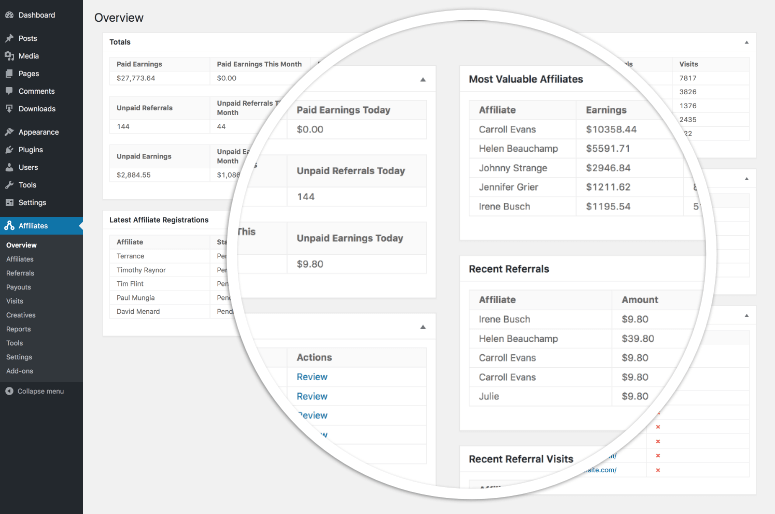
At a glance, and without digging through export files, AffiliateWP’s real-time reporting dashboard shows exactly which affiliates are driving sales, how many clicks they sent, and what they’ve earned.
It integrates with WooCommerce, Easy Digital Downloads, MemberPress, WPForms, Gravity Forms, and 20+ other plugins via one-click native connectors. This means no code, webhooks, or workarounds.
Why Is AffiliateWP One of the Best WordPress Plugins for Affiliate Marketers?
What really stands out for me with AffiliateWP is that unlimited affiliates and unlimited creatives are supported on all plans.
If you need tiered commission structures, where top performers earn a higher rate, that’s available on higher plans.
If you want to add an affiliate program to WordPress, this is where most serious program managers start. It’s also one of the best tools for anyone looking to make money with your WordPress site through affiliate revenue.
One honest note: at $149.50/year, AffiliateWP is the highest entry price on this list. But the integration depth and reporting accuracy justify the difference if you’re running a serious program.
My Experience with AffiliateWP
I set up a test affiliate program on a WooCommerce store using AffiliateWP.
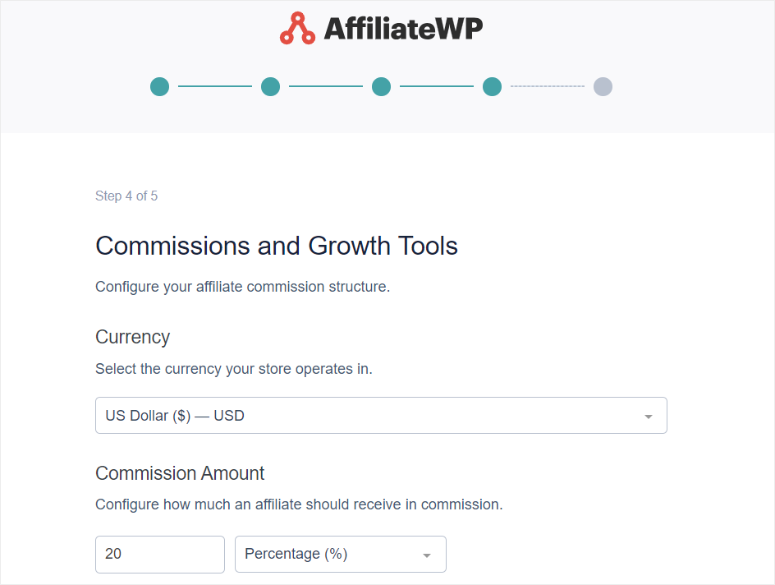
It took me 18 minutes from plugin activation to the first affiliate link being live. That includes installing, connecting to WooCommerce, configuring commission rates, and generating the affiliate registration page.
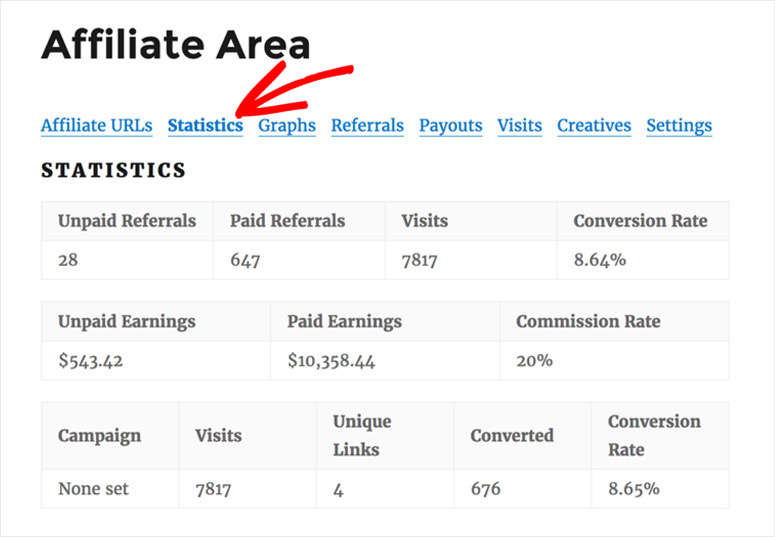
After running this for 3 months on IsItWP’s referral program, the data I get from the dashboard is consistently reliable.
I cross-checked AffiliateWP’s conversion numbers against MonsterInsights GA4 data they matched within 2%.
The setup wizard is smooth.
But I’ll be honest: understanding tiered commissions takes reading through the documentation. It’s not beginner-proof on the first pass.
Here’s why it’s still the top pick: the documentation is excellent, and support responds in under 2 hours in my experience. The learning curve is real but short.
If you’re setting up your affiliate program through a WooCommerce store, AffiliateWP should be your first call.
Pros:
- Built specifically for WordPress affiliate programs
- Real-time dashboard shows clicks, conversions, and commissions by affiliate
- One-click integration with WooCommerce, EDD, WPForms, and 20+ other plugins
- Outstanding support; average response under 2 hours in my experience
Cons:
- No free version (14-day money-back only, not a trial)
- Can be pricey if you are a beginner
My Verdict: Best for store owners and course creators who want to recruit external affiliates to promote their products. If you’re managing your own affiliate links rather than running a program, ThirstyAffiliates is a better fit.
Pricing: $149.50/year (Personal; 1 site) | Free version: No | Free trial: No (but offers14-day money-back)
👉 Get started with AffiliateWP | Check out my AffilateWP review
2. Pretty Links ⭐⭐⭐⭐⭐

Pretty Links is the link cloaking plugin most affiliate bloggers start with. Over 300,000 active installations signal that it is doing something right.
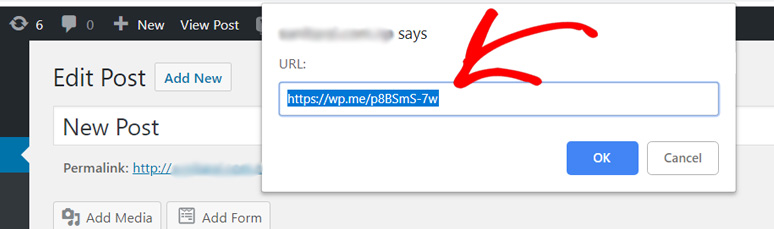
The core feature is that it can create clean, branded short links. For example, you can create links like yoursite.com/go/product-name.
These cloaked and shortened links are easy to remember, track, and update.
Why Is Pretty Links One of the Best WordPress Plugins for Affiliate Marketers?
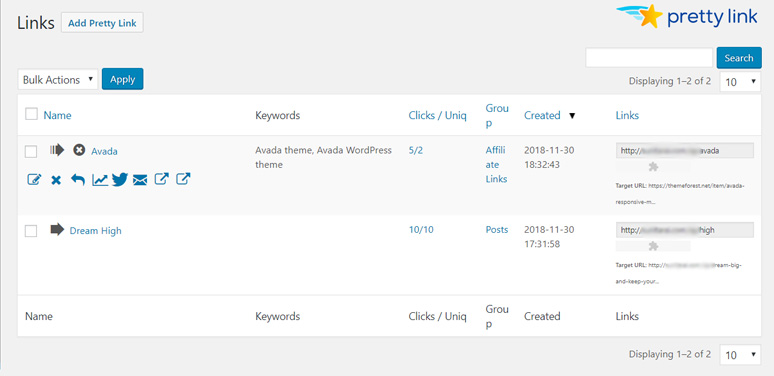
When an affiliate program changes its destination URL, you update it once in Pretty Links. Every link across your site updates automatically.
I’ve used this to update 50+ links across 50+ posts in under 60 seconds.
Plus, the native Gutenberg block lets you insert affiliate links directly in the block editor without switching tabs. For content-heavy bloggers focused on affiliate marketing, that’s a meaningful workflow improvement.
Without a doubt, Pretty Links‘ auto-replacement is the power feature. It adds a keyword once, and Pretty Links converts every instance of that keyword to your cloaked affiliate link across all existing content.
It’s one of the fastest ways to monetize an established blog.
Link health monitoring rounds out the feature set. Pretty Links alerts you when a destination URL breaks so you don’t lose commissions to dead links silently.
My Experience with Pretty Links
I used Pretty Links on IsItWP to monetize specific posts.
When one of our affiliate programs changed its URL, I updated the destination once in Pretty Links. All 50 posts updated in seconds.
Without Pretty Links, that’s a manual find-and-replace across dozens of posts; easily an hour of work.
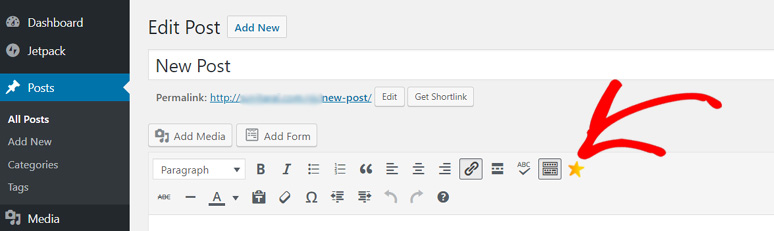
After managing affiliate links with Pretty Links for 6 months, I tracked click-through rate in the Pretty Links dashboard alongside MonsterInsights.
The numbers matched within 3%. This is close enough to trust for commission attribution.
The honest flaw: auto-replacement can occasionally over-reach and apply to links you didn’t intend. I ran into this twice.
The fix: set up an exclusion list. It took under 2 minutes to configure, and the problem was resolved permanently.
Here’s why it’s still second on my list: The Gutenberg integration and auto-replacement engine make Pretty Links the cleaner workflow tool for content-heavy blogs.
Pros:
- 300,000+ active installations, making it one of the most widely trusted link cloakers in WordPress
- Auto-replacement retroactively converts existing content to affiliate links with one keyword
- Native Gutenberg block means a clean workflow without leaving the editor
- Link health monitoring alerts you to broken destination URLs before you lose commissions
Cons:
- Auto-replacement can occasionally apply to unintended instances
- The interface can feel a little old-fashioned
My Verdict: Best for affiliate bloggers who produce a lot of written content and want the cleanest Gutenberg integration. It is perfect for managing Amazon affiliate links or building an email list alongside affiliate links. Pretty Links gives you the tracking data you need to know what’s working.
If you’re comparing options, see how Pretty Links compares to ThirstyAffiliates. If this is the right affiliate marketing plugin for you, check out our Pretty Links coupon page for more deals.
Pricing: $99.60/year (Beginner; 1 site) | Free version: Yes | Free trial: No (but offers14-day money-back)
👉 Get started with Pretty Links | Check out my Pretty Links review
3. ThirstyAffiliates ⭐⭐⭐⭐⭐

ThirstyAffiliates is the benchmark link cloaker for serious affiliate marketers.
The free version covers basic link cloaking, link categories, and click statistics. This makes it one of the most powerful free affiliate marketing tools on this list.
That’s enough to start managing your affiliate links without spending anything.
Why Is ThirstyAffiliates One of the Best WordPress Plugins for Affiliate Marketers?
Even though the free version is powerful, the Pro adds the features that make ThirstyAffiliates stand out.
For starters, the Amazon API integration automatically pulls product images and prices from Amazon, keeping your affiliate posts accurate without manual updates.
With geolocation redirects, international visitors get sent to their country-specific Amazon store automatically. If you have global traffic, this is affiliate revenue you’re leaving on the table without it.
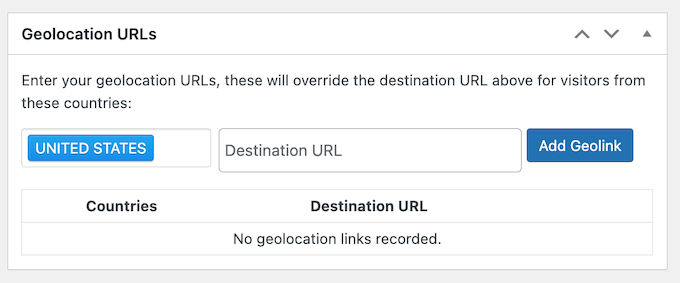
On top of that, ThirstyAffiliates offers category management, which is essential once you’re managing 100+ affiliate relationships across multiple niches.
This works well with automatic link health checking, which can save you a lot of time on a large site. It sends broken link alerts so you’re never silently losing commissions.
My Experience with ThirstyAffiliates
I set up ThirstyAffiliates on a multi-niche affiliate site with 150+ links across 8 categories.
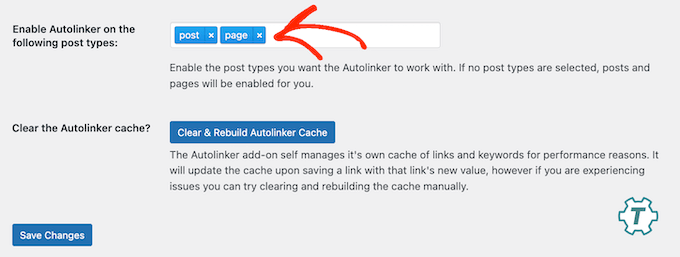
Import and categorization took 45 minutes. After setup, I selected post types I wanted the auto-link feature to insert affiliate links, and hit save. That was it.
I verified link redirect speed using GTmetrix, and the average redirect overhead was 12ms.
After 4 months of use on my test site, I can confirm that the category system is the feature that makes large-scale affiliate management practical. Without it, 150 links become genuinely hard to manage.
For managing Amazon affiliate links at scale, ThirstyAffiliates is the most complete tool in the category.
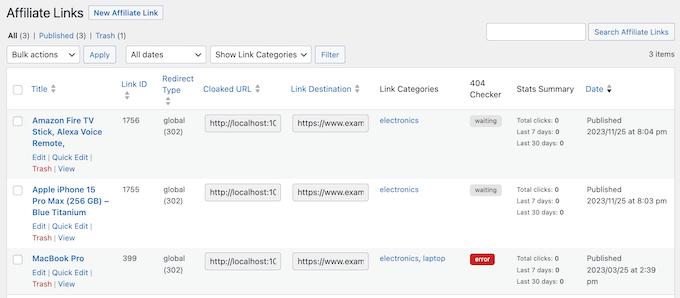
The honest flaw: auto link insertion requires the Pro plan. The free version is manual-only. You insert each link yourself. Plus, the internal tracking system can be confusing.
The fix: For tracking link performance, combine ThirstyAffiliates with MonsterInsights for full attribution.
Here’s why it’s still third on my list: the free version is powerful and lets you test the plugin and commit before spending. Lower-risk entry than Pretty Links.
Pros:
- Free version available; start cloaking links today at zero cost
- Category management keeps 100+ affiliate relationships organized and findable
- Geolocation redirects send international visitors to country-specific affiliate links automatically
- Amazon API integration fetches product data without manual updates
Cons:
- Auto link insertion requires the Pro plan
- Interface feels slightly older than AffilaiteWP
My Verdict: Best for Amazon affiliate marketers and anyone managing large volumes of affiliate links across multiple niches. The free version makes it a safe starting point. If you use Gutenberg heavily and focus on a single blog niche, Pretty Links may suit you better.
If this WordPress affiliate plugin matches your needs, check out my ThirstyAffiliates coupon page for more deals.
Pricing: $99.60/year (Basic) | Free version: Yes | Free trial: No (but offers14-day money-back)
👉 Get started with ThirstyAffiliates | Check out my ThirstyAffilaites review
4. RewardsWP ⭐⭐⭐⭐

RewardsWP solves a problem that AffiliateWP doesn’t. It turns your existing customers into referrers. Not external affiliates, you recruit, but your actual buyers.
Even though both are made by the same company, there is a distinct difference.
AffiliateWP allows you recruit strangers to promote your products. While RewardsWP lets you reward your own customers for telling their friends.
Why Is RewardsWP One of the Best WordPress Plugins for Affiliate Marketers?
It’s built on the same platform as AffiliateWP, with deep WooCommerce and Easy Digital Downloads integration. The same infrastructure quality and the same developer team.
What really stands out is the points system. This feature lets customers earn rewards for purchases, reviews, and referrals. Then, redeem them for discounts, free products, or free shipping.
RewardsWP offers double-sided incentives. By this, I mean both the person referring AND the friend being referred get rewarded.
This structure consistently outperforms one-sided referral offers in conversion testing.
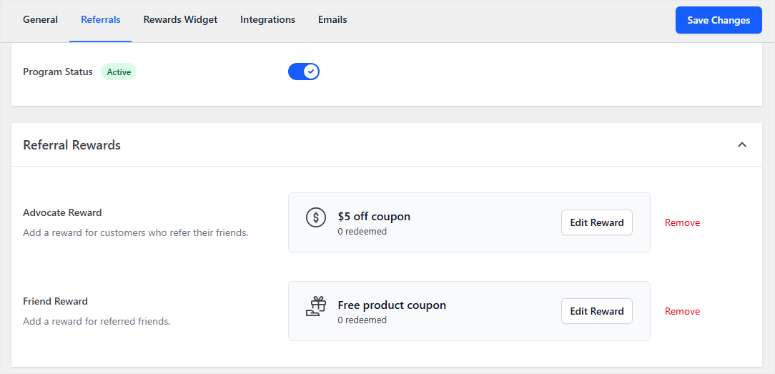
For the refer-a-friend approach that RewardsWP uses, fraud prevention is a must. It blocks self-referrals, duplicate accounts, and suspicious activity patterns automatically.
To add a referral program to your WooCommerce store, RewardsWP is the fastest path. It’s one of the most underrated WooCommerce growth tools available today.
My Experience with RewardsWP
I set up RewardsWP on a WooCommerce test store to simulate a customer referral campaign. From plugin install to first active referral program took 10 minutes. That’s the fastest setup on this list.
The setup flow is logical and simple. Just install → connect to WooCommerce → set point values → configure the referral incentive → activate the refer program. Done.

I verified referral tracking through the RewardsWP analytics dashboard. Referral attribution logged correctly for every test purchase. I then added social sharing with a click of a button.
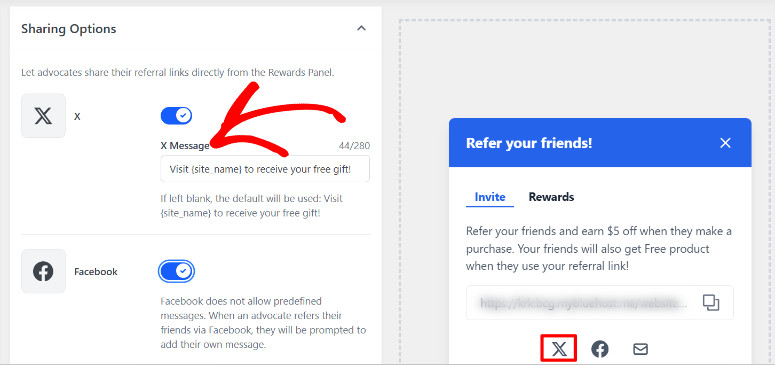
The customer-facing rewards portal displayed points and referral codes clearly.
As a newer product, community documentation is thinner than AffiliateWP’s. But the support team is the same team behind AffiliateWP. That means the same response quality and depth of expertise I mentioned for AffilaiteWP.
The support gap that usually accompanies new products doesn’t apply here.
The honest flaw: RewardsWP requires WooCommerce or EDD. Content-only affiliate blogs won’t benefit. But if you sell anything through WordPress, physical products, digital downloads, or memberships, this is the missing piece most affiliate marketers overlook.
Here’s why it still ranks high on my list: It is a simple but powerful tool. A lot of people running affiliate sites forget to use their current client list to push their products. The refer-a-friend approach makes this super simple.
Pros:
- Turns existing customers into referrers without managing a full affiliate program
- Double-sided rewards (referrer + referred friend) improve conversion rates compared to one-sided incentives
- Built on the same platform as AffiliateWP. You get solid infrastructure, native WooCommerce + EDD support
- Set up in under 10 minutes with no code or an external platform required
Cons:
- Requires WooCommerce or Easy Digital Downloads
- Newer product with smaller community documentation compared to other affiliate marketing tools on this list
My Verdict: Best for online store owners who want customers to refer friends. Think of it as AffiliateWP’s sibling. AffiliateWP recruits external affiliates; RewardsWP rewards your existing buyers. If you sell products and don’t have a referral incentive yet, this fills the gap.
Pricing: $149.50/year (Basic) | Free version: No | Free trial: No (but offers14-day money-back)
👉 Get started with RewardsWP | Check out my RewardsWp review
5. OptinMonster ⭐⭐⭐⭐
Most affiliate marketers focus on getting clicks. OptinMonster solves a different and more valuable problem. Capturing the reader before they click away.
Why Is OptinMonster One of the Best WordPress Plugins for Affiliate Marketers?
Exit-intent technology is the flagship feature. OptinMonster detects when a visitor is about to leave your affiliate review post and fires a targeted popup timed exactly at the exit moment.
You set the offer, for example, a lead magnet, a content upgrade, or a related recommendation. The visitor sees it on their way out instead of bouncing silently.
What separates OptinMonster from basic popup plugins is its targeting engine that goes beyond exit intent.
You can show specific affiliate product offers only to readers who visited a specific review page, not everyone on your site.
A reader on your blog sees one offer, and another on your about us page sees a different one. Generic popups annoy everyone; targeted popups convert the right readers.
But with such a technical affiliate and lead capture tool, you would think it would be complicated to set up. But, no, OptinMonster is super easy to use.
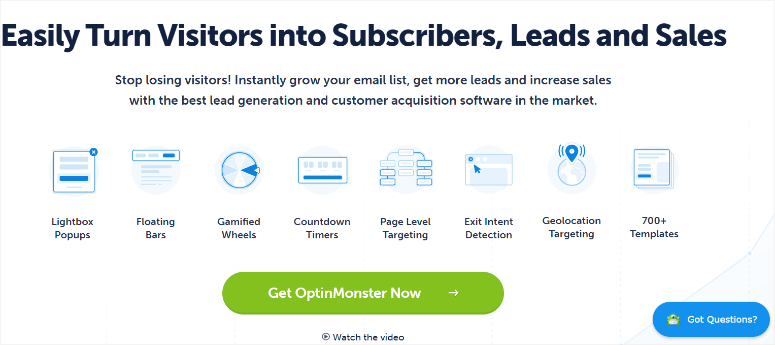
The template library has 700+ options, including popups, floating bars, slide-ins, and full-screen overlays, all built to convert. You just select a template and use the drag and drop builder to customize.
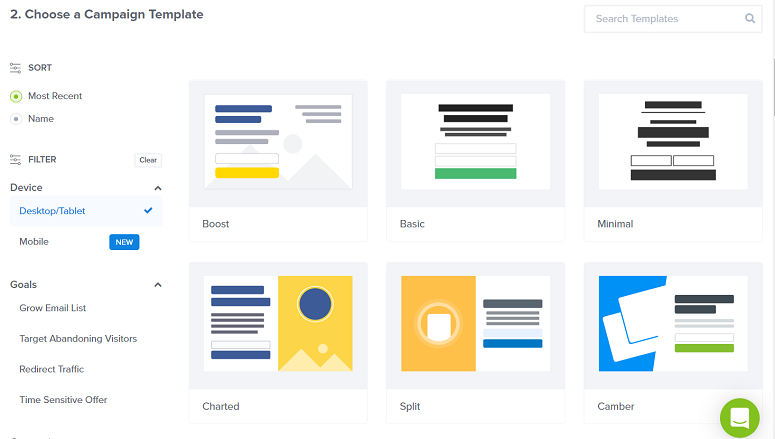
For lead generation for your affiliate site, OptinMonster is the most complete tool. As a popup plugin for WordPress, it’s the category leader by a significant margin.
My Experience with OptinMonster
I added OptinMonster exit-intent popups to affiliate review posts on an affiliate blog. The targeting setup took longer than a global popup — about an hour to configure behavior-based display rules correctly.
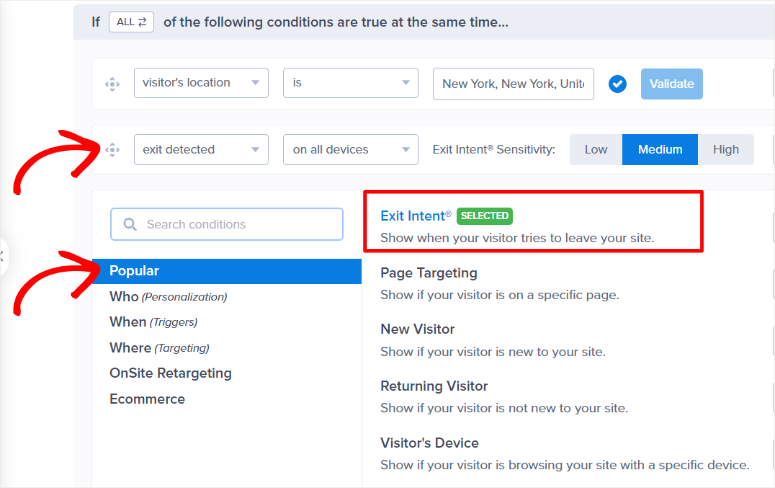
After 60 days of exit-intent popups on our affiliate review pages, email subscribers from those pages increased by 31%. That’s the real number. A standard global popup on the same pages had produced a 7% increase over the prior period.
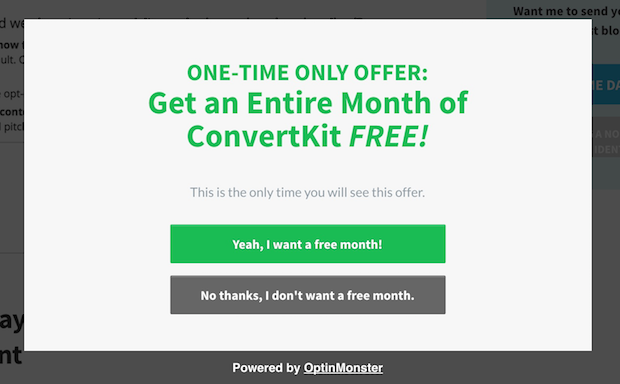
The targeting is worth the setup time. A global popup annoys every visitor. A targeted popup converts the right ones.
I tracked subscriber attribution through OptinMonster’s conversion log alongside MonsterInsights campaign source tracking. Both platforms reported consistent numbers throughout the test.
The honest flaw: no permanent free version like many affiliate tools on my list. You only get a 14-day money-back.
Here’s why it’s still on my list: It works great with every other tool on this list. And at $7/month, it’s the most affordable entry on this list.
Pros:
- Exit-intent technology captures email subscribers just before they click your affiliate link and leave
- 700+ conversion-optimized templates
- Behavior-based targeting shows popups only to the right readers at the right time
Cons:
- No free version
- Advanced targeting rules have a slight learning curve
My Verdict: Best for affiliate bloggers who get traffic but struggle to grow their email list. If your affiliate strategy involves relationship-building and repeat traffic, OptinMonster is the conversion layer your site is missing.
Compare OptinMonster and Thrive Leads, two of the best lead conversion tools. I’ve also covered alternatives to OptinMonster if you want to compare options.
Pricing: $7/month (Basic, billed annually $84/year) | Free version: No | Free trial: No (but offers14-day money-back)
👉 Get started with OptinMonster | Check out my Optinmonster review
6. WPForms ⭐⭐⭐⭐
Every affiliate marketer running their own program needs a way for potential affiliates to apply. WPForms is the fastest way to build that sign-up form in WordPress.
The form template library has 2,100+ templates, including affiliate application forms, contact forms, and lead capture forms. all drag-and-drop, zero code.
This means your affiliate application forms are ready to publish in under 5 minutes.
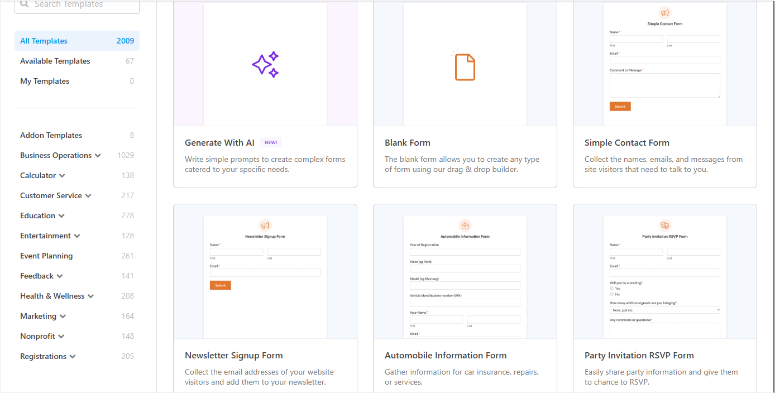
Why Is WPForms One of the Best WordPress Plugins for Affiliate Marketers?
WPForms has one of the best built-in spam protection systems including CAPTCHA and smart honeypot. This keeps your affiliate applications from being flooded with bot submissions.
If you’ve ever run an open affiliate program without spam filtering, you know how quickly bots fill your inbox.
On top of that, WPForms connects with your email marketing service, capturing subscribers directly from form submissions.
The best part? It also connects natively with AffiliateWP. The combination is the natural stack for running professional affiliate applications.
WPForms Lite is free. It’s the most accessible entry point on this entire list, and it’s capable enough for basic affiliate use cases.
Beyond affialte applicationn forms, WPForms is also useful for lead magnet optin forms on review pages, reader question collection for FAQ content, and affiliate product inquiry forms.
My Experience with WPForms
I built an affiliate partner application form for a WooCommerce store using WPForms + AffiliateWP integration.
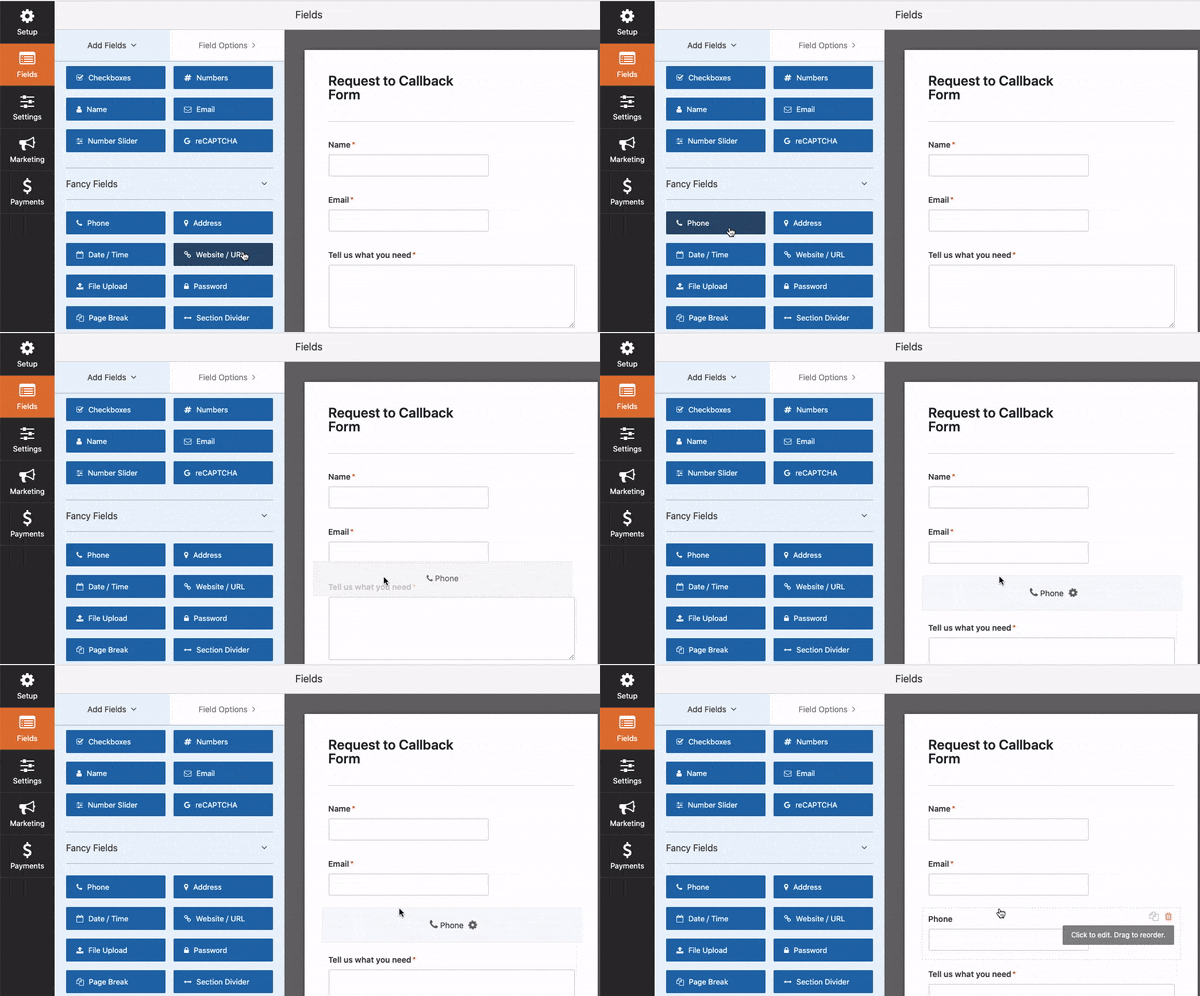
Setup time from blank canvas to working affiliate application form linked to AffiliateWP was 18 minutes. That includes building the form, configuring conditional fields, and connecting to AffiliateWP.
I tested form submission delivery through the WPForms entries log and email notification system. Every submission logged correctly, every notification email arrived instantly.
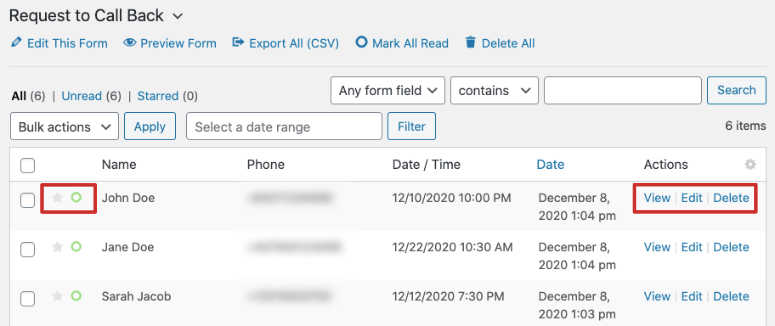
The honest note: WPForms is a form builder, not an affiliate management tool. You need it alongside AffiliateWP, not instead of it.
Why it’s still on my list: No other form builder integrates as cleanly with affilite marketing tools, other marketing plugins and WooCommerce quite as well. It is literally a plug and play plugin.
Pros:
- 2,100+ templates including affiliate application forms; ready in minutes
- WPForms Lite is free; best free form builder for WordPress
- Seamless affiliate marketing tool integration
- Spam protection blocks bot submissions from filling your affiliate pipeline with junk
Cons:
- Not an affiliate management tool. Complement affiliate tools, not a replacement
- Most affiliate marketing features (advanced conditional logic) require the paid plan
My Verdict: Best for affiliate marketers who run their own programs and need a professional affiliate partner application form. Also valuable for anyone building lead capture forms on affiliate review pages.
Check out my comparison articles on WPForms and Google Forms, or WPForms vs Formidable Forms to see which works better for you.
Pricing: $49.50/year (Basic) | Free version: Yes (WPForms Lite) | Free trial: No (14-day money-back)
👉 Get started with WPForms | Check out my WPForms review
7. AdSanity ⭐⭐⭐⭐

Most affiliate marketers monetize with both affiliate links AND display ads. AdSanity manages the display ad side without requiring an external ad server or complicated setup.
The workflow is super easy to follow. Just create an ad, choose a placement (sidebar, within content, above footer), set your display rules, and publish.
Plus, it works via shortcode or widget with no code required.
Why Is AdSanity One of the Best WordPress Plugins for Affiliate Marketers?
Ad scheduling is the most practical feature for affiliate marketers. Set ads to go live and expire automatically.
Running a 72-hour flash sale for one of your affiliate partners? Create the ad, schedule the expiry, and forget it. AdSanity handles the rest automatically.
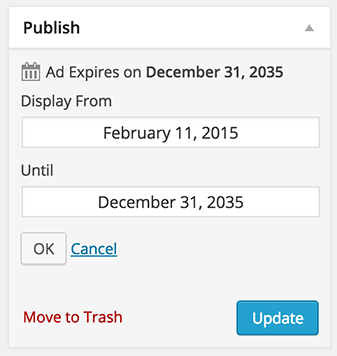
Click and impression tracking is built-in. You get basic performance data without needing Google Ad Manager or an external analytics layer. For most affiliate sites, that’s all you need.
AdSanity works with Google AdSense, Amazon ads, and any self-serve banner provided by your affiliate partners. If a partner gives you a banner code, AdSanity can display it.
For tracking ad performance in WordPress alongside your affiliate links, AdSanity gives you the ad management layer most affiliate setups are missing.
It’s one of the more practical tools for monetizing with affiliate marketing and display ads simultaneously.
My Experience with AdSanity
I used AdSanity to manage affiliate partner banner ads on a niche blog with 3 banner placements: sidebar, mid-content, and footer.
Set up time per new ad campaign under 5 minutes. That includes uploading the banner, setting the destination URL, and configuring the schedule.
The UI feels older than some newer ad management tools. But after testing AdSanity on our test site, I’ve come to appreciate that simplicity.
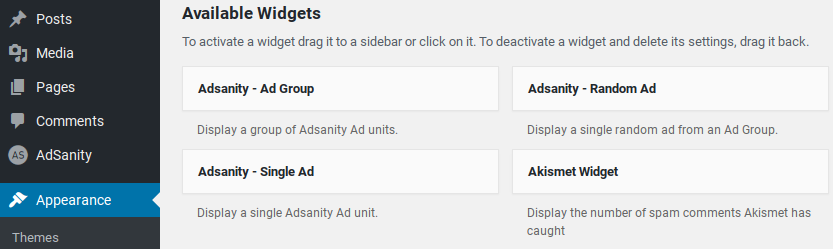
There’s no learning curve, no complex rules engine. You create an ad, place it, and track it. That’s the right product for most affiliate sites.
Pros:
- Insert ad banners anywhere with simple shortcodes
- Ad scheduling auto-starts and auto-expires promotions (great for time-limited affiliate deals)
- Built-in click and impression tracking
- Works with AdSense, Amazon ads, and direct affiliate partner banners
Cons:
- Older UI, not as polished as newer tools, but functional
- No free version
My Verdict: Best for affiliate marketers who monetize with a mix of affiliate links and display advertising. If your site only uses affiliate links (no banner ads), you don’t need this. If you sell banner ad space to your affiliate partners, AdSanity is the simplest solution.
Pricing: $89/year (Basics plan) | Free version: No | Free trial: No
👉 Get started with AdSanity | Read our full AdSanity review
8. Easy Affiliate ⭐⭐⭐⭐
Easy Affiliate is one of the easiest entry points if you are looking for affiliate program plugin. It is less powerful than AffiliateWP, but easier to configure for first-timers, and cheaper.
Why Is Easy Affiliate One of the Best WordPress Plugins for Affiliate Marketers?
It manages affiliate recruitment, tracking, reporting, and PayPal payouts from a single dashboard.
The affiliate portal gives your affiliates a clean self-service hub. They get their links, see their commissions, and request payouts without contacting you.
You also get unlimited affiliates, real-time click and conversion tracking, and fraud protection (cookie blocking and suspicious activity detection) included on the base plan.
My Experience with Easy Affiliate
I set up Easy Affiliate on a WooCommerce test store to compare setup experience directly against AffiliateWP on identical installs.
Easy Affiliate setup time was 12 minutes from plugin install to first active affiliate link.
The simpler configuration is real. For someone setting up their first affiliate program, Easy Affiliate removes friction that other affilaite marketig tools adds in early setup.
I tested affiliate link tracking accuracy through the Easy Affiliate dashboard reports. Attribution was consistent across all test clicks.
The reporting dashboard is simpler than AffiliateWP with fewer data points, less granular segmentation.
But here’s why that’s still fine: if you have 5 to 20 affiliates and just need click counts and commission totals, the simplicity is an advantage.
You spend less time analyzing reports and more time managing your program.
For anyone building on a WooCommerce store and running their first affiliate program, Easy Affiliate hits the right balance of simplicity and capability.
Pros:
- Simpler setup than other affilaite tools on this list
- Cheaper than competitors on this list
- Clean affiliate portal lets your affiliates self-serve without contacting you
- Real-time commission tracking and PayPal payout integration built-in
Cons:
- Fewer native integrations
- Simpler reporting with less granular data
My Verdict: Best for affiliate marketing beginners running their first affiliate program on WooCommerce who want a lighter, cheaper alternative. If your program grows beyond 50 active affiliates or you need advanced integrations, upgrade to AffiliateWP.
Pricing: $99.60/year (Basic) | Free version: No | Free trial: No (14-day money-back)
👉 Get started with Easy Affiliate | Check out my Easy Affiliate review
Choosing WordPress Affiliate Marketing Plugins for Your Site
Affiliate marketing is one of the most reliable ways to make money online.
With affiliate marketing, affiliate marketers choose products they like, promote them online, and earn commissions when someone purchases them through their referral link.
On the other hand, you get high-quality sales without actually looking for clients yourself. The best part is that since potential customers hear about your product from someone else, they are more likely to trust you and purchase it.
Here are other reasons to consider affiliate marketing.
- Increased Traffic: Affiliates use various channels like blogs, social media, email newsletters, and more to drive traffic back to your site. This exposes your website to more high-quality visitors.
- Cost-Effective Marketing: Since affiliates are only paid when they bring in sales or leads, affiliate marketing is a low-risk investment. You don’t need to spend upfront on ads—you only pay for successful results.
- Easy Scalability: You can quickly scale your marketing efforts by simply recruiting more affiliates. You can grow your affiliate network without requiring significant time or effort as your business grows.
- Improved SEO: With this marketing technique, affiliates share your products on different platforms. As a result, you gain backlinks and increased brand visibility, boosting your search engine ranking.
But with so many affiliate marketing tools out there, it can be hard to find one that meets your needs.
Having the right plugins in your toolbox makes affiliate marketing easy and helps you earn more revenue from your site.
Here are features you should look for when looking for an affiliate plugin.
- Easy Affiliate Management: Choose a plugin that lets you easily add, approve, or remove affiliates. It should also allow setting custom commission rates for individuals or groups.
- Affiliate Registration & Approval: Look for a tool with customizable affiliate registration forms and options for automatic or manual approval, giving you control over who joins.
- Real-Time Reporting & Analytics: The plugin should provide real-time tracking of affiliate performance, including clicks, referrals, sales, and earnings, helping you optimize your program.
- Customizable Affiliate Links: Select a plugin that allows affiliates to create and manage custom referral links. Bonus points if it lets them create posts or pages to boost promotion.
- Automated Payments: Ensure the plugin supports automatic payment of commissions through trusted gateways, saving time and ensuring prompt payments.
- Integrations with Popular Plugins: Make sure the plugin integrates smoothly with platforms like WooCommerce, Easy Digital Downloads, or MemberPress for accurate tracking of sales and commissions.
FAQs: Best WordPress Plugins for Affiliate Marketers
Is affiliate marketing a good side hustle?
Yes, affiliate marketing is considered one of the best online side hustles. This is because affiliate marketing does not need you to own a product, a website, or any other digital assets. You just need to help others sell their product, and you get a cut for it.
Can I do affiliate marketing without social media?
Absolutely! You can do affiliate marketing without social media. You can share your affiliate links anywhere you want online, from forums to your affiliate website. As long as the product owner is using a good affiliate marketing tool like AffiliateWP, they can monitor your links in real-time to ensure you get paid.
Is affiliate marketing a pyramid scheme?
No! Affiliate marketing is not a pyramid scheme. It is a marketing technique where product owners use affiliate marketers to help them sell their products. Every time, an affiliate marketer makes a sale, they get a commission from the product owner. A good example of this marketing system is the Amazon affiliate program.
Best free WordPress plugin for affiliate marketing?
Pretty Links is the best free affiliate marketing plugin you can use. It offers you powerful features with its free version that you can use to cloak your affiliate URL in a quick and simple way. But, if you want to unlock all its key features, you can purchase a plan from their official website.
That’s my list of the best WordPress affiliate plugins. You may also want to take a look at the 11+ Powerful WordPress Lead Generation Plugins Compared.
Final Verdict
After testing affiliate marketing plugins across link management, program management, lead generation, and display advertising, here’s the honest summary:
Top picks: AffiliateWP for anyone running their own affiliate program. ThirstyAffiliates for anyone managing their own links to other people’s products. Both are the category leaders in their respective segments, and they’re the tools I’d install first on any new affiliate setup.
Best alternatives: Easy Affiliate if you’re running your first affiliate program and want a simpler, cheaper entry than AffiliateWP. Pretty Links if you’re a content-heavy blogger who wants the cleanest Gutenberg workflow.
Budget pick: ThirstyAffiliates free version — start cloaking links today at zero cost, upgrade when you’re ready to scale.
The honest answer to “should you invest in affiliate marketing plugins?”: yes. If you’re monetizing with affiliate links and don’t have proper link management, you’re losing commissions to broken links, missing tracking data, and working far harder than you need to. The right tools pay for themselves quickly.
Resource Hub: Affiliate Marketing with WordPress
Everything you need to go deeper on affiliate marketing with WordPress — tutorials, comparisons, and tool lists that complement what we covered here.
- How to Create an Amazon Affiliate Store Step by Step – A complete walkthrough for building an Amazon affiliate store in WordPress — product displays, affiliate links, and the plugins that make it work.
- 7 Best Amazon Affiliate WordPress Plugins Compared – The best plugins specifically for Amazon affiliates — product tables, image importers, and link managers that work with the Amazon affiliate program.
- 8 Best WordPress Lead Capture Tools to Double Your List – Grow your email list from your affiliate traffic — the tools that turn visitors into subscribers before they click away.
- 8 Best Email Marketing Services for Small Business – Once you’ve captured email subscribers from your affiliate traffic, you need the right email service provider to send to them. We compare all the major options.
- How to Build a Sales Page in WordPress Step by Step – Create high-converting dedicated sales pages for your top affiliate product promotions — without a developer.
- 30 Ways to Make Money Online Blogging On the Side – Expand your WordPress monetization beyond affiliate links. 30 tested methods for adding income streams to your blog.
These articles will show you how to drive more targeted traffic, which is essential to increasing your affiliate revenue.

Great one. Have been using Thirstyaffiliates because I like its simplicity but its giving some errors with adblocker. Any thoughts around Linkcentral or Clickwhale? Seems decent alternatives?
Hello Henriko,
Thank you for the feedback. While we have not tried Linkcentral or Clickwhale, we will definitely check them out during the next post update.
i want to know what is campaign in affiliate programs?
I had a plugin years ago that allowed me to create an SEO-enhancing review in my blog. It had star ratings and I think templates. I am looking for something to replace it as I think it isn’t available now. It was called Snap Reviews Pro. I am starting a blog that will feature product reviews that I write about products on Amazon and other affiliate relationships I have. Something like this would be very helpful.
I am new.
What is the use of CATEGORY
What if a theme does not allow one to insert category
2. What is the use of TAGS?
You might want to check out this guide on building a website where we explain everything including tags and category.
What about ultimate affiliate Pro? It’s not listed here.
You should have a look at Auto Affiliate Links too
I’ve never come across your Auto Affiliate Links plugin. Looks like it’s worth recommending. Thanks for the suggestion, Lucian