
J'ai aidé un client à lancer sa communauté d'adhésion l'année dernière. Tout semblait parfait jusqu'à ce que les 50 premières personnes essaient de s'inscrire.
J'ai vite réalisé que la page d'inscription par défaut de WordPress les effrayait. Elle ressemblait à un formulaire gouvernemental de 1999.
Elle n'avait aucun branding, aucune personnalité, juste des boîtes grises ennuyeuses demandant un nom d'utilisateur et un mot de passe.
Pire encore, des bots de spam ont découvert la page en moins de 24 heures. À la fin de la deuxième semaine, mon client avait plus de 600 faux comptes qui encombraient sa liste de membres. Par conséquent, les vraies personnes ne pouvaient plus se trouver dans l'annuaire.
J'ai installé un plugin de connexion et d'inscription approprié ce week-end-là avec des pages personnalisées à la marque, des boutons de connexion sociale et une protection intelligente contre le spam.
Les conversions d'inscription ont augmenté de 40 % le premier mois, et les inscriptions de spam ont chuté à zéro. Les membres ont réellement commencé à utiliser la communauté car ils pouvaient se connecter avec Google au lieu de créer un autre mot de passe.
Voyez-vous, le bon plugin de connexion transforme WordPress d'un simple blog en une plateforme professionnelle qui accueille les vrais utilisateurs tout en gardant les spammeurs à l'extérieur.
Pour vous aider, j'ai testé, examiné et comparé les meilleurs plugins de connexion et d'inscription pour vous aider à transformer votre site en une communauté florissante. Consultez ma liste ci-dessous.
Points clés à retenir
- Je vais vous montrer un constructeur de formulaires par glisser-déposer qui crée des champs d'inscription personnalisés en 5 minutes sans toucher au code
- Je mentionne un plugin avec connexion sociale qui a réduit le temps d'inscription moyen de 3 minutes à 8 secondes
- Découvrez quel outil fonctionne le mieux pour les sites d'adhésion gérant plus de 1 000 utilisateurs actifs
- J'ai testé 10 solutions pour trouver ce qui offre une expérience utilisateur fluide sans les maux de tête liés au spam
- J'identifie le plugin gratuit qui personnalise les pages de connexion sans aucune connaissance technique requise
De plus, vous pouvez utiliser la table des matières ci-dessous pour voir ma liste d'un coup d'œil. Vous pouvez également cliquer sur n'importe quel lien pour accéder à cette section.
- Comparaison des meilleurs plugins de connexion et d'inscription d'utilisateurs
- Bonus : d'autres solutions de connexion et d'inscription à considérer
- Importance des plugins de connexion et d'inscription WordPress
- Comment choisir le bon plugin de connexion et d'inscription utilisateur
- FAQ : Meilleurs plugins de connexion et d'inscription utilisateur
- Verdict final : Faut-il utiliser un plugin de connexion et d'inscription utilisateur ?
- Centre de ressources : Gestion des utilisateurs et personnalisation de WordPress
Comment je teste les plugins de connexion et d'inscription utilisateur
Bonjour, je suis Alvin, l'écrivain d'IsItWP, et voici mon processus de test des plugins d'inscription et de connexion.
🔍Voici exactement comment j'évalue chaque plugin :
- Vitesse d'installation : Je chronomètre le temps nécessaire de l'installation à la première page de connexion fonctionnelle. Si l'installation dépasse 20 minutes, c'est un signal d'alarme pour les débutants.
- Options de personnalisation : Je teste la facilité avec laquelle vous pouvez ajouter des champs personnalisés, changer les couleurs, ajouter des logos et modifier les flux d'inscription sans code.
- Intégration de la connexion sociale : Je connecte Google, Facebook et Twitter pour mesurer la complexité de l'installation et les taux de réussite de la connexion.
- Prévention du spam : Je surveille les tentatives d'inscription de spam sur 30 jours en utilisant de vrais sites pour tester les flux de travail CAPTCHA, de vérification par e-mail et d'approbation.
- Expérience mobile : Je teste chaque formulaire d'inscription sur iPhone et Android pour vérifier la conception réactive et les entrées tactiles.
- Fonctionnalités de sécurité : J'évalue l'authentification à deux facteurs, les exigences de complexité des mots de passe et la limitation des tentatives de connexion.
- Impact sur les performances : Je mesure les temps de chargement des pages avant et après l'installation du plugin à l'aide de GTmetrix.
Outils que j'utilise :
- Outils de surveillance du spam pour suivre les tentatives d'inscription frauduleuses
- Outil de performance gratuit d'IsItWP, et GTmetrix pour les tests de vitesse et l'analyse de performance
- Vrais sites de test avec du trafic d'inscription d'utilisateurs réel
- Plusieurs appareils mobiles pour les tests réactifs
Je ne me contente pas de lire la documentation. Je construis de vrais systèmes d'inscription, j'invite de vrais utilisateurs de test et je mesure ce qui se passe lorsque 50 personnes essaient de s'inscrire en même temps.
Pourquoi faire confiance à IsItWP ?
Chez IsItWP, nous sommes la ressource de référence de la communauté WordPress depuis 2009, aidant plus de 2 millions d'utilisateurs à choisir les meilleurs plugins et outils.
Contrairement aux sites d'avis qui n'utilisent jamais réellement les produits et qui maintiennent des sites de test actifs avec de vrais comptes utilisateurs.
Nous gérons des communautés d'adhésion et fournissons des consultations WordPress continues aux entreprises qui mettent en œuvre ces solutions.
Comparaison des meilleurs plugins de connexion et d'inscription d'utilisateurs
WordPress est livré avec des pages de connexion et d'inscription de base qui fonctionnent. Mais elles ont l'air dépassées, n'offrent aucune personnalisation et accueillent les robots spammeurs à bras ouverts.
Le bon plugin transforme ces pages par défaut en expériences personnalisées qui correspondent à la conception de votre site.
De plus, vous bénéficiez de fonctionnalités de site d'adhésion qui protègent le contenu et gèrent les abonnements lorsque vous en avez besoin.
J'ai testé 10 solutions de connexion et d'inscription pour différents types d'entreprises. Certaines excellent dans la personnalisation simple des pages de connexion.
D'autres gèrent des flux de travail d'adhésion complexes avec des champs d'inscription personnalisés et la connexion sociale.
Tableau comparatif rapide :
| Plugin | Idéal pour | Meilleure fonctionnalité | Version gratuite | Prix de départ |
|---|---|---|---|---|
| 🥇 WPForms | Formulaires d'inscription personnalisés | Champs de logique conditionnelle | ✅ Basique | 49,50 $/an |
| 🥈 SeedProd | Conception visuelle de la page de connexion | Constructeur par glisser-déposer | ✅ Limité | 39,50 $/an |
| 🥉 Formidable Forms | Profils utilisateurs avancés | Affichage des formulaires sur le frontend | ✅ Formulaires complets | 39,50 $/an |
| 4. MemberPress | Abonnements de membres | Restriction de contenu | ❌ | 199,50 $/an |
| 5. ProfilePress | Intégration de connexion sociale | Connexion Google/Facebook en un clic | ✅ Limité | 129 $/an |
| 6. Nextend Social Login | Connexion sociale gratuite | Plusieurs fournisseurs | ✅ Complet | 49 $/an |
| 7. LoginPress | Personnalisation de la page de connexion | Personnalisateur de style | ✅ Limité | 99 $/an |
| 8. CM Registration | Inscription privée | Système sur invitation uniquement | ✅ Complet | 39 $/an |
| 9. Personnalisateur de page de connexion personnalisée | Branding de connexion gratuit | Logo & arrière-plan | ✅ Complet | 99 $/an |
| 10. WP User Frontend | Soumission de publication sur le frontend | Gestion du contenu utilisateur | ✅ Limité | 49 $/an |
Cela étant dit, passons à la liste.
1. WPForms ⭐⭐⭐⭐⭐
Plus de 6 millions d'installations actives | Idéal pour : Formulaires d'inscription personnalisés avec logique conditionnelle
WPForms est le meilleur constructeur de formulaires pour WordPress. C'est ma réponse lorsque vous avez besoin de champs d'inscription personnalisés sans engager de développeurs.
Le constructeur glisser-déposer crée des formulaires de connexion professionnels en quelques minutes, pas en quelques heures.
Pourquoi WPForms est-il le meilleur plugin d'inscription utilisateur ?
WPForms excelle dans l'inscription personnalisée car il traite les formulaires d'utilisateurs comme tout autre type de formulaire. Vous bénéficiez du même constructeur puissant qui en fait l'un des meilleurs plugins de formulaire de contact pour capturer des prospects.
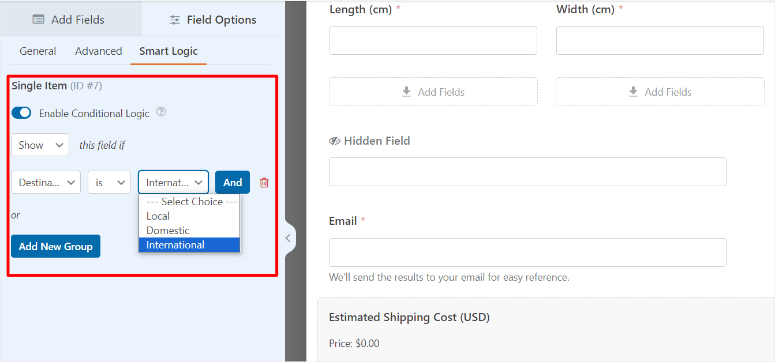
La fonctionnalité de logique conditionnelle résout facilement la complexité de l'inscription. Cela vous permet de masquer automatiquement les champs non pertinents en fonction des réponses précédentes.
Par exemple, vous pouvez afficher « Nom de l'entreprise » uniquement lorsque quelqu'un sélectionne « Compte professionnel ». Ou afficher « Taille de l'équipe » uniquement pour les utilisateurs d'entreprise.
De plus, la bibliothèque de plus de 2 000 modèles de formulaires de WPForms comprend des mises en page d'inscription pré-conçues. Vous obtenez des modèles d'inscription d'utilisateurs, des modèles d'inscription à la newsletter et des modèles d'informations de contact qui fonctionnent tous immédiatement.
Cliquez, personnalisez, publiez.
Mon expérience avec WPForms
J'ai construit un système d'inscription à plusieurs niveaux pour une association professionnelle avec 3 niveaux d'adhésion. Chaque niveau nécessitait des champs d'information différents.
La configuration a pris 15 minutes en utilisant la logique conditionnelle.
Les étudiants ont vu des champs simplifiés demandant l'école et l'année d'obtention du diplôme. Les membres professionnels ont eu des champs pour l'entreprise, le titre et le secteur d'activité. Tandis que les comptes d'entreprise affichaient la taille de l'équipe et les champs de contact de facturation.
Le taux d'achèvement des formulaires a atteint 78 % car les gens ne voyaient que les questions pertinentes. L'ancien système, avec tous les champs visibles pour tout le monde, avait un taux d'achèvement de 43 %.
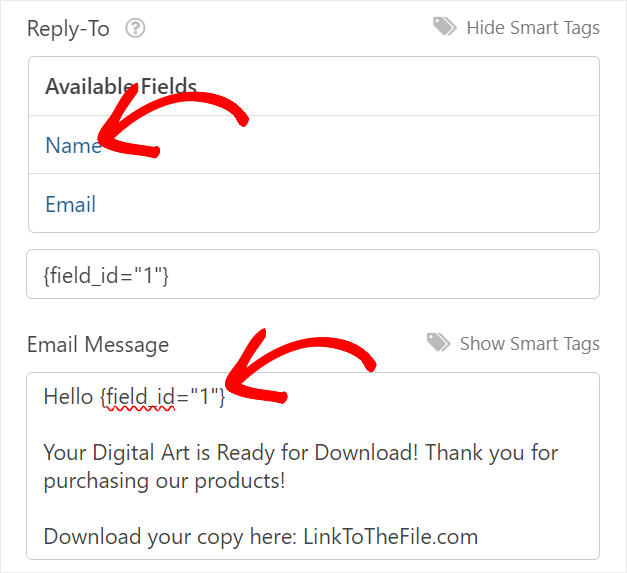
De plus, des notifications par e-mail sont envoyées instantanément au bon département en fonction du type d'adhésion sélectionné.
Ainsi, les étudiants allaient au coordinateur étudiant, et les comptes d'entreprise déclenchaient des alertes à l'équipe de vente d'entreprise.
Au final, le module complémentaire formulaires conversationnels a transformé une inscription ennuyeuse en un dialogue amical.
Au lieu d'un mur de 12 champs, les questions apparaissaient une par une comme dans une conversation. Le temps d'inscription est passé de 4 minutes à 90 secondes.
► Avantages
- La logique conditionnelle maintient les formulaires courts en n'affichant que les champs pertinents, ce qui améliore considérablement les taux d'achèvement par rapport à l'affichage de tout en même temps.
- Le constructeur par glisser-déposer ne nécessite aucune connaissance en codage, de sorte que n'importe qui dans votre équipe peut créer ou modifier des formulaires d'inscription en quelques minutes.
- Les modèles de formulaires fournissent des points de départ instantanés pour les scénarios d'inscription courants au lieu de construire à partir de zéro à chaque fois.
- Fonctionne parfaitement sans plugins WooCommerce ou d'adhésion, ce qui le rend idéal pour des besoins simples d'enregistrement d'utilisateurs
► Inconvénients
- Les fonctionnalités d'inscription d'utilisateurs nécessitent le plan Plus ou supérieur, de sorte que la version gratuite ne gère que les formulaires de contact de base.
- Pas spécifiquement conçu pour les sites d'adhésion avec abonnements, restrictions de contenu ou fonctionnalités de facturation récurrente
- Les fonctionnalités avancées comme les formulaires conversationnels nécessitent le plan Business, augmentant les coûts pour des expériences d'inscription sophistiquées
Mon verdict : WPForms offre le chemin le plus simple de « nous avons besoin d'une inscription personnalisée » à des formulaires fonctionnels. La logique conditionnelle et le constructeur par glisser-déposer éliminent complètement les barrières techniques. Choisissez-le lorsque vous avez besoin de formulaires d'inscription sophistiqués sans aide de développeur ni complexité d'adhésion.
Consultez mon avis sur WPForms pour plus de détails. Comparez WPForms vs Gravity Forms si vous hésitez entre les constructeurs de formulaires.
Tarifs : Plugin gratuit disponible ; Pro à partir de 49,50 $/an
Si cela vous convient, consultez notre page de coupons WPForms pour les meilleures offres.
2. SeedProd ⭐⭐⭐⭐⭐
Plus d'1 million d'installations actives | Idéal pour : Conception de page de connexion personnalisée avec constructeur visuel
SeedProd a transformé ma façon d'aborder la personnalisation des pages de connexion. Au lieu de modifications CSS et de fichiers de modèles, vous obtenez un constructeur de pages visuel qui crée de superbes pages de connexion personnalisées en quelques minutes.

Pourquoi SeedProd est-il l'un des meilleurs constructeurs de pages de connexion ?
SeedProd se classe parmi les meilleurs constructeurs de pages pour WordPress car il vous permet de concevoir n'importe quoi visuellement. Pages de connexion, pages d'enregistrement, pages de bientôt disponibles, le tout avec la même interface glisser-déposer.
La bibliothèque de modèles de pages de connexion comprend plus de 20 mises en page préconçues.
Cela inclut des modèles de connexion professionnelle pour entreprises, de style agence créative et de design minimaliste, tous personnalisables sans code. Cliquez sur un modèle, changez les couleurs et le logo, publiez.
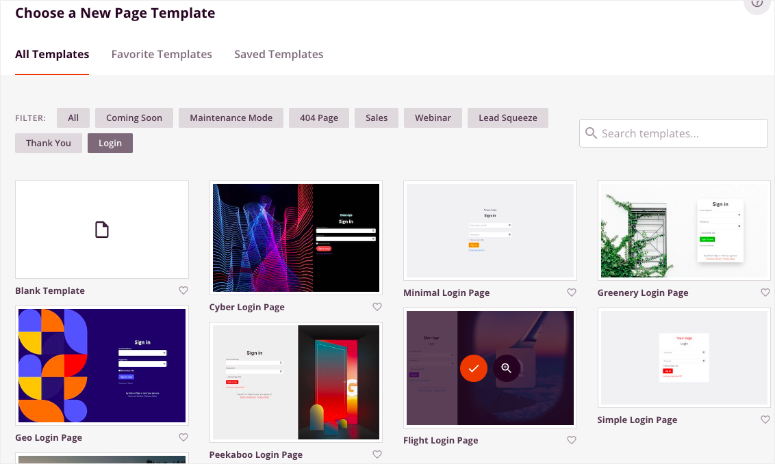
Vous contrôlez chaque élément visuellement. Vous pouvez faire glisser et déposer des images d'arrière-plan, des logos personnalisés, le style des champs de formulaire, les couleurs des boutons et les boutons de connexion sociale.
Tout apparaît exactement là où vous le placez à l'aide du constructeur visuel.
Les mêmes principes d'optimisation de page de destination qui fonctionnent pour les conversions s'appliquent aux pages de connexion. Attendez-vous donc à un design épuré, un appel à l'action clair et une réactivité mobile.
Mon expérience avec SeedProd
J'ai refait la page de connexion d'une entreprise SaaS qui semblait dater de 2008. C'était un modèle WordPress générique avec leur logo collé par-dessus.
Le constructeur visuel a simplifié la conception. J'ai intégré leurs couleurs de marque, ajouté une image principale montrant l'interface de leur produit et stylisé le formulaire de connexion pour qu'il corresponde parfaitement à l'esthétique de leur site Web.
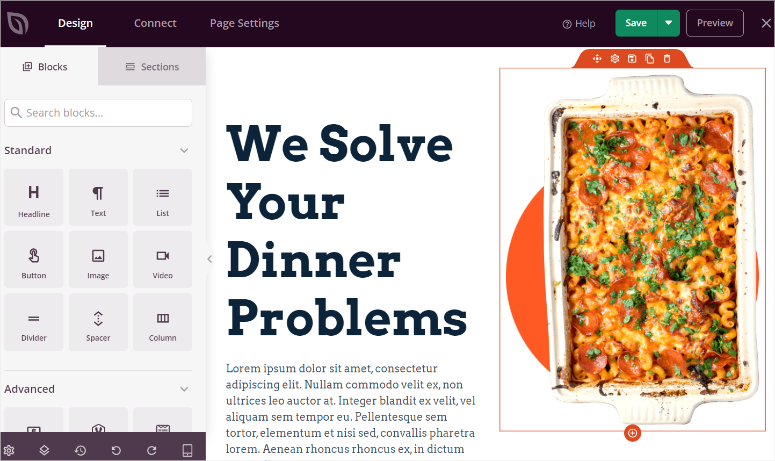
La configuration a pris 25 minutes, tests sur appareils mobiles compris. L'ancienne page de connexion avait 23 % d'utilisateurs qui abandonnaient avant la fin de la connexion, tandis que la nouvelle page de marque a réduit l'abandon à 8 %.
Boutons de connexion sociale intégrés visuellement. J'ai placé les options de connexion Google et Microsoft bien en évidence au-dessus du formulaire traditionnel. La plupart des utilisateurs choisissent désormais la connexion sociale plutôt que la saisie du mot de passe.
La conception réactive pour mobile s'est ajustée automatiquement. Les formulaires de connexion qui semblaient étriqués sur les téléphones s'affichaient maintenant proprement avec un espacement adéquat et des tailles de boutons tactiles.
► Avantages
- Le constructeur visuel par glisser-déposer supprime toutes les barrières techniques, permettant aux concepteurs de créer des pages de connexion époustouflantes sans toucher au code ni embaucher de développeurs
- Le contrôle complet de la conception signifie que votre page de connexion correspond parfaitement à votre marque, au lieu d'avoir l'air générique WordPress
- Plus de 20 modèles de pages de connexion fournissent des points de départ professionnels que vous personnalisez en quelques minutes plutôt qu'en quelques heures
- La réactivité mobile se fait automatiquement, garantissant que la connexion fonctionne parfaitement sur tous les appareils sans versions mobiles séparées
► Inconvénients
- Axé principalement sur la conception et l'apparence plutôt que sur des fonctionnalités d'enregistrement avancées comme les champs conditionnels ou les formulaires en plusieurs étapes
- La courbe d'apprentissage existe pour le constructeur visuel si vous n'avez jamais utilisé de constructeurs de pages auparavant, bien qu'elle soit plus douce que la plupart
Mon verdict : SeedProd offre la meilleure approche visuelle pour la marque des pages de connexion. Choisissez-le lorsque la conception prime sur une logique d'enregistrement complexe. Parfait pour les entreprises qui souhaitent des pages de connexion qui ressemblent réellement à leur marque au lieu du défaut générique de WordPress.
Consultez mon avis sur SeedProd pour plus de détails.
Tarifs : plugin gratuit disponible ; Pro à partir de 39,50 $/an
3. Formidable Forms ⭐⭐⭐⭐⭐
Idéal pour : Profils d'utilisateurs avancés avec affichage frontal
Formidable Forms m'aide à configurer des formulaires d'inscription pour des clients qui ont besoin de profils d'utilisateurs que les membres peuvent réellement voir et avec lesquels interagir. Pas seulement des formulaires de connexion cachés dans le tableau de bord d'administration.
Pourquoi Formidable Forms est l'un des meilleurs plugins de profil utilisateur ?
Formidable Forms excelle dans les fonctionnalités frontales que d'autres plugins cachent dans le backend.
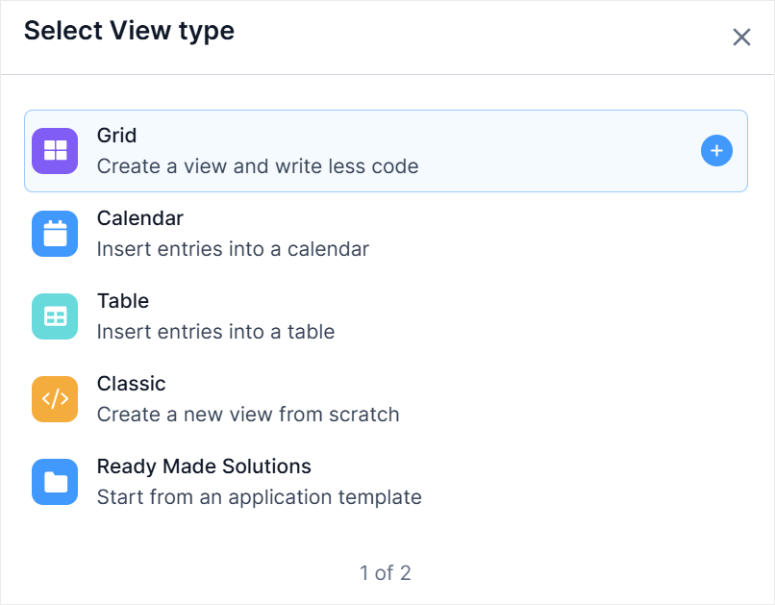
Pour commencer, la fonctionnalité Views affiche publiquement les profils d'utilisateurs, crée des annuaires de membres et construit des bases de données consultables entièrement sur le frontend.
En plus de cela, les fonctionnalités de calcul vous permettent de créer des inscriptions dynamiques avec des prix automatiques.
Par exemple, vous pouvez configurer un formulaire d'inscription en plusieurs étapes afin que les prix des adhésions professionnelles et étudiantes soient calculés instantanément en fonction de ce que l'utilisateur sélectionne lors de l'inscription.
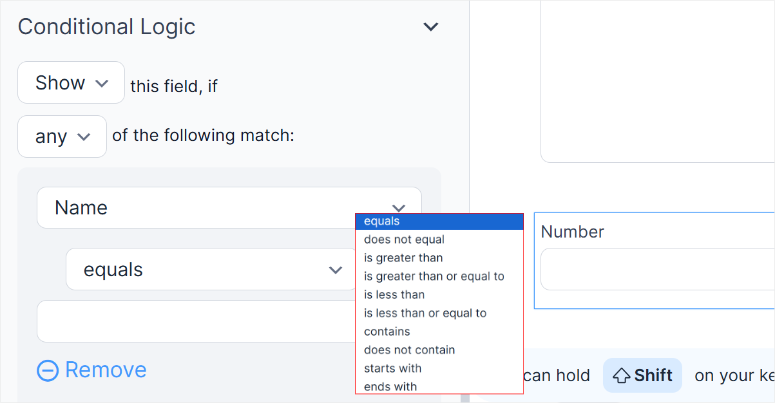
La logique conditionnelle gère les scénarios complexes avec aisance. Vous pouvez afficher le champ certifications uniquement pour les consultants et le téléchargement de portfolio uniquement pour les designers.
Ou masquer les informations de l'entreprise pour les membres individuels.
Le meilleur ?
La modification du profil utilisateur se fait sur le frontend sans exposer votre administration WordPress. Les membres se connectent, visitent leur page de profil et mettent à jour les informations directement.
Cela évite toute confusion concernant la navigation dans wp-admin.
Mon expérience avec Formidable Forms
J'ai créé une place de marché freelance en utilisant Formidable Forms pour une gestion complète des utilisateurs. Sur le portail de connexion, les utilisateurs pouvaient s'inscrire, créer des profils et afficher leur portfolio depuis le frontend.
Le processus d'inscription a collecté 18 points de données sur 3 pages. Cela incluait les compétences, l'expérience, le tarif horaire, les exemples de portfolio et la disponibilité.
La configuration a pris 2 heures, y compris le test du flux de travail complet.
Après cela, les annuaires de membres s'affichaient automatiquement à l'aide de Vues. Les visiteurs pouvaient rechercher des freelances par compétence, filtrer par fourchette de tarifs horaires et trier par niveau d'expérience.
Le suivi de l'achèvement du profil a encouragé les membres à remplir des informations complètes.
Le système a indiqué « 75 % terminé » avec les champs manquants mis en surbrillance. Ensuite, les profils avec 100 % d'achèvement ont obtenu un placement privilégié dans les résultats de recherche.
De plus, la fonctionnalité de formulaire vers publication permet aux freelances de soumettre des portfolios de projets directement depuis le frontend. Chaque soumission créait automatiquement un article de portfolio, sans accès administrateur nécessaire.
► Avantages
- L'édition de profil en frontend permet aux utilisateurs de gérer leurs informations sans avoir à naviguer dans l'interface d'administration WordPress, ce qui est plus simple pour les membres non techniques.
- La fonctionnalité Vues crée des annuaires de membres et des bases de données consultables entièrement côté client, en utilisant les mêmes données collectées lors de l'inscription
- Les champs de calcul permettent une tarification dynamique lors de l'inscription, affichant les coûts instantanément en fonction du type de membre ou des options sélectionnées
- Les formulaires multipages avec indicateurs de progression réduisent considérablement l'abandon par rapport aux formulaires d'inscription uniques et écrasants
► Inconvénients
- Courbe d'apprentissage plus raide que les plugins de formulaire simples, car la puissance s'accompagne d'une complexité qui prend du temps à maîtriser
- La fonctionnalité côté client nécessite le plan Business ou supérieur, ce qui la rend plus coûteuse que les solutions d'inscription de base
Mon verdict : Formidable Forms offre une fonctionnalité côté client inégalée pour les profils d'utilisateurs et la gestion des membres. Choisissez-le lorsque vous avez besoin que les membres voient et interagissent avec les profils des autres, pas seulement qu'ils s'inscrivent et disparaissent. Parfait pour les annuaires, les places de marché et les plateformes communautaires.
Consultez mon avis sur Formidable Forms pour plus de détails. Comparez Formidable Forms vs WPForms si vous hésitez entre puissance et simplicité.
Tarifs : Plugin gratuit disponible ; Pro à partir de 39,50 $/an
Commencez avec Formidable Forms ici
4. MemberPress ⭐⭐⭐⭐⭐
Idéal pour : les sites d'adhésion avec abonnements et protection de contenu
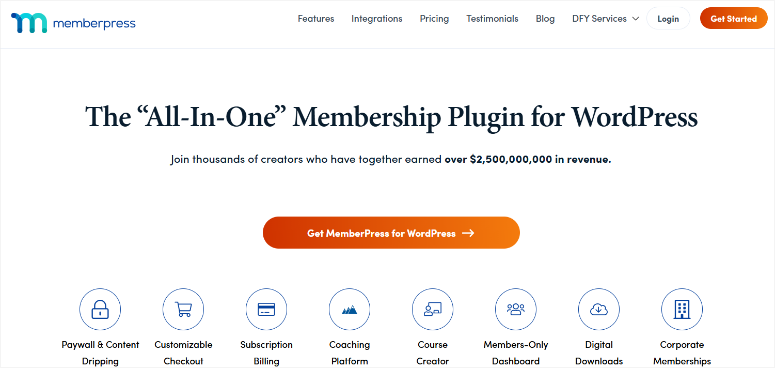
MemberPress est l'un des meilleurs plugins de connexion lorsque vous avez besoin de plus que l'enregistrement. Il offre des abonnements récurrents, du contenu protégé et des niveaux d'adhésion.
Pourquoi MemberPress est-il l'une des meilleures solutions d'inscription aux adhésions ?
MemberPress simplifie la création de sites d'adhésion en combinant l'enregistrement des utilisateurs avec la gestion des abonnements et la restriction de contenu en un seul système.
L'inscription crée automatiquement des comptes membres avec les niveaux d'accès appropriés.
Le système de règles d'adhésion protège le contenu de manière granulaire.
Vous pouvez verrouiller des catégories entières pour les membres premium, configurer la diffusion de contenu hebdomadaire pour les étudiants de cours, ou donner aux membres VIP un accès instantané à tout.
Vous pouvez faire tout cela en fonction du niveau d'adhésion sélectionné lors de l'inscription.
J'aime la façon dont vous pouvez personnaliser complètement les formulaires d'inscription sans code. Ajoutez des champs personnalisés pour les informations commerciales, les préférences ou les détails du profil. Ensuite, chaque champ est automatiquement enregistré dans le profil du membre.
De plus, MemberPress s'associe parfaitement aux plugins LMS pour les adhésions basées sur des cours. Les étudiants s'inscrivent, s'abonnent à l'accès au cours et obtiennent du contenu progressivement en fonction de leurs règles d'adhésion.
L'intégration de paiement gère Stripe et PayPal de manière transparente.
Les membres s'inscrivent, sélectionnent leur niveau, saisissent les informations de paiement et obtiennent un accès instantané. Cela garantit que la facturation récurrente s'effectue automatiquement sans gestion manuelle des factures.
Mon expérience avec MemberPress
J'ai lancé une plateforme de développement professionnel avec 3 niveaux d'adhésion en utilisant MemberPress pour une gestion complète des utilisateurs.
La configuration du formulaire d'inscription a pris 12 minutes, y compris des champs personnalisés pour le secteur, le rôle et la taille de l'entreprise.
Ces champs ont permis de segmenter automatiquement les recommandations de contenu en fonction des profils des membres.
Les règles d'adhésion protégeaient les articles, les cours vidéo et les ressources téléchargeables.
Les membres de base ont vu du contenu d'introduction, les membres professionnels ont débloqué des tutoriels avancés, et les membres d'entreprise ont accédé à tout, y compris des sessions de coaching exclusives.
Le flux d'inscription au paiement a converti davantage de visiteurs novices. Des descriptions claires des niveaux lors de l'inscription ont montré exactement ce que chaque niveau débloquait. Cela a évité toute surprise ou confusion.
Les taux de renouvellement se sont également améliorés car la facturation automatique a supprimé les frictions. Les membres qui ont commencé avec Basic sont passés à Professional sans se réinscrire.
Le système a ajusté l'accès instantanément en fonction du nouveau niveau d'abonnement.
► Avantages
- L'écosystème complet d'adhésion combine l'inscription, les abonnements et la protection du contenu dans un seul système au lieu de jongler avec plusieurs plugins.
- La restriction de contenu granulaire vous permet de protéger des articles, des catégories ou des pages spécifiques en fonction du niveau d'adhésion sélectionné lors de l'inscription.
- L'intégration de paiement gère automatiquement la facturation récurrente, afin que les membres n'aient jamais à renouveler manuellement ou à saisir à nouveau leurs informations de paiement
- Les champs d'inscription personnalisés sont enregistrés directement dans les profils des membres, permettant des recommandations de contenu personnalisées et une segmentation des utilisateurs
► Inconvénients
- Nettement plus cher que les simples plugins d'inscription car vous payez pour une infrastructure complète de gestion des membres
- Excessif si vous avez seulement besoin d'une inscription utilisateur sans abonnements, protection de contenu ou niveaux d'adhésion
- Une courbe d'apprentissage existe pour les règles d'adhésion et les paramètres d'accès si vous êtes nouveau dans la gestion de sites d'adhésion
Mon Verdict : MemberPress offre une infrastructure d'adhésion complète au-delà de la simple inscription utilisateur. Choisissez-le lorsque vous construisez une véritable entreprise d'adhésion avec des revenus récurrents, et pas seulement une collecte de comptes utilisateurs. Parfait pour les plateformes de cours, les sites de contenu premium et les communautés par abonnement.
Consultez ma critique de MemberPress pour tous les détails. Comparez MemberPress vs WishList Member ou LearnDash vs MemberPress si vous hésitez entre les solutions d'adhésion.
Tarifs : À partir de 199,50 $/an
Commencez avec MemberPress ici
5. ProfilePress ⭐⭐⭐⭐⭐
Idéal pour : Intégration de connexion sociale et profils utilisateurs en frontend
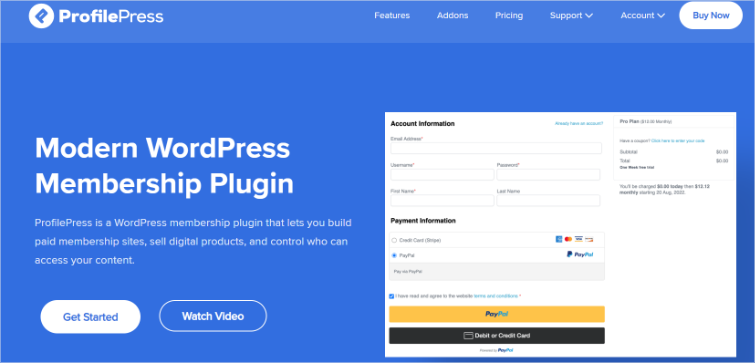
ProfilePress a résolu le plus gros point de friction lors de l'inscription que je vois : la fatigue des mots de passe. Les gens abandonnent l'inscription lorsqu'ils sont confrontés à la création d'un autre mot de passe qu'ils oublieront immédiatement.
Pourquoi ProfilePress est-il l'un des meilleurs plugins de connexion sociale ?
ProfilePress excelle à supprimer les barrières à l'inscription grâce à l'intégration de la connexion sociale.
L'inscription en un clic avec Google, Facebook, Twitter et LinkedIn élimine l'étape « créer un mot de passe » qui tue les conversions.
Le processus de configuration prend 10 minutes par fournisseur social. Connectez vos identifiants Google OAuth, configurez le style du bouton, et les utilisateurs s'inscrivent instantanément avec leur compte Google.
Pas de création de mot de passe ni d'attente de vérification par e-mail.
La connexion sociale s'intègre aux plugins d'authentification à deux facteurs pour une sécurité renforcée sans sacrifier la commodité. Les utilisateurs bénéficient d'une inscription rapide et d'une protection de connexion.
Les profils utilisateurs frontend s'affichent magnifiquement sans développement personnalisé. Les membres voient leurs informations de profil, modifient les détails, changent de mot de passe et téléchargent des avatars entièrement depuis le frontend.
Le constructeur de formulaires par glisser-déposer crée des champs d'inscription personnalisés au-delà du nom d'utilisateur et de l'e-mail. Cela vous permet de collecter des numéros de téléphone, des titres de poste, des noms d'entreprise ou toute donnée personnalisée lors de l'inscription sociale.
Mon expérience avec ProfilePress
J'ai ajouté la connexion sociale à un forum communautaire en utilisant ProfilePress. L'abandon de l'inscription était bloqué à 47% car les gens ne voulaient pas d'un autre mot de passe à gérer.
L'intégration a pris 45 minutes, y compris la configuration de Google, Facebook et Twitter. Chaque fournisseur social nécessitait des identifiants API de leurs consoles développeurs, ce que ProfilePress expliquait clairement.
L'abandon d'inscription a chuté à 18% en deux semaines.
La majorité des nouveaux membres ont choisi la connexion Google plutôt que l'inscription traditionnelle. 73% des nouvelles inscriptions se sont faites via les boutons de connexion sociale.
Les pages de profil frontend ont éliminé la confusion de l'administration WordPress. Les membres ont mis à jour leurs informations sans voir la navigation wp-admin, les types de publication personnalisés ou d'autres complexités du backend.
Les invites de complétion de profil ont encouragé les membres à ajouter les informations manquantes.
Le système a affiché des rappels « Ajouter une photo de profil » et « Compléter la biographie » après l'inscription sociale, qui n'a capturé que des informations de base.
J'ai pu suivre le comportement des utilisateurs après l'inscription. Cela a optimisé l'expérience d'intégration en fonction de la façon dont les nouveaux membres naviguent sur le site.
► Avantages
- L'intégration de la connexion sociale élimine les frictions liées à la création de mots de passe, améliorant considérablement les taux d'achèvement d'inscription pour les sites à fort trafic
- La gestion de profil côté client permet aux utilisateurs non techniques de rester à l'aise en évitant complètement la confusion du tableau de bord d'administration WordPress
- Plusieurs fournisseurs sociaux pris en charge, y compris Google, Facebook, Twitter, LinkedIn, offrant aux utilisateurs leur méthode de connexion préférée
- Le constructeur de formulaires par glisser-déposer vous permet de collecter des champs personnalisés lors de l'inscription sociale au-delà des informations de base du compte
► Inconvénients
- La connexion sociale nécessite une configuration d'API avec chaque fournisseur, ce qui implique la création de comptes développeurs et la configuration d'identifiants OAuth
- La version gratuite limite considérablement les fonctionnalités, nécessitant la version Pro pour des fonctionnalités complètes de connexion sociale et de personnalisation de profil
- Pas conçu pour des niveaux d'adhésion complexes ou la gestion d'abonnements comme le fait MemberPress de manière exhaustive
Mon verdict : ProfilePress offre l'expérience d'inscription la plus fluide grâce à l'intégration de la connexion sociale. Choisissez-le lorsque l'abandon de l'inscription freine votre croissance et que vous devez éliminer la friction des mots de passe. Parfait pour les forums, les sites communautaires et les plateformes où une inscription rapide est plus importante que des fonctionnalités d'adhésion complexes.
Tarifs : Plugin gratuit disponible ; Pro à partir de 129 $/an
Commencez avec ProfilePress ici
6. Nextend Social Login ⭐⭐⭐⭐
Idéal pour : Connexion sociale gratuite avec plusieurs fournisseurs
Nextend Social Login est l'un des meilleurs plugins de connexion lorsque vous avez besoin de la connexion sociale sans frais d'abonnement mensuels. La version gratuite gère parfaitement Google et Facebook.
Pourquoi Nextend Social Login est-il l'une des meilleures options de connexion sociale gratuites ?
Nextend Social Login offre une intégration complète de Google et Facebook dans la version gratuite. Aucune limitation de fonctionnalités, aucun plafond d'utilisateurs, ni restrictions « mettez à niveau pour débloquer ». Juste des boutons de connexion sociale fonctionnels.
Les options de personnalisation des boutons vous permettent de faire correspondre la conception de votre site sans CSS. Vous pouvez choisir des boutons avec uniquement l'icône, uniquement le texte, ou une combinaison icône-texte. Ensuite, ajustez les couleurs, les tailles et l'espacement grâce à des contrôles visuels.
De plus, le mappage des données d'inscription implique de connecter automatiquement les informations du profil social aux champs d'utilisateur WordPress.
Nextend Social Login récupère la photo de profil, l'e-mail, le nom et la biographie des comptes sociaux dans les profils d'utilisateurs WordPress lors de l'inscription.
La version pro ajoute Twitter, LinkedIn, Microsoft, Amazon et plus de 20 fournisseurs supplémentaires. Mais pour la plupart des sites, Google et Facebook couvrent 80% des utilisateurs.
Plus important encore, vous pouvez suivre les conversions de connexion sociale pour voir quels fournisseurs votre public préfère.
La configuration prend 15 minutes par fournisseur. Créez des applications OAuth dans les consoles développeurs Google et Facebook, collez les identifiants dans les paramètres Nextend et activez les boutons. Terminé.
Mon expérience avec Nextend Social Login
J'ai ajouté la connexion sociale gratuite à un blog de recettes en utilisant Nextend Social Login. Le site nécessitait une inscription pour sauvegarder les recettes préférées et créer des listes de courses.
L'inscription traditionnelle avec nom d'utilisateur, e-mail et mot de passe créait des frictions. Seulement 12% des visiteurs qui ont commencé l'inscription l'ont réellement terminée. La plupart ont abandonné le formulaire à l'étape « créer un mot de passe ».
J'ai donc placé les boutons de connexion sociale au-dessus du formulaire d'inscription traditionnel.
Le taux d'achèvement de l'inscription a grimpé à 34% au cours du premier mois, avec seulement 7% utilisant l'inscription traditionnelle.
La synchronisation automatique de la photo de profil depuis les comptes sociaux a amélioré l'engagement communautaire. Les membres voyaient de vraies photos de profil au lieu d'avatars vides, rendant la communauté de recettes plus personnelle.
► Avantages
- Entièrement gratuit pour l'intégration Google et Facebook sans restrictions de fonctionnalités ni limitations d'utilisateurs dans la version gratuite
- Les options de personnalisation des boutons vous permettent de faire correspondre visuellement le design du site sans écrire de CSS ni toucher aux fichiers de modèles
- Le mappage des données de profil extrait automatiquement les informations des comptes sociaux dans les champs utilisateur WordPress lors de l'enregistrement
- Le processus de configuration simple vous guide clairement à travers la configuration OAuth pour chaque fournisseur social
► Inconvénients
- Limité à Google et Facebook dans la version gratuite, nécessitant Pro pour Twitter, LinkedIn et d'autres fournisseurs sociaux
- L'interface semble légèrement datée par rapport aux nouveaux plugins de connexion sociale avec des esthétiques de conception modernes
- Le support de la version gratuite se fait via les forums plutôt que par e-mail direct ou assistance par chat
Mon verdict : Nextend Social Login offre la meilleure solution gratuite de connexion sociale pour WordPress. Choisissez-le lorsque le budget est important et que Google plus Facebook couvrent adéquatement votre base d'utilisateurs. Parfait pour les blogs, les petites communautés et les sites qui testent la connexion sociale avant de s'engager dans des solutions payantes.
Tarifs : Plugin gratuit disponible pour Google/Facebook, Pro à partir de 49 $/an pour les fournisseurs supplémentaires
Commencez avec Nextend Social Login ici
7. WPBrigade LoginPress ⭐⭐⭐⭐
Idéal pour : personnalisation de la page de connexion sans code
Si vous souhaitez des pages de connexion magnifiques et personnalisées, mais que vous n'avez pas de compétences en design ou de connaissances en codage, WPBrigade LoginPress est la solution pour vous. Le personnalisateur de style gère tout visuellement.
Pourquoi LoginPress est-il l'un des meilleurs personnalisateurs de page de connexion ?
LoginPress se spécialise dans la conception de pages de connexion plutôt que dans la complexité de l'enregistrement. Le personnalisateur en direct montre les changements instantanément pendant que vous concevez, éliminant ainsi les conjectures sur l'apparence des changements.
La bibliothèque de modèles comprend plus de 25 styles de pages de connexion prédéfinis.
Ceux-ci incluent des styles professionnels d'entreprise, d'agence créative, minimalistes et en mode sombre. Chaque modèle peut être personnalisé davantage avec les couleurs et le logo de votre marque.
La personnalisation de l'arrière-plan va au-delà des simples couleurs. Vous pouvez télécharger des images, créer des dégradés et ajouter des arrière-plans vidéo.
Le style du formulaire contrôle chaque élément individuellement. Avec le constructeur visuel, vous pouvez modifier les couleurs des champs de saisie, ajuster les styles des boutons, modifier les couleurs du texte et personnaliser les messages d'erreur.
LoginPress s'intègre parfaitement à votre flux de personnalisation WordPress aux côtés des modifications de thèmes et de plugins.
Mon expérience avec WPBrigade LoginPress
J'ai redessiné les pages de connexion pour 5 clients de petites entreprises en utilisant LoginPress. Chacun voulait que sa marque se reflète dans l'expérience de connexion sans payer pour un développement personnalisé.
La configuration a pris en moyenne 20 minutes par site. J'ai sélectionné un modèle proche de leur marque, téléchargé leur logo, ajusté les couleurs pour qu'elles correspondent à leur entreprise et changé l'image d'arrière-plan.
La fonction d'aperçu en direct a permis de gagner un temps considérable.
J'ai vu les changements immédiatement sans enregistrer et actualiser. Cela signifiait qu'essayer différentes combinaisons de couleurs jusqu'à trouver la correspondance parfaite prenait des minutes au lieu d'heures.
La personnalisation de la page de connexion a amélioré le professionnalisme. Un client a suivi les premières impressions et a rapporté que la connexion personnalisée a augmenté les scores de confiance parmi les nouveaux membres de l'équipe.
L'intégration Google reCAPTCHA a ajouté une protection contre le spam sans nécessiter de plugins séparés.
LoginPress s'est occupé de tout, y compris l'option reCAPTCHA invisible qui n'agace pas les utilisateurs légitimes.
Les fonctionnalités de sécurité comprenaient la limitation des tentatives de connexion et la gestion des sessions. Combiné avec des plugins de protection contre la force brute, cela a créé une sécurité de connexion solide sans complexité.
► Avantages
- Le personnalisateur d'aperçu en direct montre les changements instantanément, éliminant le cycle enregistrer-actualiser qui fait perdre du temps lors des itérations de conception.
- Plus de 25 modèles prédéfinis fournissent des points de départ professionnels qui se personnalisent facilement pour correspondre à n'importe quelle esthétique de marque.
- Les options d'arrière-plan incluent des images, des dégradés et des vidéos, allant bien au-delà des simples changements de couleur que la plupart des plugins de connexion offrent.
- L'intégration de Google reCAPTCHA ajoute une protection contre le spam sans nécessiter de plugins de sécurité séparés ou de configuration complexe.
► Inconvénients
- Exclusivement axé sur la conception de la page de connexion, vous aurez donc besoin de plugins supplémentaires pour les champs d'inscription personnalisés ou les profils d'utilisateurs.
- Les fonctionnalités avancées comme les redirections de connexion et la connexion sociale nécessitent une mise à niveau Pro, limitant la version gratuite à un style de base.
- La bibliothèque de modèles semble petite par rapport aux constructeurs de pages comme SeedProd avec des centaines d'options.
Mon verdict : LoginPress offre le moyen le plus simple de créer des pages de connexion personnalisées pour les non-designers. Choisissez-le lorsque vous souhaitez une conception de page de connexion professionnelle sans apprendre le CSS ou embaucher des développeurs. Parfait pour les petites entreprises et les agences gérant plusieurs sites clients où la personnalisation de la page de connexion est importante.
Tarifs : Version gratuite disponible ; Pro à partir de 99 $/an
8. CM Registration ⭐⭐⭐
Idéal pour : Systèmes d'inscription privés et sur invitation uniquement
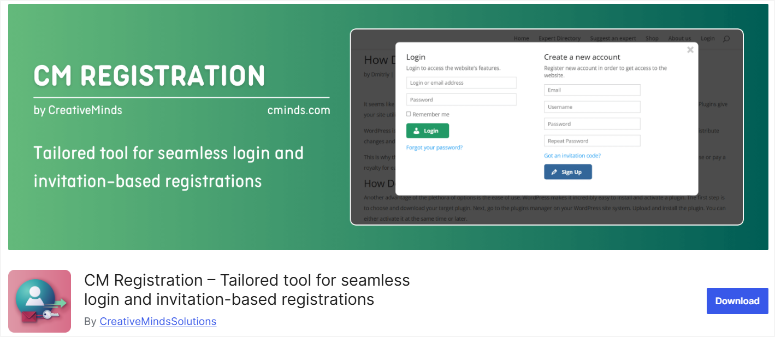
CM Registration a résolu un problème unique que je rencontrais fréquemment : des clients souhaitant une inscription contrôlée où seules les personnes invitées pouvaient créer des comptes.
Pourquoi CM Registration est-il bon pour les communautés privées ?
CM Registration transforme l'inscription ouverte en un système sur invitation uniquement. Vous générez des codes d'invitation uniques qui expirent après utilisation ou après une période définie.
Le système de génération de codes crée des codes à usage unique ou des codes à usage multiple avec des limites. Par conséquent, vous pouvez générer 100 codes pour une conférence, chacun fonctionnant une fois, ou créer un code pour une équipe, utilisable 50 fois.
La flexibilité gère parfaitement différents scénarios.
Les codes d'invitation ajoutent une couche de sécurité, empêchant les inscriptions non désirées sans approbation manuelle. Seules les personnes munies de codes valides peuvent terminer leur inscription, bloquant automatiquement tous les autres.
Le tableau de bord administrateur suit entièrement l'utilisation des codes. Vous pouvez voir quels codes ont été utilisés, combien de fois et par qui. Cette visibilité aide à gérer les campagnes d'invitation et à prévenir les abus de partage de codes.
De plus, CM Registration fonctionne aux côtés des outils anti-spam pour une protection maximale contre les fausses inscriptions et les comptes de bots.
Mon expérience avec CM Registration
J'ai utilisé CM Registration pour créer un groupe de mastermind professionnel avec 200 membres soigneusement sélectionnés. Ils souhaitaient une croissance basée sur la recommandation, où les membres existants invitaient des prospects qualifiés.
La configuration a pris 15 minutes, y compris la configuration des exigences du code d'invitation et la personnalisation du message du formulaire d'inscription.
Le plugin a ajouté un simple champ « Code d'invitation » à la page d'inscription par défaut de WordPress.
J'ai généré 200 codes d'invitation à usage unique pour les membres existants. Chaque membre a reçu un code à partager avec un filleul qualifié. Cela a permis une croissance contrôlée tout en maintenant la qualité des membres.
En conséquence, le suivi des codes a montré quels membres parrainaient activement de nouvelles personnes.
Les codes expiraient après 90 jours, garantissant que les membres ne pouvaient pas partager de codes des mois plus tard.
Une limitation est rapidement apparue : le plugin se concentre uniquement sur les codes d'invitation. Pas de champs d'inscription personnalisés, pas de connexion sociale, pas de fonctionnalités avancées. Il fait une chose bien, mais rien d'autre.
► Avantages
- L'inscription sur invitation crée des communautés exclusives en bloquant complètement les inscriptions publiques, sauf si les utilisateurs ont des codes valides.
- Les options de codes à usage unique et à usage multiple offrent une flexibilité pour différents scénarios, des conférences aux invitations d'équipe.
- Le tableau de bord de suivi des codes montre exactement quels codes ont été utilisés et par qui, offrant une visibilité complète sur les sources de parrainage.
- Le plugin gratuit gère la fonctionnalité principale sans nécessiter de mises à niveau payantes pour les fonctionnalités de base des codes d'invitation.
► Inconvénients
- L'ensemble de fonctionnalités extrêmement limité se concentre uniquement sur les codes d'invitation, sans champs personnalisés, connexion sociale ou autres améliorations d'inscription.
- L'interface de base semble utilitaire plutôt que soignée par rapport aux plugins premium avec des tableaux de bord modernes.
- Aucun système d'invitation par e-mail intégré ne nécessite de partager manuellement les codes via des canaux de communication externes.
Mon Verdict : CM Registration excelle dans une tâche spécifique : contrôler qui peut s'inscrire. Choisissez-le lorsque vous avez besoin de communautés basées sur le parrainage ou sur invitation, où la qualité prime sur la quantité. Parfait pour les groupes de réflexion, les réseaux privés et les programmes bêta avec accès contrôlé.
Tarifs : Plugin gratuit disponible ; Pro à partir de 39 $/an
Commencez avec CM Registration ici
9. Custom Login Page Customizer ⭐⭐⭐
Idéal pour : personnalisation légère et gratuite de la page de connexion
Custom Login Page Customizer est un excellent plugin de connexion pour les personnes soucieuses de leur budget qui ont besoin d'une personnalisation de base de la page de connexion sans coûts d'abonnement récurrents ni surcharge de fonctionnalités.
Pourquoi Custom Login Page Customizer est-il bon pour la personnalisation de base ?
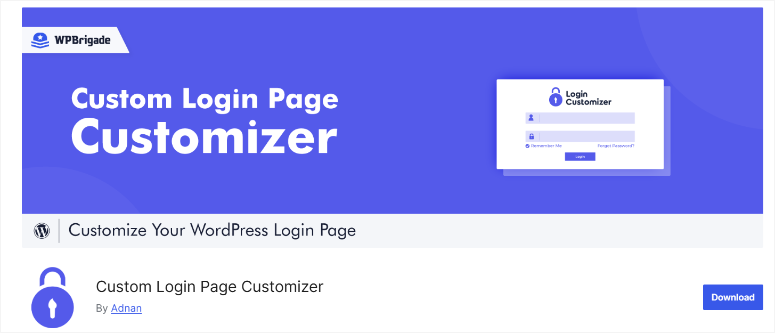
Custom Login Page Customizer gère la personnalisation essentielle de la page de connexion dans un plugin entièrement gratuit. Cela inclut le remplacement du logo, la personnalisation de l'arrière-plan, les changements de couleur et le style des boutons.
L'interface du personnalisateur en direct correspond au personnalisateur de thème natif de WordPress. Si vous avez déjà personnalisé un thème WordPress, cette interface vous semblera instantanément familière avec la même disposition de prévisualisation sur le côté.
La personnalisation du logo supprime le logo WordPress et ajoute le vôtre. Vous pouvez ajuster la taille du logo, ajouter des URL de liens et modifier le positionnement. Votre marque apparaît à la place de la marque WordPress à chaque tentative de connexion.
Les options d'arrière-plan incluent les couleurs unies, les dégradés ou les images personnalisées. Cela garantit que vous faites correspondre votre page de connexion à la conception de votre thème pour une image de marque cohérente sur l'ensemble de votre site.
Mon expérience avec Custom Login Page Customizer
J'ai utilisé Custom Login Page Customizer pour une organisation à but non lucratif avec un budget nul pour des plugins de donateurs premium.
La configuration a pris 12 minutes. J'ai téléchargé leur logo, changé l'arrière-plan en leur bleu de marque, ajusté les couleurs des champs de formulaire pour qu'elles correspondent, et stylisé le bouton de connexion avec leur couleur secondaire.
Le résultat était professionnel malgré le fait qu'il soit entièrement gratuit. Les membres du personnel ont fait des commentaires positifs sur le fait que la page de connexion correspondait enfin à leur site Web depuis son lancement.
L'impact sur les performances était faible en utilisant GTmetrix. Le plugin n'a ajouté aucune requête HTTP supplémentaire et n'a augmenté le poids de la page que de 3 Ko. Les plugins légers comme celui-ci ne nuisent pas sensiblement à la vitesse du site.
Les limitations sont devenues claires lors de la comparaison des options premium. La version gratuite de Custom Login Page Customizer n'offre pas de modèles, d'animations avancées ou d'intégration de connexion sociale.
Juste des contrôles de style de base et rien de plus.
Pour les besoins de l'organisation à but non lucratif, le basique s'est avéré parfait. Ils n'avaient pas besoin de fonctionnalités ou de modèles fantaisistes. Ils avaient besoin de leur logo et de leurs couleurs sur la page de connexion, ce que Custom Login Page Customizer a fourni gratuitement.
► Avantages
- Entièrement gratuit pour toutes les fonctionnalités sans surclassements premium, invites de mise à niveau ou limitations de fonctionnalités nécessitant des plans payants
- L'interface familière du personnalisateur WordPress la rend immédiatement utilisable pour quiconque a déjà personnalisé un thème WordPress
- L'implémentation légère ajoute une surcharge de performance minimale, mesurant seulement 3 Ko de poids de page supplémentaire lors des tests
- Couvre les besoins essentiels de branding, y compris le logo, l'arrière-plan, les couleurs et le style des boutons sans submerger les utilisateurs
► Inconvénients
- Pas de modèles prédéfinis signifie commencer à partir de zéro à chaque fois au lieu de personnaliser des points de départ professionnels
- Limité à un style de base sans fonctionnalités avancées comme la connexion sociale, les améliorations de sécurité ou les champs d'inscription personnalisés
- L'interface semble simple par rapport aux plugins premium modernes avec des expériences utilisateur plus soignées
Mon verdict : Custom Login Page Customizer fait exactement ce que son nom promet : personnalisation de la page de connexion sans complexité ni coût. Choisissez-le lorsque vous avez besoin d'un branding de base avec un budget serré et que vous n'avez pas besoin de modèles ou de fonctionnalités avancées. Parfait pour les petites organisations, les projets personnels et toute personne testant la personnalisation de la connexion avant d'investir dans des solutions premium.
Tarifs : Plugin gratuit disponible ; Pro à partir de 99 $/an
Commencez avec Custom Login Page Customizer ici
10. WP User Frontend ⭐⭐⭐⭐
Idéal pour : la soumission de contenu frontend avec inscription utilisateur
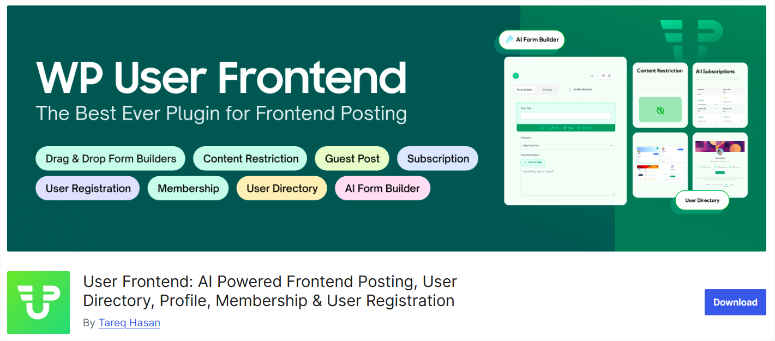
WP User Frontend vous permet de combiner l'inscription des utilisateurs avec la soumission d'articles depuis le frontend. Les membres s'inscrivent, puis commencent immédiatement à contribuer du contenu sans toucher à votre administration WordPress.
Pourquoi WP User Frontend est-il bon pour les sites de soumission de contenu ?
WP User Frontend combine l'inscription utilisateur avec la soumission de posts frontend en un seul plugin.
Les utilisateurs s'inscrivent via des formulaires personnalisés, puis soumettent des articles de blog, des produits ou des types de publication personnalisés entièrement depuis le frontend.
Le constructeur de formulaires par glisser-déposer crée des formulaires d'inscription et des formulaires de soumission de posts en utilisant la même interface.
L'édition frontend permet aux utilisateurs de gérer leur propre contenu. Ils voient leurs posts soumis dans un tableau de bord, modifient le contenu existant et suivent le statut de la soumission.
La personnalisation du tableau de bord utilisateur crée des zones membres affichant le contenu soumis, les informations de profil et l'historique d'activité. Chaque utilisateur ne voit que son propre contenu, ce qui maintient une séparation et une sécurité appropriées.
WP User Frontend fonctionne parfaitement avec les flux de travail de gestion de contenu pour les sites où plusieurs auteurs contribuent régulièrement.
Mon expérience avec WP User Frontend
J'ai configuré WP User Frontend pour une communauté de partage de recettes. Ils voulaient que les utilisateurs s'inscrivent et soumettent des recettes sans accorder l'accès administrateur WordPress à tout le monde.
La configuration a pris 45 minutes, y compris la création du formulaire d'inscription, la construction du formulaire de soumission de recettes et la configuration du tableau de bord utilisateur.
Les formulaires ont collecté les champs d'inscription standard, ainsi que les spécialités culinaires et les préférences alimentaires.
La soumission des recettes a fonctionné immédiatement après l'inscription. Les nouveaux membres ont rempli les formulaires de recettes avec le titre, les ingrédients, les instructions, les photos et le temps de cuisson.
Pour le contrôle qualité, les soumissions allaient au propriétaire du site pour approbation avant publication.
Le tableau de bord frontend montrait à chaque membre ses recettes soumises avec des indicateurs de statut. Les recettes en attente affichaient « En cours d'examen », les recettes approuvées affichaient « Publié », et les soumissions rejetées incluaient les commentaires de l'administrateur.
L'engagement des membres a augmenté car la barrière à la contribution a considérablement diminué. Auparavant, l'octroi d'un accès administrateur effrayait les contributeurs occasionnels.
La soumission frontend a complètement éliminé cette intimidation.
La qualité du contenu s'est améliorée grâce aux formulaires de soumission structurés. Les champs obligatoires garantissaient que les recettes incluaient toutes les informations nécessaires avant la soumission, réduisant ainsi les publications incomplètes nécessitant des modifications.
► Avantages
- La combinaison de l'inscription et de la soumission de contenu résout deux besoins avec un seul plugin au lieu d'installer plusieurs solutions.
- La soumission de publications en frontend maintient les utilisateurs à l'écart de l'administration WordPress, réduisant les risques de sécurité et empêchant les dommages accidentels au site.
- Le constructeur de formulaires par glisser-déposer crée des formulaires d'inscription et de soumission en utilisant une interface familière sans exigences de codage.
- Le tableau de bord utilisateur donne aux membres le contrôle de leur contenu tout en maintenant une séparation avec l'administration du site.
► Inconvénients
- La richesse des fonctionnalités crée une complexité qui submerge les utilisateurs qui ont seulement besoin d'une inscription simple sans soumission de contenu.
- La version gratuite limite les types de publications et les fonctionnalités avancées, nécessitant une mise à niveau Pro pour une fonctionnalité complète sur les sites complexes.
- Courbe d'apprentissage plus raide que les plugins d'inscription simples en raison des fonctionnalités supplémentaires de gestion de contenu.
Mon Verdict : WP User Frontend excelle lorsque vous avez besoin de l'inscription utilisateur et de la soumission de contenu en frontend ensemble. Choisissez-le pour les blogs communautaires, les sites de recettes, les annuaires ou toute plateforme où les utilisateurs enregistrés contribuent régulièrement du contenu. Évitez-le si vous n'avez besoin que de la connexion et de l'inscription sans soumission de contenu, car des plugins plus simples remplissent mieux cette fonction.
Tarifs : Plugin gratuit disponible ; Pro à partir de 49 $/an
Commencez avec WP User Frontend ici
Bien joué ! Voici ma liste des meilleurs plugins de connexion et d'inscription. Mais avant de conclure, voici quelques options qui ont failli figurer sur ma liste.
Bonus : d'autres solutions de connexion et d'inscription à considérer
Ultimate Member ⭐⭐⭐
Ultimate Member crée des communautés de membres complètes avec des profils frontend, des formulaires d'inscription et des annuaires de membres.
La version gratuite comprend la gestion des rôles, la restriction de contenu et des champs de profil personnalisables.
Parfait pour créer des réseaux sociaux ou des annuaires professionnels où les profils des membres comptent autant que l'inscription.
La configuration prend 30 minutes et permet une gestion des membres en frontend sans accès à l'administration WordPress.
User Registration by WPEverest ⭐⭐⭐
User Registration by WPEverest crée des formulaires d'inscription personnalisés avec une simplicité de glisser-déposer. Il comprend la vérification par e-mail, les options de connexion sociale et la modification de profil frontend.
Le constructeur de formulaires rivalise avec les solutions premium tout en restant entièrement gratuit. La personnalisation des e-mails vous permet de personnaliser les notifications d'inscription.
Choisissez celui-ci lorsque vous avez besoin de formulaires d'inscription de niveau WPForms sans le coût.
Theme My Login ⭐⭐
Theme My Login intègre les formulaires de connexion et d'inscription directement dans votre thème au lieu de pages WordPress séparées.
Vous pouvez créer des pages de connexion personnalisées n'importe où sur votre site à l'aide de shortcodes. Comprend la récupération de mot de passe, les notifications par e-mail et la modération des utilisateurs.
Cela fonctionne très bien pour les sites qui souhaitent des formulaires de connexion dans les barres latérales ou intégrés dans les pages de contenu. Le plugin gratuit répond à la plupart des besoins sans mises à niveau premium.
Importance des plugins de connexion et d'inscription WordPress
La raison principale de l'installation d'un plugin d'inscription et de connexion pour WordPress est de donner à vos utilisateurs un accès à votre site Web de la manière la plus sûre et la plus simple possible.
Le bon point est que de tels plugins offrent une protection pour vous et vos utilisateurs.
Premièrement, les plugins de connexion agissent comme votre première ligne de défense.
Ils vous protègent contre l'accès non autorisé des utilisateurs en exigeant que vos utilisateurs créent un profil avant d'accéder à certaines sections de votre site.
Même après l'enregistrement, ces plugins peuvent verrouiller les comptes après plusieurs tentatives de connexion infructueuses. Cela peut arrêter les attaques par force brute si des pirates essaient plusieurs combinaisons de mots de passe pour accéder au profil de l'utilisateur.
De plus, les plugins de connexion WordPress vous aident à créer un accès basé sur les rôles pour vos utilisateurs. Vous pouvez contrôler qui a accès aux informations sensibles et aux fonctions administratives, minimisant ainsi le risque d'utilisation abusive interne.
D'autre part, les plugins d'enregistrement pour WordPress protègent également les données de vos utilisateurs.
Ces plugins garantissent que les mots de passe et autres données sensibles sont cryptés, à la fois en transit (via HTTPS) et au repos. Cela rend difficile pour les attaquants d'intercepter ou d'accéder à ces informations.
Cette mesure est particulièrement bénéfique pour les utilisateurs qui utilisent un mot de passe courant sur de nombreuses plateformes.
Voici d'autres raisons d'utiliser des plugins d'enregistrement et de connexion.
- Expérience conviviale : Ces plugins permettent à vos utilisateurs de s'inscrire depuis le front-end de votre site web. Cela garantit un processus fluide, même sans expérience. Cela peut augmenter le taux d'inscription, conduisant à plus de clients.
- Gérer les utilisateurs : Comme mentionné, les plugins d'inscription peuvent vous aider à attribuer rapidement des niveaux d'accès à vos utilisateurs. En conséquence, vous pouvez rapidement surveiller et gérer vos utilisateurs automatiquement. Les plugins de connexion peuvent également vous aider à gérer les abonnements sur les sites d'adhésion.
- Suivi du comportement des utilisateurs : Vous pouvez collecter des données sur le comportement des utilisateurs, telles que la fréquence de connexion et l'interaction avec le contenu. Vous pouvez utiliser ces données pour améliorer les stratégies marketing et de contenu.
Comment choisir le bon plugin de connexion et d'inscription utilisateur
Choisir le bon plugin dépend de vos besoins spécifiques plutôt que de simples listes de fonctionnalités. Voici comment faire correspondre les plugins à votre situation.
Choisissez WPForms si vous :
- Avez besoin de champs d'inscription personnalisés avec une logique conditionnelle affichant/masquant des questions en fonction des réponses
- Souhaitez des formulaires conversationnels qui semblent conviviaux plutôt que d'interroger les utilisateurs avec des murs de champs
- Gérez des entreprises de services, des associations professionnelles ou des plateformes nécessitant des parcours d'inscription différents par type d'utilisateur
- Préférez la création de formulaires par glisser-déposer sans toucher au code ni engager de développeurs
WPForms excelle dans les flux d'inscription complexes où différents utilisateurs ont besoin de champs différents. La logique conditionnelle élimine la confusion des formulaires.
Choisissez SeedProd si vous :
- Souhaitez un contrôle visuel complet sur la conception de la page de connexion sans connaissances en CSS
- Avez besoin de pages de destination en plus de la personnalisation de la connexion pour une image de marque cohérente
- Privilégiez l'esthétique de la conception et l'expérience utilisateur de marque au-dessus des fonctionnalités d'inscription complexes
- Gérez des agences gérant plusieurs sites clients avec des exigences de marque différentes
SeedProd domine la conception visuelle. Choisissez-le lorsque l'apparence est aussi importante que la fonctionnalité.
Choisissez Formidable Forms si vous :
- Besoin de profils utilisateurs frontend affichant les informations des membres publiquement
- Souhaitez des calculs avancés ou une tarification conditionnelle dans les formulaires d'inscription
- Créez des annuaires, des places de marché ou des plateformes où les profils publics sont importants
- Nécessitez des relations de données complexes entre l'inscription et d'autres contenus du site
Formidable Forms gère des scénarios avancés que d'autres constructeurs de formulaires ne peuvent pas aborder. La courbe d'apprentissage est rentable pour les exigences complexes.
Choisissez MemberPress si vous :
- Gérez des sites d'adhésion payants avec facturation par abonnement et paiements récurrents
- Nécessitez une restriction de contenu protégeant des articles, pages ou cours spécifiques réservés aux membres
- Souhaitez un traitement des paiements intégré via Stripe ou PayPal sans plugins supplémentaires
- Créez des plateformes d'apprentissage, des sites de contenu premium ou des communautés avec des niveaux d'accès hiérarchisés
MemberPress combine l'inscription avec une gestion complète des adhésions. Laissez tomber si vous avez seulement besoin de personnalisation de la connexion.
Choisissez ProfilePress ou Nextend Social Login si vous :
- Souhaitez une connexion sociale réduisant les frictions d'inscription avec une authentification en un clic via Google ou Facebook
- Voyez des taux d'abandon d'inscription élevés car les utilisateurs détestent créer de nouveaux mots de passe
- Lancez des communautés où l'inscription rapide est plus importante que la collecte de données de profil exhaustives
- Besoin de gestion de profil frontend pour éloigner les utilisateurs de la confusion de l'administration WordPress
ProfilePress offre plus de fonctionnalités mais coûte plus cher. Nextend Social Login fournit une connexion gratuite à Google/Facebook/Twitter sans coûts récurrents.
Choisissez LoginPress ou Custom Login Page Customizer si vous :
- N'avez besoin que de la personnalisation de la page de connexion sans fonctionnalités d'inscription complexes ou flux de travail
- Voulez un aperçu en direct montrant les changements instantanément pendant que vous personnalisez les couleurs et les logos
- Avez un budget limité et avez juste besoin que les bases soient couvertes sans ensembles de fonctionnalités premium
- Gérez de petites entreprises ou des projets personnels où une simple connexion personnalisée suffit
LoginPress offre des modèles et une finition soignée. Custom Login Page Customizer reste entièrement gratuit. Les deux évitent la complexité de l'inscription.
Choisissez CM Registration si vous :
- Avez besoin d'une inscription sur invitation uniquement où seules les personnes avec des codes peuvent créer des comptes
- Gérez des communautés exclusives, des programmes bêta ou des réseaux privés avec une croissance contrôlée
- Voulez une expansion basée sur les parrainages où les membres existants invitent de nouveaux membres qualifiés
- Exigez un suivi des codes montrant quelles invitations ont été utilisées et par qui
Ce plugin fait une chose parfaitement : accès contrôlé. Évitez-le pour les sites d'inscription publique.
Choisissez WP User Frontend si vous :
- Avez besoin que les utilisateurs soumettent du contenu (articles, produits, annonces) après l'inscription
- Voulez des tableaux de bord frontend où les membres gèrent leurs propres soumissions
- Créez des blogs communautaires, des sites de recettes, des annuaires ou des places de marché avec du contenu généré par les utilisateurs
- Exigez des flux de travail d'approbation qui examinent les soumissions des utilisateurs avant la publication
WP User Frontend combine l'enregistrement à la gestion de contenu. C'est excessif si vous avez seulement besoin d'une fonctionnalité de connexion basique.
Cela marque la fin de ma liste des meilleurs plugins de connexion et d'enregistrement. Si quelque chose n'est pas clair, consultez la foire aux questions ci-dessous.
FAQ : Meilleurs plugins de connexion et d'inscription utilisateur
Quel est le meilleur plugin gratuit d'enregistrement d'utilisateurs pour WordPress ?
WPForms offre la solution d'inscription gratuite la plus complète avec des champs personnalisés et une protection anti-spam. Pour une connexion sociale pure sans frais, Nextend Social Login fournit une intégration Google, Facebook et Twitter entièrement gratuite. Si vous avez seulement besoin de personnaliser la page de connexion, Custom Login Page Customizer gère les bases sans frais.
Comment ajouter la connexion sociale à mon site WordPress ?
Installez ProfilePress ou Nextend Social Login, puis créez des comptes développeurs auprès de Google, Facebook ou Twitter pour obtenir les identifiants API. Configurez les identifiants dans les paramètres de votre plugin, et les boutons de connexion sociale apparaîtront automatiquement sur les pages d'inscription. La plupart des utilisateurs terminent la configuration de la connexion sociale en 30 à 40 minutes, y compris la configuration de l'API.
Puis-je personnaliser les pages de connexion WordPress sans plugins ?
Oui, mais cela nécessite de modifier les fichiers du thème et d'écrire du code CSS ou PHP personnalisé. Les plugins de personnalisation de connexion comme LoginPress ou Custom Login Page Customizer fournissent des interfaces visuelles, éliminant les exigences de codage. Les plugins garantissent également que les mises à jour n'écrasent pas vos personnalisations, contrairement aux modifications directes des fichiers du thème.
Quelle est la différence entre les plugins de connexion et les plugins d'adhésion ?
Les plugins de connexion personnalisent les formulaires d'inscription et les pages de connexion sans gérer l'accès au contenu ou les paiements. Les plugins d'adhésion comme MemberPress incluent la fonctionnalité de connexion ainsi que la facturation par abonnement, la restriction de contenu et la gestion des membres. Choisissez des plugins de connexion pour l'inscription de base, des plugins d'adhésion pour le contrôle d'accès payant.
Comment puis-je empêcher les enregistrements de spam sur mon site WordPress ?
Activez la vérification par e-mail, obligeant les utilisateurs à confirmer leur adresse e-mail avant l'activation de leur compte. Ajoutez un CAPTCHA ou un reCAPTCHA aux formulaires d'inscription, bloquant les soumissions automatiques par les robots. Utilisez des codes d'invitation pour limiter l'inscription aux personnes disposant de codes valides. La plupart des plugins d'inscription incluent ces fonctionnalités de prévention du spam.
Ai-je besoin de plugins différents pour la connexion et l'inscription ?
Non. La plupart des plugins de connexion modernes gèrent à la fois la personnalisation de la page de connexion et la création de formulaires d'inscription. WPForms, ProfilePress et LoginPress gèrent tous la connexion et l'inscription ensemble. Vous n'avez besoin de plugins séparés que lorsque vous combinez des outils spécialisés comme OptinMonster pour la capture de prospects avec WPForms pour la gestion réelle de l'inscription.
Verdict final : Faut-il utiliser un plugin de connexion et d'inscription utilisateur ?
Oui, si vous voulez que votre site WordPress ait l'air professionnel au lieu d'être bloqué en 1999.
Les pages de connexion par défaut de WordPress effraient les utilisateurs avec une esthétique de formulaire gouvernemental grisâtre. Les robots de spam inondent les inscriptions ouvertes en quelques jours. Vous perdez des membres potentiels car la création de mot de passe frustre tout le monde.
Le bon plugin résout ces trois problèmes. Les pages de connexion personnalisées correspondent à la conception de votre site. Une protection intelligente contre le spam bloque automatiquement les faux comptes. La connexion sociale permet aux gens de s'inscrire en 8 secondes au lieu de 3 minutes.
Commencez par votre plus grand point sensible.
La plupart des plugins offrent des versions gratuites qui répondent aux besoins de base. Testez-les avec de vrais utilisateurs avant de dépenser de l'argent pour des fonctionnalités premium que vous n'utiliserez peut-être pas.
Vos membres méritent mieux que les pages de connexion par défaut de WordPress. Choisissez un plugin, installez-le ce week-end et regardez les conversions d'inscription s'améliorer.
Centre de ressources : Gestion des utilisateurs et personnalisation de WordPress
Une connexion et une inscription efficaces se connectent à des stratégies plus larges de gestion et de personnalisation des utilisateurs WordPress :
- Comment créer un site d'adhésion dans WordPress étape par étape – Créez des communautés de membres complètes avec du contenu protégé et la facturation par abonnement
- Comparatif des meilleurs plugins de sécurité WordPress – Protégez les pages de connexion et les comptes utilisateurs avec l'authentification à deux facteurs et la surveillance de sécurité
- Comparatif des meilleurs services de marketing par e-mail – Connectez les formulaires d'inscription aux listes d'e-mails pour des séquences d'intégration automatisées des membres
- Optimisation de la vitesse WordPress – Assurez-vous que les plugins de connexion ne ralentissent pas votre site grâce à des stratégies d’optimisation des performances
Ces ressources vous aident à construire des systèmes complets de gestion d'utilisateurs où l'inscription n'est que la première étape.

Commentaires Laisser une réponse