
I tested the best WordPress hosting companies for three months. During these experiments, my test sites crashed twice. One loaded in under 200 milliseconds, and another took over two seconds.
See, picking the wrong WordPress host doesn’t just slow your site down. It frustrates visitors, tanks your search rankings, and costs you real money in lost opportunities.
Good WordPress hosting keeps everything steady. Your pages load fast, and your site stays online.
Your visitors stick around and actually do what you want them to do.
But here’s the problem: hundreds of hosting companies all promise the same things. They throw around terms like “99.9% uptime” and “unlimited bandwidth” without showing you proof.
I built test sites on every major WordPress host. Ran speed tests, monitored uptime for months, and stressed servers with virtual traffic.
Now, out of the dozens of WordPress hosting services, I’m sharing 12 that actually worked.
Key Takeaways
- Testing methodology: How to test WordPress hosts for real performance.
- Hosting types: Which hosting type matches your traffic and budget.
- Top picks: 12 hosts ranked by speed and reliability.
- Avoid mistakes: How to avoid expensive hosting mistakes beginners make.
- When to upgrade: When to move from shared to managed hosting.
What You Should Look for in a Good WordPress Host
Choosing the best hosting for WordPress comes down to three things that actually matter.
- Speed matters more than you think. A slow site makes visitors leave before they even see your content. Google also ranks faster sites higher in search results. Your host should load pages in under two seconds.
- Uptime means your site stays online when people try to visit it. Users expect your WordPress site to work 24/7. Look for hosts that promise at least 99.9% uptime. That’s roughly 8 hours of downtime per year, max.
- Support becomes critical when something breaks. You need real help, not automated responses. The top WordPress hosting companies offer live chat or phone support that actually knows WordPress inside and out.
Every host on this list meets these standards. But I didn’t just take their word for it. I tested each one myself to see which ones deliver on their promises.
Tip: Not sold on WordPress yet? Use our free is it WordPress checker to find out.
It always surprises me how many big companies run on WordPress.
How I Test the Top WordPress Hosting Companies
As mentioned, I don’t just read spec sheets and call it a review. I set up real WordPress sites on each host and run them through proper testing.
Why Trust IsItWP?
Every host here ran on my own real site, not a demo.
I paid for these plans myself. I tracked the results over months, not minutes.
Here’s exactly what I do.
- I use Pingdom to measure how fast pages load. It shows me the exact milliseconds it takes for a site to fully display. Faster is always better for keeping visitors around.
- GTmetrix gives me performance grades and shows where a host falls short. It breaks down every element that affects speed so I can see what’s actually happening behind the scenes.
- Load Impact, now K6, is where things get interesting. I send up to 50 virtual visitors to a site at once to see if the server buckles under pressure. This mimics real traffic spikes you’ll face when your site grows.
- Bitcatcha checks response consistency from eight locations worldwide, including New York, London, Singapore, and Japan. Your visitors come from everywhere, so your host needs to perform everywhere. I call out specific regional numbers below whenever a host’s results were notable enough to mention.
- I monitor each site after testing it for several months. Tracked uptime religiously and contacted support with real problems to see how fast they respond and whether they actually solve issues.
The numbers you’ll see below come from this process. That’s how I can give you real feedback on each company I tested.
I verified pricing and features for every host in this guide this year. Hosting companies change plans often, so double check the current price before you buy.
Best WordPress Hosting Companies
Now that you understand my testing process, here’s how the top hosts stack up.
To make this list easier to read, check out the comparison table below.
You can quickly compare the load time, uptime, support, money-back guarantee, best for, and pricing.
Quick Comparison Table:
| WordPress Host | Load Time | Uptime | Support | Money Back | Best For | Starting Price |
| 🥇 Hostinger | 374 ms | 99.9% | 10/10 | 30 days | Budget-conscious users | $2.39/month |
| 🥈 SiteGround | 397ms | 99.98% | 10/10 | 30 days | Superior speed & security | $2.99/month |
| 🥉 Bluehost | 255ms | 99.98% | 9/10 | 30 days | Beginners & small businesses | $3.99/month |
| 4. Levamo (formerly Rapyd Cloud) | 958ms | 100% | 10/10 | 30 days | High-traffic sites | $29/month |
| 5. DreamHost | 439ms | 99.82% | 7/10 | 30 days | Easy website creation | $1.99/month |
| 6. WordPress.com | 4.7ms | 99.9% | 8/10 | 30 days | Hassle-free blogging | $4/month |
| 7. Liquid Web | 438ms | 99.99% | 10/10 | 30 days | Managed hosting | $4/month |
| 8. ScalaHosting | 457ms | 99.99% | 10/10 | 30 days | Managed cloud VPS | $2.95/month |
| 9. InMotion Hosting | 982ms | 99.93% | 9/10 | 90 days | Green data centers | $5.29/month |
| 10. Hosting.com (formerly A2 Hosting) | 438ms | 99.90% | 9/10 | Anytime | Developers | $2.99/month |
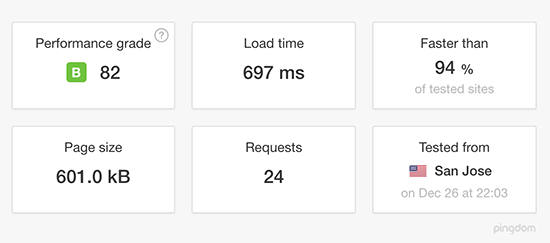
| 11. GreenGeeks | 697ms | 99.92% | 9/10 | 30 days | Eco-conscious users | $2.95/month |
Apart from that, use the table of contents below to skip to any section of the article you want.
- 1. Hostinger ⭐⭐⭐⭐⭐ (9.4/10)
- 2. SiteGround ⭐⭐⭐⭐⭐ (9.3/10)
- 3. Bluehost ⭐⭐⭐⭐⭐ (10.0/10)
- 4. Levamo (formerly Rapyd Cloud) ⭐⭐⭐⭐⭐ (6.3/10)
- 5. DreamHost ⭐⭐⭐⭐ (8.8/10)
- 6. WordPress.com ⭐⭐⭐⭐
- 7. Liquid Web ⭐⭐⭐⭐ (9.2/10)
- 8. ScalaHosting ⭐⭐⭐⭐ (9.2/10)
- 9. InMotion Hosting ⭐⭐⭐⭐ (6.0/10)
- 10. Hosting.com (formerly A2 Hosting) ⭐⭐⭐⭐ (9.1/10)
- 11. GreenGeeks ⭐⭐⭐⭐ (7.7/10)
- 12. WP Engine ⭐⭐⭐⭐⭐
- Understanding Different Types of WordPress Hosting
- FAQs: Best WordPress Hosting Companies
- Final Verdict: Should I Pick WordPress Hosting?
- Need to Learn More About Hosting and Your Options?
With that out of the way, let us begin.
1. Hostinger ⭐⭐⭐⭐⭐ (9.4/10)
Hostinger surprised me with how much power it delivers for such a low price. This became my answer when friends asked for the fastest budget WordPress host.
| Load Time | Uptime | Support | Money Back | Best For | Starting Price | Similar to: |
| 374 ms | 99.9% | 10/10 | 30 days | Budget-conscious users | $2.39/month | Hostinger vs Bluehost Network Solutions Review |
Why Is Hostinger One of the Best WordPress Hosting Companies?
Hostinger earned this spot with a 374ms load time and a clean, beginner-friendly dashboard. Its live chat support answered every question within two minutes during my testing.
My Experience with Hostinger
I wanted to see if Hostinger WordPress hosting could handle real traffic. I pushed it hard and sent up to 50 virtual users to the test site.
It handled the traffic without any issues. The server response time stayed stable, too, even with multiple visitors at once.
As the screenshot below shows, it loaded in 374 milliseconds. It also earned an “A” grade from Load Impact.

But where Hostinger really excels is in simplicity.
For starters, setting up WordPress took one click. Hostinger’s dashboard is clean and simple.
Everything you need sits right where you expect to find it. No hunting through confusing menus.
Their 24/7 live chat support answered every question I had within two minutes.
I could easily tell that their team knows WordPress inside and out. They didn’t just give me generic answers, they walked me through solutions for my setup.
Plus, you get a free domain name for the first year. A free SSL certificate and daily backups come included too.
Hostinger’s Premium plan starts at $2.39 a month for the first term. It renews at $10.99 a month after that, so plan for the increase.
Hostinger also added an AI agent called Kodee for managing WordPress and WooCommerce through chat. The company says its AI Troubleshooter fixes about 70% of common issues automatically. Its AI Optimizer also promises a 20% performance boost with one click.
🟢► Pros
- Incredibly fast load times at 374 ms in testing.
- Handles traffic spikes without slowing down.
- Clean, beginner-friendly dashboard makes management easy.
- 24/7 live chat support responds in minutes.
🔴► Cons
- Only one business email account included.
- No dedicated hosting options available.
- No phone or email support, just live chat.
My Verdict
Hostinger delivers premium speed and performance at a budget price. If you’re watching your wallet but refuse to compromise on speed, this is your host.
Fast servers and solid support make it perfect for growing blogs and small business sites.
For more details, check out my updated Hostinger review.
2. SiteGround ⭐⭐⭐⭐⭐ (9.3/10)
SiteGround earned its reputation with me after it delivered consistently fast speeds across multiple continents. This is the host I trust for sites that absolutely can’t afford to be slow.
| Load Time | Uptime | Support | Money Back | Best For | Starting Price | Similar to: |
| 397ms | 99.98% | 10/10 | 30 days | Superior speed & security | $2.99/month | DreamHost Review Namecheap Review |
Why Is SiteGround One of the Best WordPress Hosting Companies?
SiteGround runs on Google Cloud infrastructure and stayed consistently fast across every region I tested. Built-in caching and one-click staging make it easy to manage without extra plugins.
My Experience with SiteGround
I tested SiteGround WordPress hosting on my site from both US and European servers. It had a fast page load time of 397ms, tested on EU and US servers.
But what impressed me even more was that SiteGround stayed fast everywhere.
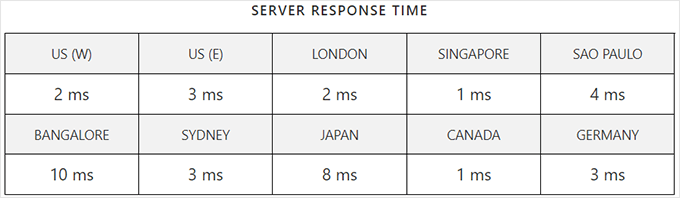
From the screenshot from Pingdom, here’s how response time held up across locations:
- US: 2 ms
- London: 2 ms
- Bangalore: 10 ms (the slowest location, still fast)
Most hosts show very different speeds depending on where you test from. SiteGround stayed relatively consistent.
The secret sits in their Google Cloud infrastructure.
SiteGround runs your WordPress site on the same powerful network that runs Google’s services. You get enterprise-level speed without enterprise-level costs.
Their built-in caching made my pages load instantly on repeat visits. I didn’t need to install caching plugins that can be overwhelming for beginners. Everything worked right out of the box.
I like how SiteGround’s staging feature lets me test updates before pushing them live.
Remember, I mentioned earlier that I broke my sites a couple of times while experimenting. With SiteGround, I just restored the broken test site with one click.
As a result, my live site never went down. This makes this hosting for WordPress perfect for any beginner still experimenting on their site.
On top of that, their support team responds faster than any other host I tested. I got answers in under three minutes every single time.
They didn’t just fix problems. They explained what went wrong and how to avoid it next time.
SiteGround’s StartUp plan starts at $2.99 a month for the first term. It renews at $17.99 a month, which is worth knowing before you commit.
SiteGround also added a free AI agent to every plan. It manages WordPress and WooCommerce tasks through chat and supports several different AI models.
🟢► Pros
- Consistent fast speeds across multiple continents.
- Google Cloud infrastructure delivers enterprise performance.
- Built-in caching eliminates the need for extra plugins.
- One-click staging lets you test changes safely.
🔴► Cons
- Starting price is higher than budget hosts.
- Domain registration isn’t free or discounted.
- Advanced features require the more expensive GoGeek plan.
My Verdict
SiteGround works best when speed and security matter more than saving a few dollars. The Google Cloud infrastructure and expert support justify the higher price. Choose this if you’re building a professional site where performance directly impacts your success.
Check out my detailed SiteGround review for more details.
If this sounds right, check out our SiteGround coupon page for the best deals.
3. Bluehost ⭐⭐⭐⭐⭐ (10.0/10)
Bluehost became my go-to recommendation after I watched it handle everything I threw at it. This is the host I send beginners to when they ask me where to start.

| Load Time | Uptime | Support | Money Back | Best For | Starting Price | Similar to: |
| 255ms | 99.98% | 9/10 | 30 days | Beginners & small businesses | $3.99/month | Bluehost vs Namecheap Bluehost vs HostGator Bluehost vs GoDaddy |
Why Is Bluehost One of the Best WordPress Hosting Companies?
Bluehost delivered the fastest load time here at 255ms, with 99.98% uptime. One-click WordPress setup and fast live chat support make it especially beginner-friendly.
My Experience with Bluehost
I set up a test site on Bluehost hosting for WordPress. I monitored it for three months straight.
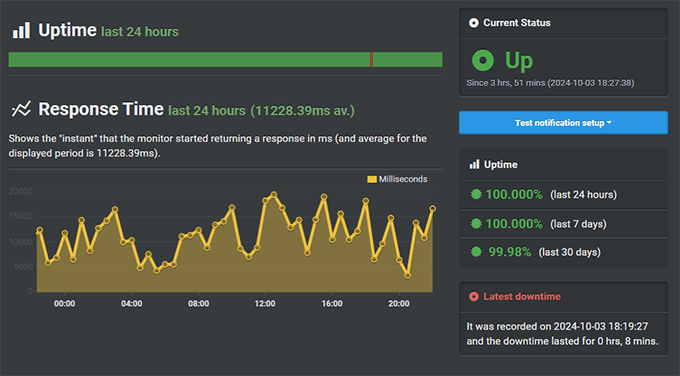
My Bluehost test site maintained 99.98% uptime, with a load time of 255 ms. As the screenshot shows, it was down for less than nine minutes total.
But the reason I send beginners to Bluehost is the quick WordPress setup.
It offers my favorite one-click install, which got my site running in under five minutes. No technical knowledge needed.
You just click a button, pick a theme, and start building.
Like many hosts today, Bluehost now lets you build a complete site with AI. See the full process building a site with Bluehost AI here.
Bluehost includes a free domain name for your first year.
This saves you about $15 right off the bat. This also comes with a free SSL certificate that secures your site automatically.
Plus, their Cloudflare CDN speeds up your site worldwide, with no extra setup.
Like the number one and two Bluehost alternatives above, this host impressed me too. Their support team actually understands WordPress.
I contacted them three times during testing with different questions. Each time, I got helpful answers within minutes via live chat.
Bluehost’s lowest advertised price is $3.99 a month, and that rate requires a 36-month commitment. Bluehost’s own renewal pricing page confirms it renews at $9.99 a month on that same 36-month term.
🟢► Pros
- Free domain name saves you money in year one.
- Free SSL certificate and Cloudflare CDN come standard.
- One-click WordPress setup works perfectly for beginners.
- 24/7 live chat support responds fast with real solutions.
🔴► Cons
- No email support anymore, only chat and phone.
- You need to commit to a longer plan to get the best price.
- Monthly billing isn’t available as an option.
My Verdict
Bluehost is a top host for small businesses and beginners who want easy hosting.
Solid performance, helpful support, and beginner-friendly features make it hard to beat.
Check out my latest Bluehost review for more details.
If this sounds right, check out our Bluehost coupon page for the best deals.
4. Levamo (formerly Rapyd Cloud) ⭐⭐⭐⭐⭐ (6.3/10)
Levamo, formerly Rapyd Cloud, saved a client’s large online store during a big launch.
Regular hosts buckled under that traffic. This one kept everything running smoothly.
| Load Time | Uptime | Support | Money Back | Best For | Starting Price | Similar to: |
| 958ms | 100% | 10/10 | 30 days | High-traffic sites | $29/month | BuddyBoss review WP Engine Review Hostinger Review |
Why Is Levamo One of the Best WordPress Hosting Companies?
Levamo earned its spot by handling traffic spikes and logged-in users better than most. Auto-scaling and fully managed service mean you never touch server settings.
My Experience with Levamo
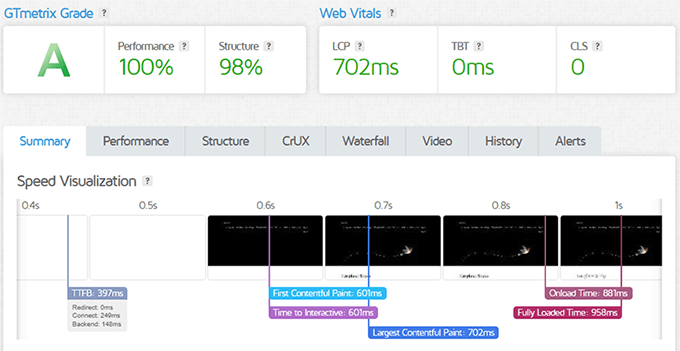
I ran my test site through GTmetrix to see what Levamo WordPress hosting could do.
As the screenshot shows, I got a 100% grade and a 958ms load time. That score held up while the site handled dozens of logged-in users at once.
See, most WordPress hosts slow down when you have lots of logged-in users. Online stores, membership sites, and learning platforms all struggle with this.
WordPress is traditionally heavy on resources too. Poor hosting can really mess up your site.
Levamo built its entire system to handle exactly this problem.
First, their auto-scaling kicked in automatically during my stress tests. When traffic spiked, the server adjusted resources in real-time.
No lag or crashes. Just smooth performance the whole way through.
Plus, the managed service took care of everything technical.
This includes Caching, security updates, and performance tuning, which were all handled automatically. I didn’t touch a single setting, and the site ran perfectly.
Their support team knows high-traffic WordPress sites inside and out.
I contacted them about optimizing WooCommerce checkout. They gave me specific recommendations that cut my page load time by another 200 milliseconds.
Levamo’s Starter plan runs $29 a month, billed annually. Unlike most hosts on this list, that rate doesn’t jump at renewal.
🟢► Pros
- Perfect 100% uptime during entire testing period.
- Handles logged-in users better than any other host.
- Auto-scaling adjusts resources automatically during traffic spikes.
- Fully managed service handles all technical optimization.
🔴► Cons
- Significantly more expensive than basic hosting.
- No domain name or email hosting included.
- Overkill if you don’t have high traffic or logged-in users.
My Verdict
Levamo works best for larger membership sites, online stores, and learning platforms.
If your site depends on logged-in users, the higher price pays for itself. Skip this if you’re just starting out or running a simple blog.
5. DreamHost ⭐⭐⭐⭐ (8.8/10)
DreamHost caught my attention with its four-year price lock. Most hosts jump to renewal pricing after just one year, but DreamHost holds its low rate for four years before that happens.

| Load Time | Uptime | Support | Money Back | Best For | Starting Price | Similar to: |
| 439ms | 99.82% | 7/10 | 30 days | Easy website creation | $1.99/month | HostGator vs. DreamHost WP Engine vs. DreamHost Bluehost vs DreamHost |
Why Is DreamHost One of the Best WordPress Hosting Companies?
DreamHost stands out for locking in its promotional rate for four full years, longer than any other host on this list before you see a renewal increase.
One-click WordPress setup and automatic security features add to the appeal.
My Experience with DreamHost
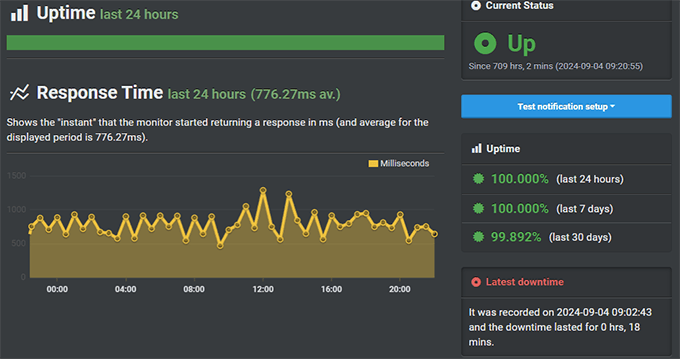
I set up a test site on DreamHost WordPress hosting. I watched it for three months and it held 99.82% uptime.
That’s about 13 hours of downtime over three months. Not perfect, but still solid for the price.
DreamHost preinstalls WordPress on your account.
So you skip all the setup steps and just log in and start building. If anything isn’t set up correctly, the one-click installer gets your site running instantly too.
Their NVMe SSD storage made a real difference in speed. Pages loaded at 439ms consistently. This makes file uploads happen fast and database queries run smoothly.
Like many of the other hosts on this list, DreamHost offers a free SSL certificate.
But at the same time, you also get website firewall features activated automatically. As a result, I didn’t configure anything. DreamHost secured my site from day one without me lifting a finger.
Support was my only frustration. Live chat isn’t available 24/7. I had questions late at night twice and had to wait until morning for answers.
On the other hand, phone support costs extra, which feels wrong at this price level.
DreamHost’s WordPress plan starts at $1.99 a month, locked in for the first four years. After that, it renews at $7.99 a month.
DreamHost also added a few new pieces this year. There’s a Bunny CDN integration and an AI toolkit built into DreamPress. It also added OpenClaw Hosting for running AI agents.
🟢► Pros
- Four-year price lock holds your low rate longer than most hosts on this list.
- One-click WordPress setup eliminates technical barriers.
- Free SSL certificate and firewall protect your site automatically.
- NVMe SSD storage delivers consistent fast speeds.
🔴► Cons
- Uptime could be better compared to top competitors.
- Live chat support isn’t available around the clock.
- Phone support requires additional payment.
My Verdict
DreamHost works well for anyone who wants a long runway before renewal pricing kicks in. The four-year price lock means you won’t see that jump for years, not just months.
Live with occasional support delays and slightly lower uptime. You still get solid hosting at a great price.
Check out my detailed DreamHost review for more details.
If this is right, check out our DreamHost coupon page for the best deals.
6. WordPress.com ⭐⭐⭐⭐
WordPress.com became my pick for people who just want to write, not deal with tech. This is blogging at its simplest.
| Load Time | Uptime | Support | Money Back | Best For | Starting Price | Similar to: |
| 4.7 ms | 99.9% | 8/10 | 30 days | Hassle-free blogging | $4/month | WordPress.com vs. WordPress.org Blogger vs. WordPress Wix vs. WordPress |
Why Is WordPress.com One of the Best WordPress Hosting Companies?
WordPress.com earned its place with a lightning-fast 4.7ms average response time. It also needs zero technical maintenance.
Built-in Jetpack features add stats, social sharing, and simple forms with no setup.
My Experience with WordPress.com
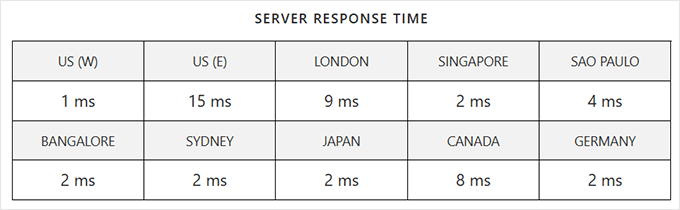
I tested WordPress.com hosting from eight different locations worldwide using Bitcatcha.
WordPress.com performed well globally, with an average response time of 4.7ms. That’s an incredibly fast server response, no matter where your visitors come from.
The setup took less than two minutes.
All I had to do was pick a name, choose a plan, and start writing. In fact, I didn’t even have to install WordPress, themes, or plugins. Everything just works right away.
WordPress.com handles all the technical maintenance.
Updates happen automatically, and security monitoring runs 24/7. Most importantly, backups occur daily automatically as well. I never touched a single setting, and the site stayed fast and secure.
What I like most is the built-in Jetpack features.
It gives me stats, social sharing, and simple contact forms without installing anything. Plus, performance optimization happened automatically in the background.
On top of that, support responded quickly through their ticket system. I got helpful answers within a few hours each time. There is no instant like live chat, but support is still reliable enough.
But here’s the catch.
You can’t install your own plugins or themes on the basic plans. You’re stuck with what WordPress.com provides. For serious customization, you need their more expensive business plan.
The Personal plan runs $2.75 a month on a 3-year term. Pick annual billing instead and it’s $4 a month. Bill monthly and it’s $9 a month.
Whichever term you pick, the rate doesn’t increase at renewal. The free first-year domain does renew at around $10 to $30 a year after that.
🟢► Pros
- Lightning-fast global server response at 4.7ms average.
- Zero technical maintenance required on your part.
- Automatic updates, security, and backups included.
- Built-in Jetpack features work without configuration.
🔴► Cons
- Can’t install custom plugins on basic plans.
- Limited theme options without upgrading.
- Less control over your site compared to self-hosted WordPress.
My Verdict
WordPress.com works perfectly for bloggers who want to focus entirely on content creation.
If you hate dealing with technical stuff, this removes all the headaches. Skip it if you want full control over plugins and themes.
If you want to learn more, here is a detailed WordPress.com review. Plus, if you feel the platform is too limiting, check out these WordPress.com alternatives.
7. Liquid Web ⭐⭐⭐⭐ (9.2/10)
Liquid Web became my premium pick after they auto-updated my plugins without breaking anything. This level of hands-off management doesn’t exist anywhere else.
| Load Time | Uptime | Support | Money Back | Best For | Starting Price | Similar to: |
| 438ms | 99.99% | 10/10 | 30 days | Managed hosting | $4/month | WP Engine vs. Liquid Web Bluehost vs. Liquid Web HostGator vs. Liquid Web |
Why Is Liquid Web One of the Best WordPress Hosting Companies?
Liquid Web stands out for automatically testing and updating your plugins. Most managed hosts skip that step entirely.
Expert support fixed a slow database issue on my site directly, in under 20 minutes.
My Experience with Liquid Web
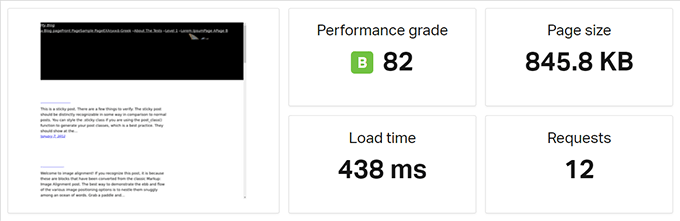
I tested Liquid Web‘s managed WordPress hosting on both US and European servers. As the screenshot below shows, the site loaded in an average of 438ms.
That speed stayed consistent even during high traffic periods.
The best part is that there are no traffic limits or pageview restrictions. Resources scale with your needs automatically, so your site can grow without hitting artificial caps.
What sets Liquid Web apart is how it handles WordPress maintenance.
Most managed hosts update WordPress core and leave your plugins alone. Liquid Web updates your plugins too, testing each one first so nothing breaks.
I watched this happen in real-time during testing. A security update came out for one of my plugins. Liquid Web updated it automatically within hours.
In the end, my site kept running perfectly without manual work from me at all.
Their support team also operates at a different level.
I contacted them about optimizing a slow database query. This is an issue I know overwhelms even seasoned WordPress experts.
They didn’t just tell me what to do. They logged into my site and fixed it for me within 20 minutes.
Apart from the do-it-for-me support team, the developer tools impressed me.
You get easy-to-use staging environments, Git integration, SSH access, WP-CLI support, and more. In essence, everything you need to manage a professional WordPress site comes standard.
Liquid Web’s managed WordPress runs on Nexcess infrastructure, a company they own. Entry-level plans start at $4 a month and renew at $6 a month.
That entry tier skips the automatic plugin testing and unlimited traffic I tested here. Those features live on the Performance tier, which runs $19 to $99 a month.
🟢► Pros
- Automatic plugin updates with testing keep sites secure.
- Perfect 99.99% uptime during entire testing period.
- Expert support fixes problems for you instead of just explaining.
- No traffic limits or pageview restrictions on any plan.
🔴► Cons
- Expensive compared to basic shared hosting plans.
- Introductory discount only lasts three months.
- No unmanaged hosting option available.
My Verdict
Liquid Web works best for busy WordPress site owners who want complete hands-off management. The automatic plugin updates and expert support justify the premium price.
Choose this when your time is worth more than the extra cost. You also need bulletproof reliability.
Check out my in-depth Liquid Web review here for more details.
8. ScalaHosting ⭐⭐⭐⭐ (9.2/10)
ScalaHosting shocked me by offering fully managed cloud VPS hosting at shared hosting prices. This became my answer when people outgrow basic hosting but can’t afford expensive managed solutions.

| Load Time | Uptime | Support | Money Back | Best For | Starting Price | Similar to: |
| 457ms | 99.99% | 10/10 | 30 days | Managed cloud VPS | $2.95/month | InMotion Hosting Review Liquid Web Review DreamHost Review |
Why Is ScalaHosting One of the Best WordPress Hosting Companies?
ScalaHosting earned its spot by delivering cloud VPS performance at shared hosting prices. Its support team beat their own 30-second live chat guarantee in every test I ran.
My Experience with ScalaHosting
I pushed WordPress ScalaHosting hard to test their cloud infrastructure.
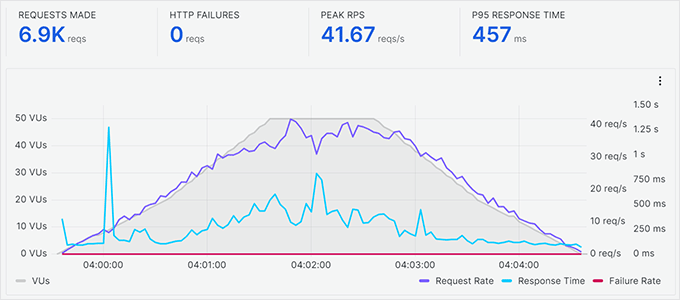
As the screenshot shows, it handled up to 50 concurrent users smoothly in stress tests. This host maintains a stable average response time of 457ms.
The server never buckled under pressure.
The cloud-based VPS gave me dedicated resources without sharing them with other websites.
My site’s performance stayed consistent no matter what happened on other sites sharing the server.
I also noticed that their SPanel control panel replaced cPanel perfectly. It’s a different platform than I’m used to, but everything felt familiar and worked faster.
From here, I could manage emails, domains, and databases without any learning curve.
ScalaHosting includes free daily backups with remote storage.
My test site’s data stayed safe in a separate location. I tested the restore process twice. Both times, my site came back online in under three minutes.
The support team earned that perfect 10/10 rating. They guarantee 30-second responses for live chat and 15-minute responses for tickets. I tested this five times, and they beat their own guarantees every single time.
ScalaHosting’s entry plan starts at $29.95 a month with a 45% discount applied. Once that discount ends, it renews at $54.95 a month.
🟢► Pros
- Cloud VPS performance at shared hosting prices.
- Handled 50 concurrent users without slowing down.
- Perfect 99.99% uptime during entire testing period.
- Lightning-fast support responses beat their guarantees.
🔴► Cons
- Renewal prices jump significantly after first term.
- Basic plans come with limited storage space.
- Smaller knowledge base compared to industry giants.
My Verdict
ScalaHosting delivers incredible value for growing WordPress sites. The cloud VPS infrastructure gives you room to scale without breaking your budget.
Choose this when you outgrow basic shared hosting. You’re just not ready for premium managed hosting prices yet.
9. InMotion Hosting ⭐⭐⭐⭐ (6.0/10)
InMotion Hosting impressed me with their 90-day guarantee and real commitment to the environment.
This became my pick for eco-conscious users who want extra testing time.

| Load Time | Uptime | Support | Money Back | Best For | Starting Price | Similar to: |
| 982ms | 99.93% | 9/10 | 90 days | Green data centers | $5.29/month | WP Engine vs. InMotion Hosting HostGator vs. InMotion Hosting Bluehost vs InMotion Hosting |
Why Is InMotion Hosting One of the Best WordPress Hosting Companies?
InMotion Hosting stands out for its 90-day money-back guarantee, the longest here. Choosing your data center location and eco-friendly infrastructure add real value too.
My Experience with InMotion Hosting
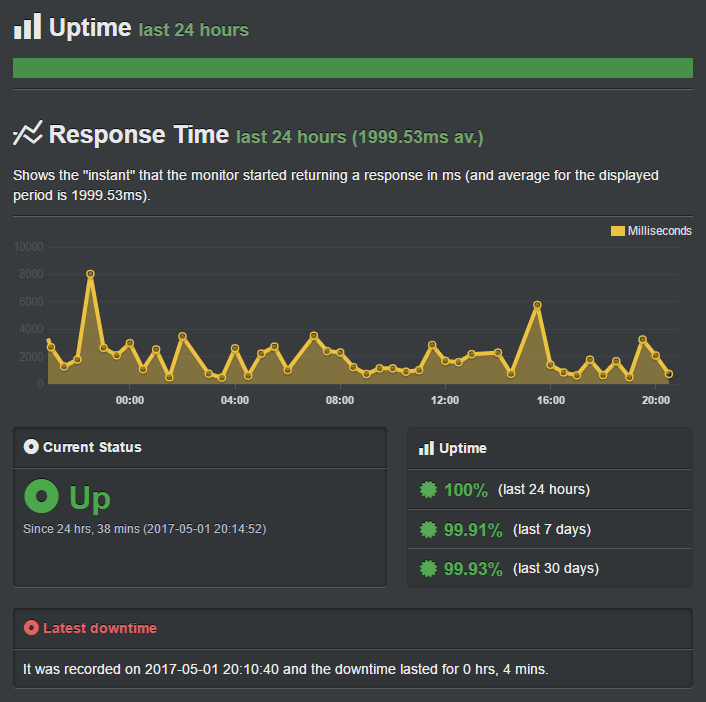
I monitored my InMotion Hosting for WordPress site for the full 90-day guarantee period. It loaded consistently at 982ms.
Not the fastest on this list, but solid enough for most WordPress sites.
Plus, it had a server uptime of 99.93% over a 30-day period.
Their NVMe SSD storage across all plans made a noticeable difference.
With that in mind, database queries ran fast, and image uploads happened instantly. Everything felt snappy despite not being the absolute fastest host.
That’s partly because InMotion WordPress hosting lets you choose your data center location during signup. I picked the closest one to my target audience.
That one choice cut my load time by about 150 milliseconds versus their default location.
Apart from that, their green data centers use advanced outside air cooling technology.
This cuts carbon output. Your WordPress site runs on infrastructure that actually cares about the environment.
The free automated backups are a lifesaver for anyone new to WordPress. During testing, I deleted an important page to check the response.
One click brought everything back exactly as it was. The backup system just works, with no setup needed.
But one of their biggest selling points is support, and I saw why.
They responded quickly every time I reached out. Live chat, phone, and email all gave me knowledgeable answers. The team understood WordPress deeply and solved problems instead of just reading scripts.
InMotion’s WP Launch plan starts at $5.29 a month. It renews at $15.49 a month, one of the smaller percentage jumps on this list even though the plan itself costs more upfront.
🟢► Pros
- 90-day money-back guarantee gives you three months to test.
- SSD storage on all plans delivers consistent performance.
- Choose your data center location for better speeds.
- Environmentally-friendly green data centers reduce carbon output.
🔴► Cons
- SSD-only hosting makes plans more expensive.
- No monthly payment option available.
- Can’t host unlimited sites on basic shared plans.
My Verdict
InMotion Hosting works best when you want to test thoroughly and care about the environment. The 90-day guarantee removes all pressure to decide fast.
Choose this if you value eco-friendly hosting with solid performance. It costs slightly more.
Check out my InMotion Hosting review here for more details.
If this sounds right for you, check out our InMotion coupon page.
10. Hosting.com (formerly A2 Hosting) ⭐⭐⭐⭐ (9.1/10)
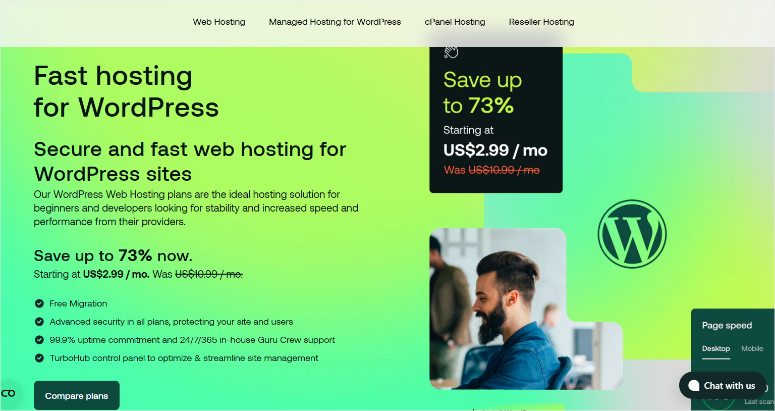
A2 Hosting became my developer-friendly pick after I discovered their anytime money-back guarantee. No other host lets you cancel months later and still get a prorated refund.
| Load Time | Uptime | Support | Money Back | Best For | Starting Price | Similar to: |
| 438ms | 99.90% | 9/10 | Anytime | Developers | $2.99/month | Bluehost vs. Hosting.com HostGator vs. Hosting.com |
Why Is Hosting.com One of the Best WordPress Hosting Companies?
Hosting.com, formerly A2 Hosting, earned its spot with Turbo servers built on LiteSpeed. A full set of developer tools comes standard too.
Its anytime money-back guarantee is one of the most flexible on this list.
My Experience with Hosting.com
I tested A2 Hosting, now Hosting.com WordPress hosting, from US and EU servers.
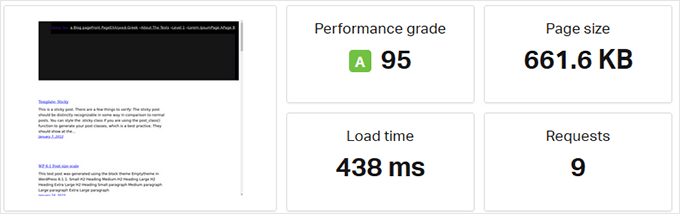
Load time averaged 438ms. It also earned a Performance Grade of “A.”
That’s consistently fast, no matter where your visitors browse from.
Their Turbo servers use LiteSpeed technology that makes WordPress fly.
I noticed the difference right away. Pages loaded faster, the admin dashboard responded quickly, and everything just felt more responsive.
I love how Hosting.com gives you a choice between Linux and Windows hosting. Most beginners won’t care, but developers appreciate having options. I stuck with Linux for WordPress, which is the standard choice.
The developer tools impressed me most.
For more control, you get SSH access, Git integration, and WP-CLI support. This is everything a developer needs to work efficiently comes included.
For me, I deployed updates through Git without touching the dashboard once. This makes my work a lot simpler.
The good thing is, you don’t have to use them if you don’t want to.
Their support team knows their stuff.
I asked technical questions about server configuration three times. Got detailed, accurate answers each time within minutes. They didn’t treat me like a beginner when I asked advanced questions.
Plus, the anytime money-back guarantee removes all risk. I canceled after 45 days and got a prorated refund within five business days.
Hosting.com’s WordPress plan starts at $2.99 a month for the first year. It renews at $11.99 a month after that.
🟢► Pros
- Fast load times across multiple continents.
- Anytime money-back guarantee with prorated refunds.
- Developer-friendly tools like SSH, Git, and WP-CLI included.
- Choice between Linux or Windows hosting environments.
🔴► Cons
- Starting price higher than basic budget hosts.
- Four different WordPress hosting plans can confuse beginners.
- Uptime at 99.90% trails top competitors.
My Verdict
Hosting.com, formerly A2 Hosting, works perfectly for developers who need flexibility and speed. The developer tools and anytime guarantee make it risk-free.
Skip this if you’re a complete beginner who wants the simplest possible setup. The multiple plan options will just confuse you.
Check out my Hosting.com review for complete details.
11. GreenGeeks ⭐⭐⭐⭐ (7.7/10)
GreenGeeks stood out for one reason. They put triple the energy they use back into the grid.
| Load Time | Uptime | Support | Money Back | Best For | Starting Price | Similar to: |
| 697ms | 99.92% | 9/10 | 30 days | Eco-conscious users | $2.95/month | WP Engine vs. GreenGeeks Bluehost vs. GreenGeeks HostGator vs. GreenGeeks |
Why Is GreenGeeks One of the Best WordPress Hosting Companies?
GreenGeeks earned its spot by proving eco-friendly hosting doesn’t mean slower speeds. It replaces 300% of the energy it uses while still delivering fast, reliable performance.
My Experience with GreenGeeks
I tested WordPress hosting from GreenGeeks, expecting to sacrifice speed for sustainability. I was wrong.
My test site loaded in 697ms consistently. That’s faster than hosts that don’t care about their carbon footprint.
Like many WordPress hosting platforms, GreenGeeks uses SSD storage.
This made everything snappy, ensuring fast page loads, image uploads, and database queries. As a result, the performance matched premium hosts that cost twice as much.
GreenGeeks includes a free domain, free SSL, and free optimized CDN with every plan.
Setting up WordPress took one click, and the site went live in under five minutes.
I reached out three times during testing with different technical questions. I got knowledgeable answers within minutes each time via live chat.
Their 24/7 support team impressed me every time I contacted them.
The eco-friendly commitment isn’t just marketing talk. They use wind energy credits to offset their power consumption by 300%. Your WordPress site runs fast while actually reducing carbon emissions.
GreenGeeks’ Lite plan starts at $2.95 a month. It renews at $13.95 a month, one of the bigger jumps on this list.
🟢► Pros
- Fast SSD-based hosting with great load times.
- 300% green energy replacement for eco-conscious hosting.
- Free domain, SSL, and CDN included with all plans.
- 24/7 support responds quickly with expert help.
🔴► Cons
- SSD-only storage makes plans slightly more expensive.
- Uptime at 99.92% could be better.
- Monthly plans require a $15 one-time setup fee.
My Verdict
GreenGeeks works perfectly if you want fast hosting without harming the environment. Solid performance plus genuine environmental commitment makes it worth the slightly higher price.
Choose this if sustainability matters to you and you refuse to compromise on speed.
Check out my GreenGeeks review here.
Apart from that, check out our GreenGeeks coupon page for amazing deals.
12. WP Engine ⭐⭐⭐⭐⭐
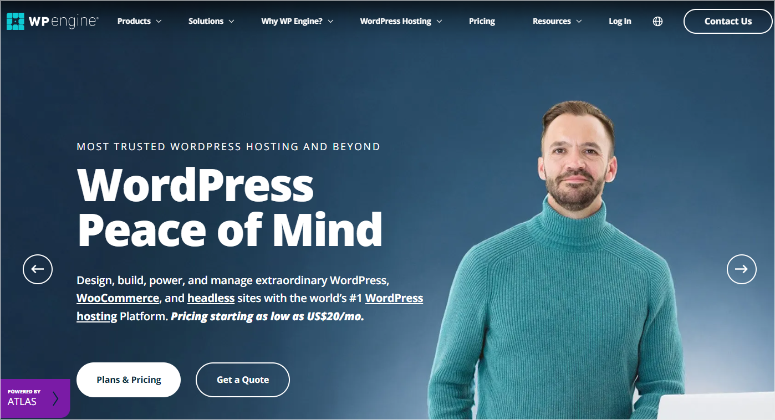
WP Engine didn’t go through this round of testing. I already cover it in a separate, dedicated review.
I’m including it because it’s one of the best managed hosts for a hands-off setup.
| Overall Rating | 5.0/5.0 for Features, Performance, Support, and Ease of Use |
| Load Time | Under 1 second in New York, faster than 96% of tested sites (Pingdom) |
| Server Response | Under half a second across every location tested (Bitcatcha) |
| Pricing | $20/mo for the first year, renewal price not published. Plans range $13 to $194/mo |
| Best For | Managed WordPress hosting with an easy, hands-off setup |
Why Is WP Engine One of the Best WordPress Hosting Companies?
WP Engine earned its spot in my separate, dedicated review. It loaded in under a second, faster than 96% of tested sites.
Staging environments, a CDN, and automated updates come standard on every plan.
My Experience with WP Engine
My full review found WP Engine loads in under a second in New York. Pingdom recorded that number, which beats 96% of all tested sites.
Bitcatcha showed server response times under half a second across every location I tested. A Load Impact stress test also handled up to 100 concurrent visitors without slowing down.
WP Engine includes staging environments, a CDN, automated updates, and solid security tools.
The dashboard stays easy to use even with all of that built in.
Plans range from $13 a month for Lite up to $194 a month for Scale. The Startup plan I tested runs $20 a month for the first year.
WP Engine’s own pricing page confirms that rate doesn’t carry over at renewal. It doesn’t publish the exact renewal number, though.
Adding a second site costs $20 a month, per WP Engine’s current pricing page.
🟢► Pros
- Loads in under a second, faster than 96% of tested sites.
- Staging environments and a CDN included on every plan.
- Handles concurrent traffic spikes without slowing down.
- Easy to use dashboard despite the advanced feature set.
🔴► Cons
- Pricing rated lower than other categories in our review, 4.0/5.0 versus 5.0/5.0.
- Costs more than the budget shared hosting picks on this list.
- Built for managed WordPress only, so it’s not the cheapest starting point.
My Verdict
WP Engine is the best choice here for managed WordPress hosting. It also makes it easy to build, publish, and personalize your site. If you’re on a tight budget, start with Hostinger or Bluehost instead.
Check out my full WP Engine review for more details.
That is my list for the best WordPress hosting companies. I personally tested 11 of these over three months. I’m also recommending WP Engine, based on a separate in-depth review.
But you may still not be sure which hosting for WordPress to go with.
Next, let me help you understand the different types of WordPress hosting.
Understanding Different Types of WordPress Hosting
Choosing the right type of hosting matters just as much as picking the right company. Let me break down your options so you know what fits.
Quick Comparison:
| Type | Best For | Starting Price | Control Level | Technical Knowledge |
| Free Hosting | Hobby blogs | $0 | Low | None |
| Shared Hosting | Beginners | $1.99/mo | Medium | Basic |
| Managed WordPress | Growing businesses | $20/mo | Medium | Basic |
| VPS Hosting | High-traffic sites | $10/mo | High | Intermediate |
| Dedicated Hosting | Enterprise sites | $80/mo | Complete | Advanced |
Free WordPress Hosting

Free WordPress hosting through WordPress.com gets you started without spending a dollar. You create an account and start publishing content immediately.
But free comes with serious limitations. You can’t install plugins or custom themes. Plus, your site sits on a WordPress.com subdomain like yoursite.wordpress.com instead of your own domain.
Basically, you can’t run ads or monetize your site since WordPress.com controls everything.
This works fine for hobby blogs and personal journals. But skip it for anything professional or business-related.
If WordPress.com isn’t for you, here is a list of the best free hosting platforms.
Shared WordPress Hosting

Shared hosting puts your WordPress site on a server with other websites. You all share the same resources like RAM, storage, and processing power, keeping costs low.
The good news: sharing happens at the server resource level, not the data level. Your files and database stay completely separate.
Shared hosting works perfectly for blogs, small business sites, and portfolios with moderate traffic. Most sites under 50,000 monthly visitors run fine on shared hosting.
All the budget-friendly hosts on this list offer shared hosting. Bluehost, Hostinger, and DreamHost all excel in this category.
Apart from that, here is a list of the best cheap hosting services to try.
Managed WordPress Hosting

Managed WordPress hosting gives you a server optimized specifically for WordPress. The hosting company handles all technical maintenance for you.
They update WordPress, configure caching, monitor security threats, and optimize your database. You just focus on content and growth.
Managed hosting costs more because you’re paying for expertise and convenience. But you save time and avoid technical headaches.
Choose managed hosting when you outgrow shared hosting. Or pick it when you’d rather pay someone else to handle the tech.
If you need more clarity, here is a comparison of shared vs. managed hosting.
Liquid Web and Levamo both offer excellent managed solutions.
Here are the best managed WordPress companies you can check out as well.
VPS WordPress Hosting

VPS stands for Virtual Private Server. You get a dedicated partition of a physical server that acts like your own.
Other sites still share the machine, but you get guaranteed resources nobody else can touch. Your RAM, CPU, and storage stay yours.
VPS hosting gives you more control than shared hosting. You skip the full cost of a dedicated server.
Configure server settings, install custom software, and optimize freely.
This works best for sites that outgrew shared hosting but aren’t ready for dedicated. ScalaHosting offers excellent managed VPS at shared hosting prices.
For more options, check out my list of the best WordPress VPS companies.
Dedicated WordPress Hosting

Dedicated hosting gives you an entire physical server just for your WordPress site. No sharing resources with anyone.
You control everything from operating system choice, hardware configuration, security settings, to software installation. Every decision is yours to make.
This costs significantly more than other hosting types because you’re leasing an entire server. But you get maximum performance, security, and control.
Choose dedicated hosting only for enterprise sites with massive traffic or strict security requirements. Most WordPress sites never need this level of hosting.
All the same, here is a list of the best Dedicated hosting for WordPress.
Still confused about the different hosting types? Check out this comparison on shared vs. VPS vs. dedicated hosting.
Congratulations! You can now pick a hosting plan that matches your needs, with room to grow. If anything is unclear, check out the questions below.
FAQs: Best WordPress Hosting Companies
Is GoDaddy good for WordPress hosting?
GoDaddy WordPress hosting starts at $6.95/month for the annual plan. The basic plan’s 10GB of storage works fine for single small sites.
The problem is how GoDaddy pushes unnecessary add-ons during checkout. Your cart fills up with extras you don’t need. This inflates your hosting costs quickly.
Better options exist at lower prices. Bluehost and Hostinger both offer superior value without the aggressive upselling.
What is the best website hosting for WordPress?
Hostinger takes the top spot as the best WordPress hosting for most users. They offer competitive pricing, reliable performance, and beginner-friendly features.
You get a free domain name, SSL certificate, and more. WordPress installation takes one click. Support responds quickly when you need help.
SiteGround comes in close second if you prioritize speed and don’t mind paying slightly more.
What is the fastest WordPress hosting service?
From my test, Bluehost delivered the fastest load times at just 255ms. That beats every other host on this list by a significant margin.
SiteGround and Hostinger come second and third with speeds just below the 400ms mark. Both offer blazing-fast speeds that keep visitors happy.
Speed matters, but balance it with other factors like support quality and uptime reliability.
Is hosting free with WordPress?
No. WordPress itself is free open-source software. But running a WordPress site on the internet requires hosting, which costs money.
You can use WordPress.com‘s free plan, but it comes with severe limitations. For starters, you don’t get a custom domain, plugins, or monetization, with limited customization.
Budget WordPress hosting starts around $2-3/month. That small investment gets you a real website you fully control.
Is SiteGround good for WordPress?
Yes. SiteGround offers excellent WordPress hosting with fast speeds, solid uptime, and exceptional support.
Their Google Cloud infrastructure delivers consistent performance. Built-in caching eliminates the need for complicated plugins. Support responds in minutes with knowledgeable answers.
The higher starting price reflects the superior features and infrastructure. You get what you pay for with SiteGround.
Is WordPress.com good for hosting?
WordPress.com works perfectly for simple blogs where you just want to write, not handle tech.
They manage everything automatically. Updates, security, backups, performance. You focus entirely on content creation.
But you sacrifice control and customization. Limited themes, no custom plugins, and restricted monetization make it wrong for business sites.
How much does WordPress hosting cost?
WordPress hosting ranges from $1.99 to $50+ per month, depending on type and features.
Shared hosting is about $2-5/month for basic plans. Managed WordPress hosting is around $20-50/month for hands-off management.
VPS hosting ranges from $10-30/month for dedicated resources. Dedicated hosting is the most expensive, starting from about $80+/month for complete control.
Most beginners start with shared hosting around $2-3/month and upgrade only when necessary.
Do WordPress hosting prices go up after the first year?
Yes, almost always. Every host on this list drops an attractive introductory rate once your first term ends.
Bluehost, DreamHost, and Hosting.com roughly triple in price at renewal. WordPress.com and Levamo keep the same rate instead. Check the renewal price in each section above before you commit.
What happened to Rapyd Cloud?
Rapyd Cloud recently rebranded to Levamo. The team, infrastructure, and plans stayed the same. Only the name changed.
Are WordPress hosts adding AI features?
Yes, several hosts added AI tools this year. Hostinger built an AI agent called Kodee. SiteGround added a free AI agent to every plan instead.
DreamHost added an AI toolkit for DreamPress and hosting built for AI agents. Treat these as a bonus, not the main reason to pick a host.
What’s the difference between Liquid Web and Nexcess pricing?
Liquid Web’s managed WordPress hosting actually runs on Nexcess, a company it owns. The cheapest Nexcess plans start around $4 a month. The features I tested here need their $19 to $99 a month Performance tier.
How do you calculate the Performance Score next to each star rating?
The Performance Score blends load time, uptime, and support response data from my testing. It’s one number out of 10. It supplements the star rating rather than replacing it.
WordPress.com and WP Engine don’t have one listed. WordPress.com’s testing used a different metric. WP Engine comes from a separate review, so neither number compares directly to the others.
Final Verdict: Should I Pick WordPress Hosting?
Yes. WordPress hosting gives your site the foundation it needs to succeed.
The right host keeps your pages fast and your site online when visitors show up. Support helps when things break, too.
These three things matter more than any fancy feature list.
Start with shared hosting if you’re new. It costs $2-3 per month and handles most WordPress sites perfectly. Then upgrade only when you actually need more power.
Don’t overthink this decision. Every host on this list works.
Pick one that fits your budget and traffic expectations. Then focus on creating great content.
Need to Learn More About Hosting and Your Options?
- First, here is a detailed top hosting comparisons article. I pit host vs. host with charts and reviews.
- Running an online store? Check out my WooCommerce hosting comparison to find hosts optimized for WordPress eCommerce.
- If you need scalable resources, explore my cloud hosting reviews for flexible, high-performance options.
- Planning to switch hosts? Follow my guide on how to migrate between hosts without downtime for a smooth transition.
- For general online stores beyond WordPress, see my eCommerce hosting comparison covering all major platforms.
- Building a community? My forum hosting services review helps you find hosts built for discussion boards.
Your WordPress site deserves hosting that keeps it fast, secure, and online 24/7. The right host lets you focus on creating great content instead of fighting technical problems.
These resources walk you through every step from launch to success. Plus, you’ll learn how to protect your site with strong security from day one.