
I launched my first WooCommerce affiliate program the wrong way.
I built a spreadsheet, I emailed affiliates manually, and I calculated commissions by hand at the end of every month.
Three months in, I had 12 affiliates, four spreadsheet errors, and one frustrated payout that went to the wrong person.
That was the moment I knew I needed a proper tool.
Since then, I’ve tested more than a dozen WooCommerce affiliate plugins. I only focus on the ones with simple dashboards, fraud detection, and the ones that pay affiliates without you touching a thing.
I found 7 that are worth your time.
Some cost $200 a year. A few are completely free. And one of them will have your program running in under 10 minutes.
Here’s what works.
Key Takeaways
- I show you 7 affiliate plugins that work natively with WooCommerce including three free options.
- I reveal the setup time for each tool, from a 10-minute launch to a 45-minute configuration.
- Tested recurring commissions, coupon-based programs, and loyalty reward models, so you know which one matches your store.
- I break down which tools work best for new stores and which ones are worth upgrading to as you scale.
- I compare fraud detection across every tool so you don’t end up paying fake commissions.
How I Test WooCommerce Affiliate Plugins
🔍My testing methodology (click to expand)
Every plugin on this list was installed and tested on a real WooCommerce store. Here’s what I evaluated:
- WooCommerce native integration: I checked whether the plugin connects directly to WooCommerce orders or needs a third-party bridge to track purchases. Native integration means fewer things to break.
- Setup time: I tracked the time from plugin activation to the first affiliate link going live. I counted everything: settings, dashboard config, registration form, payout setup.
- Affiliate reporting clarity: I logged in as a test affiliate and checked what they see. Can they track clicks, conversions, and commissions without confusion? Is the dashboard clean or cluttered?
- Support responsiveness: I submitted test support tickets and measured response times. For free plugins, I checked the WP.org support forums. For premium tools, I tested email and chat systems directly.
- Fraud detection: I checked whether each tool catches duplicate referrals, self-referrals, and suspicious click patterns. I also used WordPress conversion tracking to verify referral attribution accuracy. This matters more than most store owners realize, especially once your program grows past 20 affiliates.
Why Trust IsItWP?
I’ve been reviewing WordPress plugins for over a decade. Every plugin on this list I installed, tested, and ran on actual test stores, not just read the marketing page.
I am not motivated by sponsored placements.
When I say AffiliateWP has the best integration breadth, or SliceWP has the most trusted reviews, that comes from real testing and actual user feedback, not vendor talking points.
If something has a real downside, I say so.
Best WooCommerce Affiliate Plugins Compared
Choosing the right affiliate plugin for WooCommerce comes down to three things: your store size, your budget, and what kind of program you want to run.
If you want a broader overview of affiliate marketing in WordPress, my guide to the best affiliate plugins for WordPress covers the full landscape.
Here’s how the top options stack up. In the table, I breakdown the rating, pricing, reveal if the plugin has a free version, set up time, best for, and type.
| Plugin | Rating | Type | Best For | Free Version | Setup Time | Starting Price |
|---|---|---|---|---|---|---|
🥇 AffiliateWP Best Overall | ⭐⭐⭐⭐⭐ | Full program | Multi-integration stores | ❌ No | ~10 min | $149.50/yr |
🥈 RewardsWP | ⭐⭐⭐⭐⭐ | Loyalty + referral | Retention-focused stores | ❌ No | ~15 min | $71.55/yr |
🥉Easy Affiliate | ⭐⭐⭐⭐⭐ | Full program | Beginners, subscription stores | ❌ No | ~20 min | $99.60/yr |
4. YITH WooCommerce Affiliates | ⭐⭐⭐⭐ | WC-native | Budget-conscious stores | ✅ Yes | ~30 min | €179.99/yr |
| 5. Advanced Coupons | ⭐⭐⭐⭐ | Coupon + loyalty | Discount-driven stores | ✅ Yes | ~25 min | $99.50/yr |
6. Solid Affiliate | ⭐⭐⭐⭐ | WC-specific | WooCommerce-only stores | ❌ No | ~20 min | 149.60/yr |
7. SliceWP | ⭐⭐⭐⭐ | Full program | Simple, reliable tracking | ✅ Yes | ~20 min | $169/yr |
Plus, if you want to just read one particular WooCommerce affiliate plugin, you can use the table of contents below. Just click on the link to skip to that section.
With that out of the way, let’s dive in.
1. AffiliateWP ⭐⭐⭐⭐⭐
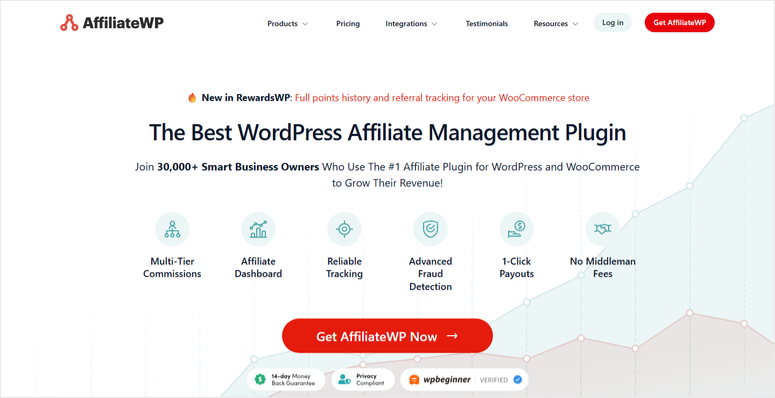
If you want the most complete affiliate management setup for WooCommerce, AffiliateWP is it.
It connects to WooCommerce natively with no bridge plugins or extra extensions. When an order comes in, it tracks the referral, calculates the commission, and logs it to your affiliate’s dashboard automatically.
If you want step-by-step help on how to use AffiliateWP, I wrote a guide on how to add an affiliate program in WooCommerce that walks through the launch process.
The best part is that it runs in the background without you touching it.
Why Is AffiliateWP the Best WooCommerce Affiliate Plugin?
What makes AffiliateWP stand out is how many commission types it supports.
You get flat-rate, percentage-based, recurring (for subscriptions), lifetime (an affiliate earns on every future order from their referred customer), and tiered commissions (top affiliates earn a higher rate).
Most tools make you pick one model. AffiliateWP handles all of them.
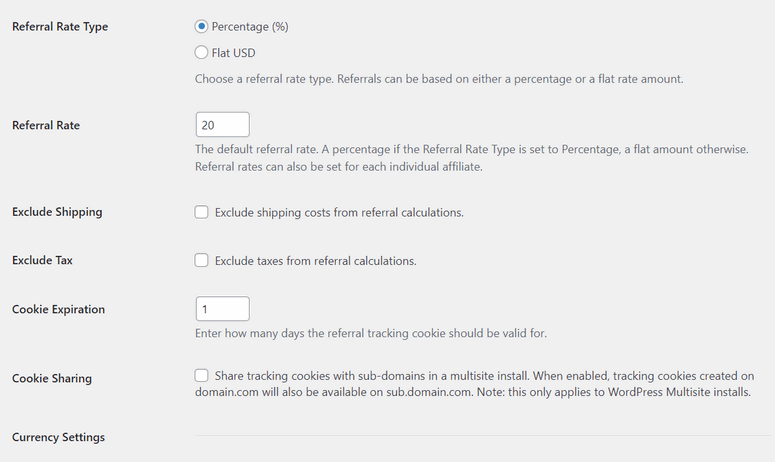
The integration list is where it really separates from the competition.
It works with 29+ platforms out of the box, including WooCommerce, Easy Digital Downloads, MemberPress, WPForms, Gravity Forms, and more.
If you run a WooCommerce store alongside a membership site or digital product shop, your affiliates can track referrals across all of them from one dashboard.
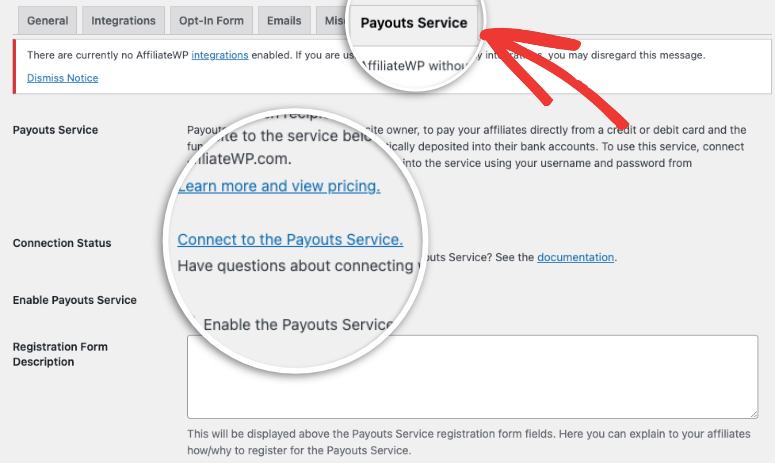
Payouts go through one-click processing via Stripe or PayPal. You don’t need manual exports or spreadsheet math.
On top of that, fraud detection catches self-referrals and duplicate submissions automatically. This is something most store owners only think about after they’ve overpaid someone.
The honest downside: AffiliateWP isn’t cheap. Plus, there’s no free version to test before buying. But all the same, it offers different price tiers with a 14-day money-back guarantee, no questions asked. This ensures you find one that fits your budget.
My Experience Using AffiliateWP
Remember in the intro when I said I was frustrated by my manual WooCommerce affiliate process? That is what actually drove me to test AffiliateWP.
I was desperate for something to replace my broken spreadsheet. With AffiliateWP, I had a working affiliate program in just under 10 minutes.
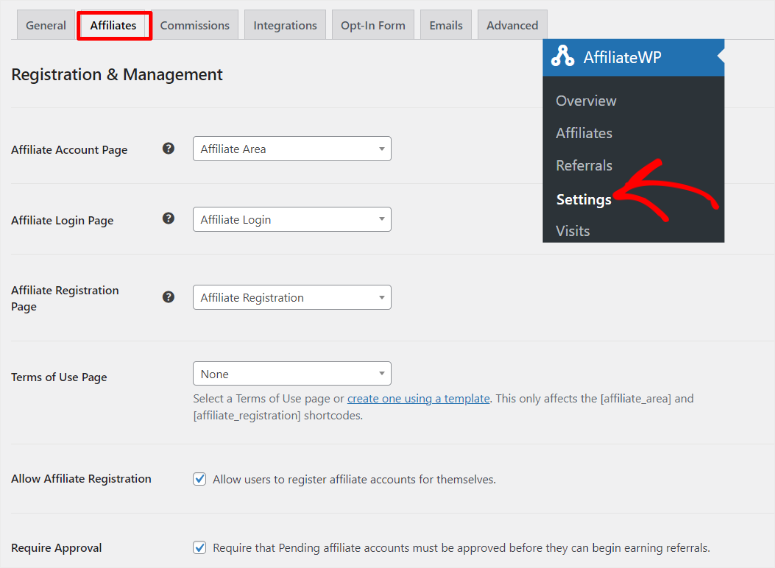
The setup wizard walked me through commission settings, affiliate registration, and payout configuration without any guesswork.
The affiliate dashboard is clean. My test affiliates could see their link, track clicks, and view pending commissions without hand-holding.
I tested the fraud detection by submitting a self-referral. It caught it immediately.
One thing I noticed: the admin interface has a lot of options. If you’re just starting out, it can feel like more than you need. But if you’re planning to scale to 50+ affiliates, you’ll want every one of those settings.
🟢► Pros
- Fast launch: I had a working affiliate program running in 10 minutes flat
- Commission depth: Supports flat, percentage, recurring, lifetime, and tiered commissions in one place
- Fraud detection: Self-referrals and duplicate submissions are blocked automatically
- Integration breadth: Works with 29+ platforms like WooCommerce, EDD, MemberPress, WPForms, and more
🔴► Cons
- No free version: This is a big commitment if you’re just testing the concept
- Feature overload Admin dashboard has dozens of options that can overwhelm a brand-new user
Verdict: AffiliateWP is the right choice if you’re serious about affiliate marketing and want a system that scales. The setup is fast, the tracking is reliable, and you won’t outgrow it.
Check out my AffiliateWP review.
Pricing: Starts at $149.50 per year
👉 Get started with AffiliateWP here
2. RewardsWP ⭐⭐⭐⭐⭐

Most affiliate programs reward people for sending new customers. RewardsWP rewards people for coming back.
It’s built for stores that want both sides of the equation: a referral program that brings in new buyers and a loyalty points system that keeps existing customers spending.
Why Is RewardsWP Worth Using for WooCommerce?
You award points for purchases, sign-ups, product reviews, and referrals. This is the same principle behind gamification on WordPress sites that drives repeat engagement.
Customers then redeem those points for free products, percentage discounts, or free shipping.
The part that makes RewardsWP different is the double-sided referral model. When someone refers a friend, both the referrer and the new customer get rewarded.
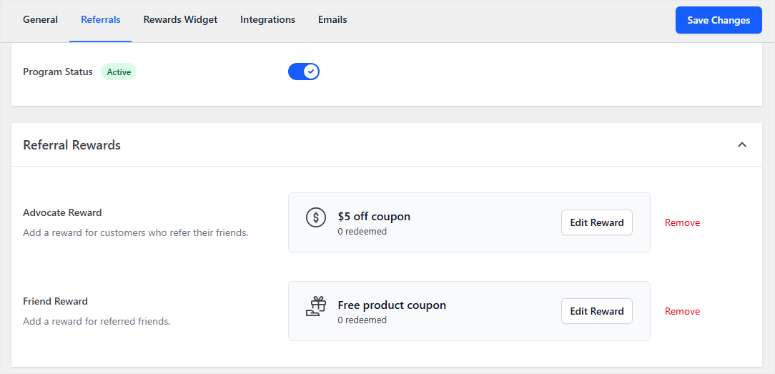
The referred customer gets an incentive to make their first purchase; the referrer gets rewarded when that purchase happens.
This removes friction from the referral process and is why refer-a-friend programs convert better than simple affiliate links.
The setup is similar to AffiliateWP. It integrates deeply with WooCommerce and shares the same backend architecture.
That means the same reliable tracking, fraud prevention, and fast payout logic you’d expect from the same team.
The analytics dashboard shows which reward types drive purchases, who your top referrers are, and what your average redemption rate looks like.
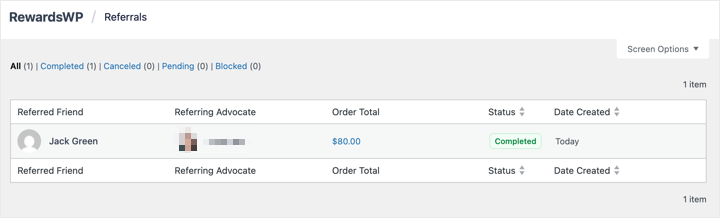
You can pair this data with your WooCommerce upsell and cross-sell strategy to maximize revenue per customer.
You set up a branded widget that sits on the front end and lets customers see their points balance without visiting a separate page.
Where it falls short: pricing is premium-only with no free version. This is the same issue I mentioned in AffiliateWP.
But again, the pricing tier system and the 14-day money-back guarantee, no questions asked, allows you to find the best fit for your business.
My Experience Using RewardsWP
I set up a points program and a refer-a-friend campaign on a test store in about 15 minutes.
Configuration is straightforward. I set the point value, define the rewards, and the widget handles the front-end display automatically.
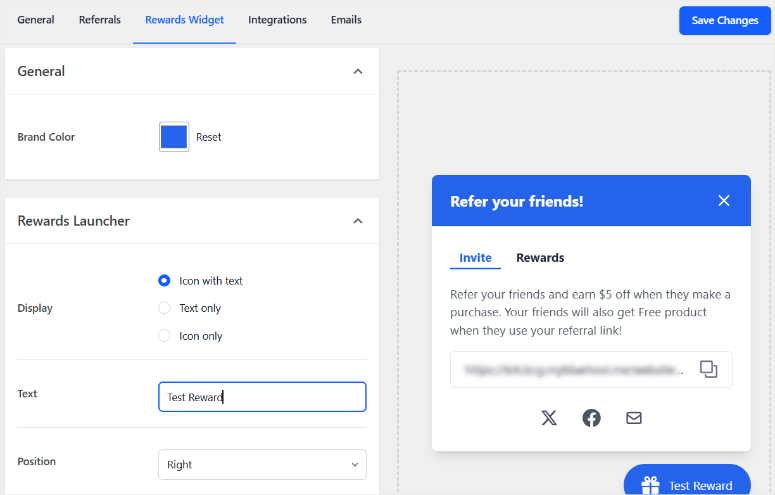
What stood out was seeing the refer-a-friend flow from the customer’s point of view. The referral link is clean, the reward prompt is clear, and there’s no friction in the sign-up-and-earn process.
🟢► Pros
- Double-sided rewards: Both the referrer and the new customer get incentives. This drives higher conversion rates
- Points plus referrals: One plugin handles your loyalty program and refer-a-friend campaign together
- Fraud protection: Self-referrals and duplicate submissions are blocked automatically
- AffiliateWP integration: Deep connection if you’re running both tools at the same time
🔴► Cons
- Premium only: No free version
- Narrower focus: Built for loyalty and referrals, not traditional affiliate tracking with commission tiers
Verdict: RewardsWP is the right choice when retention matters as much as acquisition. It’s not a replacement for a full affiliate program; it’s a layer you add on top. If you want customers to refer friends and keep coming back, this handles both at once.
Check out my RewardsWP review.
Pricing: Starts at $71.55 per year.
👉 Get started with RewardsWP here
3. Easy Affiliate ⭐⭐⭐⭐⭐
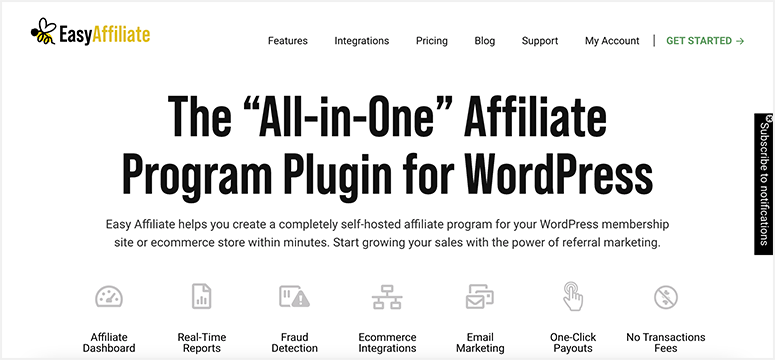
Easy Affiliate lives up to its name. It’s genuinely easier to use than most affiliate plugins on this list.
It’s built for small stores and content creators who want an affiliate program without a long setup process. Installation is fast, the settings panel is simple, and you can have your first affiliate link live in under 20 minutes.
Why Is Easy Affiliate a Strong Choice for Beginners?
The plugin supports one-time and recurring commissions, which is one of the most important things for WooCommerce affiliates just starting out.
For stores that sell digital products online, the recurring commission feature is particularly useful. Affiliates earn every time a referred customer renews, which gives them stronger motivation to keep promoting.
It also has an affiliate dashboard where your affiliates track their stats, making the whole process more streamlined.
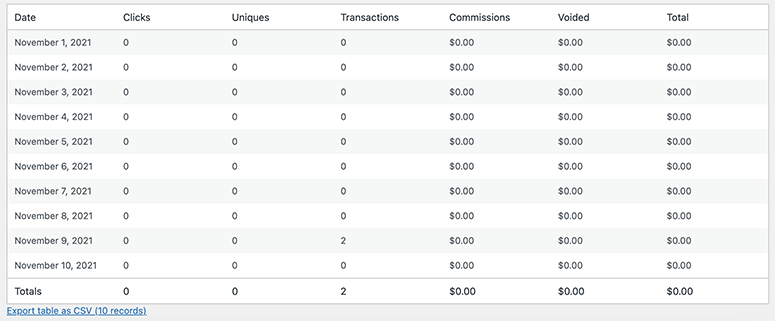
The best part is that it sends automated email notifications when commissions are approved.
Easy Affiliate connects directly with WooCommerce, MemberPress, and PayPal for payouts. This means no extra handles to jump when paying out commissions.

It also includes fraud protection, which flags suspicious activity and lets you approve commissions manually before paying out.
One thing worth knowing: the free plugin on WordPress.org called “Easy Affiliate Links” is a different product. This free plugin is a link cloaking tool, not a full affiliate management platform.
The main limitation: Easy Affiliate is simpler by design, and that means fewer integration options than AffiliateWP. If you’re running WooCommerce alongside multiple membership tools and advanced forms, you may run into gaps.
My Experience Using Easy Affiliate
The setup was clean and fast. I had affiliates able to register and generate links in under 20 minutes.
The affiliate dashboard is notably beginner-friendly, less overwhelming than AffiliateWP’s panel, which makes sense for smaller programs.
I set up the commissions and payout with a simple form, and I was good to go.
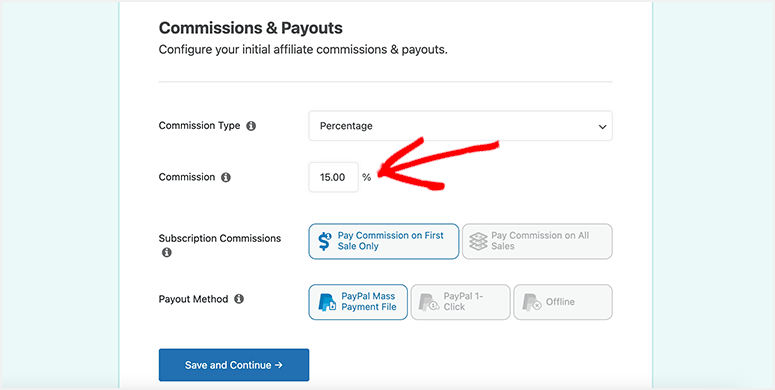
I tested commission tracking with a WooCommerce order, and referrals logged correctly. The PayPal payout integration worked without any extra configuration.
🟢► Pros
- Quick setup: Affiliates can register and get their links in under 20 minutes
- Recurring commissions: Affiliates earn on subscription renewals. This is strong for MemberPress and WooCommerce Subscriptions
- Clean dashboard: Simpler interface than AffiliateWP; good for first-time affiliate managers
- Fraud protection: Manual commission approval before payout keeps bad actors out
🔴► Cons
- Fewer integrations: Supports WooCommerce, MemberPress, and PayPal. Limited beyond that
- Free version confusion: “Easy Affiliate Links” on WordPress.org is a different product (link cloaker only)
Verdict: Easy Affiliate is the right starting point for beginners. It won’t overwhelm you, and it covers everything a new affiliate program needs. Once you hit 50–100 affiliates and need deeper integrations, consider moving to AffiliateWP.
Check out my Easy Affiliate review.
Pricing: Free version available. Pro starts at $99.60 per year
👉 Get started with Easy Affiliate here
4. YITH WooCommerce Affiliates ⭐⭐⭐⭐
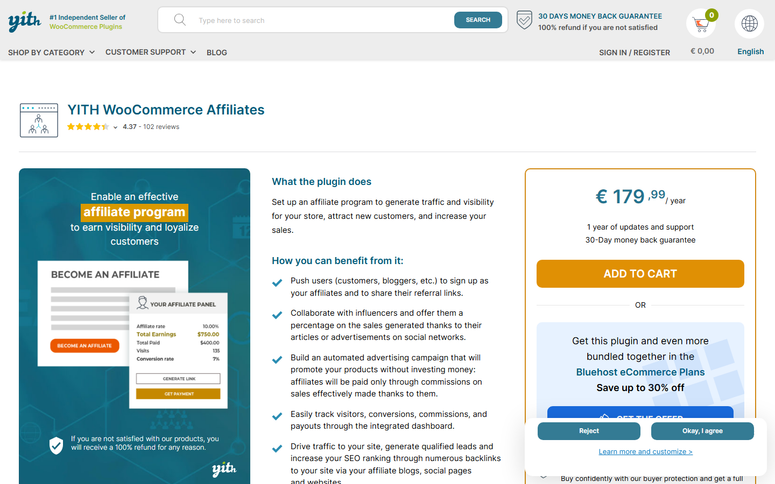
YITH WooCommerce Affiliates is the most accessible entry point for store owners who want to try affiliate marketing without spending money up front.
It is also built specifically for WooCommerce, and that tight focus is what makes the free version actually functional out of the box.
Why Is YITH WooCommerce Affiliates Worth Using?
Once you activate the free version, you get affiliate registration, referral link generation, commission tracking, and an affiliate dashboard, all connected directly to your WooCommerce orders.
An affiliate signs up, gets their link, and when a referred order comes in, the commission logs automatically.
The premium version expands into multi-tier commissions, custom rates per product, detailed affiliate reporting, and a more configurable affiliate pane.
You can set different commission percentages for different products. This is useful if you want to push higher-margin items harder.
The affiliate panel gets a significant upgrade too, giving your affiliates deeper insight into what’s converting.
My Experience Using YITH WooCommerce Affiliates
The free install was fast, and commission tracking worked correctly with WooCommerce orders. The affiliate registration page was easy to configure.
The limits showed up in reporting. Affiliates can see clicks and commissions, but the depth of insight isn’t there compared to SliceWP or AffiliateWP.
For a program just getting started, that’s fine. For a program with 20+ active affiliates, it gets frustrating.
🟢► Pros
- Genuinely free: Functional affiliate tracking with no cost to start
- WooCommerce native: No bridges needed, connects directly to WooCommerce orders
- Low learning curve: Fewer settings mean you’re up and running faster
🔴► Cons
- Thin free reporting: Affiliate statistics are basic. Limited insight without the premium upgrade
- Steep premium price: The pro version costs more relative to competitors at a similar level
Verdict: YITH WooCommerce Affiliates is the right pick if you want to test an affiliate program before spending anything. Start free, validate the model, then upgrade or switch tools once your program is growing.
Pricing: Free plugin available. Pro starts at €179.99/year
👉 Get started with YITH WooCommerce Affiliates here
5. Advanced Coupons ⭐⭐⭐⭐
Advanced Coupons doesn’t track traditional affiliate links. It tracks affiliates through coupons.
Instead of giving affiliates a unique referral link, you give them a unique coupon code. When a customer uses that code, the sale is credited to the affiliate who shared it.
This works naturally for influencers and content creators. If you want to get the most out of coupon-based programs, my guide on how to create WooCommerce coupons covers best practices in detail.
Why Is Advanced Coupons Different From Other Affiliate Plugins?
Beyond affiliate coupons, Advanced Coupons handles Buy One, Get One (BOGO) deals, store credit, loyalty points, and gift cards.
Plus, you also get auto-apply coupon URLs that fill a customer’s cart automatically. If your WooCommerce store runs a lot of promotions, this is worth considering even outside the affiliate use case.
The free version is feature-rich. You get BOGO deals, coupon URL shortcuts, and basic reporting without paying anything.
On the other hand, the premium version adds the loyalty program, gift cards, and more advanced reporting.
The honest limitation: if your affiliates expect a traditional dashboard with click tracking and referral analytics, this isn’t the right tool. It’s built for coupon-based attribution only.
My Experience Using Advanced Coupons
I set up a coupon-based affiliate program in about 25 minutes. Creating a unique coupon per affiliate is a manual step, which works fine for 10–20 affiliates but gets messy at scale.
The BOGO and loyalty features work well alongside the affiliate setup. It is a good fit for stores that run promotions heavily.
🟢► Pros
- Strong free tier: BOGO deals, coupon URLs, and basic reporting at no cost
- Coupon attribution: Works naturally for influencers and social media affiliates
- All-in-one promotions: Coupons, loyalty, gift cards, and affiliate tracking in one plugin
🔴► Cons
- No click tracking: Coupon attribution only, with no referral link analytics
- Manual at scale: Each affiliate needs a unique coupon created by hand; unwieldy past 50 affiliates
Verdict: Advanced Coupons is the right fit when your affiliates are influencers or content creators who share coupon codes. It’s also a smart pick if you want to add loyalty rewards alongside your affiliate program without installing a second plugin.
Check out my Advanced Coupons review.
Pricing: Free plugin available. Pro starts at $99.50 per year.
👉 Get started with Advanced Coupons here
6. Solid Affiliate ⭐⭐⭐⭐
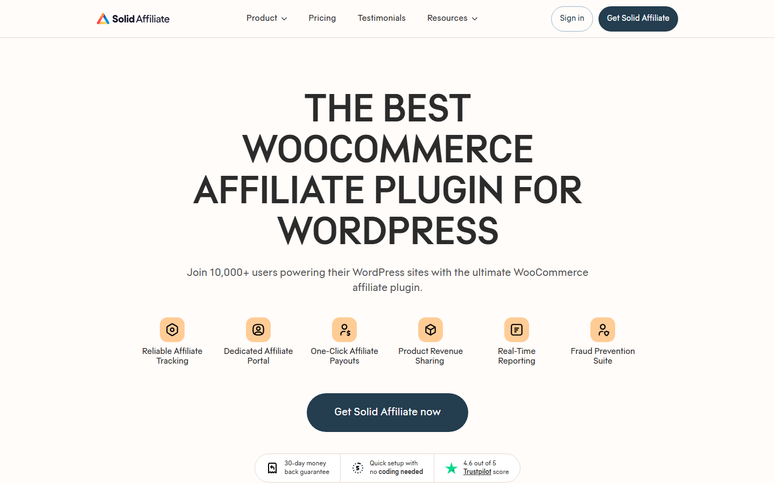
Solid Affiliate is built specifically for WooCommerce, and only WooCommerce. That focus shows in how tightly everything works together.
The plugin integrates with WooCommerce at a deep level. It tracks referrals, handles partial refund commission adjustments, and supports recurring commissions through WooCommerce Subscriptions.
There are no integration options for other platforms, but if WooCommerce is your entire stack, that’s not a problem.
Why Is Solid Affiliate Worth Considering?
Solid Affiliate’s main advantage is how many features it offers out of the box. You get flat-rate and percentage commissions, an affiliate portal, CSV payout exports, and one-click PayPal payouts.
The admin panel is deliberately simple with fewer tabs and settings than other WooCommerce affiliate plugins on this list. This makes onboarding faster.
Once your affiliates are active, pair it with a WooCommerce checkout optimization plugin to make sure referred customers actually complete their purchase.
Support is one of Solid Affiliate’s biggest selling points. They have fast email responses and actionable help, not just links to documentation.
That matters when you’re running an active program, and something goes wrong, especially during a payout cycle.
My Experience Using Solid Affiliate
The setup was clean and took around 20 minutes. Commission tracking worked correctly with WooCommerce orders, and the affiliate portal was easy to navigate as a test affiliate.
The CSV export feature makes it easy to share payout data with a bookkeeper. You can also track affiliate links with Google Analytics to measure conversion performance alongside your other marketing channels.
🟢► Pros
- WooCommerce-focused: Tight integration means fewer tracking edge cases and fewer errors
- Clean admin panel: Fewer settings than AffiliateWP. But faster to configure and manage day-to-day
- Strong support: Fast email responses with actual solutions, not just documentation links
🔴► Cons
- WooCommerce only: No support for Easy Digital Downloads, MemberPress, or other platforms
- No free version: No way to test the full feature set before paying
Verdict: Solid Affiliate is the right pick if your store runs entirely on WooCommerce and you want clean tracking without the complexity. The support alone makes it worth the price for any active store.
Pricing: Starts at 149.60/year
👉 Get started with Solid Affiliate here
7. SliceWP ⭐⭐⭐⭐
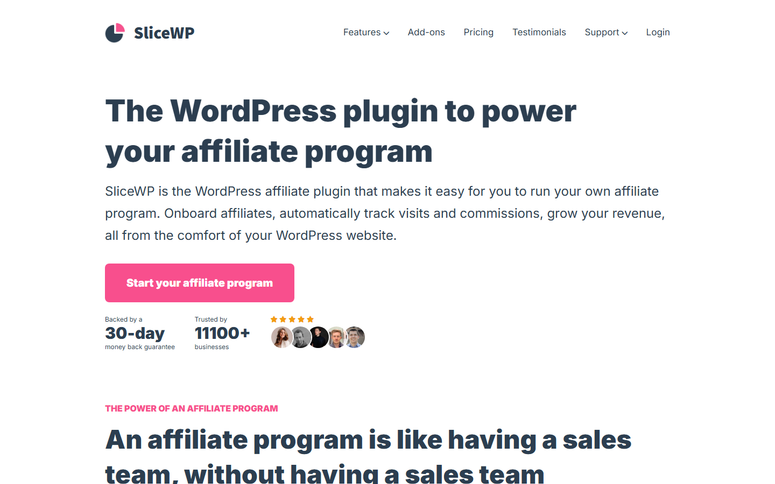
SliceWP is a WordPress-native affiliate plugin that slots into the broader ecosystem of the best WordPress eCommerce plugins.
It supports WooCommerce, Easy Digital Downloads, and WooCommerce Subscriptions out of the box.
The free version gives you affiliate registration, referral link tracking, commission management, and an affiliate dashboard. This is more than most free tools in this space offer.
Why Is SliceWP So Highly Rated?
SliceWP includes banner creatives for affiliates, a feature that matters because most WooCommerce affiliates aren’t designers.
Instead of asking them to make their own promotional images, you upload ready-made banners they can grab directly from their dashboard and post wherever they promote your store.
That removes a real friction point that causes affiliates to go inactive.
Beyond that, the free version covers the full core workflow: affiliate registration, referral link tracking, commission management, and an affiliate dashboard.
It integrates with WooCommerce, Easy Digital Downloads, and WooCommerce Subscriptions out of the box with no extra setup to get tracking working across your store.
While the premium version adds MemberPress integration, PayPal payouts, those banner creatives, and advanced reporting.
PayPal payouts in particular cut out manual work. You export a payout file, and affiliates get paid directly, without you doing the transfers one by one.
My Experience Using SliceWP
I tested the free version on a WooCommerce store. Setup took about 20 minutes.
Referral tracking was accurate, the affiliate dashboard loaded fast, and there were no conflicts with other WooCommerce plugins running at the same time.
The one limitation worth knowing: free tier support runs through the WordPress.org forums. If something breaks during a payout cycle, response times can be slow. Premium support is faster and worth it once your program is active.
🟢► Pros
- Highest rated: 4.9 out of 5 stars from 101+ verified user reviews on WordPress.org
- Strong free version: Affiliate registration, link tracking, and commission management at no cost
- Clean affiliate dashboard: Test affiliates found it easy to navigate with no hand-holding needed
🔴► Cons
- Slow free support: WordPress.org forum responses can take days. Premium needed for fast help
- Fewer integrations: Supports WooCommerce, EDD, and Subscriptions; not much beyond that
Verdict: SliceWP is the best free-to-premium upgrade path. Start free to validate your affiliate program, then upgrade when you need PayPal payouts or banner ad assets for your affiliates.
👉 Get started with SliceWP here
That’s it for my list of the best WooCommerce affiliate plugins. But there are a few options that just missed my list. Check them out below.
Bonus: Best Affiliate plugins for WooCommerce
Pretty Links
Pretty Links is the most-reviewed affiliate link management plugin on WordPress.org. It doesn’t run affiliate programs or track commissions.
What it does is help you manage, cloak, and organize your own affiliate links as a publisher.
If you’re an affiliate yourself and promoting other products, Pretty Links keeps your links organized and tracks your click data. Great companion tool for store owners who also publish content.
Check out my Pretty Links review.
👉 Get started with Pretty Links here
ThirstyAffiliates ⭐⭐⭐⭐
ThirstyAffiliates is worth knowing about if you want keyword autolinking. It automatically replaces specific words in your content with affiliate links, with no manual insertion required.
It also supports geolocation targeting, so US visitors can land on one affiliate URL while UK visitors go to another.
With 209 reviews and a 4.6 out of 5 rating on WordPress.org, it’s well-established. Like Pretty Links, it’s a tool for affiliate publishers, not affiliate program managers. That is why both are not on the main list.
You can compare Pretty Links and ThirstyAffiliate to see which best fits your company.
Check out my ThirstyAffiliates review.
👉 Get started with ThirstyAffiliates here
ReferralCandy
ReferralCandy is a SaaS-based referral platform, not a traditional plugin. So, instead of managing affiliates manually, it automates the entire refer-a-friend flow.
This includes invitation emails, reward delivery, and fraud detection. It charges a monthly fee plus a small commission on referred sales. This makes more sense for high-volume stores than fixed-price plugins.
Good fit if you want a polished, done-for-you referral system without the WordPress setup overhead.
👉 Get started with ReferralCandy here
Now you have my full list and bonus options to select from. This can be overwhelming. use the how to choose section below to narrow your options.
How to Choose the Right WooCommerce Affiliate Plugin
Here’s a decision framework based on where your store is right now.
If you’re scaling (50+ affiliates, multiple commission types):
- AffiliateWP is the answer. The 29+ integrations, advanced fraud detection, and flexible commission structures are built for this level. The price is higher, but the time you save on manual payout management pays for itself.
If retention matters as much as acquisition:
- Add RewardsWP alongside your affiliate plugin. You can also use an email marketing service to automate affiliate onboarding and performance updates. It handles loyalty points for purchases, refer-a-friend rewards, and redemption tracking without replacing your affiliate management tool.
If your program is growing:
- Easy Affiliate hits the sweet spot. It covers recurring commissions for subscription stores and has a clean enough interface to manage without a dedicated affiliate manager.
If your affiliates are influencers or content creators:
- Advanced Coupons is your answer. Influencers find coupon codes easier to share than tracking links, and coupon-based attribution works naturally for social media promotions.
If you’re just starting out:
- I recommend reading my affiliate marketing guide for beginners first. Then start with a free option like SliceWP, and YITH WooCommerce Affiliates both give you functional affiliate tracking at no cost. This lets you validate whether affiliates actually drive sales for your store before spending money on a premium tool.
If you sell exclusively on WooCommerce:
- Pick Solid Affiliate. Its WooCommerce-only focus means tighter integration and less configuration overhead than multi-platform tools.
Budget quick guide:
| Your goal | Best pick | Cost |
|---|---|---|
| Add loyalty on top | RewardsWP | $71.55/yr |
| Scale to 50+ affiliates | AffiliateWP | $149.50/yr |
| Coupon-based program | Advanced Coupons | Free / $99.50/yr |
| WooCommerce-only, clean setup | Solid Affiliate | 149.60/yr |
| Start small, subscription store | Easy Affiliate | $99.60/yr |
| Test with no commitment | SliceWP or YITH WooCommerce Affiliates | Free |
That’s it. If anything is unclear, check out the commonly asked questions below.
FAQs: Best WooCommerce Affiliate Plugins
Do I need an affiliate plugin, or can I track referrals manually?
You can track manually with spreadsheets, but it breaks down fast. Manual tracking is prone to errors, creates payout delays, and doesn’t catch fraud. On top of that, affiliate commission notification emails need reliable delivery. If you’re having email issues, the best SMTP plugins for WordPress can fix that first. Once you have more than 5–10 active affiliates, the time cost of manual tracking exceeds the cost of any plugin on this list.
Can I pay affiliates through PayPal, or only through Stripe?
Absolutely. AffiliateWP supports both Stripe and PayPal. Easy Affiliate and Solid Affiliate support PayPal. SliceWP adds PayPal payouts in the premium version. YITH WooCommerce Affiliates’ payout options are more limited in the free tier. Check each plugin’s payout integrations before committing. For a full comparison of payment options, my list of best WordPress payment plugins covers the payout landscape in more detail.
Can I set different commission rates for different products?
Yes, but most plugins have this feature only in the premium tiers. AffiliateWP, Easy Affiliate, and Solid Affiliate all support per-product commission rates. This matters if you want to push higher-margin items harder or protect low-margin products from eating into profit. The free versions of most plugins apply one flat rate across everything. If per-product rates are a must-have, budget for premium from the start.
How do I prevent affiliate fraud in WooCommerce?
The main risk is self-referrals. Affiliates buying through their own links. AffiliateWP has built-in fraud detection that flags suspicious patterns automatically. Most other plugins rely on manual review or basic IP checks. If fraud protection is a priority, AffiliateWP is the only tool on this list with a dedicated system for it. Pair it with a strong coupon strategy, so legitimate affiliates don’t need to use workarounds.
What’s the difference between an affiliate plugin and a referral plugin?
Affiliate plugins are built for external promoters like bloggers, influencers, or partners. These are people who send traffic to your store in exchange for a commission. Referral plugins focus on your existing customers sharing your store with friends. The mechanics overlap, but the audience is different. If you want to build a public-facing affiliate program with an application process and a dedicated affiliate dashboard, you need an affiliate plugin.
Which WooCommerce affiliate plugin is best for a brand new store?
SliceWP’s free version is the best starting point. You get a working affiliate program, like registration, referral tracking, and commission payouts, without spending anything. It’s simple enough to configure in an afternoon and won’t overwhelm you with settings you don’t need yet. Once your program grows and you need multi-tier commissions or advanced reporting, you can upgrade or migrate to AffiliateWP.
Final Verdict: Should I Use an Affiliate Plugin on My WooCommerce Store?
Yes, and the sooner, the better.
I learned this the hard way. The spreadsheet approach sounds manageable until you have many affiliates, payout errors, and many unhappy partners.
An affiliate plugin doesn’t just save you time. It removes the mistakes that damage trust before your program even gets momentum.
The cost is easy to justify. The right tool pays for itself the first month you run a clean, accurate, automated payout cycle.
Your affiliates stay motivated. Your program grows. And you stop spending Sunday evenings auditing a spreadsheet.
Pick the tool that fits your store size today. You can always scale up. But don’t wait until the errors start.
👉 Get started with AffiliateWP here
Resource Hub
- Best Affiliate Plugins for WordPress – Full breakdown of affiliate management tools beyond WooCommerce
- How to Set Up an Affiliate Program in WordPress – Step-by-step guide to launching your first program
- Best WooCommerce Upsell and Cross-Sell Plugins – Boost revenue once your affiliate program is running
- Top Amazon Affiliate WordPress Plugins – For stores that want to add Amazon products alongside their own
- Best WooCommerce Checkout Plugins – Reduce cart abandonment so affiliate-referred sales actually convert
- How to Build a Sales Page in WordPress – Create high-converting landing pages for your affiliate campaigns

Comments Leave a Reply