
Pe scurt: Clasez cele mai bune pluginuri WordPress pentru bilete la evenimente pentru a vinde bilete online.
- Acest lucru s-a întâmplat după ce am creat un magnet de lead-uri cu conversie ridicată pentru un client.
- Ei aveau nevoie să convertească lead-urile în vânzări de bilete la evenimente.
- Am cercetat și am descoperit că Sugar Calendar a oferit cea mai bună soluție, deoarece oferă un calendar de evenimente și bilete.
Acum câteva luni, un client a venit la mine după ce am creat ceea ce pot descrie doar ca o problemă minunată de avut.
Îi creasem un magnet de lead-uri pentru un eveniment al fondatorilor. Ceva ce arăta antreprenorilor unde se situează brandul lor online și cum evenimentul fondatorilor îi poate ajuta.
A funcționat mai bine decât oricine a prezis. În 48 de ore, peste 200 de fondatori s-au înscris și întrebau cum să participe.
Apoi m-au sunat cu adevărata problemă.
„Avem 200 de oameni care vor să vină. Cum le vindem de fapt un bilet?”
Aveau nevoie de ceva simplu. Ceva ce echipa lor putea gestiona fără mine. Și trebuia să se conecteze la site-ul lor WordPress existent, nu la o platformă terță care ia o parte din fiecare vânzare.
Acea conversație m-a determinat să testez fiecare plugin major de bilete la evenimente pentru WordPress pe care l-am putut găsi. Iată ce am învățat.
Puncte Cheie
- Vă voi arăta 7 moduri de a vinde bilete la evenimente de pe propriul site WordPress, fără un cont Eventbrite
- Acopăr instrumente care sar peste WooCommerce complet, ceea ce vă economisește ore de configurare
- Dezvălui ce plugin vă permite să fiți live cu Stripe în mai puțin de 5 minute pentru un singur tip de bilet
- Am testat ce pluginuri gestionează mai multe niveluri de bilete (VIP, Early Bird, General Admission) fără niciun cod
- Am inclus o opțiune gratuită care procesează plăți reale Stripe și PayPal din prima zi
Cum testez pluginurile de bilete la evenimente pentru WordPress
🔍 Click pentru a vedea metodologia mea de testare
Iată exact cum evaluez pluginurile de ticketing pentru evenimente WordPress:
- Calitatea gateway-ului de plată: Suportă Stripe, PayPal și Apple Pay? Percepe o taxă de platformă peste rata standard a Stripe?
- Timp de configurare: Cât durează de la instalarea pluginului până la finalizarea unei prime achiziții de test? Am cronometrat fiecare dintre acestea.
- Managementul participanților: Puteți vedea cine a cumpărat bilete, filtra după tipul de bilet și exporta lista în CSV înainte de eveniment?
- Flexibilitatea tipului de bilet: Puteți oferi mai multe niveluri de preț (VIP, Early Bird, General Admission) cu capacități separate, fără a atinge codul?
- Dependența de WooCommerce: Biletele necesită WooCommerce? Acest lucru contează. WooCommerce adaugă complexitate de care nu orice site de evenimente are nevoie.
- Ușurința în utilizare pentru începători: Un membru non-tehnic al echipei ar putea configura și gestiona acest lucru independent?
- Calitatea suportului: Cât de rapid și util este răspunsul atunci când ceva se defectează cu două zile înainte de eveniment?
Instrumente pe care le folosesc:
- Modul de testare Stripe: Efectuez achiziții de test reale prin checkout-ul fiecărui plugin înainte de a-l evalua
- Recenzii cu stele pe WordPress.org: Acolo apar tiparele reale de eșec
- GTmetrix și instrumentul de testare a vitezei IsItWP: Verific dacă pluginul adaugă o greutate semnificativă paginii listei de evenimente
De ce să ai încredere în IsItWP?
La IsItWP, suntem resursa principală a comunității WordPress încă din 2009, ajutând peste 2 milioane de utilizatori să aleagă cele mai bune pluginuri, teme și instrumente.
Spre deosebire de site-urile de recenzii care nu folosesc niciodată produsele, noi menținem conturi active, rulăm site-uri reale ale clienților și oferim consultanță continuă pentru WordPress.
Fiecare plugin din această listă a fost testat pe o instalare WordPress live, nu evaluat de pe o pagină de produs.
Cele mai bune pluginuri de ticketing pentru evenimente WordPress comparate
Există două tipuri de instrumente pe această listă. Unele sunt pluginuri dedicate de ticketing pentru evenimente, construite de la zero pentru pagini de evenimente și vânzări de bilete.
Altele sunt instrumente de plată și formulare care gestionează achizițiile de bilete fără stratul de management al evenimentelor. Ambele își au locul, iar tabelul de mai jos face ușor de identificat care se potrivește situației dumneavoastră.
| Produs | Cel mai bun pentru | Suport Stripe | WooCommerce necesar | Versiune gratuită | Preț de pornire |
|---|---|---|---|---|---|
| 🥇 Sugar Calendar | Calendar + ticketing într-un singur plugin | ✅ Nativ (nivel gratuit) | ❌ Nu este necesar | ✅ | 49,50 $/an |
| 🥈 WPForms | Echipe care folosesc deja WPForms pentru alte formulare | ✅ Plan Pro necesar | ❌ Nu este necesar | ✅ | 49,50 $/an |
| 🥉 WP Simple Pay | Tip unic de bilet, cea mai rapidă configurare Stripe | ✅ Stripe nativ | ❌ Nu este necesar | ✅ (comision de 3%) | 49,50 $/an |
| 4. Easy Digital Downloads | Bilete + alte produse digitale într-un singur magazin | ✅ Integrat | ❌ Nu este necesar | ✅ | 99,50 $/an |
| 5. The Events Calendar | Site-uri complete de evenimente cu cel mai mare ecosistem | ✅ Nivel gratuit (Stripe + PayPal) | ❌ Opțional | ✅ | 259 USD/an |
| 6. Eventin | Conferințe: vorbitori, locuri + check-in QR | ✅ Integrat | ⚠️ Opțional | ✅ | 79 USD/an |
| 7. WP Event Manager | Construcții modulare peste WooCommerce | ✅ Add-on necesar | ✅ Necesar | ✅ | Licență unică de 199 USD |
Dacă încă decideți dacă aveți nevoie de o suită completă de management al evenimentelor, ghidul meu despre cele mai bune pluginuri WordPress pentru evenimente acoperă peisajul complet.
Puteți folosi, de asemenea, cuprinsul de mai jos pentru a sări la instrumentul de ticketing pentru evenimente despre care doriți să citiți.
- 1. Sugar Calendar ⭐⭐⭐⭐⭐
- 2. WPForms ⭐⭐⭐⭐⭐
- 3. WP Simple Pay ⭐⭐⭐⭐⭐
- 4. Easy Digital Downloads ⭐⭐⭐⭐
- 5. The Events Calendar ⭐⭐⭐⭐
- 6. Eventin ⭐⭐⭐
- 7. WP Event Manager ⭐⭐⭐
- Cum să alegi pluginul potrivit de ticketing pentru evenimente WordPress
- Întrebări frecvente: Cele mai bune pluginuri de ticketing pentru evenimente WordPress
- Verdict final: Ar trebui să folosesc un plugin de ticketing pentru evenimente WordPress pe site-ul meu?
- Centru de resurse: Managementul evenimentelor WordPress
Acestea fiind spuse, să începem.
1. Sugar Calendar ⭐⭐⭐⭐⭐
Cel mai bun pentru: proprietarii de site-uri WordPress care doresc calendar de evenimente + ticketing într-un singur plugin, fără WooCommerce
Iată ce a făcut din Sugar Calendar alegerea potrivită pentru echipa de fondatori pe care am menționat-o.
L-au instalat, și-au conectat contul Stripe în aproximativ 3 minute și au creat prima pagină de eveniment în aceeași după-amiază.
Formularul de bilet a apărut automat pe pagina evenimentului. În decurs de o oră, aveau un buton live „Cumpără bilete” pe site-ul lor WordPress. Echipa lor s-a ocupat de restul fără mine.
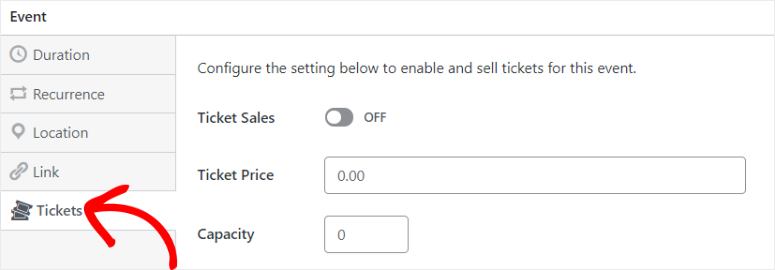
De ce este Sugar Calendar unul dintre cele mai bune pluginuri de ticketing pentru evenimente WordPress?
Pentru asta este construit Sugar Calendar. Se află alături de cele mai bune pluginuri de calendare WordPress ușoare. Dar unde acestea se concentrează exclusiv pe afișare, Sugar Calendar adaugă un strat complet de ticketing.
Un singur plugin gestionează calendarul evenimentelor și procesarea plăților împreună.
Partea cea mai bună este că nu aveți nevoie de WooCommerce sau de un alt serviciu terț. Singura deducție este 2,9% + 30¢ standard pe tranzacție pe care ați plăti-o pentru orice plugin de plată Stripe.
Versiunea gratuită Lite percepe o taxă suplimentară de 3% pe platformă, pe lângă aceasta. Acest lucru este important de știut înainte de a scala. Dar planurile plătite o elimină complet.
Pentru un plugin care gestionează atât afișarea calendarului, cât și procesarea plăților, acest lucru este cu adevărat corect.
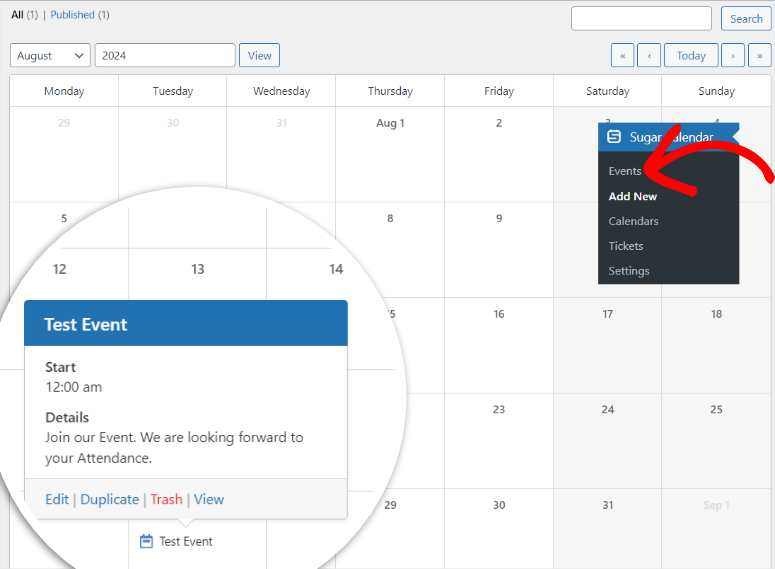
Ceea ce am apreciat cel mai mult: fiecare achiziție de bilet creează propria înregistrare a participantului.
Echipa fondatorilor putea vedea exact cine s-a înregistrat, ce nivel de bilet a ales și putea exporta lista completă în CSV înainte de eveniment, fără gestionarea manuală a foilor de calcul.
Un lucru de luat în considerare în buget: versiunea gratuită suportă doar un singur tip de bilet la un singur preț. Dacă doriți Admitere Generală + VIP + Early Bird la același eveniment, veți avea nevoie de planul Plus.
Experiența mea cu Sugar Calendar
Am configurat un eveniment de test pe o instalare WordPress curată. Un atelier de 50 de persoane cu două niveluri de bilete. Admitere Generală la 49 USD, VIP la 99 USD cu o etichetă „loc în față”.
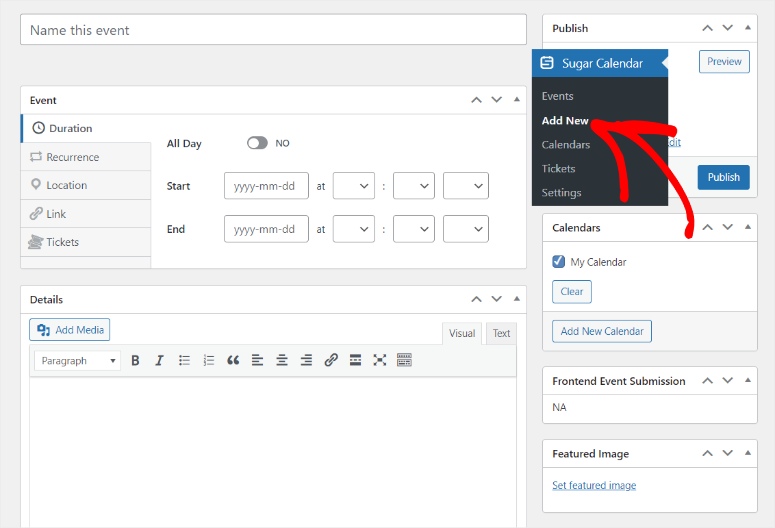
Pe planul Plus, ambele niveluri au apărut clar pe pagina evenimentului. Am efectuat o achiziție de test prin Stripe. E-mailul de confirmare a sosit în mai puțin de 30 de secunde, formatat corect cu numele evenimentului și nivelul biletului.
Singura dificultate pe care am întâmpinat-o: blocul de bilete nu se inserează automat la evenimentele create prin Editorul clasic. A trebuit să-l adaug manual prin shortcode.
Acest lucru este minor, dar dacă echipa dvs. folosește Editorul clasic, alocați 10 minute pentru a înțelege acest lucru prima dată.
🟢► Avantaje
- Nu este necesar WooCommerce: Sistemul de bilete Stripe funcționează imediat. Nicio configurare de magazin, niciun plugin suplimentar necesar.
- Nivel gratuit pentru evenimente simple: Versiunea Lite gestionează evenimente cu un singur bilet cu Stripe, făcându-l cu adevărat util înainte de a cheltui ceva.
- Urmărire curată a participanților: Fiecare achiziție de bilet creează o înregistrare a participantului pe care o puteți vizualiza și exporta din tabloul de bord WordPress.
- Migrare cu un singur clic: Dacă utilizați în prezent The Events Calendar, Sugar Calendar poate importa toate evenimentele existente într-un singur pas.
- Pregătit pentru Elementor și Gutenberg: Fără căutare de shortcode. Pur și simplu trageți blocul calendar sau bilet oriunde aveți nevoie.
- Cale de upgrade WooCommerce: Dacă aveți nevoie ulterior de PayPal sau de mai multe opțiuni de plată, integrarea WooCommerce este disponibilă pe Plus și versiunile superioare.
🔴► Dezavantaje
- Comision de platformă de 3% pe nivelul gratuit: La un bilet de 30 USD, asta înseamnă 90 de cenți per vânzare. Se adaugă rapid dacă vindeți sute de bilete fără a face upgrade.
- Frecare în Editorul clasic: Widgetul de bilete nu se inserează automat în evenimentele din Editorul clasic. Trebuie să adăugați manual un shortcode.
Verdictul meu: Sugar Calendar ocupă primul loc deoarece rezolvă exact problema cu care se confruntă majoritatea proprietarilor de site-uri WordPress: vânzarea de bilete fără a vă remodela complet site-ul. Pentru echipele care organizează 1-3 evenimente pe an, începeți cu planul gratuit Lite. Dacă aveți nevoie de mai multe niveluri de bilete sau de plăți prin WooCommerce, Plus merită fiecare cent.
Consultați recenzia mea despre Sugar Calendar. De asemenea, verificați cum puteți vinde bilete și gestiona evenimente cu Sugar Calendar aici.
Prețuri: Plugin Lite gratuit disponibil (comision de platformă Stripe de 3%) | Basic 49,50 USD/an (1 site) | Plus 99,50 USD/an (tipuri multiple de bilete + WooCommerce)
👉 Începeți cu Sugar Calendar aici
2. WPForms ⭐⭐⭐⭐⭐
Cel mai bun pentru: Echipe care folosesc deja WPForms și doresc să adauge înregistrarea biletelor fără a instala un nou plugin
WPForms nu este un plugin dedicat pentru bilete. Acesta este, de fapt, scopul.
Este cel mai bun constructor de formulare drag and drop care vă poate ajuta să creați formulare de contact, formulare de solicitare sau înregistrări. Deci, de ce se află pe lista mea pentru cel mai bun plugin de bilete?
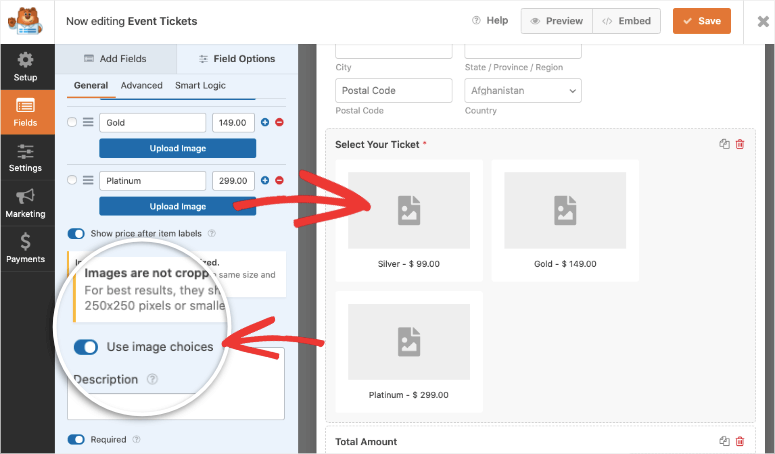
WPForms vă poate ajuta, de asemenea, să adăugați vânzări de bilete la evenimente fără a instala nimic nou. Deschideți constructorul de formulare, încărcați șablonul Formular de rezervare bilete, adăugați un câmp de plată Stripe și publicați.
Gata. Acest lucru vă va lua aproximativ 12 minute.
De ce este WPForms unul dintre cele mai bune plugin-uri de bilete pentru evenimente WordPress?
Șablonul de bilete pentru evenimente face cea mai mare parte a muncii. Acesta include deja câmpuri pentru numele participantului, email, cantitatea de bilete și plată.
În plus, logica condițională vă permite să afișați sau să ascundeți câmpuri în funcție de tipul de bilet pe care îl selectează cineva.
Puteți configura, de asemenea, un checkout cu formular pe mai multe pagini care împarte experiența în pași, ceea ce reduce abandonul formularelor de înregistrare mai lungi.
Ce face WPForms pe care pluginurile dedicate de ticketing nu le fac: se conectează la instrumentele dvs. de marketing prin email și captură de lead-uri în același pas.
Când cineva cumpără un bilet, WPForms îi poate adăuga automat la Mailchimp, ActiveCampaign sau orice alt instrument de creare de liste de email pe care îl utilizați.
Apoi, trimiteți o confirmare personalizată, tot din același instrument pe care îl utilizați pentru toate formularele dvs.
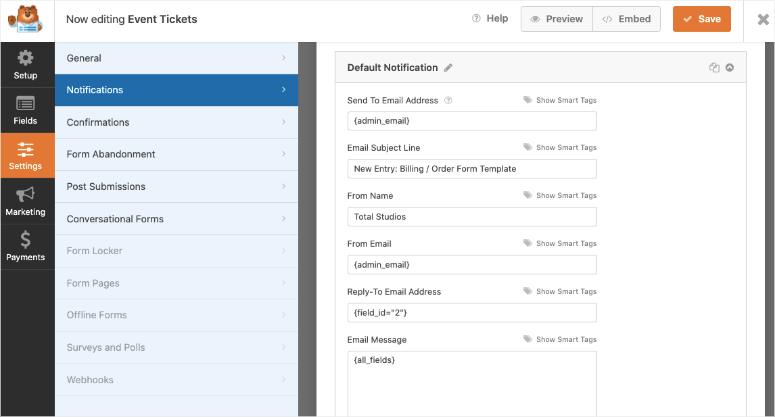
Aici v-aș încetini: procesarea plăților este disponibilă doar în planul Pro. Nivelurile mai ieftine nu includ Stripe. Dacă vânzarea de bilete este scopul dvs., bugetați de la început pentru Pro.
Experiența mea cu WPForms
Am creat un formular de bilete folosind șablonul Ticket Booking Form în aproximativ 12 minute. Stripe s-a conectat în 2 pași. Achiziția de test a decurs fără probleme.
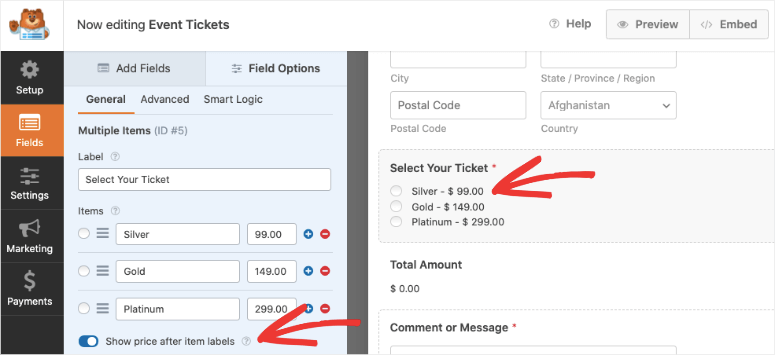
Am adăugat niveluri de ticketing folosind constructorul drag and drop. De asemenea, am adăugat un calculator în formular pentru a ajuta participanții care doresc să cumpere bilete în vrac să planifice corespunzător.
Limitarea a apărut în gestionarea post-achiziție. WPForms nu are un panou de control pentru participanți sau o vizualizare specifică biletelor.
Pentru a vedea cine a cumpărat, exportați intrările din formular și sortați-le manual. Pentru un eveniment cu 20 de persoane, acest lucru este gestionabil. Pentru 300 de participanți la 3 tipuri de bilete, veți dori un plugin dedicat.
🟢► Avantaje
- Cel mai mare rating WordPress.org de pe această listă: 4,8/5 din peste 14.000 de recenzii. Acest lucru îl face cel mai de încredere constructor de formulare din WordPress.
- Niciun plugin nou de învățat: Echipele care folosesc deja WPForms adaugă ticketing în aceeași interfață pe care o cunosc deja.
- Automatizare prin email integrată: Plata Stripe + înregistrarea în Mailchimp sau ActiveCampaign se declanșează la o singură trimitere de formular.
- Logică condițională pentru nivelurile de bilete: Afișați câmpuri sau prețuri diferite în funcție de tipul de bilet selectat de cineva.
🔴► Dezavantaje
- Planul Pro este necesar pentru plăți: Dacă doriți doar să vindeți bilete online, planul Pro poate fi o achiziție scumpă.
- Niciun panou de gestionare a participanților: WPForms urmărește intrările din formular, nu comenzile de bilete. Gestionarea unei liste mari de participanți înseamnă muncă manuală pe foaie de calcul.
Verdictul meu: WPForms are sens dacă site-ul dvs. îl rulează deja sau are nevoie de un constructor de formulare care face mai multe lucruri. Majoritatea oamenilor obțin WPForms și ajung să se bazeze pe el pentru mai mult decât intenția lor inițială.
Consultați recenzia mea despre WPForms. În plus, vedeți exact cum puteți vinde bilete la evenimente cu acest constructor de formulare aici.
Prețuri: Plugin gratuit Lite disponibil | Planurile Premium încep de la 49,50 USD/an
3. WP Simple Pay ⭐⭐⭐⭐⭐
Cel mai bun pentru: Organizatori de evenimente care vând un singur tip de bilet și trebuie să accepte plăți Stripe cât mai rapid posibil
Uneori, problema nu este complexă. Aveți un singur eveniment, un singur preț și aveți nevoie ca oamenii să vă plătească până vinerea viitoare.
WP Simple Pay rezolvă acea problemă mai repede decât orice altceva de pe această listă.
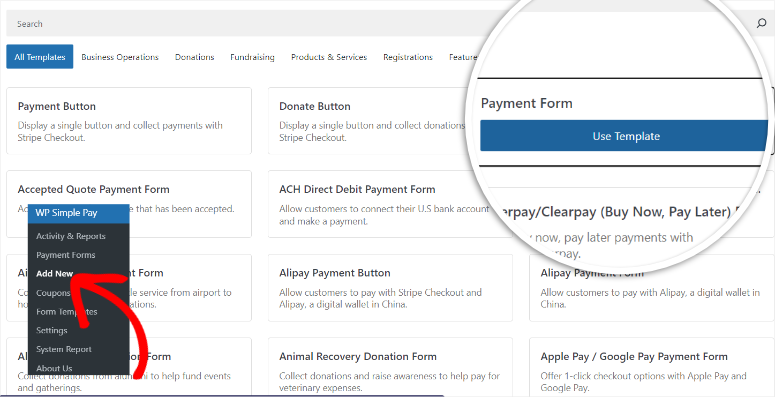
Conectați-vă contul Stripe (2 pași), alegeți unul dintre șabloanele de formulare de plată pre-făcute, setați prețul biletului și încorporați formularul pe orice pagină WordPress cu un shortcode.
Întregul proces mi-a luat 4 minute fără a construi un magazin.
De ce WP Simple Pay este unul dintre cele mai bune pluginuri WordPress pentru bilete la evenimente?
Ceea ce WP Simple Pay face deosebit de bine: este un partener Stripe verificat, ceea ce înseamnă că integrarea este neobișnuit de fiabilă.
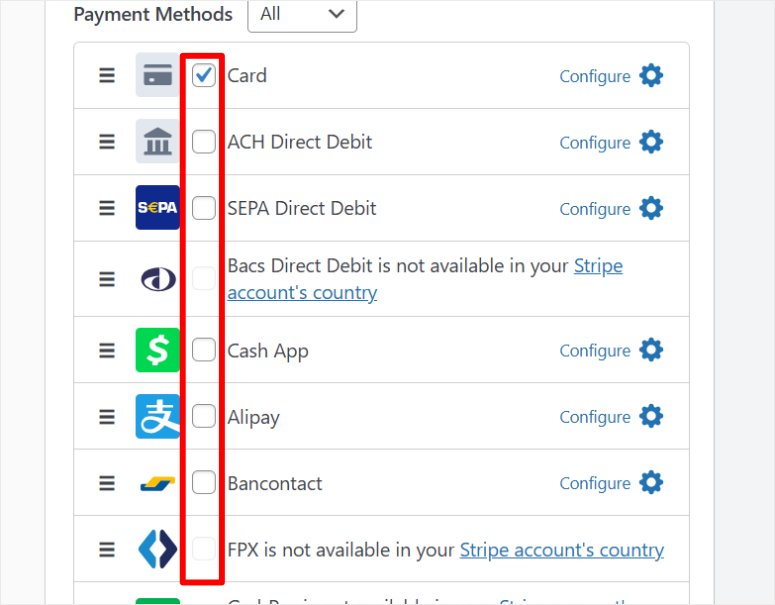
Cumpărătorii dvs. beneficiază de opțiunile complete de plată cu carduri de credit și portofele digitale ale Stripe, cum ar fi Apple Pay, Google Pay și toate metodele de plată internaționale, fără ca dvs. să configurați nimic.
Acest lucru oferă utilizatorilor dvs. confortul de a alege metoda de plată dorită.
Cel mai important, formularul de plată moștenește automat stilul site-ului dvs., astfel încât să nu pară adăugat ulterior.
Planurile Pro elimină taxa de platformă de 3% percepută în versiunea gratuită Lite și adaugă formulare de plată pe site. Astfel, clienții plătesc fără a părăsi pagina dvs. WordPress.
Versiunea gratuită redirecționează către Stripe Checkout. Pentru un eveniment simplu, redirecționarea este în regulă. Pentru un eveniment premium unde experiența brandului contează, checkout-ul pe site merită upgrade-ul.
O limitare reală: WP Simple Pay nu creează înregistrări ale participanților. Nu există un panou de control „cine a cumpărat”. Lista dvs. de participanți se află în întregime în contul dvs. Stripe.
O puteți exporta de acolo, dar necesită autentificarea în Stripe și filtrarea manuală.
Experiența mea cu WP Simple Pay
Mi-a plăcut cât de simplu a fost să creez formularele pentru biletele la evenimente. Șabloanele sunt curate, au o descriere clară și o previzualizare rapidă, astfel încât să puteți vedea cum arată fiecare pe o pagină live.
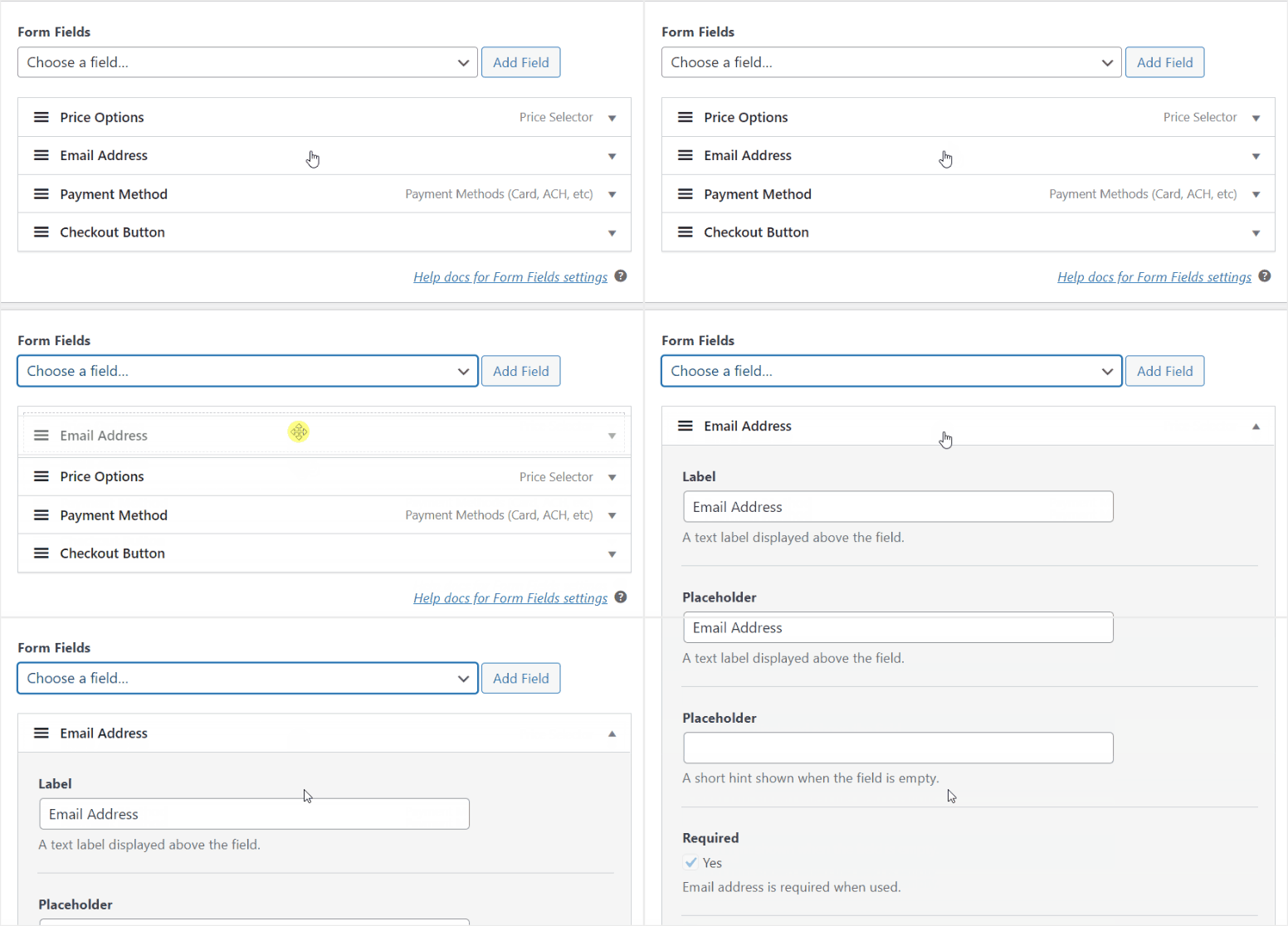
Personalizarea a fost, de asemenea, simplă. Am folosit drag and drop în unele secțiuni și un dropdown în altele. Dacă aș clasifica acest articol în ceea ce privește ușurința în utilizare, WP Simple Pay ar veni pe primul loc.
Am efectuat trei achiziții de test: una prin card, una prin Apple Pay și una prin debit ACH. Toate trei au fost procesate în Stripe în 10 secunde. Emailul de confirmare personalizat a sosit formatat corect.
🟢► Avantaje
- Cel mai rapid setup de pe această listă: Patru minute de la instalare la un formular de plată Stripe live.
- Integrare partener Stripe: Statutul de partener Stripe certificat înseamnă că Apple Pay, Google Pay și peste 30 de metode de plată internaționale funcționează fără configurare suplimentară.
- Fără taxe de platformă pe planurile plătite: Nivelul gratuit percepe 3%, dar orice plan plătit elimină complet acest lucru.
- Abonamente în nivelul gratuit: Puteți configura plăți recurente pentru abonamente la evenimente sau serii de bilete, chiar și fără a face upgrade la Pro.
🔴► Dezavantaje
- Fără gestionare a participanților: Cumpărătorii de bilete sunt înregistrări Stripe, nu înregistrări ale participanților. Veți gestiona lista dvs. din interiorul Stripe.
Verdictul meu: WP Simple Pay este alegerea potrivită atunci când viteza contează mai mult decât funcționalitățile. Dacă trebuie să vinzi un singur tip de bilet săptămâna aceasta și ai Stripe, nimic nu te duce acolo mai repede. Odată ce evenimentele tale depășesc un tip de bilet sau 50 de participanți, vei dori un plugin dedicat de ticketing care să urmărească participanții nativ.
Verifică recenzia mea despre WP Simple Pay.
Prețuri: Plugin Lite gratuit disponibil (comision de platformă de 3%) | Planurile Pro încep de la 49,50 $/an
👉 Începe cu WP Simple Pay aici
4. Easy Digital Downloads ⭐⭐⭐⭐
Cel mai bun pentru: Organizatori care vând bilete la evenimente alături de alte produse digitale într-un singur magazin
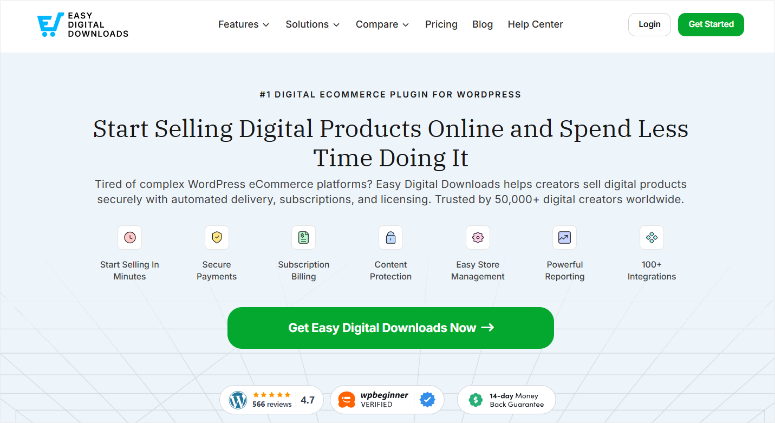
Majoritatea plugin-urilor de ticketing tratează biletele la evenimente ca pe propria lor categorie. Easy Digital Downloads le tratează la fel cum tratează tot ce vinzi: ca pe un produs digital descărcabil.
Sună ca o limitare. De fapt, este o funcționalitate.
De ce este Easy Digital Downloads unul dintre cele mai bune plugin-uri WordPress pentru ticketing la evenimente?
Cu prețurile variabile ale EDD, poți transforma un singur produs „Bilet Summit Fondatori” într-un sistem complet de prețuri pe niveluri, fără niciun add-on suplimentar.
Acest lucru îți permite să setezi Early Bird la 49 USD, General Admission la 79 USD și VIP la 149 USD, toate ca opțiuni de preț pe un singur produs.
Fiecare nivel primește propriul său stoc limitat. Când Early Bird se epuizează, dispare automat de la finalizarea comenzii. Acest lucru face ca experiența completă de finalizare a comenzii să fie convenabilă atât pentru tine, cât și pentru participanții tăi.
Cumpărătorii pot adăuga mai multe tipuri de bilete într-o singură tranzacție, pot aplica un cod de reducere și pot primi un e-mail de confirmare personalizat, totul de pe o pagină de finalizare a comenzii care se potrivește cu designul existent al site-ului tău.
Poți, de asemenea, să adaugi PayPal, Stripe și Apple Pay pentru a te asigura că primești plata prin metoda preferată.
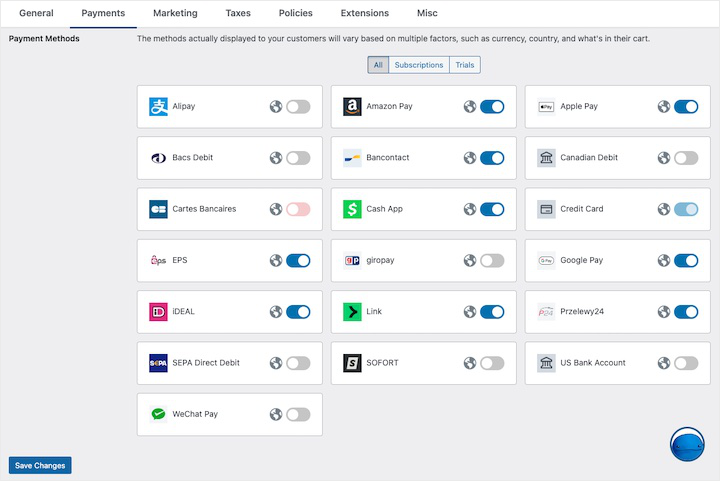
Aici EDD se diferențiază de un magazin obișnuit de eCommerce WordPress. Îți permite să vinzi și alte lucruri alături de evenimentele tale.
De exemplu, un caiet de lucru post-eveniment, cursuri online și conținut LMS, un șablon digital, produs digital sau chiar produse fizice, EDD gestionează totul dintr-un singur magazin.
Acest lucru înseamnă că participanții pot cumpăra biletul și o resursă în aceeași comandă, fără să instalezi un al doilea plugin.
Pe de altă parte, este același lucru. EDD nu are o pagină de eveniment, o verificare a participanților sau un cod QR. Este un magazin eCommerce care se întâmplă să vândă bilete.
Dacă ai nevoie de funcționalități specifice evenimentelor, ar trebui să îl asociezi cu ceva de genul Sugar Calendar.
Experiența mea cu Easy Digital Downloads
Am configurat un produs de bilet cu trei niveluri și limite de stoc pe un plan Personal.
Configurarea a durat aproximativ 25 de minute. Acest lucru a fost mai mult decât instrumentele mai simple de pe această listă, dar rezultatul a părut mai mult un magazin de produse real decât un formular de bilete.
Funcționalitatea care m-a surprins cel mai mult a fost recuperarea coșurilor abandonate. O achiziție de test lăsată incompletă a declanșat un e-mail automat de urmărire 30 de minute mai târziu.
Pentru un eveniment plătit cu 200 de locuri, acest tip de e-mail de recuperare ar putea capta 10–15% din comenzile incomplete.
🟢► Avantaje
- Prețuri variabile ca niveluri de bilete încorporate: Creează Early Bird, Admitere Generală și VIP ca opțiuni de preț pe un singur produs. Fără plugin-uri suplimentare.
- Recuperare coșuri abandonate: Trimite automat e-mailuri cumpărătorilor care nu au finalizat procesul de checkout. O funcție importantă pentru evenimentele plătite cu locuri limitate.
- Checkout multi-produs: Participanții pot cumpăra un bilet și o resursă digitală în aceeași tranzacție de coș.
- Fără taxe de platformă pe planurile plătite: Procesare Stripe și PayPal fără ca EDD să ia o cotă suplimentară.
🔴► Dezavantaje
- Fără funcții specifice evenimentelor: Fără check-in participanți, coduri QR sau pagină de listare a evenimentelor. EDD este un magazin, nu un instrument de management al evenimentelor.
Verdictul meu: EDD are sens atunci când site-ul tău WordPress este deja o vitrină digitală, sau când intenționezi să vinzi resurse post-eveniment alături de bilete. Dacă vinzi exclusiv bilete la evenimente fără alte produse digitale, Sugar Calendar sau WP Simple Pay te ajută cu mai puțină configurare și costuri mai mici.
Verifică recenzia mea Easy Digital Downloads. Compară planurile gratuite vs. plătite Easy Digital Downloads
Prețuri: Plugin gratuit disponibil | Planurile Pro încep de la 99,50 $/an
👉 Începe aici cu Easy Digital Downloads
5. The Events Calendar ⭐⭐⭐⭐
Cel mai bun pentru: Organizatori care construiesc un site dedicat evenimentelor și doresc cel mai mare ecosistem de evenimente WordPress
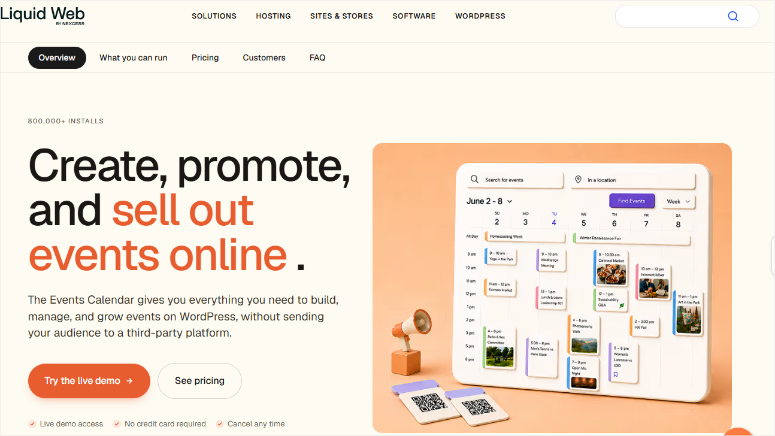
The Events Calendar este cum arată ticketing-ul de evenimente WordPress atunci când a fost construit special și testat pe teren timp de peste un deceniu.
Pluginul gratuit companion Event Tickets adaugă ticketing Stripe și PayPal oricărui eveniment pe care îl creezi. Stripe se conectează într-un singur pas. PayPal se conectează fără chei API.
Cumpărătorii tăi pot plăti cum preferă, iar tu primești un raport al participanților pe care îl poți vizualiza și exporta din tabloul de bord WordPress.
De ce este The Events Calendar unul dintre cele mai bune plugin-uri de ticketing pentru evenimente WordPress?
Ceea ce diferențiază The Events Calendar de fiecare instrument bazat pe formulare de pe această listă este pagina evenimentului în sine.
Evenimentele primesc propriul URL, propria listare optimizată SEO și o vizualizare a calendarului pe care vizitatorii o pot filtra după categorie sau dată.
Este un strat dedicat de management al evenimentelor pe care rulează ticketing-ul.
Dezavantajul este ecosistemul în sine. The Events Calendar are peste 10 add-on-uri premium, inclusiv evenimente recurente, managementul locațiilor, integrare Zoom și agregare de evenimente.
Fiecare este util, dar costă suplimentar. The Event Calendar este deținut de Liquid Web și am văzut schimbări majore în plugin. În plus, și prețurile s-au schimbat.
Încă așteptăm să vedem cum vor aborda baza de add-on-uri pentru care este cunoscut The Event Calendar. Citește cu atenție lista de add-on-uri înainte de a stabili bugetul.
Amintește-ți, supraîncărcarea plugin-urilor prin stivuirea mai multor add-on-uri este o preocupare reală pentru performanța site-ului tău.
Experiența mea cu The Events Calendar
Am creat un eveniment de test și am adăugat două niveluri de bilete prin pluginul gratuit Event Tickets. Fluxul de checkout, Stripe prin Tickets Commerce, a fost curat și rapid.
Cumpărătorii primesc un e-mail automat cu biletul atașat.
Aici am observat complexitatea: panoul de Setări are 12 file. The Events Calendar nu este o configurare de 30 de minute dacă doriți să îl configurați complet.
Pentru o echipă care vinde bilete la un singur eveniment ocazional, este mai mult decât au nevoie. Pentru o echipă care construiește o afacere continuă de evenimente pe WordPress, este fundația potrivită.
🟢► Avantaje
- Ticketing gratuit Stripe + PayPal: Pluginul gratuit Event Tickets procesează plăți reale. Nu este necesar un plan premium pentru a începe.
- Pagini de evenimente special concepute: Evenimentele primesc propria listă optimizată SEO cu afișare calendaristică. Nu doar un formular încorporat pe o pagină.
- Cel mai mare ecosistem de pe această listă: Peste 10 add-on-uri oficiale, suport extins pentru teme terțe și cea mai mare comunitate de utilizatori WordPress.org dintre toate pluginurile de evenimente.
- Exporturi participanți: Filtrați și exportați listele de participanți pe tip de bilet direct din tabloul de bord WordPress.
🔴► Dezavantaje
- Complexitatea setărilor: 12 file de setări și un ecosistem mare de add-on-uri înseamnă că configurarea durează mai mult decât instrumentele mai simple. Nu este ideal pentru evenimente unice.
- Costurile add-on-urilor se adaugă rapid: Începerea gratuită este ușoară. Adăugarea de evenimente recurente + gestionarea locațiilor + integrarea Zoom poate crește costul total.
- Achiziționat de Liquid Web: Am observat recent schimbări majore în modul în care funcționează pluginul. Prețurile au crescut, de asemenea, drastic.
Verdictul meu: The Events Calendar este alegerea potrivită pentru oricine dorește să construiască o prezență la evenimente pe WordPress pe termen lung. Ticketing-ul gratuit Stripe este un câștig real. Dar dacă evenimentul dvs. este ocazional, investiția în configurare este mai mare decât aveți nevoie; Sugar Calendar sau WP Simple Pay vă pun online într-o fracțiune din timp.
Consultați recenzia mea despre The Event Calendar.
Prețuri: Plugin gratuit disponibil | Planurile Pro încep de la 259 USD/an
👉 Începeți aici cu The Events Calendar
6. Eventin ⭐⭐⭐
Cel mai bun pentru: Organizatori de conferințe și ateliere care au nevoie de gestionarea vorbitorilor, locuri personalizate și check-in QR
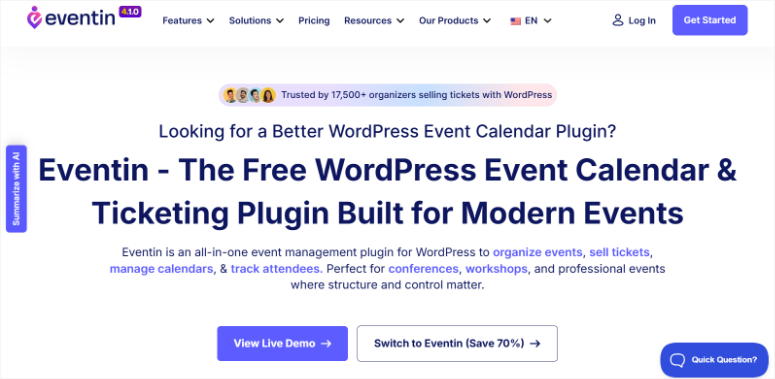
Eventin este construit pentru evenimentul care este prea complex pentru un simplu formular de bilete.
Gândiți-vă la conferințe cu mai multe sesiuni, liste de vorbitori, locuri rezervate și bilete PDF personalizate.
Acestea sunt caracteristici care necesită în mod normal o platformă dedicată de evenimente SaaS precum Hopin, Eventbrite sau o soluție personalizată. Eventin le plasează în WordPress.
De ce este Eventin unul dintre cele mai bune pluginuri de ticketing pentru evenimente WordPress?
Caracteristica care mi-a atras atenția prima dată a fost generarea de evenimente AI. Am introdus o descriere de 3 propoziții a unui atelier, iar Eventin a generat o pagină completă de eveniment.
Am primit un program provizoriu, sloturi pentru vorbitori, sugestii de prețuri pentru bilete și un formular de înregistrare. Nu e perfect, am petrecut aproximativ 15 minute curățându-l. Dar 15 minute sunt dramatic mai rapid decât să construiești de la zero.
Constructorul de bilete este un diferențiator autentic.
Proiectați biletul PDF vizual: trageți numele evenimentului, codul QR, detaliile participantului și logo-ul dvs. Fiecare cumpărător primește un bilet PDF personalizat, livrat automat în inbox.
De asemenea, creează nativ pagini pentru webinarii și evenimente virtuale. Linkurile Zoom sunt trimise automat participanților după achiziție.
Iată limitarea sinceră: pentru un eveniment simplu cu un singur tip de bilet, Eventin este exagerat. Panoul de setări are peste 30 de opțiuni.
Un membru non-tehnic al echipei va petrece mai mult timp pe documentație decât pe activarea biletelor.
Experiența mea cu Eventin
Am construit o conferință de test cu 3 niveluri de bilete și 4 sloturi pentru vorbitori în planul Standard. Configurarea a durat aproximativ 45 de minute, cea mai lungă dintre toate pluginurile pe care le-am testat.
Dar rezultatul a fost cea mai completă pagină de eveniment de pe această listă.
Verificarea QR a funcționat exact așa cum a fost descrisă. Am folosit scanerul mobil pentru a procesa o verificare de test, iar starea participantului s-a actualizat în tabloul meu de bord în timp real.
Pentru un eveniment cu peste 500 de participanți și o echipă care gestionează intrarea, aceasta este o funcționalitate operațională semnificativă.
Funcționează deosebit de bine pentru organizațiile care desfășoară programe de formare bazate pe abonament sau evenimente de tip cohortă, unde aceiași participanți revin în mod repetat.
🟢► Avantaje
- Generare pagină eveniment AI: Descrieți evenimentul în câteva propoziții, iar Eventin creează o pagină provizorie cu program, vorbitori și prețuri la bilete.
- Bilete PDF personalizate: Proiectați și trimiteți bilete PDF personalizate cu informații despre participanți, coduri QR și logo-ul dvs.
- Aplicație de verificare cu cod QR: Aplicație iOS și Android pentru scanarea codurilor QR la intrare. Starea participanților în timp real în tabloul dvs. de bord.
- Funcționalități de nivel de conferință: Managementul vorbitorilor, programarea sesiunilor, hărți personalizate ale locurilor, totul într-un singur plugin.
🔴► Dezavantaje
- Configurare complexă pentru evenimente simple: Peste 30 de opțiuni de setări și o curbă de învățare care nu se potrivește evenimentelor unice sau mici.
Verdictul meu: Eventin își merită locul pentru organizatorii de conferințe care au nevoie de managementul vorbitorilor și de ticketing personalizat, fără a plăti pentru o platformă SaaS. Pentru orice altceva mai simplu, un workshop, o întâlnire, un eveniment cu un singur tip de bilet, timpul de configurare nu se potrivește cu profunzimea funcționalităților de care aveți nevoie.
Prețuri: Plugin gratuit disponibil | Planurile Pro încep de la 79 USD/an
7. WP Event Manager ⭐⭐⭐
Cel mai bun pentru: Organizatori cu buget redus care folosesc deja WooCommerce și doresc un strat modular de listare a evenimentelor
WP Event Manager începe cu o premisă clară: plătești doar pentru ceea ce folosești efectiv.
Pluginul de bază gratuit gestionează listările evenimentelor și un calendar de bază.
Toate celelalte funcționalități, gestionarea biletelor, evenimente recurente, un sistem de înregistrare, o vizualizare calendaristică și o aplicație mobilă de organizare, sunt module separate pe care le puteți adăuga sau omite.
Dacă aveți nevoie doar de listări și gestionarea biletelor, plătiți pentru două lucruri. Dacă aveți nevoie de suita completă, construiți în jurul ei.
De ce este WP Event Manager unul dintre cele mai bune plugin-uri WordPress pentru gestionarea biletelor la evenimente?
Modulul de vânzare a biletelor se conectează la WooCommerce, ceea ce înseamnă că cumpărătorii trec printr-un proces standard de finalizare a comenzii WooCommerce.
Aceasta este o experiență familiară pentru oricine face cumpărături online. Aceasta înseamnă, de asemenea, că moștenește biblioteca completă de gateway-uri de plată a WooCommerce.
Site-urile care nu au nevoie de un magazin eCommerce complet ar putea dori să caute alternative mai ușoare la WooCommerce înainte de a se angaja la această configurație.
Dar pentru cei care rulează deja WooCommerce, suprasolicitarea este minimă.
Aplicația de organizare merită menționată. Este disponibilă pentru iOS și Android și permite personalului de la intrare să înregistreze participanții prin cod QR de pe telefon.
Acest lucru asigură gestionarea înregistrărilor la fel de fluid ca un sistem dedicat de rezervare a programărilor. Pentru evenimentele unde gestionați mai multe puncte de intrare, o soluție nativă mobilă contează.
Unde WP Event Manager se luptă: Are câteva erori care trebuie remediate. De exemplu, prețurile biletelor se pot reseta aleatoriu la zero.
Problema părea să fie remediată, dar este genul de raport care necesită o verificare suplimentară înainte de a vă încrede în el pentru un eveniment live.
Experiența mea cu WP Event Manager
Am creat o listare de bază a evenimentelor cu gestionarea biletelor prin WooCommerce. Configurația de bază a funcționat conform descrierii. Fricțiunea practică pe care am întâmpinat-o: pagina de prețuri afișează costurile pachetelor în rupii indiene, fără conversie în USD.
A trebuit să calculez cât aș cheltui de fapt înainte de a putea stabili un buget. Nu este ideal atunci când evaluați achiziționarea unui plugin.
🟢► Avantaje
- Prețuri cu adevărat modulare: Cumpărați doar funcționalitățile de care aveți nevoie. Plugin-ul de bază este gratuit; add-on-urile se achiziționează individual. –
- Integrare WooCommerce: Moștenește biblioteca completă de gateway-uri de plată a WooCommerce. Fiecare metodă de plată pe care o suportă WooCommerce este disponibilă.
- Aplicație mobilă de organizare: Aplicație de verificare prin cod QR pentru iOS și Android pentru gestionarea participanților la intrare.
- Pregătit pentru mai multe limbi: Compatibil WPML pentru evenimente care deservesc audiențe multilingve.
🔴► Dezavantaje
- WooCommerce necesar pentru gestionarea biletelor: Adăugarea WooCommerce pe un site care nu are nevoie de un magazin complet adaugă complexitate și suprasolicitare reală.
- Prețuri publicate în rupii indiene: Nu este afișat echivalentul în USD. Veți face conversia singur înainte de a cumpăra.
Verdictul meu: WP Event Manager funcționează, dar eroarea de resetare a prețului biletelor și pagina de prețuri opacă introduc fricțiuni pe care majoritatea celorlalte plugin-uri de pe această listă le evită. Este o alegere bună dacă WooCommerce rulează deja pe site-ul dvs. și doriți un strat ușor de listare a evenimentelor deasupra.
Prețuri: Plugin gratuit disponibil | Planurile Pro încep de la 199 USD pentru o licență unică
👉 Începeți aici cu WP Event Manager
Acestea sunt cele mai bune pluginuri de ticketing pentru evenimente pentru a vinde bilete online. Dacă doriți să restrângeți această listă, consultați secțiunea de mai jos.
Cum să alegi pluginul potrivit de ticketing pentru evenimente WordPress
Alegerea potrivită depinde de trei lucruri: cum arată evenimentul dvs., ce are deja site-ul dvs. și cât de tehnică este echipa dvs.
Dacă aveți nevoie de calendar + ticketing într-un singur plugin, fără WooCommerce → Sugar Calendar
- Aceasta este configurația de care au nevoie majoritatea organizatorilor de evenimente mici.
- Sugar Calendar afișează evenimentele dvs. pe un calendar, gestionează vânzările de bilete prin Stripe și urmărește participanții fără a adăuga WooCommerce.
Dacă aveți nevoie de un constructor de formulare multifuncțional → WPForms
- Există o valoare reală dacă sunteți în căutarea unui constructor de formulare care poate face mai multe lucruri.
- În plus, dacă WPForms este deja instalat și echipa dvs. știe cum să-l folosească, adăugarea unui formular de rezervare bilete cu Stripe durează aproximativ 12 minute.
Dacă aveți nevoie să acceptați plăți Stripe săptămâna aceasta, rapid → WP Simple Pay
- Un singur tip de bilet și un cont Stripe. WP Simple Pay vă permite să fiți live în mai puțin de 5 minute.
- Versiunea gratuită Lite percepe un comision de platformă de 3%. Faceți upgrade la Personal dacă vindeți un volum oarecare.
Dacă vindeți și alte produse digitale alături de bilete → Easy Digital Downloads
- EDD gestionează biletele în același mod în care gestionează ebook-urile, cursurile și software-ul. Prețurile variabile vă oferă niveluri de bilete integrate.
- Recuperarea coșurilor abandonate vă ajută să recuperați achizițiile incomplete. Dacă evenimentul dvs. este un produs dintr-un catalog digital mai larg, EDD vă menține întreaga afacere într-un singur magazin.
Dacă construiți un site dedicat evenimentelor → The Events Calendar
- The Events Calendar + Event Tickets vă oferă un strat complet de gestionare a evenimentelor cu ticketing gratuit prin Stripe și PayPal.
- Este cea mai dedicată soluție pentru o afacere continuă de evenimente pe WordPress. Citiți cu atenție lista de add-on-uri; ecosistemul este excelent, iar costurile se adaugă.
Dacă organizați o conferință cu vorbitori și locuri → Eventin
- Pentru evenimente multi-track, gestionarea vorbitorilor și PDF-uri de bilete personalizate, Eventin este cea mai completă opțiune de pe această listă.
- Generarea de evenimente AI economisește timp real la construcția inițială.
Dacă rulați deja WooCommerce și doriți un strat de evenimente ușor → WP Event Manager
WP Event Manager este modular: cumpărați doar ce aveți nevoie. Dacă WooCommerce alimentează deja magazinul site-ului dvs., adăugarea modulului de ticketing WP Event Manager are o suprasarcină mai mică decât migrarea la o soluție independentă.
Felicitări. Acum aveți o listă cu cele mai bune pluginuri de ticketing pentru evenimente WordPress și o modalitate de a vă restrânge alegerile. Dacă ceva nu este clar, consultați întrebările frecvente de mai jos.
Întrebări frecvente: Cele mai bune pluginuri de ticketing pentru evenimente WordPress
Care este cel mai bun plugin gratuit de ticketing pentru evenimente WordPress?
The Events Calendar + Event Tickets (ambele gratuite) este cea mai puternică opțiune gratuită. Procesează plăți reale prin Stripe și PayPal fără a necesita un plan premium. Sugar Calendar Lite este, de asemenea, gratuit, dar percepe un comision de platformă de 3% la fiecare vânzare de bilet. Pentru cele mai multe funcționalități fără costuri, începeți cu The Events Calendar.
Pot vinde bilete de eveniment pe WordPress fără WooCommerce?
Da. Sugar Calendar, WPForms, WP Simple Pay, Easy Digital Downloads și The Events Calendar procesează plățile Stripe fără a avea instalat WooCommerce. WooCommerce este necesar doar pentru modulul de ticketing al WP Event Manager și este opțional pentru Eventin.
Cum vând bilete pe site-ul meu WordPress cu Stripe?
Instalează Sugar Calendar Lite (gratuit), conectează-ți contul Stripe în setările pluginului, creează un eveniment și activează ticketing-ul. Formularul de achiziție a biletelor apare automat pe pagina evenimentului. Timp total de configurare: sub 30 de minute pentru un prim eveniment, fără a fi necesar cod.
Care este diferența dintre The Events Calendar și Event Tickets?
Sunt două pluginuri gratuite separate, concepute să funcționeze împreună. The Events Calendar creează și afișează listări de evenimente cu vizualizări de calendar. Event Tickets adaugă stratul de vânzare de bilete cu checkout Stripe și PayPal, urmărirea participanților și colectarea de RSVP-uri. Ai nevoie de ambele instalate pentru o configurare completă de management al evenimentelor și ticketing.
Există un plugin de ticketing pentru evenimente WordPress, precum Eventbrite?
Sugar Calendar și The Events Calendar sunt cele mai apropiate echivalente WordPress. Ambele creează pagini de evenimente, vând bilete și gestionează participanții direct pe site-ul tău, fără comisioanele de serviciu ale Eventbrite (6,95% + 1,59 USD per bilet plătit la planul lor standard). Dacă ai nevoie de pluginuri dedicate de rezervare a evenimentelor WordPress pentru scenarii de înregistrare mai complexe, acestea funcționează bine alături de oricare dintre instrumente.
Cum gestionez participanții după ce cineva cumpără un bilet?
Majoritatea pluginurilor dedicate, Sugar Calendar, The Events Calendar și Eventin, creează un record de participant pentru fiecare achiziție în tabloul de bord WordPress. Poți filtra după tipul de bilet și exporta în CSV înainte de eveniment. Multe alimentează, de asemenea, lista ta de participanți direct în instrumentul tău de captare a lead-urilor și de email automat, astfel încât urmărirea post-eveniment să ruleze fără exporturi manuale.
Verdict final: Ar trebui să folosesc un plugin de ticketing pentru evenimente WordPress pe site-ul meu?
Da, și cu cât mai repede, cu atât mai bine.
Echipa de fondatori pe care am menționat-o la început? Aveau 200 de oameni pregătiți să participe și nicio modalitate de a le lua banii.
O platformă de ticketing terță ar fi rezolvat problema și ar fi perceput 7-10% din fiecare vânzare de bilete ca taxe. Site-ul lor WordPress existent ar fi putut face același lucru pentru rata standard de procesare a Stripe.
Acesta este motivul real pentru a face acest lucru pe WordPress. Păstrezi mai mult din ceea ce câștigi. Participanții tăi cumpără de pe o pagină de vânzări de evenimente care arată ca brandul tău, nu de pe o pagină generică a unei platforme terțe.
Și când evenimentul s-a încheiat, deții datele participanților fără limite de export impuse de platformă, modificări ale termenilor de serviciu sau creșteri surpriză ale taxelor anul viitor.
Alege instrumentul care se potrivește următorului tău eveniment, conectează-l și efectuează o achiziție de test înainte de a deschide vânzările. Asta e tot.
Centru de resurse: Managementul evenimentelor WordPress
Dorești să aprofundezi? Aceste ghiduri acoperă instrumentele și tacticile care înconjoară configurarea ta de ticketing pentru evenimente.
- Cum să vinzi bilete la evenimente online folosind un site WordPress – Ghid pas cu pas pentru a publica prima ta pagină de bilete pe WordPress.
- Cum să creezi un formular de înregistrare pentru evenimente online în WordPress – Creează un formular de înregistrare cu WPForms pentru RSVP-uri și colectarea datelor participanților.
- Cele mai bune 9 pluginuri de plată pentru WordPress pentru 2026 comparate – Rezumatul complet al pluginurilor de plată dacă dorești să evaluezi mai multe opțiuni dincolo de această listă.
- Cum să accepți plăți Stripe în WordPress pas cu pas – Un ghid complet de configurare pentru conectarea Stripe la orice pagină sau formular WordPress.
- Cum să folosești Sugar Calendar pentru a gestiona evenimente și programări – Tutorial pentru configurarea și rularea Sugar Calendar pe site-ul tău.
- Cum să accepți plăți cu cardul de credit în WordPress – Acoperă opțiunile tale pentru a accepta plăți cu cardul pe WordPress fără un magazin eCommerce complet.

Comentarii Lasă un răspuns