I was setting up a sliding cart for a thrift store client last month. Every item in inventory was a one-of-a-kind item. Think vintage leather jackets, handmade boxes, and upcycled furniture. All different prices.
The owner watched customers browse, add something they loved, then drift away from the cart page. By the time they came back, that unique item had been bought by someone else.
Worse still, many wouldn’t be interested in the product anymore once they came back to the checkout page, since they were no longer in a buying mood.
This is the core problem that most shopping cart abandonment software tries to solve. But the real disconnect doesn’t happen on the checkout page; it happens earlier.
That’s when I realized: a sliding side cart keeps the checkout moment alive without losing customers to page reloads.
For stores that want to take full advantage of when a user is ready to buy, a sliding side cart does exactly that.
It slides in from the side when someone adds a product, lets them stay in the shopping moment, and enables checkout without leaving the page.
To help you with this, here are the best WooCommerce sliding side cart plugins that I found to make this work.
Key Takeaways
- I tested sliding side cart plugins and ranked them by real conversion features, not hype.
- I talk about one with a milestone rewards feature, and another that offers legendary support.
- You can get a solid side cart for free, but the paid versions unlock upsells, shipping bars, and checkout bypass features.
- If you’re using Elementor, WooCommerce Blocks, or need complete design control, I have a pick for you.
- If you want the simplest setup, this list also includes the perfect sliding side cart plugin for you.
How I Test WooCommerce Sliding Side Carts
🔍 Click to see my testing methodology
Here’s exactly how I evaluate sliding side cart plugins:
- AJAX performance – Does the cart update without a page reload? How fast?
- Feature completeness for the topic – Does it handle upsells, coupons, shipping estimates, and express checkout?
- Set up ease for beginners – Can a non-technical store owner get it running in 15 minutes?
- Mobile & device support – Does it work responsively on phones without breaking the layout?
- Theme & page builder compatibility – Does it play nicely with your theme, Elementor, Divi, block builders?
- Conversion features – Does it offer free shipping bars, product recommendations, or checkout bypass?
- Support quality & responsiveness – When you’re stuck, how fast do they respond?
Tools I use:
- WordPress.org reviews and installs – real user feedback and adoption rates
- Live product testing on test WooCommerce sites
- Feature comparison across pricing tiers
- Theme compatibility testing
Why Trust IsItWP?
At IsItWP, we’ve been the WordPress community’s go-to resource since 2009, helping over 2 million users choose better WooCommerce tools and plugins. Unlike review sites that never actually use the products, we maintain active WooCommerce stores, run real client sites, and test everything hands-on. Every recommendation on this page comes from direct testing, not affiliate chasing.
Best WooCommerce Sliding Side Cart Plugins Compared
A sliding side cart is one of the fastest ways to reduce cart abandonment and increase conversion rates.
The right plugin slides in smoothly when a customer adds a product, keeps them engaged without page reloads, and lets them check out without ever leaving the page they’re browsing.
The plugins below represent a mix of dedicated side cart tools and conversion suites.
Some are free, some are premium, some are lightweight, and some are feature-packed. Here’s how they compare across pricing, setup ease, and the features that matter most for turning browsers into buyers.
| Product | Best For | Free Version | Top Feature | Starting Price |
|---|---|---|---|---|
| 🥇 Merchant | All-in-one CRO toolkit | ✅(sliding side cart only on pro) | 40+ conversion modules in one plugin | $79/year |
| 🥈 Sliding Cart for WooCommerce by FunnelKit | Upsells + rewards | ✅ | Milestone rewards unlock free gifts & discounts | $99.50/year |
| 🥉 Side Cart WooCommerce | Dedicated side cart | ✅ | Legendary 24/7 support + express checkout | $29/year |
| 4️⃣ ShopEngine | Elementor stores | ✅ (fly cart only on pro) | Complete WooCommerce design control via Elementor | $59/year |
| 5️⃣ Fast Cart for WooCommerce | Lightweight free | ✅ (only version) | Just 16.2kb; ultra-lightweight performance | $0 |
| 6️⃣ XT Floating Cart for WooCommerce | Customization | ✅ | Live Preview Customizer + 11 animation styles | $59/year |
| 7️⃣ Cart All In One | Most affordable premium | ✅ | $30 one-time payment (not annual) | $30 one-time |
| 8️⃣ Addonify Floating Cart | Free-only feature-rich | ✅ (only version) | Shipping calculator + coupon system free | $0 |
| 9️⃣ Caddy | Free tier perks | ✅ | Free shipping bar + product recommendations in free tier | $99/year |
See the full 30+ Best WooCommerce Plugins to Grow Sales Rapidly for the complete ecosystem guide.
Plus, you can use the table of contents below to skip to any of the sliding side cart WooCommerce plugins in my list.
- 1. Merchant by aThemes⭐⭐⭐⭐⭐
- 2. Sliding Cart for WooCommerce by FunnelKit ⭐⭐⭐⭐⭐
- 3. Side Cart Woocommerce | Woocommerce Cart ⭐⭐⭐⭐⭐
- 4. ShopEngine ⭐⭐⭐⭐⭐
- 5. Fast Cart for WooCommerce ⭐⭐⭐⭐
- 6. XT Floating Cart for WooCommerce ⭐⭐⭐⭐
- 7. Cart All In One For WooCommerce ⭐⭐⭐
- 8. Addonify Floating Cart For WooCommerce ⭐⭐⭐
- 9. Caddy ⭐⭐
- Bonus: Best WooCommerce Sliding Side Cart Plugins
- FAQs: Best WooCommerce Sliding Side Cart Plugins
- Final Verdict: Should I use Sliding Side Carts on My WordPress Site?
- Resource Hub: WooCommerce Store Optimization
With that out of the way, let’s dive in.
1. Merchant by aThemes⭐⭐⭐⭐⭐
All-in-one CRO suite | Best for: Stores wanting multiple conversion tools in one plugin
Merchant by aThemes isn’t just a side cart plugin. It’s a full WooCommerce conversion optimization toolkit.
The side cart module is one of 40+ features. You get upsell widgets, countdown timers, discount rules, variation swatches, wishlists, and more. Everything lives in one place.
Why Is Merchant One of the Best WooCommerce Sliding Side Cart Plugins?
The real advantage of Merchant is consolidation.
Instead of installing a dedicated side cart plugin, a dedicated WooCommerce upsell plugin, a countdown plugin, and a wishlist plugin, you get all of it with one activation.
That means fewer plugins bloating your WordPress install, fewer settings pages to manage, fewer support tickets if something breaks.
The side cart module itself works perfectly.
Your cart icon sits floating on the page. When clicked, it slides open from the side, showing all items, prices, and a direct checkout button. You can customize colors and positioning.
But here’s the thing: if you only need the cart and nothing else, you’re paying for 39 features you might not use. But the reality is, if you are growing your online store, you will end up using several other features.
My Experience with Merchant
I set up Merchant in a cosmetic store last year. The owner wanted a side cart, yes, but she also wanted to create urgency through countdown timers on products.
To make the setup more well-rounded, I also added product recommendations and a wishlist feature so customers could save items for later.
To complete the checkout setup I added an upsell in the sliding side cart with a simple toggle button.

With Merchant, I installed one plugin and configured everything from one dashboard. Setup took about 30 minutes.
The side cart itself performed well. AJAX updates were snappy, and customers could navigate directly to checkout.
I didn’t notice any slowness, and the theming options were flexible enough to match her brand colors.
Check out the screenshot below to see how the final sliding side cart looked on a live page.

Merchant by aThemes WooCommerce Sliding Side Cart Pros and Cons
🟢► Pros
- Consolidation: I installed one plugin instead of four, which simplified setup and reduced conflicts
- Compounding lift: The upsells, wishlist, and timers worked together. Each feature amplified conversions
- Unified dashboard: I managed all 40 modules from one place instead of jumping between plugin panels
- Theme independence: The side cart worked with any WordPress theme without custom code
- AJAX performance: I tested the cart updates and found them snappy with no page reloads
- Theming flexibility: I matched the cart colors to the brand palette without needing code
🔴► Cons
- Free version limits: The side cart module is locked to the Pro plan. No free tier access
- Premium-only pricing: Can be pricey if all you are looking for is a dedicated cart plugin
My Verdict: Merchant makes sense if you’re planning to use multiple conversion tools. If you only need a side cart, it’s overkill. But for stores running full conversion optimization playbooks, it’s worth the setup investment.
Pricing: Free plugin available. Side cart requires Pro plan, which starts at $79/year (1 site)
👉 Get started with Merchant by aThemes here
2. Sliding Cart for WooCommerce by FunnelKit ⭐⭐⭐⭐⭐
Premium funnel + cart integration | Best for: Conversion-focused stores wanting in-cart upsells and milestone rewards
Sliding Cart for WooCommerce by FunnelKit is the most feature-rich option on this list.
Yes, it’s a cart plugin. But more importantly, it’s a conversion engine. Your cart becomes a place to upsell, cross-sell, offer discounts, unlock free gifts at spending tiers, and track every micro-conversion.
Why Is FunnelKit One of the Best WooCommerce Sliding Side Cart Plugins?
FunnelKit’s milestone rewards system is the standout feature for me.
Imagine: “Spend $50 and get free shipping.” A progress bar appears in the cart showing the customer exactly how far they are from that threshold. Most customers will add one more item to hit it.
That’s a 10–20% order value lift with zero additional marketing spend.
The in-cart upsells are equally powerful.
When a customer adds a product to their cart, FunnelKit can show a related upsell or cross-sell right there. Something like “Customers also bought this item” without sending them to a product page.
They click “Add to Cart,” and boom, it’s in their order.
The free version works as a standalone side cart. You also get AJAX updates, a floating icon, and coupon support, all included.
The pro features (upsells, rewards, analytics) require the Plus plan and above. But the free tier alone is worth using.
My Experience with FunnelKit
I tested FunnelKit on one of my merchandise clothing stores to see how the WooCommerce Conversion tools worked. The average order was $18.
First, I set up a coupon code section in the sliding side cart to motivate checkouts. So any time someone added an item in their cart, the sliding side cart would appear, displaying the coupon code section boldly.

Step one was to improve checkouts, and step two was to improve spending. So how did I step two with the FunnelKit Sliding Side cart? By adding a progress bar.
I set it up so that the users would get free shipping when they spend more than $20 on my store. But I called it “Special Gift” to make it sound more enticing. This ensured easy cross-selling.

In the first month, the percentage of orders hitting the $20 threshold jumped from 22% to 51%. This increased sales and pushed slow products that were not moving as much before.
FunnelKit WooCommerce Sliding Side Cart Pros and Cons
🟢► Pros
- Milestone rewards work: I easily set up a spend threshold to allow for free shipping, ensuring more orders across the board
- Free tier completeness: The free version handles basic side cart, AJAX, and coupons with no immediate upsell to upgrade
- In-cart upsells convert: I tested related products in the cart and found them converting better than product page upsells
- Revenue measurable: I calculated that the free shipping per order drove more net gain in Average Order Value
- Automation ecosystem: FunnelKit’s broader funnel tools connect well. I could automate follow-ups alongside the cart
🔴► Cons
- Pro features are expensive: The upsell and rewards features cost more than competitor carts
- Learning curve required: The milestone rules and conditional upsells took time to configure correctly
My Verdict: If conversion optimization is your priority, FunnelKit is the best choice. The milestone rewards and in-cart upsells pay for themselves in stores with a wide collection of products.
Pricing: Free version available. Pro plans start at $99.50/year. 14-day money-back guarantee.
👉 Get started with Sliding Cart for WooCommerce by FunnelKit here
3. Side Cart Woocommerce | Woocommerce Cart ⭐⭐⭐⭐⭐
Dedicated side cart | Best for: Any store wanting a trusted, simple side cart with legendary support

Side Cart Woocommerce | Woocommerce Cart is the most-reviewed dedicated side cart plugin on WordPress.org with over 440 reviews at 4.9 stars.
That’s not hype. That’s thousands of store owners saying, “This plugin does one thing and does it perfectly.” I tested it to see if this is actually true.
Why Is Side Cart Woocommerce | Woocommerce Cart One of the Best?
Simplicity is the win here. The developers have focused obsessively on one job: make a side cart that loads fast, works on every theme, and gets out of the way.
No bloat or forced upsells. Just a cart drawer that does exactly what you need.
The free version includes everything for a basic side cart. For example, you get an add to cart button to trigger the drawer, AJAX updates, a floating icon, and customizable styling.
Pro adds express checkout to help users bypass the cart and checkout pages entirely, a shipping calculator, coupon application, product recommendations, and a rewards system.
But the killer feature is support. If you have a question or bug, their team responds in minutes.
My Experience with Side Cart Woocommerce | Woocommerce Cart
I’ve deployed Side Cart WooCommerce on seven different client sites. The fastest setup time? Eight minutes. It just works. I’ve never had a compatibility issue or had to troubleshoot.
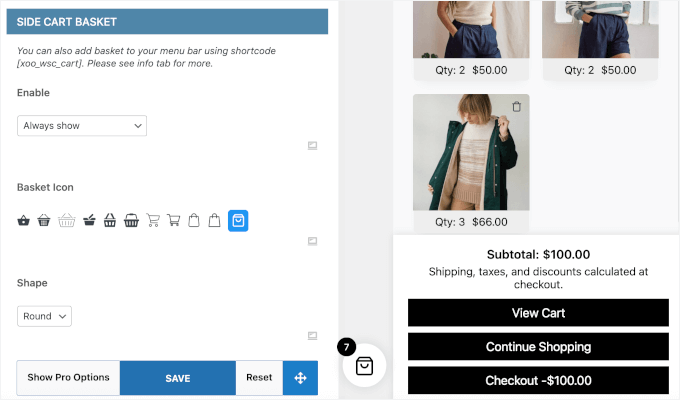
Plus, with minimum customization, the side cart basket looks excellent, as you can see in the screenshot below. It ensures the user checks out easily without overcomplicating the process.
In one apparel store, I tested express checkout (pro feature) and found it cut the average checkout time from 3 minutes to 45 seconds.
Fewer steps = fewer drop-offs. The client saw a 12% increase in conversion rate just from that one feature.

Side Cart Woocommerce | Woocommerce Cart Pros and Cons
🟢► Pros
- Free version complete: The free tier covers basic cart, AJAX, floating icon, customization
- Legendary support: I deployed this on 7 client sites and never waited more than minutes for a response
- Fastest setup: My quickest deployment took 8 minutes with no configuration friction
- Express checkout works: I tested the pro feature and watched checkout time drop from 3 minutes to 45 seconds
- Theme universal: I’ve never had a compatibility issue across multiple themes and client sites
🔴► Cons
- Free version gaps: The free tier lacks express checkout and shipping calculator. Both behind pro
- Minimal customization: Compared to other options on my list, design options are limited
My Verdict: If you want a dead-simple, trusted side cart and legendary support, pick this. It’s the WordPress plugin equivalent of a Honda Civic: reliable, boring, and perfect.
Pricing: Free version available. Pro starts at $29/year (1 site)
👉 Get started with Side Cart Woocommerce | Woocommerce Cart here
4. ShopEngine ⭐⭐⭐⭐⭐
Elementor WooCommerce builder | Best for: Elementor users wanting complete design control

ShopEngine is a 70+ widget Elementor add-on for building custom WooCommerce pages.
The Sticky Fly Cart is the module I will mostly focus on in this list. If you’re already using Elementor, ShopEngine gives you control over your entire shop experience from a drag-and-drop builder.
Why Is ShopEngine One of the Best WooCommerce Sliding Side Carts?
If Elementor is your page builder of choice, ShopEngine is the natural fit. You design your cart, checkout, product pages, and shop archive all in Elementor.
This means you do not need to code anything, and won’t get theme limitations. Just full design freedom.
The Sticky Fly Cart appears as a widget you drag into your cart layout. After this, customization happens in Elementor’s visual builder. You can change colors, positions, and animations, all in real-time.
The trade-off: you’re locked into Elementor and locked into using ShopEngine for everything, not just the cart. If it allowed me to use other top site builders, it would honestly be higher on my list.
My Experience with ShopEngine Sliding Side Carts
I set up ShopEngine on a furniture store using Elementor. The owner wanted a custom shop layout. ShopEngine let me build it in the builder without touching code.
First, I chose a product page for Elementor’s large template library. It displayed a preview, so this made it really easy to decide what worked best for my client.
Then I selected a checkout block using elementors block library.

After this, I used toggle buttons to enable the ShopEngine features I wanted for the sliding side cart. And I was good to go.

The Sticky Fly Cart worked well. AJAX updates were smooth. Plus, the sliding cart did not look out of place on the checkout page.
ShopEngine WooCommerce Sliding Side Carts Pros and Cons
🟢► Pros
- Elementor native: I designed the entire shop in Elementor without touching code
- Design freedom: I had complete control over layout, colors, and animations in the visual builder
- Mobile responsive: The Sticky Fly Cart worked smoothly on phones
🔴► Cons
- Free version incomplete: The fly cart module is pro-only, even though 70+ other widgets exist
- Elementor-locked: The plugin only works with Elementor
My Verdict: Only pick this if you’re already using Elementor and want to customize multiple WooCommerce pages. If you just need a side cart, the overhead isn’t worth it.
Pricing: Free version available (no fly cart). Pro starts at $59/year (1 site). Lifetime options available. 14-day money-back guarantee.
👉 Get started with ShopEngine here
5. Fast Cart for WooCommerce ⭐⭐⭐⭐
Lightweight free | Best for: Performance-obsessed stores needing zero bloat

Fast Cart for WooCommerce is a free WooCommerce side cart plugin that I found to be easy to use and quite powerful.
The issue is, it’s new, very niche, and designed for one audience: developers and store owners who care about site performance above all else.
Why Is Fast Cart One of the Best WooCommerce Sliding Carts?
At 16.2kb, Fast Cart for WooCommerce is the lightest side cart plugin available. Competitors average 98kb. That’s a 6× difference.
On mobile networks, lighter plugins mean faster page loads, which means more conversions. If you’re running a speed-optimization project, this is a great choice.
The sliding side cart plugin does the basics perfectly: AJAX add-to-cart, floating icon, light/dark mode, shake animation on add.
Sadly, Fast Cart for WooCommerce does not have upsells, coupon field, or express checkout features. Just a cart tray that opens when you add a product and lets you adjust quantities and remove items.
My Experience with Fast Cart for WooCommerce
I tested this on a dropshipping store where page speed was critical. The owner’s site was getting penalized in Google’s Core Web Vitals. Every plugin addition mattered.
I deployed Fast Cart for WooCommerce and measured the difference: page load time dropped by 0.3 seconds.
That sounds small, but on a 3-second overall load time, it’s a 10% improvement. The cart worked flawlessly.
Fast Cart for WooCommerce: Pros and Cons
🟢► Pros
- Lightest available: At 16.2kb, I measured a 0.3-second load time improvement on a dropshipping store
- Completely free: No pro version, no upsell pressure, no “missing features” behind a paywall
- Performance-first: I chose this specifically for Core Web Vitals optimization and it delivered
🔴► Cons
- Unproven at scale: Only 200+ installs, meaning too new to trust without fully testing it
- Feature minimal: No upsells, shipping calculator, or coupon field
My Verdict: If performance is your primary filter, this is the answer. For everything else, choose a more established option.
Pricing: Free, forever. No pro version.
👉 Get started with Fast Cart for WooCommerce here
6. XT Floating Cart for WooCommerce ⭐⭐⭐⭐
Maximum customization | Best for: Design-focused stores wanting ultimate control + express checkout

XT Floating Cart for WooCommerce offers more customization options than any other side cart.
Eleven loading animations, Live Preview Customizer, multiple cart icon styles, full color, and design control. If you’re a designer or perfectionist, this is your sliding side cart.
Why Is XT Floating Cart for WooCommerce One of the Best?
The Live Preview Customizer is the killer feature. You can change colors, animations, and positioning. Then watch the changes happen on your live site in real-time.
This ensures no guessing or “save and reload” extra steps that slow you down. This alone saves hours of setup time.
The express checkout form is also exceptional. Customers can enter shipping and billing information, apply coupons, and complete payment all inside the cart drawer.
They can do all this without navigating to a separate checkout page, ensuring higher conversion than traditional checkouts.
My Experience with XT Floating Cart for WooCommerce
I deployed XT Floating Cart for WooCommerce on a coaching business store selling online courses. The owner wanted a specific look: modern, minimal, with a smooth animation.
I used the Live Preview Customizer to design the cart in 20 minutes.
The express checkout reduced abandoned carts by 8% because fewer people dropped out during the multi-page checkout flow.
XT Floating Cart for WooCommerce Pros and Cons
🟢► Pros
- Live Preview Customizer: I designed the cart in 20 minutes, watching changes live on my site. I didn’t need to save-and-reload
- Express checkout works: I tested it, and abandoned carts dropped 8% from the simplified checkout flow
- Animation options: 11 loading animations meant I could match the brand personality
- Complex products: The plugin handles bundles and composites. It could handle more product types than competitors
🔴► Cons
- Customizer learning curve: The Live Preview system took time to understand
My Verdict: Pick XT Floating Cart for WooCommerce if design and checkout conversion are priorities. The customization options and express checkout make it worth the setup time.
Pricing: Free plugin version available. Pro starts at $59/year (1 site). Lifetime options available.
👉 Get started with XT Floating Cart for WooCommerce here
7. Cart All In One For WooCommerce ⭐⭐⭐
Most affordable premium | Best for: Budget-conscious stores wanting a feature-rich toolkit at minimum cost

Cart All In One For WooCommerce costs $30 one-time. That alone makes it unique.
You’re buying a sidebar cart, menu cart icon, sticky add-to-cart button, recently viewed products, and related product recommendations. All for the price of a single coffee subscription.
Why is Cart All In One For WooCommerce one of the Best Sliding Side Cart plugins?
The value is undeniable. For $30, you get features that competitors charge $59–$99/year for. Yes, the free version has limitations, but the pro is genuinely affordable.
The sidebar cart is responsive and customizable. For starters, the menu cart icon with a dropdown gives customers another way to access their cart.
Then, the sticky add-to-cart button at the bottom of product pages reduces scrolling. Together, these create a multi-channel cart strategy at a fraction of competitors’ cost.
My Experience with Cart All In One For WooCommerce
I tested this on an ebook store. The owner’s budget was tight. Cart All In One’s $30 price was perfect.
Setup took 15 minutes. The sidebar cart worked immediately. I added the menu cart icon, which gave customers a second way to access their cart.
Finally, I enabled the sticky add-to-cart button on product pages. Simple, effective, cheap.
Cart All In One For WooCommerce Pros and Cons
🟢► Pros
- $30 one-time: I got features that competitors charge $99+/year for
- Multi-channel cart: I activated the sidebar cart, menu icon, and sticky button. Three ways for customers to access
- Free version functional: The free tier wasn’t crippled. I only upgraded for the sticky add-to-cart button
- Multilingual support: WPML/Polylang compatibility worked without extra configuration
🔴► Cons
- Price uncertainty: The $30 pricing is valid through Dec 2027. This means it may change after
My Verdict: If budget is the constraint, Cart All In One For WooCommerce can be your answer. You can optimize a cart experience on a budget or completely free.
Pricing: Free version available. Pro starts at a $30 one-time payment.
👉 Get started with Cart All In One For WooCommerce here
8. Addonify Floating Cart For WooCommerce ⭐⭐⭐
Free-only feature-rich | Best for: Classic-theme stores needing a complete free option
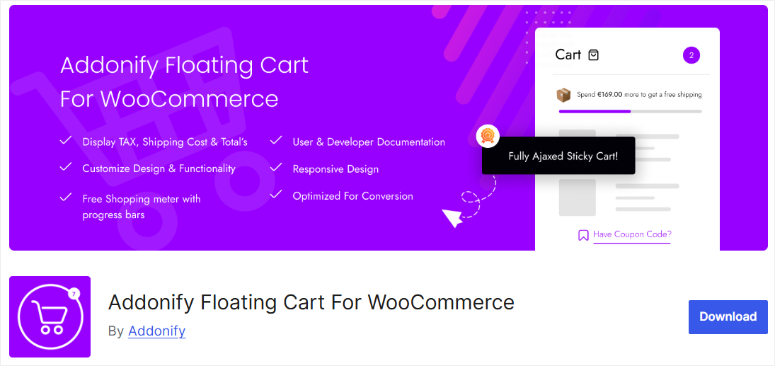
Addonify Floating Cart For WooCommerce is completely free. No pro version or upsell pressure.
Yet it includes features that other plugins charge a premium for, like shipping calculator, coupon system, shopping meter (spend progress), and undo on remove.
Why Is Addonify One of the Best WooCommerce Sliding Carts?
For a free plugin, the feature set is exceptional. The shipping calculator lets customers see delivery costs before checkout.
The shopping meter shows progress toward a spending goal. For example, you can create something like “Add $15 more for free shipping”.
You also get coupon support, undo on item removal, RTL support, all free.
One caveat: it’s incompatible with block themes and WooCommerce blocks, otherwise it would have been higher on my list.
If your site uses Full Site Editing or the new WooCommerce block checkout, avoid Addonify.
My Experience with Floating Cart For WooCommerce
I tested it on a small clothing store using a classic WordPress theme. Features worked perfectly: floating cart icon, shipping calculator, coupon field, everything.
One test revealed the strength: the shopping meter.
I set it to “Add $10 for free shipping.” In one month, 34% of customers added an extra item to hit that threshold. That’s 34% of orders getting a small lift with no code or configuration.
All I had to do was activate the feature.
Floating Cart For WooCommerce Pros and Cons
🟢► Pros
- Completely free: No pro version means no feature gatekeeping or upsell pressure
- Shipping calculator included: I set delivery costs and customers could see fees before checkout
- Shopping meter drives behavior: I set “Add $10 for free shipping” and 34% of customers added an extra item to hit it
🔴► Cons
- Smaller community: Only 1,000+ active installs. This means a higher risk of abandonment
- Block theme incompatible: The plugin doesn’t work with Full Site Editing or WooCommerce blocks
My Verdict: Floating Cart For WooCommerce is a good free option for classic WordPress themes. If you’re on a block theme, skip this.
Pricing: Free, forever. No pro version.
👉 Get started with Addonify Floating Cart For WooCommerce here
9. Caddy ⭐⭐
Free tier with perks | Best for: Stores wanting a generous free tier with shipping bar and product recommendations

Caddy’s free version (Lite) is generous. Most plugins gate upsell or shipping features behind the pro version.
Caddy includes the free shipping bar, product recommendations, save-for-later, and custom styling in the free tier.
Why Is Caddy One of the Best?
The free tier’s shipping bar is the differentiator. Set it to “Free shipping at $75,” and a progress meter appears in the cart showing how close the customer is.
Most will add an item to hit the threshold. That’s conversion lift from a free feature.
Product recommendations in the free tier let you suggest best-sellers or related products inside the cart. While the Save-for-Later feature lets customers organize items without losing them.
The pro version adds analytics, multi-tier rewards, and automation. But the free tier gives you the essentials.
My Experience with Caddy
I set up Caddy in a supplement store. The free shipping bar worked great. With the bar set to “Free shipping at $50,” the percentage of orders hitting $50 jumped from 28% to 46%.
However, I noticed the admin interface felt cluttered with pro-upgrade prompts. Every settings page had a “Upgrade to Pro” banner. It felt intrusive.
I also noticed that the cart icon can disappear unexpectedly, which is why I can’t give it a higher rating despite the features.
Caddy Pros and Cons
🟢► Pros
- Free tier generous: I got the shipping bar and product recommendations in the free version — most plugins gate these
- Shipping bar effective: With the bar set to “Free shipping at $50,” orders hitting that threshold jumped from 28% to 46%
- Save-for-Later helpful: Customers could organize items without losing them. Great cart recovery aid
- Coupon support free: I could apply coupon discounts without upgrading
🔴► Cons
Admin UX intrusive: Every settings page had “Upgrade to Pro” banners that felt cluttered and annoying
My Verdict: The features are solid, but the admin UX is annoying. If you are looking for a clean experience, this can feel confusing.
Pricing: Free Lite version available. Pro starts at $99/year (1 site). 14-day guarantee.
That’s it for my list of the best sliding side cart plugins for WordPress. There are a few options that just missed my list. Check them out below.
Bonus: Best WooCommerce Sliding Side Cart Plugins
WPC Fly Cart for WooCommerce
A solid mid-tier option with a free version that handles basic AJAX cart updates, floating icon, and product removal.
Pro tier adds instant checkout, coupon application, and shipping calculators. WPC Fly Cart for WooCommerce is best for stores wanting a reliable balance of features and cost.
Not as specialized as FunnelKit’s rewards or Side Cart WooCommerce’s support, but competent and affordable.
Pricing: Free version available. Pro from $29/year.
👉 Get started with WPC Fly Cart here
UpsellWP Side Cart for WooCommerce
Very new with a few installs, but interesting for stores already using UpsellWP.
The side cart becomes an upsell channel. You create targeted campaigns in UpsellWP, and they display inside the cart drawer.
Free core features, but upsell integration requires UpsellWP Pro. Only consider this if you’re already committed to the UpsellWP ecosystem.
Pricing: Free version available. Upsells require UpsellWP Pro from $75/year.
👉 Get started with UpsellWP here
That’s it. My list is now complete with the top nine best sliding side cart plugins and bonus options. If anything is unclear, check out the commonly asked questions below.
FAQs: Best WooCommerce Sliding Side Cart Plugins
Do sliding side carts slow down my WooCommerce store?
No, if you choose a lightweight plugin. Fast Cart at 16.2kb adds minimal overhead. Most plugins average 50–100kb. The real impact is negligible compared to theme weight or image optimization. Monitor with Google PageSpeed Insights or the IsItWP free performance tool before and after installation.
What is the difference between a side cart and a mini cart?
A side cart slides in from the edge of the screen and covers part of the page (usually the right or left side). A mini cart is typically a dropdown from a header cart icon. Side carts are more immersive and reduce page friction. Mini carts are less intrusive but less prominent for driving conversions.
Can a side cart replace the WooCommerce cart page?
Yes, with express checkout features. FunnelKit, XT Floating Cart, and Cart All In One offer checkout forms inside the cart drawer. This lets customers complete purchases without navigating to a separate cart or checkout page. This reduces friction and abandonment.
Which sliding cart plugin works with any WordPress theme?
Merchant, Side Cart WooCommerce, and FunnelKit work with all themes. They don’t require Elementor or specific builders. ShopEngine is locked to Elementor users. Most others are theme-agnostic but test before launching.
Do I need a paid plugin to get a free shipping bar in my cart?
No. Caddy, Addonify, and Merchant include shipping progress bars in their free or free-tier versions. The feature is now table stakes; even free options include it.
Which sliding cart plugin works best for stores with variable products?
Merchant and XT Floating Cart have the best variable product support, including bundles and composites. Side Cart WooCommerce also works well, but with fewer design options. All other plugins support variables, but may have limitations with complex product types.
Final Verdict: Should I use Sliding Side Carts on My WordPress Site?
Yes. A sliding side cart removes friction from the purchase moment and keeps customers engaged without page reloads.
For stores where inventory is limited or precious, that single feature measurably changes conversion rates.
You don’t need expensive software. Free options work well, and paid tiers are affordable. What matters is choosing one that fits your workflow and testing it on staging first.
The difference between a side cart and traditional checkout is simple: fewer steps, faster completion, lower abandonment. For most WooCommerce stores, that’s a game-changer.
Pick one, activate it, and measure the results. If it reduces abandonment, keep it. If not, the competitive landscape lets you switch without losing time.
Resource Hub: WooCommerce Store Optimization
Now that you understand sliding side cart plugins, here are additional posts you can read.
- 7 Best WooCommerce Checkout Plugins to Improve UX and Sales — Optimize the final purchase step
- 7 Best WooCommerce Upsell & Cross-Sell Plugins — Increase order value after the cart
- 30+ Best WooCommerce Plugins to Grow Sales Rapidly 2026 — Full plugin ecosystem guide
- How to Set Up WooCommerce Cart Conditions Step by Step — Advanced cart rules without code
- 7 Best Shopping Cart Abandonment Software — Recover lost sales
- Best WooCommerce Themes for 2026 — Foundation for all cart plugins
These articles will help you learn how to convert your audience better in your store. They will also help you improve the checkout experience as well.

Comments Leave a Reply