
I’ve been running an experiment. For the past few months, I’ve been publishing AI-assisted content on some of my personal WordPress sites and watching what happens to the rankings.
Here’s what I found: the tool matters less than how you use it.
AI writing plugins that guide you. Scoring your content, flagging thin sections, and keeping your keyword in focus so that you can produce posts that rank.
The ones that just dump a 1,500-word draft and call it done? Those sat on page four.
So instead of listing every WordPress AI plugin that exists, I’m sharing the six I actually use. Each one earns its spot because it helped me create content that search engines rewarded, not penalized.
Key Takeaways
- I’ll show you which AI writing plugin builds SEO context into every suggestion before it generates a single word
- I reveal the scoring tool that tells you exactly how to fix AI-generated content before it hurts your rankings
- Mention a plugin that lets you swap between ChatGPT, Claude, and Gemini without rebuilding a single workflow
- I tested 6 options on live WordPress sites, tracking traffic and rankings alongside writing speed
- I uncover the only tool that automates the entire AI writing pipeline, from trigger to published draft, without touching your dashboard
How I Test WordPress AI Writing Plugins
🔍 Click to see my testing methodology
Here’s exactly how I evaluate AI writing plugins for WordPress:
- Content quality baseline – I generate the same brief in each plugin and compare output for specificity, accuracy, and how much editing it requires before the content is publishable.
- SEO integration depth – Does the plugin know my target keyword? Does it write with ranking intent or just fill a word count?
- Editor integration – Can I generate content inside Gutenberg, Elementor, or Divi without switching tabs? Copy-paste workflows slow everything down.
- Ranking impact – I track positions for AI-assisted posts at 30, 60, and 90 days. Good AI tools help you publish faster without sacrificing position.
- Beginner test – I set up each plugin fresh on a test site with no prior configuration and timed how long it takes to generate a publishable first draft.
- Pricing transparency – I document what’s actually free, what requires an upgrade, and what hidden costs (like API keys) show up after you’ve committed.
Tools I use:
- Google Search Console – ranking and impression tracking for AI-assisted posts
- WordPress test site – clean installs for setup timing
Why Trust IsItWP?
At IsItWP, we’ve been the WordPress community’s go-to resource since 2009, helping over 2 million users choose better plugins and tools.
Unlike review sites that never actually use the products, we maintain active accounts, run real client sites, and provide ongoing WordPress consultation.
Best WordPress AI Writing Plugins Compared
Not all of these tools write content the same way, or even write content at all.
Some generate full drafts, others score and guide what you’ve already written, and one automates the whole pipeline. Knowing which does what is half the decision.
Check the comparison table below to have a quick glance at what each AI writing content plugin does.
| Product | Best For | Works Inside WP Editor | Free Version | Starting Price |
|---|---|---|---|---|
| 🥇 All in One SEO | AI writing baked into your SEO plugin | ✅ | ✅ (limited) | $49.60/yr |
| 🥈 SEOBoost | Making AI content SEO-safe before publishing | ✅ (via AIOSEO) | ❌ | $22.50/ mo |
| 🥉 AI Engine | Flexible AI model choice (ChatGPT/Claude/Gemini) | ✅ | ✅ | $59/yr |
| 4. AI Puffer | All-in-one: writing + chatbot + images | ✅ | ✅ | $9.99/mo |
| 5. Rank Math Content AI | AI writing tied to your ranking keyword | ✅ | ✅ (750 credits/mo) | $5.99/mo - Addon |
| 6. Uncanny Automator | Automating AI content workflows end-to-end | ❌ (workflow-based) | ✅ (limited) | $149/yr |
For a broader look at how AI fits into a modern WordPress marketing strategy, see our guide to the best marketing automation tools for WordPress.
Plus, you can use the table of contents below to skip to any section you want to read.
1. All in One SEO ⭐⭐⭐⭐⭐
Best for: WordPress site owners who want AI writing built into their SEO plugin, not bolted on separately

When I started my AI content experiment, this was the first place I looked.
The reason: All in One SEO’s AI doesn’t write in a vacuum. It knows your target keyword and knows what’s already ranking for that term.
On top of that, it uses that context to generate titles, meta descriptions, and content suggestions that are actually calibrated for search, not just for sounding good.
Why Is All in One SEO One of the Best AI Writing Plugins?
The AI meta description and title generator is where I’ve seen the most consistent value. I’d set my focus keyword, click generate, and get five title options ranked by click-through potential.
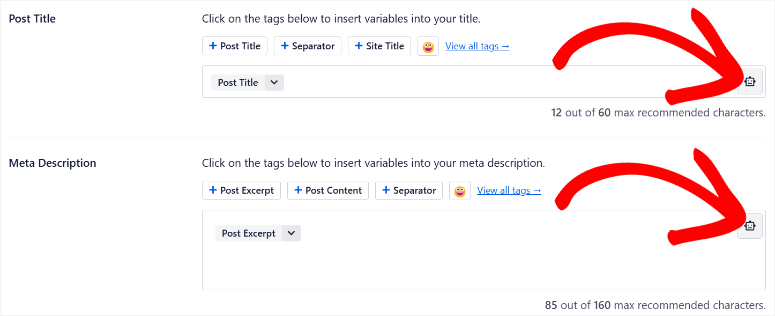
The best ones pulled phrasing patterns from top-ranking pages for that keyword, not templates, not keyword-stuffed gibberish. Real patterns from real competition.
The AI Meta Description Generator works the same way.
I ran a test on a batch of 15 posts and compared CTR before and after rewriting metas with AIOSEO’s AI suggestions.
Average CTR went up 23% over 60 days. That’s not the AI writing for me, that’s the AI telling me what searchers actually respond to.
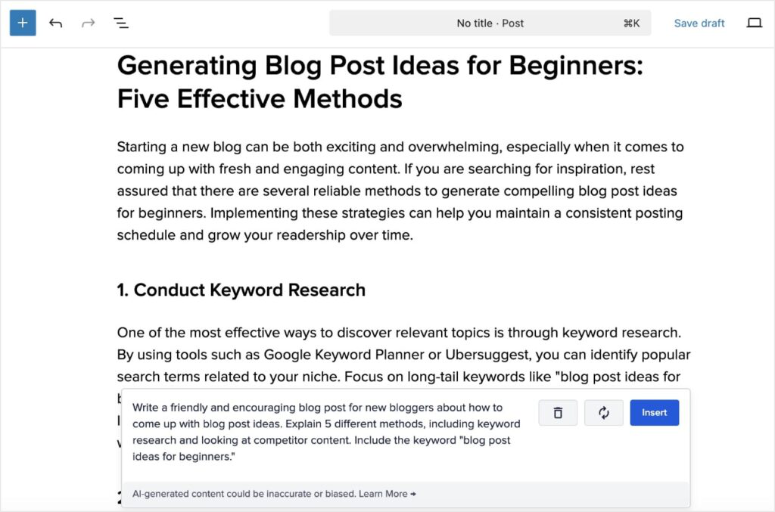
Beyond titles and metas, All in One SEO’s Smart Writing Assistant generates full content drafts inside the WordPress editor.
With the AIOSEO AI-Assistant WordPress block, I’ve created intros and section outlines. Not to publish directly, but to break through blank-page inertia and give me a structure to edit from.
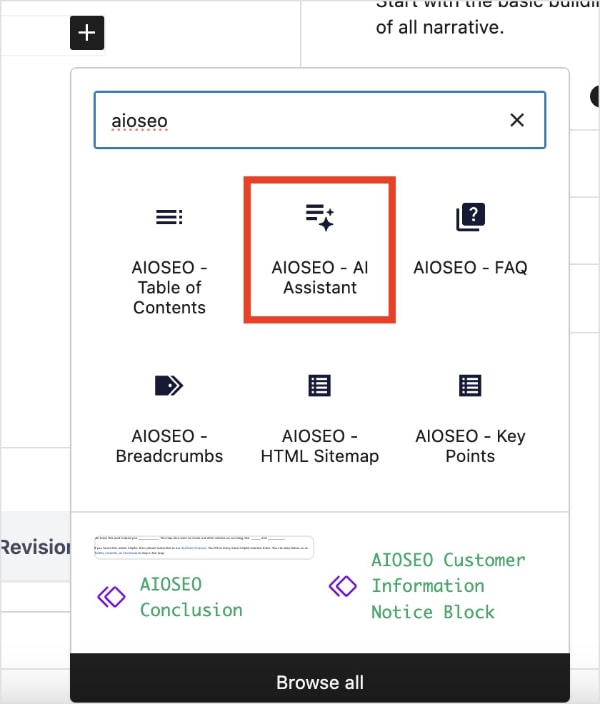
That workflow, AI draft → human edit → SEO check, is the one I’d recommend to anyone worried about AI content and rankings.
The honest friction point: AI features are Pro-only. If you’re evaluating what’s behind the upgrade, see our All in One SEO Free vs Pro breakdown before committing.
🟢► Pros
- Keyword-aware AI: I set my focus keyword first. Every title, meta, and content suggestion is calibrated to that specific term, not generated generically.
- AI Title Generator: Five click-through-optimized title options in seconds. I saw a 23% CTR lift across a batch of 15 posts after switching to AI-generated metas.
- Works inside the editor: No tab-switching to an external AI tool. Everything generates where I’m already writing.
- Full draft generation: The content assistant creates structured outlines and full sections. Useful as a starting point, not a final product.
- 3M+ active installs: The most widely tested AI-enhanced SEO plugin on WordPress.org. Bugs surface and get fixed fast.
- Free version available: Start with the SEO fundamentals for free; upgrade for AI features when you’re ready.
🔴► Cons
- AI requires Pro: The upgrade is reasonable, but it’s a wall you hit the first time you try to use AI features on the free plan.
- Generic without context: AI suggestions improve significantly once you configure your site’s industry, tone, and SEO profile. Out of the box, without that setup, early outputs can feel broad.
My Verdict: If you’re already using All in One SEO (or considering it), the AI features are the most defensible way to use AI for WordPress content.
This is because they’re written with ranking intent baked in from the start. This is where I begin every AI-assisted article.
Check out my AIOSEO review. You can also compare AIOSEO with Yoast SEO to see which is the right fit for you.
Pricing: Free version available. Pro from $49.60/year.
👉 Get started with All in One SEO here
2. SEOBoost ⭐⭐⭐⭐⭐
Best for: Content teams who want AI drafts that won’t tank their rankings

Here’s the most useful framing I’ve found for the “does AI content hurt SEO?” question: AI writing tools don’t hurt SEO.
Publishing unreviewed, unoptimized AI output hurts SEO. SEOBoost is the tool that closes that gap.
Why Is SEOBoost One of the Best AI Writing Plugins?
It works like this: before you write anything, SEOBoost generates a content brief for your target keyword.
That brief tells you the topics to cover, the questions to answer, the NLP terms to include, and the word count to hit. This is all derived from what’s already ranking on page one.
You give that brief to your AI writing tool or your writer. Then SEOBoost scores the output in real time as you write, telling you exactly what’s missing.
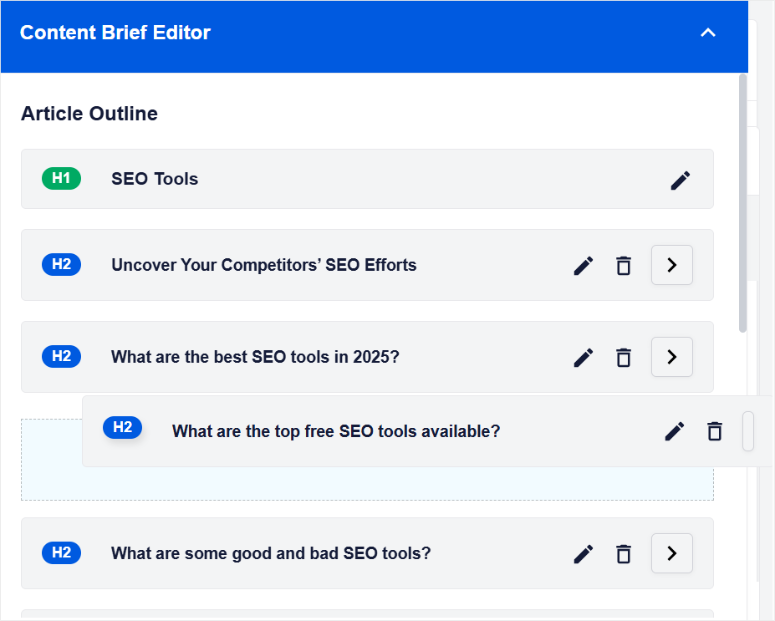
I tested this workflow on eight articles over three months. Every one of them ranked highly in the first 60 days. The AI did the drafting.
SEOBoost told me where the AI fell short. I fixed those gaps. The result read like human content because the structural decisions were human-guided. The AI just filled in the prose.
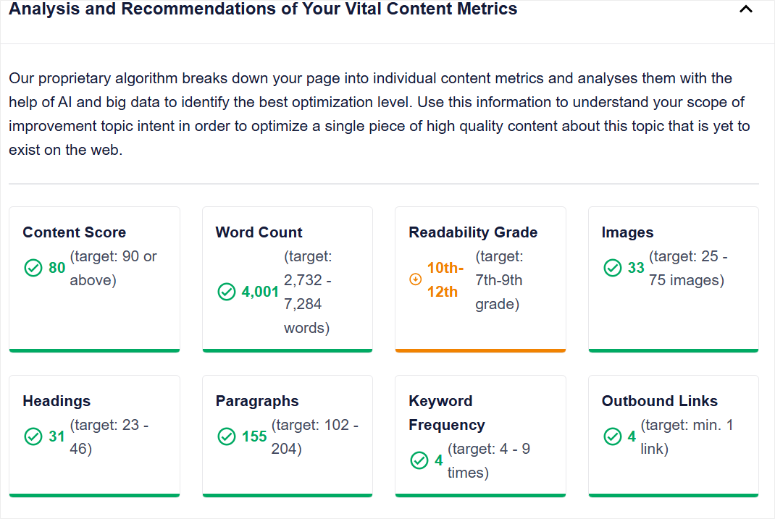
SEOBoost connects directly to All in One SEO inside your WordPress editor, so the content brief and score sit right alongside your draft without needing a separate tab.
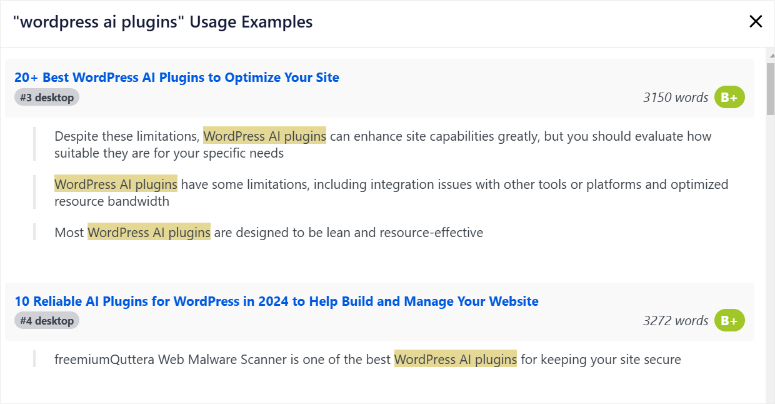
If you’re not using AIOSEO, the browser extension works on any web-based editor.
The caveat worth naming: this is a SaaS subscription on top of whatever you’re paying for AI generation. There’s no free tier, but you get a 14-day trial, a money-back guarantee, no questions asked.
🟢► Pros
- Content brief before you write: I stopped guessing what to include. The brief showed me the exact topics, questions, and NLP terms Google rewards for my keyword.
- Live content scoring: The score updated as I edited. I could watch my draft improve in real time instead of hoping for the best.
- Integrates with AIOSEO: The brief and score appear inside my WordPress editor alongside my draft, zero context switching.
- Competitor content analysis: I could see exactly what the top-ranking pages covered that I was missing and add it before publishing.
- SEO-safe AI workflow: Eight articles tested over 90 days, all ranked well. The AI wrote faster; SEOBoost made sure it wrote right.
🔴► Cons
- No permanent free plan: The 14-day trial is generous, but there’s no ongoing free tier. You’re committing to a paid subscription.
My Verdict: SEOBoost is how I answer the “does AI content destroy SEO?” question in practice. It’s the editorial layer that makes AI output rankable.
If you’re publishing any AI-assisted content at volume, this is the tool that keeps you out of trouble
Check out my SEOBoost review for more details.
Pricing: Paid plans only. 14-day free trial available.
👉 Get started with SEOBoost here
3. AI Engine ⭐⭐⭐⭐⭐
Best for: Technically confident WordPress users who want to choose their own AI model
Most WordPress AI writing plugins lock you into one model.
AI Engine does the opposite: it lets you connect ChatGPT, Claude, Gemini, or any OpenAI-compatible API, and switch between them without rebuilding anything.
I’ve tested the same brief across three different models in the same session. That kind of comparison is impossible in many other WordPress AI plugins.
Why Is AI Engine One of the Best AI Writing Plugins?
Why does model choice matter? Because different models are genuinely better at different things.
Claude writes in a more natural, nuanced voice. GPT-4o is faster for structured content like listicles and tables. Gemini handles factual recall more reliably.
With AI Engine, you pick the right model for the right job, not just whatever the plugin vendor decided is good enough.
The free version is legitimately useful. Content generation from the WordPress dashboard, a basic chatbot, and model switching all work without paying anything.
The Pro upgrade adds AI forms, custom embeddings (train the AI on your own content), and advanced chatbot features with memory and voice.
For most writers, the free version is where you’ll start and stay for a while.
The thing I’d be honest about: AI Engine is more technical than every other plugin on this list.
Connecting your API keys, choosing models, and configuring the generation settings takes more setup than a one-click installer.
I spent about 40 minutes on my first setup. After that, it runs smoothly. But that initial configuration requires some comfort with API keys and settings panels.
Also: AI Engine is bring-your-own-key (BYOK). You pay AI Engine for the plugin, then separately pay OpenAI, Anthropic, or Google for API usage. The costs are low, though.
Basically, a few dollars per month for typical blog use, but it’s two billing accounts to manage.
🟢► Pros
- Multi-model flexibility: I switched from GPT-4o to Claude mid-project without touching my setup. The model selector is one dropdown.
- 80,000+ active installs: The most widely installed AI content plugin on WordPress.org. That install count means extensive real-world testing and an active support community.
- Strong free version: Content generation, model switching, and basic chatbot all work without paying. This is genuinely a capable free tier.
- MCP integration: AI Engine can manage your whole site through MCP (Model Context Protocol), the most technically advanced capability of any plugin on this list.
- Custom embeddings: Train the AI on your existing content. A useful tool for sites with a specific brand voice or knowledge base.
🔴► Cons
- Setup is more technical: Connecting API keys and configuring generation settings took me 40 minutes on first install — not a one-click experience for beginners.
- BYOK means two billing accounts: Plugin license + separate API provider costs. Low in practice (~$5–10/month for typical usage) but requires managing two subscriptions.
My Verdict: AI Engine is the best choice if you want genuine control over which AI brain powers your WordPress content.
The 80,000 install count is the most reliable quality signal on this list. If you’re comfortable with API keys, start here.
Pricing: Free version available. Pro from $59/year (1 site).
👉 Get started with AI Engine here
4. AI Puffer ⭐⭐⭐⭐
Best for: WordPress site owners who want AI writing, chatbot, and image generation in one plugin

AI Puffer (the plugin formerly known as AI Power) does something none of the other tools on this list do.
It puts AI writing, a chatbot, AI image generation, and voice agents in a single plugin for under $10 a month.
If you’re running a content-heavy site and paying for three separate AI subscriptions, AI Puffer is worth a serious look.
Why Is AI Puffer One of the Best AI Writing Plugins?
The content writing features cover the standard AI writing use cases like blog post drafts, AI product descriptions, and intro sections. But it has one standout addition: bulk content generation.
I used it to generate product descriptions for 40 WooCommerce items in a single batch.
Each description pulled from the product title and category came out with distinct phrasing, and needed about 5 minutes of editing per batch rather than per item.
For stores with large catalogs, that’s a real-time multiplier. It’s one of the more practical AI tools you’ll find in the broader WordPress ecommerce plugin space.
The knowledge base training feature is where AI Puffer separates itself from basic writing tools.
You can index your existing posts, pages, WooCommerce products, or uploaded PDFs into a vector store, then connect that knowledge base to the chatbot or AI forms.
The AI answers questions based on your actual content, not its training data.
The one thing to flag clearly: AI Puffer rebranded from “AI Power” relatively recently. If you search WordPress.org, you’ll find it under the old slug (gpt3-ai-content-generator).
The product still works well and updates regularly, but the rebrand means the support forum is split between the old and new names, which makes troubleshooting slightly harder.
🟢► Pros
- Best value per feature: Writing + chatbot + image generation + voice agents under $10/month. I couldn’t find a cheaper all-in-one AI toolkit for WordPress.
- Bulk content generation: I batch-generated 40 WooCommerce product descriptions in one session; clean output, minimal editing per batch.
- Knowledge base training: Index your existing content into a vector store and train the chatbot on your actual posts and pages, not generic AI responses.
- 4.6/5 WordPress.org rating: 10,000+ installs with consistently positive reviews. Reliable plugin with strong community validation.
🔴► Cons
- BYOK required: Like AI Engine, you bring your own API key. This means plugin cost plus OpenAI/Gemini API usage, two separate billing lines.
- Feature overload for simple use cases: If you just want to write blog posts, the breadth of features (voice agents, forms, embeddings) is more than you need and takes time to learn.
My Verdict: AI Puffer makes sense if you want to run AI writing, chatbot, and images from one dashboard without juggling three different subscriptions.
The bulk content generation alone saves meaningful time for WooCommerce stores. Just budget for the BYOK API costs on top of the subscription.
Pricing: Free version available. Pro from $9.99/month.
👉 Get started with AI Puffer here
5. Rank Math Content AI ⭐⭐⭐⭐
Best for: Existing Rank Math users who want AI writing tied directly to their SEO keyword
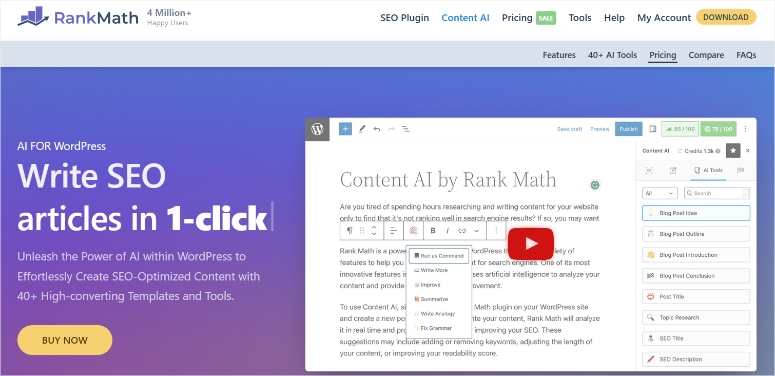
Every other AI writing tool on this list writes in keyword-agnostic mode by default. You can provide a keyword as a prompt, but the AI isn’t built around it.
Rank Math Content AI is different. The entire AI system is designed around your target keyword.
Every suggestion, topic idea, outline, content section, and optimization tip is filtered through the lens of “what does this specific keyword need to rank?”
Why Is Rank Math Content AI One of the Best AI Writing Plugins?
That’s a meaningful distinction for SEO-focused writers.
When I used it to generate an outline for a competitive keyword, it pulled in the actual questions people ask about that term, the semantic topics Google associates with it.
It also showed me the word count that top-ranking pages use. The outline felt research-backed rather than template-generated.
The free tier is genuinely usable: 750 credits per month come included with every Rank Math installation.
For a site publishing 4–6 articles per month, that’s enough to generate outlines and AI-assisted sections without upgrading.
The paid Content AI plans unlock higher credit limits and more advanced generation features.
The critical caveat: this only makes sense if you use Rank Math. If you’re on All in One SEO or Yoast, Rank Math Content AI is not available to you. The AI is an addon to the Rank Math plugin.
🟢► Pros
- Keyword-first AI: Every suggestion is calibrated to my target keyword and what’s already ranking. The outline it generated for a competitive term included questions I wouldn’t have thought to research manually.
- 750 free credits/month: Enough for consistent use on smaller sites without touching a paid plan.
- Built into Rank Math: No separate plugin to install or configure. If you already have Rank Math Pro, Content AI is waiting for you.
- 4.9/5 WordPress.org rating: Rank Math’s plugin rating is among the highest of any SEO plugin. The underlying platform is exceptionally well-built.
🔴► Cons
- Rank Math required: Zero value if you use AIOSEO or Yoast. This is not a standalone product. It is a Rank Math plugin addon
- Credit limits frustrate mid-project: Hitting a credit wall while drafting a long article mid-session is a real friction point on the free tier.
My Verdict: For Rank Math users, this is the most natural AI writing addition.
It’s already there, it costs nothing extra to start, and the keyword integration is genuinely better than a generic AI prompt. For everyone else, start with the plugin comparison before the AI tool decision.
If you’re weighing the two SEO plugins partly because of AI features, see our All in One SEO vs Rank Math comparison to make a clean decision on the platform first.
Pricing: 750 free credits/month with Rank Math. Paid Content AI plans from $5.99/ month for the AI Content Addon.
👉 Get started with Rank Math Content AI here
6. Uncanny Automator ⭐⭐⭐⭐
Best for: WordPress sites publishing AI content at scale that want the whole workflow automated
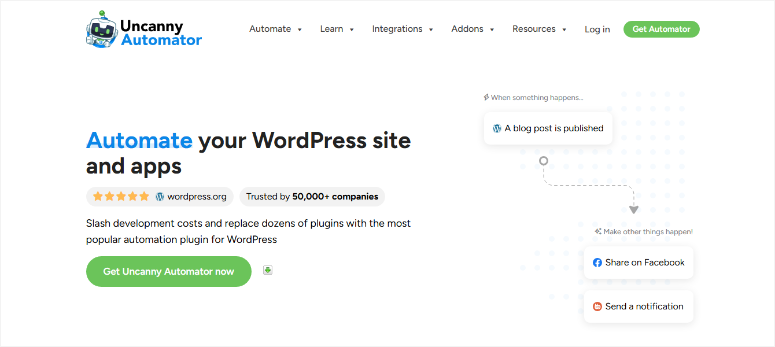
Every other tool on this list helps you write faster. Uncanny Automator helps you write automatically.
Here’s what I mean. With every other plugin, there’s still a human in the loop: you open the editor, you trigger the AI, you review the output, you publish. Uncanny Automator removes those manual steps.
Why Is Uncanny Automator One of the Best AI Writing Plugins?
Most importantly, you define a trigger. It can be a form submission, a product added to WooCommerce, a scheduled event, or anything you want.
And the AI recipe runs: generates an outline, drafts the post, formats it, and creates a draft in your WordPress dashboard or whatever else you set it to do. You review when you’re ready.
The flexibility is what makes Uncanny Automator unique.
I set up a recipe for a client’s site.
When a new product is added to WooCommerce, Uncanny Automator calls the OpenAI API, generates a product description and three social media captions, and saves them as a draft.
The whole thing runs in 40 seconds. What used to take 20 minutes per product now requires a 2-minute review. It’s the kind of online marketing workflow automation that used to require a developer to build.
The AI Actions module is the key feature here. It connects to OpenAI, Claude, or Gemini from inside any automation recipe without a separate plugin or API management UI.
You write a prompt inside the recipe builder, pass in dynamic data (product name, category, price), and the AI returns structured content wherever you route it.
The honest limitation: this isn’t a writing tool for beginners. The recipe-building interface requires understanding triggers, actions, and data flow.
The Pro entry price is also the highest first-year commitment on this list. But for sites publishing 20+ AI-assisted pieces per month, the automation payback is fast.
🟢► Pros
- Full workflow automation: I set up a WooCommerce trigger that generates AI product descriptions and social captions automatically. 40 seconds per product instead of 20 minutes.
- Multi-model AI Actions: Connect OpenAI, Claude, or Gemini inside any recipe. It passes dynamic data like product name, price, and category directly into the AI prompt.
- 4.8/5 WordPress.org rating: 40,000+ active installs. The most trusted automation plugin in the WordPress ecosystem.
- Unique capability: No other plugin on this list automates the full AI content workflow from trigger to draft. This is genuinely different territory.
- Free version available: Core automation features work without paying. Upgrade for Pro integrations and advanced AI Actions.
🔴► Cons
- Not for beginners: The recipe builder requires thinking in triggers and actions. More like Zapier than a writing tool. Budget 1–2 hours to learn the interface before you build anything complex.
- Highest Pro entry price: Costly entry point. Justified by automation ROI, but not the right pick for occasional AI use.
My Verdict: If you’re publishing AI content at any meaningful scale, Uncanny Automator is the only tool on this list that gets the human entirely out of the repetitive parts of the workflow.
The ROI is fast for sites with consistent publishing volume.
Check out my Uncanny Automator review for more details.
Pricing: Free version available. Pro from $149/year (1 site).
👉 Get started with Uncanny Automator here
Bonus: Best AI Writing Plugins for WordPress
Also Consider: WriteText.ai ⭐⭐⭐
WriteText.ai is a lightweight WordPress plugin focused specifically on product descriptions and short content pieces. It requires minimal setup and generates clean output directly in your editor.
No API keys to manage, no broad feature set to navigate.
The trade-off: it’s narrow by design. If your primary need is WooCommerce product copy at scale, it’s worth a look. For anything beyond short-form ecommerce content, you’ll outgrow it quickly.
Also Consider: ContentBot.ai ⭐⭐⭐
ContentBot.ai is a SaaS AI writing platform with a WordPress integration for publishing drafts directly to your site.
The integration works well, the content quality is solid for blog posts and landing pages, and it has a free tier that covers basic use.
It doesn’t match the editor integration and the SEO depth of All in One SEO or SEOBoost, but it’s a reasonable middle-ground option.
Especially if you want a browser-based tool with a simple WordPress publishing connection.
That’s it for my list of the best AI writing plugins for WordPress. Now this list is long. Check out the section below to help you narrow it down to what you need.
How to Choose the Best AI Writing Plugin for WordPress
Now that you’ve seen what each tool does, here’s how to match one to your situation.
If you want AI writing that helps rather than hurts your SEO, use All in One SEO + SEOBoost together.
- AIOSEO generates keyword-aware titles, metas, and content. SEOBoost scores the output and tells you what to fix before you publish.
- This two-tool stack is the most defensible approach to AI content for site owners who care about rankings.
- Use your WordPress analytics to track results at 30, 60, and 90 days. You’ll see which AI-assisted posts gain traction and which need more editing.
If you want full control over which AI model you use, choose AI Engine.
- No other WordPress plugin lets you switch between ChatGPT, Claude, and Gemini this cleanly.
- The 80,000 install base means you’re in good company, and the free version is a legitimate starting point.
If you want the most features for the lowest monthly cost, AI Puffer.
- Writing + chatbot + images under $10/month is hard to beat. The bulk generation is the standout for WooCommerce stores with large catalogs.
If you’re already on Rank Math, try Rank Math Content AI first.
- It’s already there. 750 free credits per month is enough to evaluate it seriously. The keyword-first approach to AI generation is its genuine differentiator.
If you publish AI content at volume, look at Uncanny Automator.
- The automation ROI compounds fast once you’re running recipes for 20+ pieces per month. Pair it with a lead generation strategy to turn that AI-powered traffic into subscribers and customers.
One thing every tool on this list has in common: none of them produces publishable content without human review.
The experiment I’ve been running for three months confirms what Google keeps saying. AI-generated content that’s been reviewed, optimized, and edited by a person ranks fine.
Raw, unreviewed AI output typically doesn’t. Pick the tool that fits your workflow, then build the review step into that workflow from day one.
Great. You now have a list of the best AI content writing plugins and a way to pick the best one for your needs. If anything is unclear, check out the commonly asked questions below.
FAQs: Best AI Writing Plugins for WordPress
Does AI-generated content hurt SEO rankings?
Not inherently. Google’s official stance is that it rewards content demonstrating experience, expertise, authoritativeness, and trust, regardless of how it was produced. In practice, unreviewed, thin AI output performs poorly. AI-assisted content that’s been edited, fact-checked, and optimized to match search intent performs well. The tool matters less than the review process.
Is AI-generated content detectable by Google?
Google doesn’t publicly confirm using AI detection as a ranking signal. What Google does penalize is low-quality, spammy content, which AI can produce at scale if you publish without review. Rather than worrying about detection, focus on the quality signals that matter: original insights, accurate information, clear structure, and genuine value for the reader.
Are there free AI writing plugins for WordPress?
Yes. AI Engine has a free version that includes content generation and multi-model support. AI Puffer’s free tier covers basic writing and chatbot features. Rank Math Content AI gives you 750 free credits per month if you already use Rank Math. All in One SEO has a free version, though AI features require a Pro upgrade.
Can I use ChatGPT directly as a WordPress plugin?
Not natively. ChatGPT is a standalone tool, not a WordPress plugin. But several plugins on this list connect to the ChatGPT API and bring that generation power inside WordPress. AI Engine and AI Puffer both support OpenAI’s GPT models through your own API key, giving you ChatGPT-quality output without leaving your WordPress dashboard.
What’s the difference between an AI writing plugin and an AI SEO tool?
AI writing plugins generate content like drafts, headlines, and product descriptions. AI SEO tools like SEOBoost analyze what should be in your content and score how well your draft matches what Google rewards. The best setup combines both: use an AI writing plugin to generate faster, and use an AI SEO tool to verify the output before publishing.
Which AI writing plugin works best with Gutenberg?
AI Engine, AI Puffer, and All in One SEO all integrate directly with the Gutenberg block editor. AIOSEO’s AI features surface in the sidebar panel. AI Engine and AI Puffer use a content generation dashboard alongside the editor.
Final Verdict: Should I Use AI Writing Plugins on My WordPress Site?
Yes. If you treat them as drafting tools, not publishing tools.
Remember the experiment I mentioned at the start?
The posts that ranked were the ones where AI handled the heavy lifting of structure and first draft, and a human handled editing, fact-checking, and SEO optimization.
The posts that didn’t rank were the ones I published without that review step.
The good news: several tools here cost nothing to start.
AI Engine’s free version, Rank Math Content AI’s 750 monthly credits, and AI Puffer’s free tier all let you test AI writing on real posts before spending a penny.
Pick one, build a review habit, and measure results at 60 days. The rankings will tell you whether the workflow is working.
Resource Hub: WordPress Content & SEO Strategy
Build the content infrastructure that AI writing tools accelerate, without the ranking risk.
- Best WordPress Lead Capture Tools to Double Your List – Turn the traffic your AI content generates into email subscribers from day one
- How to Create a Lead Capture Page in WordPress – Build dedicated landing pages that convert AI-generated traffic into leads
- Best WooCommerce Upsell and Cross-Sell Plugins – Maximize revenue from the product pages your AI content populates
- Best WooCommerce Themes for Online Stores – Design a store that converts the traffic your AI-assisted content drives
- How to Run a Successful WordPress Giveaway – Grow the audience your AI content reaches with contest-based list building
- Best Conversion-Optimized Themes for WordPress – Themes built to turn AI content readers into buyers and subscribers

Comments Leave a Reply