
Când mi-am creat primul magazin online, am crezut că un magazin WooCommerce grozav este suficient.
Am avut pagini de produse curate, fotografii grozave și prețuri pe care oamenii nu le puteau contesta. Dar vânzările erau lente. Apoi un prieten m-a întrebat: „Produsele tale apar pe Google Shopping?”
Nu apăreau. Nici pe Facebook, nici pe Instagram. Nicăieri în afara propriului meu site.
Vedeți, cumpărătorii de astăzi nu încep să caute produse în magazinul dvs. Ei încep pe Google. Ei derulează platforme de socializare precum Facebook și Instagram. Și dacă produsele dvs. nu sunt acolo, produsele concurenților dvs. sunt.
Acesta este exact ceea ce rezolvă un feed de produse WooCommerce.
Sincronizează automat catalogul magazinului dvs. cu Google Shopping, Facebook Marketplace și peste 100 de alte canale. Astfel, ajungeți la oamenii care caută deja ceea ce vindeți.
Am testat zece produse și am listat cele mai bune cinci pluginuri de feed-uri de produse WooCommerce, astfel încât să puteți găsi rapid potrivirea potrivită pentru afacerea dvs. Iată ce funcționează cu adevărat.
Puncte Cheie
- Vă voi arăta cum să sincronizați automat magazinul dvs. WooCommerce cu Google Shopping, Facebook și peste 100 de canale, fără a atinge o singură linie de cod
- Menționez un plugin gratuit care gestionează produse nelimitate și feed-uri nelimitate direct din cutie
- Dezvăluiți ce plugin este cel mai bun pentru vânzătorii care vând doar pe Google vs. magazinele care doresc să domine fiecare canal social
- Am testat toate cele 5 pluginuri de feed-uri de produse pentru a mă asigura că nu veți întâmpina o configurare de tip încercare și eroare
- Vă arăt ce opțiune include actualizări de feed în timp real care mențin prețurile și stocurile mereu exacte
În plus, puteți utiliza cuprinsul de mai jos pentru a vedea toate pluginurile dintr-o dată. De asemenea, puteți face clic pe orice link pentru a sări la acea secțiune.
- Cele mai bune plugin-uri de flux de produse WooCommerce revizuite, comparate și clasificate
- Cum să alegi pluginul potrivit pentru feed-uri de produse WooCommerce
- Întrebări frecvente: Cele mai bune pluginuri de feed-uri de produse WooCommerce
- Verdict final: Cele mai bune pluginuri de feed-uri de produse WooCommerce
- Hub de resurse: Feed-uri de produse WooCommerce și creșterea magazinului
Cum testez pluginurile de feed-uri de produse WooCommerce
Bună, sunt Alvin, scriitorul IsItWP, și acesta este procesul meu de testare pentru cele mai bune pluginuri de feed-uri de produse pentru WooCommerce.
🔍 Click pentru a vedea metodologia mea de testare
Iată exact cum evaluez fiecare plugin:
- Canale suportate – La câte platforme se conectează? Google, Facebook, TikTok, Instagram, Bing, Pinterest și altele
- Ușurința de configurare și maparea câmpurilor – Poate un începător să configureze un feed în mai puțin de 30 de minute?
- Automatizarea actualizării feed-ului – Oferă actualizări programate? Sincronizare în timp real când produsele se modifică?
- Suport pentru variații de produse și filtre – Gestionează produse variabile, excluderi de produse epuizate și reguli personalizate?
- Separarea funcționalităților gratuite și plătite – Cât poți face efectiv înainte de a atinge un paywall?
- Calitatea suportului și a documentației – Este disponibil ajutor când lucrurile se strică?
Instrumente pe care le folosesc:
- Magazine WooCommerce cu tipuri de produse simple și variabile
- Google Merchant Center pentru a verifica trimiterea și aprobarea fluxului
- Facebook Commerce Manager pentru a verifica sincronizarea catalogului
- Instrumentul de performanță a site-ului IsItWP și GTmetrix pentru a măsura impactul plugin-ului asupra vitezei magazinului
- Medii de testare WordPress cu cataloage de peste 100 de produse
De ce să ai încredere în IsItWP?
La IsItWP, am fost resursa principală a comunității WordPress încă din 2009, ajutând peste 2 milioane de utilizatori să aleagă plugin-uri mai bune. Spre deosebire de site-urile de recenzii care nu folosesc niciodată produsele, noi menținem conturi active, rulăm site-uri reale ale clienților și oferim consultanță continuă pentru WordPress.
Cele mai bune plugin-uri de flux de produse WooCommerce revizuite, comparate și clasificate
Dacă aveți un magazin WooCommerce și nu vă sincronizați produsele pe canale externe, pierdeți bani în fiecare zi.
Aceste cinci plugin-uri simplifică sincronizarea, fără a fi nevoie de dezvoltatori. Pentru a putea compara rapid toate instrumentele dintr-o privire, consultați tabelul de mai jos.
| Plugin | Cel mai bun pentru | Canale | Versiune gratuită | Evaluare | Preț de pornire |
|---|---|---|---|---|---|
| 🥇 Product Feed PRO de AdTribes | Acoperire completă | 100+ | ✅ | 99,50 USD/an | |
| 🥈 ELEX WooCommerce Google Shopping | Magazine axate pe Google | Google + mai mult | ✅ | 79 USD o singură dată | |
| 🥉 WebToffee Product Feed | Facebook & Instagram | Google, FB, IG, Pinterest | ✅ | 89,00 USD /an | |
| 4. CTX Feed | Max formate de export | 130+ | ✅ | 119 USD/an | |
| 5. Product Feed Manager de la Conversios | Performanța anunțurilor | Google, Facebook, TikTok | ✅ | 49,00 USD/an |
Înainte de a intra în recenziile complete, consultați alegerile mele alături de cele mai bune plugin-uri eCommerce WordPress pentru o vedere mai largă asupra construirii unui magazin performant.
Acum că am clarificat acest aspect, să începem.
1. Product Feed PRO de la AdTribes ⭐⭐⭐⭐⭐
Cel mai bun pentru: Proprietarii de magazine care doresc să ajungă la peste 100 de canale cu un plan gratuit puternic
Iată ce nu vă spune nimeni despre fluxurile de produse: majoritatea plugin-urilor vă obligă să plătiți înainte de a putea testa dacă funcționează. AdTribes răstoarnă complet acest lucru.
Versiunea gratuită de la AdTribes vă oferă produse nelimitate, fluxuri nelimitate și peste 100 de șabloane de canale gata făcute.
Aceasta acoperă Google Shopping, Facebook, TikTok, Instagram, Bing, Pinterest și zeci de site-uri de comparație de prețuri. Nu sunteți blocat pe unul sau două canale; puteți fi peste tot odată.
De ce Product Feed PRO este unul dintre cele mai bune plugin-uri de flux de produse WooCommerce?
Caracteristica remarcabilă pentru mine este maparea automată a câmpurilor, care este cu adevărat impresionantă.
Când creați un flux nou, AdTribes pre-completează atributele obligatorii ale Google, cum ar fi ID-ul produsului, titlul, descrierea și URL-ul imaginii, pe baza datelor dvs. existente din WooCommerce.
După aceasta, tot ce trebuie să faceți este să verificați mapările și să ajustați pe cele care sunt goale. Pentru majoritatea magazinelor, acest lucru economisește 30-45 de minute de configurare manuală per canal.
În afară de asta, instrumentul Feed Validator detectează erorile înainte chiar de a trimite la Google Merchant Center.
Poate detecta Numere de identificare comercială globală (GTIN) lipsă, linkuri de imagini nefuncționale și formate de preț invalide. Le semnalează pe toate în avans, astfel încât fluxul dvs. să nu fie respins.
În afară de asta, actualizările programate înseamnă că prețurile și nivelurile stocurilor dvs. rămân precise pe fiecare canal automat.
Puteți, de asemenea, să îl setați să se reîmprospăteze doar atunci când produsele se modifică, ceea ce menține sarcina serverului scăzută pe cataloage mari.
Pentru oricine este serios în privința optimizării pentru motoarele de căutare în eCommerce, acesta este cel mai capabil punct de plecare gratuit pe care l-am găsit.
Experiența mea cu Product Feed PRO
Am configurat un flux Google Shopping cu AdTribes pentru un magazin de îmbrăcăminte cu 340 de produse. Întregul proces a durat sub 20 de minute.
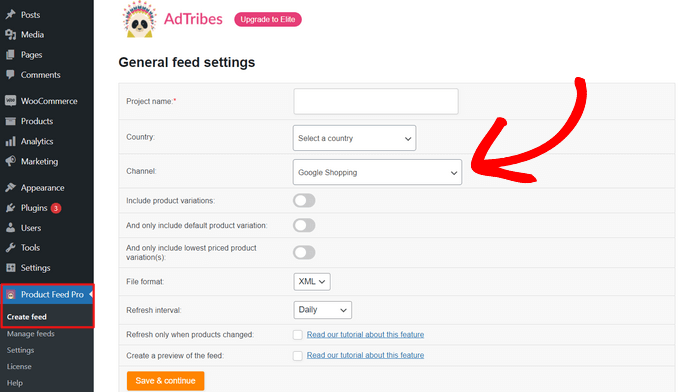
Mai întâi, am mers la Product Feed Pro » Create feed și am completat setările generale, care includ numele proiectului, țara și canalul.
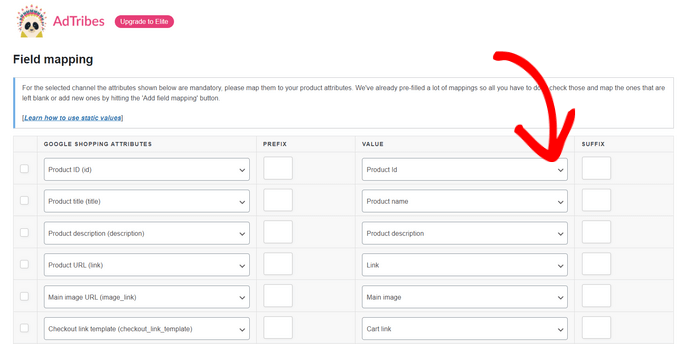
AdTribes m-a dus apoi direct la maparea câmpurilor. Aici, aproape fiecare atribut Google obligatoriu era deja pre-completat. A trebuit să mapez manual doar două câmpuri personalizate.
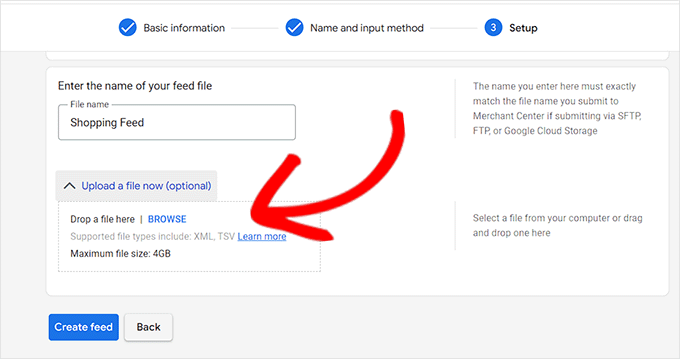
După salvare, am descărcat fișierul fluxului XML și l-am încărcat direct în Google Merchant Center.
Fluxul a devenit live fără nicio respingere. Acest lucru este rar pentru o primă încercare.
Singurul lucru pe care l-aș menționa: versiunea Elite (premium) este cea care include funcții avansate precum maparea categoriilor de produse și suportul prioritar. Nivelul gratuit este generos, dar magazinele în creștere vor dori în cele din urmă să facă upgrade. Acestea fiind spuse, majoritatea începătorilor nu vor întâmpina această limitare timp de luni de zile.
Sfat: Înainte de a face upgrade, asigurați-vă că găzduirea dvs. WooCommerce poate gestiona traficul suplimentar pe care îl vor aduce fluxurile dvs. de produse. Am văzut magazine care și-au aprobat fluxurile și au căzut imediat sub noua sarcină de vizitatori, deoarece erau pe găzduire partajată. Remediați infrastructura mai întâi, apoi faceți upgrade la pluginul de flux.
► Avantaje
- Planul gratuit include produse nelimitate și fluxuri nelimitate, astfel încât să puteți scala fără a plăti nimic în avans
- Peste 100 de șabloane de canale înseamnă că un singur plugin gestionează TikTok, Google, Facebook și Pinterest simultan
- Feed Validator detectează erorile înainte de trimitere, ceea ce economisește bătaia de cap a buclelor de respingere în Google Merchant Center
- Maparea câmpurilor pre-completată reduce dramatic timpul de configurare, chiar și pentru magazinele cu date complexe de produse
► Dezavantaje
- Maparea avansată a categoriilor și suportul prioritar necesită upgrade-ul Elite
- Configurarea fluxului poate părea copleșitoare dacă configurați cinci sau mai multe canale simultan
Verdictul meu: Product Feed PRO de la AdTribes este alegerea mea principală, deoarece îți oferă o acoperire serioasă pe mai multe canale fără a cheltui niciun ban. Pentru magazinele care abia încep cu pluginuri WooCommerce pentru a crește vânzările, acesta este cel pe care l-aș instala primul. Planul gratuit singur va face ca majoritatea magazinelor mici să fie live pe Google Shopping și Facebook în decurs de o oră.
Pentru magazinele WooCommerce care rulează configurații mai complexe, versiunea premium adaugă suport complet pentru variații de produse, categorii multilingve și suport prioritar.
Începe cu Product Feed PRO de la AdTribes aici
2. ELEX WooCommerce Google Shopping ⭐⭐⭐⭐⭐
Cel mai bun pentru: Magazinele axate pe Google care au nevoie de o mapare puternică a atributelor bazată pe reguli
Majoritatea pluginurilor de feed de produse tratează Google Shopping ca pe o simplă bifă pe o listă de canale. ELEX WooCommerce Google Shopping îl tratează ca pe o specialitate.

Dacă Google Merchant Center este canalul tău principal de vânzări, ELEX WooCommerce Google Shopping îți oferă un nivel de control pe care majoritatea pluginurilor de feed WooCommerce pur și simplu nu îl pot egala.
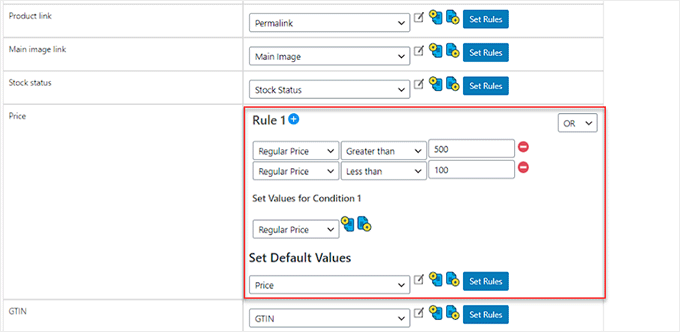
Pentru început, maparea atributelor bazată pe reguli este caracteristica de evidențiat. Poți seta logică condițională pentru orice atribut.
De exemplu, dacă prețul obișnuit al unui produs este mai mare de 500 USD, mapează o valoare diferită. Dacă este mai mic de 100 USD, aplică o altă regulă.
Acest tip de precizie contează atunci când gestionezi un catalog mare cu multe variații de tipuri de produse.
De ce este ELEX WooCommerce Google Shopping unul dintre cele mai bune pluginuri de feed de produse WooCommerce?
ELEX WooCommerce Google Shopping suportă multiple formate de fișiere de feed, inclusiv XML, CSV și TSV. Astfel, poți potrivi exact ceea ce necesită Google Merchant Center în orice moment.
Versiunea gratuită gestionează produsele simple curat și este un punct de plecare real pentru magazinele care abia își lansează prima campanie Google Shopping.
Pentru magazinele WooCommerce care rulează configurații mai complexe, versiunea premium adaugă suport complet pentru variații de produse, categorii multilingve și suport prioritar.
Programarea feed-ului funcționează pe baza joburilor cron zilnice, săptămânale sau lunare. Îl setezi o dată, iar ELEX WooCommerce Google Shopping menține datele produselor tale exacte pe Google fără nicio muncă manuală.
Experiența mea cu ELEX WooCommerce Google Shopping
Am folosit ELEX WooCommerce Google Shopping pentru a construi un feed Google Shopping pentru un magazin de articole pentru casă cu 180 de produse dintr-o gamă largă de prețuri.
Cea mai mare problemă a fost că unele erau sub 50 USD, în timp ce altele erau peste 800 USD.
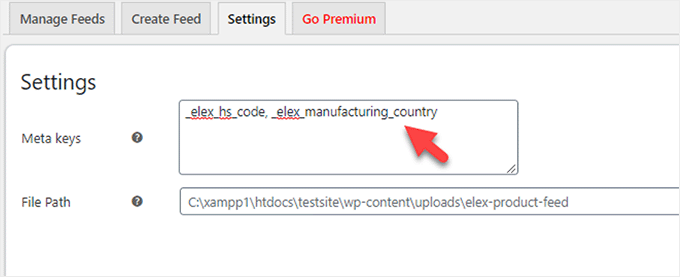
Primul lucru pe care l-am făcut a fost să adaug chei meta personalizate în setările pluginului.
Acest instrument WooCommerce îți permite să adaugi câmpuri de produs personalizate direct în feed-ul tău, ceea ce este util dacă vinzi internațional și trebuie să îndeplinești cerințele datelor vamale.
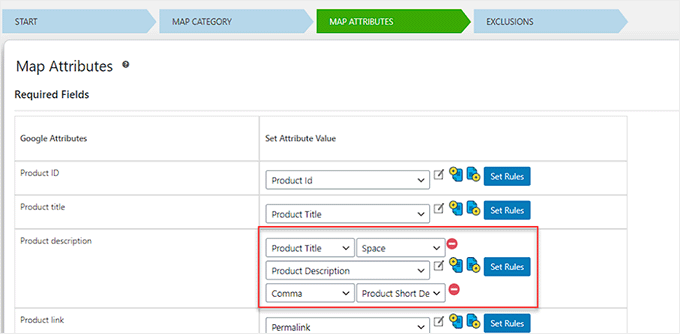
Apoi, am trecut la maparea atributelor.
Pasul Mapare Atribute este locul unde ELEX strălucește cu adevărat. Am combinat Titlul Produsului, un spațiu și Descrierea Produsului într-un singur câmp de descriere mai bogat.
Acesta este ceva ce Google recompensează cu scoruri mai bune de relevanță a anunțurilor.
Apoi am setat reguli de preț condiționale separat pentru produsele de gamă medie și de gamă înaltă. Acest lucru a menținut strategia mea de licitare curată în Google Ads.
Întregul proces a durat aproximativ 35 de minute. Fluxul s-a validat curat la prima trimitere către Google Merchant Center.
Dezavantajul demn de menționat: variațiile de produs sunt blocate în spatele versiunii premium. Dacă vindeți produse variabile cu diferite mărimi, culori sau configurații, versiunea gratuită nu vă va duce complet la destinație.
Sfat: Dar pentru a vă ajuta să mențineți versiunea gratuită și să obțineți în continuare rezultate, puteți utiliza instrumente de urmărire eCommerce precum MonsterInsights pentru a măsura ce produse generează efectiv venituri înainte de a vă decide să faceți upgrade.
► Avantaje
- Maparea atributelor condiționale bazată pe reguli vă oferă un control granular pe care majoritatea pluginurilor nu îl oferă pe niciun plan
- Multiple formate de flux (XML, CSV, TSV) acoperă fiecare metodă de trimitere Google Merchant Center
- Suportul pentru meta chei personalizate înseamnă că puteți expune date la nivel de produs pe care alte pluginuri le ignoră complet
- Versiunea gratuită este un punct de plecare solid, real, pentru cataloage simple de produse, fără elemente de bază blocate în spatele unui paywall
► Dezavantaje
- Suportul pentru variații de produs necesită upgrade-ul plătit, ceea ce limitează versiunea gratuită pentru majoritatea magazinelor WooCommerce moderne
- Concentrat aproape în totalitate pe Google, deci nu este alegerea potrivită dacă Facebook sau TikTok sunt prioritare
Verdictul meu: ELEX WooCommerce Google Shopping este alegerea potrivită atunci când Google Shopping este canalul dvs. principal. Și aveți nevoie de logică de mapare condițională care să reziste sub un catalog mare și variat. Nu încearcă să fie totul, iar acest focus este exact ceea ce îl face atât de bun la ceea ce face. Asociați-l cu pluginuri de checkout WooCommerce solide pentru a vă asigura că traficul pe care îl generează se convertește efectiv.
Prețuri: Plugin gratuit disponibil; Pro începe de la 79 USD taxă unică
Începeți cu ELEX WooCommerce Google Shopping aici
3. WebToffee Product Feed for WooCommerce ⭐⭐⭐⭐⭐
Cel mai bun pentru: Magazinele care doresc fluxuri pentru Facebook și Instagram cu configurare ușor de utilizat pentru începători
Majoritatea proprietarilor de magazine pe care îi cunosc nu încearcă să stăpânească specificațiile fluxurilor din prima zi. Ei vor doar ca produsele lor să apară pe Facebook, Instagram sau Google Shopping cât mai repede posibil.
WebToffee Product Feed for WooCommerce este construit exact pentru asta.
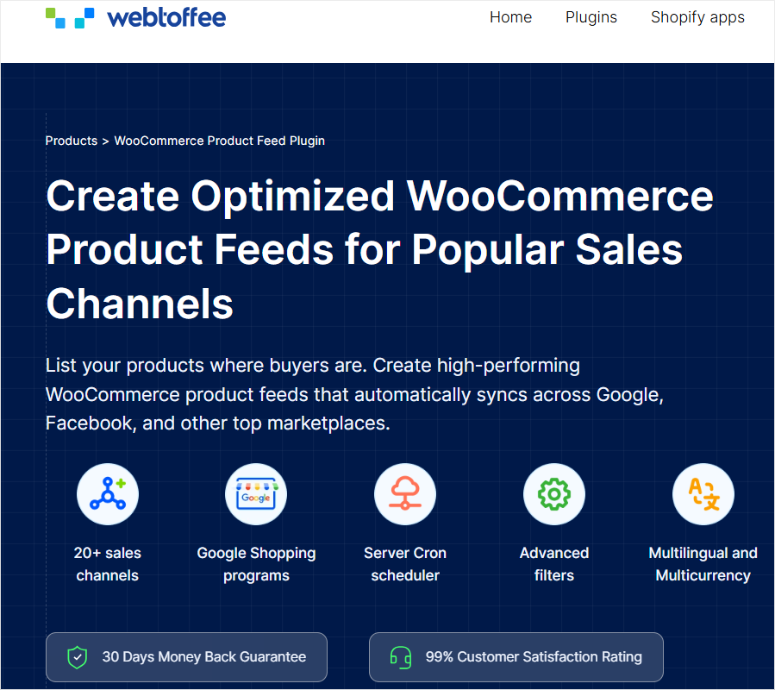
Acest lucru se datorează faptului că suportă peste 20 de canale de marketing din start, cum ar fi Facebook/Instagram Shop, Google Shopping, Pinterest și Bing.
Astfel, puteți crea și trimite fluxul dvs. fără a sări între mai multe pluginuri sau a asambla lucruri manual
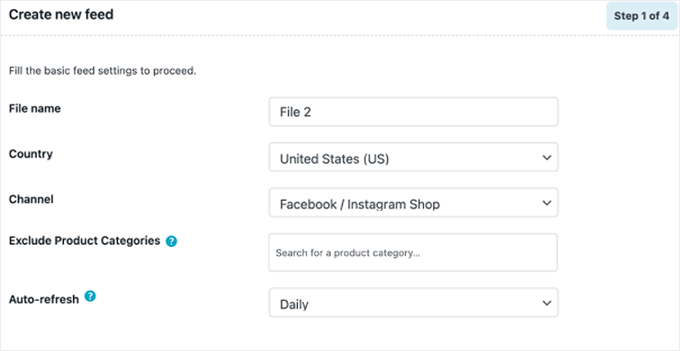
În plus, configurarea urmează un wizard curat în 4 pași.
Denumiți fluxul, alegeți țara, selectați canalul și setați intervalul de reîmprospătare automată. Chiar și un începător poate avea un flux live în mai puțin de 15 minute.
De ce este WebToffee Product Feed unul dintre cele mai bune pluginuri de flux de produse WooCommerce?
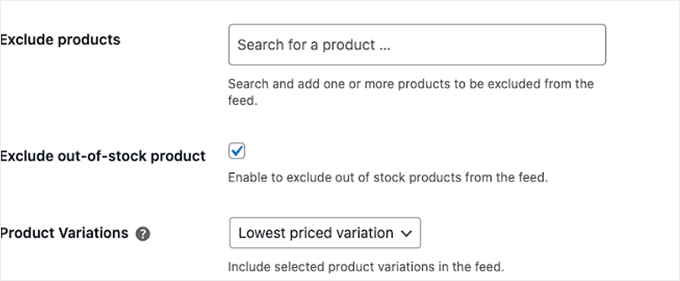
Ceea ce îmi place cu adevărat este controlul de excludere pentru produsele epuizate. O singură bifă, iar WebToffee Product Feed for WooCommerce elimină automat produsele epuizate din fluxul dvs.
Acest lucru pare puțin, dar este de fapt enorm. Trimiterea cumpărătorilor de pe Facebook pe o pagină de produs care spune „Indisponibil” este una dintre cele mai rapide modalități de a vă distruge performanța reclamelor.
În plus, controlul variațiilor de produs este inteligent.
Puteți alege să includeți doar cea mai ieftină variație în fluxul dvs. Acest lucru menține listările dvs. competitive ca preț, fără a aglomera catalogul cu fiecare variantă individuală.
Pentru magazinele cu multe variații de produs și oportunități de upsell, acesta este un filtru cu adevărat util.
În plus, reîmprospătarea automată zilnică menține prețurile și disponibilitatea exacte pe toate canalele conectate, fără nicio muncă manuală.
Pentru oricine dorește ca produsele sale WooCommerce să apară rapid pe fluxurile Instagram și Facebook, WebToffee elimină aproape toate barierele tehnice.
Experiența mea cu WebToffee Product Feed
Am configurat un flux pentru magazinul de bijuterii lucrate manual pe Instagram și Facebook pentru 95 de produse. Scopul a fost de a face catalogul lor live pe platformele Meta înainte de următoarea lor campanie promoțională.
Pasul 1 al expertului a fost curat.
Am denumit fluxul, am setat țara la Statele Unite și am selectat Facebook/Instagram Shop ca și canal. De asemenea, am activat reîmprospătarea automată zilnică, astfel încât fluxul să rămână actualizat fără ca eu să mai intervin.
Apoi am trecut la setările de excludere. Am bifat căsuța „Exclude produsele indisponibile” și am setat variațiile de produs la „Cea mai ieftină variație”. Acest lucru a menținut fluxul curat și competitiv ca preț încă din prima zi.
Timp total de configurare: 12 minute. Fluxul s-a exportat curat și s-a conectat la Facebook Commerce Manager la prima încercare.
Magazinul a înregistrat o creștere a vizibilității produselor pe Facebook în primele două săptămâni de la lansarea fluxului. Catalogul lor a fost în sfârșit indexat de Meta, în loc să se bazeze pe postări manuale de produse.
Singurul dezavantaj sincer: lista de canale a WebToffee este mai mică decât cea a AdTribes. Dacă aveți nevoie de fluxuri pentru peste 50 de site-uri de comparație de nișă sau rețele de afiliere, veți atinge limitele sale. Dar pentru platformele majore precum Google, Facebook, Instagram, Pinterest și Bing, acoperă tot ce au nevoie majoritatea magazinelor.
Sfat: Pentru a maximiza strategia dvs. de comerț social, asociați WebToffee cu un plugin pentru fluxuri de social media precum Smash Balloon pentru a afișa catalogul dvs. de Instagram direct pe site-ul dvs. WordPress. Acest lucru creează un ciclu complet. Produsele dvs. apar în fluxurile Instagram ȘI pe magazinul dvs., ceea ce construiește încredere și consolidează prezența mărcii dvs. pe ambele canale.
► Avantaje
- Expertul în 4 pași face configurarea mai rapidă decât orice alt plugin de pe această listă, chiar și pentru începătorii complet
- Excluderea produselor indisponibile printr-un singur clic protejează performanța reclamelor dvs. automat, fără reguli de configurat
- Filtrul pentru cea mai ieftină variație menține catalogul dvs. competitiv ca preț, fără a suprasolicita canalele de flux cu duplicate
- Acoperă cele patru canale care contează cel mai mult pentru majoritatea magazinelor: Google, Facebook, Instagram și Pinterest
► Dezavantaje
- Biblioteca de canale mai mică decât AdTribes sau CTX Feed, astfel încât vânzătorii de pe piețe de nișă s-ar putea să o depășească mai repede
- Unele opțiuni avansate de filtrare necesită versiunea premium
Verdictul meu: WebToffee Product Feed for WooCommerce este recomandarea mea pentru proprietarii de magazine care doresc să-și introducă produsele pe Facebook și Instagram rapid, fără o curbă de învățare abruptă. Excluderea produselor epuizate și controalele pentru variații fac singure ca instalarea să merite. Dacă comerțul social este prioritatea dvs. și nu aveți nevoie de peste 100 de șabloane de canale, acesta este un punct de plecare mai inteligent decât un plugin mai complex.
Prețuri: Plugin gratuit disponibil; Pro începe de la 89,00 USD /an
Începeți cu WebToffee Product Feed for WooCommerce aici
4. CTX Feed – Manager de produse WooCommerce ⭐⭐⭐⭐
Cel mai bun pentru: Magazine care necesită o acoperire de peste 130 de canale cu formate de export flexibile
CTX Feed se diferențiază de oricare alt plugin de pe această listă, nu doar prin suportul pentru mai multe canale, ci și prin suportul pentru mai multe formate de export.
Majoritatea plugin-urilor de feed WooCommerce gestionează XML și CSV. CTX Feed merge mai departe cu TSV, XLS, TXT și JSON.
Suportul pentru mai multe formate de export contează atunci când trimiteți către rețele de afiliați, piețe de nișă sau site-uri de comparație de prețuri care au propriile cerințe de format.
Nu aveți nevoie de un dezvoltator pentru a reformata datele. CTX Feed se ocupă de asta.
Cele peste 130 de șabloane pregătite pentru canale acoperă totul, de la Google Merchant Center și Facebook până la PriceRunner, Rakuten, Kelkoo, eBay, Snapchat și TikTok.
Acestea sunt disponibile în peste 200 de țări, ceea ce face ca acesta să fie cel mai capabil plugin la nivel global de pe această listă pentru magazinele cu audiență internațională.
De ce este CTX Feed unul dintre cele mai bune plugin-uri de produse WooCommerce?
Validarea feed-ului fără erori este unul dintre cele mai puternice puncte de vânzare ale CTX Feed.
Înainte de a trimite ceva, acesta validează automat erorile GTIN (Global Trade Item Number), descrierile lipsă, linkurile de imagini defecte și variantele nepotrivite.
Asta înseamnă mai puține respingeri și mai puțin timp petrecut diagnosticând de ce feed-ul dvs. a fost semnalat.
Unde CTX Feed își câștigă cu adevărat locul este compatibilitatea.
Funcționează perfect cu Dokan și WCFM pentru magazinele de tip marketplace multi-vendor, WPML și Polylang pentru cataloage multilingve.
În plus, toate tipurile standard de produse WooCommerce, inclusiv abonamente și pachete. Dacă aveți o configurație complexă a magazinului, această listă de compatibilitate previne multe bătăi de cap.
Experiența mea cu CTX Feed
Am testat CTX Feed pe un magazin WooCommerce multilingv care rulează WPML cu produse listate în engleză, franceză și germană. Magazinul folosea, de asemenea, Dokan pentru mai mulți vânzători.
Această combinație de obicei strică lucrurile. Plugin-urile de feed fie ignoră datele traduse ale produselor, fie creează intrări duplicate care încurcă Google. CTX Feed a gestionat atât WPML, cât și Dokan curat.
Fiecare limbă a generat propriul feed corect, fără nicio intervenție manuală.
Am efectuat analize amănunțite ulterior prin intermediul MonsterInsights pentru a urmări ce canal genera cel mai mult trafic.
Exportul multi-format al CTX Feed a facilitat trimiterea de fluxuri separate pentru Google, Facebook și două site-uri regionale de comparație a prețurilor.
Dezavantajul sincer: interfața are o curbă de învățare mai abruptă decât alte pluginuri de fluxuri eCommerce de pe această listă. Există multe setări, iar utilizatorii noi se pot simți pierduți.
Sfat: Înainte de a intra în setările CTX Feed, petreceți 20 de minute vizionând tutorialele lor de configurare și citind documentația. Apoi testați filtrele și regulile avansate pe primul dvs. flux pe un mediu de staging sau un site de test WordPress înainte de a-l publica.
► Avantaje
- Cele mai flexibile opțiuni de export de pe această listă: XML, CSV, TSV, XLS, TXT și JSON, toate acoperite
- Peste 130 de șabloane de canale în peste 200 de țări fac din acesta cea mai bună alegere pentru vânzătorii internaționali
- Compatibilitatea încorporată cu WPML, Polylang, Dokan și WCFM înseamnă că configurațiile complexe ale magazinului funcționează fără soluții alternative
- Validarea automată detectează erorile de flux înainte de trimitere, ceea ce reduce semnificativ ciclurile de respingere
► Dezavantaje
- Interfața este mai complexă decât WebToffee sau AdTribes, așa că începătorii ar putea avea nevoie de timp suplimentar pentru a se obișnui
- Unele reguli avansate de filtrare necesită încercări și erori pentru a fi configurate corect la prima încercare
Verdictul meu: CTX Feed este alegerea potrivită dacă magazinul dvs. este multi-vânzător, multilingv sau trebuie să trimită produse către o listă lungă de canale de nișă în mai multe formate de export. Nu este cel mai prietenos plugin pentru începători, dar este cel mai capabil pentru magazinele care au depășit cu adevărat instrumentele mai simple.
Prețuri: Plugin gratuit disponibil; Pro începe de la 119 USD/an
5. Product Feed Manager by Conversios ⭐⭐⭐⭐
Peste 10.000 de instalări active | Cel mai bun pentru: advertiseri Performance Max care au nevoie de cataloage de produse fără respingeri
Majoritatea pluginurilor de fluxuri de produse se concentrează pe trimiterea fluxului dvs. Acest plugin de fluxuri eCommerce se concentrează pe menținerea aprobării acestuia.
Amintiți-vă, un flux trimis care continuă să fie respins vă costă bani de publicitate, pierde timp și, în cele din urmă, vă afectează performanța campaniei.
Product Feed Manager by Conversios este construit pentru a rezolva această problemă de la sursă.
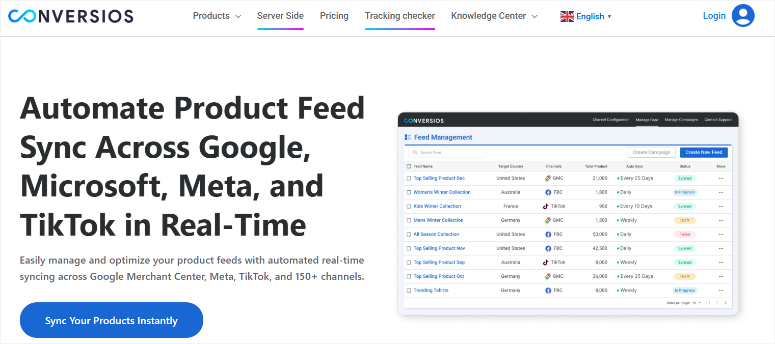
Panoul de control al stării aprobării în timp real este caracteristica care îl diferențiază.
În loc să vă conectați la Google Merchant Center pentru a căuta motivele de respingere, Conversios le afișează direct în panoul dvs. de control WordPress.
Puteți vedea exact ce produse sunt respinse și de ce, apoi le puteți remedia fără a părăsi site-ul dvs.
În plus, sincronizarea în timp real menține datele produselor dvs. precise pe Google Shopping, Facebook și TikTok pe măsură ce catalogul dvs. se modifică.
Prețurile se actualizează, starea stocului se actualizează și disponibilitatea produselor se actualizează automat, fără a programa manual nimic.
De ce este Product Feed Manager de la Conversios unul dintre cele mai bune pluginuri de fluxuri de produse WooCommerce?
Configurarea fără cod este cu adevărat prietenoasă pentru începători.
Configurați conexiunile la canale, mapați atributele, iar Conversios se ocupă de restul. Nu este necesar să scrieți XML, să configurați cron jobs sau un dezvoltator.
Pentru magazinele care rulează campanii pe Google, un feed curat îmbunătățește direct livrarea campaniilor.
Experiența mea cu Product Feed Manager de la Conversios
Am testat Conversios pe un magazin de accesorii de modă care rulează campanii Google Performance Max.
Magazinul avea o problemă recurentă. Aproximativ 12% dintre produse erau semnalate pentru prețuri necorespunzătoare între feed și pagina produsului.
Problema era simplă, dar dureroasă. Prețurile de vânzare nu se actualizau suficient de rapid în feed după ce intrau în vigoare pe site.
Google compara prețul din feed cu prețul de pe pagina live, găsea o nepotrivire și dezaproba acele produse.
Product Feed Manager de la Conversios a rezolvat acest lucru cu sincronizare în timp real. Odată ce am conectat magazinul și am configurat feed-ul Google Shopping, modificările de preț de pe site erau reflectate în feed în câteva minute.
După aceea, rata de dezaprobare a scăzut sub 2% în prima săptămână.
Tabloul de bord a facilitat diagnosticarea dezaprobărilor rămase. Puteam vedea fiecare produs respins, motivul exact și îl puteam remedia direct din WordPress. Fără comutare între file.
Dezavantajul sincer: Conversios suportă mai puține canale decât AdTribes sau CTX Feed. Se concentrează pe cele trei mari – Google, Facebook și TikTok. Dacă aveți nevoie de Pinterest, Bing sau site-uri de comparație nișate, veți avea nevoie de un alt plugin. Dar pentru magazinele ale căror eforturi de marketing online sunt concentrate pe aceste trei platforme, acea concentrare este o caracteristică, nu o limitare.
Dezavantajul sincer: Conversios suportă mai puține canale decât AdTribes sau CTX Feed. Se concentrează pe cele trei mari, adică Google, Facebook și TikTok. Dacă aveți nevoie de Pinterest, Bing sau site-uri de comparație nișate, veți avea nevoie de un alt plugin.
Sfat: Dacă acele trei canale generează cea mai mare parte a veniturilor dvs., dar doriți totuși o acoperire mai largă, rulați Conversios pentru campaniile dvs. plătite și adăugați un al doilea plugin de feed, cum ar fi AdTribes, pentru canalele rămase. Această abordare cu dublu plugin menține feed-urile dvs. de valoare ridicată, fără erori, cu Conversios, menținând în același timp prezența peste tot.
► Avantaje
- Tabloul de bord cu starea aprobării în timp real afișează dezaprobările direct în WordPress, astfel încât să remediați problemele fără a comuta între instrumente
- Sincronizarea în timp real înseamnă că nepotrivirile de preț între feed-ul dvs. și paginile produselor sunt rezolvate în minute, nu în zile
- Configurarea fără cod menține bariera de intrare scăzută chiar și pentru magazinele fără un dezvoltator la îndemână
- Impact dovedit asupra Rentabilității Cheltuielilor Publicitare (ROAS) cu rezultate documentate din studii de caz pe cataloage la scară largă
► Dezavantaje
- Bibliotecă de canale mai mică decât AdTribes sau CTX Feed. Cel mai potrivit pentru magazinele axate pe Google, Facebook și TikTok
- Mai puțin potrivit pentru magazinele care necesită feed-uri pentru piețe nișate sau site-uri de comparație de prețuri
Verdictul meu: Dacă magazinul dvs. rulează campanii plătite pe Google sau Meta, iar respingerile de fluxuri vă afectează rentabilitatea investiției în publicitate, Product Feed Manager de la Conversios este cea mai țintită soluție de pe această listă. Nu este cel mai cuprinzător plugin, dar este cel mai concentrat pe creșterea vânzărilor și maximizarea veniturilor din traficul generat de fluxurile dvs. Pentru marketerii de performanță, acest focus se amortizează rapid.
Prețuri: Plugin gratuit disponibil; Pro începe de la 49,00 USD/an
Începeți cu Product Feed Manager de la Conversios aici
Acesta este sfârșitul listei mele cu cele mai bune pluginuri de fluxuri de produse WooCommerce. Dar vreau să părăsiți această pagină înțelegând pe deplin instrumentul potrivit pentru dvs.
Având în vedere acest lucru, consultați secțiunea de mai jos pentru a vedea care se potrivește nevoilor dvs.
Cum să alegi pluginul potrivit pentru feed-uri de produse WooCommerce
Cinci pluginuri solide, cinci puncte forte diferite. Iată cum să navigați prin opțiuni și să o găsiți pe cea care se potrivește magazinului dvs. chiar acum.
Alegeți Product Feed PRO de la AdTribes dacă:
- Doriți cea mai largă acoperire cu cel mai capabil plan gratuit. AdTribes este recomandarea mea implicită pentru majoritatea magazinelor.
- Cele peste 100 de șabloane și suportul nelimitat pentru produse înseamnă că nu veți depăși rapid nivelul gratuit.
Alegeți ELEX WooCommerce Google Shopping dacă:
- Google Shopping este canalul dvs. principal și cel mai important.
- Vindeți produse cu game largi de prețuri sau cu cerințe complexe de atribute; regulile de mapare condiționată ale ELEX vă vor economisi ore de curățare manuală în fiecare lună.
Alegeți WebToffee Product Feed dacă:
- Comerțul social este prioritatea dvs. și doriți ca produsele dvs. să fie pe Facebook și Instagram rapid.
- Excluderea produselor indisponibile și controalele pentru variații sunt deosebit de valoroase pentru magazinele de modă, bijuterii și stil de viață, unde stocurile se mișcă rapid.
Alegeți CTX Feed dacă:
- Magazinul dvs. este multilingv, multi-vânzător sau trebuie să trimită produse către piețe de nișă în multiple formate de export.
- Este, de asemenea, cea mai bună alegere pentru vânzătorii internaționali care au nevoie de fluxuri în formate dincolo de XML și CSV.
Alegeți Product Feed Manager de la Conversios dacă:
- Rulați campanii plătite pe Google sau Meta, iar respingerile de fluxuri vă afectează randamentele.
- Aveți nevoie de sincronizare în timp real pentru a menține prețurile corecte.
Felicitări! Acum aveți o listă cu cele mai bune pluginuri de fluxuri eCommerce pentru WooCommerce. Dacă ceva nu este clar, consultați întrebările frecvente de mai jos.
Întrebări frecvente: Cele mai bune pluginuri de feed-uri de produse WooCommerce
Ce este un flux de produse WooCommerce?
Un flux de produse WooCommerce este un fișier, de obicei XML sau CSV, care conține datele produselor dvs.: titluri, descrieri, prețuri, imagini și disponibilitate. Trimiteți acest fișier către platforme precum Google Shopping, Facebook sau Pinterest. Aceste platforme îl folosesc pentru a afișa produsele dvs. cumpărătorilor care caută deja ceea ce vindeți. Fără un flux, produsele dvs. rămân invizibile în afara propriului site web.
Am nevoie de un plugin plătit pentru a trimite produse către Google Shopping?
Nu. Atât AdTribes, cât și ELEX WooCommerce Google Shopping oferă versiuni gratuite care se conectează la Google Merchant Center fără nicio plată necesară. Planul gratuit al AdTribes acoperă produse nelimitate și fluxuri nelimitate. Versiunea gratuită a ELEX WooCommerce Google Shopping gestionează produsele simple în mod curat. Veți întâmpina bariere de plată pentru funcții avansate, cum ar fi suportul pentru variații de produse sau suportul prioritar, dar pentru un flux de bază Google Shopping, nivelurile gratuite sunt complet funcționale.
Pot folosi un singur plugin pentru Google, Facebook și TikTok în același timp?
Absolut, și acesta este unul dintre principalele motive pentru a folosi un plugin de flux de produse în loc să trimiteți manual. Atât AdTribes, cât și CTX Feed suportă peste 100 de canale dintr-o singură instalare. Creați fluxuri separate pentru fiecare platformă, iar plugin-ul le gestionează pe toate. WebToffee acoperă Google, Facebook, Instagram, Pinterest și Bing dintr-un singur panou de control. Nu aveți nevoie de un plugin separat per canal.
Cât de des ar trebui să se actualizeze fluxul meu de produse?
Pentru majoritatea magazinelor, actualizările zilnice sunt suficiente. Dacă aveți frecvente vânzări flash sau un volum mare de stocuri, sincronizarea în timp real, disponibilă prin Product Feed Manager de la Conversios, merită upgrade-ul. Prețurile și nivelurile de stoc care devin învechite în fluxul dvs. cauzează două probleme: respingerea de către Google și clienții dezamăgiți care dau clic pentru a găsi un produs epuizat sau care costă mai mult decât cel anunțat. O configurație solidă de performanță WordPress ajută la asigurarea faptului că actualizările programate ale fluxului nu încetinesc magazinul.
Ce se întâmplă dacă fluxul meu de produse are erori?
Google și Facebook vor respinge produsele afectate, ceea ce le va elimina din listări până când erorile vor fi remediate. Erorile comune includ GTIN-uri lipsă, prețuri necorespunzătoare între flux și paginile produselor, URL-uri de imagini nefuncționale și descrieri incomplete. AdTribes are un validator de flux încorporat care le detectează înainte de trimitere.
Plugin-urile de flux de produse încetinesc magazinul meu WooCommerce?
Nu dacă alegeți instrumentul potrivit. Plugin-urile cu generare bună de flux rulează în fundal, de obicei prin joburi cron programate, deci nu afectează viteza front-end a magazinului dvs. pentru vizitatori. Sarcina de procesare are loc pe server în orele cu trafic redus. Acestea fiind spuse, generarea de fluxuri pentru cataloage foarte mari poate consuma multe resurse. Dacă aveți găzduire ieftină și gestionați un magazin mare, merită să vă uitați la găzduire eCommerce fiabilă.
Verdict final: Cele mai bune pluginuri de feed-uri de produse WooCommerce
Dacă instalați doar un singur plugin din această listă, alegeți Product Feed PRO de la AdTribes. Planul gratuit acoperă mai multe canale, mai multe produse și mai multe formate decât orice altă opțiune gratuită concurentă.
Pentru majoritatea proprietarilor de magazine WooCommerce, este cel mai rapid mod de a trece de la invizibil la peste tot.
Acestea fiind spuse, alegerea potrivită depinde cu adevărat de situația dvs. Parcurgeți acest articol și veți găsi alegerea potrivită pentru afacerea dvs.
Fluxurile de produse nu sunt complicate odată ce aveți instrumentul potrivit.
Cele mai bune plugin-uri de flux WooCommerce au un lucru în comun: preiau munca de pe umerii dvs. și vă pun produsele în fața mai multor oameni. Aceste cinci fac exact asta.
Hub de resurse: Feed-uri de produse WooCommerce și creșterea magazinului
Utilizați aceste resurse pentru a profita la maximum de strategia dvs. de flux de produse:
- Cum să configurați urmărirea comerțului electronic Google Analytics pentru WooCommerce – Urmăriți ce produse vând efectiv fluxurile dvs., nu doar generați clicuri către
- Cele mai bune 10 pluginuri de dropshipping pentru WordPress + WooCommerce – Combinați fluxurile de produse cu dropshipping pentru a gestiona un magazin bogat în cataloage, cu stoc zero
- Cele mai bune 7 pluginuri de checkout WooCommerce pentru a îmbunătăți experiența utilizatorului și vânzările – Convertiți traficul generat de fluxurile dvs. cu o experiență de checkout care nu îi pierde pe oameni în ultimul pas
- Cum să configurați urmărirea conversiilor WordPress pas cu pas – Măsurați ROI-ul real al fiecărui canal la care se conectează fluxurile dvs. de produse
Aceste articole vă vor ajuta să vă îmbunătățiți performanța magazinului și să vă asigurați că utilizatorii se bucură de cumpărături pe site-ul dvs.

Comentarii Lasă un răspuns