
TL;DR: I rank and compare the best peer-to-peer fundraising plugins for WordPress. Charitable is the best free option and is easy to use due to its drag-and-drop builder. GiveWP offers more features on the free plan and uses an add-on modular approach to keep costs down.
One of my most ambitious projects was helping a food bank with its online presence. Their main issue was struggling to keep donors engaged.
They’d ask for help, people would give once, then disappear.
Then their volunteer coordinator had an idea: what if regular supporters could create their own fundraising pages and ask their friends? The response was immediate.
Nonprofits, individuals, and small charities are realizing the same thing. Peer-to-peer fundraising works because it taps into the power of personal networks.
Instead of asking for money once, you empower your community to fundraise on your behalf. WordPress makes this possible. And choosing the right plugin determines whether your supporters find it effortless or frustrating.
In this article, I list the best peer-to-peer WordPress plugins that not only help you raise more money but also motivate your donors to support more.
Key Takeaways
- I’ll show you peer-to-peer fundraising plugins that let your supporters create their own campaign pages without coding
- I mention tools that charge zero platform fee. A critical advantage over external SaaS fundraising platforms
- Reveal which plugins work best for small nonprofits versus larger organizations with teams
- I tested seven options to find which ones actually make peer-to-peer setup simple
How I Test Peer-to-Peer Fundraising Plugins
🔍 Click to see my testing methodology
Here’s exactly how I evaluate peer-to-peer fundraising plugins:
- Campaign builder ease – Can a non-technical supporter create a fundraising page in under 5 minutes? Are the steps intuitive?
- Customization without code – Drag-and-drop builder, template library, colors/branding (not just API access for developers)
- Donor experience – Are campaign pages mobile-friendly? Can donors see progress toward goals? Is the donation process frictionless?
- Reporting & transparency – Can you see which campaigns are live, how much they’ve raised, and who’s contributing?
- Platform fees impact – Does the plugin charge a percentage per donation, or is it truly fee-free (with self-hosted payments)?
Tools I use:
- WordPress test sites – Setting up live donation forms in test environments
- Payment gateway docs (Stripe, PayPal) – Verifying fee structures and payment handling
- WordPress.org review pages – Real user feedback on setup experience
- GTmetrix – Testing campaign page speed (slow forms = fewer donations)
Why Trust IsItWP?
At IsItWP, we’ve been the WordPress community’s go-to resource since 2009, helping over 2 million users choose better plugins and tools.
Unlike review sites that never actually use the products, we maintain active accounts, run real fundraising tests, and provide ongoing WordPress consultation.
When I write about peer-to-peer fundraising plugins, I’ve set them up myself, created test campaigns, and watched how supporters interact with them.
Best Peer-to-Peer Fundraising Plugins Compared
Peer-to-peer fundraising has transformed how nonprofits and causes engage supporters.
The right plugin lets your community fundraise on your behalf, turning donors into fundraisers.
Below is a comparison of the top options that make peer-to-peer campaigns simple to launch and manage from your WordPress site.
| Product | Best For | Free Version | Native Peer-to-Peer | Starting Price |
|---|---|---|---|---|
| 🥇 Charitable | Nonprofits prioritizing zero fees | ✅ Yes | ✅ Yes | $69/yr |
| 🥈 GiveWP | Scaling organizations | ✅ Yes | ✅ Yes | $149/yr |
| 🥉 Donorbox | Quick-start teams | ✅ Yes | ✅ Yes | $150/mo |
| 4. WhyDonate | Small nonprofits & individuals | ✅ Yes | ✅ Yes | €0,25 fees + 1.9%/donation |
| 5. FundEngine | Budget-first organizations | ✅ Yes (full-featured) | ✅ Yes | Free |
| Growfund | Community-first fundraising | ✅ Yes | ✅ Yes | $74.50/yr |
If you’re looking for broader fundraising strategies beyond peer-to-peer, check out our best WordPress donation plugins guide for a wider overview.
You can also use the table of contents below to see all the peer-to-peer plugins for WordPress at a glance. Click the links to read the section you want.
- 1. Charitable ⭐⭐⭐⭐⭐
- 2. GiveWP ⭐⭐⭐⭐⭐
- 3. Donorbox ⭐⭐⭐⭐⭐
- 4. WhyDonate ⭐⭐⭐⭐
- 5. FundEngine ⭐⭐⭐
- 6. Growfund ⭐⭐⭐
- Also Consider: WPForms
- How to Choose
- FAQs: Best WordPress Peer-to-Peer Fundraising Plugins
- Final Verdict: Should I Use Peer-to-Peer Fundraising on My WordPress Site?
- Resource Hub: Peer-to-Peer Fundraising for Nonprofits
With that out of the way, let’s dive in.
1. Charitable ⭐⭐⭐⭐⭐
Best for: Nonprofits that want zero platform fees and full control over supporter fundraising pages
Charitable stands out because it lets supporters create their own fundraising pages without taking a cut. Most SaaS fundraising platforms charge 2–5% per donation. Charitable doesn’t.
That means every dollar goes to your cause. When I tested the peer-to-peer setup, I was impressed by how straightforward it was.
A supporter creates an account, clicks “Start a Fundraiser,” picks your cause, and their page goes live. No approval delays. No hidden fees creeping in at the payment stage.
Why Is Charitable One of the Best Peer-to-Peer Fundraising Plugins?
The platform has earned trust with over 10,000 organizations worldwide. Its 4.8/5 rating on WordPress.org reflects real-world use by nonprofits that manage hundreds of simultaneous campaigns.
The drag-and-drop campaign builder and multiple templates mean you don’t need to customize code.
You can set team fundraising limits, enable anonymous donations, and control which features supporters see.
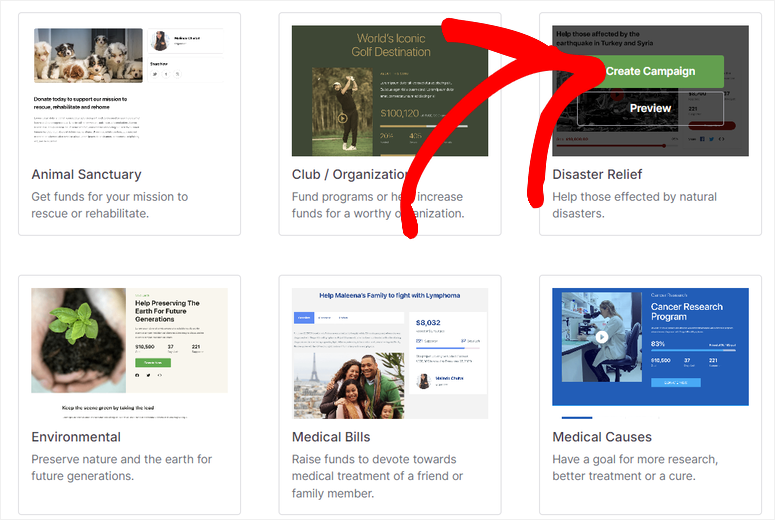
Unlike basic donation form builders, Charitable is purpose-built for peer-to-peer campaigns.
My Experience with Charitable
I set up Charitable on a test site for a fictional nonprofit (a wildlife rescue).
Using the drag and drop builder, I had created a fundraising campaign, invited three test supporters, and watched their campaign pages populate within 20 minutes.
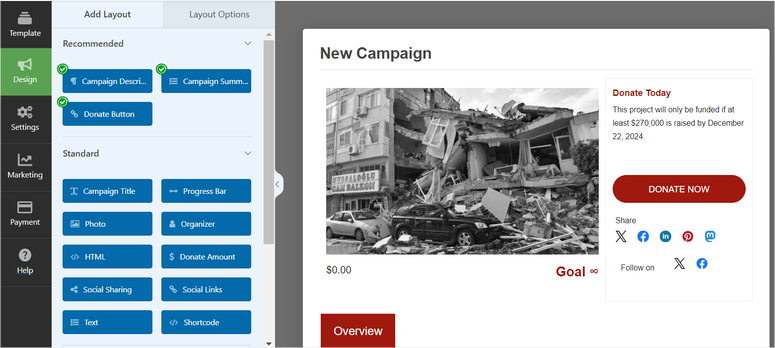
The interface felt intuitive. Supporters didn’t get lost in menus.
The reporting dashboard gave me clear visibility into which campaigns were active, how much each had raised, and who was donating.
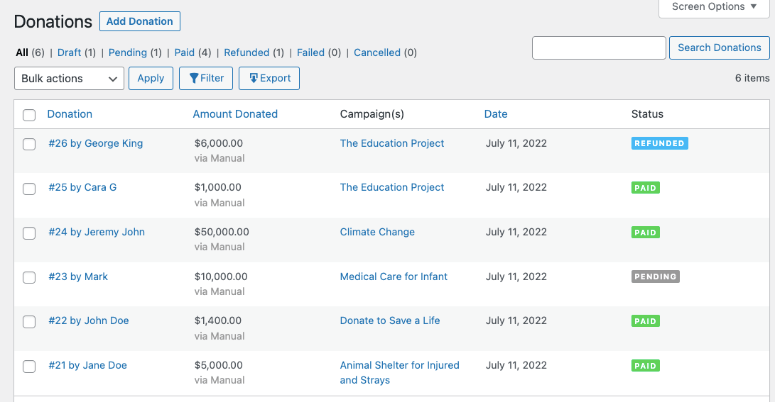
This matters because you need to recognize top fundraisers and thank them publicly. Charitable made that easy.
I also tested it on mobile, and the campaign pages loaded quickly. I recorded it in under 2 seconds on a 4G connection.
Speed matters since slow fundraising pages lose donors, which is why testing your site speed is critical for fundraising sites.
One friction point I noticed: the peer-to-peer feature requires the paid Plus plan. If you only buy the Essential tier, you can’t unlock this feature, though the Essential tier still covers basic donations.
🟢► Pros
- Zero platform fees on all plans – Every donation goes to your cause, not to Charitable or payment processors
- Supporter autonomy – Your community can create unlimited campaign pages without approval friction
- Built-in team features – Supporters can form fundraising teams with shared goals and leaderboards
- Professional reporting – Detailed dashboards showing which campaigns drive the most revenue
- Customizable donor experience – Set minimum donations, recurring options, thank-you messaging
🔴► Cons
- Peer-to-peer requires paid plan – The Plus tier is needed to unlock supporter campaigns
My Verdict: Charitable is the best choice for your nonprofit if you want to maximize revenue by eliminating platform fees. If you’re managing a large nonprofit with multiple simultaneous fundraising teams, the reporting and fee structure make this a no-brainer.
Pricing: Free plugin available | Pro starts at $69/year
Check out my Charitable review for deeper feature breakdowns.
👉 Get started with Charitable here
2. GiveWP ⭐⭐⭐⭐⭐
Best for: Organizations that want to start free and scale peer-to-peer fundraising as they grow
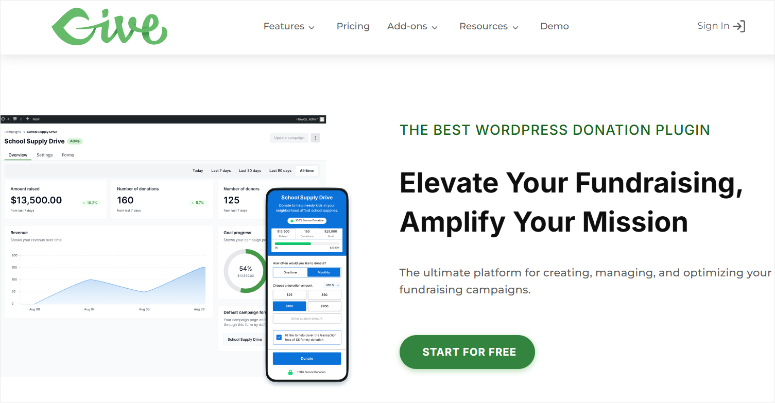
GiveWP powers 100,000+ nonprofit websites. That scale tells you something: it works.
The free version alone includes unlimited donation forms, donor management, and payment processing through Stripe or PayPal with zero platform fees.
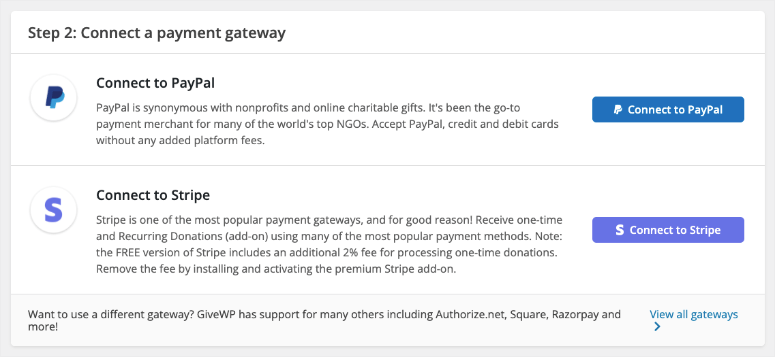
Most competitors lock those features behind a paywall. If you want advanced features like fundraising thermometers, leaderboards, and sponsorship tracking, then upgrade.
Why Is GiveWP One of the Best Peer-to-Peer Fundraising Plugins?
The peer-to-peer addon transforms GiveWP into a full team fundraising platform.
Supporters get their own fundraiser profiles, can see live leaderboards of top fundraisers, and can recruit sponsors for their campaigns.
I’ve watched nonprofits use this to turn their biggest donors into co-fundraisers. It’s a multiplier effect: you’re not asking 100 people for $100 each. You’re asking 10 advocates to each recruit 10 friends.
That’s good growth.
My Experience with GiveWP
I tested GiveWP on a nonprofit site for a youth education nonprofit. The free version setup took 15 minutes: install, create a form, and connect Stripe. Done.
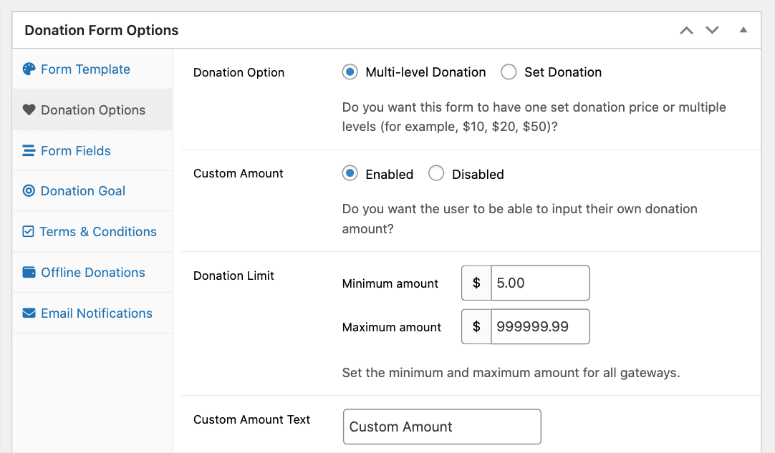
Two months later, I upgraded to add peer-to-peer. The activation was seamless. Immediately, I could see where supporters could click to “Start Fundraising.”
Their dashboard was clean, with no clutter, making it fast to scan. I shared a fundraiser link with five test accounts. Each one created their own campaign page in under 90 seconds.
The leaderboard feature caught my eye.
It showed top fundraisers, total raised, and progress bars for each campaign. That built-in social proof. Seeing who’s raising the most motivated supporters to keep fundraising.
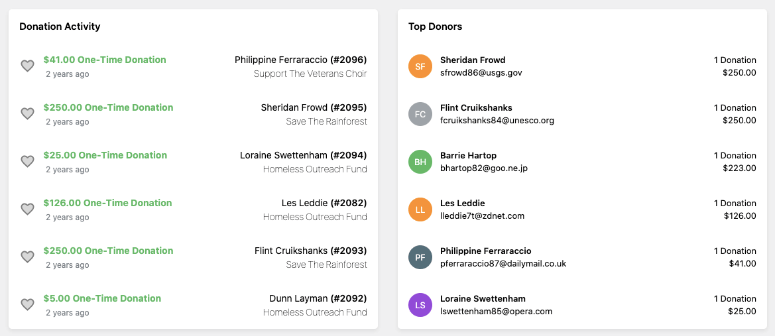
I’ve seen this psychology work in the wild: people compete (in a healthy way) to help causes they care about.
One downside: setup for the peer-to-peer add-on required an extra step to integrate the new extension, and the documentation could be clearer for non-technical teams.
🟢► Pros
- Free tier is genuinely useful – Unlimited forms, Stripe/PayPal integration, donor database with zero fees
- Modular add-ons – Pay only for peer-to-peer if you need it; other features don’t require bundled upgrades
- Leaderboard & sponsorship features – Gamification drives engagement and repeat fundraising
- Largest community support – 100,000+ nonprofits mean active forums and documentation
- Mobile-first design – Campaign pages and forms are optimized for phone donors (70% of online giving happens on mobile)
🔴► Cons
- Peer-to-peer add-on is a separate cost – Free tier doesn’t include peer-to-peer, so you’re committing to the premium plan for this feature
- Steeper learning curve for smaller teams. More features = more menu options to navigate
My Verdict: GiveWP is ideal if you’re willing to start lean with the free tier and scale. The modular approach means you’re not forced to buy features you don’t need yet. For nonprofits with a limited upfront budget, this is the path to grow into peer-to-peer.
Check out my GiveWP review for more details.
Pricing: Free plugin available | Pro starts at $149/year
👉 Get started with GiveWP here
3. Donorbox ⭐⭐⭐⭐⭐
Best for: Teams wanting the fastest onboarding, even if it means accepting transaction fees
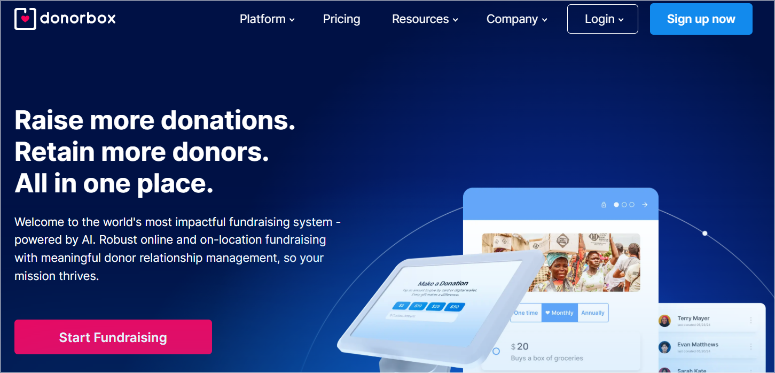
Donorbox is a SaaS solution embedded into WordPress.
You don’t host the fundraising on your server; Donorbox hosts it and embeds the widget on your site.
This has a trade-off: setup is blindingly fast (literally minutes), but Donorbox charges 2.95% + transaction fees per donation. For a $100 donation, you’re losing ~$4.95. Over a year, that compounds.
Why Is Donorbox One of the Best Peer-to-Peer Fundraising Plugins?
That said, Donorbox excels at peer-to-peer because supporters don’t need WordPress accounts. They create a fundraiser directly on Donorbox, get a link, and share it.
The barrier to entry is lower than self-hosted plugins. Donorbox also includes team fundraising, milestone tracking, and built-in social sharing. If your priority is speed-to-launch, Donorbox wins.
My Experience with Donorbox
I embedded Donorbox on a test WordPress site. The widget installed in two minutes. I created a campaign and shared the fundraiser link with test supporters.
They didn’t need accounts. They clicked the link, created a fundraiser in under a minute, and got a shareable URL.
The supporter experience was effortless. Mobile fundraising pages loaded fast. Donors could give without creating accounts (guest donations). This matters: fewer friction points = more completed transactions.
The friction I experienced was cost visibility. When I checked the reporting, the dashboard showed donations but didn’t clearly break out fees until I dug into settings.
For nonprofits that operate on thin margins, this hidden-until-you-look fee structure is risky.
I also noticed Donorbox doesn’t integrate as seamlessly with WordPress-native tools like WordPress security plugins or custom post types. You’re reliant on Donorbox’s hosted infrastructure.
🟢► Pros
- Fastest setup of any option – Minutes, not hours, to launch peer-to-peer fundraising
- No WordPress account required for supporters – Lower barrier to entry; guest fundraisers work
- Built-in team fundraising – Supporters can form teams, see shared goals, and compete on leaderboards
- Strong mobile experience – Fundraiser pages are fully responsive and fast
- Recurring giving support – Monthly subscriptions and recurring fundraisers are built-in
🔴► Cons
- Transaction fees add up – 2.95% + payment processor fees mean losing ~5% per donation at scale
- Less WordPress integration – Doesn’t leverage your WordPress audience/member plugins directly
- Pricing per-month billing – Plan at $150/month for full access, adding up fast for smaller nonprofits
My Verdict: Donorbox is best for organizations that value speed and convenience over cost optimization. If you have limited technical resources and need peer-to-peer fundraising live this week, Donorbox does it. But budget-conscious nonprofits should compare the fee impact over a year.
Pricing: Free tier | Pro starts at $150/month
👉 Get started with Donorbox here
4. WhyDonate ⭐⭐⭐⭐
Best for: Smaller nonprofits and individuals who need peer-to-peer fundraising without complexity
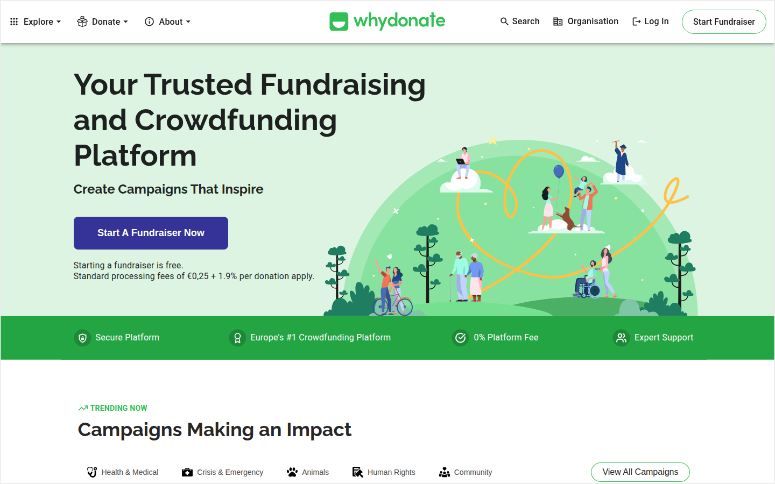
WhyDonate strips away complexity since the interface is minimal. You just create a campaign, customize colors, set a goal, and embed it on WordPress. Done.
There’s no overwhelming dashboard or advanced reporting features. For a food bank, animal shelter, or individual fundraiser, that simplicity is a strength. You’re not paying for features you’ll never use.
Why Is WhyDonate One of the Best Peer-to-Peer Fundraising Plugins?
This peer-to-peer plugin lets you customize fundraiser buttons and styles, so campaigns feel like part of your website, not like a third-party embed.
WhyDonate also handles both one-time campaigns and ongoing fundraisers. This allows you to run a seasonal giving drive or a permanent donation stream simultaneously.
My Experience with WhyDonate
I tested WhyDonate on a very small nonprofit site.
The installation took five minutes, and the interface felt immediately familiar, not bloated. I created a campaign, got a short code, dropped it on a page, and the campaign went live.
I shared it with test supporters. Their campaign creation experience was even simpler than Donorbox: name, goal, description, and live. Most importantly, mobile rendering was clean.
The downside: WhyDonate has less community documentation than Charitable or GiveWP. When I had a question about customizing donor emails, I struggled to find answers in their help center.
For nonprofits with in-house technical support, this isn’t a dealbreaker. For those relying on community forums and tutorials, it’s a risk.
🟢► Pros
- Simplicity first – No overwhelming feature bloat; easy for small teams to manage
- Customizable fundraiser pages – Colors, fonts, messaging match your brand
- Freemium model – Get started with zero cost, but pay for transaction fees and a flat fee per transaction
- Individual and organizational fundraisers – Flexible for both personal and nonprofit campaigns
🔴► Cons
- Smaller community support – Fewer tutorials, forums, and third-party integrations than larger plugins
- Limited reporting – Basic fundraiser tracking; not suitable for nonprofits managing 50+ simultaneous campaigns
- Transaction and processing fees add up quickly – If you are a large organization, paying per transaction can lead to you spending more than a standard monthly fee.
My Verdict: WhyDonate shines for organizations under 5 staff members or individuals running personal fundraisers. If you need simplicity over advanced reporting, this is your choice.
Pricing: Free but with processing fees of €0,25 + 1.9% per donation
👉 Get started with WhyDonate here
5. FundEngine ⭐⭐⭐
Best for: Budget-conscious organizations that want full peer-to-peer features without paying a plugin fee
FundEngine is the wild card. It’s completely free on WordPress.org, with no paid upgrades. This free peer-to-peer plugin is packed with features.
It includes peer-to-peer fundraising and front-end campaign creation so supporters can create campaigns directly on your site.
Plus, you also get Stripe/PayPal integration with no platform fees or hidden costs. That’s rare.
Why Is FundEngine One of the Best Peer-to-Peer Fundraising Plugins?
You get a front-end dashboard where supporters log in, click “Create Campaign,” and manage their fundraising pages without touching WordPress admin.
The plugin also includes reward/perk management (Kickstarter-style campaign perks) and funding progress bars.
My Experience with FundEngine
I installed FundEngine on a test site and immediately appreciated the lightweight approach. The plugin is ~500KB and fast to activate. The free features were genuinely robust.
I created a campaign, set up the front-end dashboard, and invited test supporters. Their onboarding was smooth. The progress bar UI was clean. Donation processing through Stripe worked without a hitch.
The catch: FundEngine has limited community documentation. When I wanted to customize the campaign page template, I couldn’t find clear instructions.
The plugin also lacks the polish and leaderboard gamification of GiveWP or Charitable. It does what it says, but it doesn’t delight you with design or community resources.
🟢► Pros
- Completely free with full peer-to-peer features – No plugin fee; only pay for payment processor fees
- Front-end campaign creation – Supporters never touch WordPress admin; they manage campaigns on the public site
- Lightweight and fast – Small plugin footprint means your site stays quick
- Elementor integration – Can customize campaign pages with Elementor builder
🔴► Cons
- Minimal community support – Fewer plugins, tutorials, or third-party integrations
- Basic design and UX – Functional, not beautiful; minimal built-in gamification
My Verdict: FundEngine is the right choice if budget is your primary constraint and you’re willing to trade polish for affordability. Nonprofits just starting peer-to-peer fundraising or testing the concept should start here.
Pricing: Free
👉 Get started with FundEngine here
6. Growfund ⭐⭐⭐
Best for: Community-driven causes that want to emphasize supporter autonomy
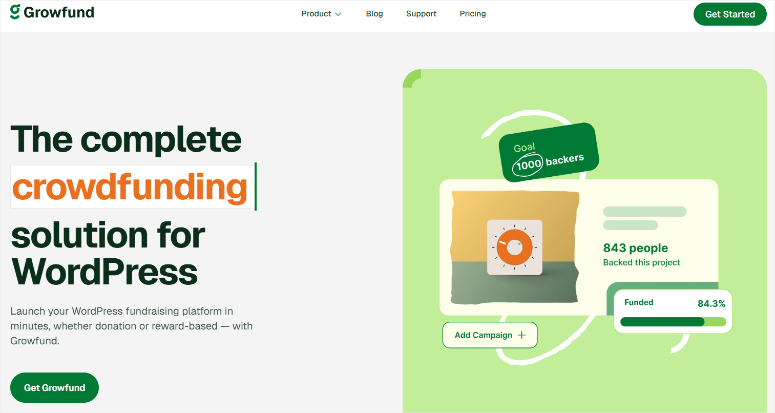
Growfund is built with a philosophy: your supporters are your best marketers.
The plugin prioritizes visibility like leaderboards, social sharing, and milestone updates. Every fundraiser sees how others are performing.
Why Is Growfund One of the Best Peer-to-Peer Fundraising Plugins?
That transparency drives healthy competition and motivates supporters to keep fundraising.
The plugin also includes recurring fundraiser support and peer funding, where supporters can fund each other’s campaigns, not just your organization’s cause.
My Experience with Growfund
I set up Growfund on a test environmental nonprofit site.
The setup was straightforward. The leaderboard was the highlight, with real-time rankings of top fundraisers creating a visible status that motivated test supporters.
One of my test accounts saw that they were in second place and asked to promote more. That psychology works.
The friction: Growfund’s documentation is sparse, similar to FundEngine. You’re relying on trial-and-error for customization.
The plugin also doesn’t integrate deeply with membership plugins or email marketing tools, so you’ll be doing manual notifications to your fundraisers.
🟢► Pros
- Leaderboard and visibility – Real-time rankings of top fundraisers motivate ongoing engagement
- Peer funding support – Supporters can fund each other’s campaigns, not just the main cause
- Recurring fundraisers – Set campaigns that reset monthly or annually for ongoing revenue
- Simple customization – Colors and messaging can be changed without code
🔴► Cons
- Limited documentation – You’ll need to experiment or hire a developer for deep customization
- Smaller ecosystem – Fewer integrations with other WordPress tools like email marketing, analytics, etc.
My Verdict: Growfund works best for causes with tight-knit communities where fundraiser visibility and peer motivation matter more than advanced reporting. Environmental, education, and social justice nonprofits often thrive here.
Pricing: Free plugin available | Pro starts at $74.50/year
👉 Get started with Growfund here
That’s it for my list. But there is one tool, though not a peer-to-peer fundraising WordPress plugin, that I knew I had to include.
Also Consider: WPForms
WPForms is the best drag-and-drop form builder for WordPress. As mentioned, while it’s not a dedicated peer-to-peer fundraising plugin, it excels at donation forms.
You can set up payment collection, recurring donations, and integrate with your email marketing tool. If you already use WPForms for contact forms and surveys, adding donation capability is seamless.
The downside: you’ll still need to add peer-to-peer features manually through custom pages or additional plugins. WPForms is the foundation, not the complete solution.
Check out my WPForms review for more details.
That’s it for my list of fundraising peer-to-peer plugins. But as you have seen, each has its strengths and weaknesses. So to help you choose one that fits your needs, check out the section below.
How to Choose
If you’re a nonprofit with 5+ staff and a budget:
- Charitable or GiveWP are your top choices. Both eliminate platform fees and scale with your organization.
If you’re a small nonprofit or running your first fundraising campaign:
- FundEngine or WhyDonate lets you test peer-to-peer without financial commitment. Start free, upgrade if it works.
If you need the fastest setup and don’t mind transaction fees:
- Donorbox is your plugin. Deploy today, not next month.
If community and transparency drive your fundraising:
Growfund’s leaderboards and peer funding features create the social momentum you need.
If you’re building an integrated WordPress experience:
- GiveWP’s free tier + modular add-ons let you start simple and scale intentionally.
The right choice depends on three things:
- Your budget. Free, $69/year, or $199/year?
- Your team size. Solo, small team, or large nonprofit?
- Your technical comfort. Can you debug if something breaks, or do you need plugin support?
Answer those honestly, and the list narrows fast.
That’s it from me. If anything is unclear, check out the commonly asked questions below.
FAQs: Best WordPress Peer-to-Peer Fundraising Plugins
What’s the difference between peer-to-peer fundraising and regular donations?
Regular donations ask supporters to give directly to your cause. Peer-to-peer fundraising empowers supporters to create their own fundraising campaigns for your cause, turning every supporter into a fundraiser. Instead of asking 100 people for $100, you ask 10 advocates to each recruit 10 supporters. The leverage is exponential.
Do I need coding skills to set up peer-to-peer campaigns?
No. Every plugin on this list uses drag-and-drop builders and short codes. You can set up a live peer-to-peer campaign without touching a line of code. If you can install a WordPress plugin, you can launch peer-to-peer fundraising.
Which peer-to-peer plugin works best with WooCommerce?
Charitable and GiveWP both integrate with WooCommerce, so you can run a store and peer-to-peer fundraising on the same site. If you’re selling products and fundraising, these two are your safest bets for seamless integration.
How much does peer-to-peer fundraising cost per donation?
It depends. Charitable and GiveWP charge zero platform fees. You only pay payment processor fees (Stripe/PayPal charges ~2.2% + $0.30 per transaction). Donorbox and similar SaaS solutions charge 2.95%+ on top. FundEngine is free. Over time, zero-fee plugins save thousands of dollars.
Can donors see the total campaign goal and progress?
Yes. All plugins on this list display progress bars, goal amounts, and funding milestones. Transparency drives more donations. Donors like seeing that a campaign is close to its goal.
Which plugin is best for large nonprofit team fundraising?
GiveWP and Charitable both shine here. They handle hundreds of simultaneous campaigns, provide bulk reporting, and include team management features. If you’re coordinating 50+ fundraisers, these two won’t break a sweat.
Final Verdict: Should I Use Peer-to-Peer Fundraising on My WordPress Site?
Yes. Peer-to-peer fundraising works because it multiplies your reach without multiplying your ask. You’re not asking the same 100 donors for more money.
You’re empowering those 100 donors to ask their networks. That shifts the psychology from “another donation request” to “help something I care about.”
WordPress plugins make this possible without learning advanced code or moving to external platforms.
Choose the plugin that matches your budget and team size, launch within a week, and watch what happens.
The food bank I mentioned three years ago now raises 40% of its annual budget through peer-to-peer campaigns. Your cause can too.
Resource Hub: Peer-to-Peer Fundraising for Nonprofits
Peer-to-peer fundraising is powerful, but it’s one piece of your nonprofit’s digital strategy. Here are resources to deepen your approach:
- Best WordPress donation plugins compared – Broader overview of all fundraising plugin types
- WordPress security plugins for nonprofits – Protect donor data and financial information
- Best plugins to create a WordPress membership site – Recognize recurring supporters with exclusive access
- Best WordPress email marketing plugins – Communicate with fundraisers and supporters automatically
- WordPress contact form plugins for nonprofits – Collect volunteer and fundraiser inquiries
- How to choose WordPress hosting for nonprofits – Ensure your fundraising site stays fast and reliable

Comments Leave a Reply