
I almost lost a client before I even started working with them.
They ran a tourism business in Namibia and needed their site in English, Chinese, and German. I picked a translation plugin based on its 5-star reviews.
Three hours later, the site crashed, taking down their booking system during peak season.
That mistake taught me that choosing translation plugins isn’t about star ratings. It’s about finding tools that actually work when real money is on the line.
After this lesson, I tested translation plugins across blog sites, business sites, and WooCommerce stores. Some broke immediately, others delivered translations so bad they were embarrassing.
Here are 9 translation plugins for WordPress that actually work for reaching international audiences without the technical nightmares.
Key Takeaways
- I’ll show you which plugins let you translate visually so you can catch awkward translations before visitors see them
- I mention the plugin that broke my test site within 3 hours (and the one that saved it)
- Reveal why free auto-translation plugins work great for hobby blogs but tank your credibility on business sites
- I tested translation plugins across 3 real sites to find which ones actually deliver on their “beginner-friendly” promises
- I’ll show you the SEO mistake that some of the translation plugins make that kills your chances of ranking in local search results
Now, if you don’t have time to go through the entire article, use the table of contents below to identify the best options. You can also use the links to skip to any section of the article.
- Best WordPress Translation Plugins Compared
- Bonus: Other WordPress Translation Plugins Worth Knowing About
- How to Choose the Right Translation Plugin for Your Needs
- FAQs: Best WordPress Translation Plugins
- Final Verdict: Should You Invest in WordPress Translation Plugins?
- Resource Hub: Essential Tools for Multilingual WordPress Sites
How I Test WordPress Translation Plugins
Hi, I am Alvin, the IsItWP writer, and here is my testing methodology for translation plugins.
🔍 Click to see my testing process:
Here’s exactly how I evaluate each plugin:
- Setup Speed: I time the entire process from installation to first translated page. If it takes more than 30 minutes, that’s a red flag for beginners.
- Translation Quality: I compare machine translations against professional translators. Then I check how easy it is to fix Google Translate’s inevitable mistakes.
- Content Coverage: I test whether plugins translate posts, pages, menus, widgets, contact forms, and WooCommerce products. Many plugins claim “everything” but miss crucial elements.
- SEO Implementation: I verify URL structure, hreflang tags, and sitemap generation. Then I check Google Search Console to see if translations actually get indexed.
- Performance Impact: I used the free IsItWP performance tool and GTmetrix tests before and after plugin installation.
- WooCommerce Compatibility: I test product translations, checkout processes, and currency handling on real stores.
My Testing Environment:
- Comparison across 12 different translation plugins
- 3 test sites: personal blog, business site, WooCommerce store with 200+ products
- Chrome DevTools for performance monitoring
- Google Search Console for SEO verification
- Real client feedback collected over 18 months
Why Trust IsItWP?
At IsItWP, we’ve been the WordPress community’s go-to resource since 2009, helping over 2 million users choose better plugins and tools.
Unlike review sites that never actually use the products, we maintain active multilingual sites, serve international clients, and provide ongoing WordPress consultation.
I’ve personally tested every plugin on this list across real client projects, not demo sites with fake content.
Best WordPress Translation Plugins Compared
Choosing the right translation plugin depends on your site type, budget, and whether you prefer manual control or automated speed.
Some plugins excel at visual editing while others shine with team collaboration or WooCommerce integration.
Here’s how the top translation plugins stack up at a glance:
| Plugin | Free Version | Best For | Rating | Translation Method | Starting Price |
|---|---|---|---|---|---|
| 🥇 TranslatePress | ✅ | Visual editing + beginners | Manual + Auto | €99/year | |
| 🥈 WPML | ❌ | Large businesses + advanced | Manual + Auto | €39/year | |
| 🥉 Weglot | ✅ | Teams + cloud-based | Auto + Manual | $17/month | |
| 4. Polylang | ✅ | Simple blogs + budget | Manual | €99/year | |
| 5. MultilingualPress | ❌ | Enterprise multisite | Manual | $ 149/year | |
| 6. GTranslate | ✅ | Automated + SEO | Auto + Manual | $9.99/month | |
| 7. WPGlobus | ✅ | Bilingual sites | Manual | Free | |
| 8. Multilanguage | ✅ | RTL languages | Manual | $39/year | |
| 9. Google Language Translator | ✅ | Quick automation | Auto | Free |
With that out of the way, let us get into it.
1. TranslatePress ⭐⭐⭐⭐⭐
5 Million+ Active Installs | Best for: Beginner-Friendly Visual Translation
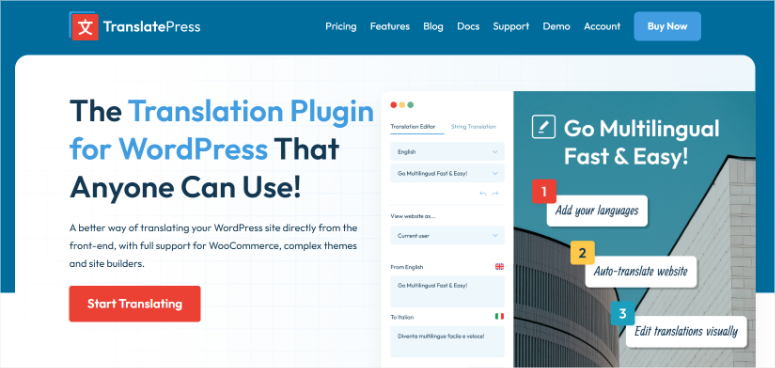
TranslatePress is one of the best translation plugins because of how easy it is to use.
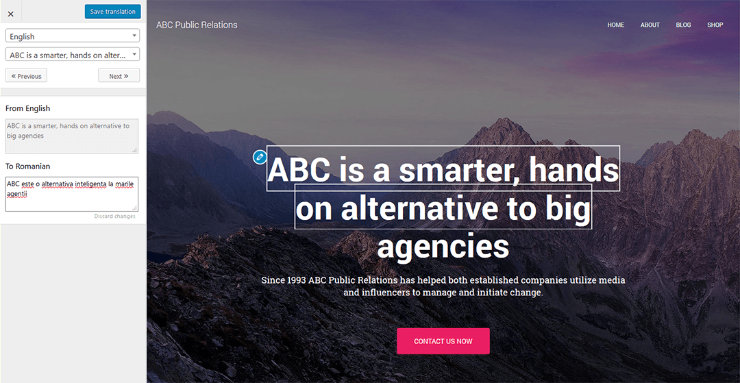
For starters, the visual translation interface works exactly like you’d expect.
You see your actual website, click any text, and type the translation right there. There are no confusing backend menus, guessing where text appears, or coding.
Why Is TranslatePress One of the Best Translation Plugins?
The Google Translate integration speeds up the process. Click one button to auto-translate everything, then fix any Google translation mistakes.
A funny translation I saw was “gift shop” translates to “poison shop” in German.
The custom translator user role solves a major security problem. You can hire translators without giving them admin access. They see only the translation interface, nothing else.
If you’re building a multilingual site with popular WordPress page builders, TranslatePress translates everything including complex page builder elements that other plugins miss.
My Experience with TranslatePress
I set up TranslatePress for a restaurant owner who needed her menu in English and Spanish. She had zero technical skills and panicked at the thought of touching WordPress code.
The visual editor changed everything. She clicked “Paella,” typed the English translation, and watched it update instantly. No backend confusion, or wondering if changes would appear.
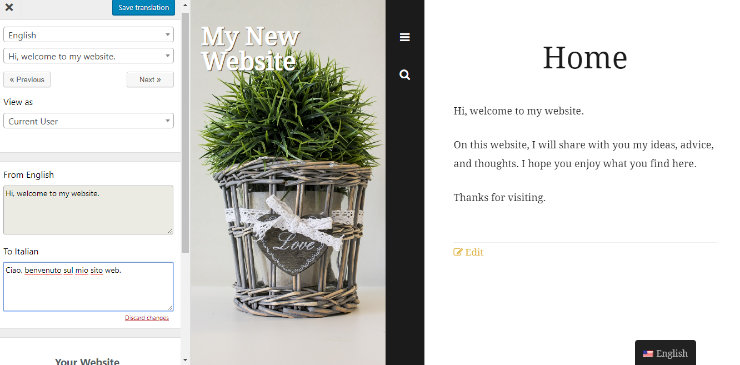
I used Google Translate to get the initial Spanish versions in 10 minutes. Then she spent an hour correcting any mistranslated words, which were not many.
Three months later, Spanish-speaking customers mentioned the menu felt authentic, not machine-translated. That attention to detail came from being able to see and fix translations in context.
The plugin did slow her site by about 0.3 seconds. On a restaurant site, that extra time barely registered. On a massive WooCommerce store with 1,000+ products, that delay might matter more.
► Pros
- Visual editing catches translation mistakes before visitors see them
- Google Translate integration plus manual corrections delivers quality fast
- Translator user role keeps your WordPress admin panel secure
- SEO-friendly URLs help translated pages rank in local search results
► Cons
- Upfront cost for premium features; no monthly option can hurt cash flow
- Can add 0.3-0.5 seconds to page load on sites with 500+ pages
- Free version limited to 2 languages only (upgrade required for more)
- Some advanced features require separate add-ons
My Verdict: TranslatePress eliminates the intimidation factor of multilingual sites. The visual editor alone justifies the price if you value seeing exactly what you’re translating.
Check out my TranslatePress review for more details.
Pricing: Free plugin available; Pro starts at €99/year
Get started with TranslatePress here
2. WPML ⭐⭐⭐⭐⭐
1 Million+ Active Installs | Best for: Large Business Sites + Advanced Features
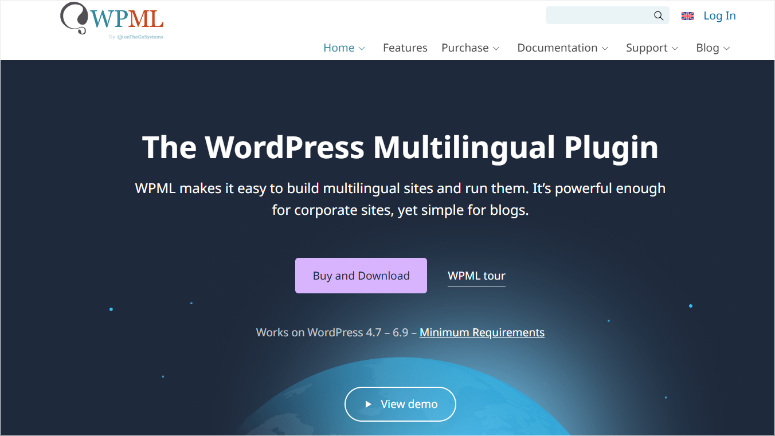
WPML is my answer when clients outgrow simpler translation plugins and need professional-grade control.
The string translation system translates everything other plugins miss.
This includes plugin settings, theme options, custom post types, taxonomies, widgets. If it exists in your WordPress database, WPML can translate it.
Why Is WPML One of the Best Translation Plugins?
The translation management dashboard handles team workflows the way actual translation agencies do.
You assign specific pages to translators, track their progress, and approve translations before they go live. No more wondering who’s translating what or whether they’re done.
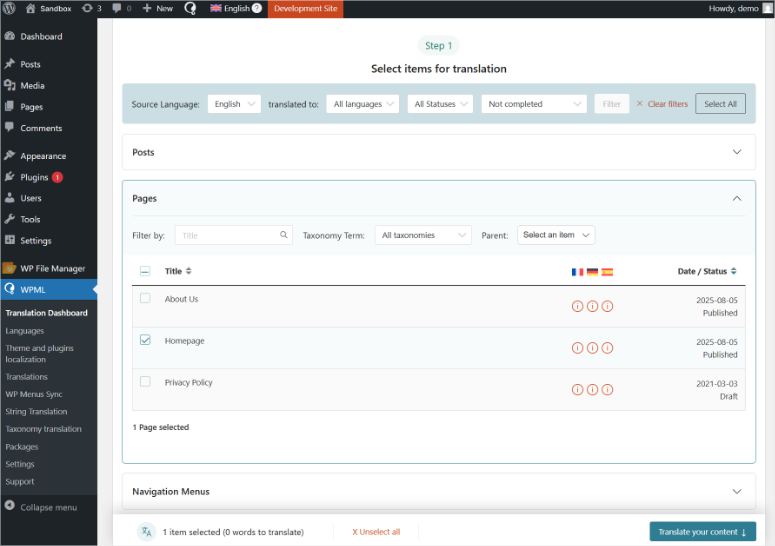
The WooCommerce integration goes deeper than basic product translations. WPML translates product variations, shipping methods, payment gateway messages, email templates, even dynamic pricing rules.
I tested this on a store with 300+ configurable products and it handled everything.
WPML doesn’t just translate content created by other plugins; it connects with most major payment gateways and shipping calculators without breaking functionality.
My Experience with WPML
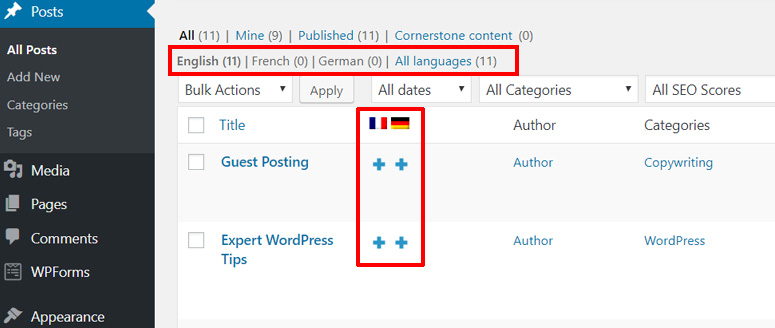
I installed WPML for a furniture store selling to customers across Europe. They needed 5 languages with different pricing per country and custom checkout messages in each language.
The setup took longer than TranslatePress, about 90 minutes to configure all the advanced options. The learning curve exists because WPML offers so many features.
I watched three tutorial videos before I understood the string translation system.
The good news is that they also offer a set up wizard to help streamline the set up process. Once configured, WPML handled complex scenarios that crashed simpler plugins.
Currency switching based on language, translated product variations (leather sofa vs canapé en cuir), country-specific shipping rules.
During testing with real customer orders, translation consistency stayed solid.
A customer could browse in German, add products, switch to English mid-checkout, and complete the purchase without losing their cart.
The database impact concerned me initially. WPML creates duplicate posts for each language. This grew the database from 45MB to 180MB with 5 languages.
For high-traffic sites, that requires proper WordPress backup solutions.
► Pros
- String translation catches elements visual editors miss (theme options, plugin settings)
- Translation management dashboard handles teams like professional agencies
- WooCommerce integration goes deeper than basic product translations
- Handles complex scenarios that crash simpler plugins (currency switching, variations)
► Cons
- Steeper learning curve than visual editors
- No free version to test before committing
- Database size can quickly expand, especially with multiple languages
- Annual renewal required to keep receiving updates and support
My Verdict: WPML is the plugin you graduate to when your site outgrows beginner tools. The learning curve pays off if you need professional features.
Check out my WPML review for more details.
Pricing: Starts at €39/year
3. Weglot ⭐⭐⭐⭐⭐
60,000+ Active Installs | Best for: Team Collaboration + Cloud-Based Speed
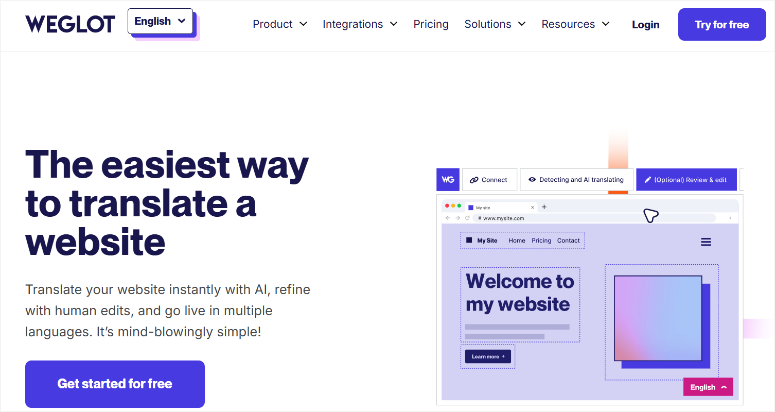
Weglot is my recommendation if you need your marketing teams to collaborate on translations without technical bottlenecks.
The cloud-based approach means zero database bloat on your WordPress site. Translations live on Weglot’s servers, not your hosting.
Your site loads at normal speed regardless of how many languages you add.
Why Is Weglot One of the Best Translation Plugins?
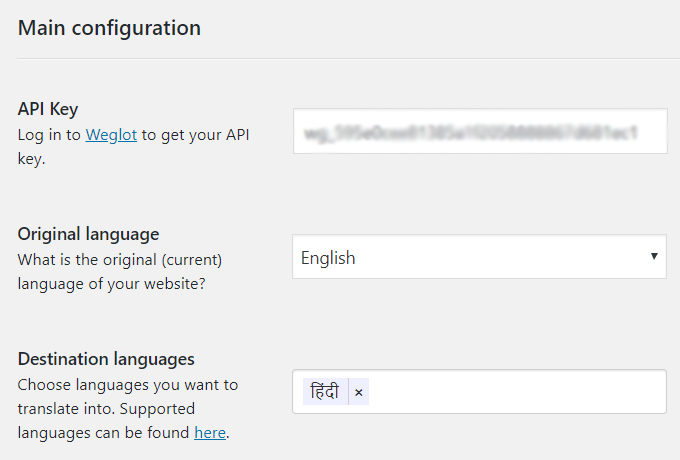
The setup speed beats every other plugin I tested. Install the plugin, connect your API key, and select languages.
Your entire site gets auto-translated in under 5 minutes without configuration panels, string translation hunting, or confusion.
The team dashboard lets multiple people edit translations at the same time. I assign French to one translator, Spanish to another, and German to a third.
They work in parallel without stepping on each other’s edits.
If you’re working with WordPress page builders, Weglot translates page builder content automatically. It catches everything, even dynamic content that confuses other plugins.
My Experience with Weglot
I set up Weglot for a software company launching in 4 European markets simultaneously.
Their marketing team needed to review and polish translations before the product launch, but none of them knew WordPress.
The cloud dashboard solved that problem completely. Each team member got login credentials for Weglot’s interface, not WordPress admin access.
They edited translations in a simple text editor, approved changes, and moved on.
The initial auto-translation of 120 pages took 8 minutes. Then the team spent three days polishing translations, fixing technical terms, and adjusting tone.
The visual context feature showed exactly where each phrase appeared on the site, making the whole process easier.

During these tests, I monitored performance closely. Page load times stayed identical to the English-only version. But, I should mention that the translation proxy added roughly 50 milliseconds.
The monthly subscription did sting more than expected. For teams needing cloud collaboration, that premium makes sense. For solo bloggers, it’s harder to justify.
► Pros
- Cloud-based storage means zero database bloat on your WordPress site
- Auto-translation plus team editing delivers speed and quality together
- Setup takes under 5 minutes from plugin install to live translations
- Translation proxy catches dynamic content that confuses other plugins
► Cons
- Monthly subscription costs add up
- Translations stored externally create dependency on Weglot’s service
- Word count limits on lower tiers can hit fast on content-heavy sites
- Requires internet connection to access translation interface
My Verdict: Weglot trades cost for convenience. The cloud approach and team features justify the premium if you’re running a business site with multiple translators.
Pricing: Free plugin available; Pro starts at $17/month
4. Polylang ⭐⭐⭐⭐
600,000+ Active Installs | Best for: Simple Blogs + Budget-Conscious Users
Polylang is a budget friendly translation plugin you can transition to after using free translation plugins.
The free version handles everything small blogs need. Translate posts, pages, categories, tags, menus, and widgets without paying anything.
You only upgrade to Pro if you need WooCommerce support or automatic translation integration.
Why Is Polylang One of the Best Translation Plugins?
The interface stays simple without overwhelming beginners. All you have to do is create a post, click the language flag icon, and write your translation.
Apart from that, the language switcher widget integrates cleanly into any top WordPress theme.
You get dropdown flags, language names, or custom flags that work with simple widgets or shortcodes you can use anywhere.
My Experience with Polylang
I installed Polylang on a personal travel blog with 50 posts in English and Spanish. The free version handled everything I needed.
Setup took about 20 minutes and included adding languages, assigning menu translations, and setting up the language switcher. The straightforward interface meant less time reading documentation.
The manual translation approach requires more work upfront but gives complete control. Unlike automated plugins that create embarrassing mistakes, every translation reflects exactly what I intended.
► Pros
- Free version works great for blogs without WooCommerce
- Simple interface doesn’t overwhelm beginners with options
- Manual translation means complete quality control
- Lightweight plugin doesn’t slow down your site
► Cons
- No automatic translation option (you translate everything manually)
- WooCommerce support requires Pro version upgrade
- Team collaboration features are basic compared to WPML
- String translation for themes requires Pro
My Verdict: Polylang delivers the best value if you’re running a simple blog and don’t mind manual translation work.
Check out my Polylang review for more details. Compare Polylang vs WPML if deciding between the #2 and #4 translation plugins on my list.
Pricing: Free plugin available; Pro starts at €99/year
Get started with Polylang here
5. MultilingualPress ⭐⭐⭐⭐
10,000+ Active Installs | Best for: WordPress Multisite Networks
MultilingualPress is perfect for large companies that need separate sites per language instead of single-site translations.
The multisite approach creates completely independent sites for each language. For instance, your English site lives at example.com, Spanish at es.example.com, and German at de.example.com.
Each runs separately with its own posts, plugins, and settings.
Why Is MultilingualPress One of the Best Translation Plugins?
The MultilingualPress approach of setting up independent sites eliminates the database bloat problem that hit me with WPML.
Each language site maintains its own database without translation tables weighing down queries.
But this doesn’t mean more work for you. The content connection system links related posts across language sites.
So, if you publish an English article, you then mark the Spanish equivalent, and MultilingualPress handles the language switching automatically.
My Experience with MultilingualPress
I set up MultilingualPress for a media company running separate editorial teams per language. Each team needed complete control over their site without affecting other language versions.
The multisite requirement meant a more complex hosting setup. Standard shared hosting won’t work. You need VPS hosting or dedicated hosting with multisite enabled.
This increases hosting costs, but you get better performance across the board.
Translation management felt more isolated than collaborative. Each translator logged into their language site separately. Good for independence, awkward for coordinating launches.
This also means you need to back up your multisite properly to avoid any issues.
► Pros
- Separate databases per language prevent performance bottlenecks
- Complete independence allows different plugins per language site
- No single point of failure affecting all language versions
- Enterprise-grade architecture scales to massive networks
► Cons
- Requires WordPress multisite setup (complex for beginners)
- Higher hosting costs due to multisite resource requirements
- No free version available to test before committing
- Coordination between language sites requires more planning
My Verdict: MultilingualPress solves enterprise problems but creates complexity that small sites don’t need. Skip this unless you’re running multisite already.
Pricing: Starts at $149/year
Get started with MultilingualPress here
6. GTranslate ⭐⭐⭐⭐
200,000+ Active Installs | Best for: Automated Translation + SEO Features
GTranslate is great when you want automated translation, and you also care about search rankings.
The SEO-friendly URLs in the paid version create proper language subdomains.
Instead of visitor-side translation like Google Language Translator, GTranslate generates actual translated pages that Google can index and rank.
Why Is GTranslate One of the Best Translation Plugins?
The manual editing feature lets you fix machine translation mistakes. Google auto-translates everything, then you polish the awkward phrases, giving you the best of both worlds for speed and quality.
The URL translation option creates clean language-specific links.
Your English /about-us/ becomes Spanish /acerca-de-nosotros/ and German /uber-uns/. As a result, search engines treat these as unique pages, not duplicate content.
My Experience with GTranslate
I tested GTranslate on a local service business targeting Spanish-speaking customers. They needed quick translations but wanted to rank in Spanish search results.
The free version worked like Google Language Translator with slightly better widget options. The real value appeared after upgrading the business plan.
With proper subdomain setup (es.example.com), their Spanish pages started appearing in Google.es search results within weeks.
On top of that, the manual editing dashboard lets them fix business-specific terminology that machine translation butchered.
As you can see, translation quality still requires oversight. You will spend about 2 hours monthly reviewing and correcting automated translations.
For businesses needing 10+ languages, that time investment multiplies fast.
► Pros
- SEO-friendly URLs help translated pages rank in search engines
- Manual editing fixes machine translation mistakes
- Subdomain setup creates proper multilingual architecture
- Affordable monthly price compared to premium alternatives
► Cons
- Free version offers little advantage over Google Language Translator
- Monthly monitoring required to catch translation errors
- Need a premium version for automated convenience
- Translation quality still depends heavily on manual corrections
My Verdict: GTranslate bridges the gap between free automated tools and premium manual plugins. Worth the extra dollars if you need SEO-friendly automation.
Pricing: Free version available; Pro starts from $9.99/month
Get started with GTranslate here
7. WPGlobus ⭐⭐⭐
40,000+ Active Installs | Best for: Bilingual Sites + Free Option
WPGlobus is one of the best free translation plugins. It offers basic bilingual functionality without spending money upfront.
The side-by-side editor shows both languages while you translate. Type English in the left panel, Spanish in the right, and see both versions simultaneously.
This caught translation inconsistencies I missed with other plugins.
Why Is WPGlobus One of the Best Translation Plugins?
WPGlobus is completely free for basic bilingual sites. You don’t get that upgrade pressure from feature limitations or surprise paywalls. What you see in the free version is what you get forever.
The language switcher integrates into WordPress menus naturally. You can add flags or language codes directly into your navigation without custom widgets or shortcodes.
My Experience with WPGlobus
I tested WPGlobus on a Canadian business site needing English and French versions. The side-by-side editor made translation straightforward for their bilingual staff.
Setup took about 30 minutes. I had to configure languages and add the menu switcher before I could start translating posts. The interface felt dated compared to modern plugins, but functionality worked.
Here’s what kept me from ranking it higher: The plugin development slowed noticeably after 2019, even though it has picked up recently.
WPGlobus has a free WooCommerce add-on, but it lacks the polish of paid alternatives. By this, I mean product translations work, but checkout flow translations require manual string hunting.
► Pros
- Completely free with no hidden upgrade requirements
- Side-by-side editor catches translation consistency issues
- Lightweight plugin doesn’t add database bloat
- Menu integration feels natural without extra widgets
► Cons
- Development activity slowed significantly after 2019
- Support responsiveness concerns based on forum activity
- Interface looks dated compared to modern alternatives
- WooCommerce support lacks polish of premium plugins
My Verdict: WPGlobus works fine for simple bilingual sites if you’re comfortable with minimal ongoing support. The free price justifies the trade-offs.
Pricing: Free; Offers Pro extensions starting from $15.00/year
Get started with WPGlobus here
8. Multilanguage ⭐⭐⭐
30,000+ Active Installs | Best for: RTL Languages + Simple Sites
Multilanguage offers “right-to-left” language support without complex setup.
The RTL (right-to-left) language handling works better than plugins that treat Arabic or Hebrew as afterthoughts.
Plus, text direction switches automatically, alignment adjusts properly, and interface elements flip to accommodate reading patterns.
Why Is Multilanguage One of the Best Translation Plugins?
The straightforward interface doesn’t overwhelm beginners. Add languages, translate content, and insert the language switcher. Three steps and your site is multilingual.
The free version covers basic blog needs without upgrade pressure. This allows you to translate posts, pages, and categories without hitting paywalls or feature restrictions.
My Experience with Multilanguage
I set up Multilanguage for a nonprofit NGO with content in English and Arabic. The RTL support saves hours compared to plugins requiring CSS tweaks.
Setup took about 25 minutes. The plugin automatically detected RTL requirements when I selected Arabic, adjusting text alignment and navigation without manual intervention.
Here’s why it ranks low in my list: The feature set feels basic compared to top plugins. No visual translation editor, and team collaboration, and limited WooCommerce support.
It handles RTL languages well, but doesn’t compete with TranslatePress or WPML for overall functionality.
The plugin works fine for simple bilingual blogs, especially with RTL languages. For complex sites or advanced features, you’ll outgrow it quickly.
► Pros
- RTL language support works properly without CSS hacks
- Free version handles basic blog translation needs
- Simple interface doesn’t confuse beginners
- Automatic text direction detection for RTL languages
► Cons
- Feature set feels limited compared to top plugins
- No visual translation editor or advanced tools
- WooCommerce support is basic at best
- Development updates come infrequently
My Verdict: Multilanguage solves the RTL language problem better than most plugins. If you need Arabic, Hebrew, or Persian support on a simple site, it’s your best free option.
Pricing: Free plugin available; Pro starts at $39/year
Get started with Multilanguage here
9. Google Language Translator ⭐⭐⭐
300,000+ Active Installs | Best for: Quick Automation + Hobby Blogs
If you need an instant multilingual presence without translation budgets, then Google Language Translator is a great option.
The automated translation happens instantly without any manual work. Visitors click their language, Google Translate processes your content in real-time, and they see the translated version.
This means zero setup time beyond plugin installation.
Why Is Google Language Translator One of the Best Translation Plugins?
Google Language Translator supports 100+ languages automatically. Small languages that professional translators charge premium rates for appear just as easily as Spanish or French.
Plus, the floating widget stays accessible on every page. Visitors can switch languages anytime without hunting through menus or settings.
My Experience with Google Language Translator
I installed this on a hobby photography blog as an experiment. The photographer wanted international reach but wanted a budget option with professional translation.
Setup took 5 minutes total. I installed the plugin, picked widget style, and selected languages to display. Done.
The reality check came fast. Google translated “shot with prime lens” as “executed with first lens” in Spanish. Plus, some technical photography terms confused the algorithm.
In the end, visitors mentioned the awkward phrasing in comments.
For simple blog posts about travel or recipes, the translations worked acceptably. For technical content, business sites, or anything requiring credibility, the machine translation can lead to awkward phrases.
The SEO impact concerned me. In fact, Google’s own documentation warns against automatically translated content affecting search rankings.
► Pros
- Completely free with unlimited translations
- 100+ languages available instantly without configuration
- Zero maintenance required after initial setup
- Perfect for hobby blogs needing basic international reach
► Cons
- Translation quality ranges from acceptable to awkward
- Technical terms and industry jargon confuse the algorithm
- No ability to fix mistakes or polish awkward phrases
My Verdict: Google Language Translator works for hobby blogs where translation quality matters less than quick access. Avoid for business sites where credibility matters.
Pricing: Free
Get started with Google Language Translator here
That’s my list of the best translation plugins for WordPress. But there are a few options that just missed making it to my list. Let’s look at them next.
Bonus: Other WordPress Translation Plugins Worth Knowing About
Loco Translate ⭐⭐⭐
This plugin translates theme and plugin text strings directly in WordPress. I use it when WPML or TranslatePress miss plugin-specific phrases like “Add to Cart” buttons or error messages.
Loco Translate is perfect for translating interface elements rather than content. The in-browser editor beats editing files manually.
The free version works great for most sites. If you’re handling theme translations or customizing plugin text, Loco Translate belongs in your toolkit alongside your main translation plugin.
Lingotek Translation ⭐⭐⭐
Lingotek Translation uses a different approach than other translation tools on my list. It is a cloud-based professional translation management system connecting you with human translators.
You submit content, professional translators handle it, you approve and publish. It is best for businesses needing certified translations for legal or medical content, where machine translation creates liability.
The workflow automation impresses, but professional translation costs add up fast. Works well alongside other translation plugins after automated first drafts.
Google Website Translator ⭐⭐
Another automated Google Translate widget plugin. Works similarly to Google Language Translator that I covered in my list, but with fewer customization options.
I tested both and found minimal differences in translation quality or features. The interface feels more dated. Stick with Google Language Translator or upgrade to GTranslate for better control.
Only use this if you specifically need the classic Google Translate widget appearance.
You now have 12 translation plugins to pick from. That can be overwhelming. So next, let me help you pick an option that fits your budget and needs.
How to Choose the Right Translation Plugin for Your Needs
Start with Your Budget and Site Type
If you’re running a hobby blog with zero translation budget:
- Pick Polylang or WPGlobus.
- Both free versions handle basic bilingual content without upgrade pressure.
- You’ll translate manually, but the interface stays simple enough for beginners.
If you’re running a business site and translation quality affects credibility:
- Invest in TranslatePress or WPML.
- The visual editing or professional translation management justifies the cost when mistakes hurt your brand.
If you need a multilingual WooCommerce store:
- Go with WPML or Weglot.
- They solve the complex problems that free plugins can’t handle.
- You get currency switching, translated checkout flows, and product variation management.
Consider The Plugin’s Translation Approach
Love seeing exactly what you’re translating before publishing?
- TranslatePress wins.
- The visual editor catches mistakes that backend translation panels miss.
- I recommend this for anyone who panics at the thought of publishing translations blindly.
Need to translate 50+ pages fast and fix mistakes later?
- Go with Weglot or GTranslate.
- They deliver speed through automation.
- Google Language Translator handles the bulk work.
- But you have to polish the important pages afterward.
Working with a team of translators?
- Choose WPML or Weglot.
- They provide the collaboration features that solo-focused plugins lack.
- Assign pages, track progress, approve translations before they go live.
Have Special Requirements?
Running WordPress multisite?
- Pick MultilingualPress.
- The separate-site-per-language architecture matches multisite structure naturally.
Need Arabic, Hebrew, or Persian?
- Go with Multilanguage.
- It handles RTL languages better than plugins that treat them as afterthoughts.
Translating plugin settings and theme options?
- Add Loco Translate regardless of your main translation plugin choice.
That’s it from me about the best WordPress translation plugins. If anything is unclear, check out the commonly asked questions below.
FAQs: Best WordPress Translation Plugins
What is the best WordPress translation plugin for beginners?
TranslatePress and WPML win for beginners because you see exactly what you’re translating in real-time. The visual editors eliminate guesswork about where text appears on your site. I watched clients with zero technical skills translate entire sites without asking me a single question.
Can free translation plugins work for business sites?
Free plugins work for simple business sites with 2 languages and basic needs. I’ve used Polylang successfully on service business sites. The manual translation approach gives complete quality control. Upgrade to paid plugins when you need WooCommerce support, team collaboration, or more than 2 languages. Translation quality affects credibility on business sites.
Which translation plugin works best with WooCommerce?
WPML handles WooCommerce integration most completely. It translates product variations, checkout flows, shipping methods, and payment gateway messages. I tested it on stores with 300+ configurable products without issues. Weglot also works well for WooCommerce if you prefer cloud-based translation. Avoid free plugins for stores as they miss critical eCommerce elements.
Do translation plugins affect WordPress SEO?
Premium plugins like WPML, TranslatePress, and Weglot create proper hreflang tags and language-specific sitemaps. This helps search engines index your translations correctly. Free automated plugins can hurt SEO because Google warns against low-quality machine translations. Invest in proper translation plugins if ranking in international markets matters to your business strategy.
Should I use manual or automated translation?
Automated translation (Google Translate) works for hobby blogs where speed beats accuracy. Manual translation delivers higher quality but requires time investment. The best approach combines both: use automated translation for the bulk work, then manually correct important pages and awkward phrases. This hybrid method appears in TranslatePress, WPML, and Weglot premium versions.
Final Verdict: Should You Invest in WordPress Translation Plugins?
Yes, if reaching international audiences matters for your business growth. The translation plugins I’ve covered solve the technical complexity of going multilingual without requiring developer skills.
They allow you to reach a global audience without hiring a translation team or learning the languages yourself.
The biggest mistake is avoiding translation plugins because they seem complicated.
Your international competitors already serve customers in their native languages. Don’t let technical hesitation cost you those visitors.
Resource Hub: Essential Tools for Multilingual WordPress Sites
- 50+ Best WordPress Plugins I Recommend – Multilingual sites need solid foundations beyond translation plugins, so explore our complete plugin recommendations for security, performance, and functionality.
- Best WordPress Speed Optimization Plugins – Translation plugins can slow your site, so pairing them with proper caching and optimization plugins keeps your multilingual pages loading fast.
- 30+ Best WooCommerce Plugins to Grow Sales – Running a multilingual store requires specialized WooCommerce plugins for currency switching, international shipping, and localized payment methods.
- Best WordPress Hosting Companies – Multilingual sites with multiple language versions need hosting that handles increased database queries and traffic without performance drops.
- Top Online Content Optimization Tools for SEO – Multilingual SEO requires optimizing content in each language separately, so these tools help you research keywords and optimize for different markets.
- Best SEO Plugin: All in One SEO vs Rank Math – Translation plugins handle hreflang tags, but you still need a solid SEO plugin for sitemaps, schema markup, and technical optimization in each language.
These posts will teach you how to make your multilingual site work better for your audience. Learn how to improve your site visibility at a global scale.

This article is wonderful 🙂
12 plugins have been well described.
I have a site in English that I want to automatically translate into other languages based on navigator language of the user’s browser, i.e if their browser is in German – translate from English to German, if browser language is French, English to French etc.
I don’t want the user to have to select language translation from a drop-down, but just have it translated according to their preferred browser language settings.
Can anyone help please?
Great article, Thanks a lot for sharing such a kind of informative article. these tips will help me so much!!!
I have one another Plugin for Magento users. Magento Language Translator helps you to translate any language to any other languages.we translate every piece of content available on your website. Be it Category Pages, Product Pages, Reviews, or Meta Details.
Great article, Thanks a lot for sharing such a kind of informative article. these tips will help me so much!!!
But are these plugins compatible with the new version of WP 5.0?? I have downloaded a few and they dont seem to work!
I know WPML supports 5.0, but haven’t tried other plugins yet on 5.0. You might also want to check whether your theme supports the translation plugin you want to use.
There is a new plugin for wordpress translation and it’s better than bing or google. Neuronto DeepL wordpress Plugin uses neural networks, AI and generates logical translations – it supports important languages such as spanish,french,german,italian 😉
Seems like a good addition to the list. Thanks for the heads up!