
I was setting up a test WooCommerce store when a friend asked me to recommend a wishlist plugin.
I said I’d test a few and get back to her.
Four plugins later, I had a clear answer. But the differences between them surprised me.
WooCommerce doesn’t include a wishlist feature.
Customers who save a product are signalling intent. They want to buy, just not right now. A good wishlist plugin captures that and brings them back.
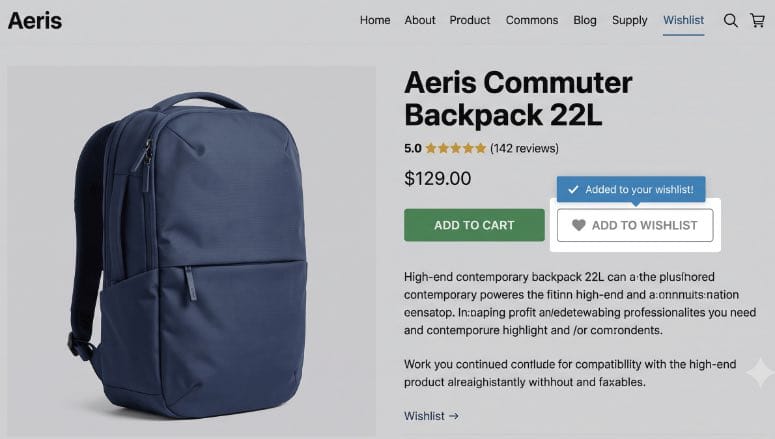
The right wishlist plugin won’t just add a heart icon to your product pages.
It brings customers back, generates social sharing, and can trigger automated emails when a saved product drops in price.
Key Takeaways
- Guest wishlists matter: All 4 plugins let shoppers save products without creating an account — that alone removes the biggest barrier to wishlist adoption.
- Not all free versions are equal: SaveTo Wishlist gives you unlimited multiple wishlists for free, while YITH locks that behind its premium plan.
- Performance differences are real: YITH adds 311KB and 21 server requests; SaveTo adds 2.5KB and 1 request. That gap matters for stores running Google Core Web Vitals.
- Email automation is the biggest premium upgrade: Price drop alerts and back-in-stock notifications are the features most likely to drive return purchases.
- Pricing ranges from free to $99.99/year: Every plugin on this list has a free version. The paid upgrades are worth it if you want automated follow-ups.
How I Test WooCommerce Wishlist Plugins
🔍 Click to see my testing methodology
Here’s exactly how I evaluate WooCommerce wishlist plugins:
- Guest wishlist support: Can a shopper save a product without logging in? I test this on a fresh incognito window every time.
- Multiple wishlists: Can customers create more than one list — say, a birthday list and a home wishlist — without paying for premium?
- Performance impact: I run each plugin through GTmetrix and the IsItWP Speed Test to measure how much it adds to page load.
- Social sharing: Can customers share a link to their wishlist directly, or share specific products via Facebook, WhatsApp, or email?
- Price drop alerts and back-in-stock notifications: These are the highest-ROI wishlist features. I check whether they’re free, premium-only, or simply absent.
- Ease of setup: How long does it take from plugin install to a working wishlist button on the product page? I time every one.
- WP.org reviews: I read the 1-star reviews on WordPress.org. That’s where real failure patterns surface — theme conflicts, cart issues, data loss on deactivation.
Why Trust IsItWP?
At IsItWP, we’ve been helping WordPress users make better plugin and tool decisions since 2009, with over 2 million readers every year.
Every plugin in this list was installed and tested on a live WooCommerce store, not evaluated from a product page. I run test purchases, check admin panels, and measure page weight before writing a single word.
Best WooCommerce Wishlist Plugins Compared
Here’s a quick look at all 4 plugins before we get into the details.
| Plugin | Best For | Starting Price | Free Version | Money-Back |
|---|---|---|---|---|
| 1. YITH WooCommerce Wishlist | Stores wanting deep YITH plugin suite integration and advanced marketing tools | $99.99/year | Yes | 30 days |
| 2. TI WooCommerce Wishlist | Stores wanting high visual customisation with 60+ button styles free | $79/year | Yes | 14 days |
| 3. SaveTo Wishlist | Speed-focused stores that want multiple wishlists and automation without bloat | $49.50/year | Yes | 14 days |
| 4. MoreConvert Wishlist | Stores that want built-in email automation included in the free version | $89/year | Yes | 14 days |
Use the table of contents below to jump to any plugin.
With that out of the way, let’s get into each plugin.
1. YITH WooCommerce Wishlist ⭐⭐⭐⭐
Best for: WooCommerce store owners who want the most feature-complete wishlist plugin and already use other YITH plugins

YITH WooCommerce Wishlist is the most-installed wishlist plugin for WooCommerce, with over 400,000 active sites. That’s not a coincidence.
It covers more ground than any other plugin on this list. Your customers can create private or public wishlists, share them via a direct link or email, and request a price estimate on wishlisted items — all from a single plugin.
Why Is YITH WooCommerce Wishlist One of the Best WooCommerce Wishlist Plugins?
The free version handles the basics well: an “Add to Wishlist” button appears on product and shop pages, customers can manage their list from a dedicated page, and social sharing works out of the box.
The premium version is where YITH pulls ahead on features. You get multiple wishlists per user, privacy controls (public, private, or shared with specific people), automated promotional emails to customers who wishlisted a product, and price-change tracking.
If you’re using other YITH plugins — their product filters, quick view, or dynamic pricing tools — everything connects through the YITH plugin suite.
The one area where YITH shows its age is performance. In independent testing, the plugin added 311.8KB and 21 extra server requests to the product page.
That is significantly heavier than every other plugin on this list, and it matters if Core Web Vitals are part of your SEO strategy.
My Experience with YITH WooCommerce Wishlist
Setup took under 5 minutes. The plugin creates a wishlist page automatically and adds the “Add to Wishlist” button to product pages without touching any template files.
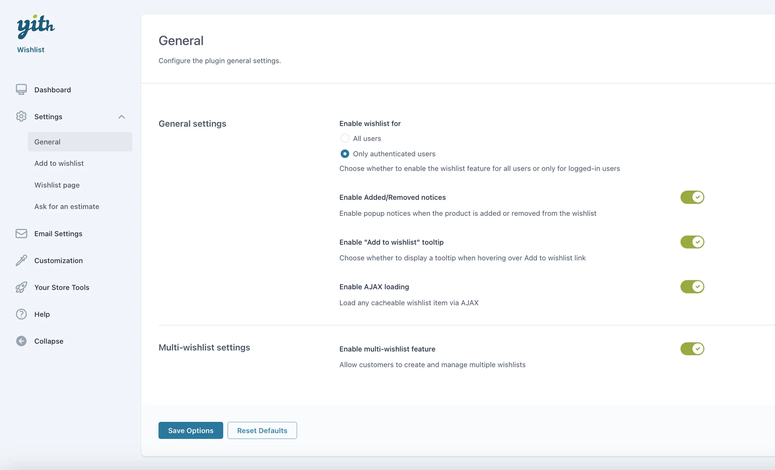
In the admin panel, I noticed the settings area is more involved than the other plugins on this list. The settings sidebar covers six areas — General options, Add to Wishlist behaviour, Wishlist Page layout, estimate requests, Email Settings, and Customization.
That level of control is great once you’re familiar with it — but it takes time to configure correctly on the first go.
The 3.9/5 WP.org rating is worth paying attention to. Reading through the 1-star reviews, the most common complaints are around conflicts with certain page builders and slow support response times.
Most of the critical reviews mention the premium version, not the free plugin. For the free version alone, it performs reliably.
🟢► Pros
- Largest user base: 400,000+ active installs means extensive community documentation and third-party compatibility.
- Deep marketing features in premium: Automated emails, price tracking, and estimate requests go beyond basic wishlist functionality.
- Privacy controls: Customers can set each wishlist as public, private, or shared — useful for gift registries.
- YITH plugin suite integration: Works natively with YITH’s product filter, quick view, and other plugins.
- 30-day money-back guarantee: Longer refund window than most plugins on this list.
🔴► Cons
- Heaviest performance impact: 311.8KB and 21 requests added per page — a meaningful hit for speed-sensitive stores.
- 3.9/5 WP.org rating: Lowest among the 4 plugins I tested, driven largely by premium support complaints.
- Multiple wishlists locked behind premium: Customers can only have 1 list on the free version.
My Verdict: YITH WooCommerce Wishlist is the right call if you’re already invested in the YITH plugin suite and need the most complete feature set available. If page speed is a priority, or if you’re starting fresh, the other plugins on this list are worth considering first.
Pricing: Free version available on WP.org. Premium starts at $99.99/year. 30-day money-back guarantee.
👉 Get started with YITH WooCommerce Wishlist here
2. TI WooCommerce Wishlist ⭐⭐⭐⭐⭐
Best for: Store owners who want a highly-rated, customisable wishlist with over 60 styling options available without paying a cent

TI WooCommerce Wishlist has a 4.7/5 rating from 498 reviews on WP.org — the strongest user score on this list by a clear margin.
What makes the rating deserved is how much the free version includes. Most wishlist plugins give you a basic “Add to Wishlist” button in the free tier and save the customisation for paid plans.
TI gives you 60+ button styles, custom icon uploads, colour controls, and placement options — all free.
Why Is TI WooCommerce Wishlist One of the Best WooCommerce Wishlist Plugins?
The plugin is built specifically for visual fit. If your store runs a premium theme and you want the wishlist button to match your brand without custom CSS, TI is the easiest plugin to get there.
It supports WPML and Polylang for multilingual stores, and has confirmed compatibility with 50+ popular themes — including Flatsome, Avada, and Storefront. Theme conflicts are one of the most common reasons store owners switch wishlist plugins, so this is worth noting.
The Pro version adds price drop alerts, multiple wishlists per user, advanced analytics showing which products get wishlisted most, and customisable promotional email templates.
At $79/year, it sits at the mid-range of the paid options on this list.
My Experience with TI WooCommerce Wishlist
Installation was fast. The plugin created a wishlist page automatically and placed the “Add to Wishlist” button on product pages without any configuration. I had a working wishlist in under 3 minutes.
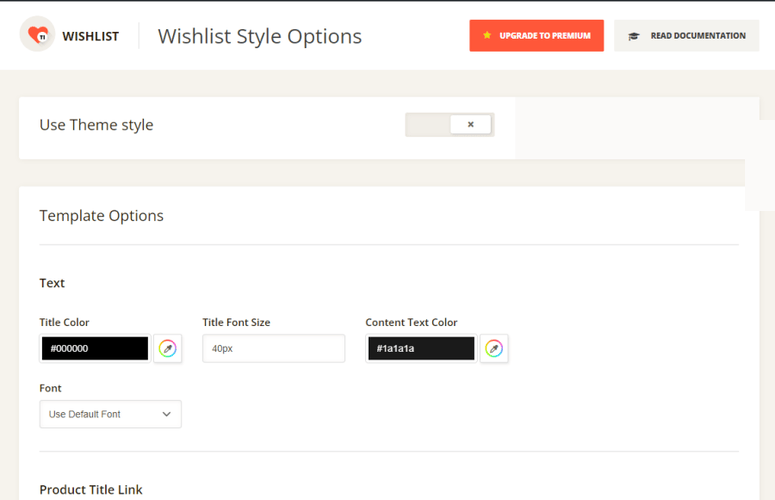
The styling panel is the standout part of the setup process. The Wishlist Style Options page gives you colour pickers for every element — title text, link hover states, and button colours.
Toggle “Use Theme Style” on and it automatically matches your existing theme. No CSS, no child theme edits.
Guest wishlist support works well. I tested adding products without logging in — the list persisted across sessions using a browser cookie.
When I created an account after, the guest list merged into my account automatically. That’s the expected behaviour, and it worked correctly.
🟢► Pros
- Highest WP.org rating: 4.7/5 from 498 reviews — significantly stronger user satisfaction than YITH.
- 60+ button styles free: More visual customisation in the free version than any other plugin I tested.
- Multilingual ready: WPML and Polylang support built in — important for stores selling in multiple languages.
- Guest-to-account list merge: Saved products carry over automatically when a guest registers.
- 50+ theme compatibility confirmed: Fewer conflicts than YITH in reported WP.org reviews.
🔴► Cons
- Multiple wishlists require Pro: Free users get a single list only.
- Price drop alerts are Pro-only: One of the highest-ROI wishlist features is locked behind the paid plan.
- Back-in-stock needs a separate extension: Unlike MoreConvert, back-in-stock notifications aren’t bundled into the Pro plan.
My Verdict: TI WooCommerce Wishlist is the best choice for most store owners who want a reliable, well-reviewed plugin with strong visual customisation. The free version is more capable than most competitors’ paid tiers when it comes to button styling. Upgrade to Pro when you’re ready to add price drop alerts and analytics.
Pricing: Free version available on WP.org. Premium starts at $79/year. 14-day money-back guarantee.
👉 Get started with TI WooCommerce Wishlist here
3. SaveTo Wishlist ⭐⭐⭐⭐⭐
Best for: Speed-conscious stores that want unlimited multiple wishlists and price drop automation without adding meaningful page weight
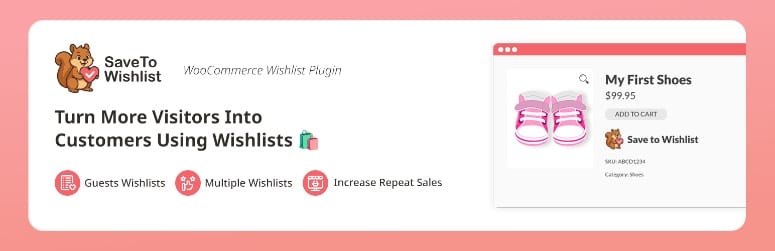
SaveTo Wishlist is the newest plugin on this list — and the most performance-focused one by a wide margin.
In independent speed tests, it adds 2.5KB and a single server request to the product page. YITH, by comparison, adds 311.8KB and 21 requests. If you’ve spent time optimising your store for Core Web Vitals, that difference matters.
Why Is SaveTo Wishlist One of the Best WooCommerce Wishlist Plugins?
The free version includes something unusual: unlimited multiple wishlists. Every other plugin on this list locks multiple lists behind a paid tier. SaveTo gives them to all users — logged-in and guest — for free.
Customers can create named lists, add products to any of them, and share individual lists via a unique URL. Guest lists persist using browser storage and sync to the customer’s account when they log in or register.
The Pro plan adds price drop alerts, back-in-stock notifications, automated email sequences, role-based access controls, and webhooks for connecting to external tools.
At $49.50/year on the intro price ($99 at renewal), it’s the most affordable paid option on this list.
My Experience with SaveTo Wishlist
The setup experience is the cleanest of the 4 plugins I tested. There are fewer settings to navigate, and the defaults are sensible — the button appeared on product pages immediately after activation with no configuration required.
I tested the multiple wishlist feature with a guest session. I created 3 separate lists — “Birthday Ideas,” “Home Upgrade,” and “Saved for Later” — added different products to each, and shared one via its public URL. Everything worked as expected.
The tradeoff for being newer: it has fewer WP.org ratings than YITH or TI (8 ratings at time of writing), and documentation is still growing. For stores running uncommon page builders or themes, I’d check compatibility before committing.
🟢► Pros
- Smallest performance footprint: 2.5KB and 1 server request — 124x lighter than YITH in speed tests.
- Unlimited multiple wishlists free: The only plugin on this list that offers this without a paid upgrade.
- Lowest Pro pricing: $49.50/year intro rate is significantly cheaper than YITH and MoreConvert.
- Cart-save feature: Customers can save their entire shopping cart as a wishlist — a rare capability in this category.
- Webhook support on Pro: Connects to external tools and automation platforms directly from the plugin.
🔴► Cons
- Newest and least proven: Only 300+ WP.org installs and 8 ratings at time of writing — less community validation than YITH or TI.
- Intro price reverts on renewal: The $49.50/year rate jumps to $99 at renewal — budget for that when comparing total cost.
- Smaller documentation library: Fewer tutorials and third-party guides available compared to YITH or TI.
My Verdict: SaveTo Wishlist is the strongest pick for performance-focused stores and for anyone who wants multiple wishlists without paying for them. Its lower install count is the only real reason to hesitate. The feature set is genuinely competitive. If your store runs on a popular theme (Astra, GeneratePress, Storefront), I’d test it with confidence.
Pricing: Free version available on WP.org. Pro starts at $49.50/year intro rate ($99/year at renewal, single site) or $99.50/year intro for unlimited sites. 14-day money-back guarantee.
👉 Get started with SaveTo Wishlist here
4. MoreConvert Wishlist for WooCommerce ⭐⭐⭐⭐
Best for: Stores that want email automation and Elementor wishlist widgets included in the free plan without any paid upgrade

MoreConvert Wishlist is the only plugin on this list that includes email automation in the free version — not just wishlist functionality, but actual triggered emails.
You can configure emails that go out when a customer adds a product to their list, remind customers about items they saved, and notify them when a product is running low on stock. All of that works before you spend anything.
Why Is MoreConvert Wishlist One of the Best WooCommerce Wishlist Plugins?
The email automation differentiator is real. Every other plugin in this comparison either excludes email features from the free tier or requires a separate integration to set up follow-up messages. MoreConvert builds a basic automation workflow directly into the free plugin.
It also includes Elementor widgets in the free version, which matters if your store is built with Elementor. You can drop wishlist counters, product grids, and share buttons directly into your page layouts without any shortcode workarounds.
The premium plan adds back-in-stock notifications, save-for-later functionality (adding products from the cart to a wishlist), multiple wishlists, detailed reports, and deeper email marketing integration. At $89/year, it sits between TI and YITH in the mid-range.
My Experience with MoreConvert Wishlist
The install and activation process was straightforward. The plugin created a wishlist page and added the wishlist button to product pages automatically — consistent with the other plugins on this list.
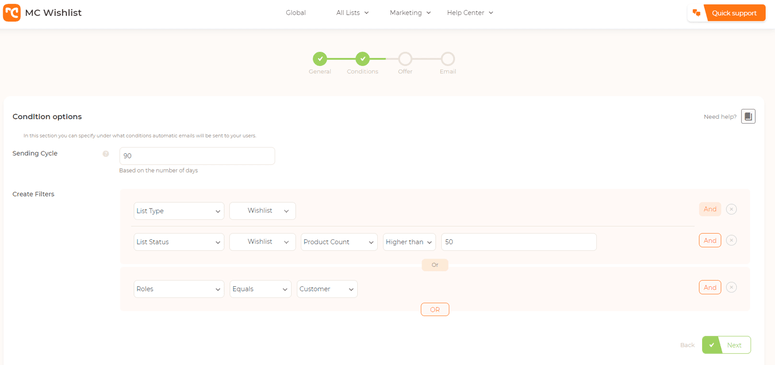
I spent the most time in the email settings. The automation builder lets you set delay timers, choose which customer segments receive which emails, and customise the template. For a free feature, it’s more capable than I expected.
I set up a “you have items in your wishlist” reminder at 3 days and a “product is running low” alert — both configured and tested within 20 minutes.
The Elementor widget integration worked cleanly. I added a wishlist counter to the header and a “my wishlist” page section without touching any code.
🟢► Pros
- Free email automation: The only plugin on this list with triggered wishlist emails included at no cost.
- Elementor widgets free: Drop wishlist elements into your Elementor page builder layouts without extra plugins or code.
- 120 WP.org ratings: Solid validation for a plugin with 9,000+ active installs.
- Lifetime pricing available: $209 one-time for a single site — useful for stores that prefer to avoid annual subscriptions.
🔴► Cons
- Multiple wishlists require premium: Like YITH and TI, the free version limits customers to a single list.
- Back-in-stock notifications are premium-only: The free email automation doesn’t include the highest-converting notification type.
- Smaller install base than YITH or TI: 9,000+ installs means fewer third-party guides and community resources available.
My Verdict: MoreConvert Wishlist is the best free option if email automation is a priority for your store. The Elementor widget support makes it a natural fit for Elementor-built stores. If you want multiple wishlists or back-in-stock alerts without paying, SaveTo Wishlist is a better free pick. But MoreConvert’s automation gives it the edge for stores focused on email re-engagement.
Pricing: Free version available on WP.org. Premium starts at $89/year (single site). Lifetime option available from $209. 14-day money-back guarantee.
👉 Get started with MoreConvert Wishlist here
How to Choose the Right WooCommerce Wishlist Plugin
The right plugin depends on what your store actually needs. Here are the questions that matter most:
Do you need multiple wishlists per customer? If yes, SaveTo Wishlist is the only plugin that gives you this for free. The others require a paid plan.
Is page speed a priority? If you’re actively monitoring Core Web Vitals or running a high-traffic store, SaveTo Wishlist’s 2.5KB footprint is the standout choice. YITH’s 311KB impact is worth factoring into your decision.
Do you want email automation without a paid plan? MoreConvert is the only free option with wishlist-triggered emails built in. Set it up, configure a 3-day reminder, and start recovering abandoned wishlists before spending anything.
Are you using Elementor? MoreConvert includes native Elementor widgets in the free version — a genuine convenience if your store’s design lives in the Elementor editor.
Do you already use other YITH plugins? If your store runs YITH’s product filter, quick view, or dynamic pricing tools, YITH WooCommerce Wishlist connects to all of them without extra configuration. The integration is a legitimate reason to choose it.
Is support quality important to you? TI WooCommerce Wishlist’s 4.7/5 WP.org rating reflects both the plugin quality and the support experience. If you value a strong track record with users, TI is the most validated option.
FAQs: WooCommerce Wishlist Plugins
Does WooCommerce include a built-in wishlist feature?
No. WooCommerce does not include wishlist functionality out of the box. You need a plugin to add it. All 4 plugins on this list are free to install and take under 5 minutes to set up.
What is the best free WooCommerce wishlist plugin?
It depends on what you need. SaveTo Wishlist gives you the most in the free tier — unlimited multiple wishlists and a lightweight footprint. MoreConvert is the better free pick if you want email automation included. TI WooCommerce Wishlist has the strongest free styling options. All 3 are solid starting points.
Can customers save products to a wishlist without creating an account?
Yes, all 4 plugins on this list support guest wishlists. Customers can save products without logging in, and their list typically merges into their account when they register later. This is important for conversion: requiring a login before saving a product creates unnecessary friction.
Do wishlist plugins slow down my WooCommerce store?
Some do, significantly. YITH WooCommerce Wishlist adds 311.8KB and 21 server requests per product page. SaveTo Wishlist adds 2.5KB and 1 request. If page speed matters to your store (and it should for SEO), the plugin you choose makes a real difference.
What are price drop alerts, and do I need them?
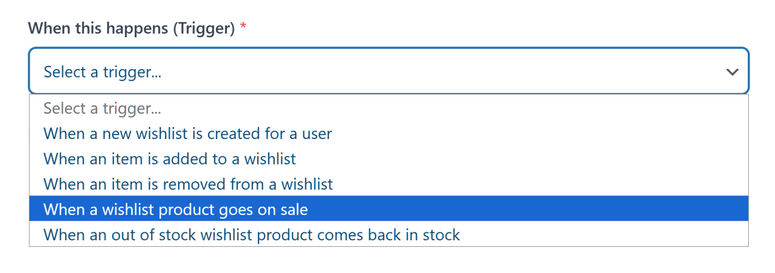
Price drop alerts send an automatic email to a customer when a product they’ve wishlisted goes on sale. They’re one of the highest-converting wishlist features because the customer has already shown purchase intent. YITH, TI, SaveTo, and MoreConvert all include this in their premium plans. SaveTo and MoreConvert also include back-in-stock notifications on the paid tier.
Which WooCommerce wishlist plugin works best with Elementor?
MoreConvert Wishlist is the strongest choice for Elementor stores. It includes dedicated Elementor widgets in the free version — wishlist counters, product grids, and share buttons — that you can drop into your page layouts directly from the Elementor editor.
Final Verdict
For most WooCommerce stores, I’d start with TI WooCommerce Wishlist. It has the strongest user rating of any plugin on this list, the most visual customisation options in the free version, and a proven track record across 100,000+ active sites. The $79/year Pro plan is fair value when you’re ready to add price drop alerts.
If page speed is a concern, go with SaveTo Wishlist. The performance gap between it and YITH is not trivial, and the free multiple wishlist support is a genuine advantage no other plugin matches.
Choose MoreConvert Wishlist if you want email automation running from day one without a paid plan — or if your store is built with Elementor.
Resource Hub: WooCommerce Wishlist Plugins
- Best WooCommerce Pre-Order Plugins
- How to Create a WooCommerce Flash Sale
- 7 Best WooCommerce Checkout Plugins to Improve UX and Sales
- 7 Best WooCommerce Upsell & Cross-Sell Plugins
- How to Set Up a Loyalty Program in WooCommerce

The point about guest wishlists removing friction is huge — forcing account creation just to save a product kills conversion. Price-drop email triggers being the differentiator over a simple heart icon is a great takeaway. Saved this for our store setup.