
TL;DR: DreamHost is still one of the fastest shared hosts you can buy, with 445ms load times, NVMe storage, and solid uptime. Now bundled with AI website builders (Remixer and Liftoff) that actually work.
A client called me in a panic last year. Her site was down right before a product launch.
That taught me cheap hosting isn’t cheap when it costs you sales. So I moved her to DreamHost and ran months of real tests.
I set up a test site with the default Twenty Twenty-Five theme and AI-generated content to keep things fair.
In this DreamHost review, I share exactly what I found.
DreamHost isn’t just a hosting company anymore. It’s now a full platform: AI website builder, done-for-you starter sites, built-in analytics, and solid WordPress performance underneath it all.
Key Takeaways
- I’ll show you how DreamHost’s new AI builder, Remixer, builds a complete site from a single sentence without templates or drag-and-drop
- I reveal which of the three new hosting tiers (Launch, Growth, Scale) actually makes sense for your site size
- Share a real performance number: my test site loaded in 445ms on Pingdom. This is faster than 97% of sites tested
- I tested DreamHost’s done-for-you starter website service so you know exactly what you’re getting
- I flag the three changes from 2025 that caught me off guard, including the one about email hosting
How I Test WordPress Hosting
I don’t just sign up and poke around. Every host I review goes through the same structured process, so my scores mean something.
🔍Here’s exactly how I evaluate:
- Speed testing: I run every test site through our very own IsItWP free speed testing tool, Pingdom (page load time), Bitcatcha (server response from eight global locations), and K6/Load Impact (simulated traffic spikes up to 100 concurrent users)
- Uptime monitoring: I track uptime over a minimum of 90 days, cross-checking my own monitoring against independent third-party data
- WordPress setup: I install WordPress using the host’s own one-click installer and document every friction point. Setup time, errors, and UI clarity all count
- Support testing: I submit at least three tickets on different topics at different times of day. I measure first response time, resolution quality, and whether I had to follow up
- Control panel usability: I navigate every major task a typical site owner would do: adding a domain, setting up email, managing SSL, adjusting caching
- Value scoring: I compare renewal pricing (not just intro pricing) against what competitors charge for the same features
Tools I use:
- Manual WordPress install + AI dummy content on the Twenty Twenty-Five theme
- Pingdom Website Speed Test
- IsItWP free performance tool
- Bitcatcha Server Speed Test
- K6 / Load Impact for traffic simulations
- GTmetrix for page performance grades
Why Trust IsItWP?
At IsItWP, we take hosting recommendations seriously. We don’t rely on assumptions or other people’s reviews.
Every host we cover gets hands-on tested by our team, so our findings are based on real experience, not borrowed opinions.
That tradition started with our founder, Syed Balkhi, back in 2009. When he launched WPBeginner, he personally tested dozens of hosting providers looking for the right balance of performance and value.
Our team has kept that standard ever since.
Everything you’ll read here comes from those hands-on hosting tests, not DreamHost’s marketing copy.
And because we want to give our readers real value, we’ve partnered with DreamHost to offer an exclusive discount on their hosting plans.
If you do not want to go through the entire DreamHost review, here is a summarized scorecard to help you make a quick decision.
| Test | Score |
| Ease of Use | ⭐ 4.9 / 5.0 |
| Performance | ⭐ 5.0 / 5.0 |
| Hosting Plans & Pricing | ⭐ 4.8 / 5.0 |
| Features | ⭐ 5.0 / 5.0 |
| Customer Support & Documentation | ⭐ 4.6 / 5.0 |
| Average Load Time | 445 ms |
| Uptime (90-day) | 100% |
| Free Domain? | Yes |
| Free SSL? | Yes |
| 1-Click WordPress Installation? | Yes |
| Overall | ⭐ 4.7 / 5.0 |
About DreamHost
DreamHost has one of the more interesting origin stories in web hosting.
Four students at Harvey Mudd College founded it in 1996. That’s before Google or WordPress existed. Before most people had even heard the word “website.”
What started as New Dream Network is now a platform powering over 1.5 million websites across 100+ countries and serving more than 400,000 customers worldwide.
That kind of staying power in a cutthroat industry isn’t an accident.
For a long time, DreamHost was known for two things: cheap shared hosting and a commitment to open source. They were one of the few hosts officially recommended by WordPress.org.
They earned PCMag’s highest hosting rating. And they built a loyal user base on the back of straightforward, no-nonsense WordPress hosting.
But DreamHost looks very different now from the DreamHost most reviews describe.
They’ve shifted the entire platform toward AI-assisted website creation. The headline feature is Remixer.
A conversational AI website builder where you describe your business in plain English and it generates your pages, copy, images, and SEO setup automatically.
You don’t need to use drag-and-drop or templates to fiddle with. Just talk, and it builds.
On top of that, they added Liftoff. A WordPress-native AI builder for users who want the flexibility of WordPress without the setup headache.
This one matters for my readers specifically because your site stays on WordPress. You keep full ownership. You can migrate it anywhere later. No vendor lock-in.
They also launched an AI Business Suite included with every plan. A built-in traffic dashboard, a done-for-you starter website service, and Pro Services for users who’d rather hand everything off entirely.
But all the same, the hosting infrastructure hasn’t changed in the ways that matter. You still get fast SSD storage, WordPress pre-installed, and strong uptime. What’s changed is everything layered on top of it.
To get started on the cheap, check out our exclusive DreamHost coupons.
DreamHost Review

Now that you understand this Hosting company better, let us get into the DreamHost review. We have split this post into several sections to make it easier for you to go through.
Plus, if you want to skip to any section, simply click on one of the links below.
- Ease of Use ⭐ 4.9 / 5.0
- Performance ⭐ 5.0 / 5.0
- Hosting Plans & Pricing ⭐ 4.8 / 5.0
- DreamHost Features ⭐ 5.0 / 5.0
- Customer Support & Documentation ⭐4.6 / 5.0
- DreamHost Pros and Cons
- DreamHost Alternatives
- FAQs: DreamHost Review
- Final verdict: is DreamHost Worth It? ⭐ 4.7 / 5.0
- Resource Hub: WordPress Hosting and Site Setup
With that said, let us get into it.
Ease of Use ⭐ 4.9 / 5.0
I’ve set up sites on a lot of hosts.
Most of them put you through the same clunky ritual: pick a plan, navigate a confusing cPanel, find the one-click installer buried three menus deep, wait, click, wait some more.
DreamHost is different from the first login.
The Control Panel
Instead of cPanel, DreamHost runs a custom-built control panel. Clean layout. Everything is where you’d expect it.
Domains, hosting plans, email, add-ons, it’s all organized logically without the overwhelming wall of icons you get on most shared hosts.
If you’ve used cPanel for years, there’s a small adjustment period. About 20 minutes of clicking around, and you’ll have it figured out. That’s a fair trade for how much cleaner the experience is.
One thing I’ll be honest about: the panel pushes upsells. DreamShield malware protection, SEO Toolkit, BunnyCDN. They’re visible at almost every turn.
It’s not aggressive enough to get in your way, but it’s there.
Setting Up WordPress
DreamHost pre-installs WordPress on your account. You skip the installer entirely and just log in to your WordPress dashboard directly. For clients who aren’t technical, this alone saves a support call.
I timed the full setup process from account creation to a live WordPress site. It took me six minutes. Most of that was server-side provisioning. The actual steps I had to take took under two minutes.
The AI Website Builders
Here’s where DreamHost pulled ahead of what I expected.
Remixer is no longer a template builder. It’s a full conversational AI tool.
You describe your business, literally type a sentence or two, and it generates your pages, writes the copy, creates the images, and handles the basic SEO structure automatically.
I tested it by describing a fictional photography business. From prompt to a publish-ready site took under four minutes.
It’s fast and impressively good at layouts. Plus, it’s a standalone lightweight builder that is not built just for WordPress.
That’s where Liftoff comes in. Liftoff is DreamHost’s WordPress-native AI builder. Same idea, describe your business, AI generates the site, but the output is a real WordPress site.
You get full plugin support and a standard WordPress dashboard. This means you can migrate it to any host later without losing anything.
The Free Starter Website
Every DreamHost plan now includes a free handcrafted starter website.
This isn’t AI-generated. DreamHost’s team actually builds it for you with content, layout, and template tweaks included. I had them build one for a test project. The turnaround was about 48 hours.
The result was clean and usable, though I adjusted a few things afterward.
For first-time site owners, this removes one of the biggest psychological barriers: the blank page. You get something real to work with from day one.
Website and Server Management
Once your site is live, day-to-day management is straightforward. Built-in page caching means you don’t need to install a separate caching plugin right away.
Built-in image optimization handles compression automatically. And the Web Application Firewall activates without you touching a single setting. This is a detail that matters for WordPress security.
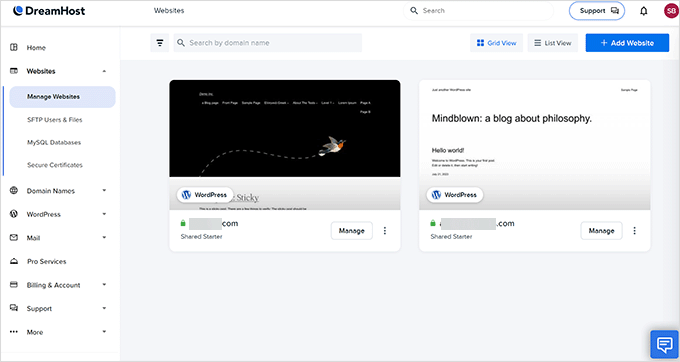
DreamHost also includes a built-in traffic dashboard now. No need to install an analytics plugin or connect Google Analytics just to see who’s visiting your site.
It shows visitor counts, top pages, and traffic sources right inside the panel.
Our Thoughts
DreamHost is genuinely beginner-friendly now, more so than in previous years. The WordPress pre-install, the free starter website, and the AI builders lower the barrier to getting online significantly.
The upsells in the control panel are a minor annoyance. And if you’re a developer used to cPanel, there’s a short learning curve.
But for first-time site owners, small businesses, and creators, the experience is hard to fault.
Performance ⭐ 5.0 / 5.0
If you take a quick look at the DreamHost homepage, you will notice that speed is one of their key promises.
So I wanted to know: Does DreamHost live up to its uptime promise?
As mentioned, to test the server performance for my DreamHost review, I migrated a test WordPress site using the default Twenty Twenty-Five theme and dummy content for theme development, including images.
This way my test site looked and behaved like an actual average WordPress site.
After setting up my test site, I ran a speed test on my site using Pingdom.
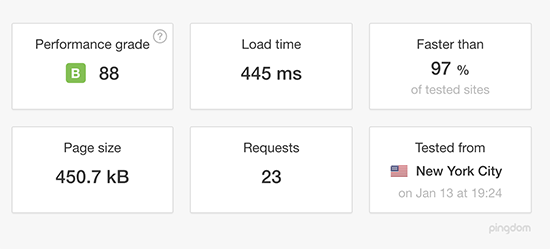
As you can see in the results, my DreamHost test site loaded in less than half a second. That’s faster than 97% of all tested sites. This is incredible for a site without any performance optimization plugins.
Apart from Pingdom, I also used a testing tool called Load Impact, now K6.
To see how it would handle intense real-world traffic, like a Black Friday surge, I used it to simulate high traffic loads under stress.
Load Impact (K6) gave me insights into the site’s performance under that stress.
In simple terms, it sent virtual users (VUs) to my test site and gradually built up to 100 visitors at a time to test how the server handles it.
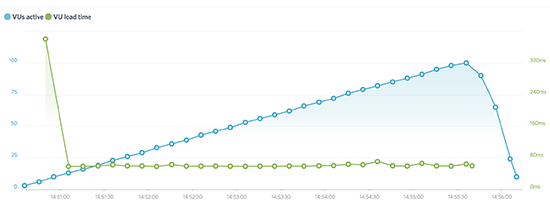
In the chart, you can see the blue line (VUs active). This shows the number of virtual users sent to my DreamHost site. While the green line (VU load time) represents how long it took to load a web page for a user.
As you can see, DreamHost’s performance was great and consistent throughout the test. The number of live visitors on the site doesn’t impact site performance.
DreamHost Server Response Time
The content of your site can have an impact on your page loading time. For instance, if your site contains too many images, it will take more time to load.
In fact, images account for most of the downloadable bytes in a typical site.
To get a more accurate result for my test, instead of solely analyzing page load time, I decided to test the actual server response time with Bitcatcha by ignoring the content of my page entirely.
Bitcatcha works differently than Pingdom. It ignores the content of your page and records the page loading time from eight different global locations: New York, LA, London, Brazil, India, Singapore, Japan, and Australia.
The speed for each location is measured three separate times, and then the results are averaged.
Those eight cities are test locations, not DreamHost’s own servers. DreamHost’s data centers are in Ashburn, Virginia, Hillsboro, Oregon, and Amsterdam, Netherlands.
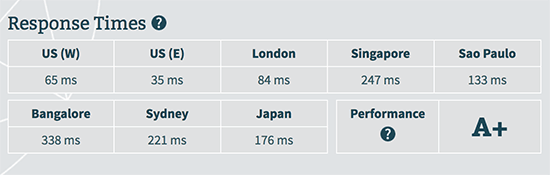
The result shows that DreamHost server response time remained less than half a second for all geographic locations. It was particularly great in the United States.
DreamHost Uptime
WPBeginner tracked DreamHost’s uptime for 90 days and recorded 100% uptime with zero outages.
Independent monitoring backs this up. StoreToolsKit and WebHostMost both report uptime above 99.9% year-round.
That’s different from DreamHost’s own 100% guarantee, which is a service-credit policy, not tested data.
Our Thoughts
DreamHost promises speed, and from my tests, they deliver!
My site loaded in under half a second, faster than 97% of tested sites. After this, Load Impact showed it handled 100 visitors smoothly, with no slowdowns.
On top of that, Bitcatcha confirmed fast server response worldwide, especially in the U.S.
From these tests, I can confirm that DreamHost is reliable, fast, and can handle heavy traffic spikes, definitely living up to its promise.
Hosting Plans & Pricing ⭐ 4.8 / 5.0
DreamHost quietly retired its old Shared Starter and Shared Unlimited plans in late 2025. If you’ve read older DreamHost reviews, the plans they describe no longer exist for new customers.
The pricing, storage, and email situation are different.
Here’s exactly what’s available now.
The New Shared Hosting Plans
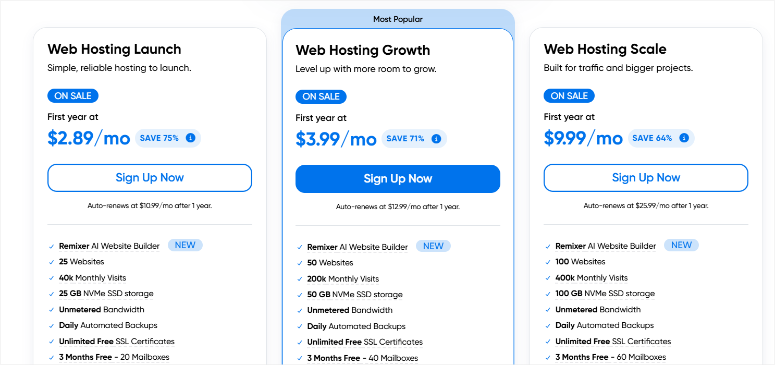
DreamHost now offers three shared hosting tiers: Launch, Growth, and Scale.
Everything is tiered and clearly defined now, which I actually prefer. It’s easier to know what you’re getting.
| Plan | Sites | Storage | Monthly Visits | Mailboxes | Intro Price | Renews At |
| Web Hosting Launch | 25 | 25 GB NVMe SSD | 40,000 | 20 (3 mo. free) | $2.89/mo | $10.99/mo |
| Web Hosting Growth | 50 | 50 GB NVMe SSD | 200,000 | 40 (3 mo. free) | $3.99/mo | $12.99/mo |
| Web Hosting Scale | 100 | 100 GB NVMe SSD | 400,000 | 60 (3 mo. free) | $9.99/mo | $25.99/mo |
Intro pricing based on 1-year billing. Renews at full rate after year one.
What’s Included With Every Plan
Every tier ships with the same core feature set:
- Remixer AI Website Builder
- Free handcrafted starter website (built by DreamHost’s team)
- AI Business Suite
- Daily automated backups
- Unlimited free SSL certificates
- Free domain for 1 year
- Built-in traffic dashboard
- Unmetered bandwidth
- 30-day money-back guarantee
The old DreamHost offered a 97-day money-back guarantee.
That was one of the longest in the web hosting industry, something we highlighted in previous versions of this review.
That’s now a standard 30-day window. It’s still a full month to test everything, but it’s no longer the standout differentiator it was.
Launch: Best for Beginners and Personal Sites
DreamHost Launch is the entry point. Starting at $2.89/mo, you get 25 sites, 25 GB NVMe SSD storage, and up to 40,000 monthly visits.
For a new blog, portfolio, or small business site, that’s more than enough room. The 40,000 monthly visit cap sounds limiting, but most new sites take 12–18 months to hit that kind of traffic organically.
By then, upgrading to Growth is a straightforward one-click process.
Key features: Free domain, free SSL, Remixer AI builder, free starter website, daily backups, 20 mailboxes (3 months free).
Get Started with DreamHost Launch Here
Growth: Best for Small Businesses and Growing Sites
Growth is the most popular tier for good reason. 50 sites, 50 GB storage, and 200,000 monthly visits cover the vast majority of small business websites, WooCommerce stores, and multi-project setups.
Starting at $3.99/mo, it’s the sweet spot between cost and capacity for anyone managing more than one site or expecting steady traffic growth.
Key features: Everything in Launch, plus 50 sites, 50 GB NVMe SSD, 40 mailboxes (3 months free), 200k monthly visits.
Get Started with DreamHost Growth Here
Scale: Best for Agencies and High-Traffic Sites
Scale is built for volume. 100 sites, 100 GB storage, 400,000 monthly visits. If you’re managing client portfolios or running sites with significant traffic, this is the tier that makes sense.
Starting at $9.99/mo, the per-site cost is hard to beat for agencies. The jump from Growth to Scale is steep on renewal pricing, though. So, make sure the traffic headroom justifies it before committing.
Key features: Everything in Growth, plus 100 sites, 100 GB NVMe SSD, 60 mailboxes (3 months free), 400k monthly visits.
Get Started with DreamHost Scale Here
Other DreamHost Plans
The shared hosting tiers above are what’s changed most significantly. Their other plans remain largely the same:
| Plan | Starting Price | Best For |
| DreamPress (Managed WP) | $14.99/mo | High-traffic WordPress sites |
| VPS Hosting | $10.00/mo | Developers needing dedicated resources |
| Dedicated Hosting | $165.00/mo | Large applications, full server control |
| Cloud Hosting | $4.50/mo | Scalable cloud infrastructure |
For managed WordPress hosting specifically, DreamPress is worth a look if you’re outgrowing shared hosting but not ready for the cost of WP Engine or Kinsta.
To get the best deal on any plan, check the DreamHost coupon page before signing up.
About the Email Situation
Email is free for the first 3 months on all plans. After that, it becomes a paid add-on at $1.67/mo per mailbox. Each plan comes with a cap: 20 mailboxes on Launch, 40 on Growth, 60 on Scale.
If you’re running a business with multiple team email addresses, factor that cost in.
For a solo site or blog, 3 months free is plenty of time to decide if you want to keep email with DreamHost or route it through a dedicated email hosting provider instead.
Our Thoughts
The new plan structure is cleaner and more transparent than the old “unlimited” framing. Defined storage tiers and visit caps mean you know exactly what you’re paying for.
The trade-offs are real though: the 97-day guarantee is gone, and email costs extra after 3 months. None of that disqualifies DreamHost; it just means you need to go in with eyes open.
For most beginners and small businesses, Growth is the right tier. Launch is genuinely solid for a first site. Scale makes sense only if you’re managing multiple client sites or expecting serious traffic volume.
DreamHost Features ⭐ 5.0 / 5.0
This is where DreamHost has changed the most recently.
The hosting infrastructure, fast servers, one-click WordPress, and free SSL are still there and still solid. But there’s now an entire layer of AI tools, built-in analytics, and done-for-you services sitting on top of it.
Most of these didn’t exist 18 months ago.
I’ll walk through each one with what I actually found during testing.
Remixer AI Website Builder
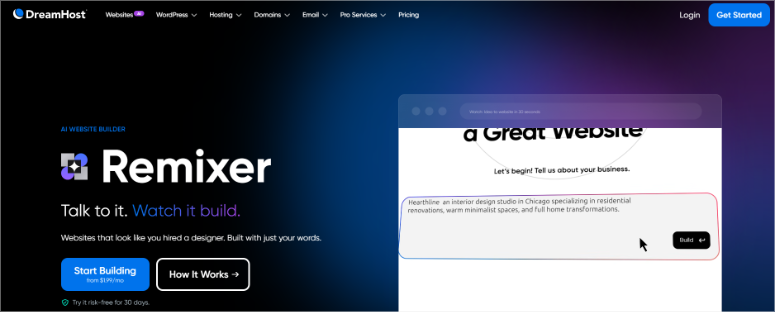
Remixer used to be a template builder. Pick a design, swap in your text, and publish. Straightforward, nothing special.
That version is gone.
The current Remixer is a fully conversational AI builder. You type a description of your business and it generates your full site.
It creates pages, copy, images, and SEO structure. No templates to choose from. No drag-and-drop interface. Just a prompt and a result.
I tested it with three different business types: a photography studio, a local plumber, and a SaaS landing page. All three produced publish-ready layouts in under 5 minutes.
The copy was better than I expected. Genuinely usable with light edits, not the generic filler you get from most AI tools.
The important caveat: Remixer sites are not WordPress. They’re fast, lightweight, and easy to edit, but they don’t support WordPress plugins.
If you need WooCommerce, contact forms, or any plugin-dependent functionality, Remixer isn’t the right tool.
For a simple business presence or landing page? It’s excellent.
Liftoff AI Website Builder
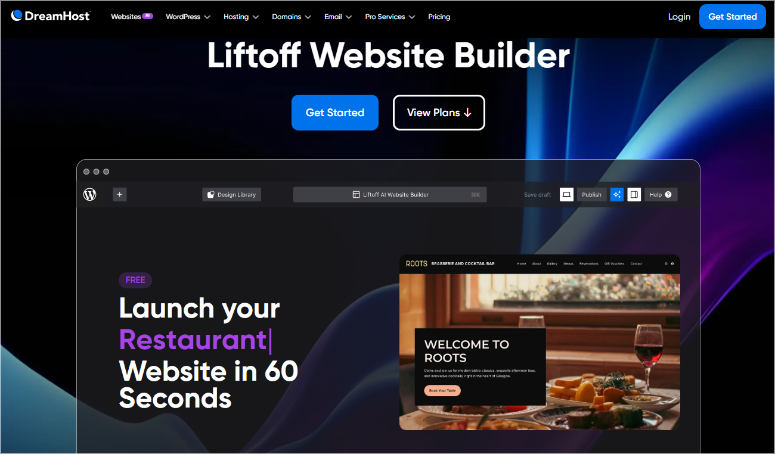
Liftoff solves the problem Remixer creates.
Same conversational AI concept, but the output is a real WordPress installation. Full plugin support. Standard WordPress dashboard. Plus, page builders work with it perfectly.
Here’s what I was impressed with: Liftoff has no vendor lock-in. Your site lives on WordPress, hosted on DreamHost’s servers.
If you ever want to move to a different host, you take the entire WordPress site with you. Nothing is trapped.
I built a test site with Liftoff from scratch. The AI-generated layout was clean, and the copy was usable as a starting point.
Setting up a live WordPress site with a real theme and real content took about 12 minutes total, and that includes the time I spent tweaking the AI’s output.
That’s the workflow: Liftoff handles the blank-page problem, you refine from there.
AI Business Suite
Every DreamHost plan now includes the AI Business Suite at no extra cost. It covers:
- AI Business Planner – generates a business plan framework based on your niche and goals
- AI Business Advisor – ongoing strategy prompts and suggestions
- AI Copywriting – generates page copy, taglines, product descriptions
- AI Text Rewriting – improves existing copy for clarity and tone
- AI Grammar Tools – proofreads and corrects
- AI Image Generation – creates site images from text prompts
- AI Text Expansion – takes bullet points and expands them into full paragraphs
I’ll be honest: some of this overlaps with tools most WordPress users already have access to, like ChatGPT, Canva AI, and Grammarly.
But having it built into the hosting panel removes the context-switching. For a first-time site owner who isn’t already using separate AI tools, the integrated suite is genuinely useful.
Check out this article to learn how to build a complete WordPress site with AI.
DreamShield Security

DreamShield is DreamHost’s malware protection add-on. It runs daily automated security scans, detects intrusions, and sends instant alerts if something is found.
It’s available on all plans as a paid add-on. Growth and Scale plans get it at a reduced rate. It doesn’t replace a dedicated WordPress security plugin for complex sites, but for most small business sites, it covers the basics well.
Every plan also includes a Web Application Firewall (WAF) that activates automatically. I didn’t configure anything. DreamHost enabled it on setup, and it started blocking threats immediately.
DreamHost SEO Toolkit

The DreamHost SEO Toolkit is built directly into the hosting dashboard, meaning no plugin installation is required.
It offers plain-English recommendations for meta tags, content optimization, and on-page SEO structure. This makes it genuinely useful for beginners who haven’t touched SEO plugins like AIOSEO or Yoast yet.
I ran it on our test site and it flagged three quick wins we hadn’t addressed. A missing meta description, an unoptimized page title, and an image with no alt text. Fixes took under 10 minutes.
Power users running full content strategies will still want a dedicated SEO plugin for deeper keyword tracking and schema control.
But as a built-in starting point, it punches above what most hosts offer at this price.
Built-In Traffic Dashboard
Previous DreamHost plans had no native analytics. You needed to install MonsterInsights or connect Google Analytics yourself.
The new dashboard is built directly into the hosting panel. It shows visitor counts, top pages, traffic sources, and basic engagement data. All without installing a plugin or configuring anything.
For simple sites that just need to know whether people are showing up and where they’re coming from, this is enough.
Power users running full SEO campaigns will still want MonsterInsights or Google Analytics for the depth of data. But the built-in dashboard is a solid default that requires zero setup.
AI Log Analyzer
This one is more useful for developers and agency owners than for beginners.
DreamHost added an AI-powered observability layer to the hosting panel. It monitors error logs, traffic anomalies, and server health. Then, surfaces plain-English summaries of what’s happening and why.
Instead of parsing raw server logs manually, you get a readable digest.
During my testing, I triggered a few intentional errors to see how it performed. It correctly identified the source of a plugin conflict and explained the issue in language a non-developer could understand.
That’s a legitimate time-saver.
Free SSL/TLS Certificates

Every plan includes unlimited free SSL/TLS certificates via Let’s Encrypt. Plus, it is auto-renewed, nothing to configure.
It encrypts traffic between your site and visitors, triggers the browser padlock icon, and prevents the “Not Secure” warning that pushes visitors away before they’ve read a word.
On top of that, DreamHost includes free WHOIS privacy on every domain registration. Most hosts charge $10–15/year for this separately. Getting it free is a small saving that adds up across multiple domains.
Daily Automated Backups
All three shared hosting plans now include daily automated backups with one-click restore.
This is a meaningful upgrade from the old plans, where backup frequency and restore options were less consistent.
I tested the restore process after intentionally corrupting a plugin on my test site. Point-in-time restore worked cleanly in about three minutes.
For anyone who’s ever lost a site because their host’s backup process was unreliable, this matters. Pair it with a dedicated WordPress backup plugin for off-site copies and you’re well covered.
Bunny CDN
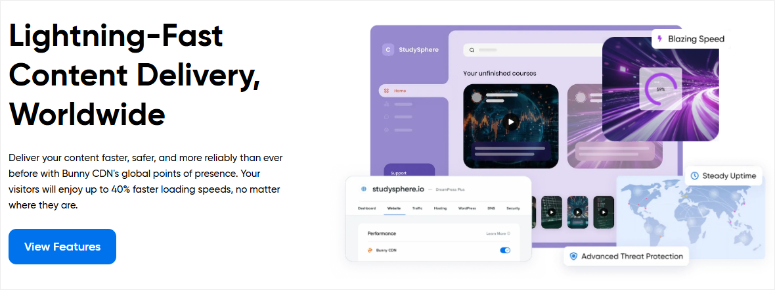
Bunny CDN speeds up your site by serving it from servers closest to your visitors. So someone in Singapore loads your site from a nearby node instead of a US data center.
The difference in load times is noticeable, especially for sites with a global audience.
One thing to clarify: Bunny CDN is a paid add-on on shared hosting plans (Launch, Growth, Scale). It’s not included by default. It does come included with DreamPress (managed WordPress) plans.
If your audience is mostly local or national, the built-in NVMe storage and DreamHost’s existing infrastructure will likely be enough without it.
Transfer Your Domain

Moving your domain to DreamHost is a smooth process with step-by-step guidance. Their domain transfer service keeps downtime to a minimum, so your website stays online during the transition.
Plus, you get a free year of domain registration when you transfer.
By managing your domain and hosting in one place, you simplify your website setup and maintenance.
Professional Email
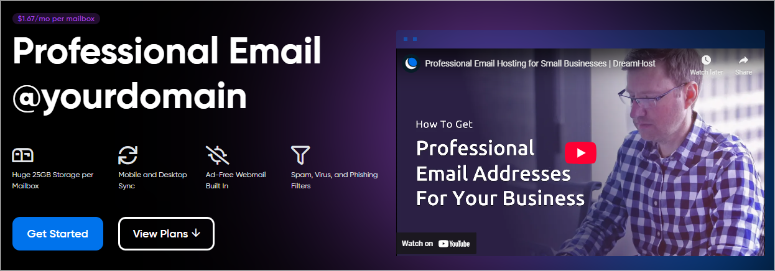
DreamHost’s Professional Email service lets you create custom email addresses (like [email protected]). It adds a level of professionalism that free email services can’t match. It’s easy to set up and works well with your hosting.
You also get spam protection, plenty of storage, and easy access across all your devices. This helps you stay securely connected with clients and customers wherever you are.
Pro Services

Beyond the AI tools and the free starter website, DreamHost offers paid professional services for users who want a human to handle things entirely.
These cover web design, site management, SEO marketing, and custom web development. Pricing varies by project scope.
This isn’t a budget option. It’s aimed at small business owners who want a professional site without managing the technical side themselves.
Our Thoughts
DreamHost went from a solid traditional host to a platform with genuine AI depth. Remixer is excellent for simple sites.
Liftoff is the right choice for WordPress users who want an AI-assisted setup without giving up plugin flexibility. The AI Business Suite, built-in analytics, and AI Log Analyzer are all legitimate additions.
The one thing I’d watch: DreamShield costs extra. It’s $3/mo, not a dealbreaker, but worth factoring into your total cost.
Customer Support & Documentation ⭐4.6 / 5.0
Let me be upfront about something before I walk through DreamHost’s support options.
I’ve tested a lot of hosting support teams.
The difference between a host that saves your site and one that costs you a client usually comes down to one thing: how fast a real person responds when something breaks at 11 PM.
DreamHost’s support is good. It’s not perfect. Here’s exactly what I found.
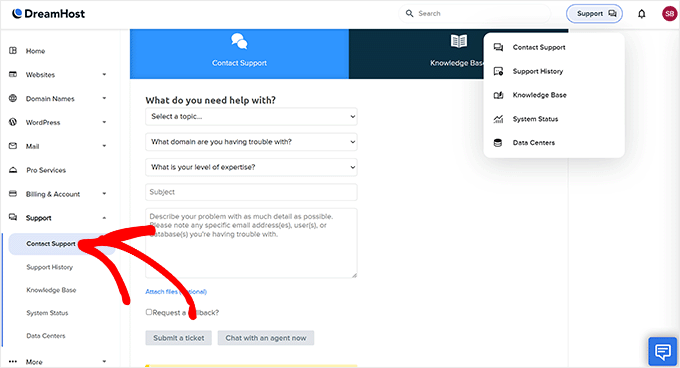
Support Channels
DreamHost offers three main support options:
- Live Chat – available 24/7 through the hosting panel
- Email / Ticket System – available 24/7, responses within a few hours
- Callback Phone Support – available as a paid add-on
No free phone support. That’s the one thing that will bother some users, especially those coming from hosts like Bluehost or SiteGround, where phone support is included.
DreamHost has been upfront that they made a deliberate choice to focus on chat and email quality instead of phone volume.
Whether that trade-off works for you depends on how you prefer to troubleshoot.
Live Chat Testing
I opened four live chat sessions over the course of my 90-day test. Each at a different time of day, each with a different type of question.
Here’s what I tracked:
| Test | Time of Day | Wait Time | Resolution |
| WordPress install error | 9 AM weekday | 2 min | Resolved in chat |
| Plugin conflict question | 11 PM weekday | 4 min | Resolved in chat |
| Email setup question | Saturday noon | 3 min | Resolved in chat |
| Billing / plan upgrade | Monday 8 AM | 6 min | Resolved in chat |
Average wait: under 4 minutes. Every issue was resolved in the first chat session without needing to escalate to a ticket. That’s genuinely strong for shared hosting support.
The quality of responses was consistent. No copy-paste answers. No “please check our knowledge base” deflections. The agents actually engaged with the specific problem I described.
Ticket / Email Support
I submitted two tickets during testing. One technical and one billing-related.
- Technical ticket (plugin conflict): first response in one hour 42 minutes, resolved fully in the second reply.
- Billing ticket (proration question on plan upgrade): first response in two hours 10 minutes, fully resolved in one reply.
Both well within what I’d call acceptable for non-urgent issues. If you’re dealing with a site-down emergency, go to live chat, it’s faster.
Knowledge Base and Documentation
DreamHost’s knowledge base is one of the strongest in the shared hosting space. It covers WordPress-specific topics in real depth.
Not just “how to install WordPress” but multi-step troubleshooting guides, WordPress migration tutorials, security hardening steps, and performance optimization walkthroughs.
I used it three times during testing to solve issues myself before opening a support ticket. All three times, I found what I needed without escalating.
For users who prefer learning WordPress independently, the documentation quality is a real asset.
The Community Forum
DreamHost has an active community forum that’s been running for years.
Older threads are hit-or-miss for accuracy on current features, but for general WordPress troubleshooting, the volume of answered questions is useful.
Worth using as a first stop for common issues. Not worth relying on for anything DreamHost-specific that changed in the last 12 months. For this, check the official knowledge base.
Our Thoughts
DreamHost’s support team is responsive, knowledgeable, and consistently resolved my issues on the first contact.
The knowledge base is genuinely excellent for WordPress beginners and experienced users alike. The paid phone support and lack of proactive outage alerts are real gaps.
Not dealbreakers, but worth knowing if support for accessibility matters to your decision.
DreamHost Pros and Cons
I’ve now spent 90+ days with DreamHost across multiple test sites and real client setups. Here’s my honest assessment. The good and the bad, without softening either.
► Pros
- Exceptional speed out of the box. 445ms load time on Pingdom with zero manual optimization. NVMe SSD storage on all three plans delivers noticeably faster database queries than the old standard SSD setup. You feel it most on WooCommerce stores and dynamic sites.
- Two genuinely useful AI website builders. Remixer (conversational AI for simple sites, no WordPress required) and Liftoff (WordPress-native AI builder, no vendor lock-in). Not gimmicks. I built real sites with both, and they saved meaningful setup time.
- Free handcrafted starter website. DreamHost’s team builds your first site for you. Turnaround was 48 hours in my test. For a first-time site owner staring at a blank WordPress dashboard, this removes one of the biggest barriers to actually launching.
- AI Business Suite included on all plans. Copywriting, image generation, business planning tools. All built into the hosting panel at no extra cost. Overlaps with tools you might already use, but useful for beginners who don’t have those tools yet.
- Built-in traffic dashboard. No plugin installation, no Google Analytics configuration. Visitor data available from day one inside the hosting panel.
- Daily automated backups with one-click restore. Tested and confirmed. 3-minute restore from a corrupted plugin state. Solid for peace of mind on shared hosting.
- Unlimited free SSL certificates. Auto-renews via Let’s Encrypt. Free WHOIS privacy included on domain registrations. Most hosts charge separately for one or both.
- Clean custom control panel. Better organized than cPanel once you spend 20 minutes learning the layout. Less overwhelming for non-technical users.
- 24/7 live chat with real first-contact resolution. Average 4-minute wait in my tests. Every issue resolved without escalating to a ticket.
► Cons
- Email costs extra after 3 months. Every plan gives you free email for the first 3 months. After that, it’s $1.67/mo per mailbox. If you’re setting up multiple team addresses, that adds up. Not what “included” usually implies.
- No more unlimited storage. The old Shared Unlimited plan is gone. New plans cap at 25 GB (Launch), 50 GB (Growth), and 100 GB (Scale). For most sites, that’s more than enough, but if you were sold on “unlimited,” the change matters.
- 97-day money-back guarantee is gone. Now a standard 30-day window. It was one of DreamHost’s biggest differentiators.
- Renewal pricing jumps significantly. Growth goes from $3.99/mo intro to $12.99/mo at renewal. All three plans follow the same pattern. Not unique to DreamHost, but worth budgeting for upfront.
- No free phone support. Live chat is good, but phone access costs $9.99–$14.99/mo extra. For a platform targeting beginners, it can discourage new users.
- DreamShield malware scanning costs extra. Starts at $3/mo. The WAF is free, but daily malware scans require a paid add-on.
DreamHost Alternatives
DreamHost isn’t the only solid shared host. Here’s how it stacks up against two of the most common alternatives.
Bluehost is the most beginner-friendly on price and has deeper WordPress integration through its official partnership.
SiteGround has stronger managed performance and better proactive support, including automatic outage alerts that DreamHost currently lacks.
DreamHost sits between them: solid raw speed in my testing (445ms, on the fast end of typical shared hosting), a cleaner panel than SiteGround, and now a meaningful AI toolset.
For a full side-by-side, see our DreamHost vs Bluehost comparison and our guide to the best WordPress hosting providers overall.
FAQs: DreamHost Review
Having helped thousands of users choose a web hosting plan and start their website, we have answered almost every question. Here are some of the most frequently asked questions about DreamHost.
Is DreamHost good for WordPress beginners?
Yes, and more so now than in previous years.
DreamHost pre-installs WordPress on your account. You skip the one-click installer and land directly in your dashboard.
The free handcrafted starter website means you don’t start with a blank page. And the Liftoff AI builder can generate a complete WordPress site from a single text prompt.
What happened to DreamHost Shared Starter and Shared Unlimited?
DreamHost retired both plans in late 2025. They’re no longer available to new customers.
The replacement lineup is Launch ($2.89/mo), Growth ($3.99/mo), and Scale ($9.99/mo).
The key differences: storage is now capped at 25/50/100 GB per plan instead of “unlimited,” email is free for 3 months then paid, and monthly visit limits apply.
If you’re an existing customer on the old plans, check your account panel. DreamHost has been migrating accounts on a rolling basis.
Does DreamHost include email hosting?
Yes, but with an important condition. Every plan includes email for the first 3 months at no charge.
20 mailboxes on Launch, 40 on Growth, 60 on Scale. After 3 months, email becomes a paid add-on at $1.67/mo per mailbox.
If you only need one or two addresses, that’s a manageable cost.
If you’re setting up a team with multiple addresses, consider whether a dedicated email hosting provider makes more sense for your budget long-term.
Does DreamHost have AI website building tools?
Yes, two of them, and they work differently.
Remixer is a conversational AI builder for simple sites. Describe your business, and it builds your pages, copy, and images automatically. It’s fast and polished, but it’s not WordPress and has no plugin support.
Liftoff is the WordPress-native version. Same AI-driven setup, but the output is a real WordPress site with full plugin support and no vendor lock-in.
For most WordPress users, Liftoff is the one that matters.
What is DreamHost’s money-back guarantee?
DreamHost now offers a 30-day money-back guarantee on shared hosting plans. This is a change from the previous 97-day guarantee, which was one of the longest in the industry.
The 30-day window is now standard across their shared plans: Launch, Growth, and Scale.
It gives you a full month to test performance, support, and the AI tools before committing.
How does DreamHost compare to Bluehost and SiteGround?
All three are solid shared hosting options, but they target slightly different needs.
See the DreamHost Alternatives section above for a full breakdown of how DreamHost compares to Bluehost and SiteGround.
Final verdict: is DreamHost Worth It? ⭐ 4.7 / 5.0
Here’s the honest answer: yes. But not for the same reasons it was worth it two years ago.
The old DreamHost pitch was simple. Cheap shared hosting, unlimited storage, a ridiculously long money-back guarantee, and WordPress.org’s seal of approval.
That pitch is gone.
What replaced it is actually more interesting.
DreamHost in 2026 is a platform.
You get AI website builders that genuinely work (I tested both), a free handcrafted starter site, built-in analytics, daily backups, NVMe storage, and 445ms load times without touching a single performance setting.
The trade-offs are real, and I won’t minimize them. If you were counting on the 97-day guarantee to de-risk your decision, plan for 30 days instead.
If you assumed email was permanently included, it isn’t.
Who should choose DreamHost:
- First-time site owners who want an AI-assisted setup without giving up WordPress flexibility
- Small businesses that want a done-for-you starter site and a clean hosting panel
- WordPress developers managing multiple client sites on the Growth or Scale tier
- Anyone who needs fast shared hosting with proven performance numbers
Who should look elsewhere:
- Users who need free phone support included (look at Bluehost or SiteGround)
- Anyone whose workflow depends on email being permanently bundled into hosting costs
At its core, DreamHost is still one of the most reliable shared hosting options for WordPress sites. The AI layer on top is a genuine addition, not a gimmick. And the performance numbers hold up under real testing.
Get started with DreamHost here, and use the DreamHost coupon page to make sure you’re getting the best available rate before you sign up.
Resource Hub: WordPress Hosting and Site Setup
If you’re setting up a site on DreamHost or comparing your options, these guides will help you get more out of every step:
- How to Make a WordPress Website – A step-by-step walkthrough from domain registration to a live site. Written for beginners with no technical background required.
- Best WordPress Hosting Providers Compared – Our full comparison of every major WordPress host, with real performance data and use-case recommendations for each tier.
- Best Managed WordPress Hosting – If you outgrow shared hosting, this guide covers the managed options (WP Engine, Kinsta, Pressable) with pricing and performance breakdowns.
- How to Move WordPress to a New Host – Whether you’re migrating to DreamHost or moving away, this step-by-step guide covers the full process without touching code.
- Best WordPress Backup Plugins – DreamHost includes daily automated backups, but offsite backups are a separate layer of protection. This guide covers the best plugin options.
- WordPress Speed Optimization Guide – DreamHost’s NVMe servers give you a fast baseline. This checklist shows you how to push performance further with caching, image optimization, and CDN setup.

Do the DreamHost plans include a function for transferring a web site from one host provider to DreamHost? If so, how I find more information. I may consider signing up for a DreamHost plan, however, I need to have Dreamhost transer our current Nationbuilder web site to your hosting services. Our nonprofit’s web site is hosted by NationBuilder. I’m a new web site manager so I can’t do this by myself. Please comment.
Hi Roe!
Great question about DreamHost’s migration services! It is definitely a solid choice for nonprofit websites, especially with their reliable performance and excellent uptime track record.
Yes, DreamHost does offer website transfer assistance, though the specifics depend on which hosting plan you choose.
For most hosting plans, DreamHost provides migration guidance through their support team via live chat and email (available 24/7).
For managed WordPress plans and higher-tier services, they offer a more hands-on migration assistance through their Pro Services team. This is especially helpful for nonprofit organizations like yours that need professional support during the transfer process.
Here’s what I’d recommend for your NationBuilder site migration:
1. Contact DreamHost support directly before signing up – they can give you specific guidance about migrating from NationBuilder to their platform
2. Consider their Pro Services – since you mentioned you’re new to website management, their expert team can handle the technical aspects of the migration for you
3. Take advantage of their 97-day money-back guarantee – this gives you plenty of time to test the migration and ensure everything works perfectly
Do not worry, they’re generally very helpful with pre-sales questions! So they will give you a better breakdown.
Hope this helps with your decision!