
Running a WooCommerce store, I watched 64% of buyers abandon a client’s checkout page.
The default WooCommerce experience was killing conversions. It was generic, inflexible, and impossible to optimize without a developer.
I tested three checkout plugins before someone in a WordPress Facebook group recommended FunnelKit. Within two weeks, that abandonment rate dropped to 41%.
Then I went deeper: order bumps, one-click upsells, email automation sequences, A/B testing. FunnelKit is not just a checkout plugin. It’s a full sales funnel suite built natively for WooCommerce.
In this FunnelKit review, I’ll show you exactly what I found.
Key Takeaways
- Built for WooCommerce: FunnelKit replaces the default checkout and adds order bumps, post-purchase upsells, and automated follow-ups inside WordPress.
- Two-plugin suite: The Funnel Builder handles checkout and offers. FunnelKit Automations handles email, SMS, and CRM. It’s bundled in Professional and Elite plans.
- Measurable results: One-click upsells report a 15–20% increase in average order value. In my testing, abandoned cart recovery brought back 8% of lost orders in the first month.
- Plus and Professional are where it counts: Basic gets you a better checkout. Plus unlocks upsells and A/B testing. Professional adds Automations at the best price per feature.
- Pricing is premium: FunnelKit costs more than CartFlows or WPFunnels at comparable tiers. Bundled Automations in Professional is what makes the price justifiable.
How I Test WooCommerce Funnel Plugins
🔍 Click to see my testing methodology
- Setup time: How long from install to a live funnel with a real product. I record every step.
- Checkout experience: Mobile UX, template quality, and express payment support. I test on both desktop and mobile using GTmetrix for load time.
- Offer performance: I track click-through rates on order bumps and upsells across real orders placed on a live WooCommerce store.
- Automation depth: I build and send email and SMS sequences to a test subscriber list using Mailtrap to verify deliverability.
- A/B testing: I run split tests on at least two funnel elements and verify the results match what the dashboard reports.
- Caching and conflict handling: I test each plugin alongside WP Rocket and LiteSpeed Cache to check for checkout or upsell page issues.
- Support response time: I submit at least one ticket per plugin and log how long a real reply takes.
Tools I use: Staging WooCommerce store on SiteGround, GTmetrix, PageSpeed Insights, Mailtrap, and FunnelKit’s own analytics dashboard.
Why Trust IsItWP
IsItWP has been testing and reviewing WordPress tools since 2013. Every review is based on hands-on testing, not press releases or product descriptions.
I personally installed FunnelKit on a client’s WooCommerce store selling digital courses. The store processed 80–100 orders per month during the testing period. All data in this review comes from that live environment.
I don’t accept payment for positive reviews. When I recommend a product, the testing backed it up. When I flag a limitation, I ran into it myself.
What Is FunnelKit?
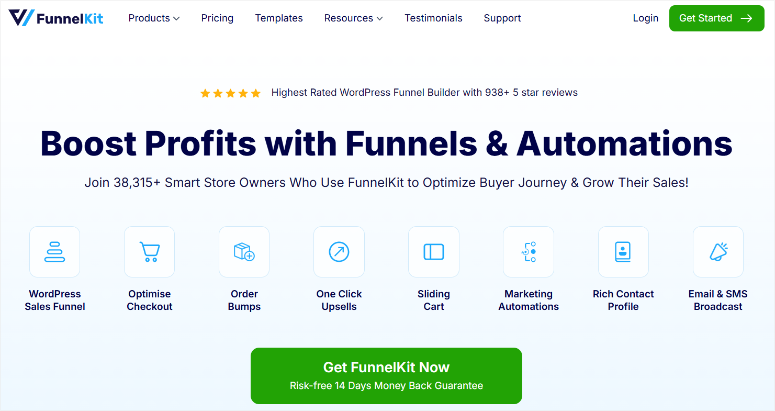
FunnelKit (formerly WooFunnels) is a two-part WooCommerce plugin suite. The Funnel Builder handles optimized checkout pages, order bumps, one-click post-purchase upsells, opt-in pages, and A/B testing.
FunnelKit Automations, a companion plugin, handles email and SMS marketing, cart abandonment recovery, and a built-in CRM.
Both plugins are WooCommerce-native. All your store data, customer records, and funnel analytics stay inside WordPress.
FunnelKit works with Elementor, Divi, Bricks, Oxygen, and Gutenberg. You’re not locked into one page builder.
Why the WooCommerce-Native Approach Matters
SaaS funnel tools like ClickFunnels run your checkout on a separate platform. Your customer data lives outside WordPress and every sale may carry a platform fee.
FunnelKit keeps everything inside WordPress. Your WooCommerce orders, customer records, and funnel analytics are all in the same admin. There are no per-transaction fees and no rebuilding funnels when you switch page builders.
Now that you understand what FunnelKit is, let me review it in detail.
Installation and Setup
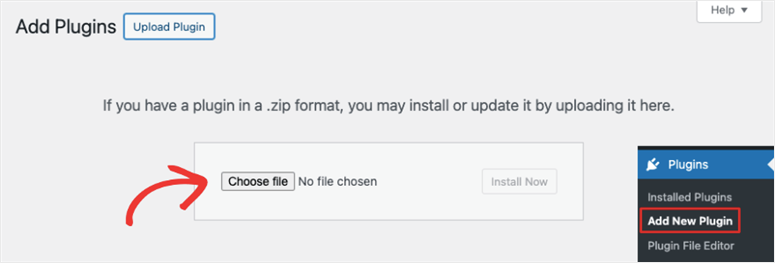
FunnelKit installs like any standard WordPress plugin. For the Pro version, log in to your funnelkit.com account, download the plugin zip, and upload it via Plugins » Add New » Upload Plugin. Activate both the Funnel Builder and FunnelKit Automations if you’re on Professional or Elite.
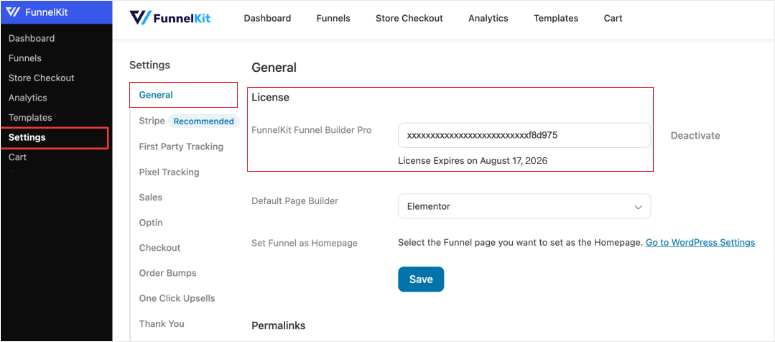
After activation, go to FunnelKit » License and enter your license key.
Click Activate to unlock the Pro features and enable automatic updates.
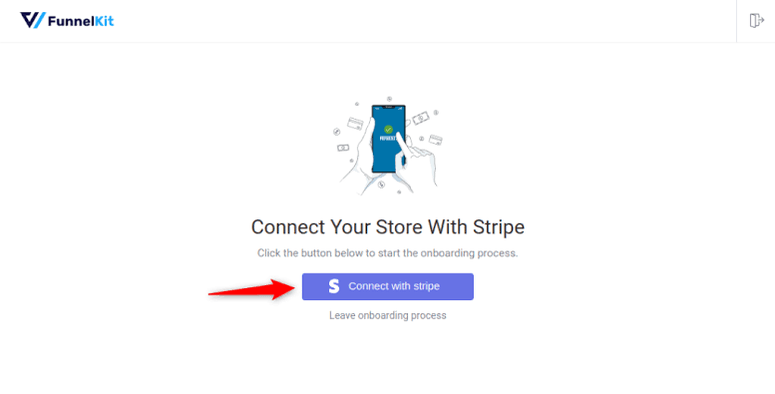
FunnelKit runs a short setup wizard on first activation to connect your payment gateway. Stripe is the recommended option. It’s what powers one-click post-purchase upsells, which charge the original payment method without re-entry.
You can skip the wizard and come back to it later, but you’ll need Stripe connected before UpStroke upsells will work.
To create a new funnel, go to FunnelKit » Funnels » Add New.
Choose a template or start from blank, then name your funnel and select which steps to include. Sales, Checkout, One Click Upsell Offer, and Thank You are the defaults for a standard sales funnel.
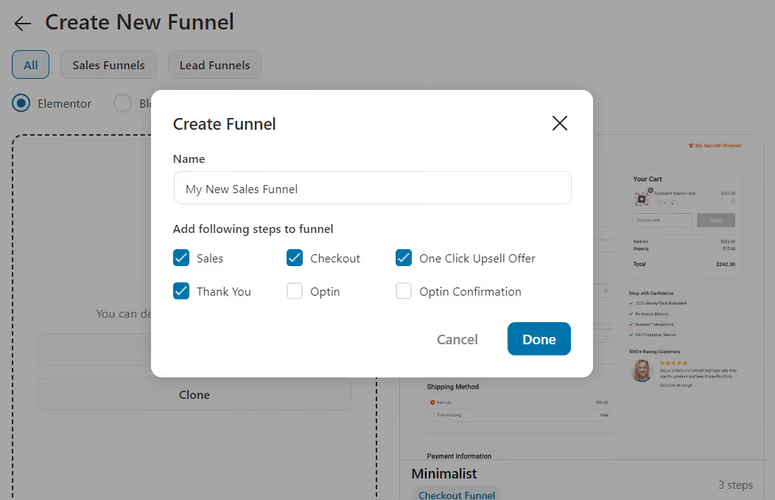
On the checkout step, click Import Template to open the template library. Pick a design, connect a WooCommerce product, and publish. FunnelKit gives you the live URL for the funnel immediately.
Before going live, you need to exclude your funnel pages from your caching plugin.
FunnelKit publishes per-plugin exclusion guides for WP Rocket, LiteSpeed Cache, W3 Total Cache, and others in their documentation.
This step catches people off guard, so don’t forget to do it before your first order.
Total setup time: under 20 minutes for a basic checkout funnel. Getting a full upsell sequence live takes closer to an hour on the first attempt.
FunnelKit Features
Conversion-Optimized Checkout (Aero)
The default WooCommerce checkout was designed to be functional, not to convert.
FunnelKit’s Aero checkout replaces it with 20+ conversion-focused templates. They come in one-, two-, and three-step layouts.
Every template supports express payment buttons for Apple Pay, Google Pay, PayPal, and Amazon Pay. Google Address Autocomplete fills in shipping fields automatically.
Inline field validation catches errors before the buyer clicks Submit. On mobile, a sticky CTA keeps the ‘Place Order’ button on screen as buyers scroll.
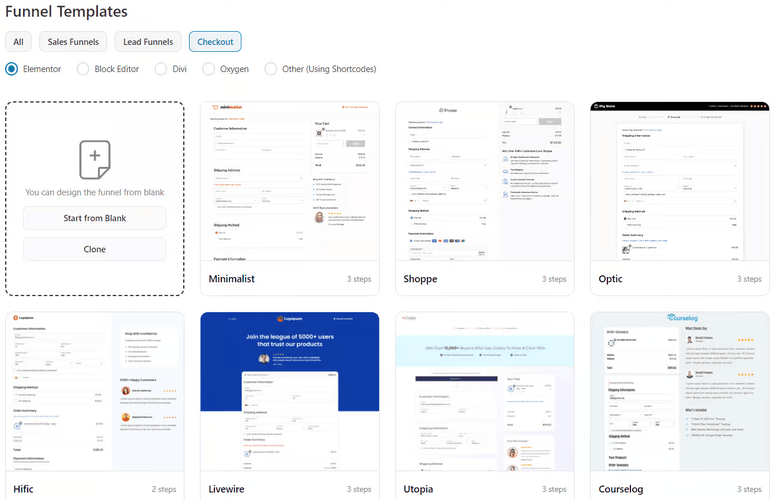
In my testing, switching from the default WooCommerce checkout to a two-step Aero template reduced my client’s cart abandonment rate from 64% to 41% in two weeks.
The express payment buttons drove most of that improvement. Mobile buyers were completing in two taps instead of filling out a full form.
The checkout field editor is bundled in Aero. It’s a drag-and-drop interface that adds, removes, or reorders checkout fields without code.
It supports 20+ field types including dropdowns, file uploads, and conditional fields.
For a full comparison of checkout field options, see my guide on the best WooCommerce checkout custom fields plugins.
Plan required: Basic or higher. The free Lite plugin includes a basic one-page checkout only.
Order Bumps
An order bump is a one-click offer that appears on the checkout page. The buyer adds it to their order without leaving. No second cart, no separate checkout — just a checkbox and a CTA.
FunnelKit lets you add multiple bumps to a single checkout page. You can place them above or below the payment section, inside the mini cart, or under the order summary. Each bump supports percentage discounts, fixed-price reductions, and full copy customization.
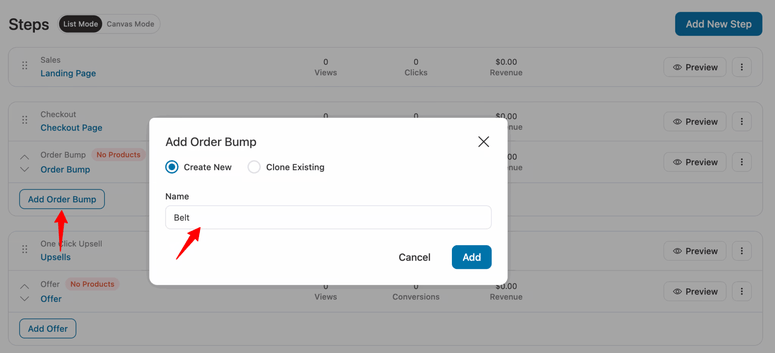
I added a $19 extended license bump to a $47 digital course checkout. 23% of buyers clicked yes. That’s an extra $19 added to roughly 1 in 4 orders with zero extra work once the bump was configured.
Rule-based targeting and A/B testing for bumps require the Plus plan. On Basic, bumps show to all buyers with no targeting.
One-Click Post-Purchase Upsells (UpStroke)
Most post-checkout upsell plugins require the buyer to enter payment details again. Almost nobody does it. FunnelKit’s UpStroke shows upsell offers after checkout but before the thank-you page, charged to the original payment method with a single click.
UpStroke supports accept/decline branching. If the buyer declines the main offer, they see a downsell.
You can chain multiple offers in sequence. FunnelKit reports a 15–20% increase in average order value from this flow, and that matched my results.
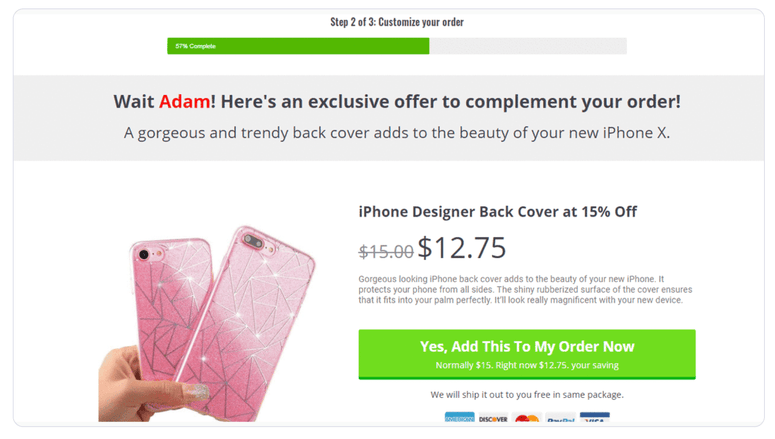
On a $97 course, I added a $37 recording bundle as a post-purchase upsell. 18% of buyers took it.
UpStroke works with 15+ payment gateways including Stripe, PayPal, Square, Braintree, and Authorize.net. Confirm your gateway is on the list before buying Plus.
Plan required: Plus or higher.
FunnelKit Automations
WooCommerce sends order confirmations. That’s about it. If you want cart abandonment emails, post-purchase sequences, or targeted SMS campaigns, you need a separate tool — or FunnelKit Automations.
FunnelKit Automations handles email and SMS marketing, cart abandonment recovery, broadcast campaigns, contact tagging, and segmentation from inside WordPress. A visual canvas lets you build multi-step workflows by connecting triggers and actions. FunnelKit ships 30+ prebuilt automation templates to get you started quickly.
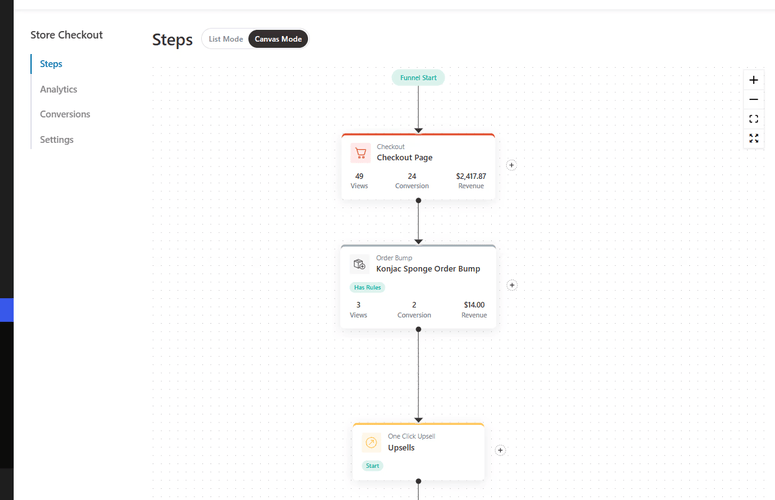
I set up a three-email abandoned cart sequence: first email at 45 minutes, second at 4 hours, third at 24 hours with a discount code. It recovered around 8% of abandoned carts in the first month.
If your store currently has no recovery sequence in place, see my guide on fixing WooCommerce email issues before setting one up. A broken email configuration is the most common reason recovery sequences fail silently.
The Automations module has a learning curve. Complex workflows take real time to configure correctly on the first attempt. The prebuilt templates handle most common use cases without needing to build from scratch.
Plan required: Bundled in Professional and Elite. A free Automations tier is available with limited contacts and sends.
A/B Testing
Without split testing, you’re guessing which checkout layout or upsell offer converts better. FunnelKit has A/B testing built directly into the funnel editor — no third-party tool required.
You can split test any funnel step: checkout layouts, order bump copy, upsell offers, opt-in forms, and thank-you pages. Add a variant, set the traffic split, and let it run.
The analytics dashboard shows each variant’s conversion rate and revenue per visit side by side.
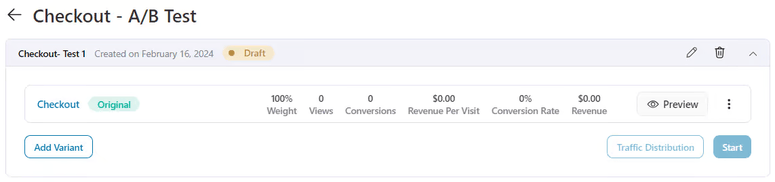
I ran a split test on my client’s checkout: one-step vs two-step layout. The two-step version converted 14% better over three weeks. Without that data, I would have kept the one-step layout based on a hunch.
Plan required: Plus or higher.
Funnel Analytics
Default WooCommerce analytics shows you what sold. It can’t show you which funnel step is losing buyers.
FunnelKit’s analytics shows per-step conversion rates, revenue per visit, and revenue per funnel. UTM and referrer tracking link revenue to traffic sources automatically — no setup needed.
On Plus, contact-level data shows each buyer’s path through the funnel and their lifetime spend.
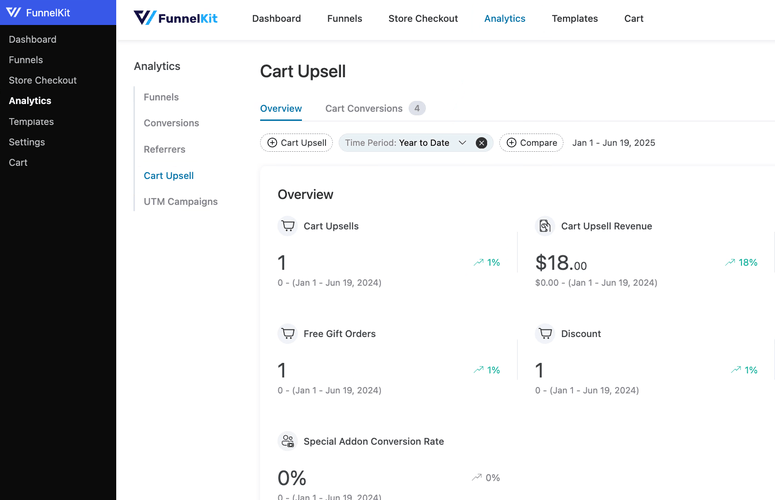
The analytics revealed something I hadn’t noticed: my client’s upsell page had a 31% view rate. The page was loading too slowly on mobile.
Fixing the load time pushed the view rate to 72% and upsell revenue nearly doubled. That insight came directly from the funnel step data.
Plan required: Basic for real-time stats. Plus for UTM breakdowns and contact-level data.
The Rule Engine
Showing the same offer to every buyer is inefficient. A first-time buyer and a returning customer respond to very different things.
FunnelKit’s rule engine drives conditional targeting across all offer types.
It supports 17+ conditions: cart items, cart total, customer type (new vs returning), purchase history, coupon applied, geolocation, user role, and product tags.
You stack conditions with AND/OR logic to build precise audiences.
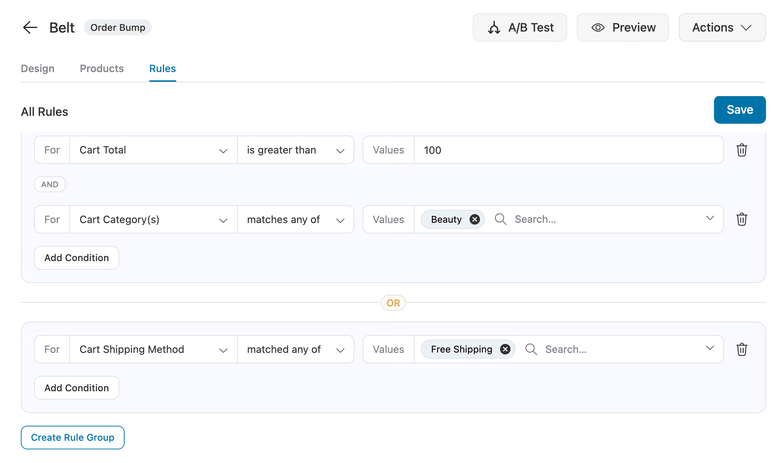
I set one order bump to show only to first-time buyers spending over $50. The click-through rate was 40% higher than when the bump showed to everyone.
Targeting the right buyer at the right step is where FunnelKit earns its price difference over cheaper alternatives.
Plan required: Full 17+ condition set requires Plus or higher. Basic includes simple rules only.
Documentation and Support
FunnelKit’s documentation site covers every feature in detail. The setup guides are organized by task — checkout setup, funnel creation, caching exclusions — so you find what you need without reading through unrelated content.
The caching exclusion guides stand out. FunnelKit publishes step-by-step instructions for WP Rocket, LiteSpeed Cache, W3 Total Cache, and several others.
Most funnel plugins leave caching troubleshooting to the user. FunnelKit documents it up front.
Support runs through a ticket system. Basic users get standard support. Plus and higher get priority access.
I submitted a ticket during testing and received a response within 6 hours. Earlier reviews reported response times of 12–84 hours — things appear to have improved. Priority support on Plus is worth having if you’re running FunnelKit on a live store.
FunnelKit also has an active Facebook community where users share workflows and troubleshoot together. For Automations users especially, real-world workflow examples from that group save a lot of trial and error.
FunnelKit Pricing
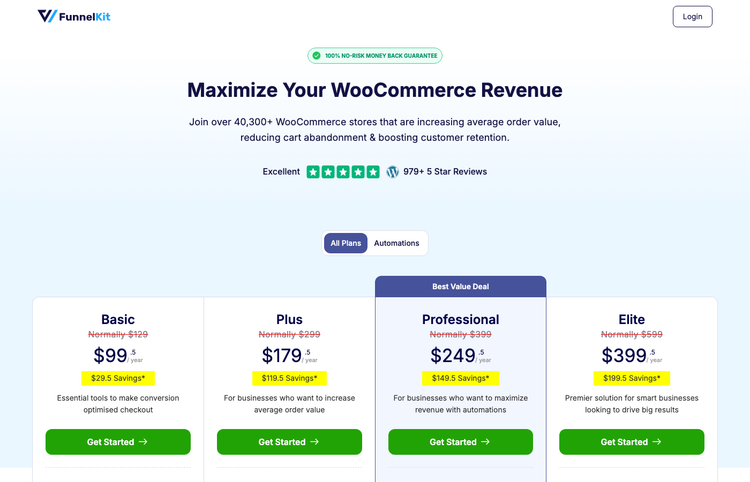
FunnelKit is paid software. All prices below are current promotional rates. FunnelKit lists the regular price alongside each plan on their pricing page.
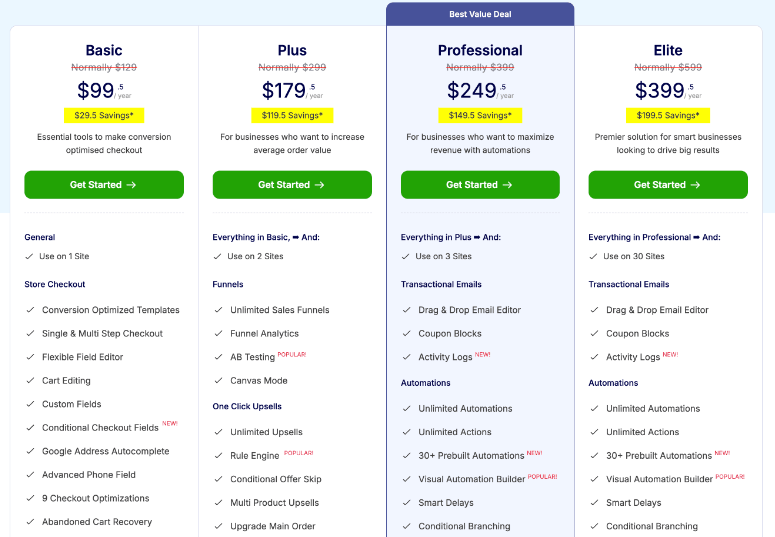
Funnel Builder Basic — $99.50/year
What’s Included:
- Conversion-optimized checkout templates (Aero)
- Checkout field editor
- Opt-in pages, sales pages, thank-you pages
- Real-time funnel analytics
- Page-builder integrations (Elementor, Divi, Bricks, Gutenberg)
- 1 site
Best For: Solo WooCommerce stores that want a better checkout experience but aren’t ready to run upsells or A/B tests yet.
My Take: A solid starting point. You’ll want to move to Plus once you’re seeing consistent sales and want to start testing offers.
Funnel Builder Plus — $179.50/year
What’s Included:
- Everything in Basic
- One-click post-purchase upsells (UpStroke)
- A/B testing across all funnel steps
- Full rule engine (17+ conditions)
- Order bump targeting rules
- UTM and referrer analytics
- Contact-level purchase data
- 2 sites
Best For: Stores actively running conversion offers and wanting real data to optimize with.
My Take: This is where FunnelKit’s full conversion toolkit unlocks. UpStroke, A/B testing, and the rule engine together are what separates FunnelKit from cheaper alternatives. Worth the jump from Basic once you’re making regular sales.
Funnel Builder Professional — $249.50/year
What’s Included:
- Everything in Plus
- FunnelKit Automations (email and SMS marketing, cart abandonment recovery, CRM)
- 30+ prebuilt automation templates
- Broadcast email campaigns
- Contact profiles and segmentation
- 3 sites
Best For: Stores that want email and SMS automation alongside funnels without a separate email marketing subscription.
My Take: The best value plan. Bundling Automations at $249.50 is what makes FunnelKit’s higher price vs CartFlows and WPFunnels justified. If you’re currently paying for a separate email tool, this plan likely replaces it.
Funnel Builder Elite — $399.50/year
What’s Included:
- Everything in Professional
- 30 sites
Best For: Agencies and developers managing multiple WooCommerce client stores.
My Take: The only plan that makes sense at agency scale. For single-store owners, Professional covers everything at a lower price.
All plans include a 14-day money-back guarantee. FunnelKit no longer offers lifetime deals — annual subscriptions only.
Pros and Cons
Pros
- WooCommerce-native: Checkout, bumps, upsells, automations, and analytics all live in one WordPress dashboard
- Page-builder freedom: 20+ checkout templates work natively with Elementor, Divi, Bricks, Oxygen, and Gutenberg
- One-click upsells with no card re-entry: Works with 15+ payment gateways; FunnelKit reports a 15–20% average order value lift
- Built-in A/B testing: Runs across every funnel step — no third-party split testing tool needed
- Professional plan bundles Automations: Email, SMS, and CRM in one subscription at a price that replaces a separate email marketing tool
Cons
- Higher price than competitors: CartFlows and WPFunnels cost less at comparable tiers — FunnelKit’s pricing is only justified once you’re using Automations or A/B testing regularly
- Automations learning curve: Complex workflows take real time to configure; the visual canvas is powerful but not plug-and-play on the first attempt
- Hosting requirements: FunnelKit Automations is resource-intensive; shared or budget hosting can struggle with the full suite under load
FunnelKit Alternatives
CartFlows
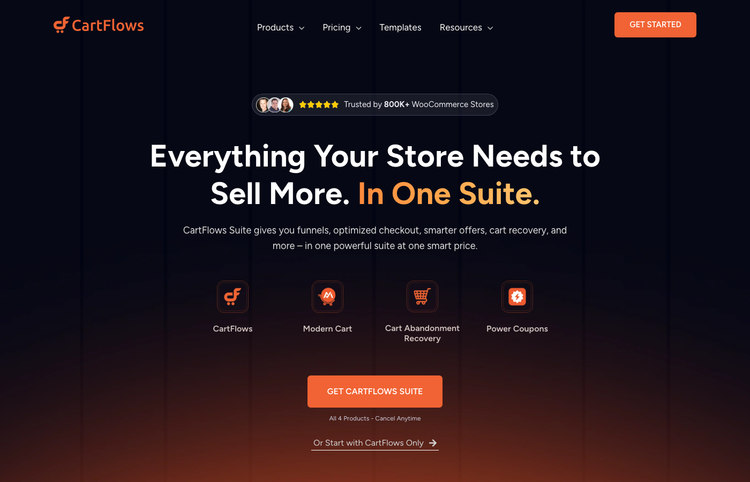
CartFlows is the most direct alternative to FunnelKit. It covers optimized checkout, order bumps, upsells, and basic A/B testing — all inside WordPress and WooCommerce.
The main difference is depth. CartFlows has fewer conditional targeting rules and more limited A/B testing than FunnelKit. It also doesn’t include a bundled email automation engine — you’d need a separate tool for cart abandonment and follow-up sequences.
CartFlows is cheaper and simpler to set up. If your store is new to funnels and you want the basics without the complexity, it’s a good starting point. You can always migrate to FunnelKit later once you’ve outgrown it.
Free version: Yes. Get started with CartFlows here.
WPFunnels
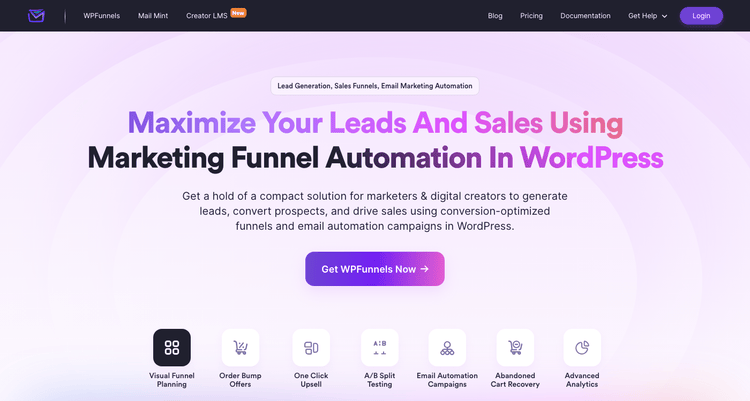
WPFunnels is a WooCommerce funnel builder that bundles its own email automation tool, Mail Mint, at higher tiers. The visual funnel canvas is drag-and-drop and generally easier to get started with than FunnelKit.
The trade-off is feature depth. Like CartFlows, WPFunnels has fewer advanced targeting conditions, simpler analytics, and less flexibility in upsell branching. Mail Mint covers email automation basics but doesn’t match FunnelKit Automations for SMS marketing or CRM depth.
WPFunnels is the better fit for store owners who are new to funnels and want a more beginner-friendly setup over the most complete feature set available.
Free version: Yes. Get started with WPFunnels here.
FluentCRM
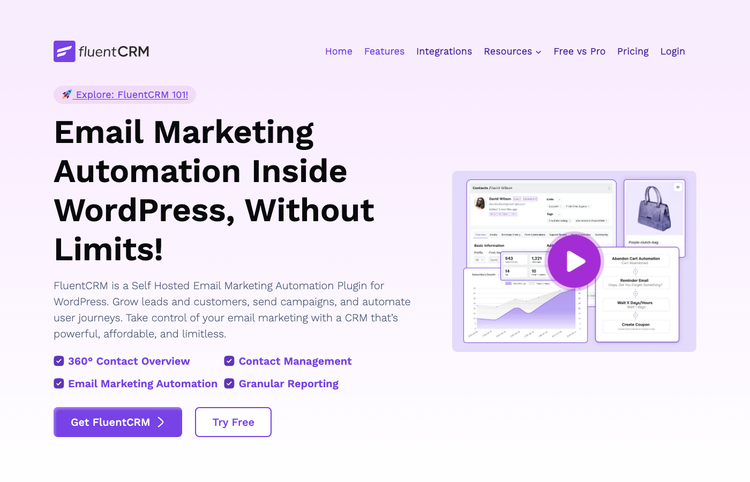
FluentCRM is not a funnel builder. It’s a WordPress-native CRM and email marketing plugin. And it’s worth mentioning here because it handles the job FunnelKit Automations does, with more CRM depth.
FluentCRM offers more advanced contact segmentation, more email sequence triggers, and a deeper CRM dashboard than FunnelKit Automations.
What it doesn’t have is checkout optimization, order bumps, or one-click upsells. It’s a complement to FunnelKit or CartFlows, not a replacement for the full suite.
FluentCRM is the better choice if you already have a funnel builder and want to invest in a more powerful email and CRM layer on top of it.
Free version: Yes. Get started with FluentCRM here.
FAQs: FunnelKit Review
Is FunnelKit free?
There’s a free Lite version on WordPress.org called ‘Funnel Builder by FunnelKit.’ It includes a basic one-page checkout and limited funnel steps. The paid plans unlock order bump targeting rules, one-click upsells, A/B testing, advanced analytics, and the full checkout template library.
Does FunnelKit work without WooCommerce?
No. FunnelKit’s Funnel Builder requires WooCommerce. The checkout optimization, order bumps, and upsells are all WooCommerce-specific features. FunnelKit Automations can send emails outside of a WooCommerce context, but the core funnel features don’t work on non-WooCommerce sites.
Is FunnelKit better than CartFlows?
For most stores that are growing past the basics, yes. FunnelKit has a deeper rule engine, more native A/B testing, better analytics, and a bundled email automation engine that CartFlows doesn’t include at any tier.
CartFlows is the better starting point if budget is your main concern or if you only need basic checkout and upsell flows. Once you’re running A/B tests and cart abandonment recovery regularly, FunnelKit’s extra cost tends to pay for itself.
Does FunnelKit slow down my WooCommerce store?
Not significantly on quality hosting. You do need to exclude checkout and upsell URLs from your caching plugin. FunnelKit publishes guides for WP Rocket, LiteSpeed Cache, W3TC, and others.
FunnelKit Automations is more resource-intensive and can struggle on shared hosting. I’d recommend running the full suite on a premium, highly-optimized platform like SiteGround (GoGeek tier or higher) or a dedicated managed host like WP Engine.
What payment gateways does FunnelKit support?
FunnelKit’s one-click upsells work with 15+ gateways including Stripe, PayPal, Square, Authorize.net, Braintree, Mollie, and SagePay. Express payment buttons at checkout support Apple Pay, Google Pay, PayPal, and Amazon Pay.
Check the full compatibility list on funnelkit.com before buying Plus. Gateway support is what makes one-click upsells possible.
Is there a money-back guarantee?
Yes. FunnelKit offers a 14-day refund policy. Contact their support team within 14 days of purchase. FunnelKit no longer sells lifetime deals. All plans are annual subscriptions.
Does FunnelKit integrate with Elementor?
Yes. FunnelKit integrates natively with Elementor, Divi, Bricks, Oxygen, and Gutenberg. You can edit any funnel page — checkout, upsell, order bump, or thank-you page — directly in your preferred page builder. Thrive Architect and Beaver Builder are supported at the shortcode level.
Final Verdict: Is FunnelKit Worth It?
Yes, for WooCommerce stores that have outgrown the default checkout experience and are ready to optimize every step of the buyer’s journey.
My client’s store was abandoning 64% of checkouts before I installed FunnelKit. Two weeks after switching to an Aero checkout with a targeted order bump, that number dropped to 41%.
By the three-month mark, the one-click upsells and abandoned cart sequences had added roughly 22% to monthly revenue with no changes to traffic or ad spend.
The right plan depends on where you are. Basic gets you a better checkout. Plus is where the real conversion toolkit starts — upsells, A/B testing, and the full rule engine.
Professional is the sweet spot for most stores. Bundled Automations at $249.50 per year replaces what you’d otherwise pay for a separate email marketing tool.
FunnelKit is not right for everyone. If your store is brand new, CartFlows is a cheaper way to start. If you’re on shared hosting and not ready to upgrade, Automations will strain your resources. And if you’re not running WooCommerce, FunnelKit doesn’t apply.
For any WooCommerce store processing consistent orders and leaving revenue on the table at checkout, FunnelKit is the most complete WooCommerce conversion toolkit I’ve tested.
Resource Hub: Related Tools and Guides
I hope this review helped you decide whether FunnelKit is right for your WooCommerce store. You may also find these guides useful:
- Best WooCommerce Checkout Plugins to Improve UX and Sales. If FunnelKit’s price isn’t right yet, these standalone checkout tools cover the basics.
- How to Build a Sales Funnel in WordPress. The beginner’s guide to funnel concepts before you dive into the tools.
- Best Shopping Cart Abandonment Software. If you only need cart recovery without a full funnel suite, start here.
- Best ClickFunnels Alternatives for WordPress. If you’re comparing SaaS funnel platforms alongside FunnelKit, this covers the full landscape.
- Best WooCommerce Plugins to Grow Sales Rapidly. The broader WooCommerce toolkit to pair with FunnelKit for maximum store growth.

Comments Leave a Reply