
Most site owners start building their email list the wrong way. They add a signup form to their sidebar, maybe toss a popup on the homepage, and then wait for subscribers.
The list grows slowly. Sometimes it barely grows at all.
The problem isn’t the form. It’s that there’s no reason for anyone to hand over their email address.
People are protective of their inboxes, and “join my newsletter” is not a compelling offer anymore. A lead magnet changes that entirely.
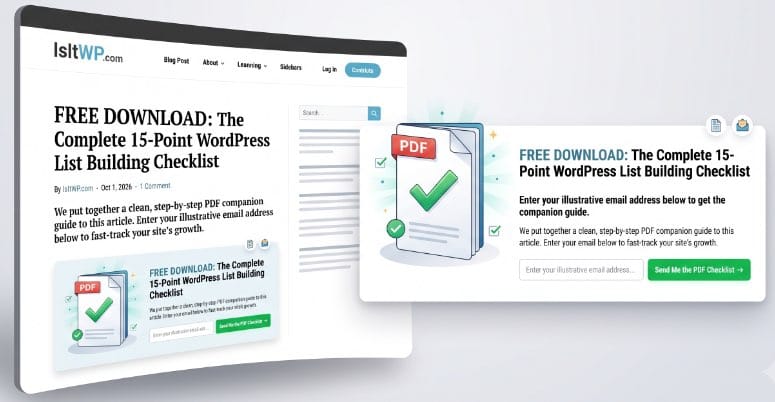
When I added my first content upgrade to a high-traffic post on IsItWP — a simple PDF version of the article — the opt-in rate jumped noticeably. Same traffic, same form. The only change was giving visitors a real reason to sign up.
The challenge is that building a lead magnet system on WordPress involves several moving parts: creating the actual resource, showing opt-in forms at the right moment, delivering the file after signup, and connecting everything to your email marketing service.
I tested the best WordPress plugins for each of these jobs to find out which ones are actually worth installing, and which ones just add complexity without results.
Key Takeaways
- Best all-in-one lead capture tool: I’ll show you which plugin lets you show targeted popups, slide-ins, and floating bars with exit-intent technology — no extra tools needed
- Free lead magnet creator: One tool on this list lets you create professional ebooks, checklists, and PDF guides from scratch — and it has a genuinely useful free plan
- Viral list-building approach: I cover a plugin that uses giveaways and contests to grow your list fast, with social sharing built in as an entry method
- Landing page solution: You’ll see which drag-and-drop builder creates high-converting lead magnet landing pages without touching code
- Free and budget options: I tested 2 free or low-cost options for beginners who aren’t ready to invest in a paid tool yet
- Tested criteria: I evaluated each plugin on setup ease, email service integrations, targeting options, A/B testing, and how well the free version holds up
How I Test Lead Magnet Plugins
🔍 Click to see my testing methodology
Here’s exactly how I evaluate WordPress lead magnet plugins:
- Setup speed: I track how long it takes from plugin activation to a live opt-in form. If it takes more than 30 minutes to get something working, I note it as a friction point.
- Email service integrations: I test each plugin’s connection to at least 3 major services (Mailchimp, ConvertKit, ActiveCampaign). If the integration requires a paid plan upgrade, I flag that clearly.
- Lead magnet creation vs. delivery: Some plugins only display opt-in forms. Others help you create the actual resource (PDF, ebook, checklist). I note which category each plugin falls into.
- Targeting and trigger options: Exit intent, scroll triggers, page-level targeting, and device targeting all affect conversion rates. I check what’s available and what’s locked behind paid tiers.
- A/B testing: Split testing headlines, offers, and designs is how you improve conversion rates over time. I note which plugins include this natively.
- Free version quality: I evaluate the free version as a standalone product — not just as a demo for upselling. If the free version is genuinely usable for a small site, I say so.
- Performance impact: I run GTmetrix before and after installing each plugin on a clean WordPress test site to check for page speed regressions.
Why Trust IsItWP?
At IsItWP, we’ve been helping WordPress users make better plugin decisions since 2009. Over 2 million site owners use our guides every year to find tools that actually work — not just tools that have impressive landing pages.
Unlike review sites that summarize feature pages, we maintain active accounts with these tools, run real opt-in campaigns, and track subscriber growth on live sites. For this article, I installed each plugin on a dedicated WordPress test site and set up a complete lead magnet funnel from form to delivery. I connected each tool to a real email marketing account.
What you’re reading is based on that, not on vendor documentation.
Best Lead Magnet Plugins Compared
Not all lead magnet plugins do the same job. Some focus on showing opt-in forms at the right moment. Others help you create the actual resource. A few handle landing pages, contests, or quiz-based funnels. This table shows the key differences before you read the full reviews.
| Plugin | Best For | Starting Price | Free Version | Money-Back |
| 1. OptinMonster | All-in-one lead capture with exit-intent and advanced targeting | $7/month (intro) | No | 14-day |
| 2. Thrive Suite | Complete list-building suite with A/B testing and 10+ WordPress tools | $228/year (intro) | No | 30-day |
| 3. Beacon | Creating and delivering professional lead magnets (ebooks, PDFs, checklists) | Free | Yes | N/A |
| 4. SeedProd | Drag-and-drop landing pages built specifically for lead magnet offers | $39.50/year (intro) | Yes (lite) | 14-day |
| 5. RafflePress | Growing your email list fast through viral contests and giveaways | $299 one-time | No | 14-day |
| 6. WPForms | Quiz and survey lead magnets with direct email marketing integrations | $49.50/year (intro) | Yes (lite) | 14-day |
| 7. Bloom | Beautiful opt-in forms for content blogs and sites already using Elegant Themes | $89/year (Divi membership) | No | 30-day |
Use the table of contents below to jump to any section, or keep reading for the full reviews.
- 1. OptinMonster ⭐⭐⭐⭐⭐
- 2. Thrive Suite ⭐⭐⭐⭐⭐
- 3. Beacon ⭐⭐⭐⭐⭐
- 4. SeedProd ⭐⭐⭐⭐⭐
- 5. RafflePress ⭐⭐⭐⭐
- 6. WPForms ⭐⭐⭐⭐⭐
- 7. Bloom ⭐⭐⭐⭐
- Bonus: More Lead Magnet Plugins Worth Knowing
- How to Choose the Right Lead Magnet Plugin
- FAQs: Best WordPress Lead Magnet Plugins
- Final Verdict
- Resource Hub: Growing Your Email List with WordPress
1. OptinMonster ⭐⭐⭐⭐⭐
Best for: WordPress site owners who want advanced opt-in targeting — exit intent, scroll triggers, page-level rules, and A/B testing — in a single plugin

OptinMonster is the most widely used lead generation plugin for WordPress, with over 1.2 million active users. It handles the entire opt-in side of your lead magnet system: creating and displaying the forms, deciding when and where to show them, and connecting to your email service automatically.
What makes it stand out from simpler popup plugins is the targeting system.
You can show different opt-in forms to visitors based on what page they’re on, how long they’ve been on the site, whether they’re about to leave, what device they’re using, and even where they came from. On a lead magnet landing page, that kind of control matters.
Why Is OptinMonster One of the Best Lead Magnet Plugins?
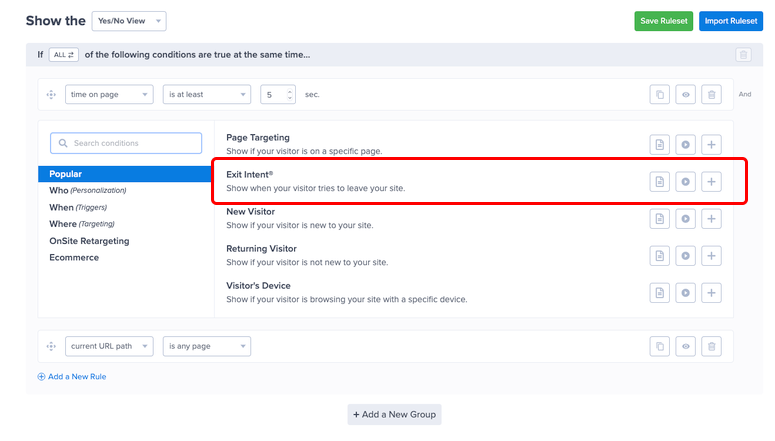
The feature that gets the most attention is Exit Intent® — OptinMonster’s patented technology that detects when a visitor is about to leave the page and triggers a popup at exactly that moment.
Exit intent popups consistently outperform time-delayed popups because they catch visitors at the decision point, not randomly. No other tool in this list has a patented version of this feature.
On top of that, OptinMonster includes 700+ pre-built templates across every campaign type: lightbox popups, floating bars, fullscreen mats, slide-in boxes, inline forms, and yes/no opt-ins.
The drag-and-drop builder lets you customize any template in minutes — no design skills needed. A/B testing is available from the Plus plan, so you can test different lead magnet offers and find out which one converts better.
My Experience with OptinMonster
In my testing, OptinMonster had the most polished setup experience of any plugin here. The onboarding wizard walks you through picking your first campaign type and connecting your email service before you’ve even seen the main dashboard.
Within 15 minutes I had a working exit-intent popup connected to Mailchimp, delivering a PDF download confirmation email.
The one thing to watch: OptinMonster handles the display side beautifully, but it doesn’t create your actual lead magnet for you. You still need a separate tool (like Beacon, below) to build the PDF or ebook itself.
OptinMonster’s job is to get people to click and sign up — it does that better than anything else on this list.
🟢► Pros
- 700+ conversion-tested templates across 6 campaign types
- Patented Exit Intent® technology fires at the optimal leaving moment
- 50+ email service integrations (Mailchimp, ConvertKit, ActiveCampaign, Klaviyo, and more)
- Page-level and behavior-based targeting out of the box
- A/B testing built in from the Plus plan
🔴► Cons
- No free version — paid plans only
- Does not create lead magnets — you need a separate tool for the actual PDF or resource
- Exit Intent® requires the Pro plan or higher ($29/month intro)
Pricing: Starts at $7/month (introductory first-year rate, billed annually). No free version. 14-day money-back guarantee.
2. Thrive Suite ⭐⭐⭐⭐⭐
Best for: WordPress site owners who want a complete conversion toolkit — including list building, landing pages, A/B testing, quizzes, and a full theme builder — in a single subscription

Thrive Suite is a subscription that bundles 10 conversion-focused WordPress tools together. The most relevant for lead magnets is Thrive Leads — a dedicated list-building plugin with opt-in forms, A/B testing, and SmartLink technology.
The suite also includes Thrive Architect (page builder), Thrive Quiz Builder (quiz lead funnels), and Thrive Ultimatum (countdown timers for urgency). All of these directly support a lead magnet strategy.
Thrive Leads works differently from a typical popup plugin. You build your opt-in forms once and then assign them to appear in specific locations — inside posts, as exit-intent popups, as sticky ribbons, as two-step opt-ins, or as screen-filling overlays.
Each placement type has its own form design and A/B tests, so you can optimize each location independently.
Why Is Thrive Suite One of the Best Lead Magnet Plugins?
The combination of Thrive Leads and Thrive Quiz Builder makes Thrive Suite the strongest option here for quiz-based lead funnels.
Quiz lead magnets, where visitors answer a short quiz and receive personalized results in exchange for their email, tend to get higher conversion rates than static downloads.
Thrive Quiz Builder handles the entire flow: building the quiz, collecting the email at the end, and routing responses to different email sequences based on answers.
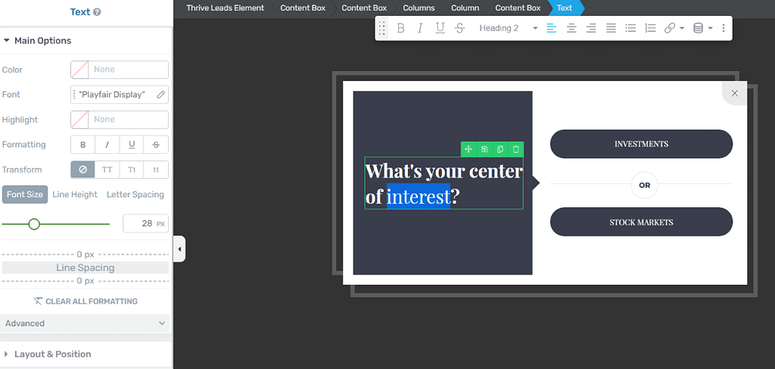
The A/B testing inside Thrive Leads is also more thorough than most tools. You can test not just different designs, but different opt-in placements, form types, and even entire lead magnet offers against each other. Thrive Optimize (included in the suite) extends this to full landing page split tests.
If you want to run a serious conversion optimization program on your WordPress site, the Thrive Suite gives you the most complete set of tools.
My Experience with Thrive Suite
The setup is more involved than a single-purpose plugin. Getting Thrive Leads, Thrive Architect, and Thrive Quiz Builder all configured and working together takes a few hours the first time.
That said, the Thrive University training library (included with the subscription) has step-by-step videos for every tool, and the quality is noticeably better than most plugin documentation.
The one friction point to flag: the renewal price jumps from $228 in year one to $599 per year after that. For a single site, that’s a significant cost.
If you only need email opt-in forms, OptinMonster is cheaper. Thrive Suite makes financial sense when you’re actually using 4 or more of the tools in the bundle.
🟢► Pros
- 10 conversion tools in one subscription, including Thrive Leads, Quiz Builder, and Architect
- Built-in A/B testing for forms, landing pages, and quiz funnels
- Quiz lead magnet support is the best of any tool in this list
- Covers up to 25 sites on one subscription
- Strong Trustpilot rating (4.8/5 from 529 reviews)
🔴► Cons
- Renewal price jumps to $599/year after the first year at $228
- Setup takes longer than single-purpose plugins
- No free version — you’re committing to an annual subscription from day one
Pricing: Starts at $228/year (introductory first-year rate; renews at $599/year). No free version. 30-day money-back guarantee.
3. Beacon ⭐⭐⭐⭐⭐
Best for: WordPress site owners who need to create professional lead magnets — ebooks, checklists, PDF guides, resource libraries — without hiring a designer or learning new software

Beacon solves a different problem from every other tool in this article. While OptinMonster and Thrive Leads handle how you capture emails, Beacon handles what you’re offering.
It’s a lead magnet creation platform, a drag-and-drop editor specifically designed to turn your content into professional PDFs, ebooks, checklists, resource guides, and email courses.
The WordPress plugin connects Beacon directly to your site. You can build a new lead magnet from scratch using one of Beacon’s 500+ templates, or you can turn an existing WordPress post into a formatted PDF with a few clicks.
Once the lead magnet is ready, Beacon provides a hosted landing page and delivery link so you don’t even need a separate tool to get it in front of visitors.
Why Is Beacon One of the Best Lead Magnet Plugins?
The blog post conversion feature is the most practical thing about Beacon for content sites. You select any post from your WordPress dashboard, and Beacon reformats it into a well-designed PDF with your branding, table of contents, and a call-to-action page at the end.
This takes about 5 minutes and gives you a ready-made lead magnet from content you’ve already written. No extra research, no extra writing.

Beacon is owned by Awesome Motive, the same company behind OptinMonster and WPForms, which means the WordPress plugin integration is tight and the support is solid.
The free plan is one of the most generous in this category: you can create 1 lead magnet per month, store up to 100 leads, and use the full editor without a credit card. For a blogger just starting out, the free plan is a real working option, not just a teaser.
My Experience with Beacon
I used the blog post conversion feature to turn a 2,000-word tutorial into a PDF checklist in about 8 minutes. The template options are well-designed and don’t look generic. The output looked like something a designer had put together.
The hosted delivery page worked immediately after publishing, with a confirmation email sent to the test address I used.
The limitation to be aware of: Beacon handles creation and delivery, but not the opt-in form display. To use Beacon effectively, you pair it with an opt-in tool (OptinMonster is the natural partner given the same parent company, but any form plugin works).
Beacon gives you the “what” — the other tools give you the “how it gets in front of visitors.”
🟢► Pros
- 500+ professional lead magnet templates (ebooks, checklists, guides, resource libraries)
- Converts existing WordPress posts to PDFs in minutes
- Free plan with 1 lead magnet/month and 100 stored leads — no credit card required
- Hosted delivery pages and confirmation emails included
- Tight WordPress integration via dedicated plugin
🔴► Cons
- Does not display opt-in forms on your site — you need a separate popup/form tool for that
- Free plan limits lead storage to 100 leads (paid plans start at $19/month)
- Paid plans are billed monthly, not annually — no annual discount available
Pricing: Free plan available (1 lead magnet/month, 100 stored leads). Paid plans from $19/month. No annual billing option. No formal money-back guarantee (free plan serves as the trial).
4. SeedProd ⭐⭐⭐⭐⭐
Best for: WordPress site owners who want to build dedicated lead magnet landing pages with a visual drag-and-drop builder — without touching code or hiring a developer

SeedProd is WordPress’s most popular dedicated landing page builder, with over 1 million active installs.
Its role in a lead magnet system is clear. Instead of sending visitors to a generic page on your site, you build a focused landing page that presents your lead magnet offer and nothing else.
No navigation menu, no sidebar, no distractions. Just the offer and the opt-in form.
SeedProd includes over 350 professionally designed landing page templates, including a full set optimized specifically for lead generation (email opt-in pages, webinar registration pages, free download pages).
The drag-and-drop builder works with any WordPress theme and doesn’t require Elementor or any other third-party page builder.
Why Is SeedProd One of the Best Lead Magnet Plugins?
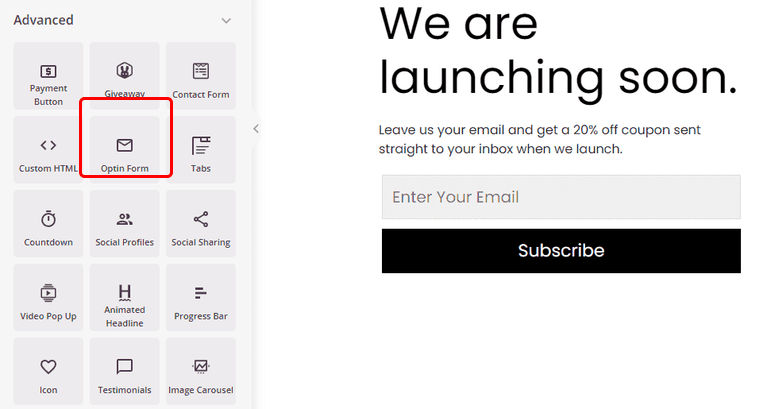
The subscriber management built into SeedProd is more useful than most people expect. When someone fills out an opt-in form on a SeedProd landing page, their email is automatically captured in SeedProd’s subscriber list.
From there, you can export it, pass it to Mailchimp or ConvertKit through the native integrations, or trigger a Zapier automation. You get a working lead collection system without needing to configure a separate form plugin.
The free lite version on WordPress.org is a real working product, not a demo. It includes basic landing page building and a coming soon mode.
If you just need a simple lead magnet landing page for a single offer, the free version handles it. The paid plans add more templates, A/B testing, the full theme builder, and WooCommerce support.
My Experience with SeedProd
I built a lead magnet landing page with SeedProd in about 20 minutes, starting from a template. The built-in opt-in form connected to ConvertKit without any issues, and the countdown timer block (available on Pro and up) added genuine urgency to the offer.
The page loaded fast on GTmetrix. There was no performance hit from the builder.
One thing to be aware of: SeedProd builds standalone landing pages. It doesn’t add popups or slide-in forms to your regular site pages. If you want to capture leads across your whole site, not just on dedicated landing pages, you need to pair SeedProd with a popup tool like OptinMonster.
🟢► Pros
- 350+ templates including dedicated lead generation page designs
- Built-in subscriber management and email service integrations
- Fast pages — no performance issues in testing
- Free lite version on WordPress.org
- Works with any WordPress theme — no dependency on Elementor or other builders
🔴► Cons
- Does not add popups or forms to existing pages — landing pages only
- A/B testing requires the Pro plan ($199.50/year intro)
- WooCommerce builder locked behind the Elite plan ($239.40/year intro)
Pricing: Starts at $39.50/year (introductory first-year rate). Free lite version available on WordPress.org. 14-day money-back guarantee.
5. RafflePress ⭐⭐⭐⭐
Best for: WordPress site owners who want to grow their email list quickly through viral giveaways, where social sharing earns participants extra contest entries

RafflePress takes a different angle on lead generation. Instead of showing opt-in forms, it runs viral contests and giveaways where email signup is the main entry method.
Participants get extra contest entries for sharing on social media, following your accounts, or referring friends, which spreads the contest (and your email capture) organically.
Setting up a contest takes about 10 minutes. You choose the prize, select your entry methods (email required, social follows optional), set a start and end date, and RafflePress generates a contest widget you can embed anywhere on your site.
When the contest ends, you export the email list and import it into your email marketing service.
Why Is RafflePress One of the Best Lead Magnet Plugins?
The viral growth mechanics are what make RafflePress worth including here. Traditional lead magnets capture one subscriber per form submission. With a RafflePress contest, each subscriber who shares the contest on social media brings in referrals, and those referrals bring in more.
A well-run giveaway can produce a significant spike in subscribers in a short window, which is hard to match with static opt-in forms alone.

RafflePress integrates with all major email services (Mailchimp, ConvertKit, ActiveCampaign, AWeber, GetResponse, Klaviyo) and includes GDPR compliance tools for the European market.
The entry method system is flexible. You can require email signup, make social follows optional bonuses, or set up a “refer a friend” structure where each referral earns extra entries.
My Experience with RafflePress
I ran a test contest with RafflePress connected to a Mailchimp list. The setup wizard walked me through prize details, entry methods, and dates clearly. The contest widget was live within 12 minutes of installing the plugin.
Participants who shared the contest on Twitter were automatically given bonus entries, and the referral tracking worked correctly in testing.
The limitation here is that RafflePress is most effective for periodic list-growth bursts. A contest runs for a week or two, you get a surge of subscribers, and then it’s over. It works well alongside a steady opt-in form system, but it’s not a replacement for one.
Also, the $299 one-time price is higher than the first-year cost of most subscription tools here, so it’s a bigger upfront investment.
🟢► Pros
- Viral mechanics (social sharing, referrals) multiply your list growth beyond what static forms achieve
- Integrates with all major email services
- One-time payment — no annual renewal fees
- GDPR compliance tools included
- Drag-and-drop contest builder with professional templates
🔴► Cons
- High upfront cost at $299 (single site) compared to subscription alternatives
- List growth is periodic, not continuous — works best as a campaign tool, not an always-on system
- No free version
Pricing: $299 one-time payment (single site). $349 one-time for unlimited sites. No free version. 14-day money-back guarantee.
6. WPForms ⭐⭐⭐⭐⭐
Best for: WordPress site owners who want to capture leads through quiz and survey funnels, or who need a reliable email opt-in form that integrates directly with their email marketing service
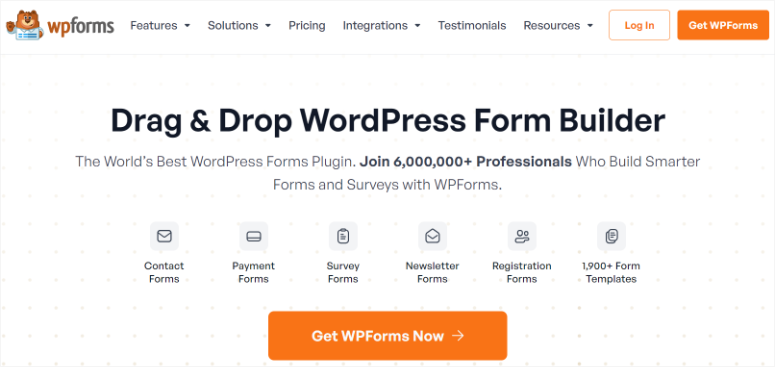
WPForms is the most widely used form builder on WordPress, with over 6 million active installs.
Its connection to lead magnets runs through 2 use cases: email opt-in forms that automatically add subscribers to your list, and quiz or survey funnels where the quiz result is the lead magnet and the email is collected at the end.
For direct email integration, WPForms Plus ($99.50/year intro) adds native connections to Mailchimp, ConvertKit, ActiveCampaign, AWeber, Constant Contact, GetResponse, MailerLite, and several others.
You map form fields to your list fields, and every new submission is added to the appropriate audience segment automatically.
Why Is WPForms One of the Best Lead Magnet Plugins?
The quiz lead magnet angle is where WPForms stands out most in this context. WPForms has a dedicated Survey and Quiz addon (available on the Plus plan and above) that lets you build interactive quizzes, collect the respondent’s email at the end, and send them personalized results.
Quiz lead magnets tend to generate higher opt-in rates than static downloads because they’re interactive and feel personally relevant. “Your result” is more compelling than “a generic checklist.”
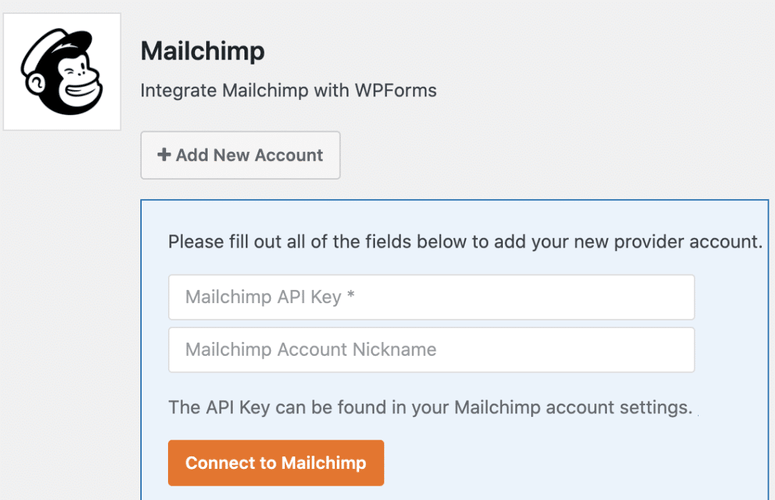
WPForms Lite (free) handles basic contact and email forms and is one of the most reliable free options on WordPress.org, with a 5-star rating from over 11,000 reviews.
The free version doesn’t include email marketing integrations, but it’s a solid starting point for anyone who just needs a working opt-in form before committing to a paid plan.
My Experience with WPForms
Setting up a Mailchimp-connected opt-in form with WPForms took about 8 minutes. The WPForms AI Form Builder (available on all plans including Basic) let me describe the form in plain language and generate a starting template.
I connected it to Mailchimp through the native integration, set a custom confirmation message that links to the lead magnet download, and had a working form embedded on a page within 15 minutes total.
WPForms doesn’t display popups or slide-ins. It only creates embeddable forms.
To use WPForms as part of a lead magnet system, you’d either embed the form on a dedicated page, or use OptinMonster to display a popup that triggers the WPForms opt-in. The two tools work well together and are built by the same parent company.
🟢► Pros
- 6 million+ active installs and 5-star WP.org rating — the most trusted form builder on WordPress
- AI Form Builder generates starting templates from plain language descriptions
- 10+ email marketing integrations on Plus plan
- Quiz and survey addon for interactive lead magnet funnels
- Free lite version is fully functional for basic opt-in forms
🔴► Cons
- No popup or overlay display — forms must be embedded on pages
- Email marketing integrations require the Plus plan ($99.50/year intro) or higher
- Quiz addon requires Plus plan or higher
Pricing: Starts at $49.50/year (introductory first-year rate for Basic). Email integrations require Plus at $99.50/year intro. Free lite version available on WordPress.org. 14-day money-back guarantee.
7. Bloom ⭐⭐⭐⭐
Best for: WordPress site owners already subscribed to Elegant Themes (Divi users, in particular) who want a well-designed email opt-in plugin included at no extra cost

Bloom is Elegant Themes’ email opt-in plugin, included with every Elegant Themes membership alongside Divi and Extra. It adds popups, fly-ins, inline opt-in forms, widget area forms, below-content forms, and locked content forms to your WordPress site, with over 100 pre-built template designs.
Bloom connects to 19 email marketing services natively, including Mailchimp, AWeber, ConvertKit, ActiveCampaign, and Brevo.
All of these integrations are available on the base Elegant Themes membership. There’s no tiered feature gating within Bloom itself. You pay for the membership and get the full tool.
Why Is Bloom One of the Best Lead Magnet Plugins?
The template library is Bloom’s clearest advantage. The 100+ pre-built designs cover a wide range of styles, from minimal and modern to illustrated and bold. And all of them look polished enough to use immediately without customization.
For a content site where visual consistency matters, Bloom produces opt-in forms that don’t look like afterthoughts.
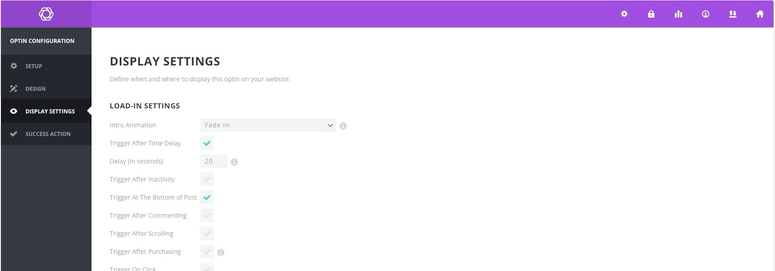
The value proposition for existing Divi users is strong. If you’re already paying for an Elegant Themes membership, Bloom is included at no extra cost.
The targeting options (display on specific pages, after a time delay, on scroll, on exit intent) cover most lead magnet use cases without needing a more expensive standalone tool.
My Experience with Bloom
Bloom’s setup is straightforward if you’re already in the Elegant Themes ecosystem. I had a styled opt-in form connected to Mailchimp in about 12 minutes using a template.
The display targeting settings are clean. You pick your trigger type (time delay, scroll, exit intent, after comment, after purchase) and set the conditions, and it works.
The honest limitation: Bloom requires an Elegant Themes membership, which includes Divi and Extra. If you don’t use Divi and just want an email opt-in plugin, the $89/year membership is a lot to pay for Bloom alone. OptinMonster or Popup Maker would be a better-value choice in that case.
🟢► Pros
- 100+ beautifully designed opt-in form templates
- 19 native email service integrations — no tiered gating
- Included free for all Elegant Themes members
- Multiple display types: popups, fly-ins, inline, locked content
🔴► Cons
- Requires an Elegant Themes membership — not available as a standalone plugin
- Limited A/B testing compared to OptinMonster or Thrive Leads
- Not the best choice if you don’t already use Divi or other Elegant Themes products
Pricing: Included with the Elegant Themes membership at $89/year (annual renewal required to keep support and updates). A Lifetime Access option is available at a $249 one-time payment, no renewals. No standalone pricing for Bloom. 30-day money-back guarantee.
Bonus: More Lead Magnet Plugins Worth Knowing
Popup Maker ⭐⭐⭐⭐⭐
Best for: WordPress beginners who need a working popup system for free
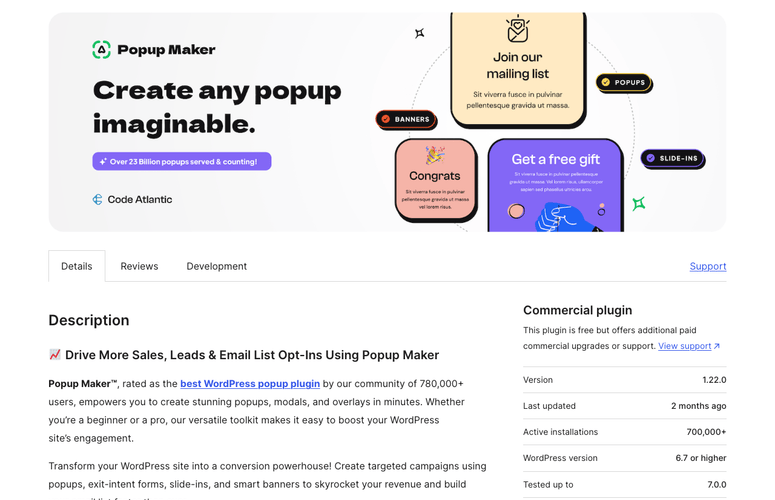
Popup Maker has a 4.9/5 rating on WordPress.org from over 4,495 reviews, and the free version is genuinely functional.
You get unlimited popups with no impressions cap, time-based and click triggers, and integrations with 15+ email marketing platforms and form builders (WPForms, Gravity Forms, Contact Form 7, Ninja Forms). Exit intent, scroll triggers, and analytics require the Pro plan at $59/year.
For a beginner who wants popups without paying anything upfront, Popup Maker is the strongest free option in this category.
How to Choose the Right Lead Magnet Plugin
The right tool depends on what part of the lead magnet process you need to improve. Here are the most common scenarios:
If you don’t have a lead magnet yet, start with Beacon. Create your free resource first — an ebook, checklist, or PDF guide — before you invest in display tools. Beacon’s free plan lets you build 1 lead magnet per month at no cost. Once you have something to offer, add an opt-in tool.
If you need your opt-in forms to appear across your whole site, choose OptinMonster. It’s the most powerful option for showing targeted popups, slide-ins, and floating bars based on visitor behavior. Exit intent, scroll triggers, page-level targeting, and A/B testing are all there.
If you want a complete conversion toolkit and plan to use multiple tools, look at Thrive Suite. At $228/year for the first year, you get Thrive Leads, Thrive Architect, Thrive Quiz Builder, and 7 more tools. The value only makes sense if you’ll use more than 2-3 of them.
If you want a dedicated landing page for your lead magnet offer, use SeedProd. A focused page with no navigation and a single call to action consistently converts better than a general blog page. SeedProd’s free lite version handles this at no cost.
If you want a rapid list-growth burst, run a RafflePress contest. Giveaways don’t build slow, steady growth — they create a surge. Plan a contest for a product launch, content campaign, or seasonal event, and expect to see significantly more subscribers in a short window.
If you’re on zero budget, start with Popup Maker’s free version. You can pair it with a Beacon free account to have a fully working lead magnet system — popup display plus PDF delivery — without spending anything.
FAQs: Best WordPress Lead Magnet Plugins
What is a WordPress lead magnet plugin?
A WordPress lead magnet plugin is any tool that helps you capture email addresses by offering something valuable in return. This includes plugins that display opt-in forms and popups (like OptinMonster), tools that create the actual lead magnet resource (like Beacon), landing page builders for lead magnet pages (like SeedProd), and contest tools that use giveaways as the incentive (like RafflePress). Most sites use 2-3 of these together rather than relying on one tool for everything.
Do I need a lead magnet to grow my email list?
Not technically. Some sites grow their lists through newsletter signups alone, especially if they have an engaged audience. But in most niches, a well-matched lead magnet (a checklist, guide, or template that solves a specific problem) produces significantly more signups than a generic “subscribe for updates” form. A targeted lead magnet signals clear value upfront, which is the main reason people share their email address.
What’s the best free WordPress lead magnet plugin?
The best combination for a zero-budget setup is Beacon (free plan for creating the lead magnet resource) paired with Popup Maker (free plan for displaying the opt-in popup). Beacon’s free tier gives you 1 lead magnet per month and 100 stored leads — enough to get started. Popup Maker’s free version provides unlimited popups with basic triggers and integrations with most email services. You won’t get exit intent or A/B testing, but you’ll have a fully working system at no cost.
Does OptinMonster work with Mailchimp?
Yes. OptinMonster has a native Mailchimp integration available on all paid plans. You connect your Mailchimp account, select the audience and group to send subscribers to, and map the form fields to Mailchimp contact fields. Every new opt-in is added to Mailchimp immediately. The same process works with ConvertKit, ActiveCampaign, Klaviyo, and 50+ other email services, all included without paying extra.
Can I use multiple lead magnet plugins together?
Yes, and most sites do. A common setup is Beacon for creating the PDF resource, OptinMonster for displaying the opt-in popup and capturing the email, and an email marketing service (Mailchimp, ConvertKit) for delivering the resource and following up. SeedProd can add a dedicated landing page to the same system. These tools are designed to work together and most have native integrations with each other.
How do I deliver a lead magnet automatically after someone signs up?
The simplest way is to use Beacon. It handles delivery automatically through a hosted link in the confirmation email. You can also use your email marketing service to send an automated welcome email with the download link as an attachment or hosted URL.
If you’re storing the file in your WordPress media library, add the direct URL to the confirmation message in your opt-in plugin settings. OptinMonster, SeedProd, and WPForms all support custom confirmation text with links.
Final Verdict
For most WordPress site owners, the combination of OptinMonster and Beacon covers the full lead magnet workflow: Beacon creates the resource, OptinMonster displays the opt-in form with precise targeting and timing. If you’re starting with no budget, Popup Maker (free) plus Beacon’s free plan gets you to the same result at no cost.
If you want a complete conversion system and are willing to invest more, Thrive Suite at $228/year in the first year gives you list building, landing pages, quiz funnels, and A/B testing in one subscription. Just factor in that the renewal goes to $599/year before you commit.
For a dedicated landing page for your lead magnet offer, SeedProd is the easiest option with a free lite version that handles the basics. And if you want to spike your list growth fast through a viral event, RafflePress is the go-to tool for running contests that grow your list through social sharing.
Resource Hub: Growing Your Email List with WordPress
- Best Email Marketing Services Compared — which service to connect your lead magnets to
- Best WordPress Popup Plugins — more options for displaying opt-in forms
- Best WordPress Landing Page Plugins — full roundup of landing page builders
- Best WordPress Form Plugins — form builders for embedding opt-ins in pages and posts
- OptinMonster Review — detailed look at the #1 lead generation plugin

Comments Leave a Reply