I’ve built dozens of WordPress sites for clients in tech, fashion, and more.
I always search for the best blog hosting solution to keep their sites running smoothly. This helps my clients get fast load times and strong security.
But I needed hosting that was reliable, quick, and easy to manage.
At first, I went with cheap shared hosting plans. They often led to sluggish sites and downtime, which annoyed my clients. So, I switched to researching blog hosting companies instead.
I didn’t trust just online reviews, so I tested several myself, looking at speed, security, support, and pricing.
I also peeked at what other users said in third-party reviews.
After all this digging, I’ve lined up the top 10 blog hosting companies, so you can pick the perfect one for your blog without the hassle.
About My Blog Web Hosting Review Process
My blog web hosting reviews are created with a single goal in mind: to help IsItWP users find the best blog host.
There are hundreds of blog host providers on the market. Even if you narrow down your search to only the most popular ones, how do you know which is the perfect choice that meets all your requirements?
Luckily, the IsItWP team has quite a number of members. To help make sure the testing process is more efficient, each member signed up for a different blog hosting platform. They then used the hosting service for three months.
After this, we hold a meeting to discuss our findings. Each member shared their unbiased first-hand experience. This allows our hosting writer, me, to create a detailed comparison to help you choose the best host for blogs.
Unlike other sites, we actually signed up for dozens of the best web hosting for blogs and beginners and reviewed them personally so you can confidently choose the right blog hosting provider.
Here’s exactly what we did:
- Assigned each IsItWP team member a blog hosting service.
- Each member signed up for the assigned platform.
- We set up a test WordPress site with a default WordPress theme for each service.
- Mirrored the production environment on our test sites by adding content and images.
- Conducted monthly speed and performance tests to see how the blog server would perform in a real-life environment.
- Checked out the front end and back end cPanel and controls.
- Each member gave feedback on the assigned Blog host service three months later.
- Finally, I, the hosting service expert writer, create a detailed list article with all our findings
Why Trust IsItWP
Our team consists of WordPress enthusiasts with extensive knowledge of website creation and management. This makes sure we stay up-to-date on the latest trends and tools in the WordPress ecosystem. We don’t just rely on theory.
We test popular WordPress themes, plugins, and hosting companies on actual websites. This hands-on approach allows us to provide insights based on real performance and user experience.
Our reviews go beyond surface-level descriptions. We look closely at each product’s features, functionalities, and potential drawbacks. This comprehensive analysis helps you make informed decisions for your WordPress project.
Here’s a quick side-by-side look at all 10 picks before we get into the details.
| Host | Best For | Starting Price | Support |
| 1. Hostinger | Lowest starting price without giving up modern performance tech | $1.99/mo | 9/10 |
| 2. Bluehost | Complete beginners who want hands-on human support | $3.99/mo | 9/10 |
| 3. SiteGround | Bloggers who prioritize raw speed | $2.99/mo | 10/10 |
| 4. HostGator | Budget bloggers who want room to grow into higher tiers | $2.75/mo | 8/10 |
| 5. WPEngine | Established blogs that want built-in developer tools | $27/mo | 9/10 |
| 6. Dreamhost | Longest money-back window, daily backups on every plan | $2.89/mo | 7/10 |
| 7. WordPress.com | Bloggers who don’t want to manage hosting at all | $4/mo | 7/10 |
| 8. Hosting.com (formerly A2 Hosting) | Developer-friendly performance at a low starting price | $5.83/mo | 9/10 |
| 9. GreenGeeks | Eco-conscious bloggers who still want standard features | $2.95/mo | 9/10 |
| 10. InMotion Hosting | Long 90-day refund window while you decide | $5.29/mo | 9/10 |
And here’s my blog web hosting review…
Top 10 Best Blog Hosting Companies (with Features and Pricing)
 1. Hostinger
 1. Hostinger
Best for: bloggers who want the lowest possible starting price without giving up modern performance tech.
- Load time: 1.42s
- Uptime: 99.99%
- Support: 9/10
- Website: Hostinger.com
Hostinger stacks up against the competition with its affordable hosting plans. With Hostinger, you can start a self-hosted blog on a tight budget.
With their starter plan, you get a free SSL certificate, 24/7 chat support, a site builder, and NVMe storage on higher tiers. You also get a free domain name and free website migration.
Hostinger runs on LiteSpeed servers with built-in object caching, which speeds up WordPress sites without needing a paid caching plugin. The hPanel control panel is also a real differentiator. It’s cleaner and less overwhelming than traditional cPanel, which matters if you’re new to hosting.
Hostinger also has an AI assistant called Kodee built into support chat, plus an AI website builder if you want help getting started. It offers multiple types of web hosting, including WordPress, VPS, and Windows VPS, so you have room to grow.
A note on support: Hostinger doesn’t offer phone support, only live chat and email. Most reviewers are happy with response times for simple issues, but a few flagged slower resolution and template responses on more complex tickets.
Pricing: Special intro offer starts at $1.99 per month on a 48-month term.
Renewal price: Renews at $5.99 per month on the Single plan, or $11.99 per month if you pick the Business plan (100 websites, 200GB NVMe storage).
 2. Bluehost
 2. Bluehost
Best for: complete beginners who want hands-on human support and the official WordPress.org recommendation.
- Load time: ~2.1s (per Tooltester benchmark testing)
- Uptime: 99.95%
- Support: 9/10
- Website: Bluehost.com
If you’re looking for a self hosted blog service that fits your budget, then Bluehost could be your best choice. Bluehost offers everything for you to get your blog up and running, including a free domain name, free SSL, 1-click install, and daily backups.
Bluehost also has addon tools like business email accounts and SEO tools to optimize your site for search engines. It’s also one of the few hosts with a built-in AI site builder, called WonderSuite, which walks beginners through setup step by step.
Bluehost is also officially recommended by WordPress.org. In my testing and in reviews, Bluehost’s support team stands out. Agents are frequently praised by name for resolving issues in a single chat session.
A note on support: The individual support experience is genuinely strong, but some users report frustration with company-level policies, like auto-renewal charges and pushback on domain transfers. Read the fine print at checkout and skip the upsells unless you actually need them.
Pricing: Special intro offer starts at $3.99 per month on a 36-month term.
Renewal price: Renews at $9.99 per month. That’s the number to budget for long-term, not the intro rate.
Read our full Bluehost review »
 3. SiteGround
 3. SiteGround
Best for: bloggers who prioritize raw speed and don’t mind paying a little more for it.
- Load time: 649 ms
- Uptime: 99.98%
- Support: 10/10
- Website: SiteGround.com
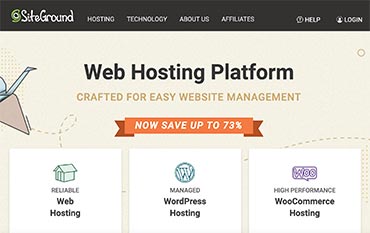
SiteGround provides a great hosting solution, which is stable, secure, and consistently fast in independent testing.
To make your website faster, SiteGround’s SuperCacher applies caching at three separate levels, and every plan includes a free CDN. On top of that, they offer free Let’s Encrypt SSL and manage security at both the server and application level.
SiteGround also bundles free Speed Optimizer and Security Optimizer plugins, plus AI Studio for content and site-management tasks. The Site Tools dashboard packs in more than 35 tools, which is a lot more than the typical cPanel setup.
With SiteGround, you get 24/7 customer support via phone, email, and chat. This is one host where the reputation for support matches real-world reviews.
Pricing: Special intro offer starts at $2.99 per month (83% off the regular rate, 12-month prepay required).
Renewal price: Renews at $17.99 per month.
Read our full SiteGround review »
 4. HostGator
 4. HostGator
Best for: budget bloggers who want a huge range of hosting tiers to grow into under one account.
- Load time: ~2.7s (ToolTester benchmark, slowest of the major hosts tested)
- Uptime: 99.96%
- Support: 8/10
- Website: HostGator.com
We believe HostGator is one of the most feature-rich blog hosting providers for the price. From site-building tools and templates to their one-click application installer, you’ll find everything you need to start your blog from scratch.
In addition, they also provide you with $200 worth of ad credits to grow your site. You also get full cPanel access with SSH and WP-CLI support if you want more control later.
Their extensive online customer support portal is comprised of over 500+ video tutorials and 600+ help articles. They also offer 24/7 support via phone, live chat, and email.
A note on support: Trustpilot reviews for HostGator run high, but G2’s business-user reviews sit lower, with billing transparency as the most common complaint. Backups are also only weekly by default, and a manual restore costs $25, so consider the CodeGuard add-on if daily backups matter to you.
Check out this comparison article on Bluehost vs HostGator to see how these 2 blog hosting companies match up.
Pricing: Special intro offer starts at $2.75 per month on a 36-month term.
Renewal price: Renews between $8.95 and $10.99 per month depending on your term length.
Read our full HostGator review »
 5. WPEngine
 5. WPEngine
Best for: established blogs that have outgrown shared hosting and want built-in developer tools.
- Load time: 582 ms
- Uptime: 99.99%
- Support: 9/10
- Website: WPEngine.com
WP Engine is one of the most reputable managed WordPress hosting providers. It offers a range of enterprise-grade solutions to publishers and online stores.
For a faster web experience, WP Engine is partnered with Amazon Web Services and Google Cloud Platform. Both are optimized specifically to run WordPress blogs and sites.
Unlike typical budget blog hosts, WP Engine gives you Git, SSH, staging environments, and WP-CLI access on every plan. That makes it a natural next step once your blog needs real developer tooling.
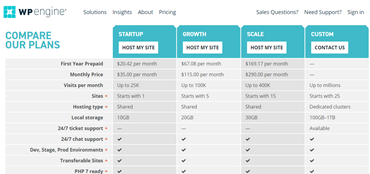
Pricing: The Essential plan starts at $27 per month. If your blog needs more power, the Core tier starts at $400 per month.
Read our full WPEngine review »
 6. Dreamhost
 6. Dreamhost
Best for: bloggers who want the longest money-back window and daily backups included on every plan.
- Load time: 445 ms
- Uptime: 99.90%
- Support: 7/10
- Website: Dreamhost.com
DreamHost is an officially recommended hosting company by WordPress.org. They offer one of the longest money-back guarantees in web hosting, 97 days, so you can try their hosting risk-free.
With every hosting plan, you’ll get a 1-click WordPress install, free domain purchase, blog domain hosting, and a free SSL certificate. You can manage your website files with their easy-to-use custom control panel.
Daily backups are included on every plan, including the cheapest one. Most budget hosts charge extra for that. If you outgrow shared hosting, DreamPress is DreamHost’s managed WordPress line, with built-in caching and staging environments.
Check out this comparison article on WP Engine vs. DreamHost to see how the 5th and 6th blog hosting services on this list match up.
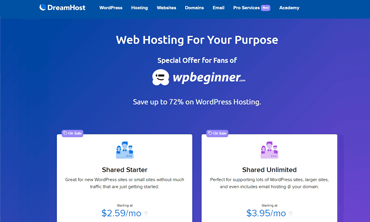
Pricing: Special intro offer starts at $2.89 per month.
Renewal price: Renews at $10.99 per month.
Read our full Dreamhost review »
 7. WordPress.com
 7. WordPress.com
Best for: bloggers who don’t want to manage hosting at all, even if that means giving up some control.
- Load time: Variable (SaaS environment, no fixed benchmark)
- Uptime: 99.999% (published SLA)
- Support: 7/10
- Website: WordPress.com
Get started with WordPress.com »
Tired of setting up a hosting account and optimizing it as your blog grows? Then you might consider a hosted platform.
With WordPress.com, all you have to do is create an account and start blogging. The best thing is that you don’t have to know the technicalities of managing a web hosting blog service.
Paid plans add real-time backups, staging environments, and SSH access on the Business tier and above, plus a published 99.999% uptime SLA. That’s worth knowing since the free plan doesn’t carry the same guarantee.
While WordPress.com lets you build a free blog, the downside is that it lacks the professionalism your blog audience might expect from you. For example, with the free account, you won’t be able to use a custom domain name for your blog.
Sometimes, they even display WordPress.com advertising and banners on your blog, making your blog look less professional.
Pricing: The Personal plan starts at $4 per month billed annually, or up to $9 per month if you pay monthly.
 8. Hosting.com (formerly A2 Hosting)
 8. Hosting.com (formerly A2 Hosting)
Best for: bloggers who want developer-friendly performance at a genuinely low starting price.
Heads up: A2 Hosting was acquired by World Host Group and rebranded to Hosting.com. The plans and infrastructure below reflect the current Hosting.com product.
- Load time: 1.28 s
- Uptime: 99.90%
- Support: 9/10
- Website: Hosting.com
Get started with Hosting.com »
Hosting.com carries forward A2’s developer-friendly reputation, with LiteSpeed servers, NVMe storage, and AMD EPYC processors standard across plans. You can still choose between Linux or Windows hosting.
On top of the standard money-back guarantee, Hosting.com also offers an anytime money-back guarantee. If you’re not fully satisfied, you can get a full refund within 30 days, and a prorated refund after that.
It also includes the Extendify AI website builder, which is a newer addition since the rebrand and worth trying if you want help getting a blog live quickly.
Check out this article to compare how HostGator vs. A2 Hosting matches up before you make your decision.
Pricing: Starts at $5.83 per month (Small plan), with Medium at $9.96 per month, Advanced at $16.63 per month, and Turbo at $24.99 per month.
Read our full Hosting.com (A2 Hosting) review »
 9. GreenGeeks
 9. GreenGeeks
Best for: bloggers who care about environmental impact without giving up standard shared-hosting features.
- Load time: 697 ms
- Uptime: 99.92%
- Support: 9/10
- Website: GreenGeeks.com
GreenGeeks is one of the best eco-friendly blog hosting providers around. Their hosting platform is built to perform well while staying environmentally friendly.
They offer a wide variety of hosting options including shared, VPS, reseller, and WordPress hosting, plus support for Drupal, Joomla, Magento, and other CMS platforms if your plans change later.
Most data centers consume large amounts of energy for cooling and air conditioning. To reduce their carbon footprint, GreenGeeks puts back 3 times the power they consume into the grid in the form of renewable energy. They’ve also been an EPA Green Power Partner since 2009.
Check out this article on Bluehost vs. GreenGeeks and compare these blogging hosts that closely match up.
Pricing: Special intro offer starts at $2.95 per month (12-month prepay required).
Renewal price: Renews at $13.95 per month.
Read our full GreenGeeks review »
 10. InMotion Hosting
 10. InMotion Hosting
Best for: bloggers who want a long 90-day refund window while they decide if a host is right for them.
- Load time: 982 ms
- Uptime: 99.91%
- Support: 9/10
- Website: InMotionHosting.com
Get started with InMotion Hosting »
InMotion Hosting offers you a variety of desirable blog hosting features, like NVMe SSD storage, unlimited bandwidth, a free domain name, and more. When signing up for a hosting plan, they allow you to choose your preferred data center.
They also offer a free and easy blog builder with all of their hosting plans. Their website builder, BoldGrid, was built on top of WordPress. Not only will you be creating a blog, but you also get the stability and flexibility of WordPress.
InMotion Hosting offers five ways to get your support questions answered: via phone, live chat, email, online tutorials, and community-based Q&A. Their 90-day money-back guarantee is three times the industry-standard 30 days.
Check out HostGator vs. InMotion Hosting and see how InMotion Hosting compares to another blog hosting service.
Pricing: The WP Launch plan starts at $5.29 per month. WP Power starts at $6.29 per month, and WP Pro starts at $11.29 per month.
Renewal price: WP Launch renews at $15.49 per month, WP Power at $19.49 per month, and WP Pro at $26.49 per month.
Read our full InMotion Hosting review »
How to Choose the Best Blog Hosting Site
There are a lot of different factors you need to consider when choosing a hosting service for your blog. Take a look at some of them below.
Reliability:
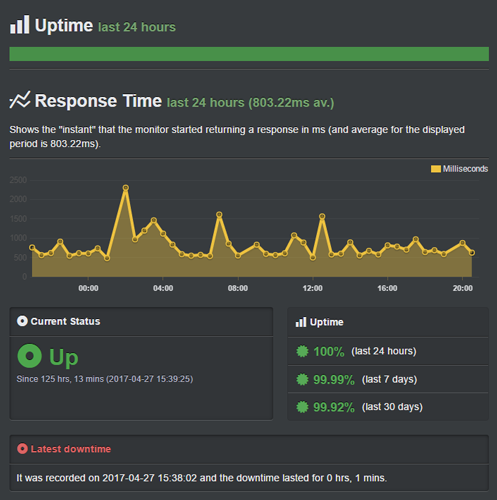
It’s a no-brainer that your readers may come to your blog around the clock and they’ll expect your blog to be up at all times.
This makes it essential to choose a reliable blog hosting service that offers maximum uptime. Anything below a 99.9% uptime guarantee is unreliable.
There are many ways to conduct due diligence about your hosting server’s uptime guarantee, like conducting a speed test. But, this isn’t feasible if you’re in a hurry to start a blog.
To make it easy for you to analyze whether the hosting provider you want to choose is reliable, we’ve created a test site on all the major hosting providers and conducted some speed tests using different tools.
We used two different speed testing tools, Pingdom and Load Impact, to analyze the uptime guarantees offered by the hosting providers and how the website performs during traffic surges on each hosting service.
Speed:
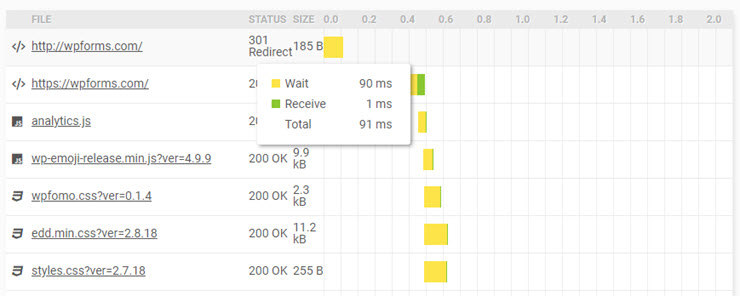
Just like the uptime guarantee, speed is another critical element you’ll need to consider when choosing a hosting provider for your blog.
Nearly half of your visitors expect your blog to load in just 2 seconds. Even worse, most of your readers will abandon your blog if it takes more than 3 seconds to load.
While you can find a lot of tips and tricks to increase your page loading speed, they won’t work if it’s hosted on a slow hosting server.
To get a hosting service that doesn’t compromise on speed, you don’t necessarily have to subscribe to an expensive hosting plan. A lot of hosting providers offer cheap hosting for those who are just starting out as a blogger, which is good enough for most beginner bloggers.
Features:

Building a blog on top of WordPress is the most popular way to get started with blogging. If you’re a first-time blogger, there’s a slight learning curve and then you’ll be able to grow your blog the way you want.
Due to the increasing popularity of WordPress, almost every website hosting company provides you with easy 1-click install options for WordPress and other website scripts like Joomla and Drupal.
Besides a 1-click installer, you’ll want to take a deeper look into other features offered by your web hosting blog provider:
- Number of domains: Generally speaking, the hosting plans are classified on the basis of the number of domains you’re allowed to use. Understand how many blogs you want to host on your account and choose the right hosting provider that offers the most affordable hosting plan for your needs.
- Disk space and bandwidth: Shared hosting plans often come with unlimited disk space and bandwidth. While hosting companies often advertise that you get unlimited resources for your site, the reality is that you’ll still have usage restrictions. When running a blog, you’re required to be compliant with the Terms of Services of your hosting company.
- Email address: Some hosting providers also limit the number of business email addresses you can set up using your hosting account. Make sure to review this aspect as well before you choose a hosting provider.
- Free offers: Take a look at what comes free with your hosting account. For example, you may get free blog files, domain, and database transfers. Some providers also offer free Google AdWords and Bing credits to promote your new blog.
- Free domain: Reputed hosting providers like Bluehost also offer a free domain when signing up for a new hosting account. Purchasing a free domain along with your hosting account is the easiest way to get your new blog up and running. Keep in mind that if you purchase a domain name from another domain registrar, you could save on the renewal price in the long run.
- Free SSL: Just like free domain registration for the first year, some web hosting providers offer a free SSL certificate as well. Installing an SSL certificate on your blog will add a small green padlock icon in your address bar, which makes your blog look trustworthy. This can also be a great feature if you plan to sell products later, so your visitors immediately understand that their sensitive data, like credit card info, is sent over a secure connection.
With WordPress.org, you should also know that you’ll get access to thousands of free plugins and website themes that you can use. For instance, you can find tools to optimize SEO rankings, add social media share buttons, and other functionality like this.
New bloggers will love the ease of use with this platform.
Customer Support:
24/7 support is a standard feature offered by all popular blog hosts.
Support is typically offered via three options: phone, ticket-based email, and live chat. Although 24/7 support is a standard hosting feature, it’s in your best interest to check whether your hosting provider of choice offers free support throughout the day using these three options.
For example, Bluehost doesn’t offer ticket-based support in an effort to focus more on providing personal and direct support through phone or chat. This can be intimidating to users who want to get assistance for advanced issues that may take a bit longer to resolve.
Similarly, with DreamHost, Live Chat is also available only from 5 am to 10 pm PST and they don’t even offer free phone support for shared hosting. If you need assistance via phone, you’ll have to purchase the phone support addon separately.
The key is not to fall into the trap of your hosting providers’ free 24/7 support claim. Before you choose a hosting provider, do your research on what modes of support they offer throughout the day.
Beware of those web hosting companies who advertise 24/7 support, but only provide email support throughout the day. Offering only email support throughout the day doesn’t make sense.
It normally takes about 24 hours to get an email request resolved. Make sure the 24/7 support team is available for free via phone and live chat as well.
Documentation:
Make sure your hosting provider offers extensive documentation that helps walk you through every aspect of web hosting. With an extensive knowledge base, you won’t have to waste your time on live chat support because you can easily discover the solutions on your own by doing a quick search.
You can find helpful articles, guides, and how-tos that provide answers to all your questions regarding your web hosting account.
Refund Policy:
Another factor you should consider is the refund policy. Most blog hosting providers offer at least a 30-day money-back guarantee so you can try their service risk-free.
Keep in mind that some hosting companies charge absurdly high cancellation fees, so our advice is to avoid those providers at all costs.
Some hosting companies, like Hosting.com, even offer an anytime money back guarantee that enables you to get a pro-rated refund even after your trial period is over.
Understand the Different Hosting Options Available
To host your blog, you’ll find a few different hosting options available. This can be overwhelming, especially when you’re just starting out. Let’s take a look at the different blog hosting options:
Free Blog Hosting Sites:
Of course, you can start a blog on a free blogging platform, like Blogger or WordPress.com. But these free blogging platforms come with a lot of restrictions that keep you from growing, like:
- Lack of control: Free blogging sites don’t give you full control over your blog.
- No guarantees: Your blog’s host can take down your own blog for any reason without your consent. Because you don’t pay for it, you don’t own it.
- Limited customizability: With a free platform, your ability to customize the way your blog looks will be limited. Plus, you can’t add as many features as you’d like either.
- Monetization restrictions: A free platform, like WordPress.com, doesn’t allow you to monetize your blog with third-party ad platforms like Google AdSense.
- Branded Domain: When you choose a free plan with hosting platforms like GoDaddy and Wix, your domain will bear the hosting name like mybloggingsite.godaddy.com.
- Limited Storage: You’ll have only a small amount of space to store your website files, media, and database.
On the flip side, with a hosted platform, you can do whatever you want with your blog and have endless possibilities to monetize and customize it. Most web hosts offer unlimited storage, speed optimization, no downtime, and even one-click app installation.
Shared Blog Hosting
Shared hosting is the best option for new bloggers. Although it’s the cheapest option, it comes with all the features you’ll need from your hosting provider to get your blog up and running.
With a shared hosting server, resources are shared with other websites hosted on the same server. This is how hosting companies keep costs low while earning a profit from their business.
While most shared hosting packages claim to offer unlimited bandwidth, you’ll have usage restrictions and be required to adhere to their terms of service. Still, in most cases, their disk space and bandwidth are sufficient for running a blog with low traffic volume.
When you exceed the bandwidth, you’ll be notified so that you can upgrade to a VPS or any other higher-level plan to run your blog smoothly.
Related: What is Shared vs Managed WordPress Hosting.
WordPress Blog Hosting
While shared hosting requires you to install WordPress on your host by yourself, WordPress hosting comes pre-installed with it.
The main advantage of WordPress hosting over shared is that the ecosystem is built specifically with WordPress in mind. With WordPress hosting, you’ll get an extra layer of protection out of the box for your blog that resists common WordPress-specific malicious attacks and vulnerabilities.
The best WordPress blog hosting companies also give you access to WordPress experts who’re trained to answer any WordPress questions you may have.
VPS Blog Hosting:
If you need a hosting plan that’s better than shared hosting, VPS could be the best choice for you.
VPS hosting is an abbreviation for Virtual Private Server hosting.
With VPS hosting, despite sharing resources with other sites hosted on it, you get more power and flexibility.
Now, you might be wondering, how’s VPS hosting different than shared hosting?
With a shared hosting plan, hosting providers have a script to limit the resources of each client so that no one is using up all the resources. With VPS hosting, you’ll still be sharing resources with other clients.
But you’ll get a much more stable server hosting environment, with little to no fluctuation in the resources available.
In fact, VPS is basically an independent partition of a physical server. Virtualization creates multiple virtual partitions of a physical server that enable you to effectively control your own resources and configure them the way you want.
Want to know when VPS hosting could be the right choice?
If your small business or startup generates considerable traffic and it outgrows what your shared hosting account can handle, you might give VPS hosting a try.
VPS hosting is scalable, meaning your hosting provider can adjust the amount of server space allocated for your blog as your traffic grows.
Related: Shared vs Dedicated vs VPS Web Hosting.
Dedicated Server Blog Hosting:
If you want to host an extremely high traffic blog without having to share your server resources with other clients, dedicated server hosting could be the right choice for you.
By subscribing to a dedicated server hosting plan, you’re leasing a physical server from your hosting provider that’s dedicated to your blog. That means you get endless possibilities to configure it per your needs.
You won’t be sharing server resources with any other clients, so it costs much more than shared or VPS hosting. But you’ll get plenty of storage space even on a basic plan.
Dedicated hosting is less vulnerable to hacking, malware, and other security threats making it the best choice for WooCommerce sites and online stores. If you don’t want to employ a system administrator, it’s highly recommended to get a managed dedicated server.
Check out the best dedicated hosting services for WordPress here.
Recap: Best Blog Host Companies
After our reviews, we found that Bluehost is one of the best blog hosting sites on the market. Regardless of your budget and the size of your business, Bluehost has got a solid hosting solution for you, backed by some of the best individual support agents we’ve dealt with.
If you can afford a little bit more and want the fastest hosting environment on this list, then we recommend SiteGround. It consistently outperforms the rest of this list on speed benchmarks, so you can provide a fast experience for your audience.
FAQs: Best Blog Hosting Companies
Having helped thousands of users to get blog hosting, we’ve found that people ask the same sort of questions again and again. This is why we’ve compiled a list of frequently asked questions, so you can get started with the best hosting service for your blog.
Why purchase a blog host account when you can start a blog for free?
A free blog comes with a lot of restrictions, such as limited customization and monetization. Even worse, free blogging platforms can take down your blog at any time without your consent.
By purchasing blog hosting, you get full control over your blog without any restrictions.
How much does it cost to purchase blog hosting?
When you’re starting out with a new blog, you can choose a shared hosting plan for as little as a few dollars a month on an intro rate. As you grow your traffic, you can upgrade your hosting to handle more traffic.
You can read how much does it cost to build a website expert’s analysis for detailed costing.
Do I need to buy the domain and hosting from the same provider?
Not necessarily. You can get a domain and hosting from different providers. Some hosting providers allow you to register a domain name for free when purchasing a hosting account, which makes it easy to set up a blog from the ground up.
Alternatively, you can buy a domain name from a domain registrar. In the long run, buying a domain name from a domain registrar will be profitable for you because the domain renewal cost will be lower.
You’d like to check out these best blog name generators.
Do I need to get a hosting addon?
No. When you purchase a new hosting account, hosting companies will try to sell hosting addon products. Skip those addons because you’ll likely not need them when you’re just starting out with a new blog. You can always purchase them later if you need them.
What happens when your blog outgrows your initial plan?
If you exceed usage, you’ll likely receive an email from your hosting provider to reduce it. If you find frequent outages, it’s the best moment to upgrade to a higher plan so you can create a stable hosting environment for your blog.
Why does hosting support matter?
You never know when you’re going to get into trouble in terms of hosting.
Just because a web hosting provider has a satisfactory uptime score, that doesn’t necessarily mean your blog will be 100% secure and up around the clock. If you’re on a shared hosting server, your blog may also be affected by how other sites on that server use resources.
When you discover any issues with your hosting server, you’ll want to contact your hosting provider immediately and get the problem resolved instantly. That can only be done if your hosting provider has a good track record of successfully resolving support requests.
I want to switch web hosts, is it possible to migrate my site?
Yes, most web hosts offer free site migration services. Or you can follow our guide: How to Move a Site From One Web Host to Another.
Do I need managed WordPress hosting for my blog?
Not right away. Shared hosting is enough for most new blogs, and it’s the cheapest way to get started.
Once your blog is getting steady traffic, or you’re tired of managing caching and updates yourself, managed WordPress hosting like WPEngine or DreamPress takes that work off your plate. It costs more, but you get staging environments, better caching, and specialized WordPress support.
Resource Hub: Blog Hosting
That’s all we have for you today. Once you’ve selected the best web hosting plan for your blog, you’ll find these resources helpful in your next steps:
- How to Start a WordPress Blog Step-by-Step [The Complete Guide]
- 15 Best WordPress Blog Tools to Double Traffic and Growth
- 30 Ways to Make Money Online Blogging (On the Side)
These posts will help you get started with your blog. You’ll find the right tools and strategies to grow your blog and make money online.