TL;DR: I tested both WPForms and Google Forms side-by-side. WPForms wins for WordPress sites that need payment forms or advanced features, but Google Forms is perfect if you just need simple surveys and want to save money.
Are you looking to build an online form on your WordPress site? Not sure whether you should use WPForms or Google Forms?
I spent three hours last week helping a friend pick between WPForms and Google Forms for her yoga studio.
She needed to collect class signups but didn’t want to pay for features she’d never use. The thing is, most comparisons skip the real question: which one actually fits your needs?
So I built the same contact form in both tools. I tested speed, ease of use, and whether my non-tech friend could handle updates herself. Here’s what I found.
To help you find the right form builder for your needs, we decided to do a head-to-head comparison between WPForms and Google Forms.
Key Takeaways
- I reveal which builder works best when you need payment collection built in
- I show you how template counts actually affect your setup time
- Tested both tools to find which one handles WordPress embedding better
- I explain when free options give you enough features to skip paid plans
- I compare support quality so you know who answers when things break
We mainly looked at different aspects:
- WPForms vs. Google Forms – Overview
- 1. WPForms vs. Google Forms – Which One is More Popular?
- 2. WPForms vs. Google Forms – Features
- 3. Google Forms vs. WPForms – Ease of Use
- 4. WPForms vs. Google Forms – Documentation & Support
- 5. Google Forms vs. WPForms – Pricing
- Pros and Cons
- FAQs: WPForms vs. Google Forms – Which One is Best Compared
Towards the end, we’ll tell you which one is the best option for you.
WPForms vs. Google Forms – Overview
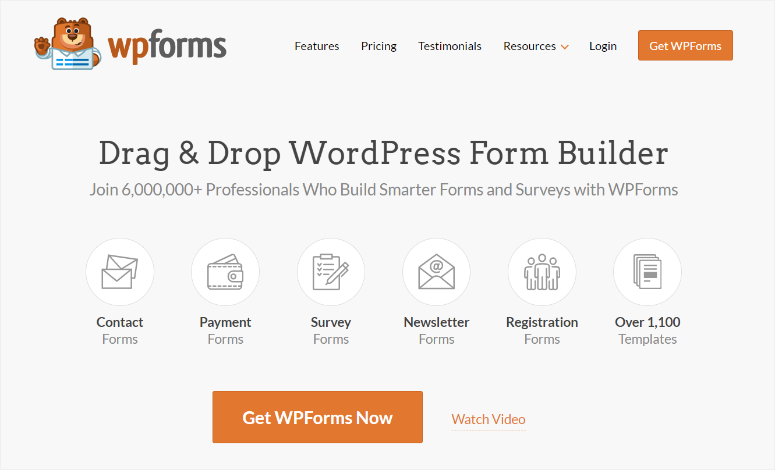
WPForms is an all-in-one form builder plugin that lets you create any kind of form for your website, including contact forms, signup forms, survey forms, and more. You can use its form templates to get a head start or build your form from scratch depending on your needs.
It supports file uploads, lets you split long forms into multiple forms, accepts payments, integrates your form with an email marketing service, and does a lot more.

Unlike WPForms, Google Forms is more of a survey form builder. However, it can be used to set up other forms as well, such as contact forms.
Since it’s not a WordPress-centric form builder, you’ll have to manually embed the code to your website; no plugin is available for WordPress integration. Although it’s best used as a survey form builder, you can create polls, questionnaires, data collection forms, or any other forms that you can think of. It also lets you upload different file formats like images, videos, links, etc.
The form entries are stored in Google Drive and can be sent to your emails as well.
1. WPForms vs. Google Forms – Which One is More Popular?
According to Datanyze, a web data company, WPForms has a 34.05% market share while Google Forms has 15.02%.
Now, this data doesn’t necessarily mean that there are more WPForms forms created than Google Forms. Keep in mind that Google Forms are often published/hosted on Google Forms’ website itself.
This data just means that more websites are hosting WPForms than Google Forms. This shouldn’t come as a surprise especially because over 42% of the web is hosted on WordPress and WPForms is currently the fastest-growing free contact form plugin in the WordPress repository.
2. WPForms vs. Google Forms – Features
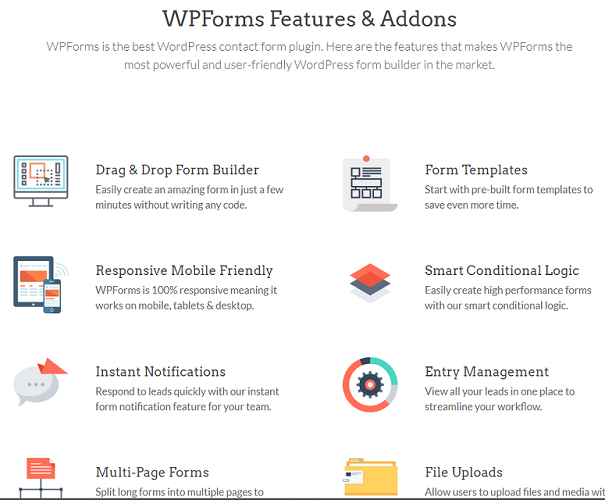
WPForms offers great features to create a pleasant form-building experience. The best thing about this plugin is that it even lets you create form-specific landing pages, which look similar to Google Forms and also provide almost the same features.
Here’s a list of some of the features it offers.
- Drag and drop builder: This makes it easy for you to create your forms without coding.
- Form Templates: WPForms offers various stunning form templates to help you get a head start.
- Spam Protection: Keep your forms secure from spam submissions.
- Smart Conditional Logic: Show and hide fields and do more based on user input.
- Payment Support: Easily collect payments, donations, etc. with PayPal and Stripe from your forms.
- Entry Management: View all your leads in one place and keep things organized.
- Email Marketing: Connect to various email marketing services and grow your list.
- Zapier Support: Connect to hundreds of apps for empowering your website with advanced features.
- Add Geolocation: Personalize your forms by detecting geolocation.
- Several Addons: This enables you to expand your form features with several powerful addons.
- Mobile Responsive: Makes your form appear good on mobile devices.
Here’s a detailed review of WPForms.
Google Forms also offers amazing features for you to get started. Here’s a list of features you might want to check out.
- Multi-form Format: Easily create multiple question type forms.
- Supports Different File Format: Create survey forms with different file format support like images, videos, links, etc.
- Various Form Templates: It offers several form templates, so you don’t always have to start from scratch
- Email Reminders: Send email reminders to your users about your forms.
- Smart Suggestion: It suggests answers to questions in your forms for user-friendly forms.
- Customizable Branding: Customize your forms to blend in with your brand.
- Conditional Logic: Create advanced forms with its conditional logic feature.
- Real-time Response Chart: Display real-time results for polls, quizzes, etc.
The key differences between them are that WPForms is an all-in-one form builder plugin, whereas Google Forms is more of a survey form.
For example, with WPForms, you can build any form, like email signup, registration, survey, order, donation, etc. On the other hand, with Google Forms, you can only build contact forms and survey forms.
Winner
After looking at both options, WPForms is clearly the winner with all its advanced features.
3. Google Forms vs. WPForms – Ease of Use
WPForms is designed specifically with beginners and non-techies in mind. This makes the interface super easy and flexible for anyone to handle. All you need to do is select your template, add your fields using its drag-and-drop builder and embed your form in your WordPress site. You can find hundreds of templates that are best suited to any niche.
Customizing the fields is also extremely easy and the plugin offers full flexibility to customize each template to meet your requirements. Just click on them and start editing the fields on your left.
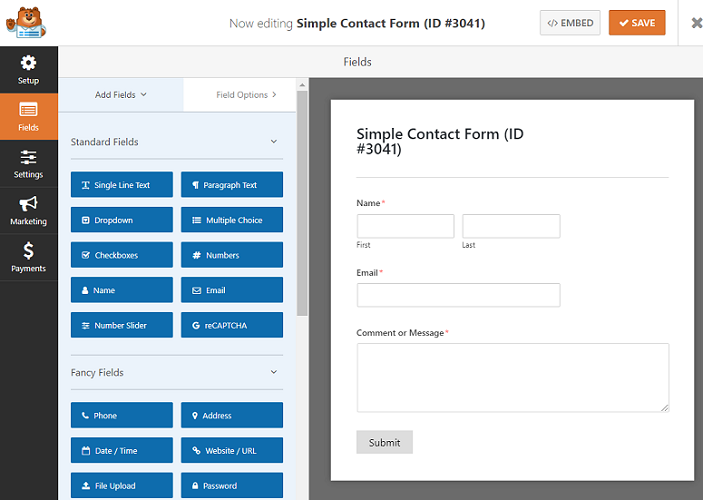
Even though the plugin comes with a lot of features, the core version isn’t bloated at all. In order to extend the features of core plugins, you’ll have to install the addons.
Google Forms also offers an easy interface to create your forms. Just go to Google Forms, click on the + button, and start creating your form. You have all the options on your right-hand side and you’ll see the real-time view right on your screen.
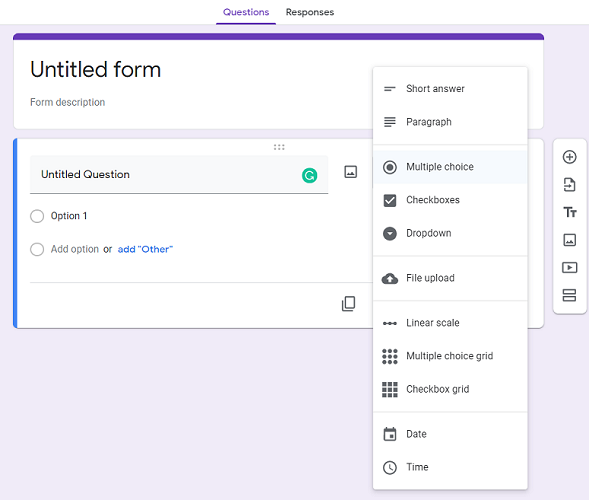
Google Forms only provides 17 premade templates, as opposed to 1,200+ templates by WPForms.
Winner
Both WPForms and Google Forms are easy to use. However, in terms of the number of templates, WPForms blows Google Forms out of the water.
4. WPForms vs. Google Forms – Documentation & Support
Both WPForms and Google Forms are very well documented. If you got stuck, you could easily find a solution from their extensive knowledge bases.
WPForms offers excellent support to its customers. You can reach out to their friendly support team by raising a ticket and someone from the team will reach out to you at the earliest with a solution to your problem.
Google Forms has a help center with a set of questions and answers, which works like a forum, supported by a global community. However, answers aren’t guaranteed.
Winner
WPForms
5. Google Forms vs. WPForms – Pricing
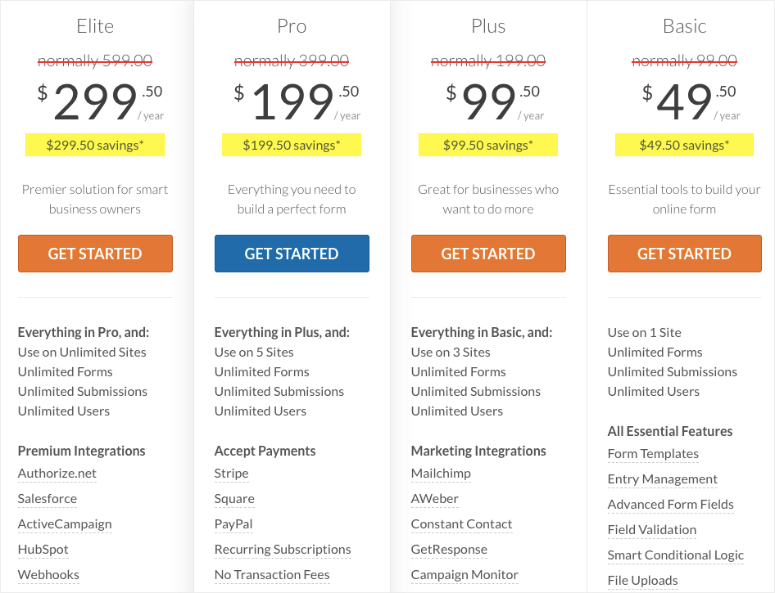
WPForms has a free version that lets you create beautiful and professional-looking forms without any code. For more form features, you can upgrade it to one of its premium plans.
Conversely, Google Forms is a 100% free app. Pro version is part of G Suite. License starts at $6/user/month
Winner
It’s a tie.
Pros and Cons
WPForms Pros and Cons
🟢► Pros
- Native WordPress Integration: I installed it like any plugin and my forms appeared in the WordPress dashboard immediately without iframe embedding hassles.
- Payment Processing Built In: I connected Stripe in under 5 minutes and started accepting donations without needing a separate payment tool or coding.
- 1,200+ Ready Templates: I found pre-built forms for job applications, event registrations, and order forms that saved me hours of field setup time.
- Conditional Logic: I built a form that shows different questions based on previous answers, which made my multi-step survey feel personalized and professional.
- Email Marketing Connections: I linked my Mailchimp account directly so new form submissions automatically join my email list without manual CSV uploads.
- Entry Management Dashboard: I view all submissions inside WordPress with search and filter options instead of jumping to external spreadsheets or email inboxes.
🔴► Cons
- Premium Price Tag: I paid $299.50 per year for the features I needed, which stings if you only run one simple contact form.
- Addon Confusion: I had to figure out which addons unlock which features because the core plugin doesn’t include everything shown in marketing demos.
Google Forms Pros and Cons
🟢► Pros
- Completely Free: I built unlimited forms with unlimited submissions and never saw a paywall or feature limit, which is perfect for tight budgets.
- Real-Time Collaboration: I shared editing access with my team and we all worked on the same form simultaneously, just like Google Docs.
- Automatic Data Organization: I got responses in a Google Sheet that auto-updates, making it easy to sort, filter, and analyze submissions without exporting files.
- Built-In Analytics: I viewed pie charts and response summaries instantly without connecting external analytics tools or building custom reports.
- Quiz and Grading Features: I created a quiz with auto-grading that scored answers immediately, which saved me hours compared to manual grading.
- Works Anywhere: I embedded forms on WordPress, Wix, and plain HTML sites using the same iframe code without platform-specific plugins.
🔴► Cons
- No Payment Collection: I couldn’t accept payments or donations directly, so I had to link to external PayPal buttons which felt clunky and unprofessional.
- Limited Design Control: I only got basic color and header image options, so my forms never matched my WordPress theme styling exactly.
Comparison Table WPForms vs Google Forms
| Plugin | Best For | Free Version | Key Feature | Starting Price |
|---|---|---|---|---|
| 🥇 WPForms | Businesses needing advanced form features | ✅ | Drag-and-drop form builder interface | $49.50/year |
| 🥈 Google Forms | Simple surveys and quick data collection | ✅ | Easy to use, quick setup | G Suite licenses $6/user/month |
FAQs: WPForms vs. Google Forms – Which One is Best Compared
Can I use Google Forms on WordPress without coding?
Yes, but you need to embed an iframe code. Google Forms gives you an embed code after you create your form. You paste this code into a WordPress page using the HTML block. The thing is, you might need to adjust width and height values to make it look right. It’s not as smooth as installing a WordPress form plugin, but it works.
Does WPForms work with free WordPress themes?
Yes, I’ve tested WPForms with dozens of free themes and it works perfectly. The forms automatically match your theme’s styling in most cases. You see, WPForms generates clean HTML that inherits your theme’s CSS. If something looks off, the plugin includes custom CSS options. Plus, all forms are mobile responsive by default, so they look good on phones regardless of your theme.
Which form builder is better for collecting payments?
WPForms wins here by a mile. I connected Stripe and PayPal directly inside the form builder. Google Forms doesn’t have payment features at all. You’d need to add a separate payment link, which means users leave your form to pay elsewhere. With WPForms, everything happens in one place. If you sell products, accept donations, or charge registration fees, WPForms is worth the investment.
Can I export form entries from both tools?
Yes, but the process differs. Google Forms stores everything in Google Sheets automatically, so you download a CSV anytime. WPForms keeps entries in your WordPress database. You export them as CSV or Excel files from the Entries page. I found WPForms easier because I don’t need to open a separate Google account. Both tools let you email entries to yourself immediately after submission too.
Does Google Forms have spam protection like WPForms?
Google Forms includes basic bot protection, but I still got spam submissions occasionally. WPForms integrates with reCAPTCHA, hCaptcha, and has custom spam filtering. I noticed way fewer spam entries with WPForms. On top of that, WPForms lets you block specific email domains and keywords. If spam is a big problem for you, WPForms gives you more control and better results overall.
Which tool should I choose if I’m just starting out?
Start with Google Forms if you need a simple contact form or survey and don’t want to spend money. It’s free and takes 10 minutes to set up. Switch to WPForms when you need payments, email marketing integration, or advanced conditional logic. I tell beginners to try Google Forms first, then upgrade to WPForms when their needs grow. You’ll know when you’ve outgrown the free option.
Which one is Better – WPForms or Google Forms?
After our comparison, it’s quite evident that WPForms is way ahead of Google Forms. What we think the key difference between these 2 plugins is the ease of access/management.
Since WPForms is a WordPress plugin, you can easily manage your forms and entries right within your WordPress dashboard. However, you’ll have to log into your Google account every time you want to edit the forms and view your survey responses.
That said, if you’re looking for an all-in-one form solution that provides you with every possible feature, then WPForms is the best choice. So you can use it as the best Google Forms alternative in the market.
Google Forms could be the best choice for you if you want to publish the same form on multiple websites that run on multiple platforms (like WordPress, Joomla, etc.), such as a survey form or job application form, etc., and organize all form entries in a single location.
That’s it. We hope you liked our article on WPForms vs. Google Forms and helped you find the right choice for your needs. You might also want to check out how to build a contact form in WordPress.

Comments Leave a Reply