Hostinger Uptime Guarantee & Speed Test Results
Another area we focus on when reviewing and testing host providers is performance. A fast WordPress website improves the user experience. Even though there are many ways to improve site performance, starting it off from the host company you choose can make a big difference.
In a nutshell, if you want a high-speed website, choosing fast web hosting is compulsory.
So, how did we test the performance of Hostinger?
To test the performance of the hosting server for our Hostinger review, we’ve created a test site powered by WordPress, using the default Twenty Twenty-Five theme, and uploaded some dummy content for theme development so as to mirror the live site environment on our test site.
We conducted a few different speed tests on our site with the following testing tools:
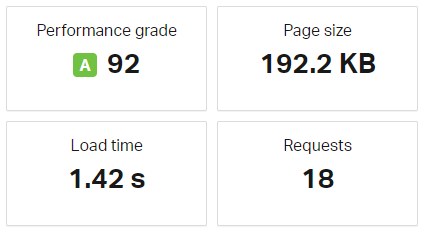
According to our Pingdom’s website speed test, we found that our test site loads in less than two seconds.

Apart from the speed test, we also analyzed whether the hosting services can survive a traffic surge. Since one of our aims is to ensure a hosting provider is sustainable, checking to see if it can handle heavy traffic is just as important as the WordPress website’s speed.
For our traffic surge test, we used a popular testing tool, Load Impact, and sent some virtual users (VU) to our site. They gradually built up to 100 visitors at a time to see how the server would handle the traffic surge.
This test simulated a high volume of users accessing the website at the same time, pushing the server to its limits to evaluate how well it could handle traffic spikes.

After the Load Impact algorithm analyzed the test results on the hosting server, we found no performance issues.
Despite the increased traffic load, the Hostinger server maintained consistent response times with no downtime and slowdowns.
This level of performance is crucial to our project and client websites, which rely on consistent uptime and fast loading speeds, especially during peak traffic periods. Such reliability is a key factor in building trust and confidence in the hosting service, making it a strong choice for both our small and large-scale websites.
As a result, we have expanded our Hostinger usage to more of our WordPress properties.
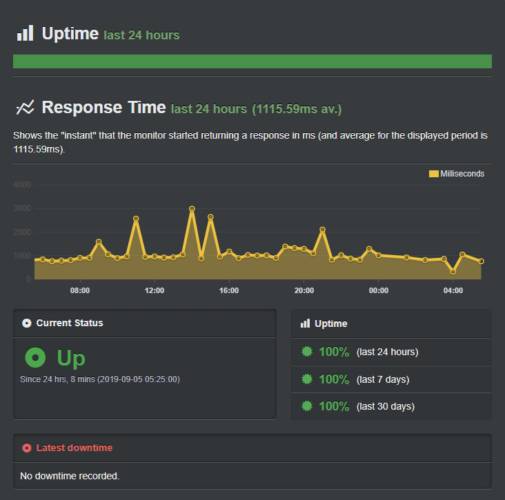
However, you can see that the response time was a bit higher at a certain point, and it went down quickly. According to Load Impact, the average response time of the Hostinger server was 116ms. It’s quite common to have a high response time at a certain point for a shared hosting account because a lot of websites will be sharing resources with each other.
For more details, you may take a look at this article: Web Hosting: Shared vs. VPS vs. Dedicated.

It’s also vital to note that no downtime has been recorded during our hosting performance test. You can see the screenshot below for a detailed look at the server response time.
Hostinger Server Response Time
The content of your site can have an impact on your page loading time. For instance, if your site contains too many images, it will take longer to load. In fact, images account for most of the downloadable bytes in a typical site.
To get accurate results, instead of solely analyzing page load time, we decided to test the actual server response time by ignoring our page’s content entirely.
For this test, we used another testing tool known as Bitcatcha.

Bitcatcha works quite differently from Pingdom.
It focuses on measuring how quickly the server responds to a request, providing a more accurate assessment of hosting performance.
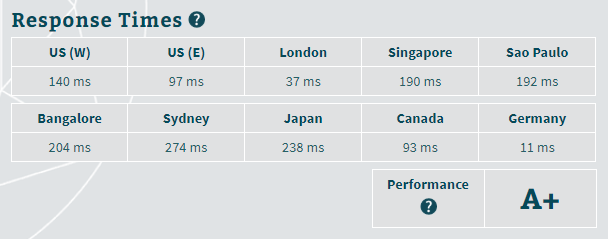
It evaluates server speed by sending requests from multiple global locations, including the US, Europe, Asia, and other regions. Each location is tested three times to ensure consistency, and the results are then averaged to give a comprehensive view of the server’s overall speed.
This method helped us determine how Hostinger performs for visitors in different parts of the world, making it a valuable tool for targeting an international audience.
You can see that Bitcatcha rated our Hostinger test site as A+.


 4.5 / 5.0

 4.0 / 5.0