
Je crée et vends des eBooks via des sites WordPress depuis plus de cinq ans. Comme beaucoup de gens cherchant des moyens de gagner de l'argent en ligne, les eBooks ont été l'une de mes premières expériences.
Ma première tentative fut un désastre. Je gérais tout manuellement. Envoyer les liens de téléchargement, faire le suivi avec les clients et protéger les fichiers contre le partage. Cela m'a presque rendu fou.
J'ai vite appris que le bon plugin eBook fait toute la différence. Il gère les paiements automatiquement, livre les fichiers instantanément et protège votre contenu. De plus, il vous fait économiser des heures de travail manuel chaque semaine.
Mais trouver ce plugin parfait n'a pas été facile.
La plupart étaient trop compliqués pour les débutants ou manquaient de fonctionnalités clés comme les téléchargements sécurisés. J'ai donc testé 8 plugins WordPress populaires pour eBooks afin de voir lesquels fonctionnaient réellement. Voici ce que j'ai découvert.
Points clés à retenir
- Je vous montre la façon la plus rapide de transformer un article de blog existant en un eBook professionnel pour générer des prospects, sans avoir besoin d'un designer, le tout en moins de 20 minutes
- Je révèle un plugin gratuit qui gère l'intégralité du flux de vente d'eBooks avec filigrane PDF intégré, sans WooCommerce requis
- J'ai testé 8 plugins WordPress pour eBooks pour découvrir lesquels protègent réellement vos fichiers contre le partage après l'achat
- Je détaille exactement quel outil utiliser si vous souhaitez développer votre liste d'e-mails par rapport à la vente directe d'eBooks, car ils nécessitent des solutions complètement différentes
Comment je teste les meilleurs plugins pour eBooks pour WordPress
🔍 Cliquez pour voir ma méthodologie de test
Voici exactement comment j'évalue :
- Vitesse d'installation – J'installe chaque plugin sur un site de staging WordPress vierge et je chronomètre le temps nécessaire pour passer de l'activation à un système de livraison d'eBook fonctionnel. Si un débutant ne peut pas le faire fonctionner en moins d'une heure, cela compte.
- Tests de livraison – J'effectue un véritable test de bout en bout : inscription, paiement (ou adhésion), et confirmation que le fichier arrive correctement. Je vérifie si le lien de téléchargement fonctionne, s'il expire correctement, et si la confirmation par e-mail a l'air professionnelle.
- Protection des fichiers – Je teste ce qui empêche quelqu'un de partager votre eBook payant après l'achat. Liens expirant, filigranes et limites de téléchargement. Je vérifie que cela fonctionne réellement, pas seulement que les paramètres existent.
- Vérification de la passerelle de paiement – Je confirme quelles passerelles fonctionnent dans le plan gratuit par rapport à ce qui nécessite une mise à niveau. Stripe et PayPal sont la référence. Moins que cela dans un plan payant est un signal d'alarme.
- Intégration de la plateforme d'e-mails – Je connecte chaque plugin à un service de marketing par e-mail et confirme que les nouveaux abonnés ou acheteurs atterrissent automatiquement dans la bonne liste, sans importations manuelles.
- Flux de lead magnet – Pour les plugins axés sur la livraison d'eBooks gratuits, je teste l'expérience complète d'opt-in à téléchargement du point de vue du visiteur. Les frictions tuent les conversions.
Outils que j'utilise :
- Mode test Stripe pour simulation de paiement sans frais réels
- Environnement de staging WordPress pour maintenir les tests isolés des sites en direct
- GTmetrix pour vérifier l'impact du chargement de la page après l'activation du plugin
- Mes propres sites de test IsItWP, fonctionnant sur différents environnements d'hébergement
Pourquoi faire confiance à IsItWP ?
Chez IsItWP, nous sommes la ressource de référence de la communauté WordPress depuis 2009, aidant plus de 2 millions d'utilisateurs à choisir de meilleurs plugins pour eBooks. Contrairement aux sites d'avis qui n'utilisent jamais réellement les produits, nous maintenons des comptes actifs, gérons des sites clients réels et fournissons une consultation WordPress continue.
Meilleurs plugins WordPress pour eBooks comparés
Si vous gérez un site WordPress et que vous ne l'utilisez pas pour distribuer des eBooks, vous laissez passer des opportunités. Que vous souhaitiez développer votre liste d'e-mails ou réaliser des ventes directes, le bon plugin change tout.
Avant de plonger dans les critiques complètes, voici un aperçu rapide de la façon dont les meilleures options se comparent. Je liste pour quoi chaque plugin eBook est le plus adapté, s'il dispose d'une version gratuite, sa fonctionnalité clé et son prix.
| Plugin | Idéal pour | Version gratuite | Caractéristique clé | Prix de départ |
| 🥇 WPForms | Formulaires de capture de prospects | ✅ Oui | Livraison automatique par e-mail avec pièces jointes | 49,50 $/an |
| 🥈 OptinMonster | Promotion des eBooks | ❌ Non | Technologie d'intention de sortie pour capturer les visiteurs qui abandonnent | 7 $/mois |
| 🥉 SeedProd | Pages de destination | ✅ Oui | Constructeur par glisser-déposer avec plus de 300 modèles | 39,50 $/an |
| 4. Easy Digital Downloads | Vente d'eBooks | ✅ Oui | Livraison sécurisée de fichiers avec des liens de téléchargement expirant | 199,50 $/an |
| 5. Beacon | Création de lead magnets | ✅ Oui | Conversion d'articles de blog en eBook en un clic | 19 $/mois |
| 6. Ebook Store | Ventes dédiées simples | ✅ Oui | Filigrane et cryptage PDF | 49 $ à vie |
| 7. Print My Blog | Réutilisation de contenu | ✅ Oui | Exportation en masse d'articles en PDF/ePub | 19,99 $/mois |
| 8. Books Gallery | Catalogues de plusieurs livres | ✅ Oui | Liens d'affiliation Amazon intégrés | 49,99 $/an |
Pour une vision plus large de la capture de prospects, consultez mon guide sur les meilleurs plugins de génération de prospects pour WordPress.
De plus, vous pouvez également utiliser la table des matières ci-dessous pour sauter à n'importe quelle section de l'article que vous souhaitez lire.
- 1. WPForms ⭐⭐⭐⭐⭐
- 2. OptinMonster ⭐⭐⭐⭐⭐
- 3. SeedProd ⭐⭐⭐⭐⭐
- 4. Easy Digital Downloads ⭐⭐⭐⭐⭐
- 5. Beacon ⭐⭐⭐⭐
- 6. Ebook Store ⭐⭐⭐⭐
- 7. Print My Blog ⭐⭐⭐
- 8. Books Gallery ⭐⭐⭐⭐
- Comment choisir le bon plugin eBook pour vos besoins
- FAQ : Meilleurs plugins WordPress pour eBook
- Verdict final : Dois-je utiliser un plugin WordPress pour mon eBook ?
- Hub de ressources : eBooks et produits numériques WordPress
Cela étant dit, commençons.
1. WPForms ⭐⭐⭐⭐⭐
Plus de 6 millions d'installations actives | Idéal pour : transformer les lecteurs de blog en abonnés par e-mail avec un eBook gratuit
WPForms est le constructeur de formulaires de contact le plus populaire dans WordPress, et pour cause. Je l'utilise le plus souvent pour collecter des prospects lorsque je distribue des eBooks gratuits ou tout autre aimant à prospects.
Il gère les paiements, livre les fichiers automatiquement et se connecte à votre service de marketing par e-mail. Le tout sans toucher une seule ligne de code.
Pourquoi WPForms est-il l'un des meilleurs plugins eBook WordPress ?
Voici ce que la plupart des gens manquent : votre eBook est inutile si vous ne pouvez pas atteindre les personnes qui le téléchargent. WPForms résout ce problème.
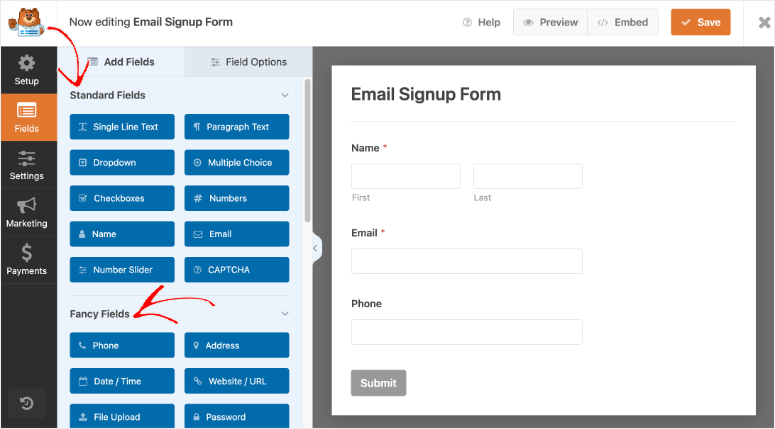
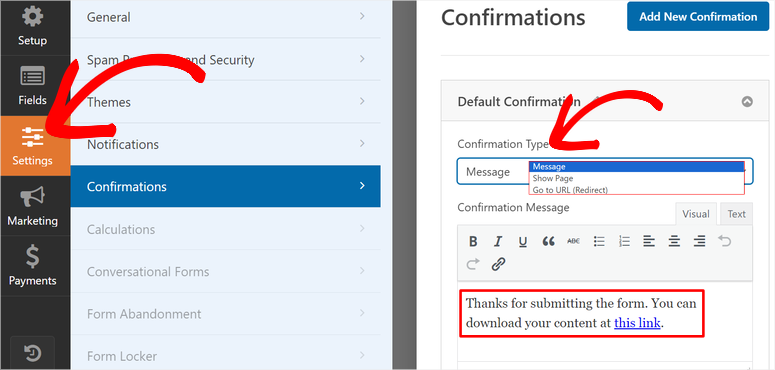
Vous créez un formulaire d'inscription simple, et lorsqu'une personne s'inscrit, WPForms peut automatiquement lui envoyer un e-mail personnalisé avec le lien de téléchargement de l'eBook.
De plus, le plan Pro vous permet d'accepter les paiements via Stripe ou PayPal directement dans vos formulaires.
Cela signifie que vous pouvez collecter le paiement et livrer le lien de votre eBook dans l'e-mail de confirmation, sans avoir besoin d'un plugin e-commerce séparé. C'est une solution complète en un seul outil.
Mon expérience avec WPForms
J'ai configuré une page de destination avec SeedProd pour un client qui a écrit un guide de 50 pages sur la planification d'événements. Après cela, j'ai intégré un formulaire de capture d'e-mails WPForms et l'ai connecté à son compte ConvertKit.
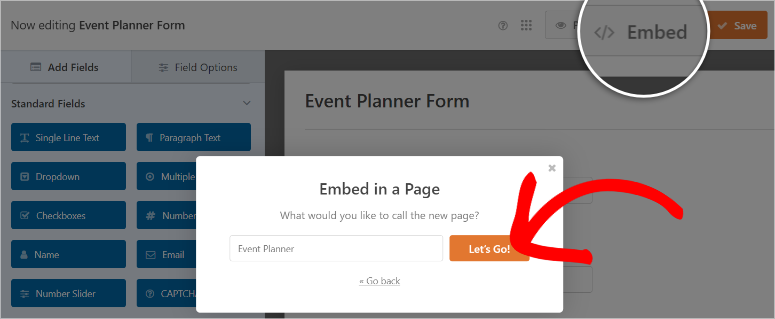
En quelques jours après le lancement, nous avions ajouté de nouveaux abonnés ciblés de qualité à leur liste de diffusion. WPForms a géré la livraison automatiquement, et je n'ai plus eu à m'en occuper.
Voici à quoi ressemble le constructeur d'eBooks WPForms :
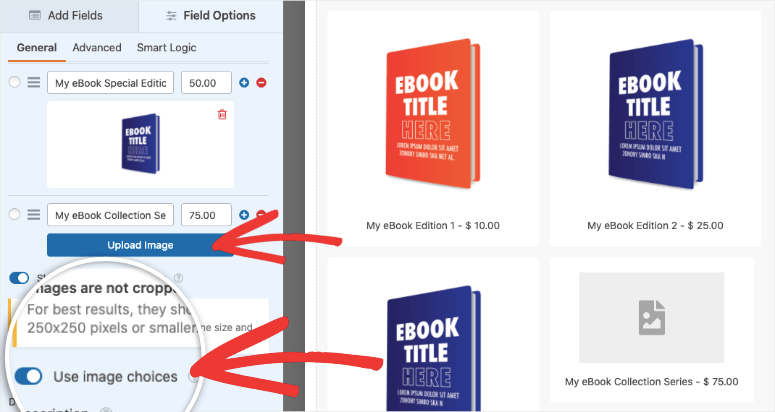
🟢► Avantages
- J'ai créé un formulaire d'inscription complet pour eBook en moins de 8 minutes en utilisant un modèle pré-conçu.
- Le champ de téléchargement de fichiers me permet de collecter plus d'informations, ou je peux simplement livrer le lien PDF via l'e-mail de confirmation.
- Il se connecte directement à plus de 10 plateformes de marketing par e-mail, donc les nouveaux abonnés vont directement dans ma liste.
- Le support de WPForms a la réputation de réponses rapides. Les avis sur Trustpilot mentionnent constamment des réponses en moins de 10 minutes, même le week-end.
🔴► Inconvénients
- L'acceptation des paiements nécessite le plan Pro, ce qui représente un investissement si vous débutez.
- Il n'est pas conçu spécifiquement pour gérer une boutique en ligne comme certains autres outils de cette liste.
Mon verdict : WPForms est ma principale recommandation si votre objectif principal est d'utiliser un eBook pour développer votre liste d'e-mails. C'est facile, fiable et se connecte directement à votre plateforme de marketing par e-mail. Vous pouvez avoir un formulaire fonctionnel en ligne en moins de 10 minutes.
Consultez ma revue complète de WPForms pour plus de détails. Si vous comparez les options, voyez comment il se compare dans ma comparaison WPForms vs. Gravity Forms.
Tarification : Plugin gratuit disponible (WPForms Lite). Le plan de base commence à 49,50 $/an. Pour ce scénario d'utilisation, vous avez besoin du plan Pro (requis pour les paiements) à partir de 199,50 $/an. Garantie de remboursement de 14 jours.
Consultez notre page de coupons WPForms pour les dernières offres.
2. OptinMonster ⭐⭐⭐⭐⭐
Plus d'un million de sites web l'utilisent | Idéal pour : promouvoir votre eBook avec des pop-ups ciblés qui convertissent les visiteurs qui abandonnent
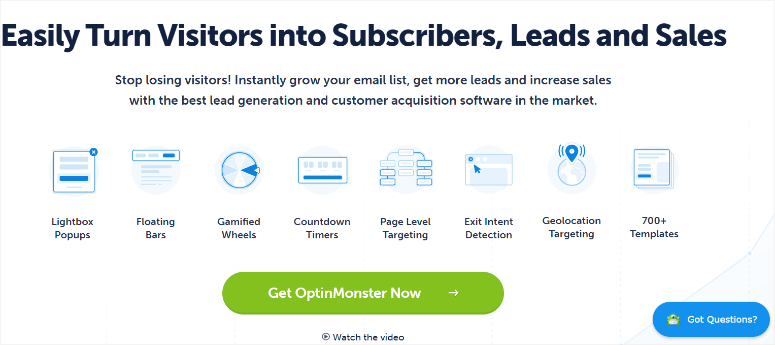
OptinMonster est sans aucun doute le meilleur outil de génération de prospects que j'ai trouvé pour promouvoir un eBook.
Au lieu d'attendre que les visiteurs trouvent votre page de téléchargement, OptinMonster vous permet de leur proposer l'offre au moment précis.
Pourquoi OptinMonster est l'un des meilleurs plugins WordPress pour eBooks ?
La magie réside dans le ciblage. Vous pouvez afficher un pop-up proposant votre eBook après que quelqu'un ait lu 70 % d'un article de blog. Ou déclencher un slide-in lorsqu'ils sont sur le point de quitter votre site.
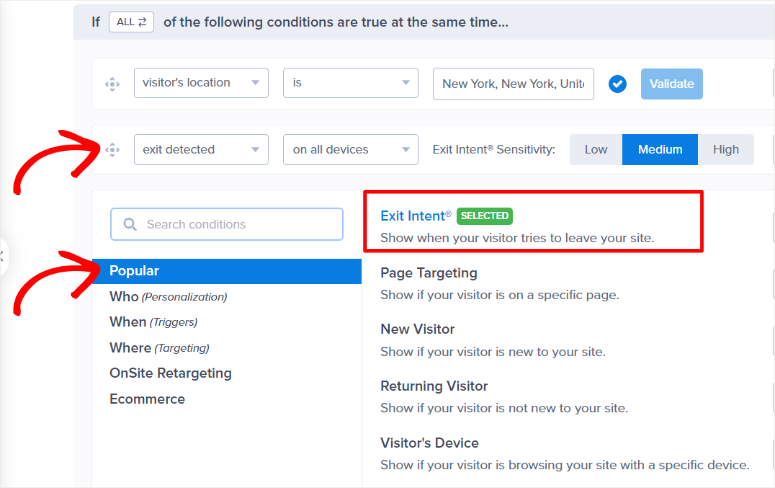
La technologie d'intention de sortie est ce qui a changé mes taux de téléchargement d'eBooks. Lorsqu'un visiteur déplace son curseur vers l'onglet du navigateur pour le fermer, OptinMonster le détecte et affiche une offre parfaitement synchronisée.
La fonction de verrouillage de contenu d'OptinMonster fonctionne également bien pour cela. Elle masque une partie d'un article de blog jusqu'à ce que quelqu'un saisisse son e-mail, transformant l'article lui-même en l'offre d'eBook au lieu d'un pop-up séparé.
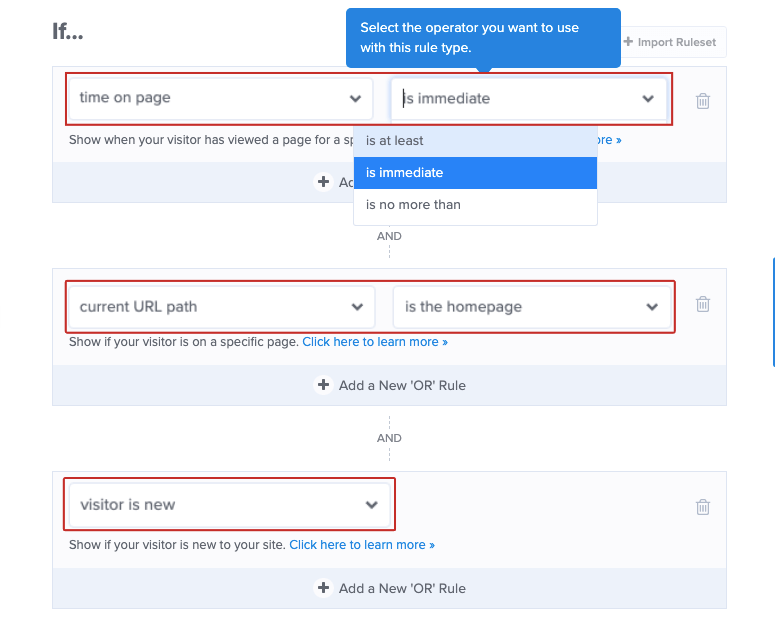
De plus, le ciblage au niveau de la page signifie que vous n'affichez votre offre d'eBook que sur les articles liés à son sujet.
Cela maintient la pertinence et évite d'agacer les visiteurs qui lisent quelque chose de complètement différent. C'est du marketing intelligent qui semble utile, pas envahissant.
Mon expérience avec OptinMonster
J'ai lancé une campagne de pop-up d'intention de sortie pour un client proposant une mise à niveau de contenu sur un article de blog avec 10 000 visiteurs par mois.
La popup proposait une checklist gratuite liée au sujet de l'article : moyens de convertir les visiteurs abandonnants. Elle a converti à 11,7 %, ajoutant plus de 100 prospects ciblés par semaine sans dépenses publicitaires supplémentaires.
C'est le pouvoir d'attraper quelqu'un au bon moment.

🟢► Avantages
- J'ai configuré une campagne en moins de 15 minutes en utilisant l'un de leurs plus de 700 modèles prédéfinis.
- La fonctionnalité d'intention de sortie seule a récupéré des prospects que je perdais chaque jour.
- Il s'intègre à tous les principaux services de messagerie, donc les nouveaux abonnés vont directement dans ma liste.
🔴► Inconvénients
- Il n'y a pas de plan gratuit, ce qui peut être un obstacle si votre budget est serré.
- C'est un outil marketing, pas un outil de livraison. Vous aurez besoin de quelque chose comme WPForms ou EDD pour livrer réellement le fichier eBook.
- Attention au renouvellement automatique. Certains utilisateurs signalent avoir été facturés au prix de renouvellement complet sans avertissement clair, alors définissez un rappel avant la fin de votre première année.
Mon verdict : OptinMonster est ma recommandation de prédilection si vous avez déjà un eBook et que vous souhaitez en faire la promotion agressivement sur votre site. Les règles de ciblage et la technologie d'intention de sortie se rentabilisent par les prospects capturés. Utilisez-le en parallèle d'un outil de livraison pour une configuration complète.
Consultez ma revue complète d'OptinMonster pour plus de détails. Si vous hésitez entre les outils de capture de prospects, consultez ma comparaison OptinMonster vs. Bloom.
Tarifs : À partir de 7 $/mois (facturé annuellement) pour le plan Basic. Le plan Pro à 29 $/mois débloque l'intention de sortie et le ciblage par page. Garantie de remboursement de 14 jours.
Consultez notre page de coupons OptinMonster pour les dernières offres.
👉Commencez avec OptinMonster ici
3. SeedProd ⭐⭐⭐⭐⭐
1+ million d'installations actives | Idéal pour : créer des pages de destination d'eBooks à forte conversion et sans distraction, sans designer

SeedProd est le meilleur constructeur de pages WordPress pour créer une page de destination dédiée aux eBooks. Chaque eBook a besoin d'une page qui le vende.
Un titre clair, une description de ce qu'il y a à l'intérieur et un seul bouton d'appel à l'action.
SeedProd vous offre plus de 300 modèles professionnels pour commencer, y compris des pages de destination spécialement conçues pour la capture de prospects.

Pourquoi SeedProd est-il l'un des meilleurs plugins pour ebooks WordPress ?
La plupart des gens ne réalisent pas que le succès de votre ebook dépend autant de la page qui l'héberge que du contenu qu'elle contient.
SeedProd vous permet de créer des pages sans distraction, sans en-tête, sans menu de navigation et sans rien d'autre à cliquer que votre bouton d'appel à l'action. Cette concentration est ce qui génère des conversions.
De plus, il se connecte directement à plus de 20 plateformes de marketing par e-mail. Ainsi, lorsqu'une personne s'inscrit pour votre ebook, elle est automatiquement ajoutée à votre liste.
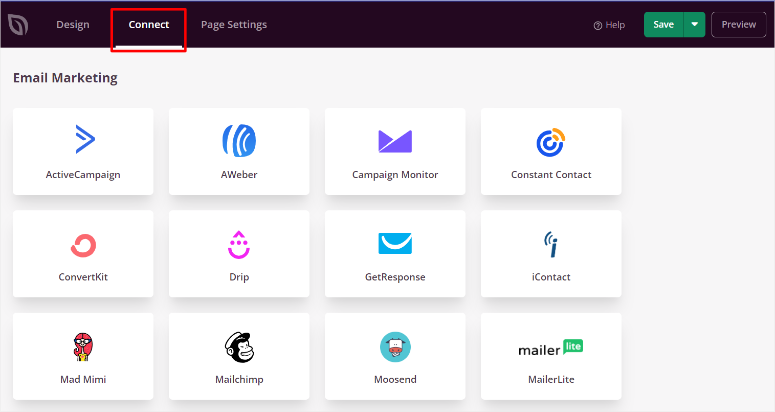
Le constructeur par glisser-déposer signifie que vous n'avez pas besoin d'un designer ou d'un développeur. Choisissez simplement un modèle, personnalisez les couleurs et le texte, et publiez.
Mon expérience avec SeedProd
J'ai créé une page de destination pour la société immobilière d'un client en utilisant l'un des modèles de pages de renvoi de SeedProd.
L'ensemble du processus a pris moins d'une heure, de la sélection du modèle à sa publication en ligne. Nous l'avons connecté à leur service de messagerie et mis en place un formulaire simple.
La page s'est chargée en 1,1 seconde sur GTmetrix, et je l'ai ensuite confirmée avec notre outil gratuit de test de vitesse IsItWP.
Au final, ils ont obtenu un taux de clics clair de 23 % vers le bouton de téléchargement. Cette page a généré plus de 500 prospects au cours de sa première semaine.

🟢► Avantages
- J'ai créé une page de destination complète à partir de zéro en moins d'une heure en utilisant leur constructeur visuel.
- Les plus de 300 modèles m'ont donné une énorme longueur d'avance au lieu de commencer avec une page vierge.
- Le test A/B intégré m'a aidé à déterminer quel titre convertissait mieux sans aucun outil supplémentaire.
🔴► Inconvénients
- La version gratuite est limitée, vous aurez donc besoin d'un plan payant pour des campagnes sérieuses.
- Il ne gère pas la livraison des ebooks par lui-même. Vous voudrez l'associer à WPForms ou EDD pour cela.
Mon verdict : SeedProd est ma meilleure recommandation si vous souhaitez une page de destination à forte conversion pour votre eBook sans avoir à engager un designer. Il est rapide, convivial pour les débutants et fonctionne avec tous les outils de marketing par e-mail que j'ai testés. La vitesse de chargement de la page à elle seule en vaut la peine.
Consultez ma revue complète de SeedProd pour plus de détails. Si vous comparez des constructeurs de pages, voyez comment il se compare à Beaver Builder.
Tarifs : Plugin gratuit disponible. Les plans payants commencent à 39,50 $/an pour 1 site. Le plan Plus à 99,50 $/an débloque le constructeur de thèmes complet. Garantie de remboursement de 14 jours.
Consultez notre page de coupons SeedProd pour les dernières offres.
4. Easy Digital Downloads ⭐⭐⭐⭐⭐
Plus de 40 000 installations actives | Idéal pour : vendre des eBooks directement avec une livraison sécurisée des fichiers et une boutique numérique complète
Easy Digital Downloads (EDD) est la solution la plus complète pour vendre des eBooks directement depuis votre site WordPress.
Contrairement à un plugin e-commerce général, EDD a été conçu dès le départ pour la vente de produits numériques.
Vous bénéficiez d'un panier d'achat, d'une livraison sécurisée des fichiers avec des liens de téléchargement expirant, et d'un traitement complet des paiements dès le départ.
Pourquoi Easy Digital Downloads est-il l'un des meilleurs plugins WordPress pour eBooks ?
Ce qui distingue EDD des autres outils pour eBooks de cette liste, c'est son système de protection des fichiers. Chaque lien de téléchargement expire après un nombre défini d'utilisations ou d'heures.
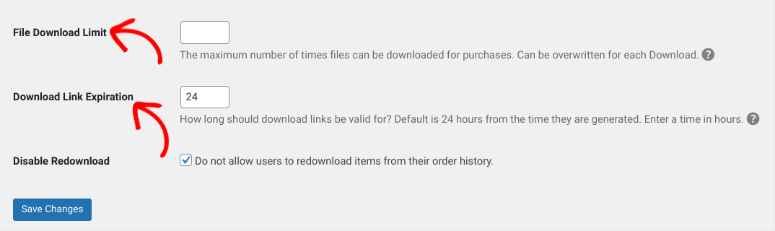
Cela rend beaucoup plus difficile pour les clients de partager votre eBook payant avec d'autres. La version gratuite est entièrement fonctionnelle pour la vente basique d'eBooks. Vous n'avez besoin de passer à la version supérieure que pour les abonnements ou les fonctionnalités avancées.
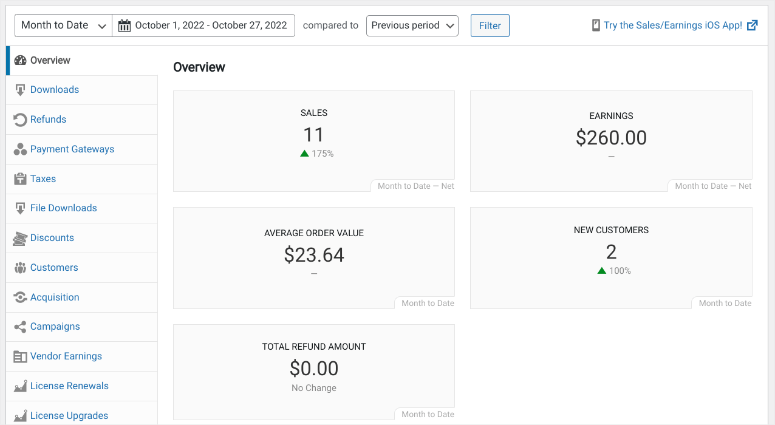
En plus, le tableau de bord de gestion client permet de voir exactement qui achète.
Je peux voir chaque client, ce qu'il a acheté, combien de fois il l'a téléchargé, et sa dépense totale. Il est facile d'identifier mes meilleurs clients et de les contacter avec une nouvelle offre d'eBook.
Mon expérience avec Easy Digital Downloads
Un client auteur est venu me voir avec un eBook de 200 pages terminé sur le jardinage. Il voulait le vendre directement, pas via Amazon ou d'autres marketplaces. Nous avons configuré EDD, connecté Stripe et téléchargé le PDF.
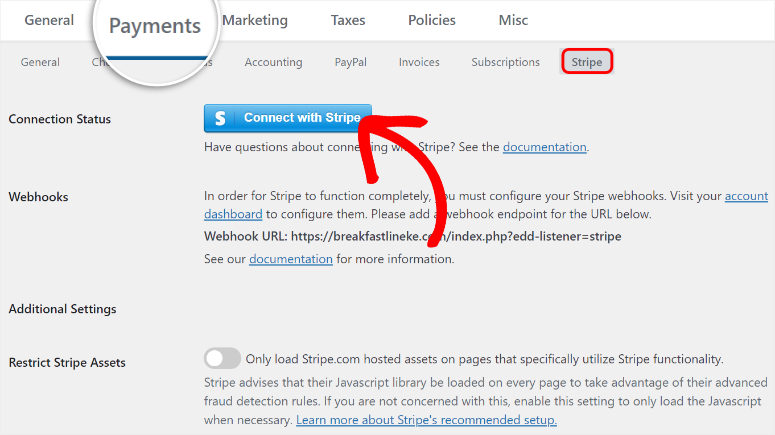
Au cours du premier mois, ils ont vendu 147 exemplaires à 19 $ chacun. EDD a géré le processus de paiement, la livraison des fichiers et a même envoyé des e-mails de suivi automatisés aux acheteurs. Le client n'a pas touché une seule ligne de code.
🟢► Avantages
- J'avais une boutique en ligne fonctionnelle en moins de 30 minutes avec la version gratuite.
- Les liens de téléchargement expirés ont donné au client la tranquillité d'esprit concernant le partage de fichiers.
- Des rapports de vente détaillés montraient les revenus, les produits les plus vendus et la valeur à vie du client sans plugins supplémentaires.
🔴► Inconvénients
- Les plans Pro peuvent être coûteux pour les débutants, ce qui peut sembler excessif si vous ne vendez qu'un seul eBook.
Mon verdict : Easy Digital Downloads est ma principale recommandation si votre objectif principal est de vendre des eBooks et de protéger vos fichiers. C'est l'outil le plus spécifiquement conçu de cette liste pour la vente de produits numériques. La version gratuite vous permet de commencer, et vous pouvez passer à une version supérieure à mesure que vous progressez.
Consultez ma revue complète d'Easy Digital Downloads pour plus de détails. Si vous comparez des options, consultez mon article comparatif sur la version gratuite et la version pro d'Easy Digital Downloads.
Tarifs : Plugin gratuit disponible sur WordPress.org. Les plans payants commencent à 199,50 $/an pour le plan Launch. Garantie de remboursement de 14 jours.
👉Commencez avec Easy Digital Downloads ici
5. Beacon ⭐⭐⭐⭐
Plus de 50 000 entreprises l'utilisent | Idéal pour : créer des eBooks professionnels de lead magnet en quelques minutes à partir du contenu de votre blog existant

Beacon est le moyen le plus simple de transformer vos articles de blog existants en un eBook d'aspect professionnel. Contrairement à tous les autres outils de cette liste, Beacon ne se contente pas de vendre ou de livrer des fichiers. Il s'agit de les créer.
Vous collez l'URL d'un article de blog, et il extrait automatiquement le contenu, la mise en forme et les images dans un modèle d'eBook prêt à être publié.

Pourquoi Beacon est-il l'un des meilleurs plugins WordPress pour les eBooks ?
Voici ce que la plupart des gens ne réalisent pas : vous avez probablement déjà un eBook caché dans vos archives de blog. Beacon vous aide à le trouver.
Vous prenez un article qui est déjà bien classé, vous le convertissez en un PDF soigné, puis vous l'offrez en téléchargement gratuit en échange d'une adresse e-mail. L'ensemble du processus prend environ 20 minutes.
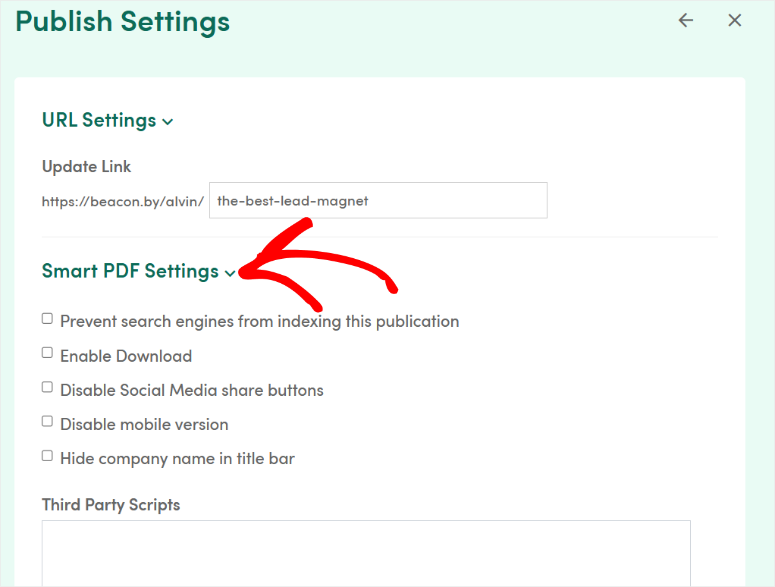
De plus, les modèles de Beacon sont conçus spécifiquement pour la génération de prospects. Il vous aide à créer des titres accrocheurs, des sections de contenu axées sur les avantages et des appels à l'action stratégiquement placés.
Vous ne créez pas juste un joli PDF. Vous en créez un qui convertit. De plus, il se connecte facilement à plus de 20 plateformes d'e-mails comme MailChimp, ConvertKit et ActiveCampaign.
Mon expérience avec Beacon
J'ai créé un article pilier de 6 000 mots sur "Comment j'ai sécurisé des sites WordPress en 40 minutes" qui générait déjà un trafic constant sur IsItWP.
Il inclut tout ce dont vous avez besoin pour vous assurer que votre site WordPress est sécurisé. J'ai fait beaucoup de recherches pour m'assurer de fournir de la valeur. Cela ressemblait plus à un eBook qu'à un article de blog dès le départ.
J'ai copié l'URL, l'ai collée dans Beacon, et l'ai laissé faire sa magie.
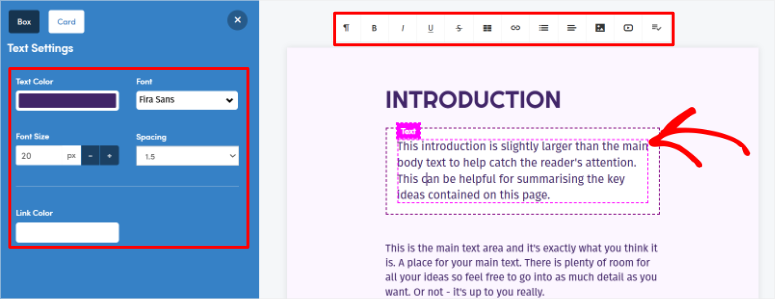
Moins de 20 minutes plus tard, j'avais un aimant à prospects PDF d'aspect professionnel avec une couverture personnalisée, des chapitres formatés et une page d'appel à l'action à la fin.
Je l'ai proposé comme mise à niveau de contenu, et il a ajouté 80 nouveaux abonnés la première semaine.
🟢► Avantages
- J'ai créé un aimant à prospects professionnel en moins de 20 minutes sans ouvrir Canva ni engager de designer.
- Le plan gratuit me permet de tester l'outil avec un e-book avant de m'engager dans un plan payant.
- Il s'intègre à ConvertKit et à d'autres services d'e-mail, de sorte que les nouveaux abonnés vont directement à la bonne séquence d'e-mails.
🔴► Inconvénients
- Il n'est pas destiné à la vente d'e-books, seulement à leur création et à leur livraison en tant qu'aimants à prospects.
- Le plan gratuit vous limite à 100 prospects stockés et une création par mois.
Mon verdict : Beacon est ma recommandation de prédilection si vous souhaitez créer rapidement des e-books d'aimants à prospects sans repartir de zéro. Il est particulièrement puissant lorsqu'il est combiné avec OptinMonster pour promouvoir l'e-book ou WPForms pour le livrer. Si vous avez du contenu de blog, vous avez un e-book qui attend d'être créé.
Consultez ma revue complète de Beacon pour plus de détails.
Tarification : Plan gratuit disponible avec 1 magnet par mois et 100 leads stockés. Les plans payants commencent à 19 $/mois pour le plan Lite. Le plan Professionnel à 49 $/mois débloque la création illimitée.
6. Ebook Store ⭐⭐⭐⭐
4,4/5 étoiles sur WordPress.org | Idéal pour : un plugin dédié simple et gratuit pour vendre des eBooks avec filigrane PDF intégré
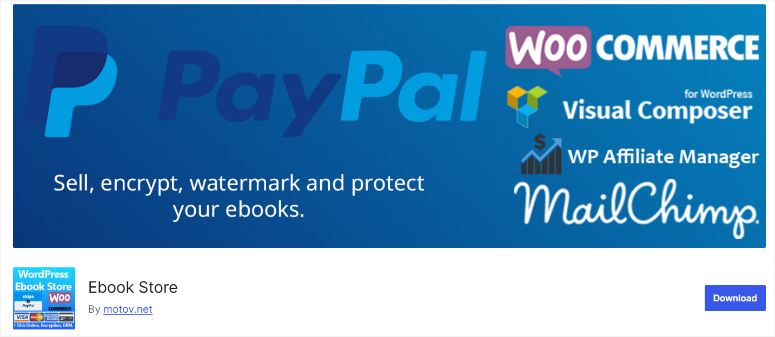
Ebook Store est le meilleur plugin gratuit dédié aux eBooks pour WordPress. Il vous offre tout ce dont vous avez besoin pour vendre des eBooks sans constructeur de page, WooCommerce, ou un plugin de paiement séparé.
Vous configurez une page produit avec un aperçu 3D du livre, acceptez les paiements PayPal et Stripe, et livrez le fichier automatiquement par e-mail. L'ensemble de la configuration prend moins d'une heure.
Pourquoi Ebook Store est-il l'un des meilleurs plugins WordPress pour eBooks ?
La fonctionnalité phare pour les vendeurs sérieux d'eBooks est la protection des fichiers de la version Pro. Elle peut ajouter un filigrane sur chaque téléchargement de PDF avec le nom et l'adresse e-mail de l'acheteur.
Cela rend beaucoup plus facile de retracer les copies piratées jusqu'à l'acheteur d'origine. Vous bénéficiez également du chiffrement PDF et de la protection contre l'impression, des fonctionnalités que la plupart des plugins de cette liste n'offrent pas.
Pro ajoute également la prise en charge de l'exportation pour les fichiers ePub, MOBI, TXT, ZIP, et même MP3 et MP4, de sorte que vous n'êtes pas limité au PDF. Chaque achat peut inclure un code QR pour la traçabilité, ce qui constitue une autre couche de protection au-delà du filigrane.
De plus, l'aperçu 3D du livre sur les pages produits donne à votre annonce d'eBook une apparence professionnelle, digne d'une librairie, sans aucun travail de conception de votre part.
Il gère les fichiers volumineux, permet aux utilisateurs de prévisualiser les PDF avant d'acheter, et dispose d'une interface épurée facile à naviguer. Pour un plugin gratuit, il est très performant.
Mon expérience avec Ebook Store
J'ai testé la fonction de filigrane de la version Pro sur un eBook de test que j'ai créé. J'ai acheté mon propre produit, téléchargé le fichier et je l'ai ouvert.
Effectivement, sur chaque page, il y avait un filigrane discret mais lisible avec mon nom et mon adresse e-mail. Ce n'était pas intrusif, mais c'était clairement là.
Cela seul donne aux auteurs la tranquillité d'esprit que le partage occasionnel sera beaucoup plus difficile à faire anonymement.
🟢► Avantages
- J'avais une librairie d'eBooks fonctionnelle en ligne en moins de 45 minutes avec la version gratuite.
- La mise à niveau Pro est un paiement unique, pas un abonnement annuel, ce qui est rare de nos jours.
- Le filigrane PDF avec les détails de l'acheteur est un excellent moyen de dissuasion contre le partage non autorisé.
🔴► Inconvénients
- Il a moins d'avis sur WordPress.org que les poids lourds comme WPForms ou EDD, bien que les mises à jour fréquentes suggèrent un développement actif plutôt qu'un plugin abandonné.
- L'interface est plus basique que celle des plugins dédiés au commerce électronique, mais cela la rend également plus simple.
Mon verdict : Ebook Store est ma principale recommandation si vous souhaitez un plugin gratuit et dédié qui gère l'intégralité du flux de vente d'eBooks sans nécessiter WooCommerce ou des constructeurs de pages. La mise à niveau Pro à 49 $ une seule fois est une affaire pour la fonctionnalité de filigrane seule.
Consultez notre guide des meilleurs plugins de téléchargement numérique pour WordPress.
Tarifs : Le plugin de base est gratuit. La mise à niveau Pro est un paiement unique de 49 $ et ajoute le chiffrement PDF, le filigrane et la protection contre l'impression.
👉Commencez ici avec Ebook Store
7. Print My Blog ⭐⭐⭐
4,8/5 étoiles sur WordPress.org | Idéal pour : recycler l'intégralité de votre archive de blog en un eBook formaté automatiquement
Print My Blog fait quelque chose qu'aucun autre plugin de ma liste ne peut faire. Il prend vos articles WordPress existants et les convertit en un eBook formaté, prêt à lire, au format PDF, ePub ou MOBI.
Si vous souhaitez recycler le contenu de votre blog en un aimant à prospects ou une mise à niveau de contenu, ce plugin le rend plus rapide que toute autre approche.
Pourquoi Print My Blog est-il l'un des meilleurs plugins WordPress pour eBooks ?
La magie réside dans le filtrage en masse du contenu. Vous pouvez sélectionner des articles par catégorie, tag, plage de dates ou auteur.
Ensuite, en un seul clic, Print My Blog les compile en un seul eBook formaté. Il supprime la navigation de votre site, les barres latérales et les publicités afin que le contenu exporté soit lu proprement.
Pour les blogueurs ayant des années de contenu, c'est de l'or pur.
En plus de cela, la version gratuite gère l'impression basée sur le navigateur et la génération de PDF de base.
Pour un formatage plus avancé comme la table des matières automatique, les notes de bas de page et l'exportation de documents Word, l'abonnement Pro PDF Service débloque ces fonctionnalités.
C'est un moyen simple de transformer vos archives en quelque chose que vous pouvez réellement vendre ou donner.
Mon expérience avec Print My Blog
J'avais un client dont le blog était entièrement axé sur le "SEO pour débutants". Ils avaient écrit plus de 100 articles en trois ans. Nous voulions créer un aimant à prospects, mais repartir de zéro aurait pris des semaines.
J'ai installé Print My Blog, sélectionné tous les articles de cette catégorie, et en un clic, il a généré un PDF de 85 pages avec une mise en page claire et une table des matières automatique.
Nous avons apporté quelques ajustements et c'était prêt. Temps total : moins de 15 minutes.
🟢► Avantages
- J'ai transformé trois ans de contenu de blog en un eBook de 120 pages en moins de 15 minutes.
- La version gratuite a géré tout ce dont j'avais besoin pour un aimant à prospects de base.
- Il prend en charge les formats PDF, ePub et MOBI, afin que les lecteurs puissent utiliser n'importe quel appareil.
🔴► Inconvénients
- L'ePub et le formatage avancé nécessitent un abonnement payant.
- Il n'est pas destiné à la vente d'eBooks, seulement à leur création à partir de contenu existant.
- Il existe une incompatibilité connue avec le thème Divi, alors vérifiez votre configuration au préalable.
Mon Verdict : Print My Blog est mon premier choix si vous souhaitez réutiliser l'intégralité de votre contenu de blog existant dans un eBook. Il n'est pas destiné à la vente, mais c'est le moyen le plus rapide de passer des archives de blog à un fichier eBook terminé. Si vous avez des années de contenu, ce plugin se rentabilise par le temps gagné.
Tarifs : Le plugin principal est gratuit. L'abonnement Pro PDF Service commence à 19,99 $/mois et débloque la génération d'ePub, les notes de bas de page et le rendu PDF professionnel.
👉Commencez ici avec Print My Blog
8. Books Gallery ⭐⭐⭐⭐
2 000+ installations actives, 4,8/5 étoiles sur WordPress.org | Idéal pour : présenter et vendre un catalogue de plusieurs livres avec des liens d'affiliation Amazon intégrés
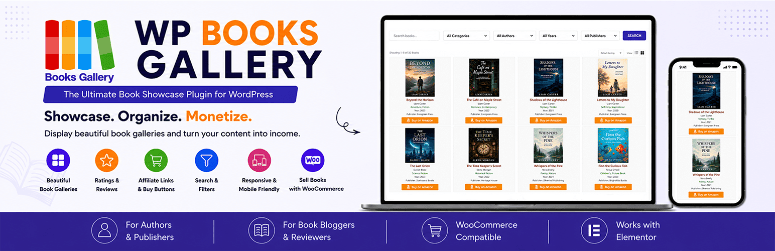
Books Gallery est différent de tous les autres plugins de cette liste. Au lieu de livrer un seul eBook, il crée une galerie consultable pour plusieurs livres à la fois.
Chaque fiche livre peut contenir un lien d'affiliation Amazon, et le plugin se connecte à WooCommerce si vous souhaitez vendre des copies directement depuis le même catalogue.
Pourquoi Books Gallery est l'un des meilleurs plugins WordPress pour eBooks ?
Si vous avez plus d'un eBook, les lister un par un avec un plugin de formulaire devient rapidement compliqué. Books Gallery résout ce problème avec une mise en page en grille dédiée conçue pour la navigation.
Les lecteurs peuvent filtrer votre catalogue par titre, auteur, ISBN, genre ou langue. C'est utile une fois que vous avez plus qu'une poignée de titres.
En plus, chaque livre peut porter son propre lien d'affiliation Amazon. Si certains de vos eBooks sont également disponibles en version imprimée via Amazon, cela transforme votre catalogue en une deuxième source de revenus sans configuration supplémentaire.
Mon expérience avec Books Gallery
La mise en route a pris moins de 10 minutes, de l'installation à la publication.
Le panneau de recherche et de filtrage s'est avéré étonnamment réactif lors des tests avec un catalogue d'échantillons en direct, permettant de filtrer rapidement par catégorie sans ralentissement.
Les extensions et les champs sont simples. L'ajout de balises d'affiliation Amazon personnalisées à des articles individuels a fonctionné immédiatement du premier coup, sans avoir à manipuler de shortcodes ou de paramètres de suivi supplémentaires.
🟢► Avantages
- 4,8/5 étoiles sur 92 avis sur WordPress.org, et il est activement maintenu avec une mise à jour datant d'il y a 4 semaines.
- Les liens d'affiliation Amazon sur chaque fiche de livre, ainsi que l'intégration WooCommerce, couvrent deux angles de monétisation en un seul plugin.
- La recherche et le filtrage par titre, auteur, ISBN, genre et langue facilitent la navigation dans un catalogue plus important.
🔴► Inconvénients
- La version gratuite est limitée à 20 livres affichés, donc un catalogue plus important nécessite un plan payant.
- Il n'y a pas de garantie de remboursement sur les plans payants, contrairement à tous les autres outils payants de cette liste.
- Il est conçu pour présenter et vendre plusieurs livres sous forme de catalogue, et non pour la livraison de fichiers d'e-books uniques ou pour des lead magnets comme la plupart des autres outils ici.
Mon verdict : Books Gallery est mon choix si vous gérez un catalogue de plusieurs livres plutôt que de livrer un seul e-book. Les liens d'affiliation Amazon intégrés et l'intégration WooCommerce couvrent les deux angles de monétisation en un seul plugin. Sachez simplement qu'il n'y a pas de remboursement si cela ne convient pas.
Tarifs : Version gratuite disponible sur WordPress.org, limitée à 20 livres. Les plans payants commencent à 49,99 $/an pour le niveau Basic. Professional est à 69,99 $/an, et Enterprise à 149,99 $/an. Des licences à vie sont également disponibles. Pas de garantie de remboursement.
👉Commencez avec Books Gallery ici
C'est tout pour ma liste. Mais avec 8 produits à choisir, cela peut être un peu écrasant. Pour vous aider, consultez la section ci-dessous pour affiner vos choix des meilleurs plugins pour eBook.
Comment choisir le bon plugin eBook pour vos besoins
8 plugins. 8 tâches différentes. Et voici la vérité : la plupart des gens font le mauvais choix non pas parce qu'ils ont choisi un mauvais plugin, mais parce qu'ils n'ont pas d'abord clarifié leur objectif.
Donc, avant d'installer quoi que ce soit, répondez à cette seule question : donnez-vous votre eBook ou le vendez-vous ?
Cette seule réponse élimine immédiatement la moitié de la liste.
Si vous donnez votre eBook en tant qu'aimant à prospects, votre priorité est la croissance de votre liste, pas la livraison de fichiers.
Vous avez besoin d'un formulaire qui capture les e-mails, s'intègre à votre service de marketing par e-mail et envoie automatiquement le téléchargement.
- C'est exactement pour cela que WPForms a été conçu. Je l'ai configuré en moins de 10 minutes sur des sites clients. L'eBook n'est qu'un prétexte ; WPForms s'occupe du reste.
- Associez-le à OptinMonster si vous souhaitez promouvoir cet eBook gratuit de manière agressive. En effet, OptinMonster ne livre pas de fichiers. Mais il présente votre offre aux bons visiteurs au moment précis. Cela inclut les déclencheurs d'intention de sortie, les déclencheurs de défilement et le ciblage par page. Si vous avez déjà un eBook et que les téléchargements sont faibles, c'est la pièce manquante. C'est pourquoi je recommande de les utiliser ensemble pour la génération de prospects sur WordPress.
- Et si votre eBook n'existe pas encore ? Commencez avec Beacon. Il transforme vos articles de blog les plus performants en un aimant à prospects PDF formaté et professionnel en moins de 20 minutes. Pas de designer. Pas de Canva. Collez simplement une URL et c'est parti.
Si vous vendez votre eBook, la conversation change complètement. Vous avez besoin de paiements, d'une livraison sécurisée des fichiers et d'une protection contre le partage. C'est une catégorie d'outils entièrement différente.
- Easy Digital Downloads est ma recommandation par défaut ici. Il a été conçu spécifiquement pour la vente de produits numériques en ligne, et non adapté à partir d'un formulaire de contact ou d'un constructeur de pages. La version gratuite vous offre une boutique fonctionnelle avec Stripe, des liens de téléchargement expirant et un tableau de bord client. J'ai vu des clients passer de zéro à leur première vente en moins de 30 minutes.
- Si vous avez un budget serré et que vous souhaitez la configuration la plus simple possible, Ebook Store est le choix sous-estimé. Gratuit pour commencer, 49 $ une fois pour Pro, et cette mise à niveau Pro inclut le filigrane PDF avec le nom de l'acheteur sur chaque page. Pour un auteur solo vendant un ou deux eBooks, il fait tout ce que EDD fait pour une fraction du coût.
Vous utilisez déjà WooCommerce ?
- Alors Books Gallery vaut le coup d'œil si vous gérez un catalogue de plusieurs livres plutôt qu'un seul e-book. Il combine une galerie consultable, des liens d'affiliation Amazon sur chaque fiche, et l'intégration WooCommerce pour des ventes directes en un seul plugin. Il n'y a pas de garantie de remboursement sur les plans payants, alors testez d'abord la version gratuite.
Si votre objectif est de construire la page de destination, pas le système de livraison.
- C'est SeedProd. Il ne gère pas les paiements ou la livraison de fichiers par lui-même. Mais aucun autre outil de cette liste ne crée une page de destination pour eBook plus rapide et plus performante, plus de 300 modèles, un constructeur par glisser-déposer et des tests A/B intégrés. Utilisez-le comme porte d'entrée, puis connectez WPForms ou EDD derrière lui pour la livraison réelle.
- Et si vous avez des années de contenu de blog existant qui prend la poussière ? Print My Blog est dans une catégorie à part. Sélectionnez les articles par catégorie, cliquez sur exporter, et il les compile automatiquement dans un PDF ou ePub formaté. Ce n'est pas pour la vente. Mais c'est le moyen le plus rapide de transformer une archive de blog en quelque chose qui vaut la peine d'être donné.
Vous avez maintenant ma liste complète des meilleurs plugins pour eBook, et comment choisir celui qui convient le mieux à votre entreprise. Si quelque chose n'est pas clair, consultez les questions fréquemment posées ci-dessous.
FAQ : Meilleurs plugins WordPress pour eBook
Quel est le meilleur plugin WordPress gratuit pour eBook ?
Cela dépend de votre objectif. Pour la génération de prospects, WPForms dispose d'une version gratuite puissante qui gère la capture d'e-mails et la livraison de fichiers. Pour la vente, Easy Digital Downloads et Ebook Store proposent tous deux des versions gratuites qui vous permettent d'accepter les paiements et de livrer les fichiers. Commencez avec le niveau gratuit et passez à la version supérieure lorsque vous avez besoin de plus de fonctionnalités.
Puis-je vendre des eBooks sur WordPress sans WooCommerce ?
Absolument. Easy Digital Downloads et Ebook Store sont conçus spécifiquement pour les produits numériques et gèrent les paiements et la livraison de fichiers sans WooCommerce. WPForms peut également accepter les paiements et livrer les fichiers via son plan Pro. WooCommerce est une option, mais pas une exigence.
Comment livrer automatiquement un eBook après paiement ?
La plupart des plugins dédiés aux eBooks gèrent cela automatiquement. Easy Digital Downloads envoie un lien de téléchargement après l'achat. WPForms livre le fichier via un e-mail de confirmation personnalisé. Ebook Store fait de même. L'essentiel est de choisir un plugin avec livraison automatisée afin de ne jamais avoir à envoyer les fichiers manuellement.
Ai-je besoin d'un plugin séparé pour protéger mon PDF du partage ?
Certains plugins incluent des fonctionnalités de protection. Ebook Store Pro ajoute un filigrane PDF avec le nom et l'e-mail de l'acheteur sur chaque page. Easy Digital Downloads utilise des liens de téléchargement expirant. Si vous utilisez un plugin de formulaire comme WPForms, vous distribuez probablement du contenu gratuit, donc le partage n'est pas une préoccupation.
Quelle est la différence entre WPForms et Easy Digital Downloads pour les eBooks ?
WPForms est un constructeur de formulaires idéal pour offrir des eBooks gratuits en échange d'une adresse e-mail. Easy Digital Downloads est une plateforme eCommerce complète conçue pour vendre des eBooks avec un panier, un traitement des paiements et une gestion sécurisée des téléchargements. Choisissez en fonction de si vous souhaitez développer une liste ou réaliser des ventes.
Comment promouvoir mon eBook sur mon site WordPress ?
OptinMonster est le meilleur outil de promotion. Utilisez des popups d'intention de sortie pour capturer les visiteurs qui abandonnent, des slide-ins pour apparaître après que quelqu'un ait lu un article, et un ciblage au niveau de la page pour montrer des offres pertinentes. Associez-le à une page de destination créée dans SeedProd et à un outil de livraison comme WPForms pour une configuration complète.
Verdict final : Dois-je utiliser un plugin WordPress pour mon eBook ?
Oui. Absolument. Surtout si vous avez déjà un site WordPress en cours d'exécution.
Voici la chose que personne ne vous dit : vous n'avez pas besoin d'une plateforme séparée pour vendre ou offrir des produits comme des eBooks. Les outils sont déjà dans votre tableau de bord WordPress. Il vous suffit d'avoir celui qui convient à votre objectif.
Je l'ai appris à mes dépens avec ce premier désastre il y a des années. Les e-mails manuels, les fichiers perdus, les heures que je ne récupérerais jamais. J'ai failli tout abandonner.
Mais je suis content de ne pas l'avoir fait. Parce que voici ce que je sais maintenant : votre eBook n'est bon que si le système derrière lui l'est. Le bon plugin ne vous fait pas seulement gagner du temps. Il transforme un projet unique en quelque chose qui travaille pour vous en mode automatique. Jour après jour. Semaine après semaine.
Votre contenu est prêt. Votre public est là. La seule chose qui vous sépare d'un eBook réussi est de choisir le bon outil et d'appuyer sur publier.
Alors allez-y. Faites le premier pas. Votre futur vous vous remerciera.
Hub de ressources : eBooks et produits numériques WordPress
Que vous débutiez ou que vous cherchiez à maximiser ce que vous proposez, ces guides couvrent tout ce qui concerne les eBooks et les produits numériques sur WordPress.
- Comment vendre un eBook sur WordPress – Tutoriel étape par étape pour publier et vendre votre premier eBook directement depuis votre site.
- Meilleurs plugins de génération de prospects pour WordPress – Comparaison complète des outils pour développer votre liste d'e-mails avec des lead magnets.
- Comment créer une page de destination dans WordPress – Créez des pages à forte conversion où se trouveront vos offres d'eBooks.
- Meilleurs plugins de téléchargement numérique pour WordPress – Guide complet des plugins pour vendre de la musique, des cours, de l'art, et plus encore.
- Comment gagner de l'argent en ligne en bloguant – 30 méthodes éprouvées pour monétiser votre site, y compris les eBooks.
- Meilleurs services de marketing par e-mail comparés – Les meilleures plateformes pour nourrir les abonnés que vous capturez avec vos eBooks.
Quoi que vous créiez, ces ressources vous aideront à construire le type de configuration d'e-book WordPress qui vous convient longtemps après avoir appuyé sur publier. Maintenant, allez créer quelque chose qui vaut la peine d'être téléchargé.

existe-t-il un plugin disponible où l'utilisateur peut seulement lire l'eBook (pas le télécharger) après l'achat.
Bonjour,
Quels sont les prix pour :
WPForms : Configurez un formulaire simple d'achat ou de téléchargement d'eBook et automatisez les paiements et la livraison.
OptinMonster : Utilisez des campagnes ciblées pour inciter plus de personnes à télécharger votre eBook.
Easy Digital Downloads : Une solution complète pour vendre tout type de produit numérique en ligne.
Salut, si vous visitez les liens joints à chacun de ces plugins, vous trouverez facilement la page de tarification. Chaque plugin a une tarification différente.