Suchen Sie nach den besten dunklen WordPress-Themes?
Laut Farbpsychologie suggeriert ein schwarzer Hintergrund Macht, Eleganz, Geheimnis, Mysterium, Angst und Unterdrückung. Er wird oft verwendet, um Glamour und Exklusivität zu kommunizieren.
Dieser Stil funktioniert in vielen Nischen. Er eignet sich am besten für Mode-, Glamour- und Luxusmarken.
In diesem Artikel stellen wir einige der besten dunklen WordPress-Themes vor, die Sie verwenden können.
Wichtige Erkenntnisse
- Vergleichen Sie 20 dunkle WordPress-Themes auf einen Blick. Springen Sie zur Vergleichstabelle unten für Preise und die am besten geeigneten Anwendungsfälle, bevor Sie die vollständigen Einträge lesen.
- Sehen Sie echte Funktionsdetails, keine generischen Beschreibungen. Die Einträge für Divi, Astra, OceanWP und SeedProd spiegeln ihre aktuellen Funktionsumfänge wider, nicht einen alten Schnappschuss.
- Vermeiden Sie einen Fehlkauf. Drei beliebte Optionen haben ihre Verkaufsweise geändert. Wir erklären genau, wie Sie sie trotzdem bekommen können.
- Wählen Sie nach Budget. Die Optionen reichen von kostenlosen WordPress.org-Themes bis hin zu Premium-Page-Builder-Preisen.
- Erhalten Sie eine schnelle Empfehlung. Lesen Sie unser "Finales Urteil" am Ende, wenn Sie nicht alle 20 Einträge lesen möchten.
Wie ich dunkle WordPress-Themes teste
Sehen Sie unsere Testkriterien
- Bestätigte, dass jedes Theme noch aktiv verkauft und aktualisiert wird, indem die Anbieter-Websites und bei kostenlosen Themes deren WordPress.org-Listing-Status direkt überprüft wurden.
- Verifizierte aktuelle Preise von offiziellen Preisseiten, anstatt sich auf veraltete Screenshots zu verlassen.
- Verglich echtes Nutzerfeedback von WordPress.org, G2 und anderen Bewertungsplattformen für die Themes mit einer öffentlichen Bewertungshistorie.
- Überprüfte den tatsächlichen aktuellen Funktionsumfang jedes Themes im Vergleich zu dem, was beworben wird, einschließlich wichtiger Versionsänderungen wie Divi 5.
Warum IsItWP vertrauen?
IsItWP überprüft WordPress-Themes und -Tools, um Ihnen zu helfen, den Kauf von veralteten oder nicht unterstützten Produkten zu vermeiden.
Wenn sich ein Produkt ändert sein Preismodell ändert oder eingestellt wird, wie bei drei der unten aufgeführten Genesis Framework-Themes, aktualisieren wir diese Liste, um dies widerzuspiegeln.
Wir teilen Ihnen lieber mit, dass sich ein Theme geändert hat, als veraltete Kaufempfehlungen beizubehalten.
Die besten dunklen WordPress-Themes im Vergleich
Bevor wir ins Detail gehen, hier ein schneller Seitenvergleich aller 20 Themes. Nutzen Sie ihn, um direkt zu dem Theme zu springen, das am besten zu Ihrem Budget und Anwendungsfall passt.
| Thema | Am besten für | Startpreis |
| Divi | Agenturen und Freiberufler, die mehrere Kunden-Websites erstellen | 89 $/Jahr (oder 249 $ lebenslang) |
| Astra | Anfänger und geschwindigkeitsorientierte Entwickler | Kostenlos (Pro ab 59 $/Jahr) |
| Neve | Leichte Blogs und kleine Unternehmens-Websites | Kostenlos (Pro ab 69 $/Jahr) |
| Ultra | WooCommerce-Shops, die einen All-in-One-Builder wünschen | 59 $ einmalig |
| OceanWP | E-Commerce-Shops, die eine starke WooCommerce-Anpassung benötigen | Kostenlos (Pro Bundle ab 35 $/Jahr) |
| SeedProd | No-Code-Landingpages und vollständige Theme-Erstellung ohne Beauftragung eines Entwicklers | Kostenlos (kostenpflichtige Tarife ab 79 $/Jahr) |
| Parallax Pro | Storytelling und persönliche Blogs, wenn Sie bereits auf WP Engine Hosting sind | Inklusive WP Engine Hosting oder 360 $/Jahr über Genesis Pro |
| Fargo | Hochzeits- und Porträtfotografen | 75 $/Jahr (oder 112 $ lebenslang) |
| Hestia Pro | Einseitige Geschäfts- und Startup-Websites | 69 $/Jahr |
| Kollektiv | Agenturen, die ein großes Designpaket mit mehreren Startseiten wünschen | 39 $ einmalig |
| Inspiro | Fotografen und Videografen | 69 $/Jahr |
| Monochrome Pro | Minimalistische, typografieorientierte Blogs, wenn Sie bereits auf WP Engine Hosting sind | Inklusive WP Engine Hosting oder 360 $/Jahr über Genesis Pro |
| Auberge | Cafés, Restaurants und Food-Blogger | Kostenlos (Auberge Plus 44 $ einmalig) |
| Beat | Bands, DJs und Veranstaltungsveranstalter | 49 $/Jahr |
| Wallstreet | Digitale Agenturen und Portfolio-Websites mit kleinem Budget | Kostenlos |
| Modern | Persönliche Blogs und mehrsprachige Websites | Kostenlos |
| Carbone | Cafés, Bars und Restaurants, die ein bildschirmfüllendes visuelles Layout wünschen | 49 $/Jahr |
| Tusant | Podcaster und Musik-Streaming-Websites | 69 $/Jahr |
| Altitude Pro | Landing-Page-ähnliche Websites, wenn Sie bereits auf WP Engine Hosting sind | Inklusive WP Engine Hosting oder 360 $/Jahr über Genesis Pro |
| Korina | Restaurants, Bars und Streetfood-Verkäufer | 49 $/Jahr |
Bedeutung von dunklen WordPress-Themes
Dunkle WordPress-Themes sind aufgrund ihres einzigartigen und schönen Aussehens beliebt geworden. Außerdem sind sie vielseitig und können in vielen Branchen eingesetzt werden. Sie können sie für einen persönlichen Blog, einen E-Commerce-Shop, eine Portfolio-Website usw. verwenden.
Abgesehen davon können dunkle Designs einzigartige Vorteile bieten, die die Benutzererfahrung und die Leistung der Website verbessern.
- Verbesserte visuelle Attraktivität: Dunkle Themes sind visuell auffällig und vermitteln einen modernen, eleganten Look, der gut für kreative Branchen, Technologie, Gaming und Luxusmarken geeignet ist. Der hohe Kontrast von hellem Text auf dunklem Hintergrund kann einen dramatischen Effekt erzeugen und Ihre Inhalte hervorheben.
- Verbesserte Lesbarkeit bei schlechten Lichtverhältnissen: Dunkle Themes sind in schwach beleuchteten Umgebungen augenschonender und reduzieren die Belastung und Ermüdung der Besucher. Dies macht sie zu einer ausgezeichneten Wahl für Blogs, Foren und Websites mit langen Inhalten, die Benutzer möglicherweise beim nächtlichen Surfen aufrufen.
- Energieeffizienz: Dunkle Themes verbrauchen auf OLED- und AMOLED-Bildschirmen weniger Strom, da Pixel, die Schwarz oder dunkle Farben anzeigen, nur minimale Energie verbrauchen. Dies kann indirekt zu einem umweltfreundlicheren Surferlebnis beitragen, insbesondere für mobile Nutzer.
- Hervorhebung von Inhalten: Dunkle Hintergründe lenken die Aufmerksamkeit auf Schlüsselelemente wie Bilder, Videos und Call-to-Action-Schaltflächen. Dies macht dunkle Themes besonders effektiv für Portfolios und Websites, bei denen visuelle Inhalte im Vordergrund stehen.
- Modern und angesagt: Der Dunkelmodus ist aufgrund seiner Beliebtheit bei den Nutzern zu einem Standard auf digitalen Plattformen geworden. Ein dunkles Design passt Ihre Website an diesen Trend an, sodass sie für Besucher modern und vertraut wirkt.
Wie Sie sehen können, können Dunkelmodus-Designs Ihnen auf verschiedene Weise helfen. Gleichzeitig müssen Sie jedoch darauf achten, die Benutzererfahrung nicht zu beeinträchtigen. Hier sind ein paar Tipps, die Ihnen helfen, dunkle Designs gut zu nutzen.
Tipps zur Auswahl und Verwendung dunkler WordPress-Themes
- Kontrast prüfen: Stellen Sie sicher, dass Text und andere Elemente auf dem dunklen Hintergrund gut lesbar sind.
- Akzentfarben verwenden: Heben Sie Schaltflächen, Links oder Schlüsselelemente mit lebendigen Farben hervor, um das Gleichgewicht zu wahren und die Aufmerksamkeit des Benutzers zu lenken.
- Mobile Optimierung priorisieren: Überprüfen Sie, ob Ihr dunkles Theme auf allen Geräten gut aussieht, insbesondere auf kleineren Bildschirmen, auf denen die Lesbarkeit schwierig sein kann.
- Mit visuellen Inhalten testen: Dunkle Designs glänzen oft in Kombination mit hochwertigen Bildern. Stellen Sie also sicher, dass Ihre Bilder und Videos das Design ergänzen.
Damit wollen wir uns unserer Liste der besten dunklen WordPress-Themes widmen.
Die besten dunklen WordPress-Themes
1. Divi
Am besten für: Agenturen und Freiberufler, die ein Theme und einen Builder benötigen, der jedes Kundenprojekt bewältigen kann
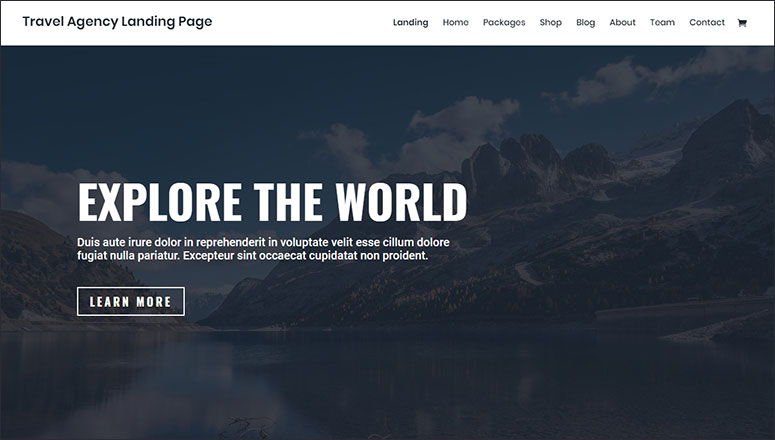
Divi ist ein beliebtes, vielseitiges WordPress-Theme für alle Arten von Websites. Es enthält mehrere dunkle Vorlagen für Restaurants, Cafés, Künstler, Architekten, Anwaltskanzleien und Podcast-Websites.
Divi gibt es in zwei Produkten: Divi Theme und Divi Builder Plugin.
Das Divi Theme eignet sich am besten für Benutzer, die Anpassungen mithilfe von über 2.000 vorgefertigten Layouts aus über 180 Layout-Paketen vornehmen möchten.
Das Divi Builder Plugin funktioniert mit jedem Theme und ist am besten für Benutzer geeignet, die es neben anderen Themes verwenden möchten.
Divi 5, die neueste Version, hat die Plattform von Grund auf neu aufgebaut. Es verwendet jetzt natives CSS Flexbox und Grid anstelle des alten Zeilen-Spalten-Systems. Es rendert Seiten auch doppelt so schnell wie die Vorgängerversion.
Divi enthält auch Divi AI. Es kann eine komplette Website generieren, Seiteninhalte schreiben und Bilder aus einer Textaufforderung erstellen. Rezensenten erwähnen durchweg diese Kombination aus Designflexibilität und Supportqualität als Grund für die Wahl von Divi.
Funktionen:
- Flexible Anpassungsoptionen mit CSS Flexbox und Grid
- Visueller Builder mit einem Theme Builder für Header, Footer und Archive
- Benutzerdefinierte Schriftarten und Textgestaltung
- Filter, Effekte und Schatten
- Hintergrundbild und Video
- Divi AI zur Seitengenerierung, Texterstellung und für Bilder
Divi kostet 89 $/Jahr oder 249 $ als einmaliger Lifetime-Kauf. Die Lifetime-Option ist einer der am häufigsten genannten Gründe, warum Benutzer sie anderen Buildern vorziehen.
Lesen Sie hier die neueste Divi-Rezension.
Holen Sie sich noch heute das Divi-Theme!
2. Astra
Am besten für: Anfänger und geschwindigkeitsorientierte Website-Besitzer, die ein leichtgewichtiges Theme wünschen, das mit jedem Page Builder funktioniert
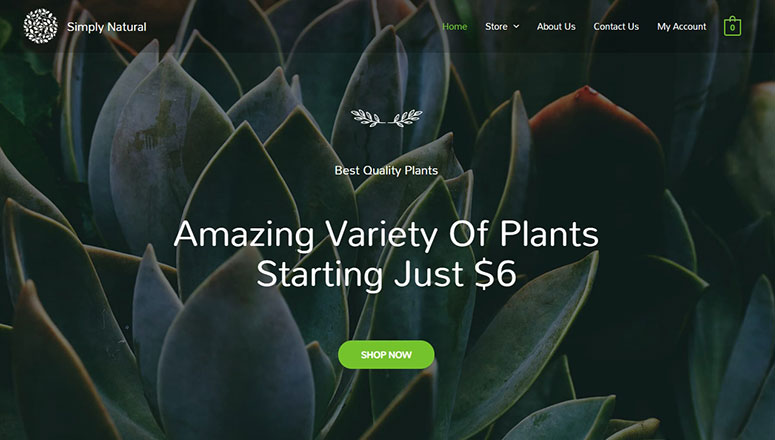
Astra ist ein leichtgewichtiges Allzweck-WordPress-Theme, das sich gut für jede geschäftliche Website eignet. Es wird mit über 300 Starter-Vorlagen geliefert, darunter viele dunkel gestaltete Designs, die Sie mit wenigen Klicks importieren und anpassen können.
Astra funktioniert mit Elementor, Spectra, Gutenberg und den meisten anderen Page Buildern, sodass Sie nicht an einen Editor gebunden sind. Es ist auch eines der wenigen WordPress-Themes mit über 6.000 Fünf-Sterne-Bewertungen auf WordPress.org.
Funktionen:
- Integration von Page Buildern mit Elementor, Spectra und Gutenberg
- Geschwindigkeitsoptimierung
- Benutzerdefinierte Farben und Schriftarten
- Optionen für das Header-Layout
- Übersetzungsbereit
- Über 300 Starter-Vorlagen, davon über 180 Premium-Designs in Astra Pro
Astra ist kostenlos zu installieren. Astra Pro beginnt bei 59 $/Jahr für eine Website oder 129 $/Jahr für 10 Websites über das Essential Toolkit Bundle.
Schauen Sie sich hier die neueste Astra-Bewertung an.
Holen Sie sich noch heute das Astra Theme!
3. Neve
Am besten für: Kleine Unternehmenswebsites und Blogs, die ein schnelles, leichtgewichtiges Theme benötigen

Neve ist ein stilvolles WordPress-Theme, das für jeden Website-Typ entwickelt wurde. Es enthält Dutzende von fertigen Vorlagen für verschiedene Geschäftsbereiche, einschließlich Dark-Mode-Layoutdesigns.
Funktionen:
- WooCommerce kompatibel
- Blog-Seite-Vorlage
- Anpassbarer Header
- Call-to-Action-Button
- Benutzerdefiniertes Logo
- Und mehr…
Neve ist kostenlos zu installieren. Neve Pro beginnt bei etwa 69 $/Jahr.
Holen Sie sich noch heute das Neve-Theme!
4. Ultra
Am besten für: WooCommerce-Shop-Besitzer, die einen schnellen, integrierten Page Builder ohne ein Plugin von Drittanbietern wünschen

Ultra ist ein leistungsstarkes, vielseitiges WordPress-Theme mit seinem eigenen integrierten Themify Builder. Das bedeutet, dass Sie keinen separaten Page Builder-Plugin benötigen. Es bietet mehrere voll funktionsfähige integrierte Website-Vorlagen und dunkle Vorlagen, die Sie importieren und einfach anpassen können, um Ihre Website zu starten.
Ultras Demo-Websites erzielen regelmäßig 90-100 Punkte bei Google PageSpeed und enthalten einen Sticky Buy Button und einen Ajax Slide Cart für WooCommerce-Shops.
Funktionen:
- Integrierter Themify Builder, kein separates Plugin erforderlich
- 12 Bonus-Addons, einschließlich Slider Pro und WooCommerce
- Parallax-Scrolling
- Benutzerdefinierte Farbauswahl
- Intelligente Layout-Optionen
- Und mehr…
Ultra kostet 59 $ als einmaliger Kauf, oder Sie erhalten es plus alle 42 Themify-Themes über den 89 $/Jahr Master Club.
Lesen Sie hier die neueste Ultra-Theme-Bewertung.
Holen Sie sich noch heute das Ultra-Theme!
5. OceanWP
Am besten für: E-Commerce-Websites, die tiefe WooCommerce-Anpassungen benötigen, ohne für ein separates Plugin zu bezahlen
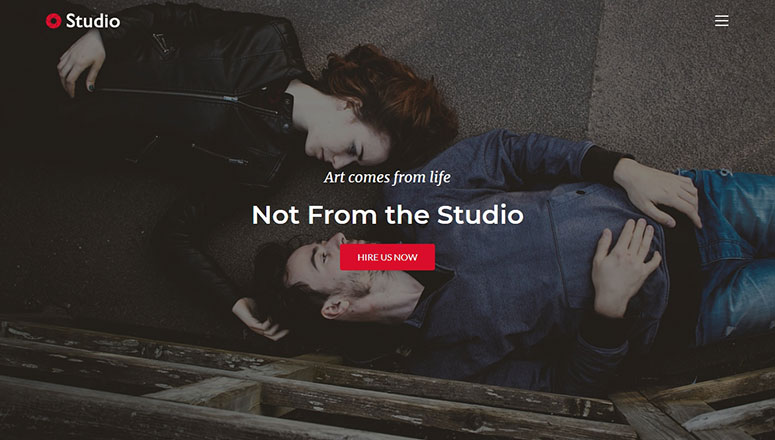
OceanWP ist ein klassisches WordPress-Theme, das für jede geschäftliche oder professionelle Website entwickelt wurde. Es enthält einen 1-Klick-Demo-Content-Importer, um eine dunkle Website mit nur wenigen Klicks sofort zu starten.
OceanWP läuft auf mehr als 1.000.000 Websites. Seine kostenlose Version enthält bereits einen wirklich nutzbaren WooCommerce-Funktionsumfang, was bei kostenlosen Themes selten ist.
Funktionen:
- Unterstützung für RTL-Sprachen
- Bereit für E-Commerce, mit Sticky Add to Cart und Mini-Warenkorb-Stilen
- Schnelle Ladezeiten der Seite
- Vollbild-Vorlagen
- Instagram-Feed
- Über 240 vollständige Website-Vorlagen im Pro Bundle
OceanWP ist kostenlos zu installieren. Das Pro Bundle beginnt bei 35 $/Jahr für eine Website und schaltet die vollständige Vorlagenbibliothek und erweiterte WooCommerce-Tools frei.
Lesen Sie hier die neueste OceanWP Theme-Bewertung.
Holen Sie sich das OceanWP-Theme noch heute!
6. SeedProd
Am besten für: Jeden, der ein benutzerdefiniertes dunkles WordPress-Theme erstellen möchte, ohne einen Entwickler zu beauftragen
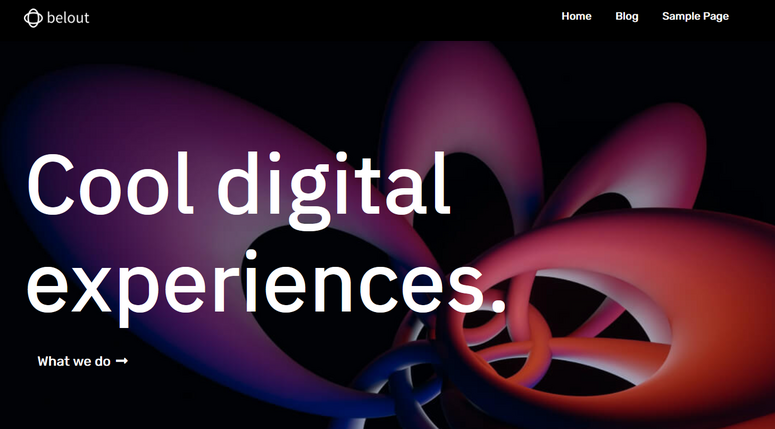
SeedProd ist das beste Drag-and-Drop-Theme-Builder-Plugin für WordPress. Mit SeedProd können Sie ganz einfach ein benutzerdefiniertes WordPress-Theme im Dark-Mode von Grund auf neu erstellen, ohne einen Entwickler einstellen oder Code bearbeiten zu müssen.
Es wird mit über 350 Vorlagen aus über 20 Branchen geliefert, darunter vollständige Theme-Kits mit passenden Designs für jede Seite Ihrer Website. Sie können jedes Element einfach durch Zeigen und Klicken anpassen. Sie können auch fertige, auf Konversionen ausgerichtete Blöcke hinzufügen, wie Countdown-Timer, E-Mail-Optin-Formulare, Bildkarussells, Social-Media-Profile und vieles mehr.
SeedProd beinhaltet auch einen KI-Theme-Builder, der eine vollständige Website aus einer kurzen Beschreibung Ihres Unternehmens in 20-60 Sekunden generiert. Es lohnt sich, ihn auszuprobieren, bevor Sie mit der manuellen Anpassung beginnen.
Funktionen:
- Drag-and-Drop-Funktionalität
- Über 350 professionell gestaltete Vorlagen aus über 20 Branchen
- KI-Theme-Builder, der eine vollständige Website in weniger als einer Minute generiert
- Live-Vorschauen und Layout-Navigation
- Vielfalt an Farb- und Schriftkombinationen
- Hintergrundvideo und Diashows
- Integriert mit WooCommerce und E-Mail-Marketing-Diensten
Die Lite-Version von SeedProd ist kostenlos. Bezahlte Pläne beginnen bei 79 $/Jahr, und für das WooCommerce-Theme-Building ist der Elite-Plan für 599 $/Jahr erforderlich.
Lesen Sie hier die neueste SeedProd-Bewertung.
Holen Sie sich noch heute den SeedProd Theme Builder!
7. Parallax Pro
Am besten für: Storytelling und persönliche Blogs, wenn Sie bereits bei WP Engine hosten
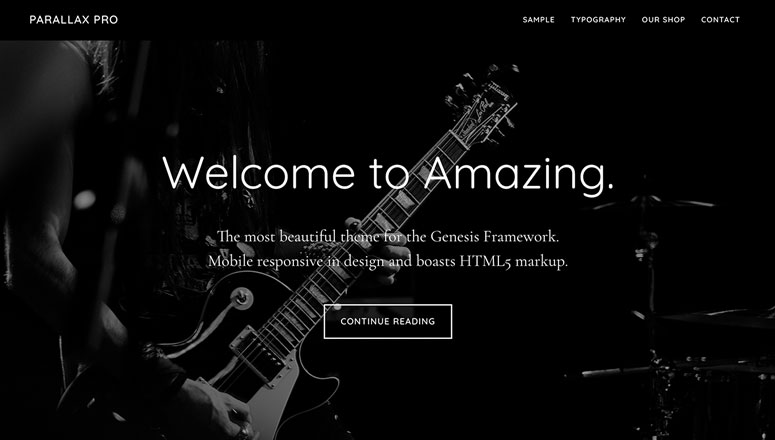
Parallax Pro ist eines der besten dunklen WordPress-Themes auf dem Markt. Es hat ein schönes Layout-Design für Storytelling, persönliche Blogs und inhaltsorientierte Websites.
Parallax Pro basiert auf dem Genesis Framework, das StudioPress nicht mehr als Einzelkauf anbietet. Sie können es auf zwei Arten erhalten. Es ist kostenlos enthalten, wenn Sie sich für WP Engine Hosting anmelden, oder Sie können Genesis Pro für 360 $/Jahr abonnieren, wenn Sie woanders hosten.
Funktionen:
- 5 Homepage-Widgets
- Benutzerdefinierter Header
- Parallax-Scrolling
- Footer-Widget
- Farbauswahl
- Genesis Framework-Grundlage, im Wartungsmodus mit nur Sicherheitsupdates
Erfahren Sie, wie Sie Parallax Pro über WP Engine Hosting oder Genesis Pro erhalten
Möchten Sie alle Premium-Themes von StudioPress, einschließlich Parallax Pro, KOSTENLOS ausprobieren?
Wenn Sie sich für WP Engine anmelden, den besten Managed WordPress Hosting-Service, erhalten Sie das Genesis Framework und ALLE StudioPress Themes kostenlos (Das ist ein Wert von über 2.000 US-Dollar!).
8. Fargo
Am besten für: Hochzeits- und Porträtfotografen, die ein dunkles, filmisches Portfolio wünschen
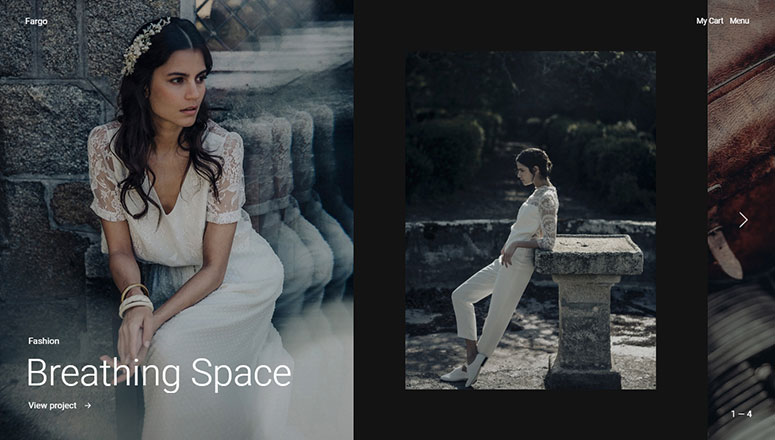
Fargo ist ein dunkel gestaltetes WordPress-Hochzeitsfotografie-Theme von Pixelgrade, einem Theme-Shop, der seit über einem Jahrzehnt aktiv ist. Es bietet Homepage-Abschnitte, um Ihre herausragenden Arbeiten und Fotos professionell zu präsentieren.
Funktionen:
- Dynamische Navigation
- Zentriertes Layout
- Beitragsformate
- Kinoreifes Layout
- Benutzerdefinierte Farben und Schriftarten
- Und mehr…
Fargo kostet 75 $/Jahr oder 112 $ als einmaliger Kauf für lebenslange Nutzung.
Holen Sie sich noch heute das Fargo Theme!
9. Hestia Pro
Am besten für: Einseitige Geschäfts- und Startup-Websites, die ein sauberes, dunkles Design benötigen
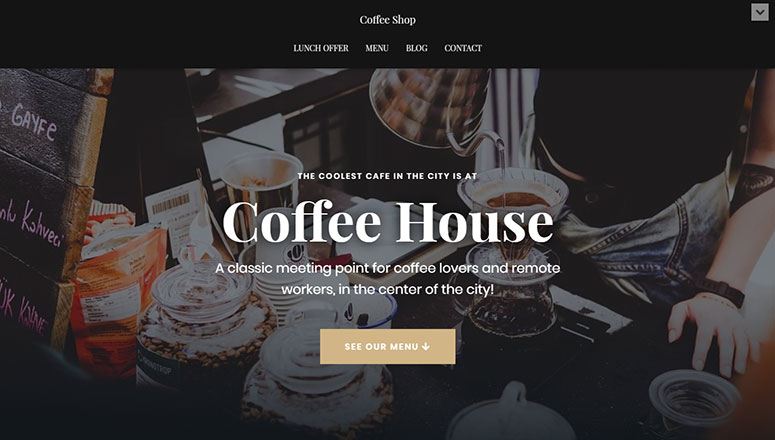
Hestia Pro ist ein One-Page-WordPress-Multipurpose-Theme mit mehreren dunklen Vorlagen. Es ermöglicht Ihnen, einfach eine Website Ihrer Wahl zu erstellen.
Funktionen:
- Mit Page Builder kompatibel
- Starter-Websites
- Fertige Homepage
- Portfolio-Bereich
- Video-Header
- Und mehr…
Hestia Pro beginnt bei 69 $/Jahr für den Personal Plan, mit Business- und Agency-Stufen zu höheren Preisen.
Holen Sie sich das Hestia Pro-Theme noch heute!
10. Collective
Am besten für: Agenturen, die eine große Auswahl an fertigen dunklen Homepages wünschen
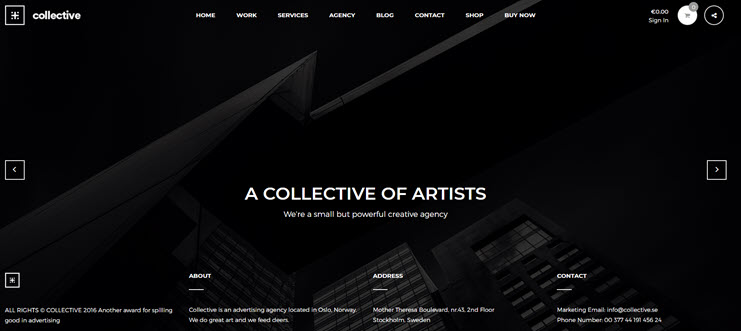
Collective ist ein weiteres dunkles WordPress-Theme, das von KubiStudio, einem der Top-Autoren auf dem ThemeForest-Marktplatz, verkauft wird. Es kommt mit 12 einzigartigen, schönen Homepages und 14 benutzerdefinierten Visual Composer-Modulen.
Auf ThemeForest hat Collective mehr als 1.300 Lizenzen mit einer Bewertung von 4,66 von 5 Sternen verkauft, was eine solide Erfolgsbilanz für ein Nischen-Dark-Theme ist.
Funktionen:
- Sauberes und minimales Design
- Wird mit dem Visual Composer Builder geliefert
- 5 Header-Lösungen
- One-Click-Demo-Importeur
- Lazy Loading
- 600+ Google Fonts
Collective kostet 39 $ als einmaliger Kauf auf ThemeForest.
11. Inspiro
Am besten für: Fotografen und Videografen, die eine visuelle Vollbildpräsentation wünschen
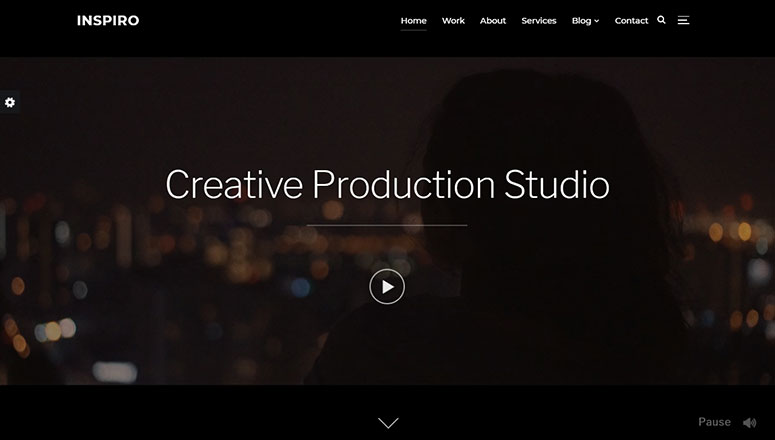
Inspiro ist ein professionelles WordPress Dark Theme, das speziell für Fotografen und Videografen entwickelt wurde. Seine Vollbild-Bildershow zeigt Ihre hervorgehobenen Inhalte wunderschön an.
Funktionen:
- Unterstützt YouTube- und Vimeo-Videos
- Modul Bildergalerie
- Benutzerdefinierter Video-Hintergrund
- Theme-Optionen-Panel
- Integrierte Website-Demos
- Und mehr…
Inspiro Premium beginnt bei 69 $/Jahr. Höhere Stufen, Creator Pack und All Access Pass, schalten mehr von WPZooms Theme-Bibliothek frei.
Holen Sie sich noch heute das Inspiro-Theme!
12. Monochrome Pro
Am besten für: Minimalistische, typografieorientierte Blogs, wenn Sie bereits bei WP Engine hosten

Monochrome Pro ist ein minimalistisches, vielseitiges WordPress-Theme. Es verfügt über eine beeindruckende Typografie, die Ihre Inhalte hervorhebt und für Ihre Leser sehr zugänglich macht.
Wie Parallax Pro ist Monochrome Pro ein Genesis Framework-Theme. StudioPress verkauft es nicht mehr einzeln. Es ist im WP Engine Hosting enthalten oder über ein Genesis Pro-Abonnement für 360 $/Jahr erhältlich.
Funktionen:
- Genesis Framework
- Atomic Blocks Plugin
- Kompatibel mit WPForms
- Demo-Inhalt
- 1-Klick-Theme-Einrichtung
- Genesis Framework-Grundlage, im Wartungsmodus mit nur Sicherheitsupdates
Erfahren Sie, wie Sie Monochrome Pro über WP Engine Hosting oder Genesis Pro erhalten
13. Auberge
Am besten für: Cafés, Restaurants und Food-Blogger mit kleinem Budget
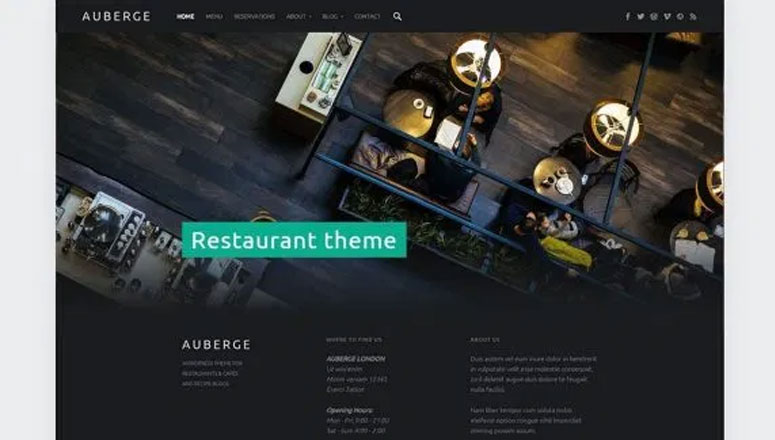
Auberge ist ein kostenloses WordPress-Theme für Cafés und Restaurants von WebMan Design. Sein modernes, dunkles Layout-Design eignet sich gut für die Erstellung eines Food- und Rezept-Blogs.
Es wird auf WordPress.org aktiv gepflegt, sodass Kompatibilität hier kein Problem darstellt.
Funktionen:
- Beaver Builder-Integration
- Benutzerdefinierte Header-Slideshow
- Google Rezeptansicht
- Verschachtelte Food-Menüs
- Unterstützt RTL-Sprachen
- Und mehr…
Auberge ist kostenlos. Eine Premium-Version, Auberge Plus, ist für 44 US-Dollar als einmaliger Kauf erhältlich, wenn Sie zusätzliche Layout-Optionen wünschen.
Holen Sie sich noch heute das Auberge-Theme!
14. Beat
Am besten für: Bands, DJs und Event-Promoter, die eine auffällige, dunkle Homepage benötigen
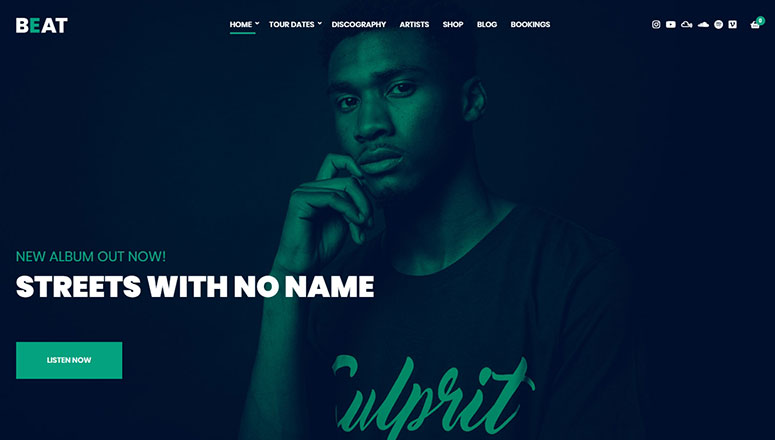
Beat ist ein elegantes WordPress Dark Theme für Bands, Musiker, Events, DJs, Künstler und Nachtclubs. Es verfügt über eine Vollbild-Bildershow auf der Homepage, um Ihre Benutzer sofort zu fesseln.
Funktionen:
- 50 Customizer-Einstellungen
- Benutzerdefinierte Beitragstypen
- Elementor Widgets
- Mehrere Layout-Optionen
- Flexibler Header und Footer
- Und mehr…
Beat kostet 49 US-Dollar pro Jahr allein, oder Sie können es zusammen mit anderen CSSIgniter-Themes über den Standard Club für 69 US-Dollar pro Jahr erhalten.
Holen Sie sich noch heute das Beat-Theme!
15. Wallstreet
Am besten für: Digitale Agenturen und Portfolio-Websites, die ein kostenloses dunkles Theme wünschen
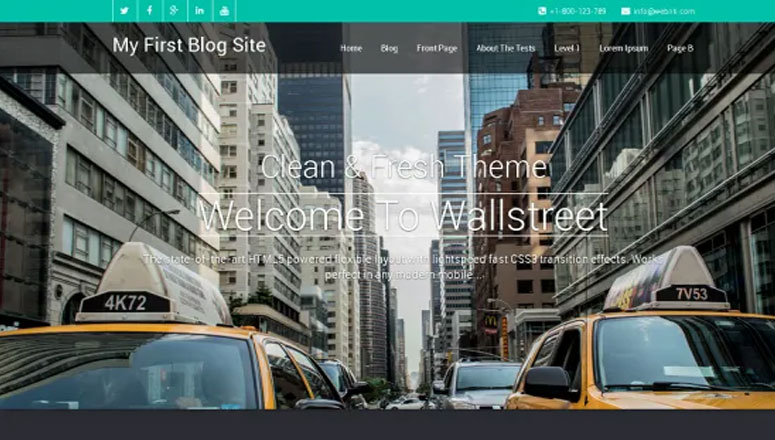
Wallstreet ist ein kostenloses WordPress Dark Business Theme. Es eignet sich gut für Digitalagenturen, Architekturbüros, Portfolio-Websites und persönliche Blogs.
Es wird auf WordPress.org aktiv gepflegt, sodass Kompatibilität hier kein Problem darstellt.
Funktionen:
- Vollbreiten-Seitenvorlage
- Social-Media-Icons
- Hervorgehobene Bildbanner
- 4-Spalten-Widget-Footer
- Service- und Portfoliobereiche
- Und mehr…
Wallstreet kann kostenlos von WordPress.org heruntergeladen werden.
Holen Sie sich noch heute das Wallstreet-Theme!
16. Modern
Am besten für: Persönliche Blogs und mehrsprachige Websites, die ein kostenloses, einfaches dunkles Theme wünschen
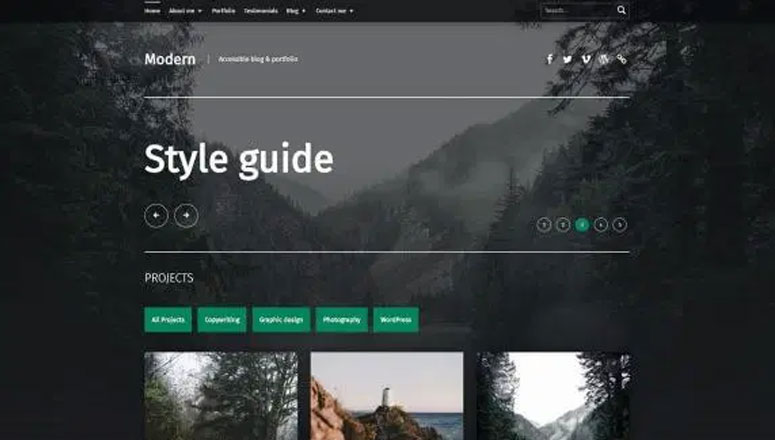
Modern ist ein kostenloses dunkles WordPress-Theme für persönliche Blogs und Portfolio-Websites. Es unterstützt RTL-Sprachen und ist übersetzungsbereit, um einfach eine mehrsprachige Website zu erstellen.
Funktionen:
- Diashow mit hervorgehobenen Beiträgen
- Geschwindigkeitsoptimierung
- Jetpack-Plugin-Kompatibilität
- Benutzerdefinierte Farbauswahl
- Footer-Widgets
- Und mehr…
Modern kann kostenlos von WordPress.org heruntergeladen werden.
Holen Sie sich noch heute das Modern-Theme!
17. Carbone
Am besten für: Cafés, Bars und Restaurants, die ein Vollbild-Layout wünschen
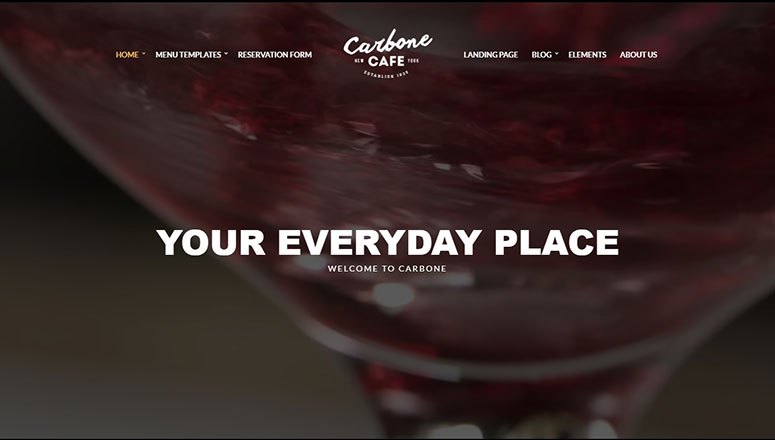
Carbone ist ein schönes dunkles WordPress-Theme für Cafés, Bars, Restaurants und andere lebensmittelbezogene Unternehmen. Es verfügt über ein benutzerdefiniertes Vollbild-Hintergrundbild und ein klassisches zentriertes Layout.
Funktionen:
- Live-Theme-Anpasser
- Menüverwaltungssystem
- Page-Builder-freundlich
- Reservierungsformular
- Individuelles Logo-Design
- Und mehr…
Carbone kostet 49 US-Dollar pro Jahr allein, oder Sie können es zusammen mit anderen CSSIgniter-Themes über den Standard Club für 69 US-Dollar pro Jahr erhalten.
Holen Sie sich noch heute das Carbone-Theme!
18. Tusant
Am besten für: Podcaster, Musik-Streamer und Video-Ersteller
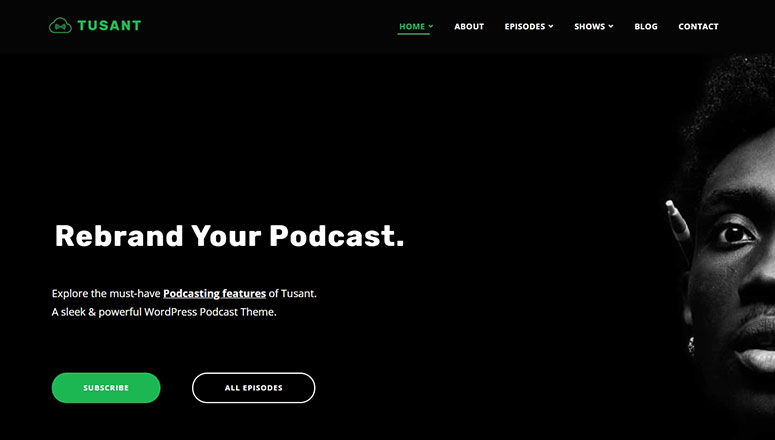
Tusant ist ein beeindruckendes dunkles WordPress-Theme, das speziell für Podcasts, Musikstreaming und Video-Websites entwickelt wurde. Es bettet problemlos visuelle Inhalte aus mehreren Quellen ein.
Funktionen:
- Episodenseite
- Masonry Podcast-Shows
- Karussell-Slider
- Kategorien und Filter
- Unendliches Scrollen und Paginierung
- Und mehr…
Tusant kostet 69 US-Dollar pro Jahr oder 389 US-Dollar als einmaliger lebenslanger Kauf.
Holen Sie sich noch heute das Tusant-Theme!
19. Altitude Pro
Am besten für: Landing-Page-ähnliche Websites, wenn Sie bereits bei WP Engine hosten
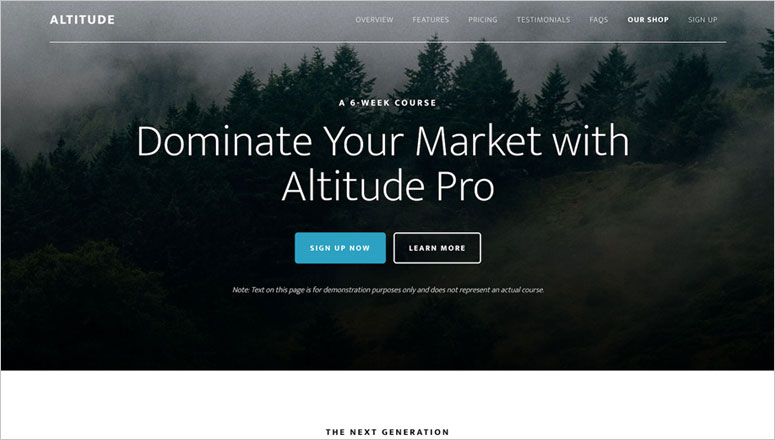
Altitude Pro ist ein Premium-WordPress-Dark-Theme. Es basiert auf dem Genesis Theme Framework, was es leistungsstark und für jede Art von Website geeignet macht.
Wie die beiden anderen Genesis-Themes auf dieser Liste wird Altitude Pro nicht mehr einzeln verkauft. Der Zugriff ist im WP Engine-Hosting oder über ein Genesis Pro-Abonnement für 360 US-Dollar pro Jahr enthalten.
Funktionen:
- 7 Homepage Widgetbereiche
- Farbstile und -auswahl
- Benutzerdefinierter Hintergrund
- Landing Pages
- Optionen für das Seitenlayout
- Genesis Framework-Grundlage, im Wartungsmodus mit nur Sicherheitsupdates
Sehen Sie, wie Sie Altitude Pro über WP Engine-Hosting oder Genesis Pro erhalten
20. Korina
Am besten für: Restaurants, Bars und Streetfood-Verkäufer
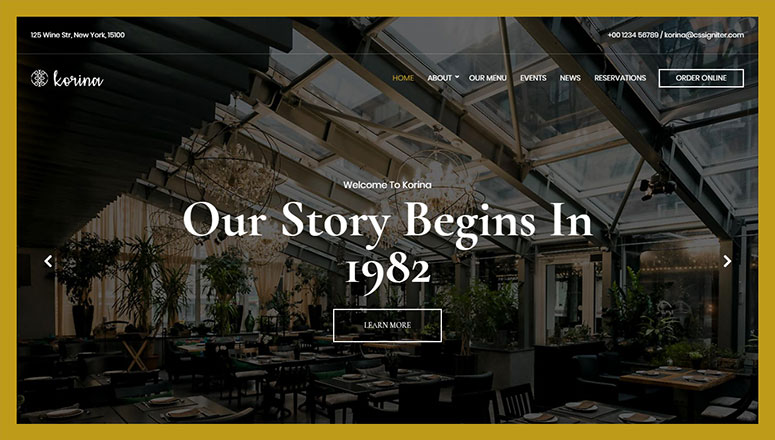
Korina ist ein einzigartig gestaltetes WordPress Dark Theme für Restaurants, Bars, Clubs, Cafés und Streetfood-Verkäufer. Es verfügt über einen Vollbild- Bildschieberegler und ermöglicht Ihnen die Anpassung Ihres Logos und Navigationsmenüs.
Funktionen:
- Mehrere Header-Stile
- Schöne Typografie
- Menüverwaltungssystem
- Layout-Auswahl
- Video-Header-Hintergrund
- Und mehr…
Korina kostet 49 US-Dollar pro Jahr allein, oder Sie können es zusammen mit anderen CSSIgniter-Themes über den Standard Club für 69 US-Dollar pro Jahr erhalten.
Holen Sie sich noch heute das Korina Theme!
Wir hoffen, dieser Artikel hat Ihnen geholfen, die besten Dark WordPress Themes für Ihre Website zu finden.
Wenn es Ihnen gefällt, möchten Sie vielleicht auch unseren Leitfaden zum Thema Erstellen eines Multimedia-Sliders in WordPress lesen, um ein elegantes Design für Ihre Website zu erstellen.
FAQs: Dunkle WordPress-Themes
Verlangsamen dunkle WordPress-Themes meine Website?
Nein, das Farbschema selbst hat keinen Einfluss auf die Geschwindigkeit. Was zählt, ist der zugrunde liegende Code des Themes.
Leichte Optionen wie Astra, Neve und OceanWP sind unabhängig von der Farbe auf Geschwindigkeit ausgelegt. Schwerere Builder wie Divi erfordern mehr Einrichtungsaufwand, um schnell zu bleiben.
Kann ich zu jedem Theme einen Light/Dark-Mode-Switcher hinzufügen?
Ja. Wenn Sie Ihr aktuelles Theme lieber beibehalten und nur einen Umschalter hinzufügen möchten, kann ein spezielles Dark-Mode-Plugin einen Umschalter hinzufügen, ohne das gesamte Theme zu ändern.
Dies ist eine gute Option, wenn Ihnen das Design Ihrer Website bereits gefällt und Sie nur die Dark-Mode-Option für Besucher wünschen.
Sind dunkle Themes schwerer zu lesen als helle Themes?
Nicht, wenn das Theme gut gestaltet ist. Achten Sie auf starken Kontrast zwischen Text und Hintergrund sowie Akzentfarben, die Ihr Auge zu Schaltflächen und Links leiten.
Schlechter Kontrast ist der Hauptgrund, warum sich einige dunkle Themes schwerer lesen lassen, nicht die dunkle Farbe selbst.
Benötige ich Programmierkenntnisse, um ein dunkles WordPress-Theme einzurichten?
Nein. Jedes Theme auf dieser Liste wird über Ihr WordPress-Dashboard wie jedes andere Theme installiert.
Builder-basierte Optionen wie Divi, Ultra und SeedProd ermöglichen es Ihnen auch, Farben, Layouts und Inhalte anzupassen, ohne Code anzufassen.
Welche Art von Website eignet sich am besten für ein dunkles Theme?
Dunkle Themes eignen sich besonders gut für Fotografie, Musik, Restaurants, Agenturen und persönliche Blogs. Sie passen auch zu jeder Marke, die einen mutigen, modernen Look anstrebt.
Websites, die auf dichten Text angewiesen sind, wie Dokumentationen oder Nachrichten, sollten möglicherweise zuerst sorgfältig auf Lesbarkeit getestet werden.
Endgültiges Urteil
Wenn Sie eine klare Empfehlung wünschen, ist Astra die sicherste Allround-Wahl. Es ist kostenlos, schnell und funktioniert mit fast jedem Page Builder.
Für Agenturen und Freiberufler, die mehrere Kunden-Websites erstellen, ist Divis lebenslange Preisgestaltung kaum zu übertreffen.
Wenn Sie lieber ein vollständig benutzerdefiniertes dunkles Theme erstellen möchten, ohne Code anzufassen, bringt Sie SeedProds KI-Theme-Builder am schnellsten dorthin.
Und wenn Sie bereits WP Engine Hosting nutzen, sind Parallax Pro oder Monochrome Pro in Ihrem Plan enthalten.
Ressourcen-Hub: Dunkle WordPress-Themes
Möchten Sie weiter erkunden? Diese Anleitungen behandeln weitere Theme-Optionen und wie Sie das Beste aus jedem von Ihnen gewählten Theme herausholen.
- Die besten kostenlosen WordPress-Blog-Themes
- Beste Responsive WordPress Themes
- Beste Premium WordPress Themes
- So passen Sie eine WordPress-Website an
- Die besten kostenlosen WordPress E-Commerce-Themes
- Beste WordPress-Hosting-Unternehmen

Ich habe gerade Ihren Artikel über die besten Dark WordPress Themes zu Ende gelesen und muss sagen, dass ich von der Bandbreite der von Ihnen vorgestellten Optionen sehr beeindruckt war. Als jemand, der dunklere Themes bevorzugt, habe ich die Vielfalt der von Ihnen hervorgehobenen Stile und Funktionalitäten geschätzt.
Vielen Dank für die Wertschätzung, Karl. Wir freuen uns über Ihre Antwort! 😀