
Înainte de WordPress, eram expert SEO. Toată munca mea se concentra pe cuvinte cheie, backlink-uri și rapoarte de clasament.
Când au apărut primele instrumente de scriere AI, am fost cel mai mare sceptic din sală. Am văzut rezultatele. Robotice, goale și pline de cuvinte cheie. Le-am spus clienților să stea departe, iar Google a fost de acord cu mine, pentru o vreme.
Apoi, nu a mai fost așa.
Conținutul AI a început să se claseze pe măsură ce instrumentele s-au îmbunătățit. Și mi-am dat seama că petrecusem doi ani argumentând despre AI, în timp ce toți ceilalți îl foloseau pentru a mă depăși în clasament.
Așa că am testat aceste instrumente AI pentru SEO pentru a afla care te ajută cu adevărat să te clasezi și care respectă ghidurile Google.
Cel mai important, care au depășit cu adevărat era „gunoiului AI” despre care am avertizat oamenii atât de mult timp.
Acestea sunt cele care merită timpul tău.
Puncte Cheie
- Vă voi arăta ce instrument AI pentru SEO este integrat direct în WordPress, fără a necesita aplicații suplimentare sau schimbări de context
- Dezvălui ce instrument găsește cuvinte cheie cu concurență redusă, analizând rezultatele reale ale căutării, nu doar scorurile de dificultate
- Menționați un instrument care urmărește cum apare marca dvs. atunci când oamenii întreabă ChatGPT sau Gemini, nu doar Google
- Am testat 6 instrumente dedicate și 3 opțiuni bonus, inclusiv opțiuni gratuite și freemium
Cum testez instrumentele AI pentru SEO
🔍 Click pentru a vedea metodologia mea de testare
Iată exact cum evaluez instrumentele AI SEO:
- Impactul asupra clasamentului: Urmăresc pozițiile cuvintelor cheie în Google Search Console înainte și după utilizarea fiecărui instrument. Dacă pozițiile se mișcă, notez. Dacă nu, notez și asta.
- Conformitate Google: Verific dacă sugestiile AI încurajează practici care ar putea declanșa o acțiune manuală.
- Aceasta include umplerea cu cuvinte cheie, conținut AI subțire fără revizuire editorială sau modele de legături manipulative.
- Flux de lucru WordPress: Câte etape sunt necesare pentru a trece de la cercetarea cuvintelor cheie la un post publicat și optimizat? Pluginurile native obțin scoruri mai mari decât instrumentele care necesită comutare constantă între file.
- Calitatea rezultatelor AI: Testez scrierea AI a fiecărui instrument, solicitând același subiect pe mai multe instrumente și citind rezultatele cu voce tare. Dacă sună ca și cum ar fi fost scris de o mașină, eșuează.
- Timp de configurare până la prima valoare: Timpul de la activarea pluginului sau crearea contului până la prima perspectivă acționabilă. Peste 30 de minute și îl marchez.
- Transparența creditelor și a prețurilor: Ce este de fapt gratuit, ce este restricționat și cât de clar este comunicat acest lucru în timpul configurării?
Instrumente pe care le folosesc:
- Google Search Console: urmărirea pozițiilor înainte și după
- GTmetrix: verificare a performanței la instalarea pluginurilor WordPress
- Mai multe site-uri de testare WordPress curate: unul pentru fiecare plugin
De ce să ai încredere în IsItWP?
La IsItWP, suntem resursa principală a comunității WordPress din 2009, ajutând peste 2 milioane de utilizatori să aleagă mai bune plugin-uri, instrumente și soluții de securitate.
Spre deosebire de site-urile de recenzii care nu folosesc niciodată produsele, noi menținem conturi active, rulăm site-uri reale ale clienților și oferim consultanță continuă pentru WordPress.
Pentru acest articol, am instalat fiecare plugin WordPress pe un site de test dedicat, am efectuat cercetări reale de cuvinte cheie cu fiecare instrument SaaS și am testat funcțiile de scriere AI.
Apoi, am urmărit pozițiile în clasament prin Google Search Console înainte și după. Ceea ce citiți se bazează pe asta.
Cele mai bune instrumente AI pentru SEO comparate
Nu toate instrumentele AI pentru SEO fac același lucru.
Unele trăiesc în interiorul WordPress și optimizează pe măsură ce scrii, în timp ce altele sunt platforme independente care acoperă totul, de la cercetarea cuvintelor cheie la evaluarea conținutului.
Puțini urmăresc cum apare brandul tău în chatbot-urile AI, nu doar pe Google. Așadar, înainte de a citi recenziile complete, acest tabel arată diferențele cheie dintr-o privire.
| Produs | Cel mai bun pentru | Plugin WordPress | Scriere AI inclusă | Versiune gratuită | Preț de pornire |
|---|---|---|---|---|---|
| 🥇 All in One SEO | WordPress AI SEO + tehnic all-in-one | ✅ | ✅ | ✅ | 49,50 $/an |
| 🥈 SEOBoost | Flux de lucru de la cercetare la publicare a conținutului | ❌ | ✅ | ❌ Perioadă de probă gratuită de 14 zile | 22,50 $/lună |
| 🥉 LowFruits | Descoperire de cuvinte cheie cu concurență scăzută | ❌ | ❌ | ❌ Perioadă de probă gratuită de 14 zile | 20,75 $/lună |
| 4. Surfer SEO | Scor de conținut în timp real + scriere AI | ❌ | ✅ | ❌ | 99 $/lună |
| 5. Rank Math | Funcții AI gratuite maxime în interiorul WordPress | ✅ | ✅ | ✅ | $7.99/lună |
| 6. Semrush One | SEO complet + urmărire căutări AI | ❌ | ✅ | ❌ | 117,33 USD/lună |
Pentru o privire mai largă asupra modului în care aceste instrumente se încadrează în strategia dvs., consultați lista noastră cu cele mai bune instrumente SEO pentru a crește traficul site-ului dvs. web.
În afară de asta, puteți folosi cuprinsul de mai jos pentru a vedea totul dintr-o privire sau pentru a sări la orice secțiune doriți să citiți.
- 1. All in One SEO ⭐⭐⭐⭐⭐
- 2. SEOBoost ⭐⭐⭐⭐
- 3. LowFruits ⭐⭐⭐⭐
- 4. Surfer SEO ⭐⭐⭐⭐⭐
- 5. Rank Math ⭐⭐⭐⭐
- 6. Semrush One ⭐⭐⭐⭐
- Bonus: Cele mai bune plugin-uri AI SEO pentru WordPress
- Cum să alegi instrumentul AI SEO potrivit
- Întrebări frecvente: Cele mai bune instrumente AI SEO pentru WordPress
- Verdict final: Ar trebui să folosesc instrumente AI SEO pe site-ul meu WordPress?
- Centru de resurse: SEO pentru WordPress
Acestea fiind spuse, să începem.
1. All in One SEO ⭐⭐⭐⭐⭐
Cel mai bun pentru: proprietarii de site-uri WordPress care doresc SEO asistat de AI, generare de conținut și SEO tehnic fără a comuta între instrumente
Majoritatea instrumentelor AI SEO sunt platforme SaaS. Aceasta înseamnă că trebuie să părăsiți WordPress, să faceți cercetarea sau scrierea, apoi să reveniți pentru a lipi conținutul.
All in One SEO sare complet peste asta. AI-ul trăiește în editorul dvs. Când scrieți o postare, blocul Asistent AI este chiar acolo, în Gutenberg.
Pur și simplu introduceți un prompt, generați o secțiune, adăugați FAQ-uri și creați puncte cheie, totul fără a atinge o altă filă de browser.
De ce All in One SEO este unul dintre cele mai bune instrumente AI SEO?
Dar funcția care m-a surprins cu adevărat și pe care niciun concurent din această prezentare nu o acoperă, este Generatorul LLMs.txt.
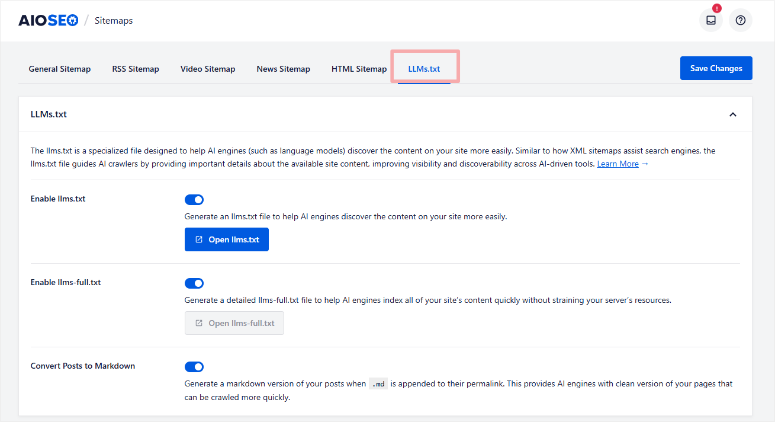
Creează un fișier structurat care ajută motoarele de căutare AI precum ChatGPT, Gemini și Perplexity să descopere și să indexeze conținutul site-ului tău.
Acest lucru contează acum, deoarece răspunsurile generate de AI ocupă din ce în ce mai mult spațiul fragmentelor de prezentare din Google.
Aducerea conținutului tău în acest strat necesită un semnal tehnic diferit față de o hartă site XML, iar All in One SEO este unul dintre puținele instrumente care construiesc activ pentru acesta.
AI-ul gestionează, de asemenea, metadate în vrac la scară largă. AIOSEO a adăugat recent un Generator de Scheme AI, care analizează tipul de conținut.
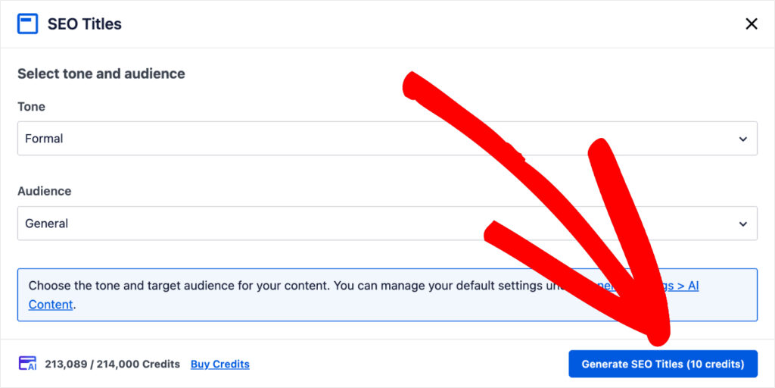
După aceasta, generează date structurate adecvate folosind AI, în loc să necesite selectarea manuală a unei scheme dintr-un meniu derulant.
Combinat cu generarea de metadate AI în vrac a titlurilor și descrierilor pentru toate postările dintr-o singură rulare, acoperiți SEO tehnic și conținut AI într-o singură instalare de plugin.
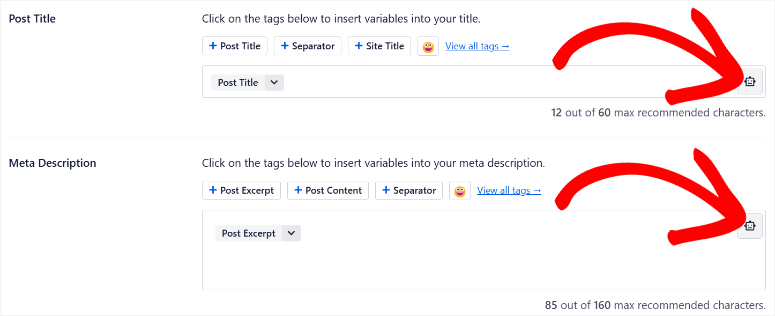
Un lucru de știut înainte de a-l configura: Calitatea conținutului AI poate varia de la o postare la alta atunci când utilizați funcțiile de vrac. Este important să verificați de două ori pentru a vă asigura că calitatea este menținută pe întregul spectru. Am văzut acest lucru în două ocazii din cincizeci. Deci, o calitate destul de bună pe întregul spectru.
Experiența mea cu All in One SEO
Configurarea a durat mai puțin de cinci minute. Expertul mi-a configurat harta site-ului, schema și conexiunea la Google Search Console înainte ca eu să fi scris un singur cuvânt de conținut.
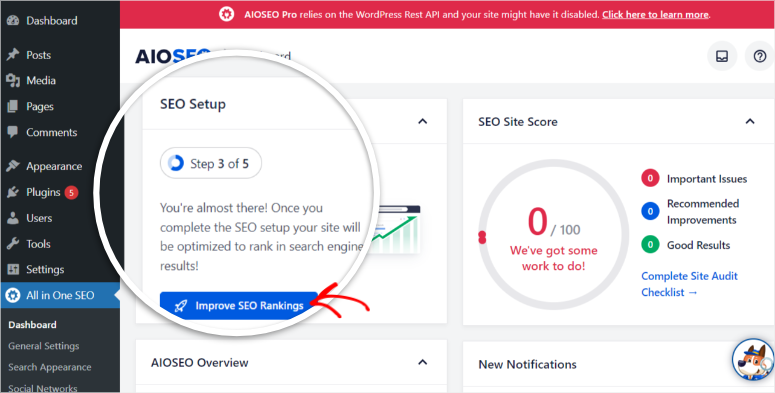
Am testat mai întâi generarea de metadate AI în vrac selectând toate postările, rulând AI-ul și revizuind rezultatele. Aproximativ 85% au fost utilizabile fără modificări.
Restul de 15% au fost prea generice pentru cuvinte cheie competitive. Practic, AI-ul a ales cuvântul cheie, dar nu un unghi convingător.
Cu toate acestea, generarea a 60 de descrieri draft în două minute bate scrierea lor manuală cu o marjă semnificativă.
Am rulat, de asemenea, o verificare GTmetrix înainte și după instalare. Timpul de încărcare a crescut cu 0,3 secunde pe site-ul de test. Acest lucru se încadrează în intervalul acceptabil, dar merită menționat pentru gazdele care rulează alocări de resurse limitate.
🟢► Avantaje
- AI nativ WordPress: Am generat secțiuni întregi și FAQ-uri din editorul de blocuri. Nu este necesar un cont SaaS sau comutarea între file.
- Generator LLMs.txt: Creează automat fișierul de care au nevoie motoarele de căutare AI pentru a indexa site-ul dvs. Unul dintre puținele instrumente construite pentru descoperirea AI în căutare la acest punct de preț.
- Generare metadate AI în vrac: A generat titluri și descrieri SEO pentru peste 60 de postări într-o singură rulare, cu aproximativ 85% rezultate utilizabile.
- Generator de Scheme AI: Creează date structurate folosind AI pe baza tipului dvs. de conținut, acoperind eligibilitatea pentru rezultate bogate fără selecție manuală a schemei.
- Asistent de legături: Afișează oportunități contextuale de legături interne în timp ce scrieți, cu inserare printr-un singur clic.
- Nivel gratuit cuprinzător: Hărțile site-ului, schema de bază și optimizarea metadatelor sunt disponibile fără un plan plătit.
🔴► Dezavantaje
- Calitatea metadatelor AI variază pe cuvinte cheie competitive: Aproximativ 15% din descrierile generate în vrac sunt prea generice. Revizuiți rezultatele înainte de publicarea pe paginile cu prioritate înaltă.
- Nicio funcționalitate AI cuprinzătoare în versiunea gratuită: Deși versiunea gratuită este excelentă pentru SEO tehnic și on-page, funcționalitățile AI SEO sunt disponibile doar în versiunile plătite.
Verdictul meu: All in One SEO este răspunsul cel mai clar pentru proprietarii de site-uri WordPress care doresc să nu mai comute între editorul lor și instrumentele AI externe.
Generatorul LLMs.txt singur îl plasează înaintea oricărui altceva de pe această listă în ceea ce privește pregătirea conținutului pentru viitor în căutarea AI.
Dacă aveți nevoie de funcționalități AI SEO, aveți nevoie de planul pro. Iată analiza mea All in One SEO Free vs Pro, care arată exact ce obțineți înainte de a face upgrade.
Consultați recenzia mea AIOSEO. De asemenea, comparați AIOSEO și Yoast SEO dacă încă mai căutați un plugin SEO care să se potrivească nevoilor dumneavoastră.
Prețuri: Plugin SEO gratuit disponibil | Planurile Pro încep de la 49,50 USD/an.
👉 Începeți cu All in One SEO aici
2. SEOBoost ⭐⭐⭐⭐
Ideal pentru: Echipe de conținut care desfășoară un flux de lucru structurat de la cercetare la publicare pentru 10 sau mai multe articole pe lună
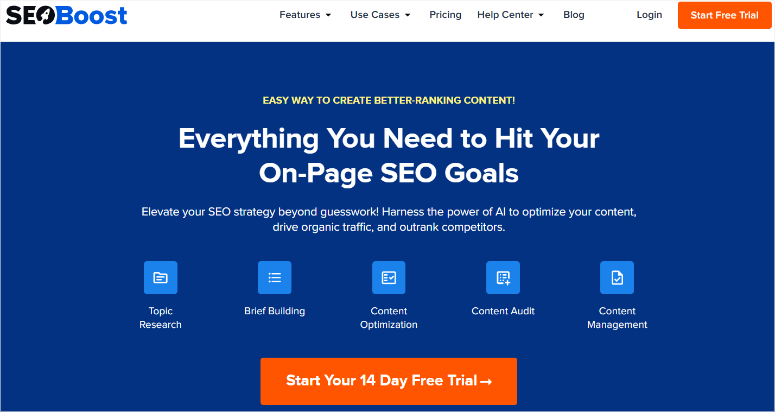
Ceea ce diferențiază SEOBoost de orice alt instrument de optimizare a conținutului pe care l-am testat este profunzimea analizei concurenței sale.
Majoritatea instrumentelor analizează primele 10 sau 15 rezultate pentru un cuvânt cheie. SEOBoost analizează primele 30. Această diferență contează mai mult decât pare.
Diferența dintre locul 10 și locul 30 dezvăluie adesea tipare pe care instrumentele care analizează doar primele 10 le omit.
De ce este SEOBoost unul dintre cele mai bune instrumente AI SEO?
Cu o analiză atât de profundă, puteți identifica tipare mai bune în domenii precum conținutul subțire care se menține pe prima pagină, grupuri de subiecte pe care toată lumea de pe prima pagină le ignoră, unghiuri de întrebări care apar în pozițiile 11–25, dar nu în rezultatele de top și multe altele.
De exemplu, când am rulat un raport de subiect pe un cuvânt cheie competitiv, rezumatul generat de SEOBoost a inclus 14 subteme și unghiuri de întrebări pe care niciunul dintre instrumentele cu 10 rezultate nu le-a afișat.
Dincolo de cercetare, SEOBoost gestionează întregul flux de lucru al conținutului într-un singur loc:
cercetare cuvinte cheie → generare rezumat conținut → scriere cu scor SEO în timp real → audit conținut → calendar de publicare.
Pentru echipele de conținut care jonglează cu mai mulți clienți sau subiecte, acel calendar economisește timp și vă permite să vă coordonați între voi.
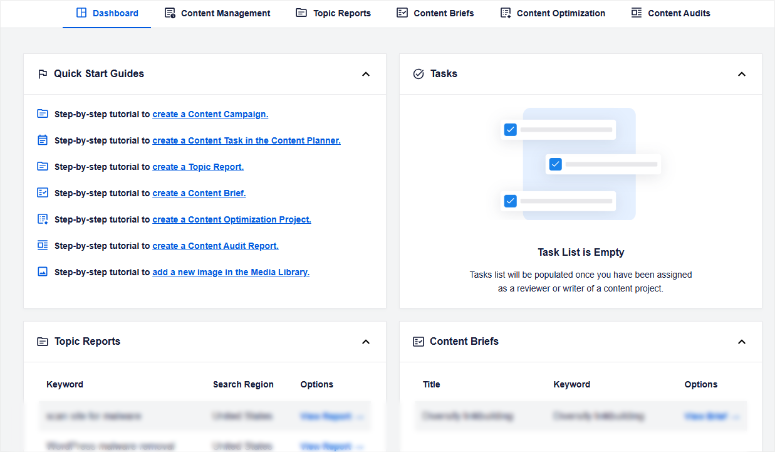
Puteți vedea ce este în cercetare, ce se scrie și ce a fost auditat, fără a deschide un instrument separat de gestionare a colaborării.
Limitarea este singurul lucru pe care utilizatorii WordPress îl resimt imediat: SEOBoost este un instrument SaaS. Efectuați cercetarea și scorarea acolo, apoi reveniți la WordPress pentru a publica.
Pentru a utiliza SEOBoost direct în WordPress, va trebui să instalați AIOSEO.
Acesta integrează rezumate de conținut bazate pe AI, rapoarte de cuvinte cheie și optimizare de la SEOBoost direct în editorul dumneavoastră WordPress
Experiența mea cu SEOBoost
Am rulat un raport de subiect pe un cuvânt cheie țintă și am avut un rezumat complet de conținut în aproximativ patru minute.
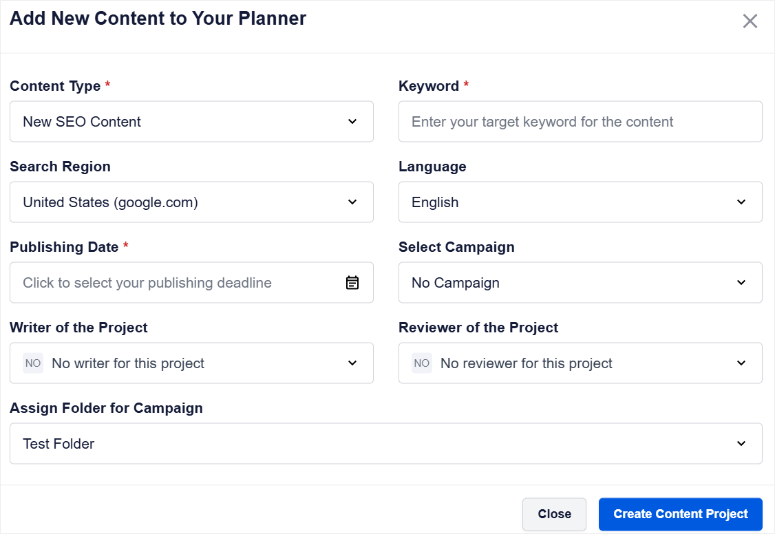
Rezumatul a inclus cuvântul cheie principal, cuvinte și expresii asociate clasificate după frecvență, întrebări „Oamenii caută și”, și o structură recomandată de antet bazată pe ceea ce au folosit primele 30 de rezultate.
Am scris în editorul SEOBoost cu scorul în timp real activ. A început de la 31/100 și a terminat la 65/100 după ce am lucrat la termenii recomandați.
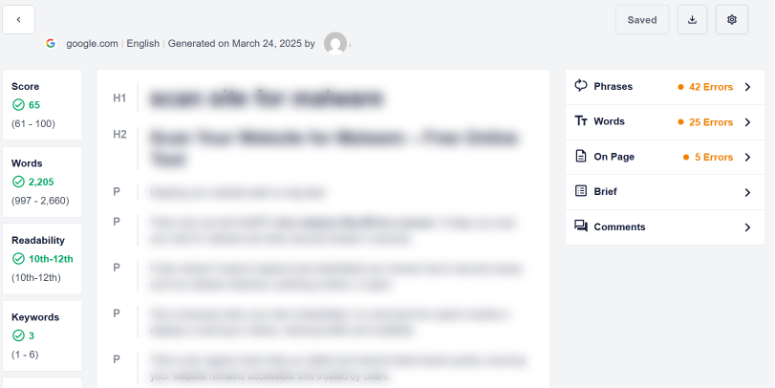
Scorul a părut calibrat, deoarece nu a penalizat scrierea naturală așa cum fac uneori instrumentele care cer număr exact de cuvinte cheie.
AIOSEO se extinde, de asemenea, dincolo de clasamentele SEO tradiționale, către vizibilitatea în căutarea AI.
Funcția sa mai nouă AI Insights/ AI Suite vă permite să cercetați cum apar mărcile pe ChatGPT, Gemini, Claude, DeepSeek și Perplexity direct din tabloul de bord WordPress.
În loc să urmărească doar clasamentele Google, analizează ce mărci menționează motoarele AI pentru solicitări specifice și compară vizibilitatea pe platforme.
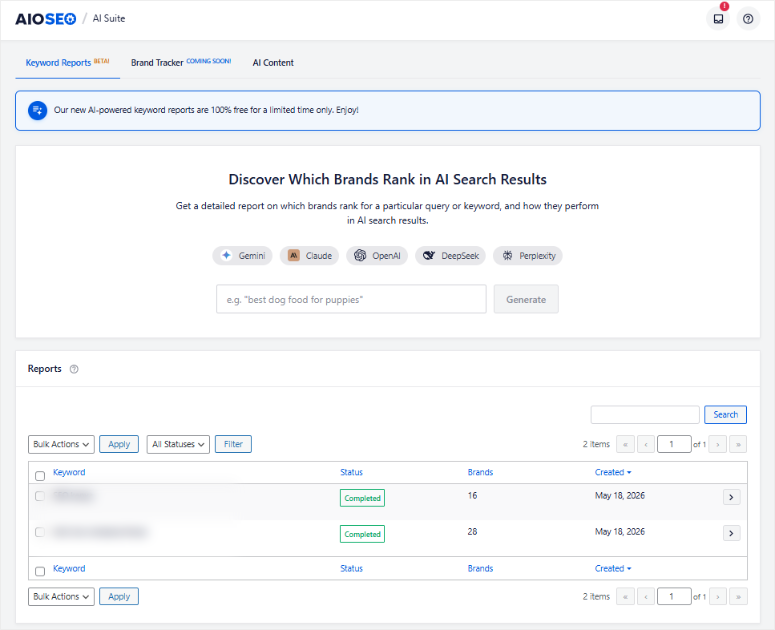
Aceasta este încă o etapă incipientă în comparație cu sistemele de urmărire AI mai mature. Dar arată că AIOSEO construiește deja pentru tranziția către descoperirea căutărilor bazate pe AI, nu doar motoare de căutare tradiționale.
Dificultatea: copierea conținutului finalizat în WordPress și reformatarea acestuia în editorul de blocuri. Dar odată ce am conectat SEOBoost la AIOSEO în tabloul meu de bord WordPress, am putut vedea direct toate modificările și scorurile.
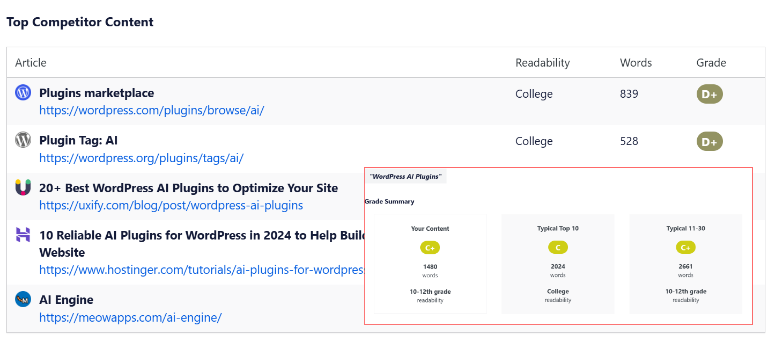
În plus, am putut apoi edita totul direct din WordPress.
Acesta este un pas suplimentar, dar nu un impediment pentru echipele cu un proces editorial stabilit. Dar dacă sunteți nou în WordPress, s-ar putea să aveți nevoie de câteva minute pentru a vedea cum funcționează conexiunea.
🟢► Avantaje
- Analiza primilor 30 de concurenți: Afișează lacunele tematice și tiparele de cuvinte cheie pe care instrumentele cu 10 rezultate le ratează constant.
- Flux de lucru complet pentru conținut: Cercetare, briefing, scriere, scorare, audit și calendar într-o singură platformă. Fără schimbări de instrumente în timpul proiectului.
- Scorare SEO în timp real: Scorul conținutului se actualizează pe măsură ce scrieți, fără a penaliza limbajul natural așa cum fac instrumentele bazate pe numărul de cuvinte cheie.
- Audit de conținut: Analizează postările existente pentru lacune și oportunități de îmbunătățire, nu doar conținutul nou.
🔴► Dezavantaje
- Fără integrare nativă cu editorul WordPress: Toată munca se desfășoară în interfața SEOBoost sau utilizați integrarea All in One SEO.
- Comunitate mai mică de utilizatori: Acest instrument SEO AI este încă nou. Prin urmare, mai puține tutoriale și resurse comunitare decât Surfer sau Clearscope.
Verdictul meu: Pentru un blogger solo care scrie un articol pe săptămână, fluxul de lucru al SEOBoost vă poate ajuta să creați un calendar de conținut într-un mod mai definit.
Unde SEOBoost își câștigă locul este cu echipele de conținut care publică în mod constant și au nevoie de structură: briefinguri, scorare, audituri și un calendar care menține pe toată lumea aliniată.
Citiți recenzia mea completă SEOBoost pentru o analiză mai aprofundată a fiecărui nivel de funcționalități.
Prețuri: Începând de la 22,50 USD/lună | Disponibilă perioadă de probă gratuită de 14 zile; nu este necesar cardul de credit.
3. LowFruits ⭐⭐⭐⭐
Cel mai bun pentru: bloggeri solo și proprietari de site-uri de nișă care vânează cuvinte cheie cu concurență redusă pe care scorurile KD le ratează constant
Fiecare instrument major de cuvinte cheie îți oferă un scor de Dificultate a Cuvintelor Cheie. Problema este că scorurile KD măsoară autoritatea medie a domeniului pe paginile clasate, nu cine se află de fapt în acele poziții.
Un cuvânt cheie poate arăta KD 25 pe Ahrefs și totuși să aibă trei domenii puternice și un articol Forbes în primii cinci.
Chiar dacă dificultatea cuvântului cheie nu este mare, poate fi foarte dificil să-ți clasezi articolul din cauza concurenței puternice.
De ce este LowFruits unul dintre cele mai bune instrumente AI SEO?
LowFruits face ceva diferit. Analizează SERP-ul real pentru fiecare cuvânt cheie și marchează ce poziții sunt deținute de site-uri slabe. Se uită la bloguri cu autoritate scăzută, pagini de afiliere subțiri și conținut învechit.
Acele puncte slabe sunt acolo unde un site nou sau cu autoritate medie poate concura realist. Această distincție este întregul produs și este una pe care niciun alt instrument de pe această listă nu o replică.
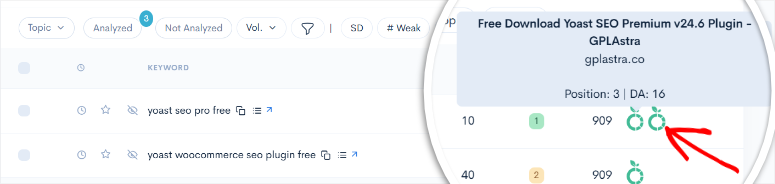
Funcția Keyword Finder folosește Google Autocomplete cu căutare wildcard pentru a genera sute de idei de cuvinte cheie long-tail, apoi rulează analiza SERP pe toate simultan.
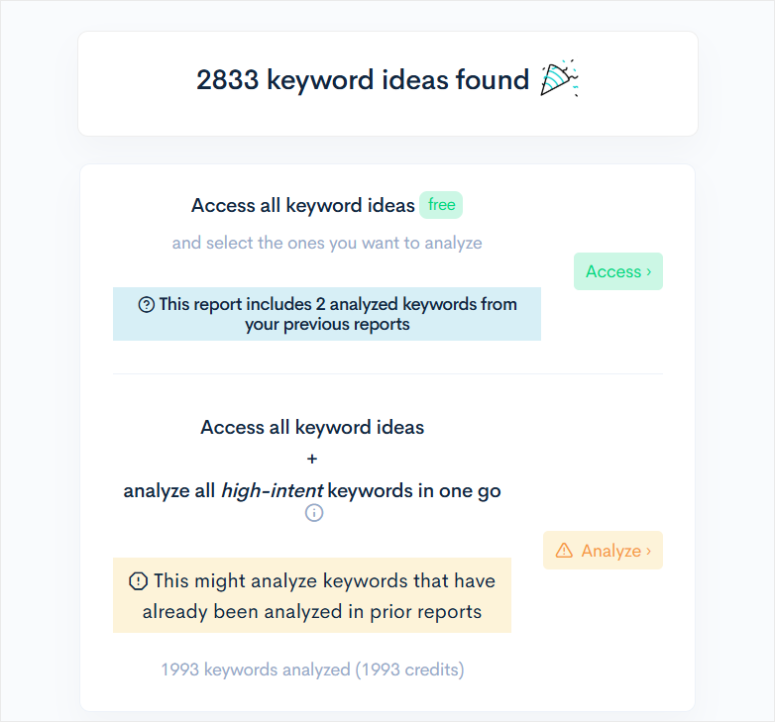
Când am rulat un lot pe un subiect de îmbunătățire a locuinței, LowFruits a marcat 34 de cuvinte cheie ca având cel puțin un site slab în primii cinci.
Șase dintre acestea aveau două sau mai multe site-uri slabe în primii trei. Acest lucru deschide cu adevărat teritorii pe care scorurile KD le-ar fi etichetat „dificultate medie” fără a marca oportunitatea reală.
Domain Explorer adaugă un alt strat: o bază de date cu peste 150.000 de site-uri slabe pentru analiza competitivă. Știind ce site-uri să urmărești, nu doar ce cuvinte cheie să vizezi, schimbă modul în care îți construiești un calendar de conținut.
Experiența mea cu LowFruits
Am importat 200 de idei de cuvinte cheie long-tail și am rulat o analiză SERP în vrac. Rezultatele au revenit în aproximativ 20 de minute: 34 de oportunități „ușor de câștigat” marcate, 6 cu mai mulți concurenți slabi în primii trei.
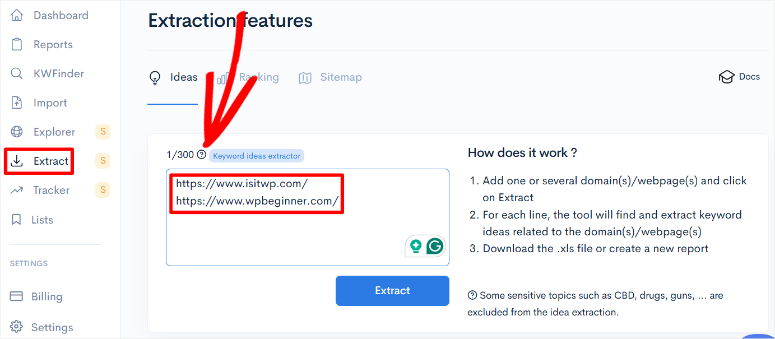
Dar am vrut să aflu ce alte cuvinte cheie cu concurență scăzută pot folosi în conținutul meu. Așa că am folosit funcția „Extract” care îmi permite să adaug 300 de URL-uri.
Apoi a analizat aceste cuvinte cheie și, folosind o listă de verificare, am adăugat cele pe care le doream la lista mea principală. În final, am avut suficiente cuvinte cheie pentru a viza atât cuvinte cheie cu concurență ridicată, cât și scăzută.
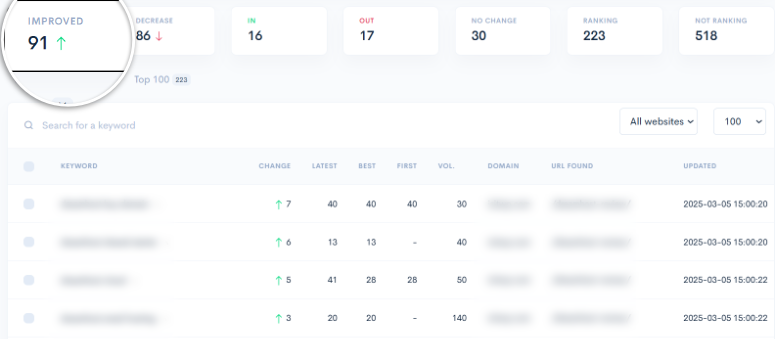
Urmăritorul de clasament funcționează bine și este mult mai ușor de citit decât Google Search Console. În fiecare dimineață, înainte de a face orice altceva, apăs butonul de reîmprospătare pe pagina urmăritorului de clasament.
Acest lucru îmi permite să văd cum performează cuvintele mele cheie instantaneu. O săgeată verde pentru toate cuvintele cheie care și-au îmbunătățit clasamentul și o săgeată roșie pentru cele care au scăzut.
Ceea ce am întâlnit în timpul testării: sistemul de credite. Lotul de 500 de cuvinte cheie pe care l-am încercat în continuare a consumat o porțiune semnificativă din alocarea lunară de credite într-o singură rulare.
Având în vedere acest lucru, sugerez să testați un lot mai mic înainte de a vă angaja lista completă de cuvinte cheie.
🟢► Avantaje
- Detectarea reală a slăbiciunii SERP: Identifică pozițiile deținute de site-uri cu autoritate scăzută, în loc să se bazeze pe scorurile KD. Suprafață oportunități reale pe care metricile de dificultate le ratează.
- Analiză în vrac a cuvintelor cheie: A procesat peste 200 de cuvinte cheie simultan și a marcat cele mai acționabile oportunități într-o singură rulare.
- Keyword Finder: Generează idei long-tail din Google Autocomplete cu intrări wildcard și filtrare a intenției.
- Domain Explorer: Bază de date cu peste 150.000 de site-uri slabe. Vă permite să urmăriți competitorii de urmărit, nu doar cuvintele cheie de țintit.
🔴► Dezavantaje
- Consum de credite: Analizele mari în lot consumă creditele mai repede. Rulați un lot mic de testare înainte de a scala.
- Rank tracker limitat pe planul standard: Doar 100 de cuvinte cheie pe planul de bază. Acest lucru este gestionabil pentru un singur site de nișă, insuficient pentru utilizarea de către agenție fără upgrade.
Verdictul meu: LowFruits rezolvă o problemă specifică de SEO cu AI mai bine decât orice altceva de pe această listă: găsirea cuvintelor cheie unde site-ul dvs. poate clasa realist acum. Nu este o platformă SEO completă, fără scor de conținut, fără scriere AI, fără analiză de backlink.
Citiți recenzia mea aprofundată despre LowFruits pentru o privire detaliată asupra sistemului de credite și a nivelurilor de plan înainte de a vă angaja.
Prețuri: De la 20,75 USD/lună. Opțiune de plată la cerere cu 3 căutări gratuite la fiecare 7 zile.
4. Surfer SEO ⭐⭐⭐⭐⭐
Cel mai bun pentru: Echipe de conținut care produc volume consistente de articole și au nevoie de scriere asistată de AI și optimizare on-page în timp real pe o singură platformă
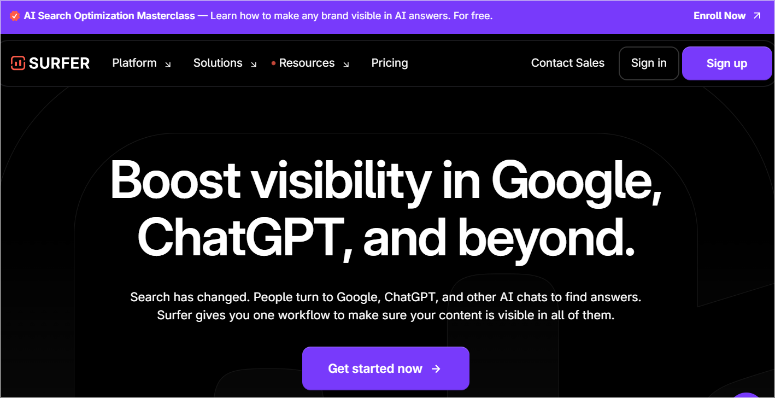
Content Score este funcția emblematică a SurferSEO. Dacă ați auzit de acest instrument SEO, îl cunoașteți. Dar ceea ce nu mă așteptam când am început să testez a fost AI Tracker.
Surfer SEO monitorizează acum cum apar marca dvs. și cuvintele cheie țintă atunci când utilizatorii pun întrebări ChatGPT, Gemini și Perplexity.
Surfer SEO este una dintre puținele platforme SEO care integrează urmărirea vizibilității în același panou de control unde scrieți și optimizați.
De ce este Surfer SEO unul dintre cele mai bune instrumente AI pentru SEO?
Content Score în sine funcționează diferit față de majoritatea instrumentelor de scor.
Folosește analiza Procesării Limbajului Natural (NLP) pentru a identifica ce subiecte, termeni și entități apar în conținutul cu clasament superior, nu doar cât de des apare un cuvânt cheie.
Asta înseamnă că penalizează supraîncărcarea și recompensează profunzimea topică folosind Content Score. Un articol cu 45 de repetări ale cuvântului cheie poate obține un scor mai mic decât unul cu 12 utilizări, dar o acoperire mai largă a conceptelor legate de subiect.
În plus, AI-ul Surfer SEO generează schițe complete de articole care încep deja de la un scor de conținut de peste 60. Asta înseamnă că optimizați dintr-un punct de plecare, nu de la zero.
Asistentul Surfy rafinează și reformulează în timp real pe măsură ce editați.
Precizarea importantă: urmarea prea literală a recomandărilor Content Score produce conținut care sună optimizat, mai degrabă decât scris.
M-am surprins adăugând termeni care au stricat fluxul propozițiilor doar pentru a obține cel mai mare Content Score. Scorul a crescut; lizibilitatea a scăzut.
Instrumentul funcționează cel mai bine atunci când îl tratați ca pe un ghid, nu ca pe o țintă de urmărit cu orice preț.
Experiența mea cu Surfer SEO
Am scris un articol de test în editorul Surfer SEO cu Content Score activat. Scorul de pornire a fost 23/100.
După încorporarea termenilor recomandați, restructurarea a două secțiuni și adăugarea a trei subteme sugerate în limbaj natural, a atins 78/100 în aproximativ 45 de minute.
În momentul în care am început să lupt cu instrumentul, acesta a marcat „audit SEO” și „audit website” ca entități separate, necesitând plasare separată, în ciuda intenției de căutare identice.
A trebuit să ignor conștient o mână de recomandări pentru a menține scrierea lizibilă. Să știi când scorul te ajută versus când te optimizează într-un colț este abilitatea pe care niciun tutorial nu o acoperă.
Partea cea mai bună? Pluginul WordPress Surfer SEO a trimis conținutul finalizat direct în ciorna mea, fără pierderi de formatare la copiere-lipire. Acest lucru singur îl face unul dintre cele mai bune pluginuri SEO de astăzi.
Pentru echipele care publică la volum, acea integrare singură economisește timp semnificativ per articol.
🟢► Avantaje
Monitorizare AI pentru ChatGPT/Gemini/Perplexity: Monitorizează vizibilitatea mărcii și a cuvintelor cheie în răspunsurile generate de AI. Unul dintre puținele instrumente care urmăresc vizibilitatea post-căutare Google.
Scor de conținut bazat pe procesarea limbajului natural: Recompensează profunzimea topică peste frecvența cuvintelor cheie. Acest lucru este mai greu de manipulat și mai aliniat cu modul în care Google evaluează calitatea conținutului.
Generare de articole Surfer AI: Ciornele încep peste un scor de conținut de 60, reducând semnificativ timpul de optimizare.
Integrare WordPress: Trimite conținutul finalizat direct în ciorna ta; fără copiere-lipire sau pierderi de formatare.
Linkuri interne automate: Sugerează și inserează automat linkuri interne relevante contextual.
🔴► Dezavantaje
Supra-optimizarea scorului de conținut este reală: Urmarea prea strictă a recomandărilor produce conținut mecanic. Tratează scorul ca pe un ghid, nu ca pe un mandat.
Prețuri mari pentru bloggeri individuali: Valoarea este clară pentru echipele care publică peste 10 articole pe lună; mai greu de justificat pentru freelanceri sau site-uri personale.
Verdictul meu: Pentru echipele de conținut care produc volum constant, Surfer SEO este cea mai puternică alegere de flux de lucru aici. Obții scorare NLP plus ciorne AI plus integrare WordPress într-o singură platformă.
Bloggerii individuali vor găsi dificil de justificat prețul atunci când nivelul gratuit al Rank Math gestionează optimizarea on-page fără costuri.
AI Tracker este funcția care merită urmărită. Urmărirea vizibilității ChatGPT și Gemini este direcția în care se îndreaptă măsurarea SEO.
Prețuri: Începând de la 99 USD/lună | Extensie Chrome gratuită | Instrumente AI autonome disponibile separat.
5. Rank Math ⭐⭐⭐⭐
Cel mai bun pentru: Utilizatori WordPress cu buget redus care doresc funcții maxime de SEO AI fără a plăti pentru un abonament SaaS
De ce este Rank Math unul dintre cele mai bune instrumente AI SEO?
Rank Math nivelul gratuit este greu de explicat fără să sune ca un text de marketing. Așa că voi fi specific.
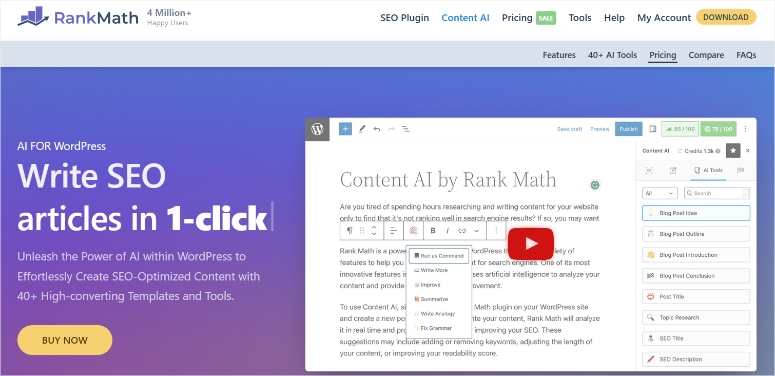
Content AI oferă peste 40 de instrumente AI pentru cercetare SEO, generare de conținut și optimizare, incluse în planul gratuit.
La fel și marcajul de schemă bazat pe AI, sugestiile automate de linkuri interne, integrarea Google Analytics și un instrument de urmărire a clasamentului conectat la Search Console.
Funcționalitatea care mi-a atras atenția este AI Link Genius (Pro). Nu doar că sugerează linkuri interne, dar monitorizează și starea linkurilor pe întregul site.
Acest lucru ajută la identificarea paginilor orfane fără linkuri de intrare și la găsirea variațiilor de cuvinte cheie pentru auto-linkuri, astfel încât să nu vânați manual fiecare oportunitate de interconectare.
Pentru un site cu sute de postări unde optimizarea SEO pentru WooCommerce și interconectarea paginilor de produse au scăpat de sub control, acea automatizare are un impact direct asupra clasamentului.
Sunt sigur că acum vă întrebați de ce Rank Math este mai jos pe lista mea?
Este pentru că sistemul său de credite este unul dintre cele mai agresive. Content AI funcționează pe bază de credite, iar acele credite nu sunt nelimitate, chiar și pe planurile plătite. Pluginul nu prezintă acest lucru clar în timpul configurării.
Instalați Rank Math, vedeți Content AI în meniu, începeți operațiuni în masă, apoi loviți un zid când un lot eșuează pe parcurs cu o eroare vagă. Nu este exact ascuns, dar nici exact explicit.
Experiența mea cu Rank Math
Am activat Rank Math pe un site de test curat și am conectat Content AI. În 15 minute, am generat titluri și descrieri meta pentru 20 de postări folosind instrumentul de generare în masă.
Calitatea rezultatului a fost solidă.
Apoi am rulat un lot mai mare și am atins limita de credite. Mesajul de eroare nu a fost util. A trebuit să navighez la tabloul de bord Rank Math, să găsesc secțiunea de credite și să reconstruiesc ce s-a întâmplat.
Procesul de descoperire a durat mai mult decât ar fi trebuit pentru un instrument poziționat ca fiind prietenos cu începătorii.
Expertul de configurare este amănunțit, dar dens. Peste 15 pași de configurare care acoperă totul, de la tipul de schemă la regulile de redirecționare.
Utilizatorii experimentați vor aprecia profunzimea. Utilizatorii începători de WordPress ar trebui să aloce 45 de minute, nu 5.
🟢► Avantaje
- Nivel gratuit generos: Content AI (peste 40 de instrumente), schemă AI, sugestii de linkuri interne și Google Analytics, toate gratuite. Comparabil cu planurile plătite pe unele platforme.
- AI Link Genius (Pro): Monitorizează starea linkurilor, auto-linkuri cu variații de cuvinte cheie și identifică paginile orfane. Acest lucru asigură că interconectarea este pe pilot automat pentru site-urile mari.
- Generare meta în masă cu AI: A generat titluri și descrieri meta precise pentru 20 de postări în mai puțin de două minute.
- Plan Pro mai ieftin: Prețul de intrare este mai mic decât multe dintre celelalte pluginuri SEO AI pe care le-am listat aici.
- SEO pentru WooCommerce: Schema automată și tagurile meta pentru paginile de produse, disponibile atât în nivelul gratuit, cât și în cel pro.
🔴► Dezavantaje
- Sistemul de credite Content AI nu este dezvăluit clar în timpul configurării: Nu veți ști că operați pe un model de credite până când nu rămâneți fără ele. Verificați secțiunea de credite înainte de a rula orice operațiune în masă.
- Panoul de control este copleșitor pentru începători: peste 15 elemente de meniu fără o ierarhie evidentă. Utilizatorii noi au nevoie de mai mult timp decât implică expertul de configurare.
Verdictul meu: Nivelul gratuit face ca Rank Math să merite instalat pe orice site WordPress. Atenție la creditele Content AI. Tratează-le ca pe un contor de utilități, nu ca pe acces nelimitat.
Pentru dezvoltatorii care gestionează mai multe site-uri ale clienților, planul Pro este un plugin SEO premium rentabil. Pentru utilizatorii noi de WordPress, procesul de onboarding al All in One SEO este mai blând.
Vezi comparația mea All in One SEO vs Rank Math pentru a decide ce se potrivește fluxului tău de lucru.
Prețuri: Plugin SEO gratuit disponibil | Planuri Pro de la 7,99 $/lună.
6. Semrush One ⭐⭐⭐⭐
Cel mai bun pentru: Agenții și afaceri de conținut stabilite care desfășoară operațiuni SEO complete, incluzând cercetarea cuvintelor cheie, informații despre concurență și monitorizarea căutărilor AI.
Când cineva întreabă ChatGPT „Care este cel mai bun CRM pentru afaceri mici?”, apar câteva mărci în răspuns. Dacă a ta nu este printre ele, aceasta este o problemă de vizibilitate pe care niciun tracker de clasament tradițional nu ți-o va arăta.
Tracker-ul AI Overview de la Semrush One abordează exact acest lucru. Monitorizează cum apare marca ta, sau nu, în răspunsurile generate de AI pe ChatGPT, Gemini și Perplexity.
De ce este Semrush One unul dintre cele mai bune instrumente AI SEO?
Toate celelalte instrumente de pe această listă urmăresc clasamentele Google. Semrush One urmărește stratul de deasupra Google care interceptează în liniște o cotă tot mai mare de interogări de căutare.
Dincolo de urmărirea AI, Semrush One este planul „totul inclus”.
Include cercetare de cuvinte cheie, analiză de backlink-uri, rapoarte de diferență a concurenței, audituri tehnice ale site-ului, urmărirea clasamentelor și instrumente de marketing de conținut incluse într-un singur abonament.
În timp ce instrumentele SEO specializate fac un singur lucru în profunzime, Semrush face totul la un nivel profesional.
Pentru o agenție care efectuează audituri SEO trimestriale, rapoarte de clasament lunare și briefinguri de conținut săptămânale pentru cinci clienți, având toate acestea într-un singur panou de control, în loc de cinci abonamente separate, este un câștig operațional real.
Deși caracteristicile sale sunt vaste, prețul este ceea ce aduce Semrush One mai jos pe lista mea. Costă aproape cât unele dintre instrumentele de pe această listă combinate.
Un blogger solo care scrie un articol pe săptămână nu are nevoie de toate caracteristicile și profunzimea tehnică. Pe de altă parte, o agenție care facturează 5.000 $/lună per client are.
Acesta este motivul pentru care Semrush One este unul dintre cele mai bune instrumente SEO pentru agenții.
Experiența mea cu Semrush One
Am folosit AI Overview Tracker pe site-ul unui client din domeniul serviciilor pentru locuințe. Raportul a arătat că marca apărea în două din cincisprezece interogări AI urmărite. Trei concurenți au apărut în șase sau mai multe.
Această diferență a informat o schimbare a strategiei de conținut către formate optimizate pentru răspunsuri.
Aceasta a inclus structuri directe de întrebări, mențiuni specifice de entități și scheme FAQ pe care urmărirea clasamentelor tradițională nu le-ar fi dezvăluit.
Analiza decalajului de cuvinte cheie a identificat 47 de cuvinte cheie unde concurenții direcți s-au clasat, iar clientul nu a avut deloc conținut.
Rularea acestui lucru pe trei domenii concurente în Semrush a durat aproximativ 20 de minute. Realizarea manuală prin instrumente separate ar fi durat cea mai mare parte a unei zile de lucru.
Singurul lucru pe care îl verific: pentru cuvinte cheie foarte nișate, cu mai puțin de 100 de căutări lunare, estimările de volum ale Semrush diferă vizibil de ceea ce raportează Google Search Console.
Datele sunt excelente ca volum, dar mai puțin fiabile la coada lungă. Pentru cuvinte cheie cu volum redus, verific cu GSC înainte de a lua decizii privind conținutul.
🟢► Avantaje
- Monitorizare AI Overview: Monitorizează vizibilitatea mărcii în ChatGPT, Gemini și Perplexity. Singurul instrument de pe această listă monitorizează vizibilitatea în căutările AI alături de clasamentele tradiționale.
- Platformă SEO completă: Cercetare de cuvinte cheie, analiză de backlink-uri, rapoarte de decalaj concurențial, audit de site și urmărire a clasamentelor. O singură abonare, fără complicații.
- Analiza decalajului de cuvinte cheie la scară: A identificat 47 de decalaje de conținut pe trei domenii concurente în mai puțin de 20 de minute.
- Profunzimea informațiilor despre concurență: Istoricul backlink-urilor, estimări de trafic și date de clasare ale concurenților, esențiale pentru construirea strategiilor clienților.
🔴► Dezavantaje
- Prețul este inaccesibil pentru majoritatea utilizatorilor solo de WordPress: Calculul ROI funcționează doar pentru agenții sau afaceri de conținut stabilite, nu pentru site-uri personale sau bloguri mici.
- Estimările cuvintelor cheie cu volum redus sunt nesigure: Pentru cuvinte cheie nișate sub 100 de căutări lunare, cifrele Semrush diferă de datele GSC. Verificați înainte de a lua decizii privind conținutul.
Verdictul meu: Semrush One își merită prețul pentru agenții și operațiuni mari de conținut, unde o singură platformă care înlocuiește cinci instrumente separate economisește de fapt bani și ore pe lună.
Pentru oricine administrează un site WordPress personal sau o singură afacere mică, fiecare alt instrument de pe această listă oferă o valoare mai bună per dolar.
Citiți recenzia noastră completă Semrush înainte de a vă angaja la abonament. De asemenea, puteți compara Ahrefs și Semrush, doi dintre cei mai mari jucători din SEO.
Preț: De la 117,33 $/lună. Cont gratuit disponibil cu funcționalități limitate.
👉 Începeți cu Semrush One aici
Aceasta este lista mea pentru cele mai bune plugin-uri AI SEO pentru WordPress. Dar există unele instrumente care au ratat lista mea, deoarece nu sunt la fel de complete.
Ele fac unul sau două lucruri foarte bine, dar nu suficient pentru ca eu să le clasific ca un plugin AI SEO complet.
Bonus: Cele mai bune plugin-uri AI SEO pentru WordPress
Writesonic ⭐⭐⭐⭐
Writesonic este o platformă de scriere AI cu un mod SEO încorporat care generează pagini de destinație, articole și conținut social optimizat pentru un cuvânt cheie țintă.
Este mai puternic ca instrument de scriere decât ca platformă de cercetare SEO; nu există analiză a concurenței sau descoperire de cuvinte cheie aici.
Dar dacă aveți nevoie de schițe de conținut AI de volum mare, cu structură SEO de bază deja implementată, Writesonic gestionează ieșirea mai rapid decât majoritatea instrumentelor de pe această listă.
În plus, se integrează cu Surfer SEO pentru scoruri de optimizare, dacă doriți să adăugați acel strat peste schițele AI.
Frase ⭐⭐⭐⭐
Frase combină cercetarea cuvintelor cheie, briefingul de conținut AI și scrierea într-un singur flux de lucru, similar cu SEOBoost.
Motorul său de optimizare a răspunsurilor este construit în jurul grupării „Oamenii întreabă și” (People Also Ask), ceea ce îl face eficient pentru conținut bogat în întrebări frecvente și țintirea fragmentelor de răspuns (featured snippets).
Îi lipsesc analiza aprofundată a concurenței și calendarul de conținut, dar la prețul său este un punct de intrare credibil pentru creatorii de conținut individuali care au nevoie de mai multă structură de cercetare decât un document gol.
Clearscope ⭐⭐⭐
Clearscope este un instrument de evaluare a conținutului. Scrieți în altă parte, copiați în Clearscope și primiți o notă (literă) cu recomandări de termeni.
Motorul de evaluare este precis și bine respectat în cercurile agențiilor. Limita este ceea ce nu este: fără descoperire de cuvinte cheie, scriere AI sau date despre backlink-uri.
Evaluează conținutul și nimic altceva. La prețul său, este greu de justificat atunci când alte plugin-uri AI SEO despre care am vorbit acoperă aceeași funcție de evaluare, plus scriere AI și urmărire căutări AI pentru mai puțin.
Excelent. Acum aveți lista mea completă de instrumente și bonusuri AI SEO WordPress pe care le recomand. Dar cu o listă atât de lungă, poate fi greu să o restrângeți pentru a se potrivi nevoilor dumneavoastră. Aici intervine următoarea secțiune.
Cum să alegi instrumentul AI SEO potrivit
Instrumentul AI SEO potrivit depinde de locul unde se află de fapt cea mai mare problemă a dumneavoastră. De exemplu, poate fi optimizarea conținutului pe care îl scrieți deja sau găsirea subiectelor potrivite despre care să scrieți în primul rând.
Având în vedere acest lucru, permiteți-mi să vă ajut să alegeți instrumentul potrivit pentru problema dumneavoastră.
Dacă aveți un site WordPress și doriți AI SEO fără a părăsi editorul: All in One SEO este răspunsul.
- Se instalează ca un plugin, gestionează SEO tehnic și generarea de conținut AI din același panou de control și include generatorul LLMs.txt pentru vizibilitatea căutărilor AI.
- Nimic de pe această listă nu se compară cu integrarea nativă WordPress.
- Dacă doriți o a doua opțiune gratuită, nivelul gratuit al Rank Math este aproape la fel de capabil. Verificați doar secțiunea de credite Content AI înainte de a rula prima operațiune în masă.
Dacă echipa dumneavoastră publică 10+ articole pe lună și are nevoie de un flux de lucru repetabil de la cercetare la publicare: SEOBoost este soluția.
- Obțineți o analiză a 30 de concurenți și un calendar de conținut pentru a-l face cea mai puternică alegere pentru operațiuni de conținut structurate.
- Scrierea nu are loc în WordPress, decât dacă aveți AIOSEO. Dar pentru echipele cu un proces editorial, profunzimea cercetării și a evaluării justifică acest pas în fluxul de lucru.
Dacă continuați să vizați cuvinte cheie și pierdeți în fața site-urilor cu autoritate mare care par a fi învinse: Încercați LowFruits.
- Scorurile de Dificultate a Cuvintelor Cheie (KD) nu vă spun cine ocupă de fapt locul; LowFruits o face.
- Găsește cuvintele cheie pentru care site-urile slabe dețin pozițiile 1–3, scrie conținut mai bun și concurează în teritorii pe care site-urile de autoritate nu le-au blocat.
Dacă produci conținut de lungă durată în volum și vrei ca fiecare piesă să fie optimizată înainte de publicare: Surfer SEO este pentru tine.
- Scorul de conținut bazat pe NLP, scrierea AI Surfer și integrarea WordPress se combină într-un flux de producție complet.
- Prețul necesită 10+ articole pe lună pentru a se justifica. Sub acest prag, calculele nu se potrivesc.
Dacă ești o agenție care gestionează SEO pentru clienți pe mai multe site-uri: Semrush One este soluția pentru tine.
- Monitorizarea AI Overview îl diferențiază pentru clienții care doresc să știe cum apar în răspunsurile ChatGPT și Gemini, nu doar clasamentele Google.
- Consolidarea cercetării cuvintelor cheie, a backlink-urilor, a analizei concurenței și a monitorizării clasamentelor într-o singură platformă este valoarea operațională.
Indiferent ce alegi, combină-l cu un program de publicare consecvent și o revizuire editorială autentică.
Instrumentele AI asistă procesul; ele nu înlocuiesc semnalele de calitate ale Google și nu scriu cu judecata de care au nevoie cititorii tăi.
Întrebarea care simplifică acest lucru: Încercați să optimizați conținutul pe care îl scrieți deja sau să găsiți subiectele potrivite despre care să scrieți în primul rând? Acest lucru vă va ajuta să luați decizia mult mai bine.
Întrebări frecvente: Cele mai bune instrumente AI SEO pentru WordPress
Poate Google să spună dacă am folosit un instrument AI pentru a-mi scrie conținutul?
Google nu penalizează conținutul în funcție de modul în care a fost produs, ci doar dacă este util, precis și original. Conținutul asistat de AI, care este revizuit, editat și cu adevărat util pentru cititori, este tratat la fel ca și conținutul scris de oameni. Ceea ce declanșează penalizări este un conținut AI subțire, neditat, publicat la scară largă, fără valoare reală pentru cititor. Instrumentul contează mult mai puțin decât judecata editorială pe care o aplicați ulterior.
Care este diferența dintre un plugin SEO și un instrument de optimizare a conținutului?
Un plugin SEO (precum All in One SEO sau Rank Math) funcționează în interiorul WordPress și gestionează SEO tehnic, cum ar fi hărțile site-ului, schema, meta tag-urile, redirecționările și, din ce în ce mai mult, sugestii de conținut AI. Un instrument de optimizare a conținutului (precum Surfer SEO sau SEOBoost) este o platformă independentă unde cercetați, redactați și evaluați conținutul înainte de publicare. Multe operațiuni de conținut folosesc atât un plugin pentru SEO tehnic, cât și un instrument de evaluare pentru calitatea conținutului.
Am nevoie atât de un plugin SEO WordPress, cât și de un instrument AI pentru conținut?
Nu neapărat. All in One SEO și Rank Math includ acum funcții de scriere AI în interiorul WordPress, ceea ce acoperă majoritatea cazurilor de utilizare pentru editorii individuali. Echipele de conținut care produc volum adaugă adesea un instrument dedicat, precum Surfer sau SEOBoost, pentru o evaluare mai riguroasă a optimizării. Începeți cu un plugin și adăugați un instrument de conținut doar atunci când publicați suficient de consecvent pentru a avea nevoie de suportul fluxului de lucru.
Care instrument AI SEO este cel mai bun pentru un site fără buget?
Nivelul gratuit al Rank Math este cea mai puternică opțiune gratuită. Oferă Content AI (peste 40 de instrumente), schema, link-uri interne și urmărirea clasamentului, toate incluse gratuit. Versiunea gratuită a All in One SEO acoperă elementele fundamentale ale SEO tehnic și SEO on-page. Niciuna dintre aceste două opțiuni nu necesită un abonament plătit pentru a oferi valoare reală unui site nou sau în creștere.
Utilizarea instrumentelor AI SEO garantează clasamente mai bune?
Nu. Instrumentele AI îmbunătățesc eficiența și calitatea a ceea ce publicați; ele nu înlocuiesc semnalele de calitate ale Google. Un articol bine documentat, bine scris și optimizat cu plugin-uri AI SEO va depăși un articol slab scris pe aceeași temă. Dar nu va depăși un articol cu adevărat mai bun doar pentru că a atins 80/100. Clasamentele reflectă calitatea conținutului și autoritatea site-ului. Aceste instrumente ajută la stratul de conținut. Autoritatea trebuie încă câștigată.
Cum funcționează urmărirea clasamentului prin AI?
Instrumente precum Semrush One și AIOSEO interoghează în mod regulat ChatGPT, Gemini și Perplexity cu un set de întrebări țintă și înregistrează ce mărci sau pagini apar în răspunsurile generate de AI. Vizibilitatea dvs. este cât de des apare marca dvs. Acest lucru este diferit de un clasament Google; nu există poziția 1-10. Fie apăreți în răspuns, fie nu. Scopul este de a produce conținut structurat în modul în care modelele AI extrag informații: răspunsuri clare, entități specifice și răspunsuri directe la întrebările pe care le pune audiența dvs.
Verdict final: Ar trebui să folosesc instrumente AI SEO pe site-ul meu WordPress?
Da, și spun asta ca cineva care a petrecut doi ani argumentând contrariul.
Eu eram cel care avertiza clienții să evite conținutul AI. Văzusem rezultatele. Văzusem Google penalizând spam-ul AI de calitate scăzută. Am stat pe margine în timp ce instrumentele s-au îmbunătățit în tăcere și peisajul s-a schimbat în tăcere.
Dacă nu evoluați, SEO va evolua fără dvs.
Asta nu înseamnă instalarea fiecărui instrument de pe această listă. Înseamnă alegerea stratului potrivit pentru unde vă aflați astăzi.
Un plugin pentru SEO tehnic și funcții AI de bază dacă abia începeți, un instrument de scor dacă publicați la volum, un instrument de descoperire a cuvintelor cheie dacă încă vă găsiți focusul conținutului.
Revizuiți fiecare bucată de ieșire AI înainte de a intra în vigoare. Folosiți instrumentele pentru a merge mai repede, nu pentru a sări peste gândire. Judecata este încă a dvs.
Alegeți un instrument de pe această listă, instalați-l săptămâna aceasta și rulați primul test real. Rezultatele vă vor spune mai multe decât orice articol comparativ.
Centru de resurse: SEO pentru WordPress
Aceste resurse IsItWP acoperă imaginea completă a SEO. De la configurarea fundamentală a WordPress la strategia de conținut și instrumentele AI în practică.
- Cum optimizez SEO On-Page cu AI: Procesul meu complet în 5 pași – Un flux de lucru pas cu pas folosind instrumente AI într-un proces real de conținut
- Cea mai bună strategie AI SEO: Cum folosesc interlinking-ul pentru a mă clasa – Combinarea instrumentelor AI cu link-uri interne pentru câștiguri compuse de clasament
- 9 Instrumente SEO On-Page pe care le recomand pentru afaceri mici – Recomandări concentrate pentru site-uri cu bugete mai restrânse
- Ghidul complet pentru începători despre SEO WordPress – Fundația SEO completă înainte de a adăuga instrumente AI deasupra
- Cele mai bune 8 instrumente de verificare a clasamentului pe care fiecare site web ar trebui să le folosească – Urmăriți dacă munca dvs. de SEO AI chiar dă rezultate
- Cele mai bune 8 instrumente online de optimizare a conținutului pentru un SEO mai bun – Extindeți setul de instrumente de conținut dincolo de instrumentele din acest articol

Internetul este un loc minunat. La prima vedere: deschis tuturor.
Complicat și totuși simplu. De ce mai cred atât de puternic în internet?
Cum putem ajuta la menținerea online-ului ca un loc primitor și deschis?
Ce este diferit chiar acum, care face web-ul atât de mult mai
interesant ca niciodată? Cu capacitatea de a identifica zonele care nu
funcționează și de a le îmbunătăți. Posibilitatea de a continua să evoluăm și să ne dezvoltăm pe măsură ce înțelegem mai bine mediul înconjurător.
Respectându-ne unii pe alții, ascultându-ne unii pe alții, împărtășind unii cu alții și învățând unii de la alții.
1. Anterior: istoria motivului pentru care îmi pasă, cerințe web:
„De ce mai cred atât de puternic în web?” Internetul mi-a permis să-mi impulsionez dorințele artistice. Sunt un dezvoltator online.
Rezumat: Internetul este un loc rafinat. La prima vedere: deschis tuturor.
Complicat și totuși simplu.