
Ogni visitatore che lascia il tuo sito senza darti la sua email è perso, probabilmente per sempre.
Puoi spendere centinaia di euro in pubblicità per farli tornare. Oppure puoi dedicare qualche minuto all'impostazione di uno strumento di acquisizione email che catturi il loro indirizzo prima che se ne vadano.
Ho testato gli strumenti di acquisizione email più popolari per WordPress per scoprire cosa funziona davvero. Alcuni sono semplici costruttori di popup. Altri sono piattaforme complete per la generazione di lead.
Quello giusto per te dipende da quanto traffico ricevi e da cosa vuoi fare con quelle email.
Ecco i sette migliori strumenti di acquisizione email per WordPress, testati e classificati.
Punti chiave
- OptinMonster è lo strumento di acquisizione email più efficace in questa lista. La tecnologia exit-intent da sola può recuperare il 2-4% dei visitatori che stavano per andarsene.
- Thrive Leads ti offre il maggior controllo sul targeting tra tutti gli strumenti nativi di WordPress. Mostra opt-in diversi in base alla categoria del post, al tag o alla fonte di traffico.
- SeedProd è l'unico strumento qui costruito principalmente per le landing page. Usalo quando hai bisogno di una pagina autonoma (lista d'attesa, download gratuito, iscrizione webinar) invece di un popup.
- WPForms è il punto di ingresso più semplice. Installa, scegli un modello di newsletter, collega la tua lista email, fatto; la versione gratuita gestisce l'acquisizione di base senza aggiornamenti.
- Formidable Forms vale la pena considerarlo se hai bisogno di moduli complessi. Moduli multi-step, logica condizionale e calcoli che strumenti più semplici non possono gestire.
- LiveChat acquisisce email in modo diverso dagli altri. Raccoglie indirizzi tramite moduli pre-chat prima che inizi una conversazione, il che funziona bene per le aziende di servizi.
- Bloom vale la pena solo se stai già pagando per Elegant Themes. Da solo, OptinMonster o Thrive Leads offrono di più per meno.
- Nessuno di questi strumenti invia email per te. Hai ancora bisogno di un servizio di email marketing come Constant Contact, Mailchimp o ActiveCampaign collegato nel backend.
Perché è importante acquisire email?
L'acquisizione di email significa raccogliere gli indirizzi email degli utenti in modo da poter creare campagne e contenuti pertinenti.
Circa il 61% dei marketer utilizza l'email marketing per generare traffico verso i propri siti web, rendendo l'email marketing un modo efficiente per far crescere la tua attività.
1. Costruisci una lista email sana
La raccolta di indirizzi email ti dà accesso agli utenti molto tempo dopo che hanno lasciato il tuo sito web. È più facile coltivare clienti fedeli quando puoi raggiungerli con contenuti via email.
La generazione di lead tramite email marketing aiuta anche il tuo marchio a personalizzare i propri contenuti in modo che siano più pertinenti per gli utenti.
2. Genera feedback dagli utenti
Il modo migliore per migliorare i tuoi processi attuali e comprendere il tuo pubblico di destinazione è ottenere il loro feedback.
Ascoltare i loro pensieri ti dà una migliore comprensione di ciò di cui hanno bisogno dalla tua attività e di come puoi soddisfare le loro esigenze.
3. Raccogli dati cruciali
Senza dati dei clienti, non sarai in grado di creare campagne, contenuti o prodotti efficaci.
I dati degli utenti ti forniscono preziose informazioni su ciò che i tuoi clienti desiderano, sui loro punti dolenti, su cosa cercano dopo e molto altro.
I migliori strumenti di acquisizione email per far crescere la tua lista email
Se non hai tempo di leggere l'intera lista. Ecco un indice per aiutarti. Fai clic su qualsiasi link per saltare a quella sezione.
Detto questo, diamo un'occhiata ai 7 migliori strumenti di acquisizione email che puoi utilizzare per il tuo sito web.
1. OptinMonster

OptinMonster è il miglior strumento di acquisizione email che puoi utilizzare per il tuo sito WordPress. Puoi trasformare i visitatori che abbandonano in lead e migliorare la tua generazione di lead.
Con OptinMonster, è facile creare popup completamente ottimizzati che catturano l'attenzione dei visitatori. Scegli tra box scorrevoli, popup lightbox, barre fluttuanti, moduli nella barra laterale e molto altro.
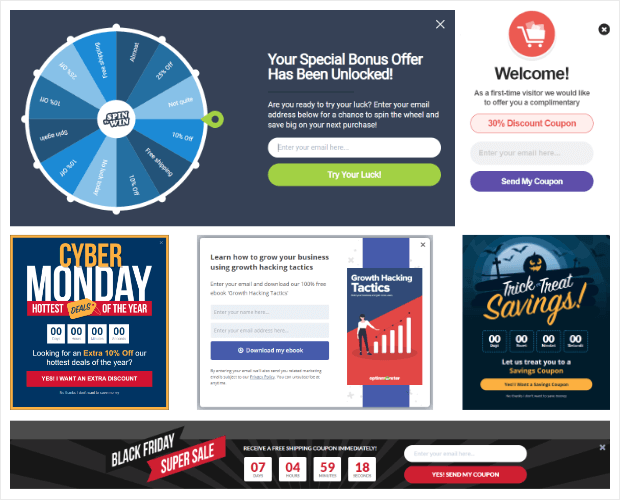
E se sei un principiante con poche o nessuna competenza di codifica, non c'è bisogno di preoccuparsi. OptinMonster è al 100% adatto ai principianti e non richiede alcuna codifica da parte tua, così puoi creare facilmente le tue campagne in pochi minuti.
Una delle parti più difficili della raccolta di email è farlo al momento giusto. Se cogli di sorpresa i tuoi visitatori, è più probabile che abbandonino il tuo sito e non tornino mai più.
OptinMonster ti consente di programmare i tuoi popup in modo da aumentare il tasso di completamento dei moduli e raccogliere maggiori informazioni sugli utenti.
Dai un'occhiata alla recensione di OptinMonster.
Prezzi: A partire da $7/mese
👉 Inizia oggi stesso con OptinMonster.
2. Thrive Leads
Thrive Leads è un plugin di generazione di lead che ti consente di creare moduli di contatto e acquisire indirizzi email sul tuo sito web.
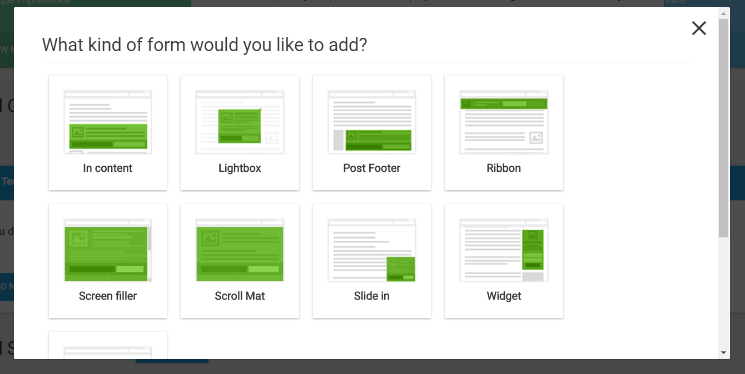
Con ThriveLeads, puoi scegliere tra una serie di opzioni di moduli, tra cui popup lightbox, nastri adesivi, moduli in linea, moduli scorrevoli, widget di opt-in e altro.
Scegli tra decine di bellissimi modelli o personalizza completamente il tuo design da zero.
Il costruttore drag-and-drop intuitivo di Thrive Leads non richiede l'uso di una singola riga di codice, quindi non devi preoccuparti di assumere uno sviluppatore.
Thrive Leads viene fornito anche con potenti integrazioni email, tra cui ActiveCampaign, Campaign Monitor, AWeber, Constant Contact, Drip, ConvertKit e altro.
Dai un'occhiata a questa recensione di Thrive Leads. Confronta Thrive Leads e OptinMonster qui.
Prezzi: A partire da $99/anno
👉 Inizia oggi stesso con ThriveLeads.
3. SeedProd

SeedProd è un costruttore di landing page per WordPress che ti consente anche di acquisire email prima del lancio del tuo sito. In questo modo, puoi sfruttare la creazione di una lista email prima di avviare ufficialmente il tuo blog o la tua attività.
Il costruttore drag-and-drop di SeedProd rende facile creare bellissime landing page che attraggono i visitatori del sito.
Viene fornito con modelli di landing page predefiniti in modo da non doversi preoccupare di assumere uno sviluppatore o di progettare il proprio.
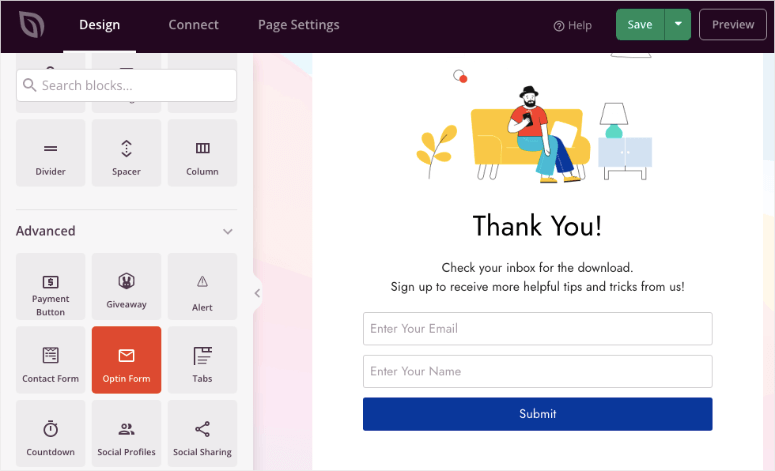
SeedProd è completamente reattivo, quindi il tuo sito catturerà sicuramente le email indipendentemente dal dispositivo su cui si trovano gli utenti.
Viene fornito con integrazioni premium come MailChimp e Constant Contact, quindi connettersi al proprio servizio di email marketing è semplice.
Dai un'occhiata a questa recensione di SeedProd.
Prezzi: Plugin gratuito disponibile. Pro parte da $39,50/anno
👉 Inizia oggi stesso con SeedProd.
4. WPForms

WPForms è il miglior plugin per moduli di contatto per WordPress. Il suo costruttore drag-and-drop rende facile creare moduli ottimizzati che raccolgono indirizzi email e informazioni sugli utenti.
WPForms viene fornito con oltre 1.200 modelli di moduli predefiniti, così chiunque può creare un bellissimo modulo di contatto.
La sua logica condizionale intelligente ti consente di nascondere o mostrare campi, iscriverti alle newsletter e fornire scelte di pagamento.
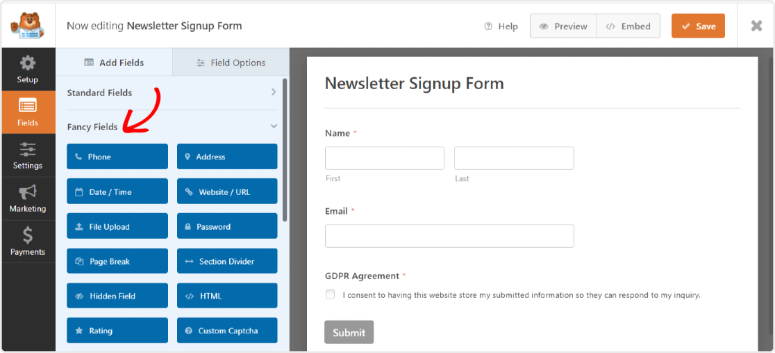
Questo plugin si integra anche con i servizi e le piattaforme più popolari, tra cui MailChimp, AWeber, GetResponse, Salesforce, Active Campaign, Drip e altri.
L'installazione richiede solo pochi minuti e non è richiesta alcuna conoscenza di codifica per iniziare subito.
Dai un'occhiata a questa recensione di WPForms. Confronta WPForms e Formidable Forms qui prima di fare la tua scelta.
Prezzi: Versione gratuita disponibile. Pro parte da $49,50/anno
👉 Inizia oggi stesso con WPForms.
5. Formidable Forms

Formidable Forms rende facile creare moduli ottimizzati che raccolgono le email degli utenti. Ha potenti integrazioni con servizi popolari come Constant Contact, MailChimp, Zapier, HubSpot, Campaign Monitor e altri.
Formidable Forms viene fornito con modelli di moduli che rendono facile acquisire indirizzi email. Il suo modello di iscrizione alla newsletter richiede solo pochi semplici clic per essere installato e configurato sul tuo sito.
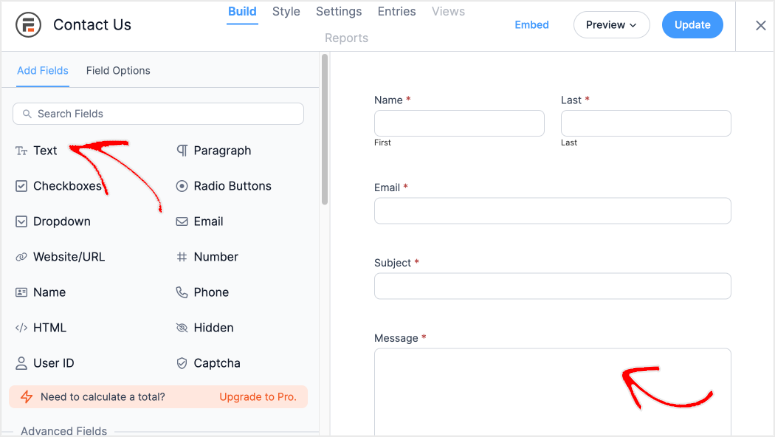
Per moduli più personalizzati, puoi utilizzare il suo costruttore drag-and-drop per creare moduli personalizzati che soddisfino le tue esigenze. Personalizza i tuoi moduli esattamente come desideri aggiungendo il tuo HTML e CSS.
Dai un'occhiata a questa recensione di Formidable Forms.
Prezzi: Plugin gratuito disponibile. Pro parte da $39,50/anno
👉 Inizia oggi stesso con Formidable Forms.
6. LiveChat

Anche se non è un costruttore di moduli di contatto, LiveChat è comunque un ottimo modo per raccogliere gli indirizzi email degli utenti e altri dati cruciali.
È il miglior software di live chat per il tuo sito web che garantisce di rimanere connesso ai tuoi visitatori.
Quando parli con gli utenti sul tuo sito, LiveChat chiede loro le loro informazioni di contatto e le aggiunge al tuo CRM.
In questo modo, puoi rispondere alle loro domande via email se un rappresentante live non è disponibile. Ti aiuta a servire meglio i tuoi clienti e a fornire loro un supporto efficiente.
Inoltre, LiveChat si integra con molti diversi provider di email marketing, come Constant Contact, Campaign Monitor, iContact, GetResponse e altri.
Dai un'occhiata a questa recensione di LiveChat.
Prezzi: Plugin gratuito disponibile. I prezzi partono da $19/mese
👉 Inizia oggi stesso con LiveChat.
7. Bloom

Bloom è un plugin di Elegant Themes che crea moduli di iscrizione e popup per il tuo sito web. Bloom semplifica la raccolta delle informazioni via email dei visitatori mentre navigano sul tuo sito.
Questo plugin autonomo ti consente di utilizzare ritardi temporali in modo che i tuoi popup catturino l'attenzione degli utenti al momento migliore, aumentando il tuo tasso di completamento dei moduli.
Visualizza le iscrizioni in diversi modi, come iscrizioni automatiche, fly-in, moduli inline, moduli sotto il contenuto e moduli nell'area widget.
Integra con qualsiasi servizio di email marketing tu scelga, inclusi MailChimp, Sendinblue, AWeber, ConvertKit, Constant Contact e altri.
Poiché Bloom è completamente responsive, il tuo modulo di acquisizione email è accessibile agli utenti indipendentemente da come visualizzano il tuo sito.
Dai un'occhiata a questa recensione di Bloom. Confronta Bloom e OptinMonster per maggiori dettagli.
Prezzi: ottienilo con Divi a partire da $7,42/mese
👉 Inizia oggi stesso con Bloom.
E questo è tutto! Speriamo che questo articolo sui migliori strumenti di acquisizione email che puoi utilizzare per il tuo sito web ti sia piaciuto.
Verdetto finale: devo aggiungere uno strumento di acquisizione email al mio sito WordPress?
Sì, e prima è meglio è.
Ogni giorno che il tuo sito funziona senza uno, stai perdendo visitatori che non torneranno mai più. Un indirizzo email ti dà una linea diretta con qualcuno che ha già mostrato interesse.
Questo vale più di qualsiasi follower sui social media.
Se hai appena iniziato, WPForms non costa nulla e richiede dieci minuti per essere configurato.
Se sei pronto a essere più aggressivo nella crescita della tua lista, il targeting per uscita e comportamentale di OptinMonster può raddoppiare il tuo tasso di acquisizione senza aggiungere più traffico.
Gli strumenti in questo elenco fanno il lavoro. Devi solo sceglierne uno e installarlo oggi.
Se ti è piaciuto questo post, assicurati di consultare il nostro articolo sui migliori strumenti di verifica delle email per la tua attività. Analizza i migliori strumenti di verifica delle email disponibili in modo che tu possa scegliere l'opzione giusta per le tue esigenze.
Letture correlate
- Migliori servizi di email marketing per WordPress – una volta acquisite le email, ecco dove inviarle
- Migliori plugin per la generazione di lead per WordPress – uno sguardo più ampio alla generazione di lead oltre l'acquisizione di email
- Migliori plugin per popup per WordPress – se i popup sono la tua strategia principale, consulta il confronto completo
- Migliori plugin per landing page per WordPress – pagine dedicate per i tuoi lead magnet e offerte
- Come creare una lista email in WordPress – guida passo passo per principianti che partono da zero
- Migliori strumenti di verifica delle email – mantieni pulita la tua lista e migliora la recapitalità

Commenti Lascia una risposta